


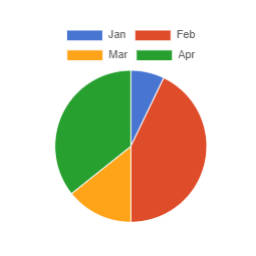
SB Chart block
Displays a Chart for CSV content.

Use with caution
SB Chart block works, but test it on a staging site before relying on it in 2026. It runs on 300+ sites, is rated 5/5 and was last updated 2 years ago, and scores 42/100 on our health check.
- Small user base (300+ active installs)
- Very few reviews so far
- No update in over a year
- Only tested up to WordPress 6.8 (latest is 7.1)
How does it stack up?
Side-by-side on installs, updates, ratings & support


Daily downloads
Download spikes usually follow a new release — each site that auto-updates counts as a download.
Rankings
Where SB Chart block stands todayWordPress.org search rankings
Live position in the plugin search, top 100| Keyword | Position |
|---|---|
| Bar chart | #25 |
| block | >100 |
| Horizontal bar chart | #14 |
| Line chart | #25 |
| pie chart | #23 |
Version adoption
Share of active sites per release.
Rating breakdown
★★★★★★★★★★ 5 from 1 reviews
About SB Chart block
From the official readme · v1.3.1Description
Use the Chart block ( oik-sb/chart ) to display a chart.
Installation
- Upload the plugin files to the
/wp-content/plugins/sb-chart-blockdirectory, or install the plugin through the WordPress plugins screen directly. - Activate the plugin through the ‘Plugins’ screen in WordPress
OR with the authority to install plugins
- In the block editor, open the block inserter.
- Search for the block by typing ‘Chart’.
- Click on the ‘Add block’ button for the SB Chart block.
- The SB Chart block plugin will be installed and activated.
- And the block will be inserted into your content.
Frequently asked questions
What types of chart can I display?
So far… Line and stacked line, with optional fill Bar and stacked bar Horizontal bar and stacked horizontal bar Pie
How do I choose the chart colors?
There are 6 predefined color palettes: choose the color palette from a drop down list. Use the Background color overrides and border color overrides fields to set custom color values.
What options are there?
Options to control the chart display are: Stacked – Toggle on to stack line or bar charts Begin Y axis at 0 toggle Fill toggle for line charts Time line toggle for a date based axis, with selectable Time unit (stepSize) Y-axes for multi axis charts Color palette dropdown Background color overrides. Enter comma separated hex codes. Border color overrides. Enter comma separated hex codes. Opacity – set the opacity of the background colours. Height of the chart, in pixels Bar thickness in pixels Tension – for curved line charts Legend font size X-axis font size
What Chart script does it use?
v1.2.6 delivers chartjs v4.4.2 and chartjs-adapter-date-fns v3.0.0
What do I need to search for to find the block?
Chart or SB Chart
What if my first language is not English?
If your first language is not English then you could try: French – graphique German – Diagramm Dutch – grafiek Italian – grafico Spanish – gráfico
Do I need to build this block?
No. The plugin is delivered with the production version of the block. If you do wish to modify the code then you can find instructions in the src folder.
Are there shortcodes available?
Charts can be embedded with the shortcode chartjs. The general syntax is as follows: [chartjs attribute="attribute value"]CSV content[/chartjs] Several attributes can be added at the same time. Example: [chartjs attribute1="attribute1 value" attribute2="attribute2 value"]CSV content[/chartjs] Here’s the list of supported attributes: backgroundColors (string): list of custom background colors (separated by comma) to use for datasets. For example, if there are 3 datasets (d1, d2 and d3) and we want d1 to use the color #0000FF, d2 to use #FFFF00 and d3 to use #008000, the value of the attribute…
Are there hooks available for developers?
The following filter hooks are available: sb_chart_block_content: filter allowing to manipulate the content before it’s processed sb_chart_block_options: filter allowing to add custom Chart.js options For example, to customize the legend, use the sb_chart_block_options filter in your functions.php theme file as follows: `php function customize_legend($options, $atts, $series) { $custom_options = to_array($options); $custom_options['plugins']['legend']['labels']['font']['size'] = 16; $custom_options['plugins']['legend']['labels']['color'] = '#0000FF'; return…
Changelog
Update for support for PHP 8.4 and a minor security fix
1.3.1
- Changed: Run esc_attr() against the classNames attribute. Props: Peter Thaleikis (Wordfence) #38
- Changed: Support PHP 8.4’s str_getcsv() changes #38
- Tested: With WordPress 6.8 and WordPress Multisite
- Tested: With PHP 8.3 and PHP 8.4
- Tested: With PHPUnit 9.6
Screenshots
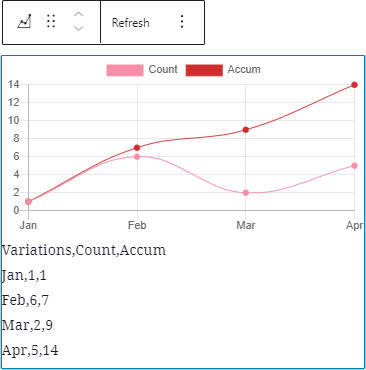


For developers
Is this your plugin? Show off the numbers.
Add a live badge to your site, docs or GitHub README. It updates on its own — no account needed.
Best SB Chart block alternatives
All Bar chart plugins →FAQ
SB Chart block: quick answers
Straight answers, pulled from live WordPress.org data.
Live data from WordPress.org · checked Oct 19, 2026
Is SB Chart block free?
Yes. SB Chart block is free to download and use from the official WordPress.org plugin directory.
Is SB Chart block safe to use in 2026?
SB Chart block works, but test it on a staging site before relying on it in 2026. It runs on 300+ sites, is rated 5/5 and was last updated 2 years ago, and scores 42/100 on our health check.
How many websites use SB Chart block?
SB Chart block is active on 300+ WordPress websites and has been downloaded 8,420 times since it launched in April 2021. It was downloaded 176 times in the last 30 days.
Does SB Chart block work with WordPress 7.1?
SB Chart block is officially tested up to WordPress 6.8.11, while the latest release is 7.1.3. It may still work, but try it on a staging site first.
What PHP version does SB Chart block need?
SB Chart block requires PHP 7.2.0 or higher. Most hosts run PHP 8.x today, so it works on any modern WordPress hosting.
When was SB Chart block last updated?
The latest version, 1.3.1, was released on April 18, 2025 (2 years ago).
Who makes SB Chart block?
SB Chart block is developed and maintained by bobbingwide.
What are the best alternatives to SB Chart block?
The most popular alternatives to SB Chart block are WP Google Charts (50+ installs), Linear Tag Cloud (10+ installs) and Chartivio (<10 installs).
Powered by PageForge
Want thousands of pages that rank like these? Build them in an afternoon.
This directory runs on the same engine as PageForge. Turn any spreadsheet, CSV or API into thousands of fast, SEO-ready WordPress pages — with schema, internal links and AI-written copy baked in.
- CSV, Google Sheets & API data sources
- AI content, schema & internal links per page
- Works with Elementor, Gutenberg, Yoast & Rank Math
- Free on WordPress.org — no credit card


