



Savri Analytics
Talk to your website analytics in ChatGPT and Claude. Understand visitors, top pages and conversions. No tracking cookies.

Use with caution
Savri Analytics works, but test it on a staging site before relying on it in 2026. It runs on 10+ sites and was last updated 2 weeks ago, and scores 61/100 on our health check.
- Actively developed — last update 2 weeks ago
- Small user base (10+ active installs)
- Very few reviews so far
How does it stack up?
Side-by-side on installs, updates, ratings & support



Daily downloads
Download spikes usually follow a new release — each site that auto-updates counts as a download.
Rankings
Where Savri Analytics stands todayWordPress.org search rankings
Live position in the plugin search, top 100| Keyword | Position |
|---|---|
| analytics | >100 |
| ChatGPT | >100 |
| Claude | >100 |
| cookieless | #52 |
| statistics | >100 |
Version adoption
Share of active sites per release.
About Savri Analytics
From the official readme · v1.2.0Description
Ask your website a question. Get answers from your own analytics.
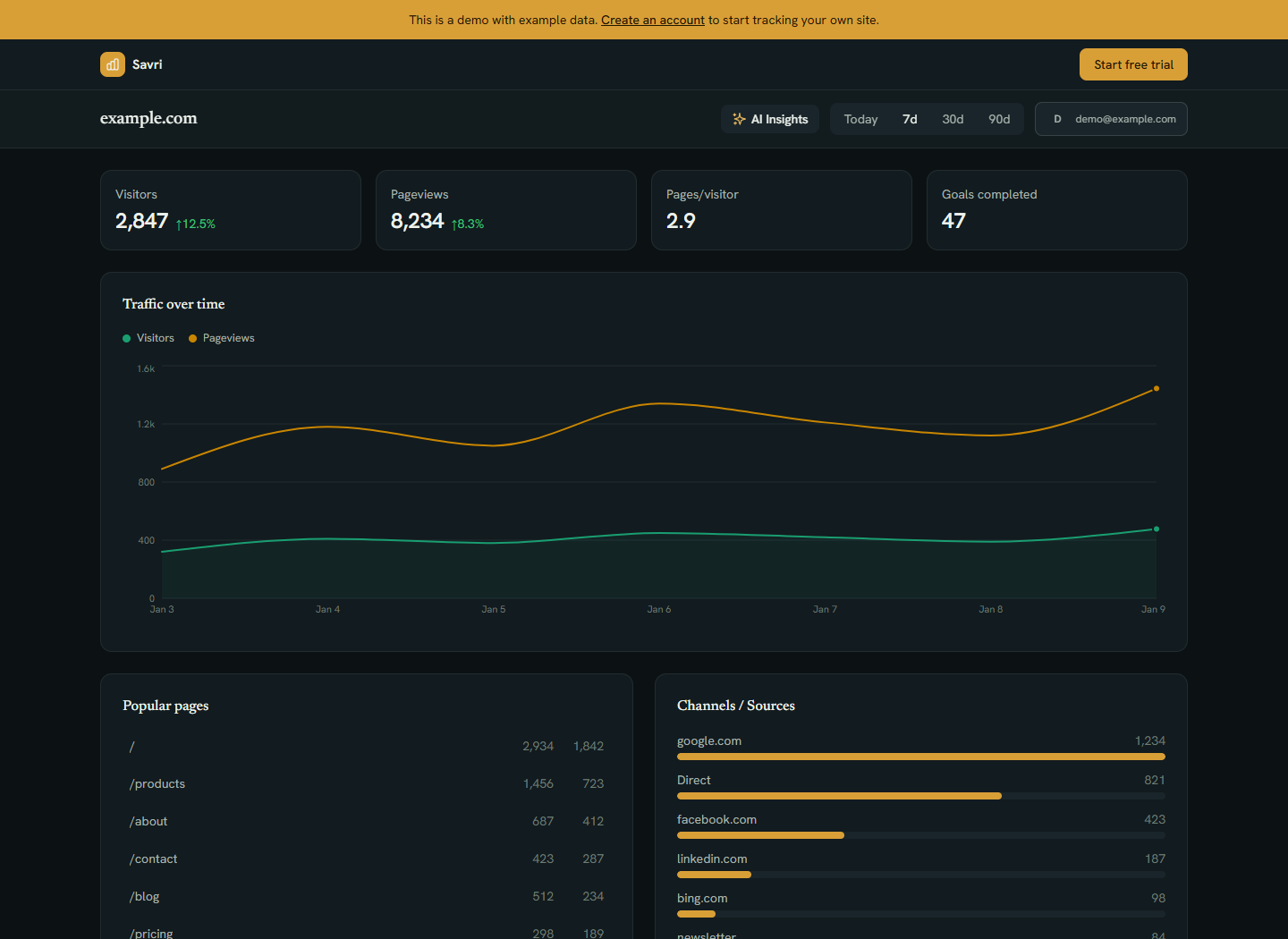
Where do your visitors come from? Which pages get attention? How are your goals performing? Savri connects your WordPress analytics to ChatGPT and Claude, so you can explore the numbers in a conversation and ask follow-up questions.
Install this plugin to collect your site’s traffic, connect your Savri account in your preferred AI assistant, and start asking:
- “Compare visitors this month with last month. What changed?”
- “Which pages brought in the most traffic last week?”
- “Where are my visitors coming from?”
- “How did my configured goals perform over the last 30 days?”
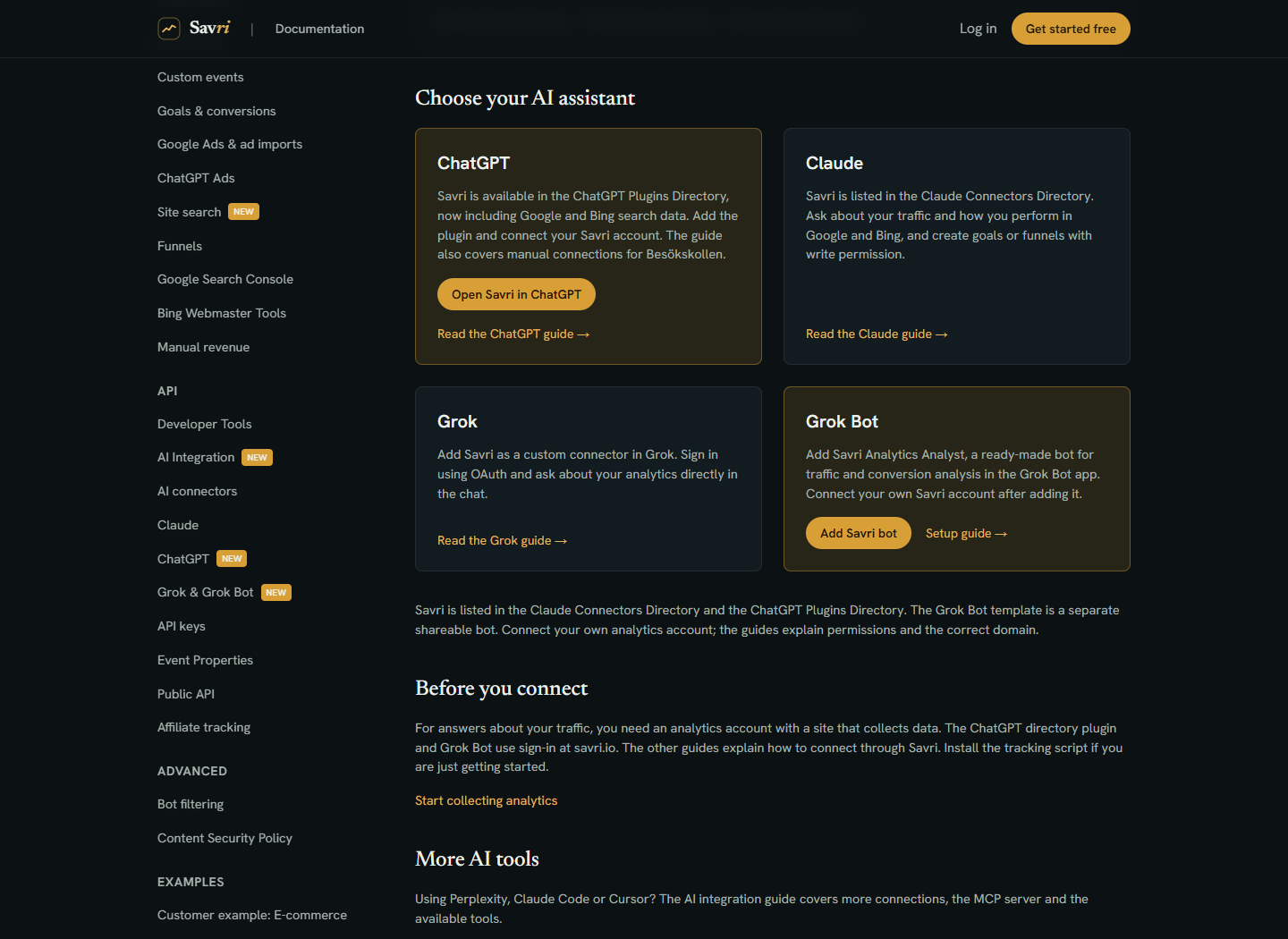
Connect your AI assistant
Sign in with your existing Savri or Besökskollen account and approve the connection. The directory connections use account sign-in, so you do not need to copy an API key. Your AI account and workspace must allow the connection. Answers depend on the data collected, your site’s plan and the permissions you grant. Goals need to be configured before you can analyze their results.
The connection gives your assistant access to Savri reports; it does not give it access to edit your WordPress pages or plugins. You can also use Savri’s dashboard without an AI assistant.
See what is happening on your website
- Visitors and top pages – understand your traffic, referrers, countries and devices.
- Goals and conversions – follow the actions that matter to your business with configured events and goals.
- AI traffic – see visits referred by AI services and requests from recognized AI crawlers. A crawler request is not proof that your site was cited in an AI answer.
- Site search – find what visitors search for, searches with no results and clicks on results.
- Broken pages – discover 404 URLs your visitors reach.
- Optional event tracking – outbound link clicks, file downloads, form submissions and scroll depth. A form submission event does not confirm delivery of a message.
Simple setup. Cookieless measurement.
Add your Site ID in WordPress and choose savri.io or besokskollen.se. The plugin loads Savri’s tracking script asynchronously. It uses no tracking cookies and does not track visitors across websites. You can exclude logged-in administrators from your reports.
The WordPress plugin is free. A Savri or Besökskollen account is required; service features and usage limits depend on your plan. Your ChatGPT or Claude account is separate.
Explore the live demo | Plans and pricing | WordPress setup guide
Svenska / Besökskollen
Prata med din webbstatistik i ChatGPT och Claude: fråga om besökare, trafikkällor, populära sidor och uppsatta mål. Använd ditt vanliga Besökskollen-konto. Kom igång i WordPress, anslut ChatGPT eller anslut Claude.
External services
This plugin connects to the Savri Analytics service (savri.io or besokskollen.se, selectable in the plugin settings) to load the tracking script and send pageview data. This is required for the plugin to function, since Savri Analytics is the service that records and displays your site’s traffic.
savri.io and besokskollen.se are operated by the same company and provide an identical service. besokskollen.se is the Swedish-language interface and savri.io is the international (English) interface. You only need an account on one of them, and you should select the matching domain in the plugin settings.
What the service is and what it is used for
Savri Analytics is a privacy-friendly, cookieless web analytics service that records anonymous pageviews and aggregated traffic data (referrers, top pages, countries, devices). The plugin uses the service to track visits to your WordPress site and display the results in your Savri dashboard.
What data is sent and when
- Every time a visitor loads a page on your site, the plugin loads the tracking script from
https://savri.io/script.jsorhttps://besokskollen.se/script.js(depending on the domain configured in the plugin settings). - That script sends pageview events to the same domain (
/api/collectendpoint). The payload includes your Site ID, the page URL and path, referrer, viewport width and a timestamp. The service also receives the request headers and network information needed to process the request. - If you enable the optional tracking flags in the plugin settings, additional events are sent when the corresponding action happens on the page: clicks on outbound links, file downloads, form submissions, and scroll depth.
- On WordPress search result pages, the plugin sends a site search event containing the search term (trimmed, lowercased, capped at 100 characters), the number of results, and a click event when the visitor clicks a search result. This shows what visitors search for under Site Search in your Savri dashboard. It can be disabled under Settings > Savri Analytics > Site Search Tracking.
- On 404 pages, the tracking script sends a 404 event containing the requested path, so you can find broken links.
- When a known AI crawler (for example GPTBot, ClaudeBot or PerplexityBot) requests a page, the plugin sends a non-blocking report to the same domain (
/api/ai-crawlendpoint) containing: your Site ID, the requested URL path, and the crawler’s user-agent string. This only happens for user-agents matching a fixed list of known AI bots, never for regular visitors. It can be disabled under Settings > Savri Analytics > AI Crawler Tracking. - The tracking script sets no cookies and does not track visitors across sites. Avoid including personal information in page URLs, search terms or event properties. See the privacy policy below for how the service handles received data.
Optional ChatGPT and Claude connections are set up separately in the AI service, using your Savri account and the permissions you approve. Installing this WordPress plugin does not activate them. When you use a connected assistant, Savri returns the requested report data to that service; its terms and your account settings apply. The setup guides linked above explain access and disconnection.
Service terms and privacy policy
- Terms of service: https://savri.io/terms
- Privacy policy: https://savri.io/privacy
Installation
- In WordPress, go to Plugins > Add New, search for “Savri Analytics”, then install and activate it. Alternatively, upload the
savri-analyticsfolder to/wp-content/plugins/and activate it. - Create or sign in to your Savri or Besökskollen account and add your website.
- Open Settings > Savri Analytics in WordPress.
- Enter the Site ID from your site’s Savri settings and select the domain you use for your account.
- Save changes, visit a public page and check that the visit appears in your dashboard. Logged-in administrators are excluded if that setting is enabled.
- Optional: connect ChatGPT or connect Claude. Ask your assistant to list your sites, then choose the site and date range you want to explore.
Frequently asked questions
Can I ask ChatGPT or Claude about my WordPress traffic?
Yes. This plugin collects traffic in Savri. Then connect your Savri or Besökskollen account using Savri in ChatGPT or Savri in Claude. Ask about visitors, top pages, traffic sources and configured goals. Your AI account or workspace must support the connection.
Do I need ChatGPT or Claude to use the plugin?
No. AI connections are optional. You can use the Savri dashboard on its own. Installing this WordPress plugin does not automatically connect or send reports to an AI assistant.
Is the plugin free?
The WordPress plugin is free. It requires a Savri or Besökskollen service account. See current plans and limits. A ChatGPT or Claude account is separate.
Where do I get a Site ID?
Sign up at savri.io (international) or besokskollen.se (Sweden) and create a new site. Your Site ID will be displayed in the site settings.
Does Savri use tracking cookies?
No. Savri does not set tracking cookies or track visitors across sites. Other plugins and services on your website may have their own consent requirements. See Savri’s privacy policy for details about data handling.
How does the plugin load the tracking script?
The script loads asynchronously. Optional event tracking is controlled in the plugin settings.
Can I exclude my own visits?
Yes! Enable “Exclude Administrators” in the plugin settings to stop tracking logged-in admins.
Does it work with caching plugins?
Savri can work with caching plugins. If tracking is missing, clear the page cache and check whether a script optimizer delays or blocks Savri. Server-side crawler reports only run when a request reaches WordPress; a full-page cache can bypass that hook.
What is AI Crawler Tracking?
AI assistants like ChatGPT, Claude and Perplexity send bots to read websites, but many of these requests do not run JavaScript and can be missed by browser-based analytics. Savri Analytics 1.1.0+ detects them on the server and reports the visits to your Savri dashboard (under AI Insights), so you can see which AI models read your site, which pages they fetch and how often. The report uses a non-blocking request. You can turn it off in the plugin settings.
Does AI Crawler Tracking slow down my site?
The plugin compares the request user-agent with known crawler names and uses a non-blocking request for reports. This reduces the wait for the analytics service, although server-side work still has some overhead.
What is Site Search Tracking?
When a visitor uses your WordPress search, the plugin reports what they searched for, how many results they got, and whether they clicked a result. Your Savri dashboard shows the top searches, the searches that returned nothing (a goldmine for content ideas), the zero-result rate and the search click-through rate. The search term is trimmed, lowercased and capped at 100 characters before it is sent. You can turn it off in the plugin settings.
Does the plugin track 404 pages?
Yes. Since 1.2.0 the plugin marks 404 pages so the tracking script reports them, and your dashboard shows which broken URLs visitors actually hit.
Changelog
New: automatic site search analytics (including zero-result searches) and 404 tracking. Both on by default, both can be disabled in settings.
1.2.0
- New: Site Search Tracking. WordPress native searches are now reported automatically: the search term, the number of results, zero-result searches and clicks on search results. See them under Site Search in your Savri dashboard. On by default, can be turned off under Settings > Savri Analytics > Site Search Tracking.
- New: 404 tracking. The plugin marks 404 pages so the tracking script reports them, letting you find broken links your visitors hit.
- Documentation: the External services section describes the new site search and 404 events.
1.1.0
- New: AI Crawler Tracking. The plugin now detects visits from AI bots (GPTBot, ChatGPT-User, OAI-SearchBot, ClaudeBot, Claude-User, PerplexityBot, Google-Extended, MistralAI-User, Grok and more) server-side and reports them to your Savri dashboard, where they appear under AI Insights. AI bots do not run JavaScript, so this is the only way to see them.
- The report is sent as a non-blocking request and never delays page loads.
- Enabled by default, can be turned off under Settings > Savri Analytics > AI Crawler Tracking.
- Documentation: the External services section now describes the AI crawler reports (Site ID, URL path and the bot’s user-agent string are sent, only for known AI bots).
1.0.3
- Documentation: add “External services” section to the readme describing the third-party Savri Analytics service the plugin connects to, what data is sent, and links to terms of service and privacy policy. No code changes.
1.0.2
- Internal refactor: centralize allowed API domains and tracking flags in class constants to remove duplication. No functional or behavioral changes.
1.0.1
- Security: escape all translated strings before output to prevent any theoretical XSS via translation files
- Security: validate api_domain against an allowlist on save and on read
- Fix: Plugin URI now points to a real documentation page
- Improvement: tracking script tag is built with esc_url + esc_attr and filtered through wp_kses on output
1.0.0
- Initial release
- Basic pageview tracking
- Enhanced tracking options (outbound links, downloads, forms, scroll)
- Admin exclusion option
Screenshots

For developers
Is this your plugin? Show off the numbers.
Add a live badge to your site, docs or GitHub README. It updates on its own — no account needed.
Best Savri Analytics alternatives
All analytics plugins →





FAQ
Savri Analytics: quick answers
Straight answers, pulled from live WordPress.org data.
Live data from WordPress.org · checked Oct 17, 2026
Is Savri Analytics free?
Yes. Savri Analytics is free to download and use from the official WordPress.org plugin directory.
Is Savri Analytics safe to use in 2026?
Savri Analytics works, but test it on a staging site before relying on it in 2026. It runs on 10+ sites and was last updated 2 weeks ago, and scores 61/100 on our health check.
How many websites use Savri Analytics?
Savri Analytics is active on 10+ WordPress websites and has been downloaded 688 times since it launched in June 2026. It was downloaded 340 times in the last 30 days.
Does Savri Analytics work with WordPress 7.1?
Savri Analytics is officially tested up to WordPress 7.0.7, while the latest release is 7.1.3. It may still work, but try it on a staging site first.
What PHP version does Savri Analytics need?
Savri Analytics requires PHP 7.4 or higher. Most hosts run PHP 8.x today, so it works on any modern WordPress hosting.
When was Savri Analytics last updated?
The latest version, 1.2.0, was released on October 5, 2026 (2 weeks ago).
Who makes Savri Analytics?
Savri Analytics is developed and maintained by valueunlimited.
What are the best alternatives to Savri Analytics?
The most popular alternatives to Savri Analytics are Site Kit by Google (5M+ installs), MonsterInsights (2M+ installs) and WP Statistics (500K+ installs).
Powered by PageForge
Want thousands of pages that rank like these? Build them in an afternoon.
This directory runs on the same engine as PageForge. Turn any spreadsheet, CSV or API into thousands of fast, SEO-ready WordPress pages — with schema, internal links and AI-written copy baked in.
- CSV, Google Sheets & API data sources
- AI content, schema & internal links per page
- Works with Elementor, Gutenberg, Yoast & Rank Math
- Free on WordPress.org — no credit card


