


RobArt Colour Collector
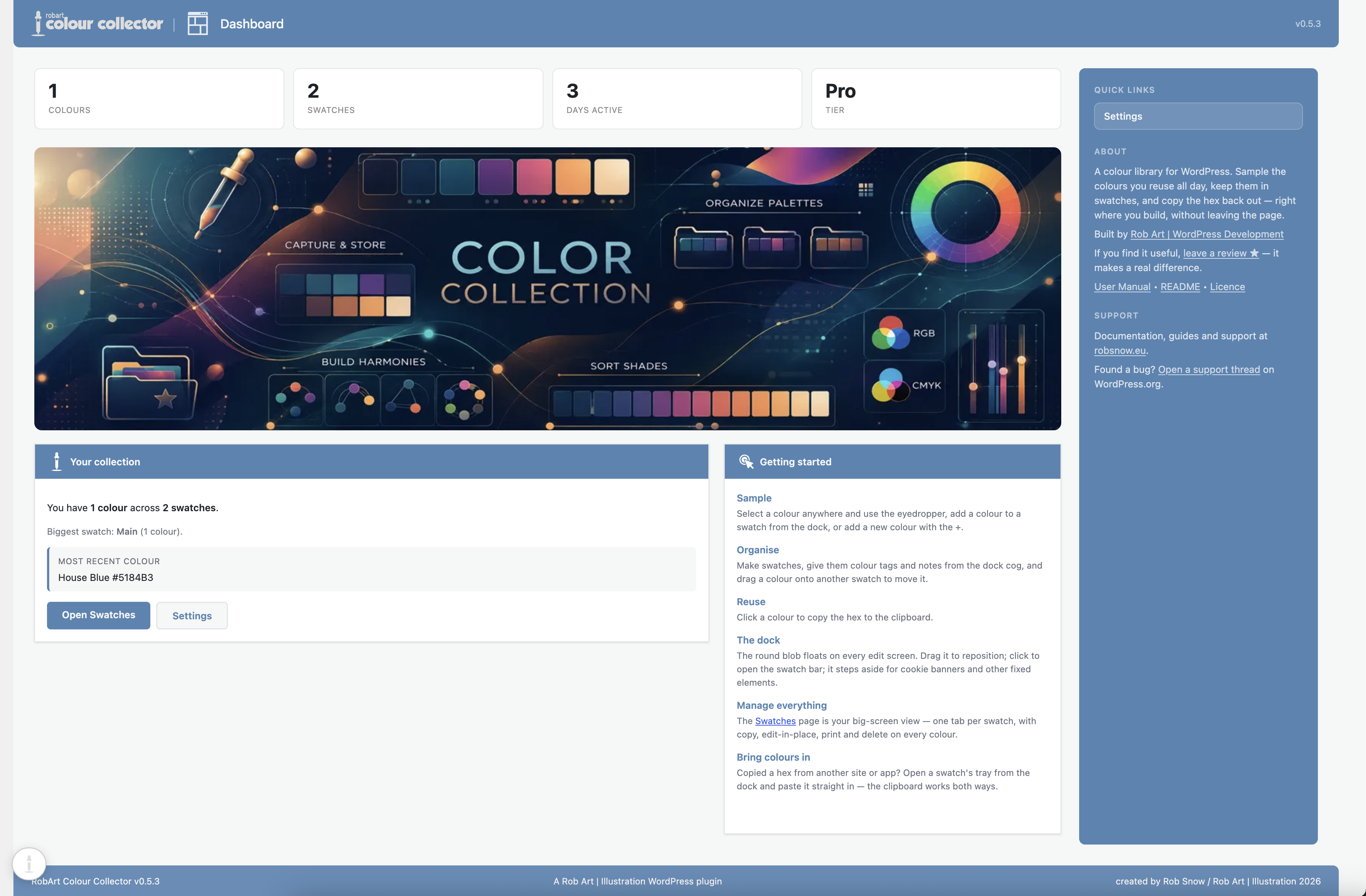
Your personal colour library in WordPress admin — sample colours from anywhere on screen, organise them into swatches, and reuse the hex in one click.

Solid choice
RobArt Colour Collector is a solid plugin choice in 2026, with a few things worth checking first. Was last updated 1 week ago, and scores 64/100 on our health check.
- Actively developed — last update 1 week ago
- Tested with the latest WordPress (7.1)
- Small user base (<10 active installs)
- Very few reviews so far
How does it stack up?
Side-by-side on installs, updates, ratings & support



Daily downloads
Download spikes usually follow a new release — each site that auto-updates counts as a download.
Rankings
Where RobArt Colour Collector stands todayWordPress.org search rankings
Live position in the plugin search, top 100| Keyword | Position |
|---|---|
| color palette | >100 |
| color picker | >100 |
| design | >100 |
| eyedropper | #3 |
| swatches | >100 |
About RobArt Colour Collector
From the official readme · v0.5.12Description
A personal colour library that lives in WordPress. Sample colours from anywhere on your screen, organise them into swatches, and reuse the hex wherever you work. This is not for your site’s palette — it’s for yours: the colours you keep coming back to, wherever you happen to be building.
A small floating dock rides along wherever you edit in WordPress. Click its eyedropper and pick a colour from anywhere on screen — then click a saved colour to copy its hex, ready to paste into the block editor, a colour field, or your CSS.
Capture
- Click the eyedropper on the floating dock and pick a colour. In Chrome and Edge the browser’s built-in eyedropper samples any pixel on screen, even outside the browser window; Safari and other browsers open the system colour picker instead.
- The picker is sticky — after each pick it re-arms, so you can collect several colours in a row. Click the eyedropper again or press Esc to stop.
- Every captured colour is auto-named from a built-in name list, so it arrives labelled.
Add by hex
- An Add-colour form (and inline edit) with a hex field, a live colour preview, and a system colour-picker block that all stay in sync.
- Type a hex, pick from the OS picker, or edit an existing colour’s name and hex together.
Organise
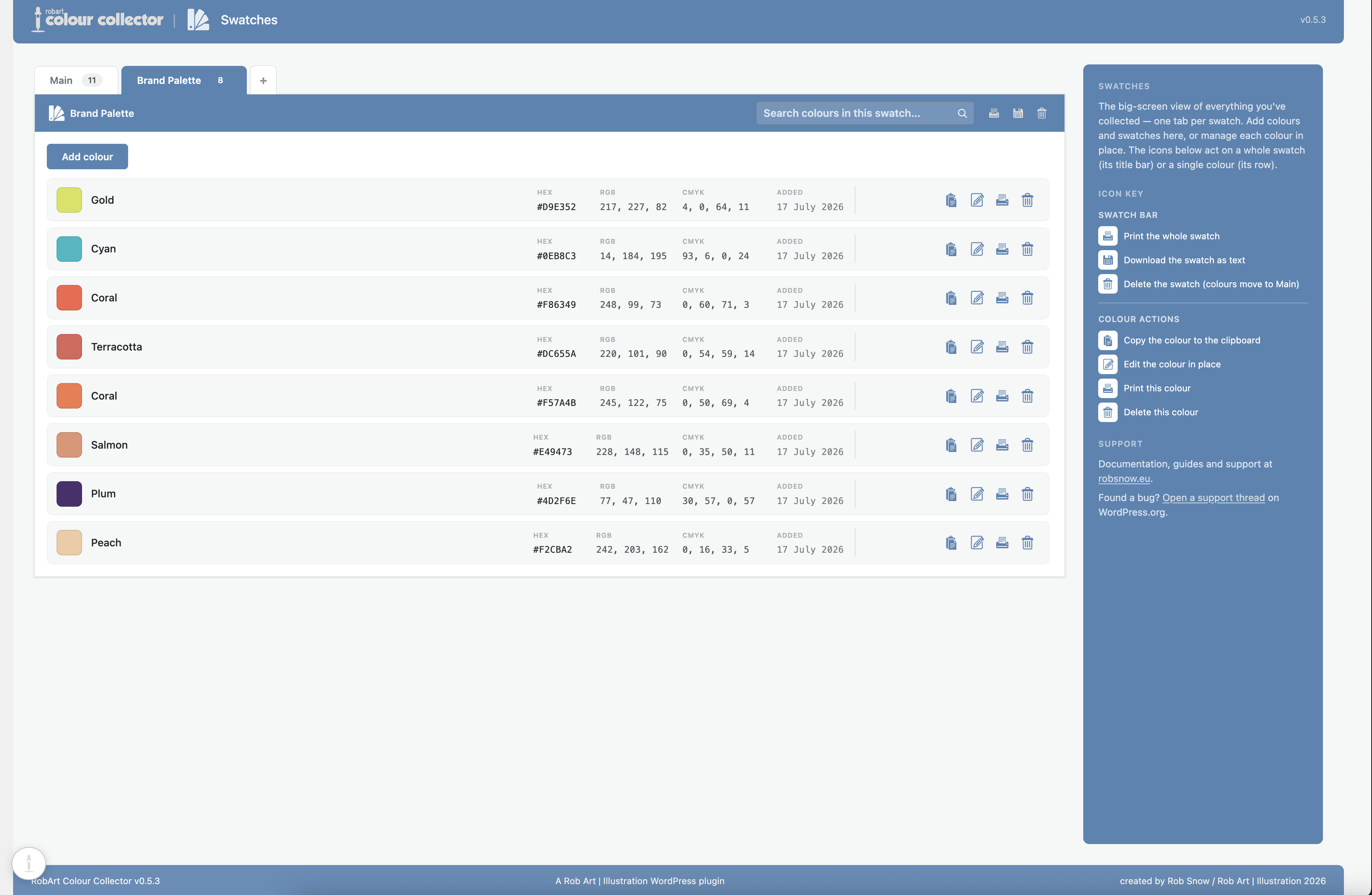
- Colours live in swatches — a swatch is a named group of colours, each with an optional note.
- A pinned Main swatch to start; add your own.
- Rename, note, merge or delete a swatch from its settings cog.
- A full Swatches admin page mirrors the dock: one tab per swatch, and each colour is a row with a colour square, its name and hex, plus copy-hex / edit-in-place / print / delete.
Reuse
- Click a colour to copy its hex to the clipboard, ready to paste into the block editor, a colour field, or your CSS.
Your colours are stored only in your own site’s database. There are no external services in the free plugin.
Free vs Pro
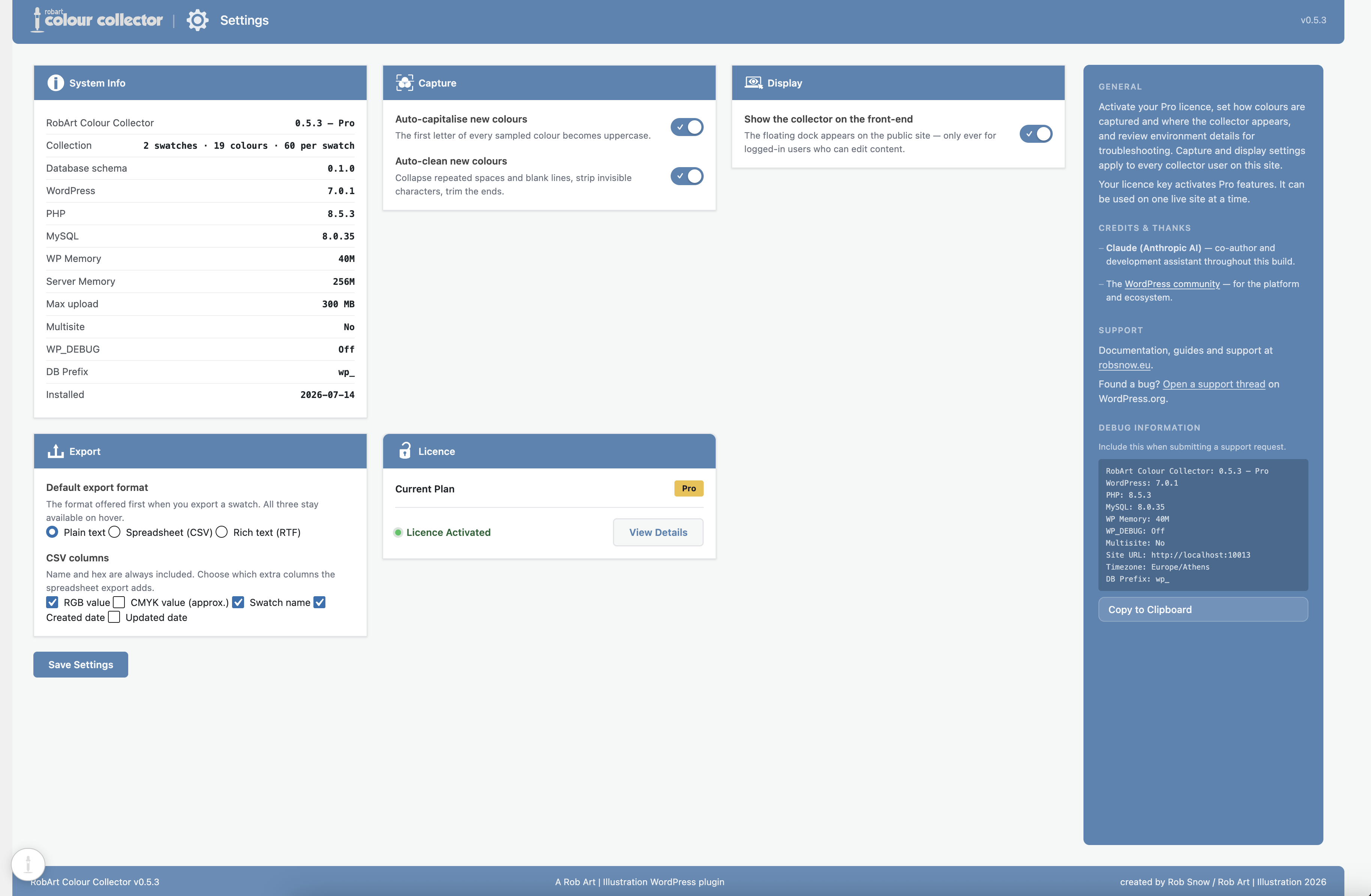
The free plugin is the whole capture → organise → reuse workflow, in full: the dock, the eyedropper, add-by-hex, unlimited swatches, auto-names, notes and copy-hex.
Pro adds hands-on tools for a growing library:
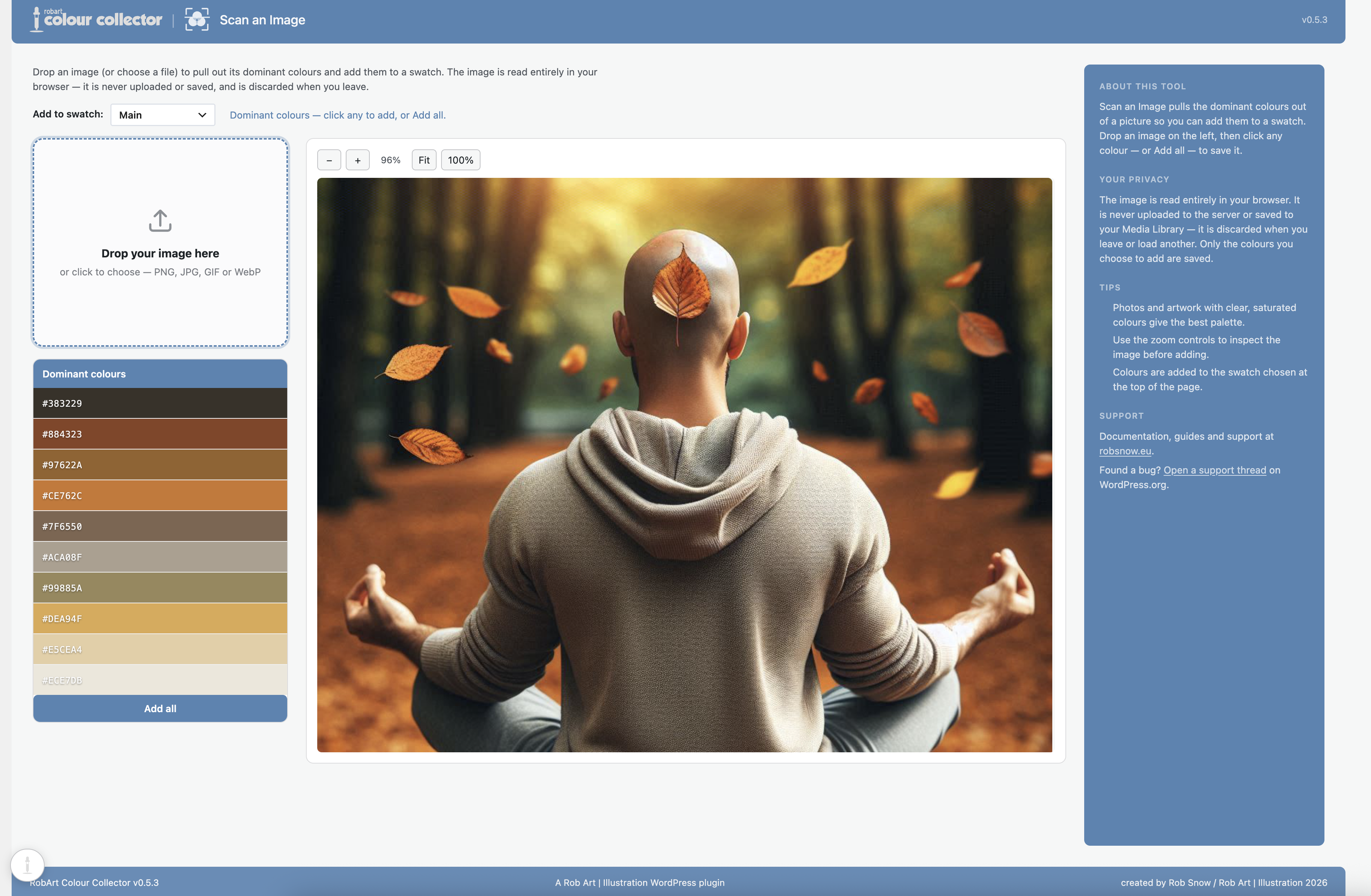
- Scan an image for its colours — arm the scan tool on the dock, click any image on the page, and the plugin pulls out its dominant colours as ready-to-save swatches. It runs entirely in your browser; no image is ever uploaded.
- Search and filter your colours.
- Alt-drag to reorder swatches and colours.
- Export a swatch as CSS custom properties, CSV, or a swatch file.
Pro is a one-time purchase (it includes every version 1.x update). The Pro add-on is what talks to the licence server; the free plugin never does.
A note on the licence server (Pro only)
The free plugin makes no external calls. The paid Pro add-on validates your licence key with the author’s licence server at robart-illustration.eu (which in turn checks Lemon Squeezy). It sends only your licence key and your site URL, and only when you activate, deactivate, or during a periodic re-check. See the author’s site for the privacy policy and terms.
External Services
The free plugin makes no external requests — your colours are stored only in your own site’s database.
The paid RobArt Colour Collector Pro add-on (a separate download, not part of this free plugin) validates your licence key with the author’s licence server so Pro features can be unlocked on your site. This applies only if you install the Pro add-on and enter a key.
- Service: RobArt / WPRobarts licence server at robart-illustration.eu, which in turn verifies the licence with Lemon Squeezy (the payment processor).
- What is sent, and when: your licence key and your site URL — sent only when you activate a licence, deactivate it, or during a periodic background re-check of an active licence. No personal data, and nothing about your colours, is ever sent.
- Why: to confirm the licence is valid and tied to your site, and to release Pro updates to licensed sites.
- Terms & privacy: see the author’s site at https://robart-illustration.eu/ for the privacy policy and terms of service, and Lemon Squeezy’s policies at https://www.lemonsqueezy.com/privacy and https://www.lemonsqueezy.com/terms .
Support
Questions, bug reports and feature requests are welcome on the plugin’s support forum on WordPress.org. Documentation and guides are available at https://robart-illustration.eu/plugins-wordpress-development/ .
Uninstall
Deleting the plugin from the Plugins screen removes all of its data: your swatches and colours (the plugin’s two custom tables), its settings and licence record, its transients, and the per-user “Main swatch” reference. Deactivating the plugin keeps everything — only Delete removes data.
Installation
- Upload the plugin to
/wp-content/plugins/robart-colour-collector, or install via the
Plugins screen. - Activate it through the Plugins menu in WordPress.
- Open the RobArt Colour Collector menu and configure it on the Settings page.
Frequently asked questions
Where are my colours stored?
In your own site’s database, private to your WordPress user account. Nothing is sent anywhere — the free plugin makes no external calls.
Does the eyedropper work in my browser?
In Chrome and Edge it uses the browser’s built-in eyedropper, so you can sample any pixel on screen, even outside the browser window. Safari and other browsers don’t offer that, so the dock opens the system colour picker instead — you still capture a colour, just from the OS picker rather than by pointing at a pixel.
Can I add a colour by hex?
Yes. The Add-colour form (and inline edit) has a hex field, a live colour preview and a system colour-picker block that all stay in sync — type a hex, pick from the OS picker, or edit an existing colour’s name and hex together.
Can I pull the colours out of an image?
Yes, with Pro. Click the scan tool on the dock to arm it, then click any image on the page — a small panel shows that image’s dominant colours, and you can add any of them (or all) to your active swatch. It works on any image the dock can see: media, screenshots, theme thumbnails. The analysis happens entirely in your browser — nothing is uploaded. (Images loaded from another website can’t be read by the browser for this, so it works on images hosted on your own site.)
What’s the difference between Free and Pro?
Free is the complete capture → organise → reuse workflow — the dock, the eyedropper, add-by-hex, unlimited swatches, notes and copy-hex. Pro adds scanning an image for its dominant colours, search/filter, Alt-drag reordering, and export as CSS custom properties, CSV or a swatch file. Pro is a one-time purchase that includes every version 1.x update.
Is there a limit on how much I can collect?
A swatch holds up to 60 colours, which keeps the dock tray and swatch list quick to scan; you can make as many swatches as you like. If you’d rather set your own ceiling, both are filterable — see racc_colours_per_swatch_cap and racc_swatches_cap.
Who can see the Colour Collector menu?
Anyone who can edit content (the edit_posts capability), so editors reach their colours too — not just administrators. Only administrators see the Settings page.
Changelog
0.5.12
- Security: internal hardening.
0.5.11
- Security: internal hardening.
0.5.10
- Fixed: the floating collector dock could show its “Open Colour Collector” accessibility label as visible text on themes that do not provide the standard screen-reader-text utility. The dock now hides its own labels regardless of the active theme.
0.5.9
- Hardened the built-in documentation renderer: all text is now HTML-escaped before formatting and links are passed through esc_url(), so the bundled help docs cannot introduce unsafe markup. Defensive hardening — the renderer only ever processes the plugin’s own documentation.
- Fixed the plugin logo not appearing on the “Enjoying RobArt Colour Collector?” review reminder panel. Logo resolution is now resilient, so it will not silently disappear if an asset is renamed.
0.5.8
- Fixed a stray colour block appearing in the picker dock when the Iridys plugin was also active — the two plugins no longer interfere
- Confirmed compatible with the current version of WordPress
0.5.7
- Fixed: the floating dock now repositions correctly when you collapse or expand the WordPress admin menu — it previously stayed put and drifted out over the page content.
Screenshots
For developers
Is this your plugin? Show off the numbers.
Add a live badge to your site, docs or GitHub README. It updates on its own — no account needed.
Best RobArt Colour Collector alternatives
All color palette plugins →


FAQ
RobArt Colour Collector: quick answers
Straight answers, pulled from live WordPress.org data.
Live data from WordPress.org · checked Oct 15, 2026
Is RobArt Colour Collector free?
Yes. RobArt Colour Collector is free to download and use from the official WordPress.org plugin directory.
Is RobArt Colour Collector safe to use in 2026?
RobArt Colour Collector is a solid plugin choice in 2026, with a few things worth checking first. Was last updated 1 week ago, and scores 64/100 on our health check.
How many websites use RobArt Colour Collector?
RobArt Colour Collector is active on <10 WordPress websites and has been downloaded 554 times since it launched in July 2026. It was downloaded 189 times in the last 30 days.
Does RobArt Colour Collector work with WordPress 7.1?
Yes. The developer has tested RobArt Colour Collector up to WordPress 7.1.3, the latest release. It requires WordPress 6.2 or newer.
What PHP version does RobArt Colour Collector need?
RobArt Colour Collector requires PHP 8.0 or higher. Most hosts run PHP 8.x today, so it works on any modern WordPress hosting.
When was RobArt Colour Collector last updated?
The latest version, 0.5.12, was released on October 8, 2026 (1 week ago).
Who makes RobArt Colour Collector?
RobArt Colour Collector is developed and maintained by Rob Art.
What are the best alternatives to RobArt Colour Collector?
The most popular alternatives to RobArt Colour Collector are Block Editor Colors (3K+ installs), Custom Color Palette for Gu… (1K+ installs) and Editor Custom Color Palette (100+ installs).
Powered by PageForge
Want thousands of pages that rank like these? Build them in an afternoon.
This directory runs on the same engine as PageForge. Turn any spreadsheet, CSV or API into thousands of fast, SEO-ready WordPress pages — with schema, internal links and AI-written copy baked in.
- CSV, Google Sheets & API data sources
- AI content, schema & internal links per page
- Works with Elementor, Gutenberg, Yoast & Rank Math
- Free on WordPress.org — no credit card


