



Retrigger Notifications Gravity Forms
Resend Gravity Forms entry data to Zapier and Webhook feeds with one click -- no need to resubmit the form.

Use with caution
Retrigger Notifications Gravity… works, but test it on a staging site before relying on it in 2026. It runs on 1K+ sites, is rated 4.6/5 and was last updated 8 months ago, and scores 52/100 on our health check.
- Only tested up to WordPress 6.9 (latest is 7.1)
How does it stack up?
Side-by-side on installs, updates, ratings & support



Daily downloads
Download spikes usually follow a new release — each site that auto-updates counts as a download.
Rankings
Where Retrigger Notifications Gra… stands todayWordPress.org search rankings
Live position in the plugin search, top 100| Keyword | Position |
|---|---|
| gravity forms | #36 |
| gravity forms addon | #13 |
| resend notifications | #5 |
| webhooks | #47 |
| zapier | #30 |
Version adoption
Share of active sites per release.
Rating breakdown
★★★★★★★★★★ 4.6 from 5 reviews
About Retrigger Notifications Gravity Forms
From the official readme · v1.3Description
Retrigger Notifications Gravity Forms lets you manually re-send Gravity Forms entry data to external Zapier and Webhook API feeds — directly from the WordPress admin, without resubmitting the form.
Whether a webhook failed silently, Zapier missed a trigger, or you simply need to push historical entries to a new integration, this plugin has you covered.
🔄 What It Does
When Gravity Forms sends entry data to Zapier or Webhooks, things don’t always go right. Endpoints go down, APIs timeout, and integrations break. Instead of asking users to resubmit, this plugin lets you retrigger the feed for any entry — individually or in bulk.
✅ Use Cases
- 🔁 Resend failed Zapier triggers — A Zap didn’t fire? Retrigger it from the entry detail page without asking the user to resubmit.
- 🌐 Resend failed Webhook deliveries — Push entry data again to your Webhook endpoint when the first attempt failed or timed out.
- 📦 Bulk resend entries to Zapier — Select multiple entries from the Entries list and resend them all to Zapier feeds in one action.
- 📦 Bulk resend entries to Webhooks — Select multiple entries and push them all to Webhook endpoints at once.
- 🐛 Debug API integrations — Use the built-in test endpoint and GF logging to troubleshoot why data isn’t reaching your external service.
- 🔗 Connect a new Zapier integration to old entries — Set up a new Zap and retrigger historical entries so they flow into the new workflow.
- 🔗 Connect a new Webhook to old entries — Added a new Webhook feed? Push past entries through it without resubmission.
- 🛠️ Test Zapier/Webhook setup during development — Quickly retrigger entries while building and testing your automation pipeline.
- 📊 Sync data after downtime — If your external service was down during form submissions, retrigger all affected entries once it’s back online.
- 🔍 Verify data delivery — Retrigger a single entry and check GF logs to confirm data was sent and received correctly.
⚙️ Settings & Usage
This plugin works seamlessly within the existing Gravity Forms interface — no separate settings page required.
Single Entry Resend:
- Go to Forms → Entries in your WordPress admin.
- Click on any entry to open the Entry Detail page.
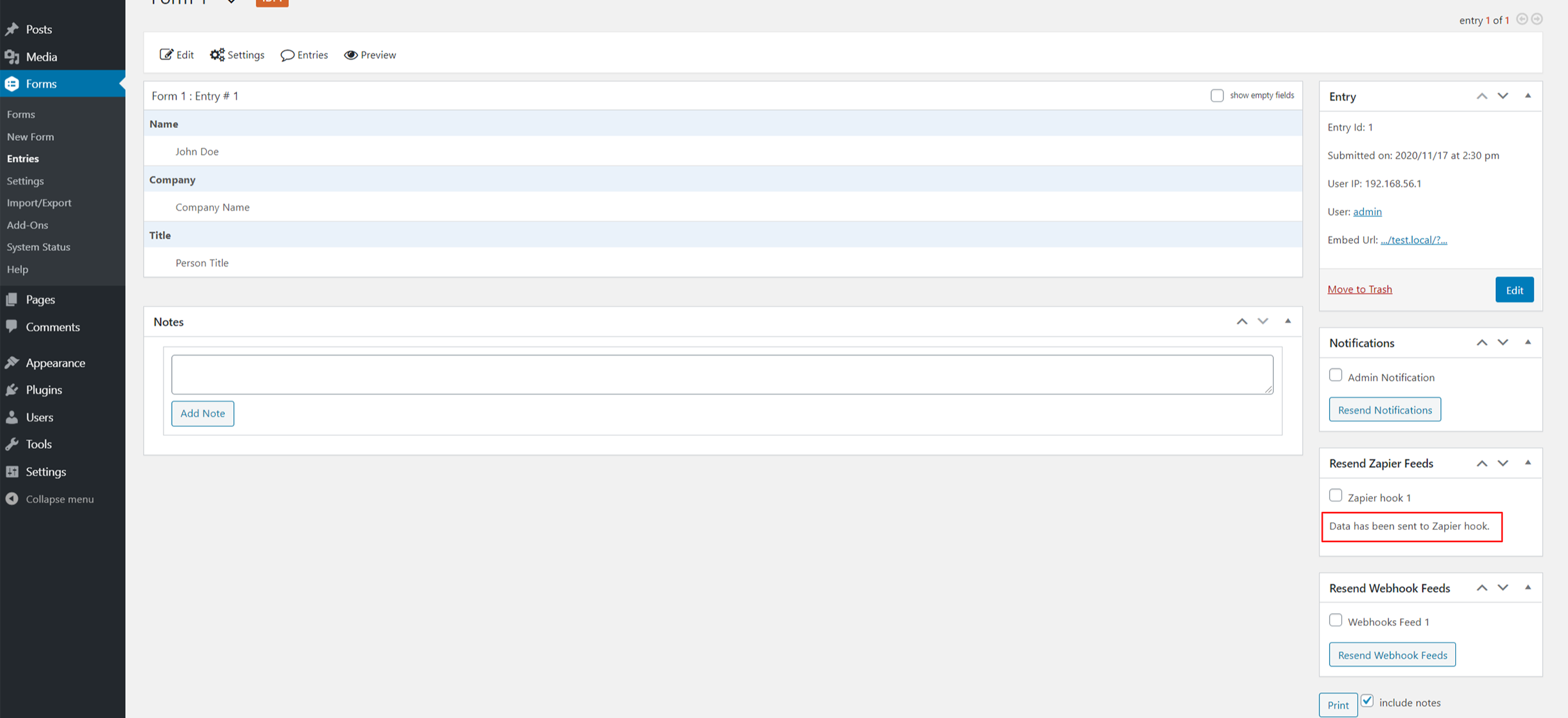
- In the right sidebar, you’ll see “Resend Zapier Feeds” and/or “Resend Webhook Feeds” panels.
- Check the feeds you want to retrigger.
- Click the Resend button. Done!
Bulk Resend:
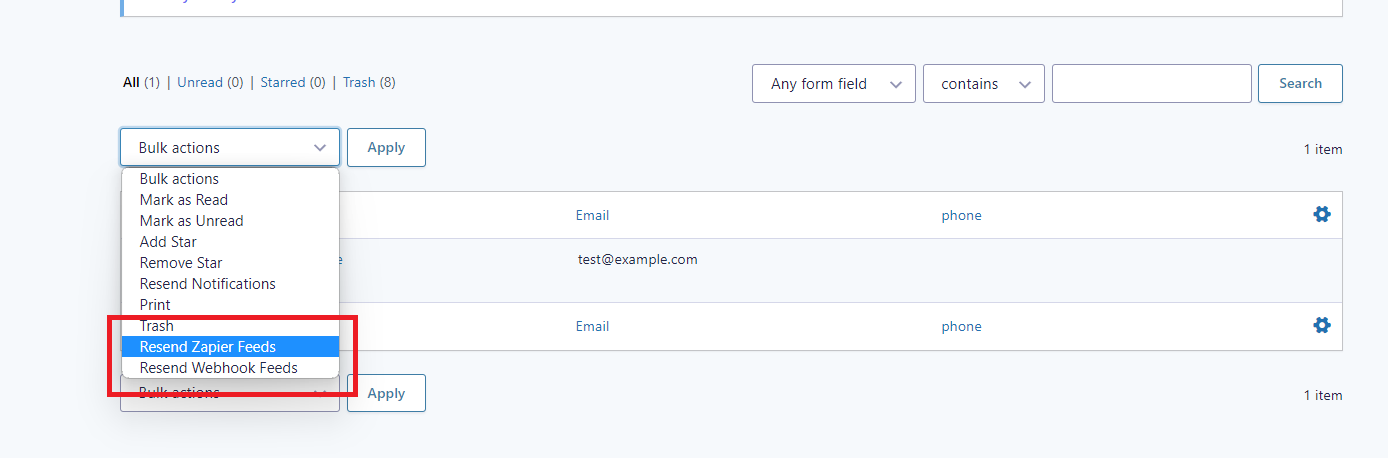
- Go to Forms → Entries and select the entries you want to resend.
- Choose “Resend Zapier Feeds” or “Resend Webhook Feeds” from the Bulk Actions dropdown.
- Click Apply. Confirm the action in the popup dialog.
- All selected entries will be resent to the configured feeds.
Debugging:
- Enable Gravity Forms Logging under Forms → Settings → Logging.
- Use the built-in test endpoint (
/wp-json/gf/v1/test-webhook-api) to verify webhook delivery. - All retrigger operations are logged to the GF debug log.
🧩 Works Great With These Plugins
- Gravity Forms — Required. The form plugin this addon extends.
- Gravity Forms Zapier Add-On — Required for Zapier retrigger features.
- Gravity Forms Webhooks Add-On — Required for Webhook retrigger features.
- GravityView — Display entries on the frontend; use Retrigger to fix API issues behind the scenes.
- Gravity Perks — Advanced Gravity Forms snippets and utilities that complement this plugin.
- Gravity Flow — Workflow automation for Gravity Forms; retrigger feeds at any workflow step.
- WP Webhooks — Extend your webhook capabilities beyond Gravity Forms.
- Zapier — The automation platform this plugin integrates with for retriggering Zaps.
- Make (formerly Integromat) — Use with Gravity Forms Webhooks to push data to Make scenarios.
- Gravity SMTP — Reliable email delivery alongside your retriggered API feeds.
📋 Requirements
- WordPress 4.0 or higher
- Licensed Gravity Forms plugin (active)
- Zapier Add-On enabled (for Zapier features)
- Webhooks Add-On enabled (for Webhook features)
Installation
- Upload the
gravityforms-retrigger-notificationsfolder to/wp-content/plugins/. - Activate the plugin through Plugins → Installed Plugins in WordPress.
- Make sure Gravity Forms and at least one of the Zapier or Webhooks add-ons are active.
- Navigate to Forms → Entries, open any entry, and look for the Resend panels in the sidebar.
Frequently asked questions
Do I need both Zapier and Webhooks add-ons?
No. The plugin detects which add-ons are active and only shows the relevant resend panels. You can use it with just Zapier, just Webhooks, or both.
Will this create duplicate entries?
No. This plugin only resends the existing entry data to external feeds. It does not create new form entries.
Does it work with the latest Gravity Forms Zapier add-on?
Yes. The plugin automatically detects whether you are using Zapier add-on version below 4.0 or 4.0+ and uses the correct methods.
Where can I see logs?
Enable Gravity Forms Logging under Forms → Settings → Logging. All retrigger actions are logged to the Gravity Forms debug log.
Changelog
1.3
- Compatible with WordPress 6.9
- Updated plugin tags and description
- Added support contact banner in retrigger panels
1.2
- Check compatible with WordPress 6.2
- Added bulk action to resend feeds in entries page.
- Added logging messages in gravity forms test mode.
1.1.5
- Check compatible with WordPress 6.1.1
1.1.4
- Check compatible with WordPress 6.0.1
1.1.3
- Add donation URL
1.1.2
- Check compatible with WordPress 5.8.2
- Update author URI.
Screenshots

For developers
Is this your plugin? Show off the numbers.
Add a live badge to your site, docs or GitHub README. It updates on its own — no account needed.
Best Retrigger Notifications Gravi… alternatives
All gravity forms plugins →




FAQ
Retrigger Notifications Gravity For…: quick answers
Straight answers, pulled from live WordPress.org data.
Live data from WordPress.org · checked Oct 7, 2026
Is Retrigger Notifications Gravity… free?
Yes. Retrigger Notifications Gravity… is free to download and use from the official WordPress.org plugin directory.
Is Retrigger Notifications Gravity… safe to use in 2026?
Retrigger Notifications Gravity… works, but test it on a staging site before relying on it in 2026. It runs on 1K+ sites, is rated 4.6/5 and was last updated 8 months ago, and scores 52/100 on our health check.
How many websites use Retrigger Notifications Gravity…?
Retrigger Notifications Gravity… is active on 1K+ WordPress websites and has been downloaded 8,192 times since it launched in December 2020. It was downloaded 386 times in the last 30 days.
Does Retrigger Notifications Gravity… work with WordPress 7.1?
Retrigger Notifications Gravity… is officially tested up to WordPress 6.9.10, while the latest release is 7.1.3. It may still work, but try it on a staging site first.
What PHP version does Retrigger Notifications Gravity… need?
Retrigger Notifications Gravity… requires PHP 7.0 or higher. Most hosts run PHP 8.x today, so it works on any modern WordPress hosting.
When was Retrigger Notifications Gravity… last updated?
The latest version, 1.3, was released on February 12, 2026 (8 months ago).
Who makes Retrigger Notifications Gravity…?
Retrigger Notifications Gravity… is developed and maintained by WPspin LLC.
What are the best alternatives to Retrigger Notifications Gravity…?
The most popular alternatives to Retrigger Notifications Gravity… are Gravity Forms Zero Spam (100K+ installs), Advanced Custom Fields: Gra… (30K+ installs) and Gravity PDF (20K+ installs).
Powered by PageForge
Want thousands of pages that rank like these? Build them in an afternoon.
This directory runs on the same engine as PageForge. Turn any spreadsheet, CSV or API into thousands of fast, SEO-ready WordPress pages — with schema, internal links and AI-written copy baked in.
- CSV, Google Sheets & API data sources
- AI content, schema & internal links per page
- Works with Elementor, Gutenberg, Yoast & Rank Math
- Free on WordPress.org — no credit card


