


Multiple Columns for Gravity Forms
Introduces new form elements into Gravity Forms which allow for simple column creation.

Solid choice
Multiple Columns for Gravity Fo… is a solid plugin choice in 2026, with a few things worth checking first. It runs on 10K+ sites, is rated 4.5/5 and was last updated 2 months ago, and scores 76/100 on our health check.
- Proven at scale on 10K+ active sites
- Loved by users — 4.5/5 from 30 reviews
How does it stack up?
Side-by-side on installs, updates, ratings & support



Daily downloads
Download spikes usually follow a new release — each site that auto-updates counts as a download.
Rankings
Where Multiple Columns for Gravit… stands todayWordPress.org search rankings
Live position in the plugin search, top 100| Keyword | Position |
|---|---|
| gravity forms | #12 |
| layout | #73 |
| multi column | #1 |
| multicolumn | #1 |
| responsive | >100 |
Version adoption
Share of active sites per release.
Rating breakdown
★★★★★★★★★★ 4.5 from 30 reviews
About Multiple Columns for Gravity Forms
From the official readme · v4.0.8Description
When activated this plugin allows Gravity Forms elements to be split into columns. To implement the columns three new elements (Row Start, Column Break, and Row End) which are introduced into the Gravity Forms administration area in a group labelled as Multiple Columns Fields.
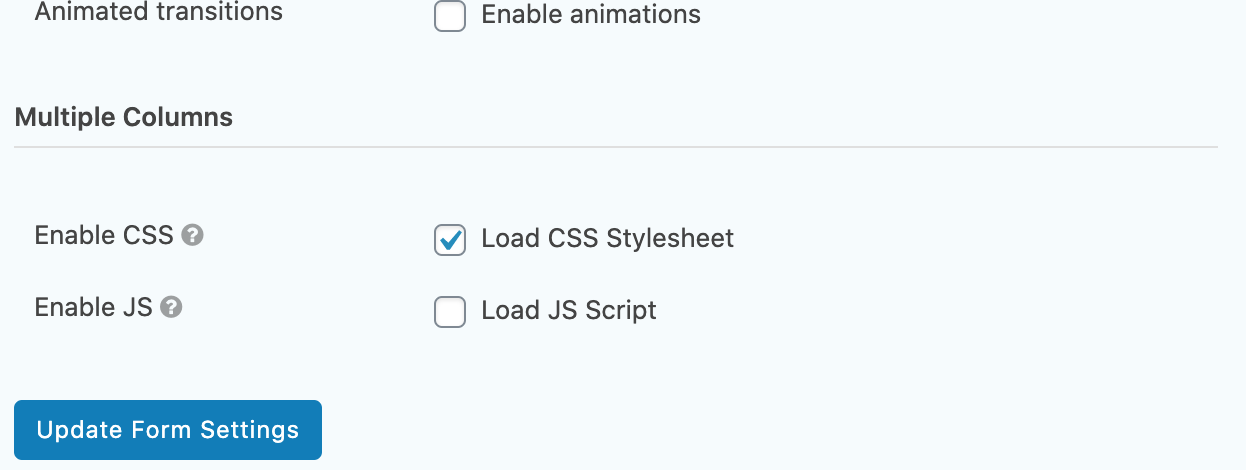
For each form, in its form settings it is possible to enable and disable the plugin’s CSS and JS that are used by the plugin. The CSS file is responsible for the layout of the form, and the JS file is used to remove unwanted spacing generated if using conditional logic to hide form elements. It is advised to keep the CSS enabled at all times, but the JS should only be enabled in the case of hidden elements through the use of conditional logic.
** Note: Plugin no longer supports initial column specification using Sections in versions 2 and before. If updating plugin from a version prior to version 3, the form will need to be recreated with the current design definitions.**
Note: If updating from version 3.0.3 or earlier. If the columns are not displaying as expected, first please visit the Form Settings for each form and check the Enable CSS checkbox.
Support this plugin by purchasing Gravity Forms now, using the affiliate link. No extra cost to you, and a big help towards supporting this plugin.
Credits
A big thank you goes to K. Woodberry, T. Kaufenberg, J. Wright, D. Donnelly, A. Sharma, L. Hanbury-Pickett for identifying issues, and assisting in finding solutions to them. 🙂
Installation
Upload …
1. In your WordPress admin panel, go to Plugins > New Plugin, search for “Multiple Columns for Gravity Forms”, find the “Multiple Columns for Gravity Forms” plugin and click “Install now”.
2. Alternatively download the zip file, unzip, and upload the gf-form-multicolumn folder (and files) to your plugins directory, which usually is /wp-content/plugins/.
… and activate.
3. Activate the plugin through your Plugins area.
Once installed, the following steps will help provide guidance to introduce column elements into a form:
4. Create a new row of separated columns by selecting the Row Start button in the Multiple Columns Field box on the right-hand side of the Gravity Forms form page.
5. Add the fields that you want in the column.
6. Create a Column Break to separate to the next column, or Row End to end the column division and the field row.
7. Repeat 4-6 as necessary.
8. Click the Update button to save the changes.
CSS and JS included with the plugin can be toggled on and off in the Form Settings for the individual form.
- In Settings -> Form Settings once a form has been selected, visit the section titled Multiple Columns. Here there
are new options related to the Multiple Columns for Gravity Forms plugin.
Note: If updating from version 3.0.3 or earlier. If the columns are not displaying, please visit the Form Settings for each form and check the Enable CSS checkbox.
Frequently asked questions
I have updated from an earlier version, where have my columns gone?
For each Gravity Form that you had prior to update, please visit the Form Settings for each and check the Enable CSS checkbox.
How many columns can I make?
We’ve tested 2 up to 10 columns. Theoretically you can have more, although this will depend on your theme and the amount of screen space you have.
Could you give an example of how I would create 3 columns on a single row?
Add a Row Start field. Add the field/s that are to be contained in the first column. Add a Column Break field. Add the field/s that are to be contained in the second column. Add a Column Break field. Add the field/s that are to be contained in the third column. Add a Row End field.
Could you give an example of how I would create 1 row with 2 columns, then a second row with 3 columns?
Add a Row Start field. Add the field/s that are to be contained in the first column. Add a Column Break field. Add the field/s that are to be contained in the second column. Add a Row End field Add a Row Start field. Add the field/s that are to be contained in the first column. Add a Column Break field. Add the field/s that are to be contained in the second column. Add a Column Break field. Add the field/s that are to be contained in the third column. Add a Row End field.
Is it possible to disable the default CSS and the JS from the plugin?
It is possible to stop the loading of these files from within the settings of the individual form. It must be noted that much of the column splitting functionality is defined by the inclusion of the CSS stylesheet. The JS file includes functionality to maintain layout integrity (removes spacing that is generated by hidden fields) when using conditional logic to hide field elements in a form.
How do I ensure that a new row will occur at the end of my columns?
The Row End field will default to ending a given row.
I am not seeing columns on the front end, after adding Multiple Column elements to my form
Check the form settings, and ensure that the Enable CSS checkbox has been checked, and save the form. If the Enable CSS checkbox is checked, please uncheck it, save the form, recheck it, and resave. Then try again.
Can I use this plugin with multisite?
Yes.
Changelog
Plugin no longer supports initial column specification using Sections in versions 2 and before. If updating plugin from a version prior to version 3, the form will need to be recreated with the current design definitions.
4.0.8
Fix: Alteration to Gravity Forms 3.0.0 results in an error when going to the wp-login.
4.0.7
Fix: Version comparison for Gravity Forms 2.10+ used float casting which incorrectly parsed “2.10.1” as 2.1, causing the plugin to fall back to the legacy ul/li markup even on sites using the modern div-based layout. Replaced with PHP’s version_compare() in both the field container filter selection and the conditional logic JavaScript version selector.
4.0.6
If upgrading from a previous version of this plugin it may be necessary to activate the CSS for each form that uses the multiple column functionality. This is done by going to the form -> Form Settings -> Check the box beside Load CSS Stylesheet -> Click Update Form Settings.
Fix: Rollback of GFMC-73 issue as this appeared to cause issues with removed layout elements.
4.0.5
If upgrading from a previous version of this plugin it may be necessary to activate the CSS for each form that uses the multiple column functionality. This is done by going to the form -> Form Settings -> Check the box beside Load CSS Stylesheet -> Click Update Form Settings.
Fix: How to remove muticolumn fields from Entries. (GFMC-73)
Fix: PHP error (Required parameter). (GFMC-76)
4.0.4
If upgrading from a previous version of this plugin it may be necessary to activate the CSS for each form that uses the multiple column functionality. This is done by going to the form -> Form Settings -> Check the box beside Load CSS Stylesheet -> Click Update Form Settings.
Fix: CSS class names on MCGF elements. (GFMC-74)
4.0.3
If upgrading from a previous version of this plugin it may be necessary to activate the CSS for each form that uses the multiple column functionality. This is done by going to the form -> Form Settings -> Check the box beside Load CSS Stylesheet -> Click Update Form Settings.
Fix: Divide by Zero error. (GFMC-69)
Fix: Uninstall Function Conflict. (GFMC-60)
Screenshots


For developers
Is this your plugin? Show off the numbers.
Add a live badge to your site, docs or GitHub README. It updates on its own — no account needed.
Best Multiple Columns for Gravity… alternatives
All gravity forms plugins →





FAQ
Multiple Columns for Gravity Forms: quick answers
Straight answers, pulled from live WordPress.org data.
Live data from WordPress.org · checked Sep 26, 2026
Is Multiple Columns for Gravity Fo… free?
Yes. Multiple Columns for Gravity Fo… is free to download and use from the official WordPress.org plugin directory.
Is Multiple Columns for Gravity Fo… safe to use in 2026?
Multiple Columns for Gravity Fo… is a solid plugin choice in 2026, with a few things worth checking first. It runs on 10K+ sites, is rated 4.5/5 and was last updated 2 months ago, and scores 76/100 on our health check.
How many websites use Multiple Columns for Gravity Fo…?
Multiple Columns for Gravity Fo… is active on 10K+ WordPress websites and has been downloaded 251,438 times since it launched in September 2016. It was downloaded 2,424 times in the last 30 days.
Does Multiple Columns for Gravity Fo… work with WordPress 7.1?
Multiple Columns for Gravity Fo… is officially tested up to WordPress 7.0.6, while the latest release is 7.1.2. It may still work, but try it on a staging site first.
What PHP version does Multiple Columns for Gravity Fo… need?
Multiple Columns for Gravity Fo… requires PHP 7.3 or higher. Most hosts run PHP 8.x today, so it works on any modern WordPress hosting.
When was Multiple Columns for Gravity Fo… last updated?
The latest version, 4.0.8, was released on August 3, 2026 (2 months ago).
Who makes Multiple Columns for Gravity Fo…?
Multiple Columns for Gravity Fo… is developed and maintained by WebHolism.
What are the best alternatives to Multiple Columns for Gravity Fo…?
The most popular alternatives to Multiple Columns for Gravity Fo… are Gravity Forms Zero Spam (100K+ installs), Advanced Custom Fields: Gra… (30K+ installs) and Gravity PDF (20K+ installs).
Powered by PageForge
Want thousands of pages that rank like these? Build them in an afternoon.
This directory runs on the same engine as PageForge. Turn any spreadsheet, CSV or API into thousands of fast, SEO-ready WordPress pages — with schema, internal links and AI-written copy baked in.
- CSV, Google Sheets & API data sources
- AI content, schema & internal links per page
- Works with Elementor, Gutenberg, Yoast & Rank Math
- Free on WordPress.org — no credit card


