



Recently
A highly customizable, feature-packed Recent Posts widget!

Use with caution
Recently works, but test it on a staging site before relying on it in 2026. It runs on 300+ sites, is rated 5/5 and was last updated 4 months ago, and scores 55/100 on our health check.
- Small user base (300+ active installs)
How does it stack up?
Side-by-side on installs, updates, ratings & support



Daily downloads
Download spikes usually follow a new release — each site that auto-updates counts as a download.
Rankings
Where Recently stands todayWordPress.org search rankings
Live position in the plugin search, top 100| Keyword | Position |
|---|---|
| posts | >100 |
| recent | #15 |
| recently | #1 |
| widget | >100 |
Version adoption
Share of active sites per release.
Rating breakdown
★★★★★★★★★★ 5 from 9 reviews
About Recently
From the official readme · v4.2.1Description
Let’s face it: WordPress’ default Recent Posts widget does the job as promised but it’s not very flexible. Things like excluding certain entries from the list or displaying recent posts by category can’t be done with the stock Recent Posts widget. Therefore, let me introduce Recently.
Recently is a WordPress widget that displays your site’s most recent posts. And it doesn’t stop there:
Main Features
- Multiple Recently lists – That is, you can have several Recently lists on your blog – each with its own settings!
- Thumbnails! – Display a thumbnail of your recent posts! (see the FAQ section for more details.)
- Custom Post-type support – Want to show other stuff than just posts and pages, eg. Recent Products? You can!
- Taxonomy filtering – List recent posts filtered by categories, tags, or custom taxonomies!
- Use your own layout! – Recently is flexible enough to let you customize the look and feel of your recent posts list! (see customizing Recently’s HTML markup and How to style Recently for more.)
- WordPress Multisite support – Each site on the network can have its own recent posts list!
- Localization – Translate Recently to your own language (See translating Recently into your language for more info).
- Polylang/WPML 3.2+ support – Show the translated version of your recent posts!
- WordPress Popular Posts / WP-PostViews / Top 10 support: – Display the views count of your recent posts!
- WP-PostRatings support. Show your visitors how your readers are rating your posts!
PSA: do not use the classic Recently widget with the new Widgets screen!
The classic Recently widget doesn’t work very well / at all with the new Widgets screen introduced with WordPress 5.8.
This new Widgets screen expects WordPress blocks instead of regular WordPress widgets. If you’re using the Recently widget on your block-based Widgets screen please replace it with the Recently block.
Support the Project!
If you’d like to support my work and efforts to creating and maintaining more open source projects your donations and messages of support mean a lot!
Recently is now also on GitHub!
Installation
Please make sure your site meets the minimum requirements before proceeding.
Automatic installation
- Log in into your WordPress dashboard.
- Go to Plugins > Add New.
- In the “Search Plugins” field, type in Recently and hit Enter.
- Find the plugin in the search results list and click on the “Install Now” button.
Manual installation
- Download the plugin and extract its contents.
- Upload the
recentlyfolder to the/wp-content/plugins/directory. - Activate the Recently plugin through the “Plugins” menu in WordPress.
Done! What’s next?
- Go to Appearance > Widgets, drag the Recently widget onto your sidebar, configure it, and when you’re done click on Save.
- If you have a caching plugin installed on your site you may need to adjust some settings to make sure Recently can work: Is Recently compatible with caching plugins? Also, if you’re using a JS minifying plugin you may need to add recently.min.js to its exclusion list (see Is Recently compatible with plugins that minify / bundle JavaScript code?)
Make sure to stop by the Wiki as well, you’ll find even more info there!
That’s it!
Changelog
If you're using a caching plugin flushing its cache after installing/upgrading to this version is recommended.
4.2.1
If you’re updating from a previous version please clear your Recently posts thumbnails cache via WP Dashboard > Settings > Recently > Tools > Thumbnails > Empty image cache button.
- Improves security around image generation.
- Adds button to easily reset the default thumbnail.
- Minor fixes improvements.
4.2.0
If you’re using a page caching plugin it’s highly recommended to clear its cache after upgrading to this version.
- Improves compatibility with Autoptimize, LiteSpeed Cache, Polylang, Speed Optimizer, W3 Total Cache, and WP Rocket.
- Fixes an issue where your recent posts list may get stuck in the loading animation on macOS/iOS devices.
- Fixes PHP notice about textdomain being called incorrectly.
- Modernizes and cleans up Recently’s JS files.
- Improved CSP compatibility.
- Block: numeric fields use type=number now.
4.1.0
- Adds WebP / AVIF support.
- Fixes an issue where the excerpt would not be truncated as expected.
- Fixes an issue where the fallback thumbnail may revert to the stock one under certain conditions.
- Minor fixes and improvements.
4.0.3
If you’re using a page caching plugin it’s highly recommended to clear its cache after upgrading to this version.
If you’re using a JS minifying plugin you may need to add recently.min.js to its exclusion list (see FAQ).
- Min. required WordPress version is now 5.7.
- Improves PHP 8 support.
- Improves compatibility with XHTML WordPress themes.
- Query data caching feature has been removed as it’s now built-in into WordPress.
- Other minor enhancements.
4.0.2
- Fixes an issue where the excerpt would not be truncated at the expected length (props to dimalifragis!)
- Fixes a PHP warning related to the excerpt generator function (props to dimalifragis!)
- Updates dependencies.
4.0.1
- Fixes an issue where the excerpt may output broken HTML under some circumstances.
- Updated dependencies.
Screenshots
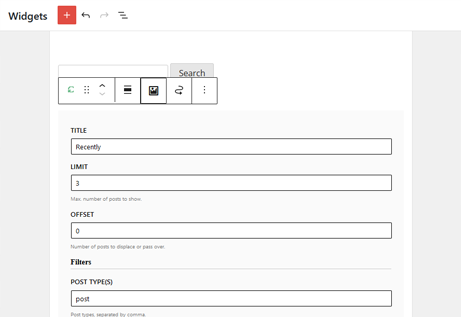


For developers
Is this your plugin? Show off the numbers.
Add a live badge to your site, docs or GitHub README. It updates on its own — no account needed.
Best Recently alternatives
All posts plugins →


FAQ
Recently: quick answers
Straight answers, pulled from live WordPress.org data.
Live data from WordPress.org · checked Sep 27, 2026
Is Recently free?
Yes. Recently is free to download and use from the official WordPress.org plugin directory.
Is Recently safe to use in 2026?
Recently works, but test it on a staging site before relying on it in 2026. It runs on 300+ sites, is rated 5/5 and was last updated 4 months ago, and scores 55/100 on our health check.
How many websites use Recently?
Recently is active on 300+ WordPress websites and has been downloaded 13,157 times since it launched in June 2015. It was downloaded 143 times in the last 30 days.
Does Recently work with WordPress 7.1?
Recently is officially tested up to WordPress 7.0.6, while the latest release is 7.1.2. It may still work, but try it on a staging site first.
What PHP version does Recently need?
Recently requires PHP 7.2 or higher. Most hosts run PHP 8.x today, so it works on any modern WordPress hosting.
When was Recently last updated?
The latest version, 4.2.1, was released on May 18, 2026 (4 months ago).
Who makes Recently?
Recently is developed and maintained by Hector Cabrera.
What are the best alternatives to Recently?
The most popular alternatives to Recently are GenerateBlocks (200K+ installs), Post Duplicator (200K+ installs) and WP Popular Posts (100K+ installs).
Powered by PageForge
Want thousands of pages that rank like these? Build them in an afternoon.
This directory runs on the same engine as PageForge. Turn any spreadsheet, CSV or API into thousands of fast, SEO-ready WordPress pages — with schema, internal links and AI-written copy baked in.
- CSV, Google Sheets & API data sources
- AI content, schema & internal links per page
- Works with Elementor, Gutenberg, Yoast & Rank Math
- Free on WordPress.org — no credit card


