


Recently
A highly customizable, feature-packed Recent Posts widget!

Choix solide
Recently is a solid plugin choice in 2026, with a few things worth checking first. It runs on 300+ sites, is rated 5/5 and was last updated 1 month ago, and scores 66/100 on our health check.
- Testé avec le dernier WordPress (7.1)
- Petite base d'utilisateurs (plus de 300 installations actives)
Comment s'accumule-t-il ?
Côte à côte sur les installations, les mises à jour, les évaluations et le support



Téléchargements quotidiens
Les pics de téléchargement suivent généralement une nouvelle version - chaque site qui met à jour automatiquement compte comme un téléchargement.
Classements
Where Recently stands todayWordPress.org Classements de recherche
Position en direct dans la recherche de plugins, Top 100| Mot-clé | Position |
|---|---|
| des postes | >100 |
| récent | #16 |
| recently | #1 |
| widget | >100 |
Adoption de version
Part de sites actifs par version.
Répartition des notes
★★★★★★★★★★ 5 from 9 reviews
About Recently
À partir du Lisez-moi officiel · v4.2.2Description
Let’s face it: WordPress’ default Recent Posts widget does the job as promised but it’s not very flexible. Things like excluding certain entries from the list or displaying recent posts by category can’t be done with the stock Recent Posts widget. Therefore, let me introduce Recently.
Recently is a WordPress widget that displays your site’s most recent posts. And it doesn’t stop there:
Caractéristiques principales
- Multiple Recently lists – That is, you can have several Recently lists on your blog – each with its own settings!
- Thumbnails! – Display a thumbnail of your recent posts! (see the FAQ section for more details.)
- Custom Post-type support – Want to show other stuff than just posts and pages, eg. Recent Products? You can!
- Taxonomy filtering – List recent posts filtered by categories, tags, or custom taxonomies!
- Use your own layout! – Recently is flexible enough to let you customize the look and feel of your recent posts list! (see customizing Recently’s HTML markup and How to style Recently for more.)
- WordPress Multisite support – Each site on the network can have its own recent posts list!
- Localization – Translate Recently to your own language (See translating Recently into your language for more info).
- Polylang/WPML 3.2+ support – Show the translated version of your recent posts!
- WordPress Popular Posts / WP-PostViews / Top 10 support: – Display the views count of your recent posts!
- WP-PostRatings support. Show your visitors how your readers are rating your posts!
PSA: do not use the classic Recently widget with the new Widgets screen!
The classic Recently widget doesn’t work very well / at all with the new Widgets screen introduced with WordPress 5.8.
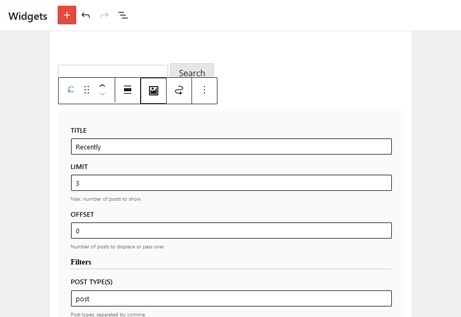
This new Widgets screen expects WordPress blocks instead of regular WordPress widgets. If you’re using the Recently widget on your block-based Widgets screen please replace it with the Recently block.
Support the Project!
If you’d like to support my work and efforts to creating and maintaining more open source projects your donations and messages of support mean a lot!
Recently is now also on GitHub!
Installation
Please make sure your site meets the minimum requirements before proceeding.
Installation automatique
- Log in into your WordPress dashboard.
- Allez dans Plugins > Ajouter un nouveau.
- In the “Search Plugins” field, type in Recently and hit Enter.
- Find the plugin in the search results list and click on the “Install Now” button.
Installation manuelle
- Download the plugin and extract its contents.
- Téléchargez le dossier
recentlydans le répertoire/wp-content/plugins/. - Activate the Recently plugin through the “Plugins” menu in WordPress.
Done! What’s next?
- Go to Appearance > Widgets, drag the Recently widget onto your sidebar, configure it, and when you’re done click on Save.
- If you have a caching plugin installed on your site you may need to adjust some settings to make sure Recently can work: Is Recently compatible with caching plugins? Also, if you’re using a JS minifying plugin you may need to add recently.min.js to its exclusion list (see Is Recently compatible with plugins that minify / bundle JavaScript code?)
Make sure to stop by the Wiki as well, you’ll find even more info there!
That’s it!
Journal de modifications
If you're using a caching plugin flushing its cache after installing/upgrading to this version is recommended.
4.2.2
- Password-protected posts are now automatically excluded from the recent posts list (props to Raymond Moul!)
- Recently’s settings page is now restricted to administrators only.
- Minor fixes and improvements.
4.2.1
If you’re updating from a previous version please clear your Recently posts thumbnails cache via WP Dashboard > Settings > Recently > Tools > Thumbnails > Empty image cache button.
- Improves security around image generation.
- Adds button to easily reset the default thumbnail.
- Minor fixes improvements.
4.2.0
If you’re using a page caching plugin it’s highly recommended to clear its cache after upgrading to this version.
- Improves compatibility with Autoptimize, LiteSpeed Cache, Polylang, Speed Optimizer, W3 Total Cache, and WP Rocket.
- Fixes an issue where your recent posts list may get stuck in the loading animation on macOS/iOS devices.
- Fixes PHP notice about textdomain being called incorrectly.
- Modernizes and cleans up Recently’s JS files.
- Improved CSP compatibility.
- Block: numeric fields use type=number now.
4.1.0
- Adds WebP / AVIF support.
- Fixes an issue where the excerpt would not be truncated as expected.
- Fixes an issue where the fallback thumbnail may revert to the stock one under certain conditions.
- Minor fixes and improvements.
4.0.3
If you’re using a page caching plugin it’s highly recommended to clear its cache after upgrading to this version.
If you’re using a JS minifying plugin you may need to add recently.min.js to its exclusion list (see FAQ).
- Min. required WordPress version is now 5.7.
- Improves PHP 8 support.
- Improves compatibility with XHTML WordPress themes.
- Query data caching feature has been removed as it’s now built-in into WordPress.
- Other minor enhancements.
4.0.2
- Fixes an issue where the excerpt would not be truncated at the expected length (props to dimalifragis!)
- Fixes a PHP warning related to the excerpt generator function (props to dimalifragis!)
- Updates dependencies.
Captures d'écran


Pour les développeurs
Est-ce votre plugin ? Montrez les chiffres.
Ajoutez un badge en direct à votre site, docs ou github readme. Il se met à jour par lui-même - aucun compte n'est nécessaire.
Best Recently alternatives
Tous les plugins de publications →


FAQ
Recently: quick answers
Réponses directes, extraites des données en direct WordPress.org.
Source : WordPress.org
Is Recently free?
Yes. Recently is free to download and use from the official WordPress.org plugin directory.
Is Recently safe to use in 2026?
Recently is a solid plugin choice in 2026, with a few things worth checking first. It runs on 300+ sites, is rated 5/5 and was last updated 1 month ago, and scores 66/100 on our health check.
How many websites use Recently?
Recently is active on 300+ WordPress websites and has been downloaded 13,915 times since it launched in June 2015. It was downloaded 311 times in the last 30 days.
Does Recently work with WordPress 7.1?
Yes. The developer has tested Recently up to WordPress 7.1.5, the latest release. It requires WordPress 5.7 or newer.
What PHP version does Recently need?
Recently requires PHP 7.2 or higher. Most hosts run PHP 8.x today, so it works on any modern WordPress hosting.
When was Recently last updated?
The latest version, 4.2.2, was released on October 12, 2026 (1 month ago).
Who makes Recently?
Recently is developed and maintained by Hector Cabrera.
What are the best alternatives to Recently?
The most popular alternatives to Recently are GenerateBlocks (200K+ installs), Post Duplicator (200K+ installs) and WP Popular Posts (100K+ installs).
Propulsé par PageForge
Un modèle et une feuille de calcul. Une vraie page pour chaque recherche.
PageForge transforme chaque ligne d'un CSV en une page WordPress avec son propre titre, URL, SEO et schéma, construit sur la mise en page que vous Déjà conçu. Gratuit sur WordPress.org.
- CSV et XLSX, plus Google Sheets sur les professionnels et les entreprises
- Son propre titre, URL, SEO champs et schéma pour chaque page
- Fonctionne avec l'éditeur de blocs, Elementor, Divi et Avada
- Gratuit sur WordPress.org, pas de carte de crédit