



YARPP – Yet Another Related Posts Plugin
The best WordPress plugin for displaying related posts. Simple and flexible, with a powerful proven algorithm and inbuilt caching.

Consider an alternative
YARPP shows warning signs in 2026 — compare the alternatives below before installing. It runs on 100K+ sites, is rated 4.8/5 and was last updated 2 years ago, and scores 40/100 on our health check.
- Proven at scale on 100K+ active sites
- Loved by users — 4.8/5 from 1,163 reviews
- No update in over a year
- Only tested up to WordPress 6.7 (latest is 7.1)
How does it stack up?
Side-by-side on installs, updates, ratings & support



Daily downloads
Download spikes usually follow a new release — each site that auto-updates counts as a download.
Rankings
Where YARPP stands todayWordPress.org search rankings
Live position in the plugin search, top 100| Keyword | Position |
|---|---|
| contextual related posts | #7 |
| posts | >100 |
| related posts | #25 |
| seo | >100 |
| similar posts | #29 |
Version adoption
Share of active sites per release.
Rating breakdown
★★★★★★★★★★ 4.8 from 1,163 reviews
About YARPP – Yet Another Related Posts Plugin
From the official readme · v5.30.11Description
Related Posts Plugin for WordPress
Yet Another Related Posts Plugin (YARPP) is a professionally maintained, highly customizable, performant and feature rich plugin that displays pages, posts, and custom post types related to the current entry. YARPP introduces your visitors to other relevant content on your site — boosting visitor engagement, time on site and SEO. Related Posts can increase your pageviews up to 10%. Simply install, activate and watch your sessions and pageviews increase.
Key Features
- An advanced and versatile algorithm: Using a customizable algorithm considering post titles, content, tags, categories, and custom taxonomies, YARPP finds related content from across your site
- Caching: Inbuilt cache makes subsequent queries super efficient and fast
- Custom Templates and Styles: Use a pre-built list or thumbnail template, or use the YARPP custom templating system for 100% control of how results are styles and displayed
- Flexible with a full range of placement options, including:
- Automatic Display Options (pick where to show YARPP from the YARPP settings page)
- RSS/Feed Options
- Block Editor (Gutenberg)
- [yarpp] Shortcode
- Widget
- YARPP functions()
- REST API
- Works with all languages, including those with full-width (double-byte) characters and those that don’t use spaces between words
- Custom post type and taxonomy support
- WordPress Multisite support
- bbPress forums support
- WooCommerce support
- Professionally maintained and supported with regular updates
YARPP Algorithm Explained
Contribute: Translate YARPP
YARPP is available for translation directly on WordPress.org. Please check out the official Translator Handbook.
Wide Support
YARPP is the most popular and the highest rated Related Posts Plugin for WordPress. With your support, this plugin always strives to be the best WordPress plugin for Content Discovery and Related Posts.
✔ Over 10 years of development
✔ Over 6 million downloads
✔ Translated into more than a dozen languages
✔ Professionally maintained and actively supported with regular updates
✔ Works with all languages
YARPP works best with PHP 5.3 or greater, MySQL 5.6 or greater OR MariaDB 10.1 or greater, and WordPress 3.7 or greater. See the FAQ for answers to common questions.
Installation
Install YARPP from within WordPress
- Visit the plugins page within your WordPress dashboard and select
Add New - Search for
YARPP - Press “Install Now” for the
YARPPplugin - Activate YARPP from your Plugins page
- Go to the “YARPP” settings page to customize YARPP
- [optional] copy the sample YARPP Custom Template files inside the
yarpp-templatesfolder into your active theme folder.
Install YARPP Manually
- Upload the
yet-another-related-posts-pluginfolder to the/wp-content/plugins/directory - Activate YARPP from your Plugins page
- Go to the “YARPP” settings page to customize YARPP
- [optional] copy the sample YARPP Custom Template files inside the
yarpp-templatesfolder into your active theme folder.
Install YARPP with the WP-CLI
wp plugin install yet-another-related-posts-plugin --activate- Go to the “YARPP” settings page to customize YARPP
- [optional] copy the sample YARPP Custom Template files inside the
yarpp-templatesfolder into your active theme folder.
The YARPP custom template feature allows you to easily customize look and feel using the same coding conventions and Template Tags as in WordPress themes.
Your YARPP Custom Template file must be in the active theme’s main directory in order to be recognized by YARPP. If your theme did not ship with a YARPP templates, move the files in the yarpp-templates directory which ships with YARPP into your active theme’s main directory. Be sure to move the files (which must be named yarpp-template-….php) to your theme, not the entire directory. There is no limit restriction on custom templates.
After Activation
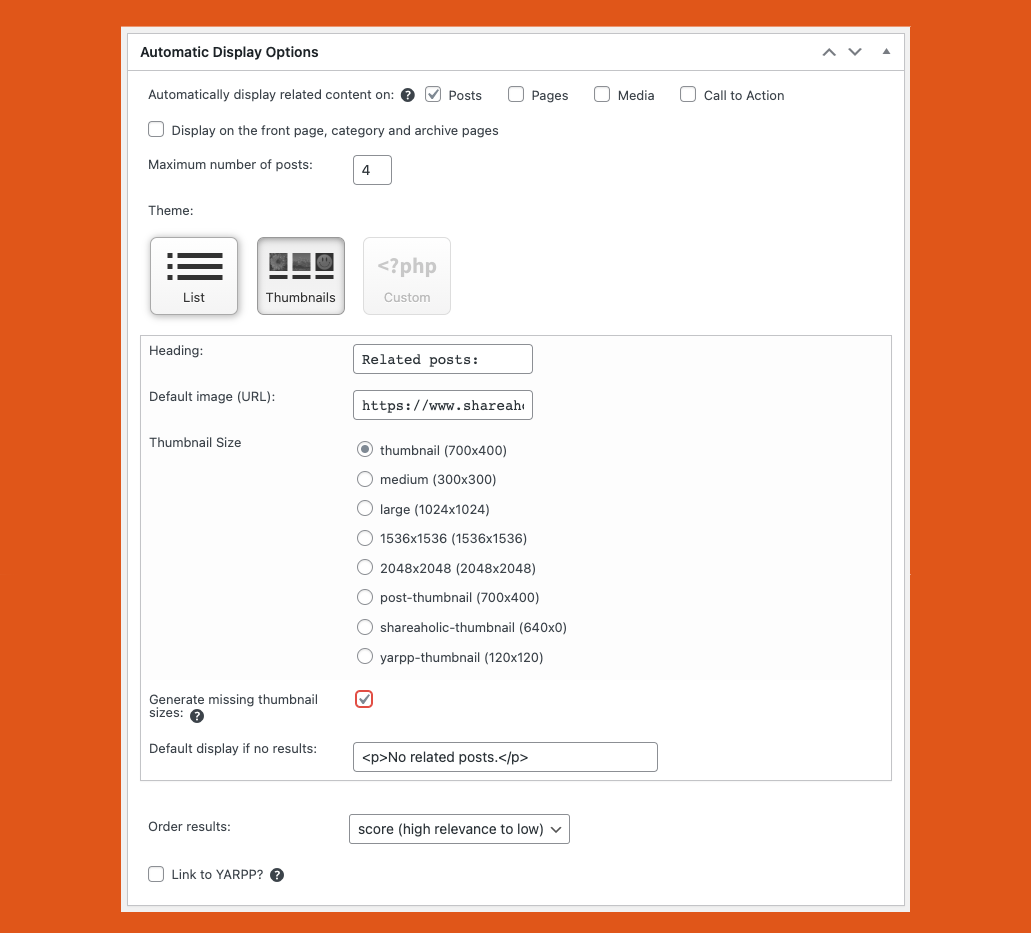
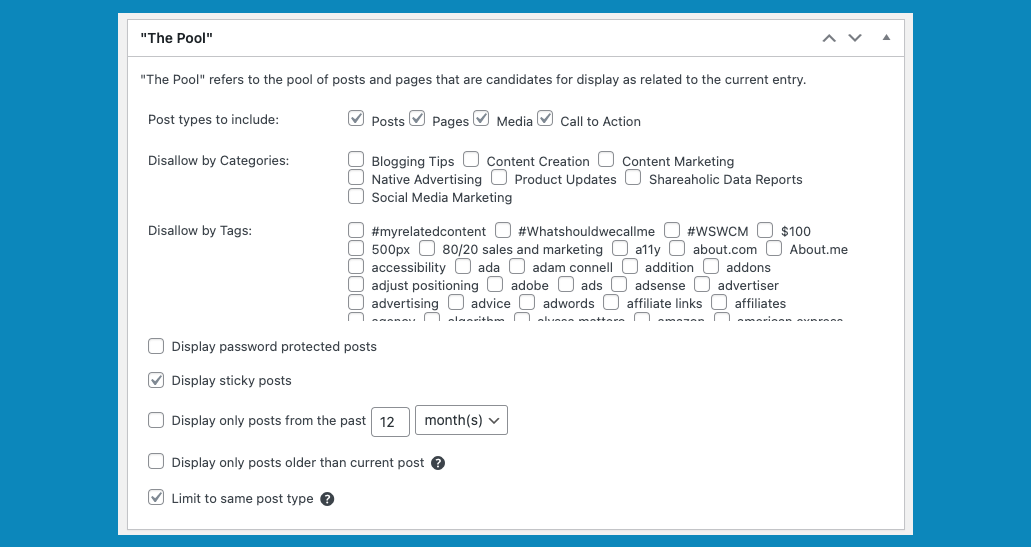
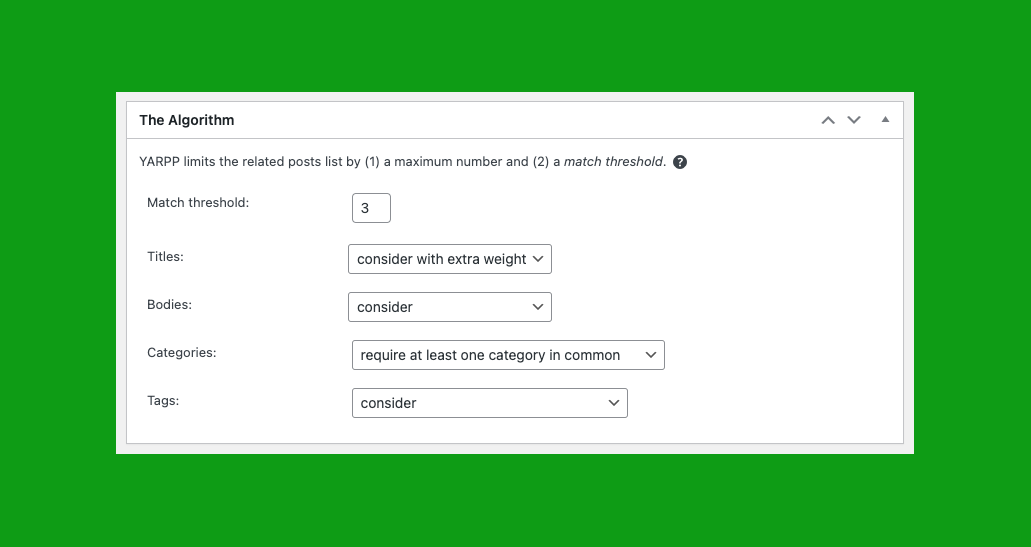
You should customize your Pool, Algorithm and Automatic Display Options settings from the YARPP settings page. YARPP supports a full range of placement options, including Automatic Display Options (pick where to show YARPP from the YARPP settings page), Block, Shortcode, Widget, YARPP functions() and REST API support. Details below.
Automatic Display Options
Configurable from the YARPP settings page, the Automatic Display Option automatically displays YARPP right below post content. You can configure which posts types to display YARPP on from the YARPP settings page.
If you do not want to show the Related Posts display in its default position (right below the post content), first go to YARPP options and turn off the “Automatic Display Options”.
If you would like to instead display it in your sidebar and you have a widget-aware theme, YARPP provides a Related Posts widget which you can add under “Appearance” > “Widgets.”
If you would like to add Related Posts elsewhere (such as inline related posts), edit your relevant theme file (most likely something like single.php) and add the shortcode code [yarpp] or PHP function yarpp_related(); within The Loop where you want to display the related posts. Make sure you don’t add echo yarpp_related(); or you may end up with duplicates in your related posts section. The YARPP Block is also an option.
Automatic Display in Feed Options
Make sure the “display related posts in feeds” option is turned on if you would like to show related posts in your RSS and Atom feeds. The “display related posts in feeds” option can be used regardless of whether you auto display them on your website (and vice versa).
Block
YARPP ships with full support for Gutenberg Blocks. You can place YARPP’s Block manually wherever you’d like in post content.
Shortcode
You can place YARPP’s related posts manually wherever you’d like in post content or theme files.
To add to post content, use the shortcode:
[yarpp] to show content related to the current post. You may use more than one YARPP shortcode in a given post or template.
All the parameters accepted by yarpp_related() (see below) can also be used in the shortcode. Here are some examples…
If you know the reference Post ID that you want to show content related to, use:
[yarpp reference_id=123] to show content related to post 123
To specify which YARPP template to use, use the “template” attribute like so:
[yarpp template="yarpp-template-photoblog"] - where `yarpp-template-photoblog.php` is the file name of the custom template
[yarpp template="list"] - built-in "List" template
[yarpp template="thumbnails"] - built-in "Thumbnails" template
To specify maximum number of posts to show, use the “limit” attribute like so:
[yarpp template="list" limit=3]
To only show recent posts, use the “recent” attribute (provide it with a number, a space, and then either “day”, “week” or “month”)
[yarpp recent="6 month"]
To show another post type, use the “post_type” parameter.
[yarpp post_type="page"]
If you need to provide multiple values (eg posts and pages, or a list of categorires of posts to exlude), separate them with a comma but no space.
[yarpp post_type="post,page"] - include both posts and pages in results
[yarpp exclude="1,2,3"] - exclude posts with categories with IDs 1,2 and 3
To adjust the weights and taxonomy requirements, provide the value as JSON (using the same structure as for yarpp_related() below). Eg
[yarpp weight='{"body":1}'] - only consider body content
[yarpp weight='{"body":2,"title":2,"tax":{"category":0, "post_tag":0}}'] - give extra weight to bodies and titles, but none to categories
[yarpp require_tax='{"category": 2, "post_tag": 0}'] - require at least one category in common
To order results:
[yarpp order="score DESC"] - high relevance score to low
[yarpp order="rand"] - random
To add YARPP shortcode to your theme files (eg. single.php), use:
<?php echo do_shortcode('[yarpp]'); ?>
<?php echo do_shortcode('[yarpp reference_id=123]'); ?>
If you’re adding the shortcode outside the loop, you must provide the reference_id.
Widget
Related posts can also be displayed as a widget. Go to the Appearance > Widgets options page and add the “Related Posts (YARPP)” widget. Choose to display content from YARPP Basic. The widget will only be displayed on single entry (permalink) pages.
The YARPP widget can be used even if the “auto display” option is turned off.
REST API
Add related posts to your JavaScript driven app!
YARPP adds a REST API endpoint for fetching related posts. The JSON results from the REST API query are the same as you would see if you were visiting a post on your website (the same quantity and order). It is possible to override the quantity at the time of making the REST API request.
YARPP functions()
Developers can call YARPP’s powerful relatedness algorithm from anywhere in their own code. Some examples and more details are in this WordCamp Birmingham talk.
You may use the functions defined in includes/related_functions.php in your own code, notably:
yarpp_related()– gets the HTML for related posts and displays ityarpp_related_exist()– checks whether any related posts existsyarpp_get_related()– returns the list of related posts (WP_Postobjects)
Examples:
Show related posts, using all the settings set on the YARPP settings page:
<?php yarpp_related(); ?>
Each of these functions will default to using the settings set on the YARPP settings page, but can be customized. For example:
yarpp_related(
  array(
    // Pool options: these determine the "pool" of entities which are considered
    'post_type' => array('post', 'page', 'wc_product', ...), //  post types to include in results
    'show_pass_post' => true, // show password-protected posts
    'show_sticky_posts' => true, // show sticky posts
    'past_only' => true, // show only posts which were published before the reference post
    'exclude' => array(), // a list of term_taxonomy_ids. entities with any of these terms will be excluded from consideration.
    'recent' => false, // to limit to entries published recently, set to like '15 day', '20 week', or '12 month' (https://www.mysqltutorial.org/mysql-interval/)

    // Relatedness algorithm options: these determine how "relatedness" is computed
    // Weights are used to construct the "match score" between candidates and the reference post
    'weight' => array(
      'body' => 1,
      'title' => 2, // larger weights mean this criteria will be weighted more heavily
      'tax' => array(
        'post_tag' => 1,
        ... // put any taxonomies you want to consider here with their weights
      )
    ),
    // Specify taxonomies and a number here to require that a certain number be shared:
    'require_tax' => array(
      'post_tag' => 1 // for example, this requires all results to have at least one 'post_tag' in common
    ),
    // The threshold which must be met by the "match score" to be considered related
    'threshold' => 5,

    // Display options:
    'template' => 'thumbnails', // which theme/custom template to use. Built-in ones include "list" and "thumbnails", or the name of a YARPP template file in your active theme folder starting with "yarpp-template-". Example: yarpp-template-videos or yarpp-template-videos.php
    'limit' => 5, // maximum number of results
    'order' => 'score DESC', // column on "wp_posts" to order by, then a space, and whether to order in ascending ("ASC") or descending ("DESC") order
    'promote_yarpp' => true, // boolean indicating whether to add 'Powered by YARPP' below related posts
    'generate_missing_thumbnails' => true, // automatically generate missing thumbnail sizes on the fly
    'extra_css_class' => 'class_1 class_2', // add CSS classes to YARPP's parent div
  ),
 $reference_ID, // second argument: (optional) the post ID. If not included, will use the current post.
 true // third argument: (optional) true to echo the HTML block; false to return it
);
Options which are not specified will default to those specified on the YARPP settings page. Additionally, if you are using a builtin template rather than specifying a custom template file in template, the following arguments can be used to override the various parts of the builtin template: before_title, after_title, before_post, after_post, before_related, after_related, no_results, excerpt_length.
If you need to implement related entries programmatically or to know whether they exist, you can use the functions:
yarpp_get_related( $args, $reference_ID )
Returns an array ofpostobjects, just like the WordPress functionget_posts.yarpp_related_exist( $args, $reference_ID )
Returns a boolean for whether any such related entries exist.
For each of these functions, $args takes the same arguments as those detailed for yarpp_related() above, except for the various display and template options.
Note that at this time custom YARPP queries using the functions mentioned here are not cached in the built-in YARPP caching system. Thus, if you notice any performance hits, you may need to write your own code to cache the results.
Example of how to use a custom YARPP query and cache the results for a day:
$result = get_transient('yarpp_custom_results_for_' . $post->ID);
if(! $result){
  $result = yarpp_related(['post_type' => 'reply'],null,false);
  set_transient('yarpp_custom_results_for_' . $post->ID, $result, DAY_IN_SECONDS);
}
echo $result;
Show at most 4 related WooCommerce products based on their title and especially on their categories, assuming custom YARPP template
yarpp-related-wc-products.php has been added to the active theme folder:
yarpp_related(
  array(
    'limit' => 4,
    'weight' => array(
      'title' => 1,
      'tax' => array(
        'category' => 2
      )
    ),
    'post_type' => 'wc_product',
    'template' => 'yarpp-related-wc-products.php'
  )
);
Check for posts related to post with ID 123, and loop through them in order to do some more custom logic:
$related_posts = yarpp_get_related(array(), 123);
if(! $related_posts){
  echo 'No related posts';
} else {
  foreach($related_posts as $post){
    // $post is a WP_Post object.
    echo $post->post_title;
  }
}
Show results ordered by score (high relevance to low):
yarpp_related(
  array(
    'order' => 'score DESC',
  )
);
Show results ordered by post publish date (new to old):
yarpp_related(
  array(
    'order' => 'post_date DESC',
  )
);
Show results ordered randomly:
yarpp_related(
  array(
    'order' => 'rand',
  )
);
YARPP Filters
Documentation: https://support.shareaholic.com/hc/en-us/articles/4408775687060
Frequently asked questions
Many pages list “no related posts.”
Most likely you have “no related posts” right now because the default “match threshold” is too high. Here’s what we recommend to find an appropriate match threshold: lower your match threshold in the YARPP “Algorithm” options to something very low, like 1. (If you don’t see the match threshold, you may need to display the “Algorithm” options via the “Screen Options” tab at the top.) Most likely the really low threshold will pull up many posts that aren’t actually related (false positives), so look at some of your posts’ related posts and their match scores. This will help you find an…
How can I limit related posts to a certain time frame? For instance, I don’t want to show posts from two years ago.
In WordPress, go to “Settings” and “Related Posts (YARPP)” and make sure “The Pool” is checked in the “Screen Options” section at the top of the page. In “The Pool” section, check the box next to “Show only posts from the past X months.”
Where do I tell YARPP to display related posts only by tags?
In WordPress, go to “Settings” and “YARPP” and make sure “Algorithm” is checked in the “Screen Options” section at the top of the page. In the “Algorithm” section, configure the dropdown boxes next to “Titles,” “Bodies,” “Categories,” and “Tags.”
Can I manually specify related posts?
Sorry, but specifying related posts, displaying related posts from external WordPress sites, and pulling content from the Comments section are all outside the scope of YARPP at this time.
I’m seeing related posts displayed on the home page. How do I prevent that?
Some WordPress themes treat the home page as an archive or a “page.” Go to “Settings” then “Related Posts (YARPP)” and view the “Automatic Display Options” section. Make sure “Pages” and “Also display in archives” are not checked.
How can I prevent the “related posts” list from displaying on specific posts?
Option 1: On the edit post page, uncheck “Display Related Posts” in the YARPP box. Be sure to update or publish to save your changes. Option 2: Add to the HTML code of any post to prevent related posts from displaying. Option 3: Use the noyarpp filter. For example: // Disable YARPP Automatic Display in specific categories function yarpp_disable_categories() { // Examples of in_category usage: https://codex.wordpress.org/Function_Reference/in_category if ( in_category( array( 'my_category_1_slug', 'my_category_2_slug' ) ) ) { return true; } } add_filter( 'noyarpp', 'yarpp_disable_categories'…
I’m using the Thumbnails display in YARPP 4+. How do I override the style of the text that displays? The title only shows two lines, the font is larger than I’d like, I’d like to center the thumbnails, etc.
If you’re familiar with CSS, you can override any YARPP styles by editing your theme’s style.css file, or any other CSS file you may have created that loads after the YARPP one. To edit your theme’s CSS file, go to “Appearance” then “Editor” and then click style.css in the right sidebar. Add changes at the bottom of the file and click “Save.” If you do edit this file, just make sure you add !important after each style declaration, to make sure they’ll override the YARPP rules. Some common overrides that YARPP users have added are: /* Reduces the title font size and displays more than two…
How do I remove sold out WooCommerce products from recommendations (and otherwise filter by postmeta)?
If you use YARPP to show related products and want to exclude products that are sold out, use the following code snippet: function yarpp_custom_wp_query($query) { if(isset($query->yarpp_cache_type)){ $query->set('post_type', 'product'); $meta_query = [ 'relation' => 'AND', [ 'key' => '_stock_status', 'value' => ['instock','onbackorder'], 'compare' => 'IN', ] ]; $query->set('meta_query', $meta_query); } return $query; } add_filter('pre_get_posts', 'yarpp_custom_wp_query', 100); Note: this filter applies after the related items were already calculated, so when it filters out an item you will…
I’m using the Thumbnails display. How can I change the thumbnail size?
As of YARPP v5.19.0, YARPP usually defaults to using WordPress’ default thumbnail size. This can be changed to another thumbnail size using the YARPP setting “Thumbnail Size”. However, if you used YARPP before v5.19.0, or your theme defines a “yarpp-thumbnail” size, the default is the “yarpp-thumbnail”. To change “yarpp-thumbnail” size, add the following to your theme’s functions.php file with appropriate width and height variables: add_image_size( 'yarpp-thumbnail', $width, $height, true ); When you do this, make sure you also set the YARPP setting “Thumbnail Size” to “yarpp-thumbnail”. Each…
I’m using the Thumbnails display. Why aren’t the right size thumbnails being served?
By default, if an appropriately sized thumbnail is not available in WordPress, a larger image will be served and will be made to fit in the thumbnail space via CSS. Sometimes this means images will be scaled down in a weird way, so it is not ideal. What you really want is for YARPP to serve appropriately-sized thumbnails. There are two options for doing so: First, you can use the Regenerate Thumbnails plugin to generate all these thumbnail-sized images in a batch process. This puts you in control of when this resizing process happens on your server (which is good because it can be…
I’m using the Thumbnails display. Why are some of my posts missing appropriate images?
YARPP’s thumbnail view requires that a WordPress “featured image” be set for each post. If you have many posts that never had a featured image set, we recommend the plugin Auto Post Thumbnail, which will generate post thumbnails for you.
Is YARPP compatible with WordPress Multisite?
YARPP should work fine in a multisite environment, and many users are running it without any issues using WordPress Multisite. It will, however, only get results within each blog. It will not display related posts results from across your network.
I want to use YARPP on a site with content in multiple languages.
The recommended solution in such cases is to use the Polylang plugin. Polylang has posted a tutorial for using YARPP with Polylang.
Does YARPP work with full-width characters or languages that don’t use spaces between words?
YARPP works fine with full-width (double-byte) characters, assuming your WordPress database is set up with Unicode support. 99% of the time, if you’re able to write blog posts with full-width characters and they’re displayed correctly, YARPP will work on your blog. However, YARPP does have difficulty with languages that don’t place spaces between words (Chinese, Japanese, etc.). For these languages, the “consider body” and “consider titles” options in the “Algorithm options” may not be very helpful. Using only tags and categories may work better for these languages.
Does YARPP slow down my blog/server?
YARPP is a highly optimized plugin with an inbuilt cache that makes subsequent queries super efficient. This means that YARPP will not slow your site down. If you are running a large site and need to throttle YARPP’s computation, try the official YARPP Experiments plugin which adds this throttling functionality.
Are there any plugins that are incompatible with YARPP?
SEO_Pager plugin: turn off the automatic display option in SEO Pager and instead add the code manually. Other related posts plugins, obviously, may also be incompatible. Please submit similar bugs by starting a new thread on the WordPress.org forums. We check the forums regularly and will try to release a quick bugfix.
YARPP seems to be broken since I upgraded to WordPress X.X.
Before upgrading to a new WordPress version, you should first deactivate all plugins, then upgrade your WordPress, and then reactivate your plugins. Even then, you may still find that something went wrong with your YARPP functionality. If so, try these steps: Visit the “YARPP” settings page to verify your settings. Deactivate YARPP, replace the YARPP files on the server with a fresh copy of the new version, and then reactivate it. From the “YARPP” settings page, flush the YARPP cache
Can I clear my cache? Can I build up the cache manually?
Yes, there is a button to clear YARPP’s cache table in YARPP’s WP Admin options.
How to add support for a Custom Post Type (CPT)?
To make YARPP support your Custom Post Type (CPT), the attribute yarpp_support must be set to true when the CPT is registered. The CPT will then be available in the YARPP settings page. 'yarpp_support' => true For example: function register_my_cpt() { $args = array( 'public' => true, 'label' => 'Books', 'yarpp_support' => true, ); register_post_type( 'book', $args ); } add_action( 'init', 'register_my_cpt' ); If you do not have access to the code which is registering the CPT, maybe because it is a third-party plugin that is creating it, you can still add the yarpp_support argument: /** *…
Does YARPP support custom taxonomies?
Yes. Any taxonomy, including custom taxonomies, may be specified in the weight or require_tax arguments in a custom display as above. term_taxonomy_id specified in the exclude argument may be of any taxonomy. If you would like to choose custom taxonomies to choose in the YARPP settings UI, either to exclude certain terms or to consider them in the relatedness formula via the UI, the taxonomy must (a) have either the show_ui or yarpp_support attribute set to true and (b) must apply to either the post types post or page or both.
Changelog
We update YARPP regularly so we can keep making it better for you. Update to the latest version for the latest features and improvements. Thank you for using YARPP!
5.30.11 (11-November-2024)
- Bugfix: Resolves minor Unauthenticated Broken Access Control bug
- Tested on WordPress 6.7
5.30.10 (17-February-2024)
- Bugfix: Resolves stored Cross-Site Scripting bug
5.30.9 (22-November-2023)
- Enhancement: Better input sanitization for a more predictable output
- Enhancement: Misc performance improvements
5.30.8 (21-November-2023)
- Enhancement: Adds ability to set sort order to Random from the YARPP Admin UI
5.30.7 (20-November-2023)
- Tested on WordPress 6.4
- Bugfix: Fixes PHP 8.2 warnings that were filling up server logs
5.30.6 (09-August-2023)
- Tested on WordPress 6.3
Screenshots



For developers
Is this your plugin? Show off the numbers.
Add a live badge to your site, docs or GitHub README. It updates on its own — no account needed.
Best YARPP alternatives
All contextual related posts plugins →FAQ
YARPP: quick answers
Straight answers, pulled from live WordPress.org data.
Live data from WordPress.org · checked Sep 27, 2026
Is YARPP free?
Yes. YARPP is free to download and use from the official WordPress.org plugin directory.
Is YARPP safe to use in 2026?
YARPP shows warning signs in 2026 — compare the alternatives below before installing. It runs on 100K+ sites, is rated 4.8/5 and was last updated 2 years ago, and scores 40/100 on our health check.
How many websites use YARPP?
YARPP is active on 100K+ WordPress websites and has been downloaded 7,997,378 times since it launched in January 2008. It was downloaded 7,384 times in the last 30 days.
Does YARPP work with WordPress 7.1?
YARPP is officially tested up to WordPress 6.7.9, while the latest release is 7.1.2. It may still work, but try it on a staging site first.
What PHP version does YARPP need?
YARPP requires PHP 5.3 or higher. Most hosts run PHP 8.x today, so it works on any modern WordPress hosting.
When was YARPP last updated?
The latest version, 5.30.11, was released on November 11, 2024 (2 years ago).
Who makes YARPP?
YARPP is developed and maintained by YARPP.
What are the best alternatives to YARPP?
The most popular alternatives to YARPP are Contextual Related Posts (50K+ installs), Super Related Posts (50+ installs) and VL Related Posts by Taxonomy (<10 installs).
Powered by PageForge
Want thousands of pages that rank like these? Build them in an afternoon.
This directory runs on the same engine as PageForge. Turn any spreadsheet, CSV or API into thousands of fast, SEO-ready WordPress pages — with schema, internal links and AI-written copy baked in.
- CSV, Google Sheets & API data sources
- AI content, schema & internal links per page
- Works with Elementor, Gutenberg, Yoast & Rank Math
- Free on WordPress.org — no credit card


