


Portfolio Block – show off your work with stunning layouts
Create responsive portfolios in Gutenberg with grid, masonry, filters, lightbox, slider, and customizable project layouts.

Solid choice
Portfolio Block is a solid plugin choice in 2026, with a few things worth checking first. It runs on 800+ sites, is rated 5/5 and was last updated 1 week ago, and scores 72/100 on our health check.
- Actively developed — last update 1 week ago
- Small user base (800+ active installs)
- Very few reviews so far
How does it stack up?
Side-by-side on installs, updates, ratings & support


Daily downloads
Download spikes usually follow a new release — each site that auto-updates counts as a download.
Rankings
Where Portfolio Block stands todayWordPress.org search rankings
Live position in the plugin search, top 100| Keyword | Position |
|---|---|
| filterable portfolio | #10 |
| gutenberg | >100 |
| portfolio | #11 |
| portfolio gallery | #36 |
| project showcase | #12 |
Version adoption
Share of active sites per release.
Rating breakdown
★★★★★★★★★★ 5 from 2 reviews
About Portfolio Block
From the official readme · v2.1.5Description
Showcase your projects like a pro – build clean, modern, filterable portfolios right inside the WordPress block editor, no page builder required.
Portfolio Block | Documentation | Pricing | Support | Demo
Why Use Portfolio Block?
Portfolio Block makes it easy to create a clean, modern portfolio directly inside the WordPress block editor. It includes multiple layouts, category filters, responsive controls, and full design flexibility – ideal for freelancers, designers, photographers, agencies, or anyone who wants to showcase projects in a professional way.
Build a portfolio with the Gutenberg block, or generate a shortcode and display it anywhere on your site – pages, posts, widgets, footers, or page builders. Native Gutenberg, fast loading, lightweight, SEO friendly, and fully responsive, with unlimited projects and categories.
Free Features
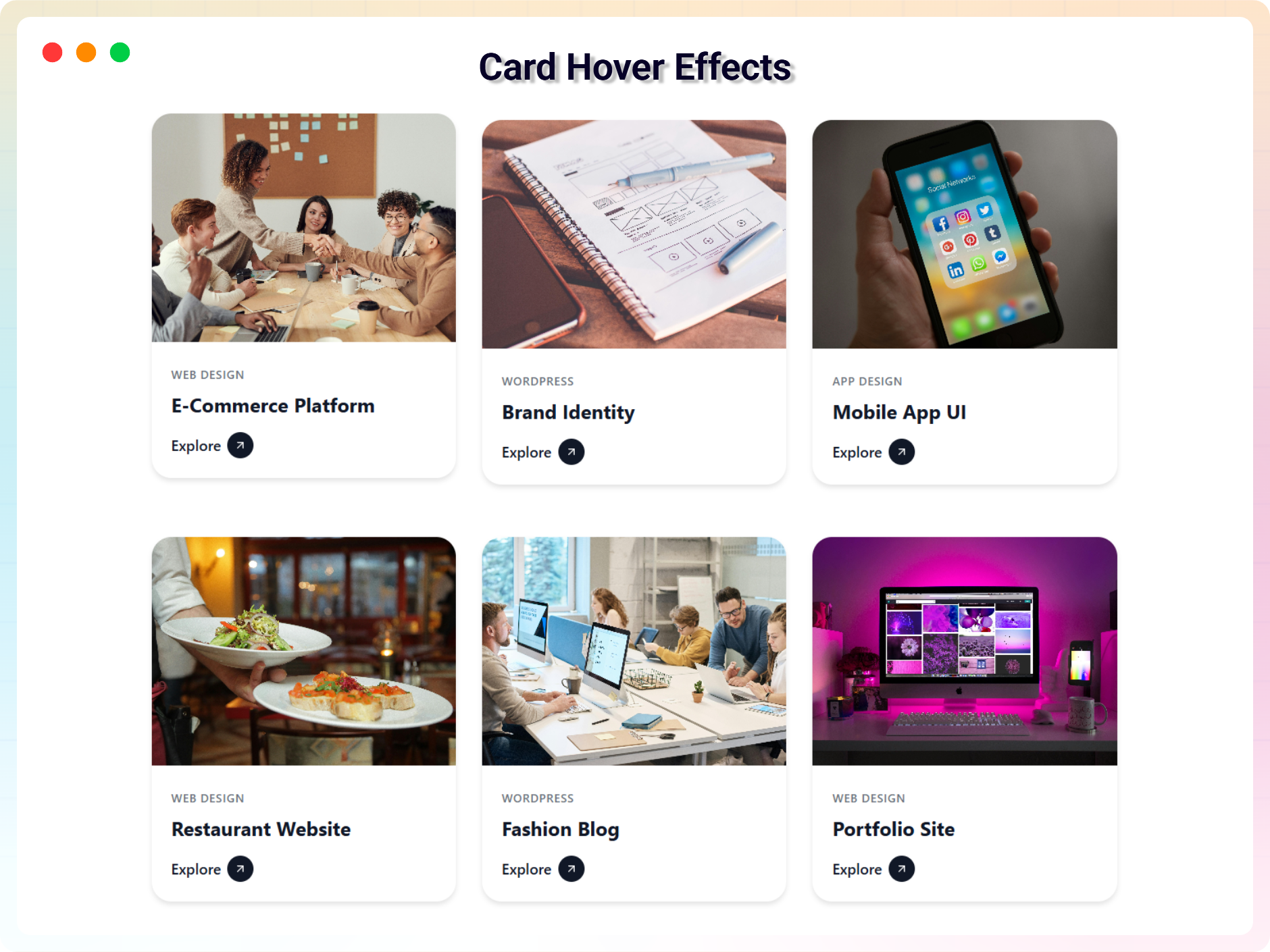
- Multiple Layouts: Grid, Masonry, and Card Hover layouts for flexible portfolio design.
- Unlimited Categories: Organize projects with as many categories as you need and let visitors filter by category.
- Portfolio Items: Add images, titles, descriptions, and external or internal links. Assign multiple categories per item.
- Item Management: Duplicate, delete, or reorder items with simple controls.
- Responsive Controls: Adjust columns, spacing, and layout settings for desktop, tablet, and mobile.
- Styling Options: Customize colors, borders, shadows, spacing, and overlay settings to match your theme.
- View All Button: Add a customizable button linking to your full portfolio archive or a separate page.
- Shortcode Support: Use your portfolio anywhere with the shortcode format [pfb id=”123″].
Pro Version – Unlock Advanced Features
Upgrade to Portfolio Block Pro for:
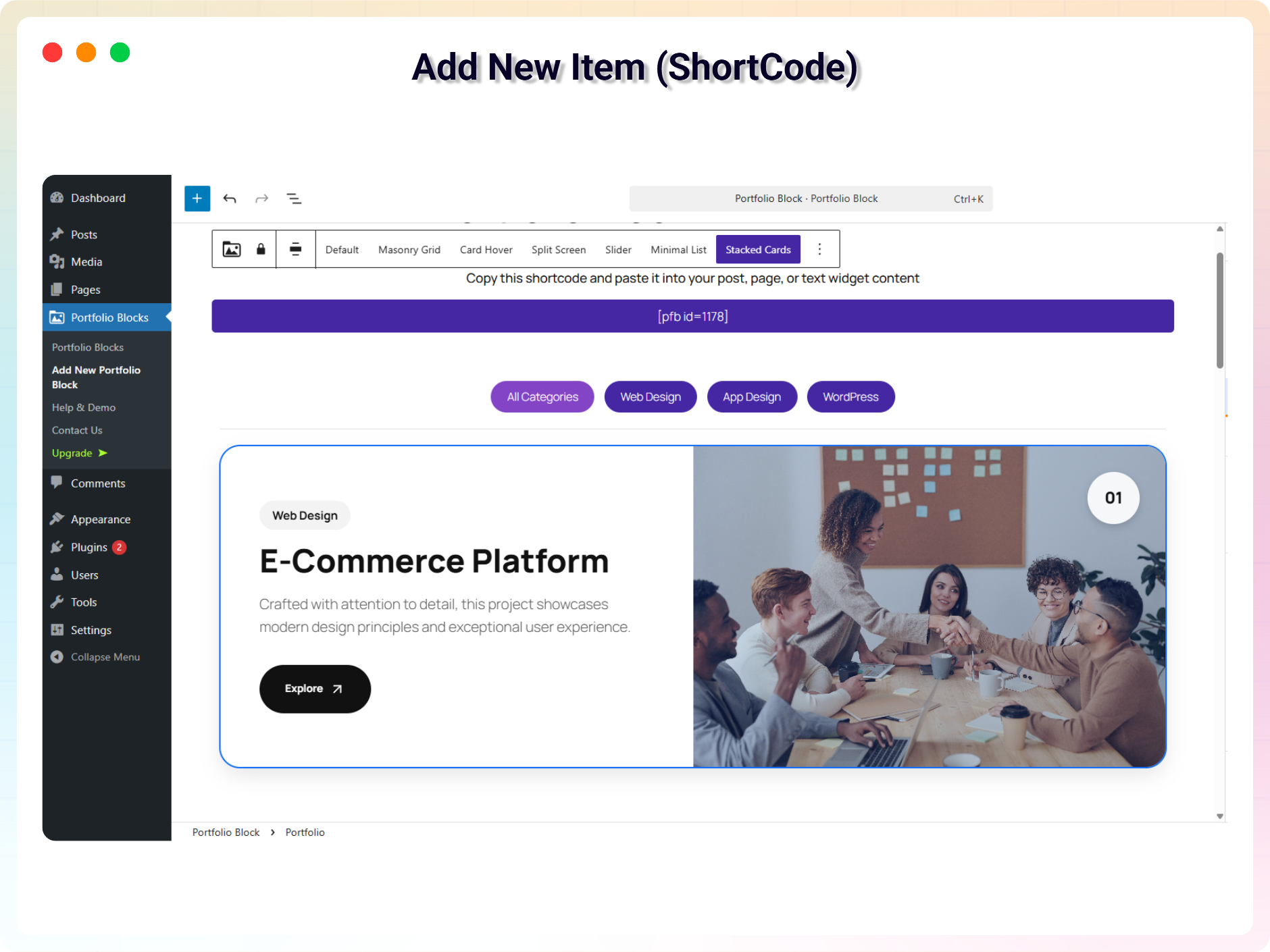
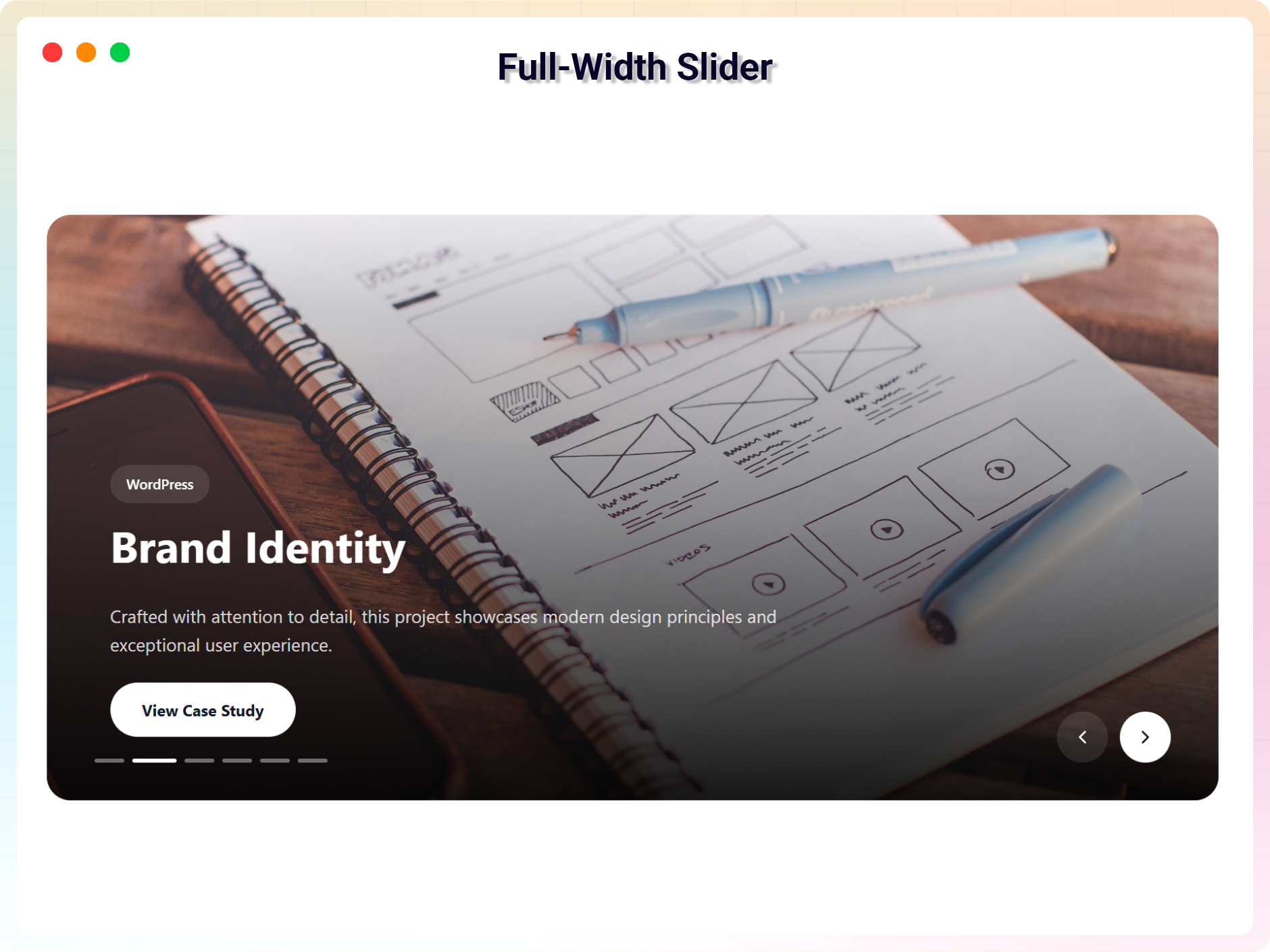
- Advanced Layouts: Split Screen, Slider, Minimal List, and Stacked Cards for more dynamic presentation styles.
- Typography Controls: Adjust fonts, sizes, colors, weight, and alignment for titles, categories, and descriptions.
- Hover & Animation Effects: Premium hover transitions and animations for a more interactive experience.
- Slider Options: Autoplay, loop, pause on hover, navigation controls, and speed settings for slider-based portfolios.
- Advanced Styling: More control over buttons, badges, icons, overlays, and spacing.
- Specialized Portfolio Blocks: Niche-specific, professionally designed blocks:
- Developer Portfolio – showcase projects and technical work directly inside Gutenberg.
- Fashion Portfolio – display fashion collections, lookbooks, and brand campaigns.
- Marketing Portfolio – present case studies, campaign results, and marketing projects.
- Photography Portfolio – highlight photography collections with visual-focused layouts.
- Resume Builder – create a professional resume or CV portfolio page inside Gutenberg.
- Priority Support: Faster support and ongoing updates with the Pro upgrade.
Unlimited Categories
Create and assign multiple categories to your portfolio projects.
Portfolio Items
Add the following information to portfolio items:
– Images
– Titles
– Descriptions
– Internal links
– External links
– Categories
Common Use Cases
Portfolio Block can be used for many types of WordPress websites.
- Personal Portfolio: Showcase your skills, experience, and creative work.
- Freelancer Portfolio: Present client projects and attract new customers.
- Developer Portfolio: Display websites, apps, plugins, and software projects.
- Photography Portfolio: Create a visual photography gallery with lightbox support.
- Agency Portfolio: Showcase services, client work, and successful projects.
- Design Portfolio: Present graphic design, UI/UX, branding, and creative projects.
- Marketing Portfolio: Display campaigns, case studies, and marketing projects.
- Product Showcase: Present products, product designs, and featured work.
- Creative Portfolio: Build a visually engaging portfolio for creative professionals.
- Resume Portfolio: Combine professional experience, projects, and skills into a portfolio page.
Specialized Portfolio Blocks
Portfolio Block Pro includes professionally designed portfolio layouts for different professional needs.
Developer Portfolio
Showcase websites, applications, plugins, software projects, GitHub projects, and technical work.
Fashion Portfolio
Display fashion collections, campaigns, and creative fashion projects.
Marketing Portfolio
Present marketing campaigns, case studies, client results, and creative marketing work.
Photography Portfolio
Create an image-focused photography portfolio for photographers, studios, and creative professionals.
Resume Builder
Create a professional resume or CV portfolio page containing experience, projects, skills, and professional information.
What Is Portfolio Block?
Portfolio Block is a Gutenberg portfolio builder for WordPress that lets you create responsive portfolio galleries and project showcases directly in the WordPress Block Editor.
Create portfolio grids, masonry layouts, card hover portfolios, sliders, minimal lists, split-screen portfolios, and stacked card layouts without relying on a separate page builder.
Use it to showcase:
- Client projects
- Websites and applications
- Photography
- Design work
- Marketing campaigns
- Products
- Creative work
- Professional experience
- Case studies
- Personal projects
Advanced Portfolio Layouts
Portfolio Block Pro adds advanced layouts for creating more distinctive portfolio pages:
- Split Screen
- Slider
- Minimal List
- Stacked Cards
- Advanced typography
- Hover animations
- Advanced styling
- Slider autoplay
- Slider loop
- Pause on hover
- Navigation controls
- Slider speed
Filterable Portfolio Gallery
Create a filterable portfolio in WordPress by organizing projects into categories.
Visitors can select a category to quickly find relevant projects, making the portfolio easier to browse.
Use category filtering for:
- Web design projects
- Photography collections
- Client projects
- Product categories
- Marketing campaigns
- Design work
- Case studies
Portfolio Lightbox and Project Links
Choose what happens when visitors click a portfolio item:
- Open a single-image lightbox
- Open a gallery lightbox
- Open a custom URL
Use lightbox layouts to let visitors explore visual projects without leaving the portfolio page.
Hover and Animation Effects
Add additional hover transitions and animation effects to portfolio layouts.
Slider Controls
The Pro Slider layout includes:
– Autoplay
– Loop
– Pause on hover
– Navigation controls
– Slider speed
How to Use – Quick Start
With the block editor:
- Install and activate Portfolio Block.
- Open the Block Editor and click the + icon.
- Search for Portfolio (by bPlugins) and insert the block.
- Add your portfolio items and customize your layout.
- Publish your page.
With the shortcode:
- Go to Portfolio Block → Add New Portfolio in the dashboard.
- Create your portfolio using the block editor and publish it.
- Copy the shortcode that appears after publishing.
- Paste it anywhere on your site where you want the portfolio to appear.
Have a suggestion or question? Email us: support@bplugins.com
Check out our other WordPress Plugins-
Html5 Video Player – Display videos as single and playlist in multiple skins.
PDF Poster – Display/Embed PDF files with different styles.
Html5 Audio Player – Listen audios with awesome visuals.
StreamCast – Customizable radio player with different skins.
3D Viewer – Embed 3D models and 3D products with interaction.
Advanced Post Block – Show posts and custom posts in different layouts.
bBlocks – A blocks collection and page building tool for Gutenberg.
Installation
From your WordPress dashboard (recommended):
- Go to Plugins → Add New in your WordPress dashboard.
- Search for “Portfolio Block” and find the plugin developed by bPlugins.
- Click Install Now, then Activate.
- Open a page in the Block Editor, insert the Portfolio (by bPlugins) block, and start adding your portfolio.
Upload via plugin installer:
- Download the portfolio-block.zip file.
- Go to Plugins → Add New → Upload Plugin.
- Select the
portfolio-block.zipfile and click Install Now. - After installation, click Activate.
Manual installation:
- Download the plugin ZIP file and extract it.
- Upload the extracted folder to
/wp-content/plugins/using FTP or File Manager. - Go to Plugins in your WordPress dashboard, find Portfolio Block, and click Activate.
Frequently asked questions
Is Portfolio Block free?
Yes, the core plugin is free. A Pro version adds advanced layouts, typography controls, animations, and specialized portfolio blocks.
How do I get the shortcode?
After publishing a portfolio under Portfolio Block, you will see a Shortcode column in the portfolio list. Copy the shortcode ([pfb id=”123″]) and paste it anywhere on your site.
Can I use it with page builders?
Yes – it works with all page builders that support shortcodes.
Does it work with all themes?
Yes, it is fully compatible with modern WordPress themes.
Can I customize layouts and styles?
Yes, all settings – layouts, colors, borders, shadows, spacing, and overlays – are editable in the block editor sidebar.
Can visitors filter projects by category?
Yes. You can organize projects into unlimited categories and let visitors filter the portfolio by category on the front end.
Can portfolio items open in a lightbox?
Yes. You can choose the click behavior for each portfolio: open a single-image lightbox, a gallery lightbox, or a custom URL.
Is the portfolio responsive on mobile?
Yes. You can adjust columns, spacing, and layout settings separately for desktop, tablet, and mobile. Can I create a portfolio grid? Yes. The free version includes a responsive Grid layout. Can I create a masonry portfolio? Yes. Portfolio Block includes a Masonry layout for flexible project galleries. Can I create a photography portfolio? Yes. Portfolio Block Pro includes a Photography Portfolio layout designed for photographers and visual projects. Can I create a developer portfolio? Yes. The Developer Portfolio layout can showcase websites, apps, plugins, software projects, GitHub projects…
Can I reuse the block?
Yes, you can use it as many times as you want, on as many pages as you want.
Where can I get support?
You can post your questions on the support forum here.
Where do I report security bugs found in this plugin?
Please report security bugs found in the source code of the Portfolio Block plugin through the Patchstack Vulnerability Disclosure Program. The Patchstack team will assist you with verification, CVE assignment, and notify the developers of this plugin.
Changelog
2.1.5 – 30 June 26
- Updated Admin Dashboard
- Fixed: Added root plugin functionality.
2.1.3 – 06 June 26
- Fixed: resume builder style issue.
- Added: portfolio Click Behavior: Open Single image lightbox, gallery lightbox or Custom URL
2.1.1 – 09 Mar 26
- Reduced file size.
2.1.0 – 08 Mar 26
- Fixed dashboard issue.
2.0.9 – 07 Mar 26
- Fixed toast issue.
2.0.8 – 05 Mar 26
- Improved design and customization.
Screenshots





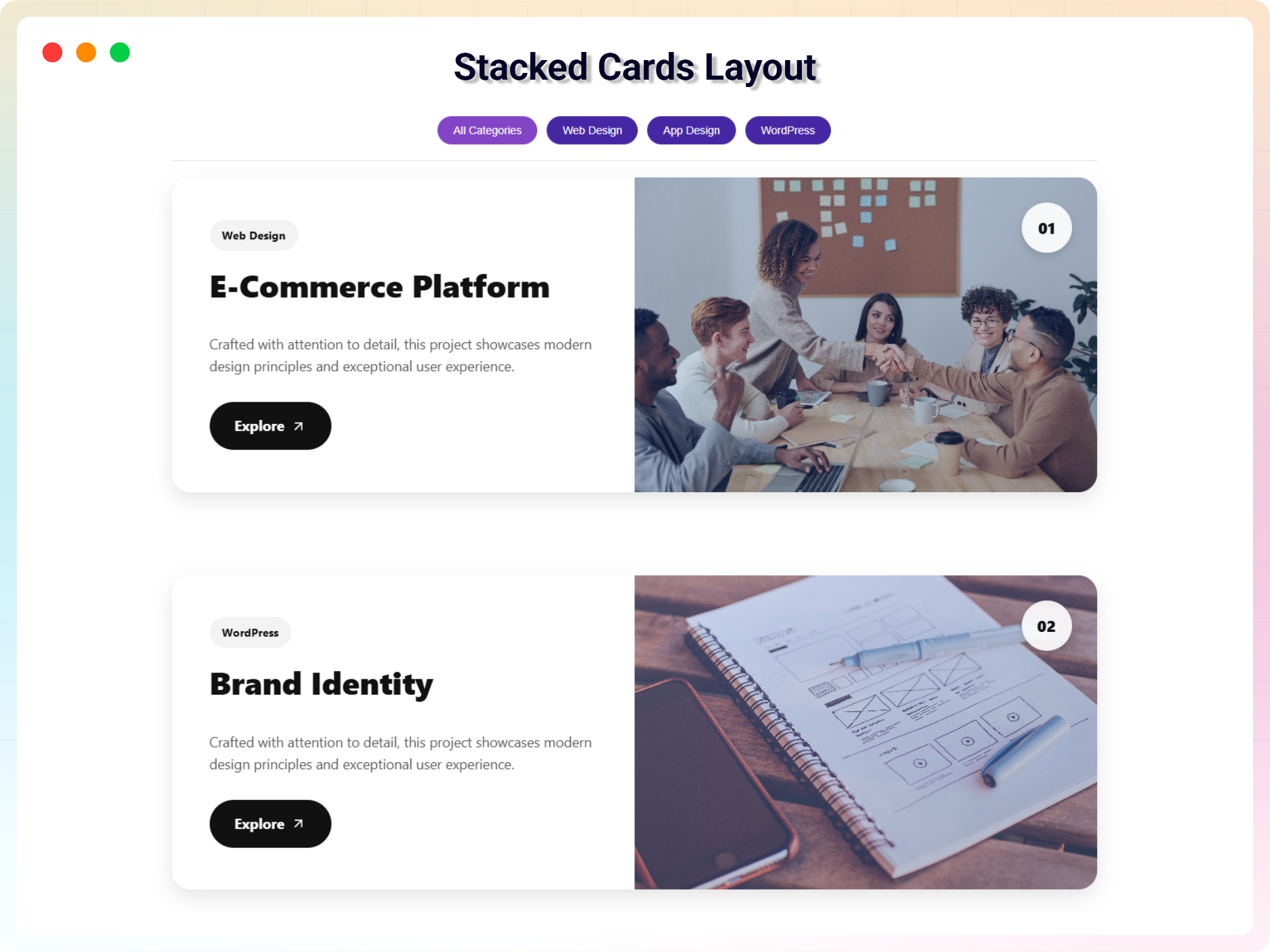
For developers
Is this your plugin? Show off the numbers.
Add a live badge to your site, docs or GitHub README. It updates on its own — no account needed.
Best Portfolio Block alternatives
All filterable portfolio plugins →


FAQ
Portfolio Block: quick answers
Straight answers, pulled from live WordPress.org data.
Live data from WordPress.org · checked Sep 30, 2026
Is Portfolio Block free?
Yes. Portfolio Block is free to download and use from the official WordPress.org plugin directory.
Is Portfolio Block safe to use in 2026?
Portfolio Block is a solid plugin choice in 2026, with a few things worth checking first. It runs on 800+ sites, is rated 5/5 and was last updated 1 week ago, and scores 72/100 on our health check.
How many websites use Portfolio Block?
Portfolio Block is active on 800+ WordPress websites and has been downloaded 16,967 times since it launched in April 2022. It was downloaded 487 times in the last 30 days.
Does Portfolio Block work with WordPress 7.1?
Portfolio Block is officially tested up to WordPress 7.0.6, while the latest release is 7.1.2. It may still work, but try it on a staging site first.
What PHP version does Portfolio Block need?
Portfolio Block requires PHP 7.1 or higher. Most hosts run PHP 8.x today, so it works on any modern WordPress hosting.
When was Portfolio Block last updated?
The latest version, 2.1.5, was released on September 20, 2026 (1 week ago).
Who makes Portfolio Block?
Portfolio Block is developed and maintained by bPlugins.
What are the best alternatives to Portfolio Block?
The most popular alternatives to Portfolio Block are Radius Portfolio (7K+ installs), Responsive Filterable Portf… (1K+ installs) and Portfolio Grid (800+ installs).
Powered by PageForge
Want thousands of pages that rank like these? Build them in an afternoon.
This directory runs on the same engine as PageForge. Turn any spreadsheet, CSV or API into thousands of fast, SEO-ready WordPress pages — with schema, internal links and AI-written copy baked in.
- CSV, Google Sheets & API data sources
- AI content, schema & internal links per page
- Works with Elementor, Gutenberg, Yoast & Rank Math
- Free on WordPress.org — no credit card


