



PDF Rack – PDF Viewer, Document Manager & Embed PDF Files
Stop losing visitors to clunky PDF downloads. PDF Rack lets you display PDFs directly on your WordPress pages — no iframes, no browser plugins, no external services. Just a clean, fast, mobile-friendly viewer your…

Use with caution
PDF Rack works, but test it on a staging site before relying on it in 2026. It runs on 40+ sites and was last updated 3 months ago, and scores 58/100 on our health check.
- Small user base (40+ active installs)
- Very few reviews so far
How does it stack up?
Side-by-side on installs, updates, ratings & support


Daily downloads
Download spikes usually follow a new release — each site that auto-updates counts as a download.
Rankings
Where PDF Rack stands todayWordPress.org search rankings
Live position in the plugin search, top 100| Keyword | Position |
|---|---|
| document viewer | #40 |
| embed pdf | #53 |
| gutenberg-pdf | #57 |
| pdf manager | #79 |
| pdf viewer | #48 |
Version adoption
Share of active sites per release.
About PDF Rack
From the official readme · v1.0.5Description
Stop losing visitors to clunky PDF downloads. PDF Rack lets you display PDFs directly on your WordPress pages — no iframes, no browser plugins, no external services. Just a clean, fast, mobile-friendly viewer your visitors will love.
Unlike the WordPress Media Library that buries PDFs alongside thousands of images and videos, PDF Rack gives you a dedicated PDF dashboard built for document management. Upload once, embed anywhere — in seconds.
🚀 Why site owners choose PDF Rack
- Save time — Upload, categorize, and find any PDF in seconds with built-in search and filters.
- Better user experience — Visitors read PDFs right on your page without leaving your site or installing anything.
- Works everywhere — Gutenberg block, Elementor widget, or a simple shortcode. Pick whatever fits your workflow.
- Mobile-ready — The viewer automatically adapts to any screen size so your content looks great on phones and tablets.
📋 Feature Highlights
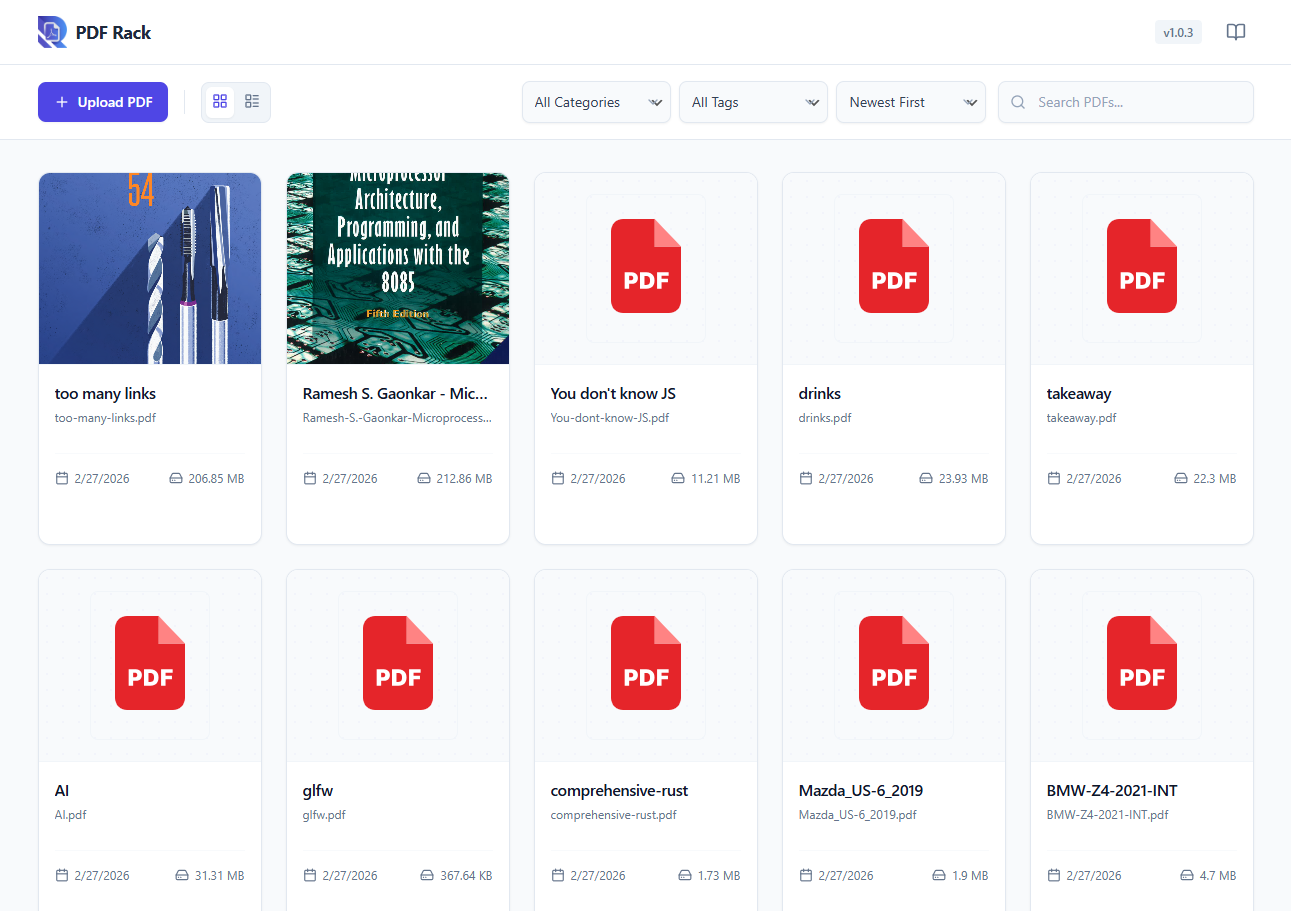
- Dedicated PDF Dashboard — A focused admin panel just for your PDF documents, separate from the Media Library clutter.
- Categories & Tags — Organize documents with custom taxonomies for easy sorting and retrieval.
- Quick Search & Filter — Find any document instantly by name, category, or upload date.
- Media Library Preview — Preview PDF contents directly within the WordPress Media Library details view.
- Auto-Generate Covers — Generate and set a cover image for your PDFs on demand.
- Responsive PDF Viewer — Page navigation, zoom controls, and an optional download button — all in a sleek, lightweight viewer powered by Mozilla’s PDF.js.
- Gutenberg PDF Viewer Block — Embed PDF viewer in Gutenberg editor.
- Elementor Widget — A dedicated widget for Elementor page builder users.
- Shortcode Support — Use
[pdf-rack id="123"]in the Classic Editor or any text widget. - Lightweight & Fast — No bloat. The viewer loads only on pages where you embed a PDF.
💎 Premium Features (Coming Soon)
- Flipbook Viewer — Realistic 3D page flipping effect for an immersive reading experience.
- Lightbox Viewer — Open PDFs in a stunning, distraction-free modal overlay.
- Carousel Display — Showcase multiple PDFs in a beautiful, swipeable carousel slider.
- Secure PDF — Protect your documents with passwords and prevent unauthorized downloads.
- Watermarking — Automatically add custom text or image watermarks to your PDFs.
- Analytics — Track views, downloads, and engagement metrics for your documents.
🎯 Perfect For
- Businesses sharing catalogs, brochures, or price lists.
- Educators & trainers publishing course materials and handouts.
- Real estate agents displaying property brochures and floor plans.
- Nonprofits sharing annual reports and newsletters.
- Any WordPress site that needs professional PDF document management.
📖 How It Works
- Go to PDF Rack → Add New and upload your PDF.
- Assign a category (optional) to keep things organized.
- Embed it anywhere using the Gutenberg block, Elementor widget, or the auto-generated shortcode.
That’s it — your visitors can now read the PDF directly on your site.
Third Party Libraries
This plugin utilizes the following third-party libraries to provide its functionality:
- PDF.js (Mozilla) – https://github.com/mozilla/pdf.js (Apache License 2.0)
- React (Meta) – https://reactjs.org (MIT)
- Lucide Icons – https://lucide.dev (ISC)
- Date-fns – https://date-fns.org (MIT)
Installation
- Upload the plugin files to
/wp-content/plugins/pdf-rack, or install directly from the WordPress plugin directory. - Activate through Plugins → Installed Plugins.
- Navigate to the new PDF Rack menu in your admin sidebar to start uploading documents.
Frequently asked questions
Does this plugin modify my existing Media Library files?
Not at all. PDF Rack stores its data separately. Your existing Media Library files remain completely untouched.
Can I use this with the Classic Editor?
Absolutely. Every uploaded PDF gets a unique shortcode (e.g., [pdf-rack id="10"]) that you can paste into the Classic Editor or any text widget.
Is the PDF viewer mobile-friendly?
Yes. The viewer is fully responsive and adapts to any screen width — phones, tablets, and desktops.
Will it slow down my site?
No. The PDF viewer scripts load only on pages where you embed a PDF, so the rest of your site stays fast.
Does it support large PDF files?
The plugin will load any PDF your server allows. For very large files (50 MB+), performance depends on your hosting upload_max_filesize setting and your visitor’s connection speed.
Do visitors need to install anything?
No. The built-in viewer runs entirely in the browser — no plugins, extensions, or third-party apps required.
Changelog
1.0.5
- Tested compatibility with WordPress version 7.0.2.
- Minor updates.
1.0.4
- Minor updates.
1.0.3
- New: Added PDF Rack Viewer Gutenberg Block.
- New: Added Light/Dark Mode and Position, dock/float options for Toolbar.
- Fix: Fixed the issue of PDF thumbnail not displaying in the admin dashboard.
1.0.2
- New: Added in-app documentation slideover for easier usage.
- New: Added keyboard shortcuts for PDF viewer navigation and zoom.
- New: Added custom background color support for shortcode.
1.0.1
- Added Quick View lightbox feature in the admin dashboard.
1.0.0
- Initial release.
- Dedicated PDF dashboard with upload, categorization, and search.
- Responsive frontend PDF viewer powered by PDF.js.
- Gutenberg block, Elementor widget, and shortcode embedding.
- Category and tag taxonomy support for document organization.
Screenshots


For developers
Is this your plugin? Show off the numbers.
Add a live badge to your site, docs or GitHub README. It updates on its own — no account needed.
Best PDF Rack alternatives
All document viewer plugins →

FAQ
PDF Rack: quick answers
Straight answers, pulled from live WordPress.org data.
Live data from WordPress.org · checked Oct 4, 2026
Is PDF Rack free?
Yes. PDF Rack is free to download and use from the official WordPress.org plugin directory.
Is PDF Rack safe to use in 2026?
PDF Rack works, but test it on a staging site before relying on it in 2026. It runs on 40+ sites and was last updated 3 months ago, and scores 58/100 on our health check.
How many websites use PDF Rack?
PDF Rack is active on 40+ WordPress websites and has been downloaded 1,202 times since it launched in February 2026. It was downloaded 113 times in the last 30 days.
Does PDF Rack work with WordPress 7.1?
PDF Rack is officially tested up to WordPress 7.0.6, while the latest release is 7.1.2. It may still work, but try it on a staging site first.
What PHP version does PDF Rack need?
PDF Rack requires PHP 7.4 or higher. Most hosts run PHP 8.x today, so it works on any modern WordPress hosting.
When was PDF Rack last updated?
The latest version, 1.0.5, was released on July 20, 2026 (3 months ago).
Who makes PDF Rack?
PDF Rack is developed and maintained by codersuraz.
What are the best alternatives to PDF Rack?
The most popular alternatives to PDF Rack are Embed Any Document (50K+ installs), Document Viewer (2K+ installs) and Document Preview For WooCom… (100+ installs).
Powered by PageForge
Want thousands of pages that rank like these? Build them in an afternoon.
This directory runs on the same engine as PageForge. Turn any spreadsheet, CSV or API into thousands of fast, SEO-ready WordPress pages — with schema, internal links and AI-written copy baked in.
- CSV, Google Sheets & API data sources
- AI content, schema & internal links per page
- Works with Elementor, Gutenberg, Yoast & Rank Math
- Free on WordPress.org — no credit card


