


Continuous PDF Viewer
A high-performance, WordPress-native PDF viewer powered by PDF.js with a shortcode generator and Gutenberg block integration.

Solid choice
Continuous PDF Viewer is a solid plugin choice in 2026, with a few things worth checking first. It runs on 10+ sites, is rated 2/5 and was last updated 4 weeks ago, and scores 64/100 on our health check.
- Actively developed — last update 4 weeks ago
- Tested with the latest WordPress (7.1)
- Small user base (10+ active installs)
- Very few reviews so far
How does it stack up?
Side-by-side on installs, updates, ratings & support


Daily downloads
Download spikes usually follow a new release — each site that auto-updates counts as a download.
Rankings
Where Continuous PDF Viewer stands todayWordPress.org search rankings
Live position in the plugin search, top 100| Keyword | Position |
|---|---|
| document viewer | #33 |
| gutenberg | >100 |
| >100 | |
| pdf viewer | #42 |
| pdf.js | #26 |
Version adoption
Share of active sites per release.
Rating breakdown
★★★★★★★★★★ 2 from 1 reviews
About Continuous PDF Viewer
From the official readme · v2.1.20Description
Thanks to Imran Siddiq (https://www.youtube.com/@websquadron/). This code was adapted from his PDF Viewer code.
Continuous PDF Viewer is a high-performance, WordPress-native PDF viewer powered by PDF.js. Version 2.1 introduces a completely rebuilt rendering engine optimized for 100% continuous scrolling, bringing a modern, native-app reading experience to your WordPress site.
Key Features
- Continuous Scroll Engine: Pages stack seamlessly for smooth, vertical reading. Highly optimized sequential rendering prevents browser lag, even on large documents.
- Smart Page Tracking: An intelligent viewport observer automatically detects which page you are reading and instantly updates the toolbar and sidebar thumbnails as you scroll.
- Advanced Search & Highlight: Pinpoint search functionality that calculates the exact pixel location of your search terms and smoothly scrolls them directly into the center of your screen.
- Native Fullscreen Mode: Utilizes the browser’s native Fullscreen API for distraction-free reading, featuring “scroll memory” to keep your place when entering or exiting fullscreen.
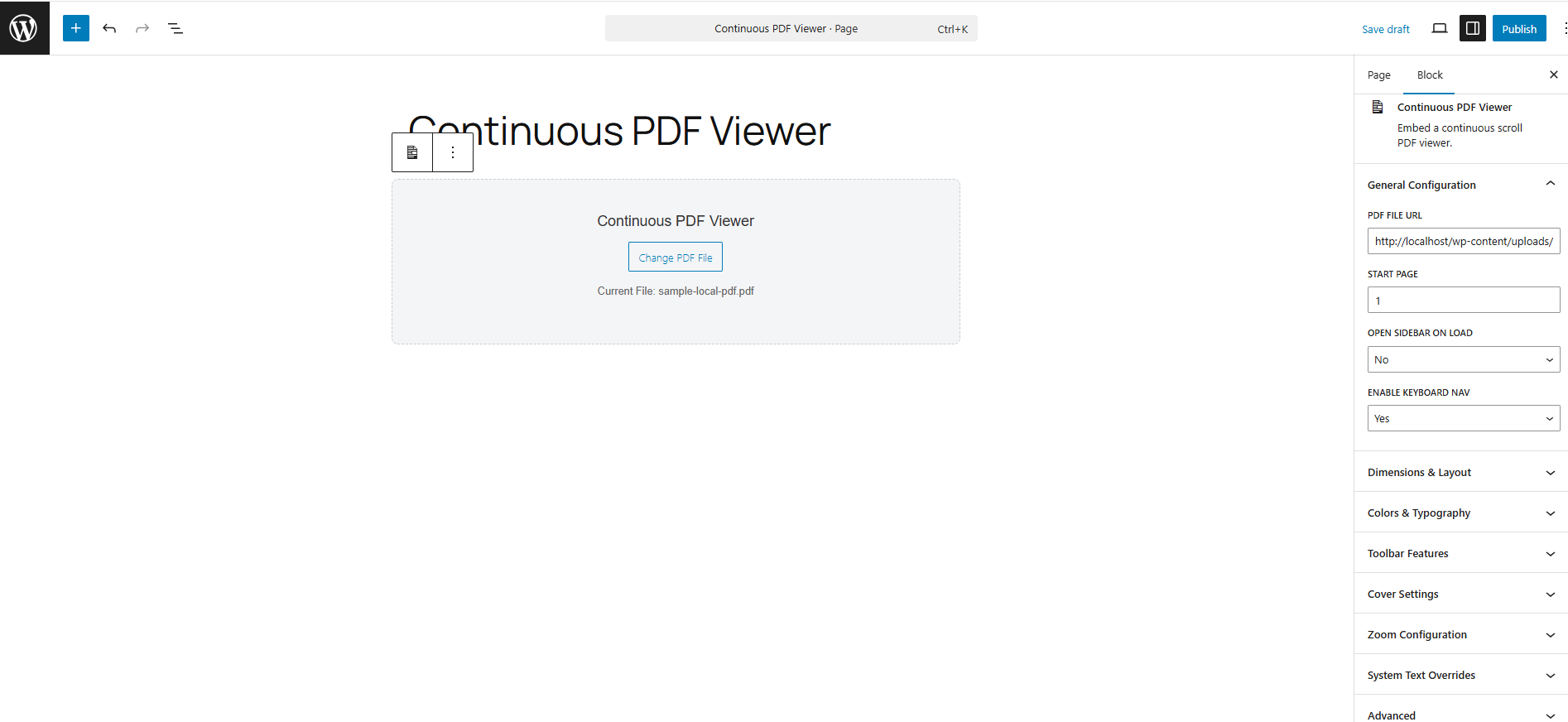
- Gutenberg Block Integration: A native WordPress block with a click-to-select placeholder UI and seamless Media Library integration.
- Live Shortcode Generator: A dedicated admin tools page (Tools > Continuous PDF Viewer) that lets you visually configure colors, dimensions, and toolbar features while generating a live shortcode.
Installation
Using the Gutenberg Block
- Open the WordPress Block Editor.
- Search for the “Continuous PDF Viewer” block.
- Click “Select PDF File” on the canvas to choose a document from your Media Library.
- Use the right-hand Inspector Controls to customize the start page, default zoom, sidebar visibility, and colors.
Using the Shortcode
You can place the viewer anywhere using the [continuous_pdf_viewer] shortcode.
Basic Example:
[continuous_pdf_viewer url=”https://yoursite.com/wp-content/uploads/document.pdf”]
Advanced Example:
[continuous_pdf_viewer url=”/wp-content/uploads/document.pdf” title=”Annual Report” start_page=”3″ theme=”dark” accent=”#4f7df3″]
Note: Generating complex shortcodes is highly recommended via the built-in Shortcode Generator under the Tools menu.
Changelog
2.1.20
- Added support for internationalization
- Security and Code Hardening
2.1.19
- Support links (including internal links)
2.1.18
- fix the search function on a new search to go to the correct page
2.1.17
- fix the handling of clicking on the thumbnails so the correct page number is displayed
- fix the Print icon so it brings up a print dialog box
2.1.16
- fix switching in in out of fullscreen mode so it stays on the same page
- fix the highlighted text alignment when doing a search
2.1.15
- fix searching so it goes to the correct page when doing the search
Screenshots

For developers
Is this your plugin? Show off the numbers.
Add a live badge to your site, docs or GitHub README. It updates on its own — no account needed.
Best Continuous PDF Viewer alternatives
All document viewer plugins →

FAQ
Continuous PDF Viewer: quick answers
Straight answers, pulled from live WordPress.org data.
Live data from WordPress.org · checked Oct 4, 2026
Is Continuous PDF Viewer free?
Yes. Continuous PDF Viewer is free to download and use from the official WordPress.org plugin directory.
Is Continuous PDF Viewer safe to use in 2026?
Continuous PDF Viewer is a solid plugin choice in 2026, with a few things worth checking first. It runs on 10+ sites, is rated 2/5 and was last updated 4 weeks ago, and scores 64/100 on our health check.
How many websites use Continuous PDF Viewer?
Continuous PDF Viewer is active on 10+ WordPress websites and has been downloaded 1,279 times since it launched in April 2026. It was downloaded 207 times in the last 30 days.
Does Continuous PDF Viewer work with WordPress 7.1?
Yes. The developer has tested Continuous PDF Viewer up to WordPress 7.1.2, the latest release. It requires WordPress 5.8 or newer.
When was Continuous PDF Viewer last updated?
The latest version, 2.1.20, was released on September 8, 2026 (4 weeks ago).
Who makes Continuous PDF Viewer?
Continuous PDF Viewer is developed and maintained by joneiseman.
What are the best alternatives to Continuous PDF Viewer?
The most popular alternatives to Continuous PDF Viewer are Embed Any Document (50K+ installs), Document Viewer (2K+ installs) and Document Preview For WooCom… (100+ installs).
Powered by PageForge
Want thousands of pages that rank like these? Build them in an afternoon.
This directory runs on the same engine as PageForge. Turn any spreadsheet, CSV or API into thousands of fast, SEO-ready WordPress pages — with schema, internal links and AI-written copy baked in.
- CSV, Google Sheets & API data sources
- AI content, schema & internal links per page
- Works with Elementor, Gutenberg, Yoast & Rank Math
- Free on WordPress.org — no credit card


