



PCIO VIS Member Event
Member and event management for voluntary organizations: members register, event calendar with signups, mailings, newsletters, documents and finance.

Solid choice
PCIO VIS Member Event is a solid plugin choice in 2026, with a few things worth checking first. Was last updated 22 hours ago, and scores 64/100 on our health check.
- Actively developed — last update 22 hours ago
- Tested with the latest WordPress (7.1)
- Small user base (<10 active installs)
- Very few reviews so far
- Needs PHP 8.1 or newer
How does it stack up?
Side-by-side on installs, updates, ratings & support



Daily downloads
Download spikes usually follow a new release — each site that auto-updates counts as a download.
Rankings
Where PCIO VIS Member Event stands todayWordPress.org search rankings
Live position in the plugin search, top 100| Keyword | Position |
|---|---|
| documents | >100 |
| events | >100 |
| members | >100 |
| newsletter | >100 |
| signup | >100 |
About PCIO VIS Member Event
From the official readme · v1.6.0Description
PCIO VIS Member Event turns your WordPress site into a complete back office for a voluntary organization or association.
It provides a members register, an event calendar with public sign-ups, e-mail and newsletter tools, a document library and a simple finance journal — all built on native WordPress capabilities so access control works with the roles you already use.
Public pages are served automatically under /vis/; no WordPress pages or shortcodes are required to get started. The public event permalinks are the one exception: the plugin creates a single Event page (slug event, containing the [pcio_me_event] shortcode) that /events/{slug}/ links to, so those pages render through the theme’s page template and use your site’s header and footer:
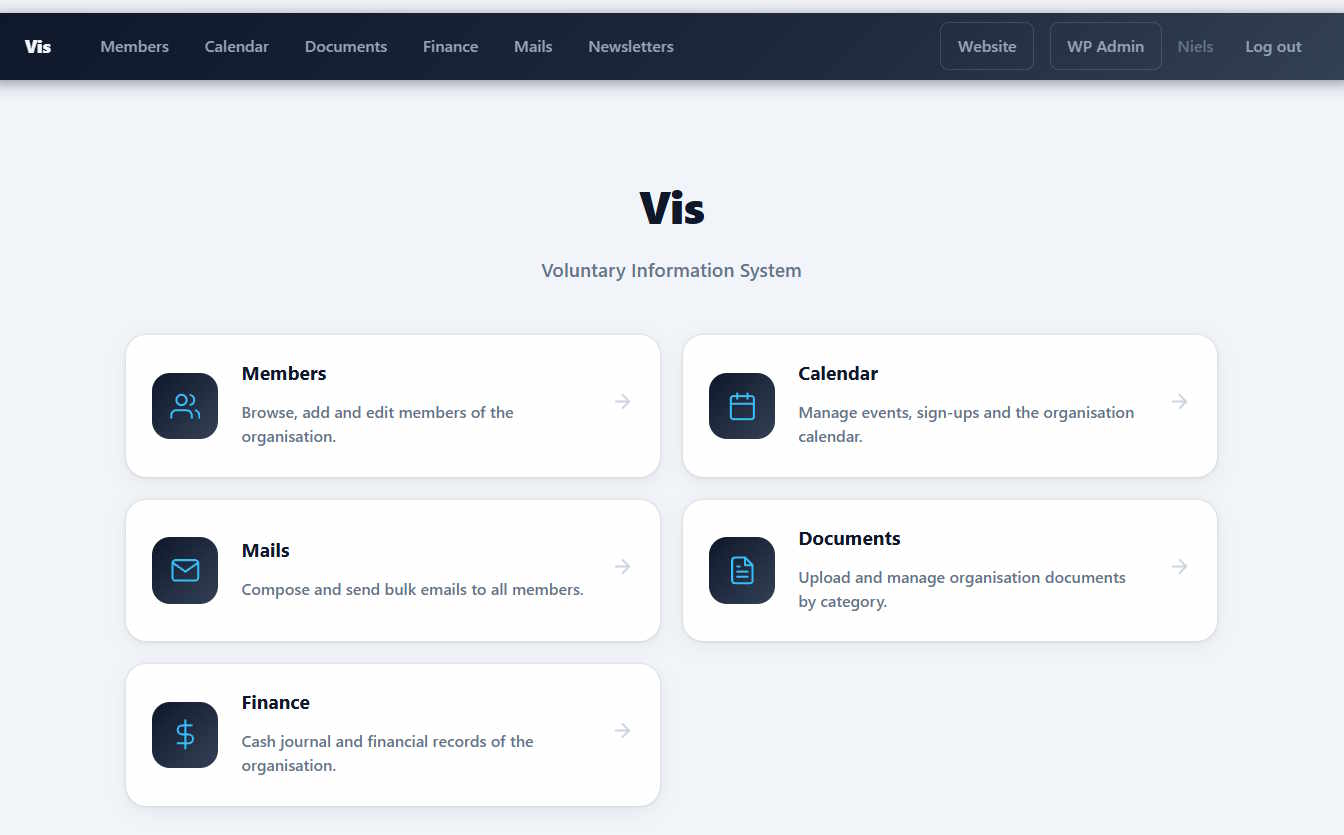
- Home (
/vis/) — landing page for members. - Members (
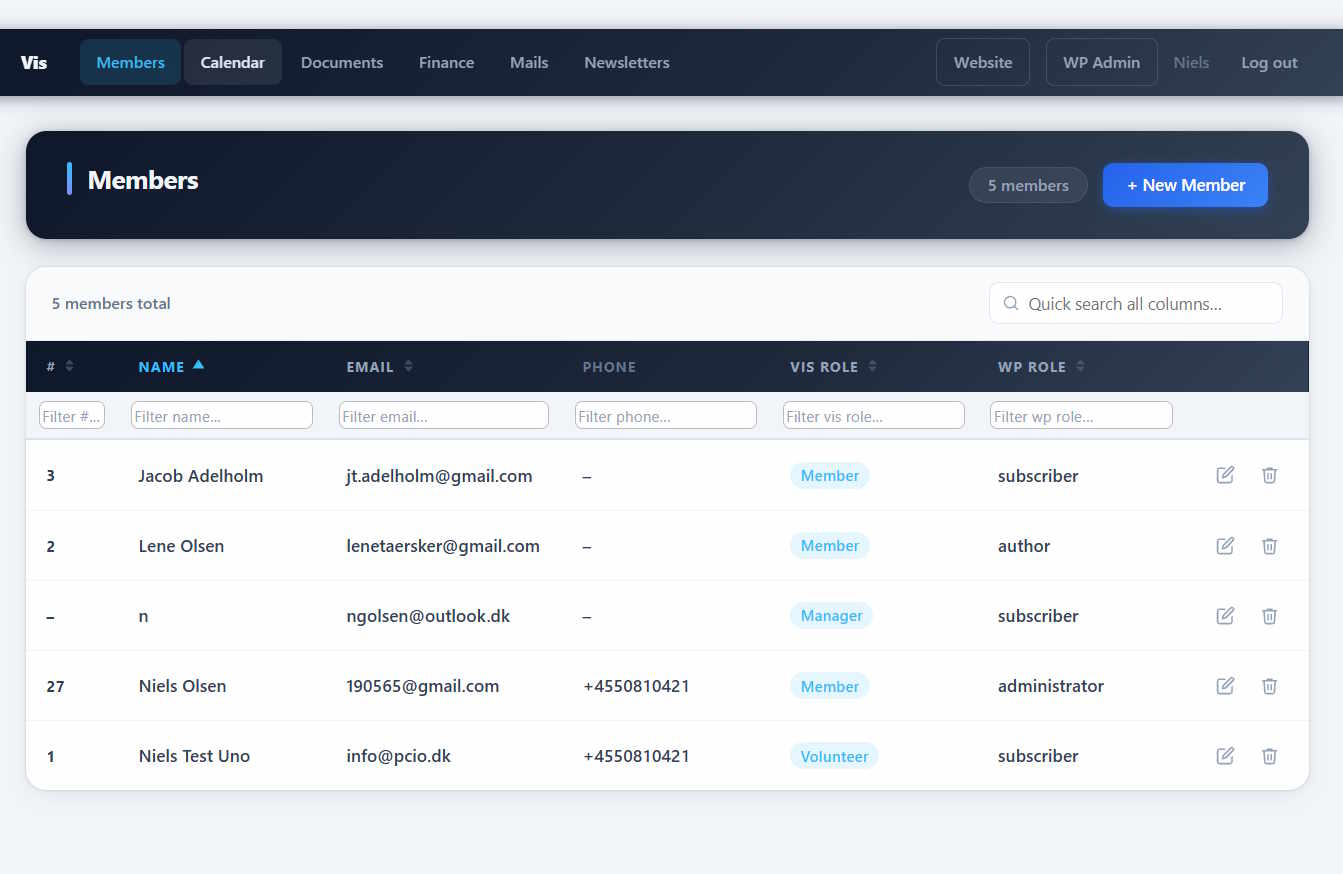
/vis/members) — searchable members directory. - Member (
/vis/members/{id}) — member detail page with a Settings tab and, for administrators, a History tab. - Calendar (
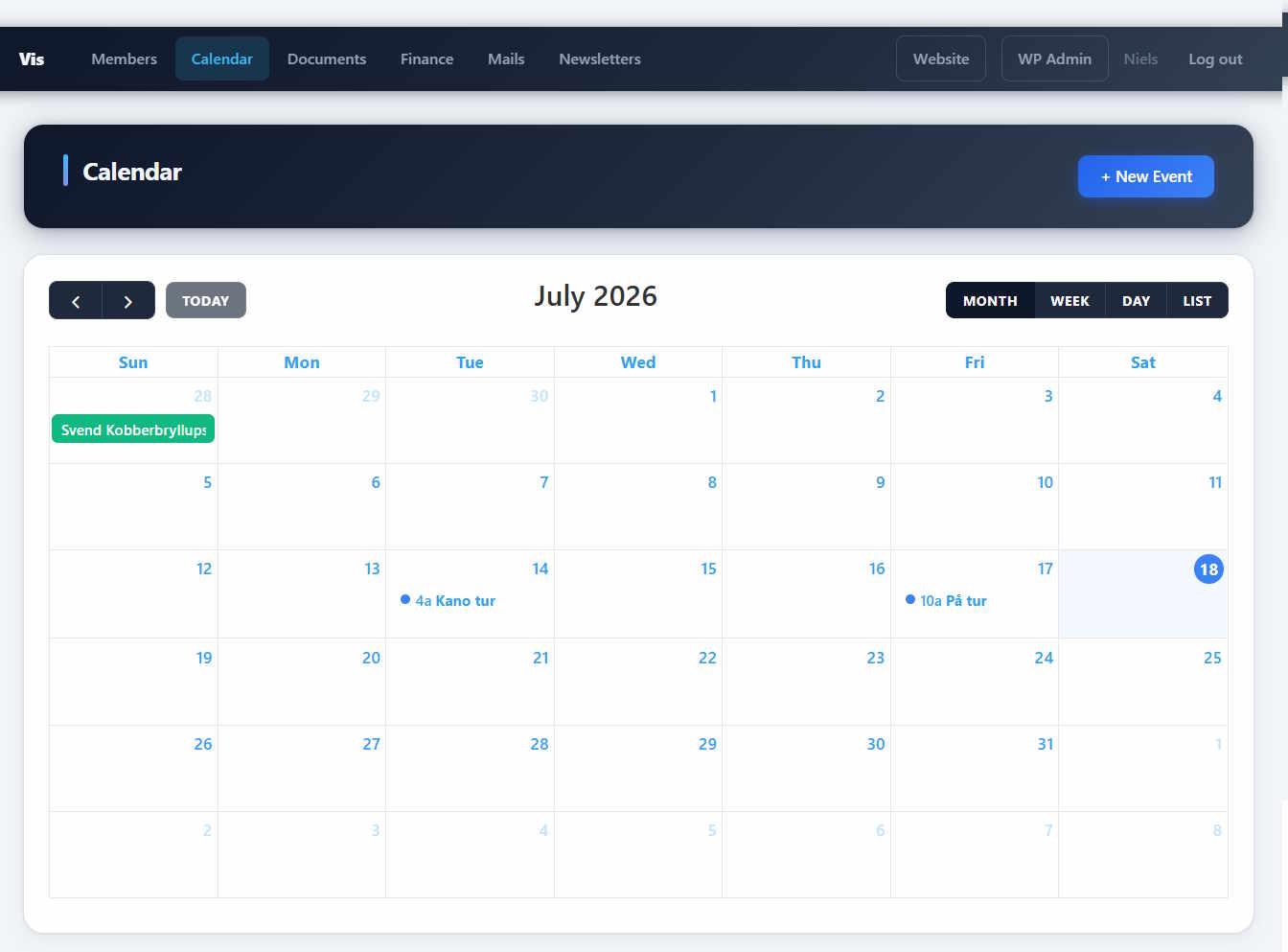
/vis/calendar) — upcoming events with sign-up. - Event (
/vis/events/{id}) — member event detail page with banner, description and sign-up box. - Public event (
/events/{slug}) — indexable, no-login event page rendered through the Event page. - Mails (
/vis/mails) — member mailings. - Newsletters (
/vis/newsletters) — public newsletter archive. - Documents (
/vis/documents) — document library grouped by type. - Finance (
/vis/finance) — finance overview for authorized users. - Statistics (
/vis/statistics) — member growth chart, page-view and login counters, and sponsor link click tracking.
Roles and capabilities. The plugin defines a cumulative set of logical roles — Member, Volunteer, Event Manager, Publisher and System Admin — that grant additional capabilities to Vis members. Define these roles under Vis → Roles and assign them to member records. Default management capabilities are also granted to built-in WordPress roles.
The vis_member capability is a separate membership marker granted to individual WordPress accounts when they are linked or provisioned as Vis members, and revoked when membership is removed. It is shown on Vis → Roles for reference, but is not selectable as a role capability. The default Member role intentionally has no additional capabilities; basic member access comes from this marker.
In member lists, the Vis Role column displays Member when the linked WordPress account has vis_member and no explicit Vis role is assigned. This is a display-only fallback: stored assignments and permissions are unchanged, and explicitly assigned roles remain visible. It is not a subscription-status indicator.
Additional role capabilities include:
- Volunteer
- Create own events
- Edit own events
- Edit all events
- Publish events / manage documents
- Manage members
- Manage settings & mails
- Manage finance
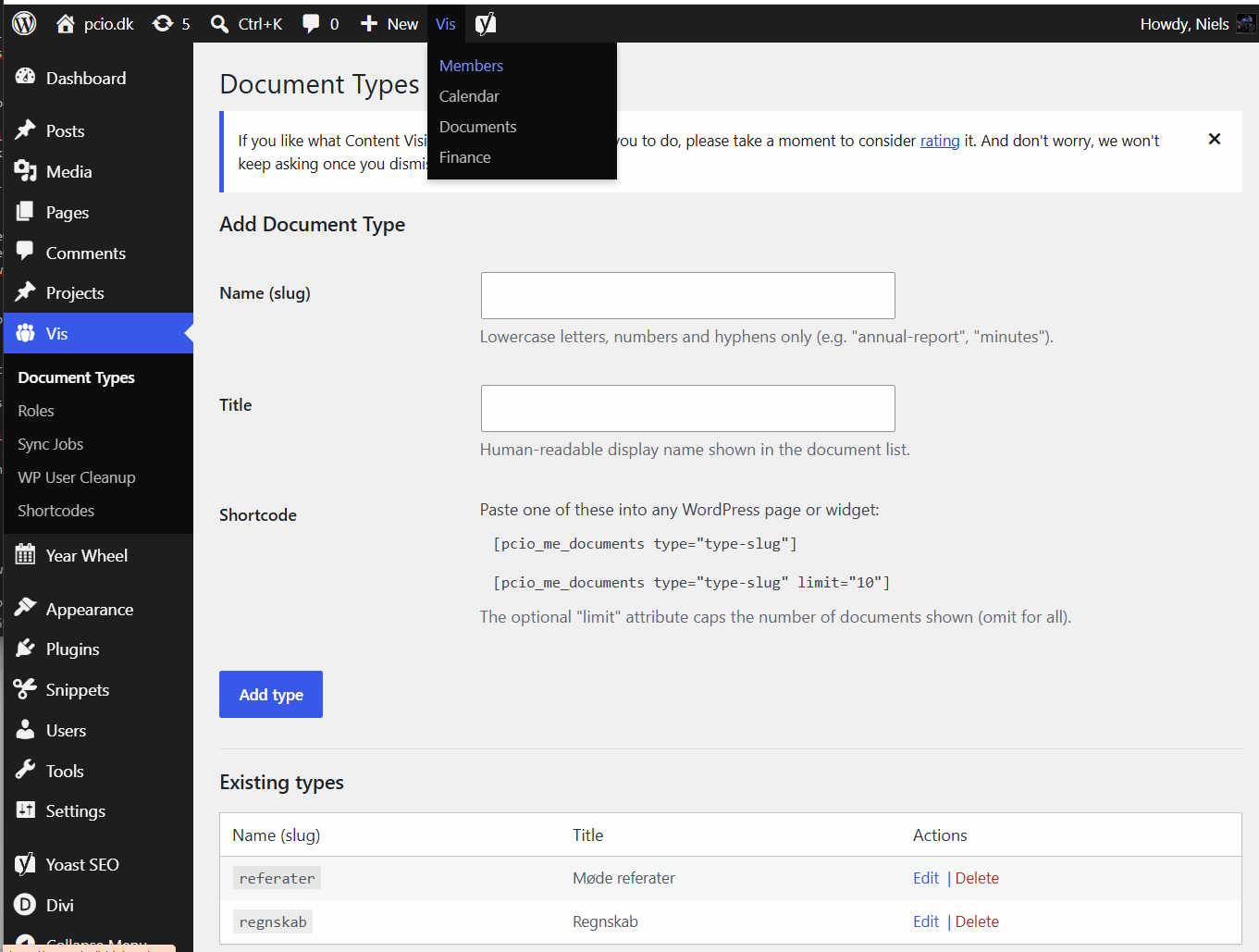
Shortcodes. For themes that prefer to embed content in ordinary pages, the plugin also ships shortcodes: [pcio_me_members], [pcio_me_documents], [pcio_me_edit_profile], [pcio_me_event], [pcio_me_events], [pcio_me_event_roller], [pcio_me_newsletters], [pcio_me_member_count], [pcio_me_member_signup] and [pcio_me_rolling_text]. The [pcio_me_event] shortcode renders a compact event card when given id or slug, and the full-width detail layout when left bare on the Event page (where it resolves the event from /events/{slug}/). The [pcio_me_edit_profile] shortcode renders a pre-filled profile form (membership number, name, email, phone, address) for the logged-in member, validates in the browser and saves over REST; the membership number is shown read-only. The [pcio_me_members] shortcode renders a searchable member table — it requires a logged-in account holding the vis_member capability, and the table includes each member’s email address and phone number. The search box filters rows live and shows a message when nothing matches, and ?member_number=… in the page URL pre-fills the membership-number filter. The [pcio_me_member_count] shortcode displays an animated total member count and can be used in any page builder (e.g. a Divi Text Module); each render increments the front-page-view counter visible on the Statistics dashboard. The [pcio_me_member_signup] shortcode renders a public member registration form that creates the member, provisions a WordPress account and sends an automated welcome email. The [pcio_me_rolling_text] shortcode outputs a scheduled scrolling banner. A Shortcode reference page in the Vis admin documents every shortcode with its attributes and examples, and a Sponsor Links page documents the pcio-sponsor-link class used for click tracking.
Change history and undo. Every change to Vis data (members, events, sign-ups, roles, workgroups, documents, mails, journal entries and extension data) is logged with the time, the user and a readable description. Vis → History lists all changes newest first, and the event and member pages have their own History tab. Users with the vis_undo_changes capability (System Admin) can undo a change; the undo is itself logged and can be undone again. Undo restores database rows only — sent e-mails, payments and WordPress accounts are not reverted, and changes with such side effects are logged as not undoable. Long text fields (event descriptions, mail content) are summarised by length in the log instead of storing every version in full.
WordPress user cleanup. Vis → WP User Cleanup lists WordPress accounts not linked to a Vis member. WordPress administrators with user-deletion permissions can select accounts and choose Delete selected, or use Delete All for the eligible accounts on this list only. Accounts with any authored posts, pages, attachments, custom post types or revisions (including drafts and trash), registered-user comments, or legacy WordPress links are kept and marked in the Status column. Administrators, accounts with manage_options, super administrators and the current account are protected. The server rechecks eligibility when the action is submitted, uses WordPress user-deletion APIs and reports deleted, skipped and failed accounts. Deletion is permanent and unavailable on Multisite, where accounts and content may belong to other sites.
Unsaved dialog changes. Data-entry dialogs in the core, boat and products extensions stay open when clicking outside them. Cancel, the close button and Escape ask before discarding changed fields, including checkboxes, selected files and rich text. Navigating away with unsaved dialog changes triggers the browser’s standard warning. Successful saves and checkout redirects do not trigger a discard warning. This protection keeps edits in the current page only; it does not store drafts or recover data after a browser crash.
System event types. The Event Types tab at /vis/calendar/#event-types includes seeded Cafe, Art (art exhibition) and Holiday (all closed) types with stable slugs cafe, art and holiday. These types can be edited but cannot be deleted, and their system flag and slugs cannot be changed through the event-type API. New Cafe and Art types have in_cafe_time enabled; Holiday and user-created types default to disabled. The checkbox stores whether events may take place during cafe opening hours; warning suppression and closure behavior will be implemented separately. Upgrades reuse existing matching slugs, preserving their IDs, names and settings while marking them as system types.
Regression tests live outside the plugin in the repository’s tests/pcio-vis-member-event/ folder and are not part of the distributed plugin. Run the PHP tests with php tests/pcio-vis-member-event/<name>.test.php. For the browser tests, serve the repository root locally and open tests/pcio-vis-member-event/modal-guard.html; its application fixtures mock REST requests and do not change WordPress data.
Extensions. PCIO VIS Member Event is the core plugin for a family of optional add-ons (gallery, products, tickets, project management, home-owner association tools and Conventus sync). The bundled Dompdf and php-qrcode libraries are shared with those extensions for PDF and QR generation.
Google Calendar sync. The optional Sync Google Calendar job (Vis → Sync Jobs, disabled by default) pushes Vis events from one year back to one year ahead into one or more Google calendars. Each calendar takes either all events (including unpublished drafts) or only homepage-approved events whose event type has public access. Configure it under Vis → Google: paste a Google Cloud service-account key (JSON, Calendar API enabled), share each Google calendar with the service-account e-mail (“Make changes to events”), and add the calendars. The job creates missing Google events, updates changed ones (a failed update is retried on the next run) and deletes Google events in the window that no longer match a Vis event. Chosen event types can be shown as single-day events ending at 22:00, so long-running events such as exhibitions do not fill the calendar.
Installation
- Upload the
pcio-vis-member-eventdirectory to/wp-content/plugins/. - Activate the plugin in Plugins in the WordPress admin.
- Define event-system roles under Vis → Roles and assign them to member records.
- Configure plugin options under the Vis admin menu.
After activation, if /vis/ or an event page returns a 404, go to Settings → Permalinks and click Save Changes to flush the rewrite rules.
Frequently asked questions
Where are the public pages?
The plugin registers pages automatically under /vis/ — for example https://yoursite.com/vis/members and https://yoursite.com/vis/calendar. Individual events for members are available at https://yoursite.com/vis/events/{id}, and the public, no-login event pages at https://yoursite.com/events/{slug}. On activation the plugin also creates a single Event page (slug event, containing the [pcio_me_event] shortcode); the public event URLs are rewritten onto that page so they render with your theme’s header and footer. Do not delete it — it is recreated the next time you open the WordPress admin.
How do I control who can do what?
Access is based on native WordPress capabilities. Open Vis → Roles to define the additional capabilities granted by each logical role, then assign a role to the member record. The logical roles (Member, Volunteer, Event Manager, Publisher, System Admin) are cumulative — each level includes the capabilities of the level below. Membership itself is controlled separately by the per-account vis_member marker; an empty Member role is normal and does not mean the member lacks access.
A public page returns a 404.
Go to Settings → Permalinks and click Save Changes to flush the rewrite rules. This registers the /vis/ routes.
Does this require any third-party services?
No. The core plugin runs entirely on your WordPress site. Optional extensions (such as ticket sales) may integrate with external services. The only exception is the optional Google Calendar sync, which is off until you store a Google key under Vis → Google and enable the “Sync Google Calendar” job. When it runs, it sends the title, plain-text description (or the shorter resume when the description is too long for Google), location and start/end times of the synced events to Google: tokens from https://oauth2.googleapis.com/token, and calendar data to the Google Calendar API at…
How long can changes be undone?
Undo data is kept for 180 days; after that the change stays in the history but can no longer be undone. Developers can change the period with the pcio_me_history_undo_retention_days filter. A change can only be undone while the affected rows are unchanged — undo newer changes first.
Which hooks does the change history offer?
pcio_me_history_tables (filter) — register an extension table so its writes are logged and undoable. Write through PCIO_VIS_History::insert(), update(), delete() and upsert() instead of $wpdb. pcio_me_history_undo_retention_days (filter) — days to keep undo data (default 180). pcio_me_history_undone (action) — fires after an undo with the history id, the history row and the applied steps; use it to re-apply side effects outside the database tables. pcio_me_member_tabs (filter) — add tabs to the member detail page, like pcio_me_event_tabs does for events.
How do I uninstall?
Deactivate and delete the plugin from the WordPress admin — the plugin drops its own tables and options on delete, so this is only needed if you remove the plugin files by hand. To also remove the data, open your database admin tool and drop these tables (replace wp_ with your actual table prefix): wp_me_members wp_me_member_meta wp_me_member_roles wp_me_vis_roles wp_me_events wp_me_event_signups wp_me_event_recurrence wp_me_event_types wp_me_resources wp_me_event_resources wp_me_event_type_resources wp_me_workgroups wp_me_workgroup_members wp_me_mails wp_me_newsletters wp_me_documents…
Changelog
Back up your database before updating. 1.6.0 Introduces new history and undo functionality so you need to upgrade all the extension plugins.
1.6.0
- Added: Personal calendar filter. A Filter button next to “+ New event” (both shown only on the Calendar tab) opens filter settings for date range, text (title, resume, description), crew member or open shifts, published on homepage, event types (with Internal/Public/Cafe quick picks) and crew roles. Each criterion can show or hide (exclude) its matches. Settings are stored per user in the new
me_calendar_filterstable (not tracked in the change history), the button turns green while a filter is in use, and Clear deletes the settings to return to the default view. - Changed: The calendar list view uses the personal filter’s date interval when its date rule is active (instead of the current month), and its title shows that interval (e.g. “13 Oct – 17 Nov 2026”). An empty start means all past events and an empty end all future events, shown as “From …”, “Until …” or “All events”.
- Added: Previous («) and next (») buttons beside the date on the event page jump to the neighbouring event in time order. They follow the personal calendar filter when one is in use (all events otherwise) and keep the open tab.
- Changed: Google Calendar sync sends the event’s full description (up to 8,000 characters, with paragraph breaks kept) instead of only the first 160 characters on one line. When the description is longer than that, the shorter resume is used instead; without a resume the description is cut at a word boundary. Already-synced events are updated on the next run.
- Changed: The Mails section is now called Marketing, with a megaphone icon on the landing page. It still has the Mails and Newsletters tabs, and the page addresses are unchanged.
- Added: Crew shift reminders. A new daily sync job, “Crew shift reminders” (disabled by default), e-mails each volunteer assigned to a crew role on tomorrow’s shifts. The text is the editable
crew_shift_remindersystem mail with the tags {name}, {event_title}, {shift_start}, {shift_end}, {role_name} and {site_name}. A shift is reminded once, and again only if its member or times change. - Changed: The event types list shows columns for name, scope, cafe opening hours (read-only checkbox), default resources and a colour swatch.
- Changed: Every event must have an event type. Creating or saving an event without a valid type is rejected (the editors require a choice instead of offering “None”), and an event type still used by events cannot be deleted.
- Added: Optional Get-in time (artist arrival) and Door opening time on events, edited on the event’s general-details tab and stored as
get_in_datetime/door_opening_datetime. A time later than the start time is saved on the evening before the start date. Both must be on or before the start, follow the start when it is moved (e.g. by calendar drag), are copied to recurring series events, and are tracked in the change history. The public event page shows the door opening time. - Added: Protected Cafe, Art and Holiday system event types and an editable in_cafe_time flag. Schema upgrades preserve existing type IDs and settings. Cafe-time warning suppression is reserved for a future change.
- Fixed: Section headers and browser titles remain Members on Workgroups, Mails on Newsletters, and Finance on Deliveries; the active tab identifies the current subsection.
- Fixed: Mails and Newsletters section tabs appear below the page header, matching the other Vis pages.
- Improved: Vis navigation groups Members, Calendar, Mails, Finance and Shop into accessible dropdowns with direct links to their page tabs. Newsletters belongs under Mails; Deliveries belongs under Finance; Statistics is a standalone menu item. The landing page uses a two-column tile layout (one column on mobile). Navigation, tabs and the WordPress admin bar share capability-aware section definitions. Existing page URLs remain supported.
- Added: Event publication approval on the Publish tab, visible to all members but editable only with
vis_publish_events. Homepage approval controls public event tiles, sliders, agenda, newsletter event inclusion, direct public links, embeds and signup/ticket checkout. Existing events remain approved during upgrade; new events start unpublished. Poster and Facebook flags are stored for future use and do not trigger integrations. Unpublished public links return 404; event embeds show a not-published message. Internal event editors can still manage unpublished events. - Changed: Event detail headers show a compact start/end date and time, updated after saving. The Delete event button is now on the general-details tab.
- Added: Mail and newsletter-template editors now offer inline font sizes and an HTML source mode. Unchanged source HTML is preserved when switching back to the visual editor; saves still use WordPress HTML sanitization.
- Fixed: Newsletter emails include upcoming events with full descriptions, dates, locations and main event images between the mail body and shared footer. Email output retains emojis and contains no PDF page breaks.
- Added: Shared Newsletter template system mail under Vis → Mails. Its header (organization title and media-library logo) and footer are reused by every newsletter email and PDF. The newsletter checkbox reveals read-only previews and an Edit newsletter template button; edit the shared template to update future sends and PDF generations. Existing newsletter-specific footers are retained in stored mail records but are replaced by the shared footer in output. Ordinary mails are unchanged.
- Changed: Each event starts on a new page in generated newsletter PDFs. Email content is unchanged.
- Fixed: Newsletter PDFs remove unsupported emojis and trailing empty editor lines. Event images are centered above the description and scaled to fit; long descriptions can continue across pages instead of being trapped in a single table row.
- Added: Change history with undo — all writes to Vis tables are logged in the new
me_change_historytable, with undo data inme_change_undo. A new Vis → History admin page lists every change with filters and an Undo button, guarded by the newvis_undo_changescapability (granted to System Admin). - Added: History tab on the event page (
/vis/events/{id}), listing the changes to that event, its sign-ups and resources. - Added: Member detail page (
/vis/members/{id}) with a Settings tab (edit fields, Vis role, delete) and a History tab. Rows in the members list now open this page. Extensions can add tabs with thepcio_me_member_tabsfilter. - Added: developer hooks
pcio_me_history_tables,pcio_me_history_undo_retention_daysandpcio_me_history_undone. - Added: Google Calendar sync — new Vis → Google admin page (service-account key, default location, single-day event types, calendars with All/Public scope, connection test) and a “Sync Google Calendar” job under Vis → Sync Jobs, replacing the legacy
/vis/sync_calendar.phpendpoint. Event links are kept per calendar in the newme_google_calendarsandme_google_event_maptables. Changed events are detected from a stored payload hash instead of a shared dirty flag, so failed updates are retried. Uses the WordPress HTTP API, without a Google client library.
1.5.0
- Fixed: Roles page membership display — shows the separately managed
vis_membercapability and explains why the default Member role has no additional capabilities, without changing permission grants.
1.5.0
- Added: Rewritten member profile page —
[pcio_me_edit_profile]is now a server-rendered form (newtemplates/member-profile.phpplus its own stylesheet) with browser-side validation, an inline error box and a success message. The membership number is shown read-only so members cannot change it. Extensions can add their own fieldsets with the newpcio_me_profile_extra_sectionsfilter. - Added: Member save validation hook — the new
pcio_me_member_update_validatefilter lets extensions reject a save (from the member dialog or the profile form) before anything is written; the request is answered with a 422 and the extension’s message. - Added: Vis → Sponsor Links — a dedicated admin page documenting the
pcio-sponsor-linkclass, moved off the Shortcode reference page, with step-by-step instructions for the block editor, the classic editor and Divi (plain text links and Image modules). - Added: Exact membership-number deep link —
/vis/members?member_number=42pre-fills the membership-number filter and matches that number exactly, so a short number can no longer match a longer one. Used by the Boat register’s crew links. - Added: “No members match your search” message on the
[pcio_me_members]list when a search filters every row out. - Added: Signup fulfilment context — new public methods
PCIO_VIS_Member_Signup_Fulfillment::stash_order_context(),get_order_context(),take_order_provision(),claim_order_welcome()andis_order_welcome_claimed()let extensions running onpcio_mep_order_confirmedshare the created member, read the provisioned WordPress account, and take over (or hand back) the welcome mail. - Changed: One membership number instead of two. The separate “Membership #” field is retired; the
#column is now the membership number itself, stored as an integer, and any number of members can share it (that is how a boat or household is grouped). - Changed: The numbering upgrade migrates your data automatically on the next admin page load. Members with a “Membership #” keep that number; members without one get the leading digits of their old “#”; a “#” that was not a plain number is preserved as a
legacy_member_numberrow inwp_me_member_meta. The finance journal and the Products extension’s subscription table are converted the same way. The routine is safe to re-run and resumes by itself if a step fails. - Upgrade procedure:
- Export
wp_me_members(andwp_me_p_subscriptionsif you use the Products extension) from your database admin tool, so you can restore the old numbers if anything looks wrong. - Update the plugin, then open any wp-admin page to run the upgrade.
- Check Vis → Members: several members may now share one number, and a number that used to carry a letter suffix has lost it. Correct anything that looks wrong by hand.
- Update the Products, Tickets and Boat extensions to their matching 1.5.0 release. Older extension versions read the retired column, so membership status would look out of date until they are updated.
- If the upgrade did not run (for example because a host blocks
ALTER TABLE), amember_number_legacy_140column is left behind onwp_me_membersholding the original numbers — leave it in place and open any wp-admin page again; the next attempt resumes from there.
- Export
- Fixed: the members and finance-journal tables are now actually brought up to date on an existing site. Their
CREATE TABLEstatements no longer useIF NOT EXISTS, which madedbDelta()treat “IF” as the table name and skip the table completely. - Changed: Collision-free number allocation — new sign-ups get the next free membership number through the new
PCIO_VIS_DB::create_with_next_number(), which re-checks for a concurrent claim. Two simultaneous sign-ups can no longer be handed the same number. - Changed: Member meta writes are hardened —
PCIO_VIS_Meta_DB::set()now accepts a member id or a member row (or a single-row list) and silently ignores a non-numeric id instead of raising a type error that killed the request. - Changed: Welcome mail can be rendered without being sent —
render_welcome()returns the resolved subject and body (and an empty result when the template, member or address is unusable);send_welcome()keeps its old behaviour and now falls back to nothing instead of sending an empty mail. - Changed: No inline script in the members shortcode — the live search and the boat detail popup were previously emitted as an inline
<script>block; the search now lives inassets/members-public.jsand the boat popup is gone (boat details are on the profile page). - Changed:
PCIO_VIS_DBmember-number helpers were renamed and aligned:get_next_member_number(),get_next_free_member_number(),member_number_is_taken(),create_with_next_number(),get_member_number_by_id(),set_member_number(),get_member_ids_by_member_number()andget_members_by_member_number(). Thenext_member_number()/next_subscription_number()/*_subscription_number()methods are removed — extensions that called them must be updated. - Changed: the finance journal stores the membership number as an integer, and the journal REST payload no longer returns it as a string.
- Changed: refreshed the Danish (da_DK) translation and regenerated the translation template (.pot) — the recurring-events strings, the new Sponsor Links page, the sign-up modes and the rewritten profile form were all untranslated before.
- Fixed: member search in the
[pcio_me_members]list lowercases withmb_strtolower(), so Danish letters (Ø, Æ, Å) now match a search typed with a Danish keyboard. - Fixed: the sponsor-link help section is no longer listed twice (the scroll-spy index and the page no longer disagree).
1.4.0
- Added: Recurring events — a new Recurrence tab on the event editor. Define a repeat rule on the first event in a series (daily, weekly, monthly by weekday, monthly by date, or yearly) and generate linked copies; the series can be navigated, extended or resolved into standalone events. A new database table stores the series rules.
- Added: Upcoming events shortcode —
[pcio_me_upcoming_events]renders a compact, month-grouped agenda list of the next events. Acceptsmonths(how far ahead to look) andlimit(maximum events) attributes. - Added: Membership number — a new “Membership #” field on member records, sortable in the member list and editable from the member dialog. It lets shop subscriptions reference a specific member.
- Added: Event sign-up modes — each event can now choose how people respond: No sign-up (information only), Simple (join / interested / not joining), or Ticket sales when the Tickets extension is active. Choosing No sign-up hides the invitation box entirely on the public event page.
- Added: Rich description editor — the event description editor now supports text and background colour and an Edit HTML toggle for editing the raw source.
- Added: Week numbers — the calendar week view title now shows the ISO-8601 week number (e.g. “Uge 37”).
- Changed: Member deep links —
/vis/members?q=…pre-filters the member list, so links (for example from shop subscriptions) can jump straight to a member. - Changed: public event pages now inherit the active theme’s text colour, so titles and body text stay readable on any page-builder background (e.g. Divi).
- Changed: refreshed the Danish (da_DK) translation and updated the translation template (.pot).
- Fixed: event creation could fail on sites upgraded from older versions whose events table was missing newer columns; the schema now self-repairs on upgrade.
- Fixed: the calendar month title could appear blank or untranslated under Danish; the localised title now renders correctly and is capitalised.
- Fixed: the Edit button on the Calendar → Event Types and Resources tabs showed the wrong label in non-English languages.
1.3.0
- Added: Member sign-up — new
[pcio_me_member_signup]shortcode renders a public registration form (name, email, phone, address). It creates the member record, provisions a WordPress account and, with no payment extension active, registers the member immediately. Extensions can inject extra fields and add a payment (checkout) step on submission. - Added: Welcome email & notifications — a “member_welcome” system mail template is seeded under Vis → Mails and sent automatically to new members, with tag chips for
{name},{member_number},{site_name}and a one-time set-password{login_url}. Extensions can add their own tags via filters. - Added: Rolling texts — new
[pcio_me_rolling_text]shortcode shows a scrolling banner built from time-scheduled entries. Manage them under Calendar → Rolling Texts, where each entry has a Roller ID and a start/stop window; multiple pages can show independent banners. - Added: Shortcode reference — new admin page documenting every shortcode with its attributes, defaults, examples and welcome-email tags, including scroll-spy navigation.
- Added: Volunteers mail group and a Copy emails button on the member and workgroup lists for quick recipient selection.
- Fixed: text overlap and layout issues in the admin UI.
- Changed: refreshed the Danish (da_DK) translation and updated the translation template (.pot).
1.2.0
- Added: Event Types — color-coded categories for calendar events with configurable access level (Public, Members only, Volunteers only). Managed from the Calendar → Event Types tab.
- Added: Resources — bookable resources (rooms, equipment, etc.) that can be assigned to events. Conflict detection warns when a resource is already booked for an overlapping event. Managed from the Calendar → Resources tab.
- Added: Default resources per event type — define which resources are pre-selected when a new event of that type is created; defaults are applied automatically on event creation.
- Added: Workgroups — new page at
/vis/workgroups/for organizing volunteers into named working groups. Each workgroup can have one or more members flagged as chairman. - Added: Volunteer role — members can be designated as volunteers (
vis_volunteercapability), enabling volunteer-only event access and workgroup membership. - Fixed: “Publish & share” heading was double-escaped and displayed as raw HTML entity in the event editor.
Screenshots
For developers
Is this your plugin? Show off the numbers.
Add a live badge to your site, docs or GitHub README. It updates on its own — no account needed.
Best PCIO VIS Member Event alternatives
All documents plugins →



FAQ
PCIO VIS Member Event: quick answers
Straight answers, pulled from live WordPress.org data.
Live data from WordPress.org · checked Oct 20, 2026
Is PCIO VIS Member Event free?
Yes. PCIO VIS Member Event is free to download and use from the official WordPress.org plugin directory.
Is PCIO VIS Member Event safe to use in 2026?
PCIO VIS Member Event is a solid plugin choice in 2026, with a few things worth checking first. Was last updated 22 hours ago, and scores 64/100 on our health check.
How many websites use PCIO VIS Member Event?
PCIO VIS Member Event is active on <10 WordPress websites and has been downloaded 534 times since it launched in July 2026. It was downloaded 180 times in the last 30 days.
Does PCIO VIS Member Event work with WordPress 7.1?
Yes. The developer has tested PCIO VIS Member Event up to WordPress 7.1.3, the latest release. It requires WordPress 6.2 or newer.
What PHP version does PCIO VIS Member Event need?
PCIO VIS Member Event requires PHP 8.1 or higher. Most hosts run PHP 8.x today, so it works on any modern WordPress hosting.
When was PCIO VIS Member Event last updated?
The latest version, 1.6.0, was released on October 19, 2026 (22 hours ago).
Who makes PCIO VIS Member Event?
PCIO VIS Member Event is developed and maintained by Niels Olsen.
What are the best alternatives to PCIO VIS Member Event?
The most popular alternatives to PCIO VIS Member Event are PDF Embedder (300K+ installs), BuddyPress Docs (6K+ installs) and FileBird Document Library (5K+ installs).
Powered by PageForge
Want thousands of pages that rank like these? Build them in an afternoon.
This directory runs on the same engine as PageForge. Turn any spreadsheet, CSV or API into thousands of fast, SEO-ready WordPress pages — with schema, internal links and AI-written copy baked in.
- CSV, Google Sheets & API data sources
- AI content, schema & internal links per page
- Works with Elementor, Gutenberg, Yoast & Rank Math
- Free on WordPress.org — no credit card


