


WP Docs
A documents management tool for education portals.

Safe pick
Yes — WP Docs is a safe, well-maintained plugin to use in 2026. It runs on 1K+ sites, is rated 4.8/5 and was last updated 3 weeks ago, and scores 85/100 on our health check.
- Actively developed — last update 3 weeks ago
- Tested with the latest WordPress (7.1)
- Momentum — downloads up 545.1% vs the previous 30 days
How does it stack up?
Side-by-side on installs, updates, ratings & support



Daily downloads
Download spikes usually follow a new release — each site that auto-updates counts as a download.
Rankings
Where WP Docs stands todayWordPress.org search rankings
Live position in the plugin search, top 100| Keyword | Position |
|---|---|
| directory | #99 |
| documents | #33 |
| library folders | #41 |
| memphis-documents-library | #1 |
| wp docs | #3 |
Version adoption
Share of active sites per release.
Rating breakdown
★★★★★★★★★★ 4.8 from 18 reviews
About WP Docs
From the official readme · v2.3.4Description
-
Author: Fahad Mahmood
-
Project URI: http://androidbubble.com/blog/wordpress/plugins/wp-docs
-
License: GPL 3. See License below for copyright jots and titles.
WP Docs is a documents management plugin. You can manage user roles to restrict access to files, directory view, file types allowed for uploading. Nicely managed layouts with optional Bootstrap wrappers.
Tags
upload, download, library, files, breadcrumb
How it works?
WP Docs Insights
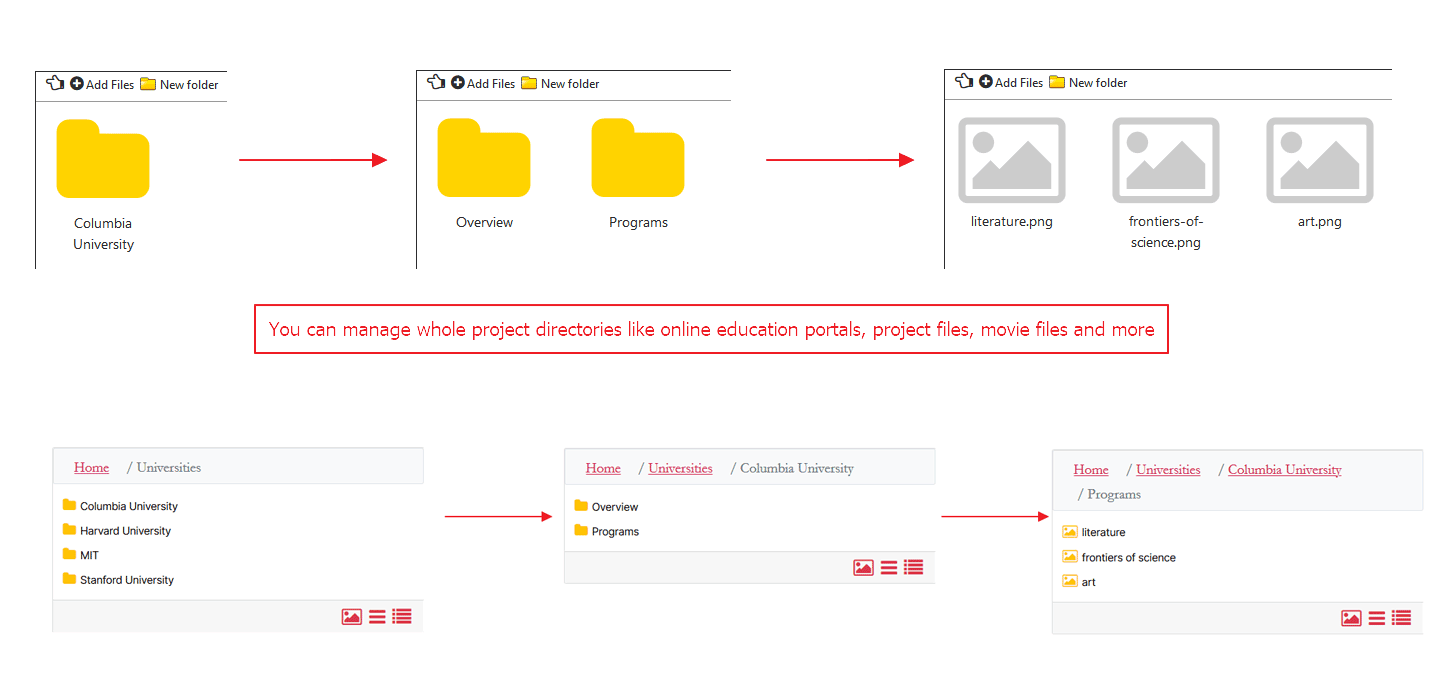
- Breadcrumb bar is available for a better navigation.
- Front end refresh based files browser.
- Front end ajax based browsing.
- Document preview and thumbnails available for most file types.
- Multiple directory views are available, also with the shortcodes.
- Multiple instances are possible with the shortcodes, icons, list and details.
- Posts created for each new directory and your library items will be considered as file items using meta fields for post efficiently.
- The ability to create unlimited, edit and delete directories and sub-directories.
- A smooth navigation experience based on jQuery/Ajax instead of page refresh. This is a premium feature.
- Each folder can have a separate shortcode so you can use different pages for different directory listing and files inside.
- Folder icon and title size can be changed in pixels or percentage from settings page.
License
This WordPress Plugin is free software: you can redistribute it and/or modify it under the terms of the GNU General Public License as published by the Free Software Foundation, either version 2 of the License, or any later version. This free software is distributed in the hope that it will be useful, but WITHOUT ANY WARRANTY; without even the implied warranty of MERCHANTABILITY or FITNESS FOR A PARTICULAR PURPOSE. See the GNU General Public License for more details. You should have received a copy of the GNU General Public License along with this software. If not, see http://www.gnu.org/licenses/gpl-2.0.html.
Installation
From the WordPress plugin menu click on Add New and search for WP Docs
Instead of searching for a plugin you can directly upload the plugin zip file by clicking on Upload:
Use the browse button to select the plugin zip file that was downloaded, then click on Install Now. The plugin will be uploaded to your blog and installed. It can then be activated.
“WP Docs” is available in left admin menu under settings.
Frequently asked questions
How security level feature work?
Click on any directory and select a logged in user role as a security level. So automatically logged in and that required role will be implemented as dual security. In addition, all sub-directories will follow get the same security level.
What if I accidentally turn back to FREE version from PRO?
Your data security is important for us. In case you got replaced the PRO version with a FREE one, all secured directories and content inside will remain secured and will work in the same way. The only missing part would be, new security level implementation and/or removal.
How to manage files with this plugin?
You can create directories with sub-directories to manage files with this plugin. You can add a new folder with “New Folder” button and edit / delete files or folders with Edit / Delete buttons.
How to implement different shortcodes on different sub-pages with different sub-folders?
Create a new sub-folder / sub-directory, different shortcode will appear in shortcode section. so you can use different pages for different directory listing and files inside.
Can files be uploaded from front-end? Who can upload files from front-end?
Yes, Admin can allow user roles for uploading files. Allowed user roles can upload files from front-end. If admin will allow so logged in user can delete the files related to his account from front-end.
What type of files user can upload?
Allowed file types can be defined by admin and user can upload allowed file types only.
Can logged-in user see all files?
If “Show files uploaded by logged-in user only” is not checked then logged-in user can see all the files. If this box is checked, logged-in user can see only his uploaded files.
How to import files from Memphis Document Library?
On settings page, there is a button named Memphis Documents Library. Open it and click “Import From Memphis Documents Library”. Confirm importing by clicking OK. All files will be imported from Memphis Documents Library.
Is it safe to rollback import?
Yes, it is safe to rollback import. When you will undo import, imported files from Memphis Documents Library will be deleted from WP Docs directory but still remain in Memphis Library.
Uninstalling WP Docs
When you uninstall the plugin, files will still remain in your WordPress library because these files are linked within these directories not physically moved within.
Changelog
Security release. Fixes Stored XSS (CVE-2026-81782) and adds missing capability checks to AJAX handlers. Update immediately.
2.3.4
- Security: Fixed Stored XSS (CVE-2026-81782) — hardened
sanitize_wpdocs_data()and addedesc_html/esc_attr/esc_urloutput escaping across frontend and admin views. * Security: Added capability checks towpdocs_add_files,wpdocs_delete_files,wpdocs_update_folder; removednoprivfromwpdocs_update_view.
2.3.1
- Enhancement: Added Memphis Documents Library verification tool to check imported files and folders integrity, “Import Missing Items Only” button, clickable folder links in verification tree, and full localization support. [Thanks to Teboho Ramonyaluoa][2026-06-05]
2.3.0
- Security: Escaped all dynamic attributes and text in the folder
- output for XSS safety using esc_attr() and esc_html__().
2.2.9
- Security: Fixed Broken Access Control in AJAX handlers
wpdocs_create_folderandwpdocs_delete_folderby adding proper capability checks (manage_options). [Thanks to hhhai / Patchstack] - Fix: Deleting unused folder in WP Docs. [Thanks to Jordan Wells / gclna.org]
2.2.8
- Fix: Deleting unused folder in WP Docs. [Thanks to Jordan Wells / gclna.org]
2.2.5
- Fix: Imagick related exceptions added. [Thanks to James Oliver / Paluma]
Screenshots



For developers
Is this your plugin? Show off the numbers.
Add a live badge to your site, docs or GitHub README. It updates on its own — no account needed.
Best WP Docs alternatives
All directory plugins →





FAQ
WP Docs: quick answers
Straight answers, pulled from live WordPress.org data.
Live data from WordPress.org · checked Oct 8, 2026
Is WP Docs free?
Yes. WP Docs is free to download and use from the official WordPress.org plugin directory.
Is WP Docs safe to use in 2026?
Yes — WP Docs is a safe, well-maintained plugin to use in 2026. It runs on 1K+ sites, is rated 4.8/5 and was last updated 3 weeks ago, and scores 85/100 on our health check.
How many websites use WP Docs?
WP Docs is active on 1K+ WordPress websites and has been downloaded 66,820 times since it launched in February 2016. It was downloaded 2,432 times in the last 30 days.
Does WP Docs work with WordPress 7.1?
Yes. The developer has tested WP Docs up to WordPress 7.1.3, the latest release. It requires WordPress 3.5 or newer.
What PHP version does WP Docs need?
WP Docs requires PHP 7.0 or higher. Most hosts run PHP 8.x today, so it works on any modern WordPress hosting.
When was WP Docs last updated?
The latest version, 2.3.4, was released on September 15, 2026 (3 weeks ago).
Who makes WP Docs?
WP Docs is developed and maintained by Fahad Mahmood.
What are the best alternatives to WP Docs?
The most popular alternatives to WP Docs are Directorist: AI-Powered Bus… (20K+ installs), GeoDirectory (10K+ installs) and HivePress (10K+ installs).
Powered by PageForge
Want thousands of pages that rank like these? Build them in an afternoon.
This directory runs on the same engine as PageForge. Turn any spreadsheet, CSV or API into thousands of fast, SEO-ready WordPress pages — with schema, internal links and AI-written copy baked in.
- CSV, Google Sheets & API data sources
- AI content, schema & internal links per page
- Works with Elementor, Gutenberg, Yoast & Rank Math
- Free on WordPress.org — no credit card


