


DocumentCloud
Embed DocumentCloud resources in WordPress content.

Consider an alternative
DocumentCloud shows warning signs in 2026 — compare the alternatives below before installing. It runs on 1K+ sites, is rated 4/5 and was last updated 1 year ago, and scores 40/100 on our health check.
- Momentum — downloads up 18% vs the previous 30 days
- Very few reviews so far
- No update in over a year
- Only tested up to WordPress 6.8 (latest is 7.1)
Daily downloads
Download spikes usually follow a new release — each site that auto-updates counts as a download.
Rankings
Where DocumentCloud stands todayWordPress.org search rankings
Live position in the plugin search, top 100| Keyword | Position |
|---|---|
| documentcloud | #1 |
| documents | >100 |
| journalism | #2 |
| reporting | >100 |
| research | #61 |
Version adoption
Share of active sites per release.
Rating breakdown
★★★★★★★★★★ 4 from 1 reviews
About DocumentCloud
From the official readme · v0.7.0Description
DocumentCloud is a service that allows journalists to analyze, annotate and publish documents, hosted by Investigative Reporters & Editors. Initial development of this plugin supported by NPR as part of the StateImpact project.
This plugin allows you to embed DocumentCloud resources using either the raw URL on its own line:
Here's something you should really take a look at:

https://www.documentcloud.org/documents/282753-lefler-thesis.html

Isn't that interesting?
Or a custom shortcode:
[documentcloud url="https://www.documentcloud.org/documents/282753-lefler-thesis.html"]
When you save, WordPress fetches and stores the actual embed code HTML from the DocumentCloud servers using oEmbed. You can freely toggle between visual and HTML mode without mangling embed code, and your embed will always be up to date with the latest embed code.
By default, documents will have a responsive width (it will narrow and widen as necessary to fill available content area) and use the theme’s default height. If you want to override this, you can either set responsive="false" or explicitly set a width:
[documentcloud url="https://www.documentcloud.org/documents/282753-lefler-thesis.html" width="600"]
You can set your own defaults in Settings > DocumentCloud, but default widths will be ignored unless responsive is disabled:
[documentcloud url="https://www.documentcloud.org/documents/282753-lefler-thesis.html" responsive="false"]
To embed a single page, use any page-specific URL. Pages ignore width/height and always act responsively:
[documentcloud url="https://www.documentcloud.org/documents/282753-lefler-thesis.html#document/p1"]
To embed a note, use any note-specific URL. Notes ignore width/height and always act responsively:
[documentcloud url="https://www.documentcloud.org/documents/282753-lefler-thesis.html#document/p1/a53674"]
To control which view is displayed by default, use the mode parameter:
[documentcloud url="https://www.documentcloud.org/documents/282753-lefler-thesis.html" mode="notes"]
[documentcloud url="https://www.documentcloud.org/documents/282753-lefler-thesis.html" mode="text"]
[documentcloud url="https://www.documentcloud.org/documents/282753-lefler-thesis.html" mode="grid"]
Here’s the full list of embed options you can pass via shortcode attributes; some are specific to the type of resource you’re embedding.
All resources:
url(required, string): Full URL of the DocumentCloud resource.container(string): ID of element to insert the embed into; if excluded, embedder will create its own container.
Documents only:
height(integer): Maximum height (in pixels) of the embed.width(integer): Maximum width (in pixels) of the embed.page(integer): Page number to have the document scroll to by default.note(integer): ID of the note that the document should highlight by default.notes(boolean): Hide or show notes.search(boolean): Hide or show search form.sidebar(boolean): Hide or show sidebar.pdf(boolean): Hide or show link to download original PDF.text(boolean): Hide or show text tab.zoom(boolean): Hide or show zoom slider.mode(string): Display mode for the document viewer. Valid values:document,notes,text,grid. Controls which view is shown by default.format(string): Indicate to the theme that this is a wide asset by setting this towide. Defaultsnormal.
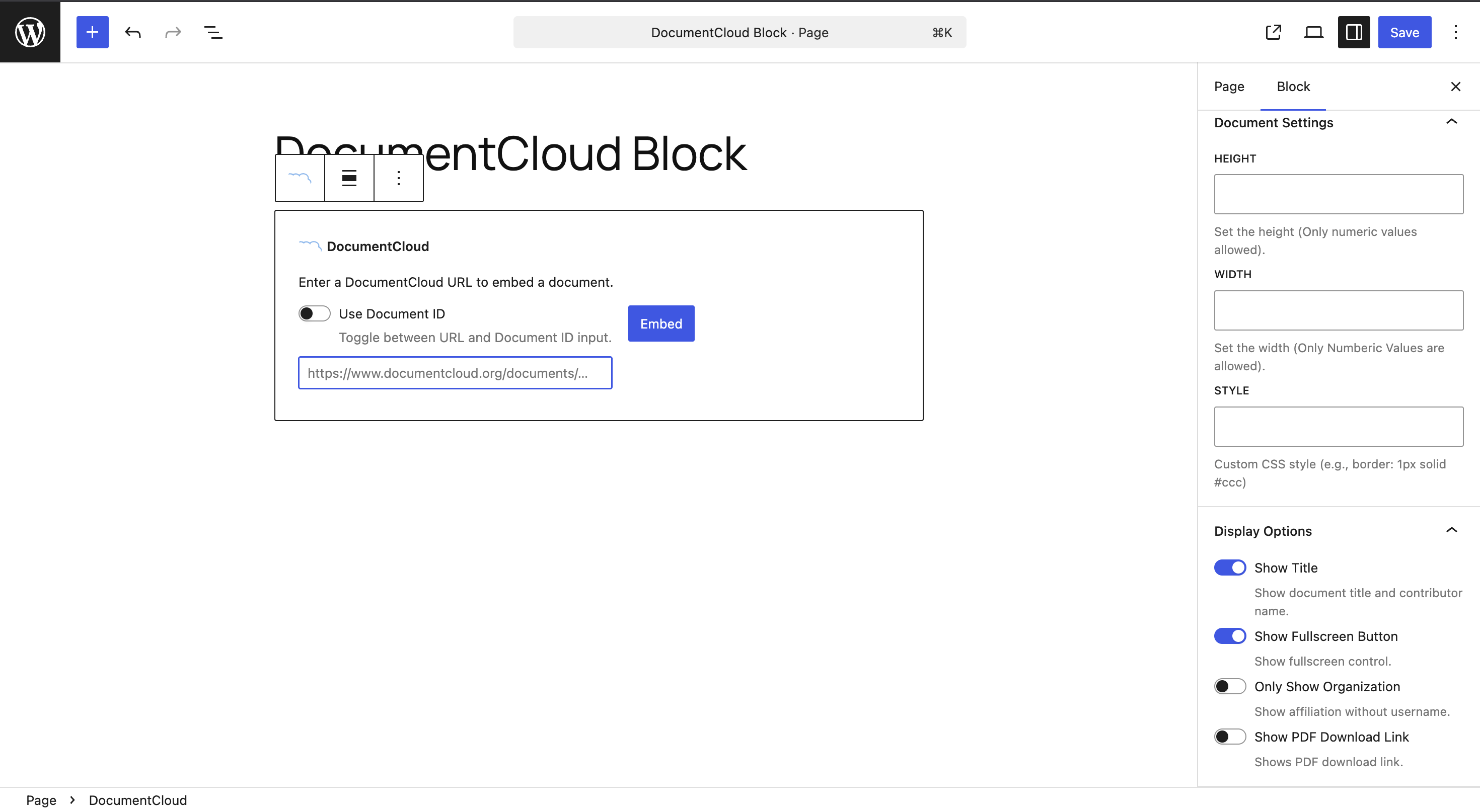
Or as a Gutenberg Block:
DocumentCloud
Here’s the list of settings that can be used for the block:
– WIDTH (number): Sets the width of the document (optional)
– HEIGHT (number): Sets the height of the document (optional)
– STYLE (string): Adds additional style to the embedded document (optional)
The following options can only be used for Documents:
– Show Title (toggle): Determines whether to show the title of the embedded document
– Show FullScreen Button (toggle): Determines whether to show a full screen icon on the document
– Only Show Organization (toggle): Determines whether to only show the organization name that published the document.
– Show PDF Download Link (toggle): Determines whether to show the download as pdf icon for documents.
Note – The default width and height from the Settings does not work for the Gutenberg Block.
You can read more about publishing and embedding DocumentCloud resources on https://www.documentcloud.org/help/publishing.
Installation
- Upload the contents of the plugin to
wp-content/plugins/documentcloud - Activate the plugin through the “Plugins” menu
- In your posts, embed documents, pages, or notes using the DocumentCloud button or the
[documentcloud]shortcode - Optional: Set a default width/height for all DocumentCloud embeds (which can be overridden on a per-embed basis with the
height/widthattributes) at Settings > DocumentCloud. (This default width will only be used if you setresponsive="false"on an embed.)
Upgrading from Navis DocumentCloud: If you’re currently using the Navis DocumentCloud plugin (from which this plugin was built), you’ll want to deactivate or delete it before installing this plugin.
Changelog
Adds support for embedding notes and enables caching.
0.7.0
- Removes the
responsiveURL parameter option.
All embeds are rendered responsively, so this option is now deprecated.
The height and width of the embed can still be controlled with their respective options. - Add
modeparameter to control document viewer display mode. Valid values:document,notes,text,grid.
0.6.0
- Add Gutenberg block for embedding DocumentCloud documents resonating a functionality similar to the shortcode.
- Update the shortcode to support the following attributes
onlyshoworg– When set to 1 it only displays the organization namepdf– When set to 1 it shows a pdf download iconshowfullscreen– When set to 1 it displays a full screen icon.title– When set to 1 it displays the title of the document.
- Allow setting the query parameter attributes when directly embedding the url in Embed block.
0.5.1
- Expand regex support to catch more DocumentCloud URLs
0.5.0
- Add support for the DocumentCloud beta
0.4.3
- Separate the oEmbed config options (provided as params to the endpoint) from the embed config options (encoded as params on the
url) (#48) - Rename
default_pageanddefault_noteoptions back topageandnote(#47) - Remove
sidebar,text, andpdfdefault values
0.4.2
- Recognize Unicode document slugs (#37)
Screenshots
For developers
Is this your plugin? Show off the numbers.
Add a live badge to your site, docs or GitHub README. It updates on its own — no account needed.
FAQ
DocumentCloud: quick answers
Straight answers, pulled from live WordPress.org data.
Live data from WordPress.org · checked Sep 29, 2026
Is DocumentCloud free?
Yes. DocumentCloud is free to download and use from the official WordPress.org plugin directory.
Is DocumentCloud safe to use in 2026?
DocumentCloud shows warning signs in 2026 — compare the alternatives below before installing. It runs on 1K+ sites, is rated 4/5 and was last updated 1 year ago, and scores 40/100 on our health check.
How many websites use DocumentCloud?
DocumentCloud is active on 1K+ WordPress websites and has been downloaded 60,142 times since it launched in April 2015. It was downloaded 2,197 times in the last 30 days.
Does DocumentCloud work with WordPress 7.1?
DocumentCloud is officially tested up to WordPress 6.8.10, while the latest release is 7.1.2. It may still work, but try it on a staging site first.
When was DocumentCloud last updated?
The latest version, 0.7.0, was released on September 24, 2025 (1 year ago).
Who makes DocumentCloud?
DocumentCloud is developed and maintained by muckrock.
Powered by PageForge
Want thousands of pages that rank like these? Build them in an afternoon.
This directory runs on the same engine as PageForge. Turn any spreadsheet, CSV or API into thousands of fast, SEO-ready WordPress pages — with schema, internal links and AI-written copy baked in.
- CSV, Google Sheets & API data sources
- AI content, schema & internal links per page
- Works with Elementor, Gutenberg, Yoast & Rank Math
- Free on WordPress.org — no credit card


