



Order Notifications in Messaging Apps for WooCommerce
Instant Messaging Apps notifications including WhatsApp for new WooCommerce orders – Api 100% FREE using CallMeBot

Use with caution
Order Notifications in Messagin… works, but test it on a staging site before relying on it in 2026. It runs on 300+ sites and was last updated 2 months ago, and scores 60/100 on our health check.
- Small user base (300+ active installs)
- Very few reviews so far
- Needs PHP 8.1 or newer
How does it stack up?
Side-by-side on installs, updates, ratings & support


Daily downloads
Download spikes usually follow a new release — each site that auto-updates counts as a download.
Rankings
Where Order Notifications in Mess… stands todayWordPress.org search rankings
Live position in the plugin search, top 100| Keyword | Position |
|---|---|
| Free | >100 |
| notification | #68 |
| order notification | #8 |
| #76 | |
| woocommerce | >100 |
Version adoption
Share of active sites per release.
About Order Notifications in Messaging Apps f…
From the official readme · v2.0.0Description
Send new WooCommerce orders directly to your WhatsApp (extendable to other apps). Uses the CallMeBot API 100% FREE – no subscriptions or extra costs.
Features:
– Automatic notification to the setup WhatsApp number
– Choose exactly which order statuses trigger the notification
– Direct Order link included
– Multilanguage Ready – English + Spanish included
– Compatible with HPOS
– No CallMeBot links or branding in messages
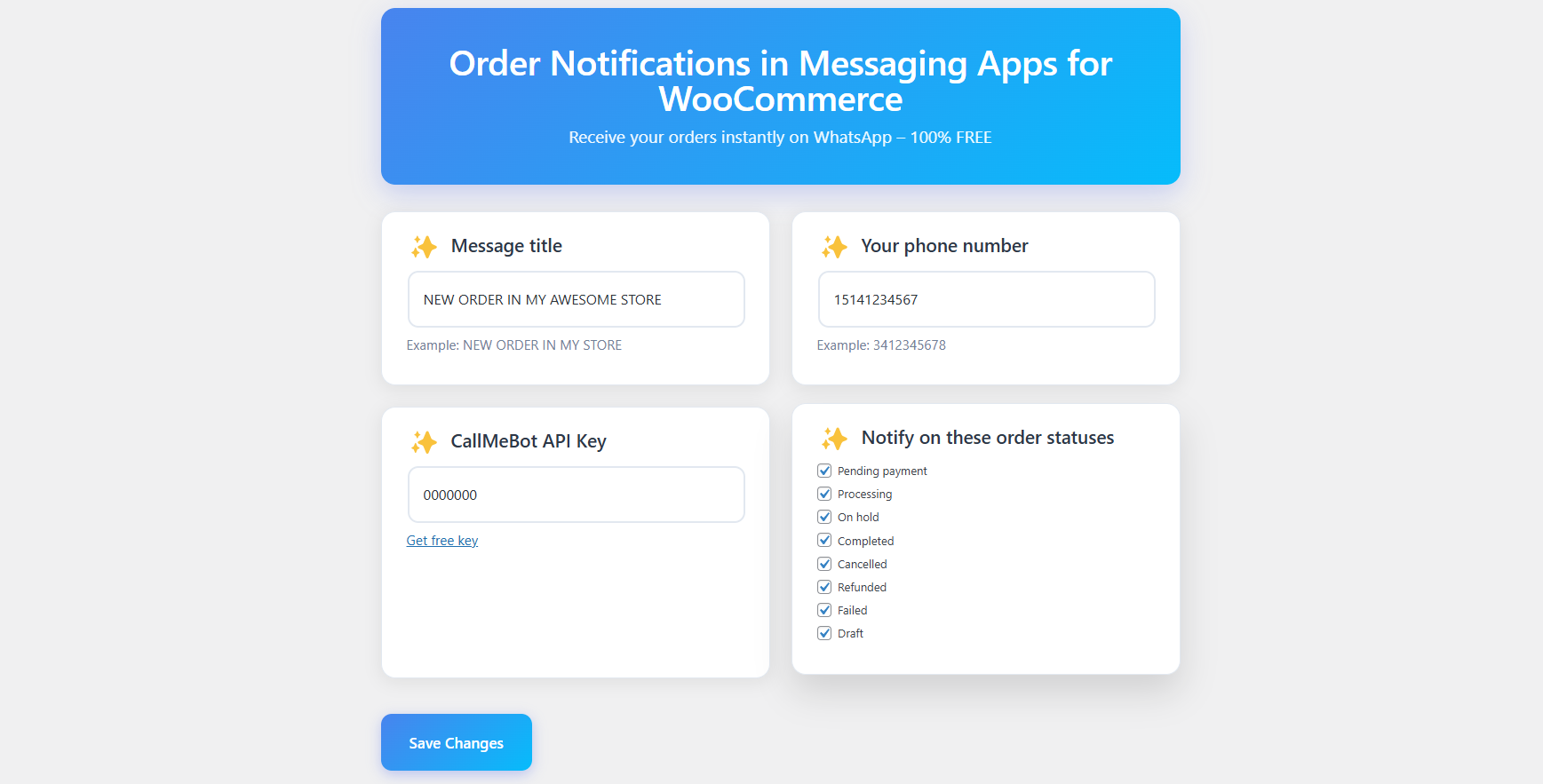
– Settings inside WooCommerce → Messaging Notifications
How to get your free API key in 30 seconds:
1. Open https://www.callmebot.com/blog/free-api-whatsapp-messages/ on your phone
2. Add the bot to contacts
3. Send the message “I allow callmebot to send me messages”
4. You will instantly receive your personal API key
External services
This plugin uses the CallMeBot API to send WhatsApp messages with new order notifications.
The CallMeBot API is a free service that allows sending messages to WhatsApp without any subscription or cost.
Data sent:
– Your configured phone number (with country code)
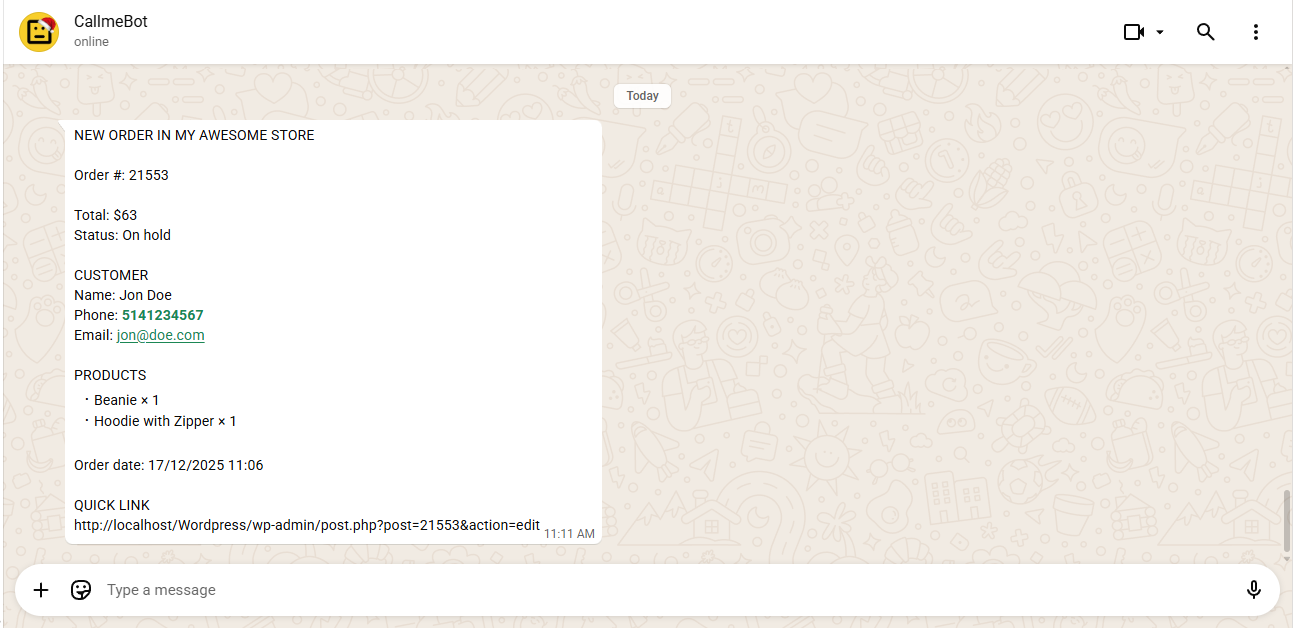
– The notification message text (includes order number, total, status, customer name, phone, email, products list, order date, and admin link)
– Your personal API key (obtained by the user from CallMeBot)
This data is sent only when a new WooCommerce order reaches one of the selected statuses (pending, processing, or on-hold by default).
CallMeBot does not store messages or personal data. More information and how to get your free API key: https://www.callmebot.com/blog/free-api-whatsapp-messages
Información en Español
¡La forma más sencilla y 100% GRATUITA de recibir tus pedidos de WooCommerce en tu WhatsApp personal!
– Notifica al numero de WhatsApp configurado
– Elige en qué estados del pedido quieres recibir aviso
– Mensajes limpios (sin publicidad de CallMeBot)
– CallMeBot API 100% Gratuita
Installation
- Upload the folder to
/wp-content/plugins/ - Activate the plugin
- Go to WooCommerce → Messaging Notifications
- Enter your phone number (with country code, no +) and your CallMeBot API key
- Done!
Changelog
2.0.0
- Fix: Resolved an API bug where CallMeBot truncated the total amount when interpreting currency symbols as script variables.
- Feature: Added customer billing address to the WhatsApp notification message.
- Enhancement: Implemented native WooCommerce currency functions for 100% global currency support.
- Enhancement: Improved the WhatsApp message layout and presentation.
1.0.0
- Initial release
Screenshots
For developers
Is this your plugin? Show off the numbers.
Add a live badge to your site, docs or GitHub README. It updates on its own — no account needed.
Best Order Notifications in Messag… alternatives
All Free plugins →





FAQ
Order Notifications in Messaging Ap…: quick answers
Straight answers, pulled from live WordPress.org data.
Live data from WordPress.org · checked Oct 3, 2026
Is Order Notifications in Messagin… free?
Yes. Order Notifications in Messagin… is free to download and use from the official WordPress.org plugin directory.
Is Order Notifications in Messagin… safe to use in 2026?
Order Notifications in Messagin… works, but test it on a staging site before relying on it in 2026. It runs on 300+ sites and was last updated 2 months ago, and scores 60/100 on our health check.
How many websites use Order Notifications in Messagin…?
Order Notifications in Messagin… is active on 300+ WordPress websites and has been downloaded 1,707 times since it launched in December 2025. It was downloaded 334 times in the last 30 days.
Does Order Notifications in Messagin… work with WordPress 7.1?
Order Notifications in Messagin… is officially tested up to WordPress 7.0.6, while the latest release is 7.1.2. It may still work, but try it on a staging site first.
What PHP version does Order Notifications in Messagin… need?
Order Notifications in Messagin… requires PHP 8.1 or higher. Most hosts run PHP 8.x today, so it works on any modern WordPress hosting.
When was Order Notifications in Messagin… last updated?
The latest version, 2.0.0, was released on July 24, 2026 (2 months ago).
Who makes Order Notifications in Messagin…?
Order Notifications in Messagin… is developed and maintained by Gabriel De la Hoz.
What are the best alternatives to Order Notifications in Messagin…?
The most popular alternatives to Order Notifications in Messagin… are Ultimate Blocks (50K+ installs), Setmore (4K+ installs) and Conekta Payment Gateway (2K+ installs).
Powered by PageForge
Want thousands of pages that rank like these? Build them in an afternoon.
This directory runs on the same engine as PageForge. Turn any spreadsheet, CSV or API into thousands of fast, SEO-ready WordPress pages — with schema, internal links and AI-written copy baked in.
- CSV, Google Sheets & API data sources
- AI content, schema & internal links per page
- Works with Elementor, Gutenberg, Yoast & Rank Math
- Free on WordPress.org — no credit card


