



OptiCache
Comprehensive performance optimization: page caching, cache warmup, CSS/JS minification, defer/async loading, and intelligent .htaccess management.

Consider an alternative
OptiCache shows warning signs in 2026 — compare the alternatives below before installing. It runs on 10+ sites and was last updated 8 months ago, and scores 38/100 on our health check.
- Small user base (10+ active installs)
- Very few reviews so far
- Only tested up to WordPress 6.9 (latest is 7.1)
How does it stack up?
Side-by-side on installs, updates, ratings & support



Daily downloads
Download spikes usually follow a new release — each site that auto-updates counts as a download.
Rankings
Where OptiCache stands todayWordPress.org search rankings
Live position in the plugin search, top 100| Keyword | Position |
|---|---|
| cache | >100 |
| minify | #97 |
| optimization | >100 |
| performance | >100 |
| speed | >100 |
Version adoption
Share of active sites per release.
About OptiCache
From the official readme · v1.0.9Description
Finally, an all-in-one solution that replaces multiple performance and caching plugins, preconfigured for most users at installation.
OptiCache consolidates the functionality of five or six separate plugins into one lightweight package: page caching, asset minification, lazy loading, security headers, PHP OPcache management, and object caching (Redis/Memcached). Instead of juggling multiple plugins with overlapping features and potential conflicts, OptiCache provides a unified solution with a single settings interface.
The standout feature is the intelligently generated .htaccess optimization. Most cache plugins either ignore .htaccess entirely or offer basic toggles. OptiCache generates comprehensive server rules for GZIP compression, browser caching, security headers, and file protection, while intelligently preserving existing configurations like PHP handlers and cPanel directives. Rules can be edited directly in the admin panel, and toggling any rule off and then back on restores its optimized default.
In testing, a 5.4MB WordPress page with 122 requests and over 4MB of images scored a C- after testing four competing optimization plugins. When switching to OptiCache alone in under 5 minutes, the same page achieved a GTmetrix Grade A with 93% Performance, 1.2s Largest Contentful Paint, and sub-second First Contentful Paint. These results speak for themselves.
Why Site Speed Matters
Slow websites lose visitors. Studies show that 40% of people abandon a website that takes more than 3 seconds to load. Google uses site speed as a ranking factor, meaning faster sites rank higher in search results. A single heavy WordPress site can easily require page caching, asset optimization, lazy loading, server-level compression, and proper cache headers to perform well. Manually configuring .htaccess rules for optimal compression, caching, and security typically requires server administration expertise. OptiCache handles all of this through intelligent automation, producing results that are difficult to achieve with competing solutions.
Preconfigured for Optimal Results
OptiCache activates with safe, effective defaults. No configuration is required for immediate performance gains. The default settings include page caching, HTML/CSS/JS minification, deferred JavaScript loading, GZIP compression, browser caching with optimized expiry times, and security headers. These techniques work safely with virtually any theme or plugin combination. Advanced options, such as CSS/JS combining, which can break load-order-dependent scripts, remain disabled until explicitly enabled. Tooltips throughout the settings panel provide clear explanations and warnings about potential issues if settings are implemented incorrectly.
Key Features:
-
Page Caching – When a visitor loads a page, WordPress normally runs PHP code and database queries to build it. Page caching saves a static HTML copy of each page, so repeat visitors receive the pre-built version instantly with no waiting for PHP or database. This alone can make a site dramatically faster. When content is edited, OptiCache intelligently clears only the affected pages (the post itself, homepage, and relevant archives) rather than purging the entire cache.
-
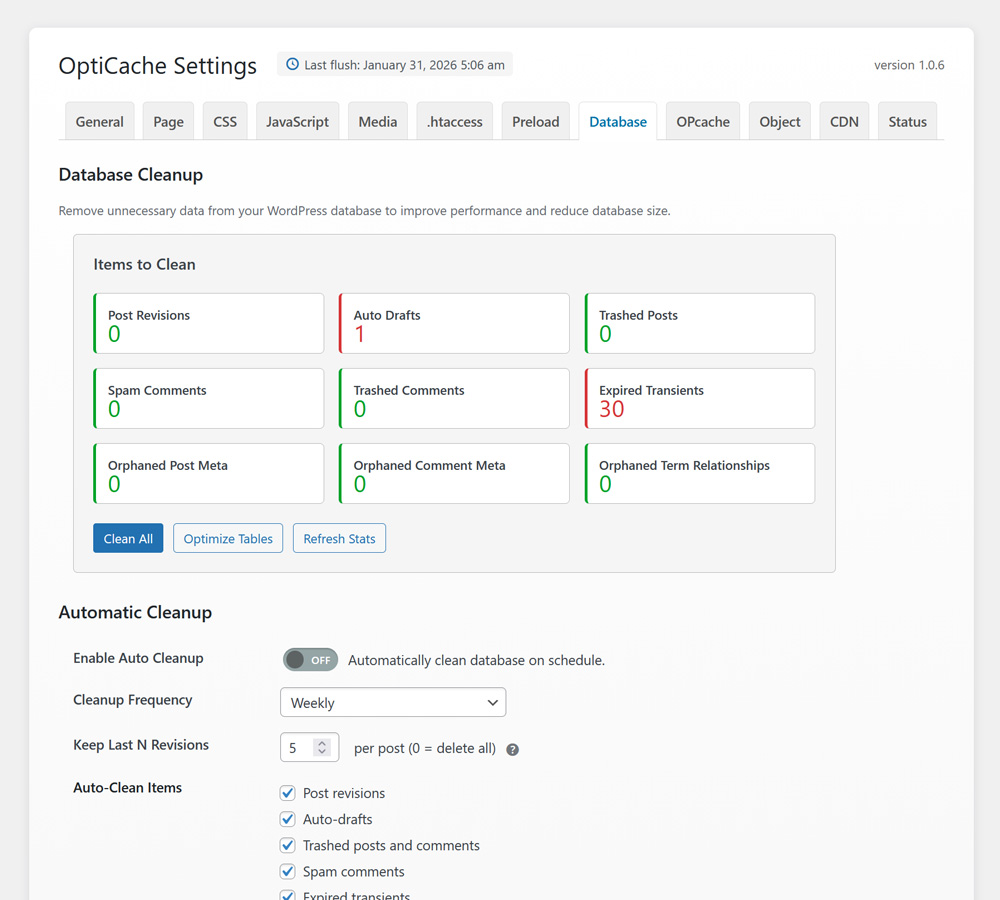
Database Optimization – WordPress databases accumulate bloat over time: post revisions, auto-drafts, trashed content, spam comments, expired transients, and orphaned metadata. OptiCache provides one-click cleanup for all of these, plus MySQL table optimization. Automatic scheduled cleanup is included as an option for hands-off maintenance.
-
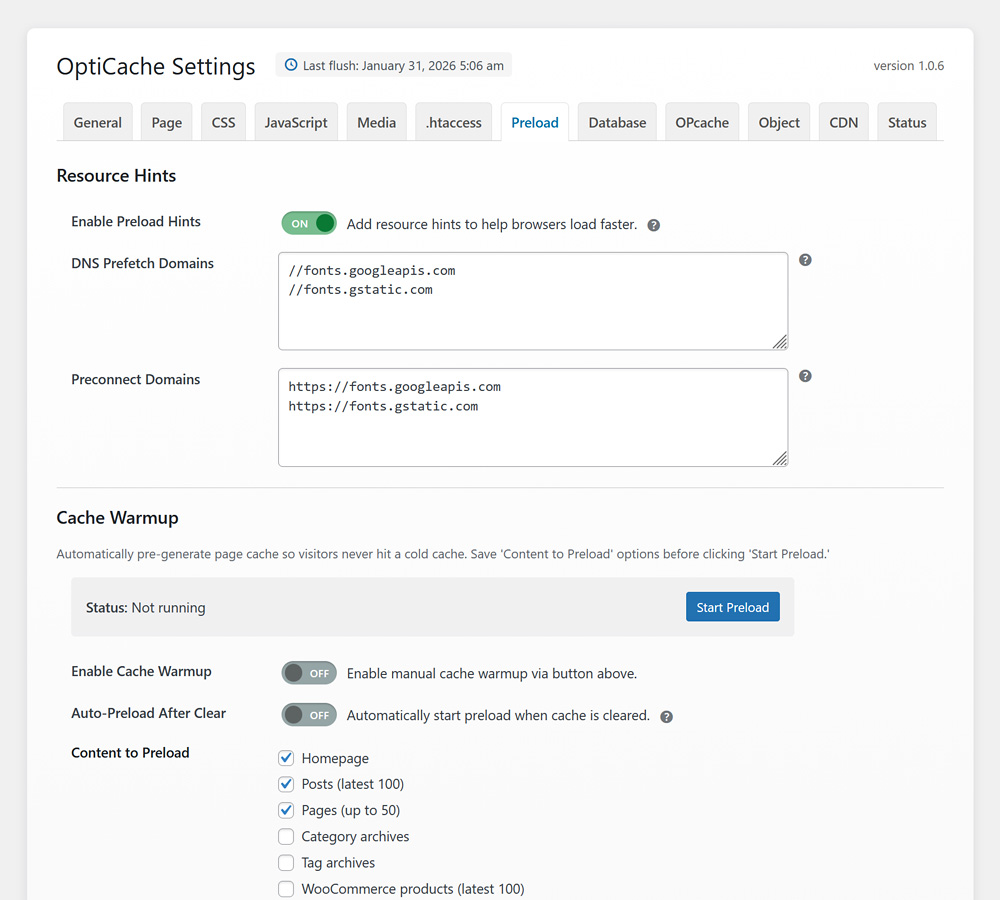
Cache Warmup (Preload) – After the cache is cleared, the first visitor to each page must wait while WordPress rebuilds it. Cache warmup solves this by automatically visiting all pages in the background, pre-building the cache so real visitors always receive fast, cached pages. Includes sitemap discovery that auto-detects XML sitemaps from popular SEO plugins (Yoast, Rank Math, AIOSEO, SEOPress, and more) to ensure all indexed URLs are preloaded.
-
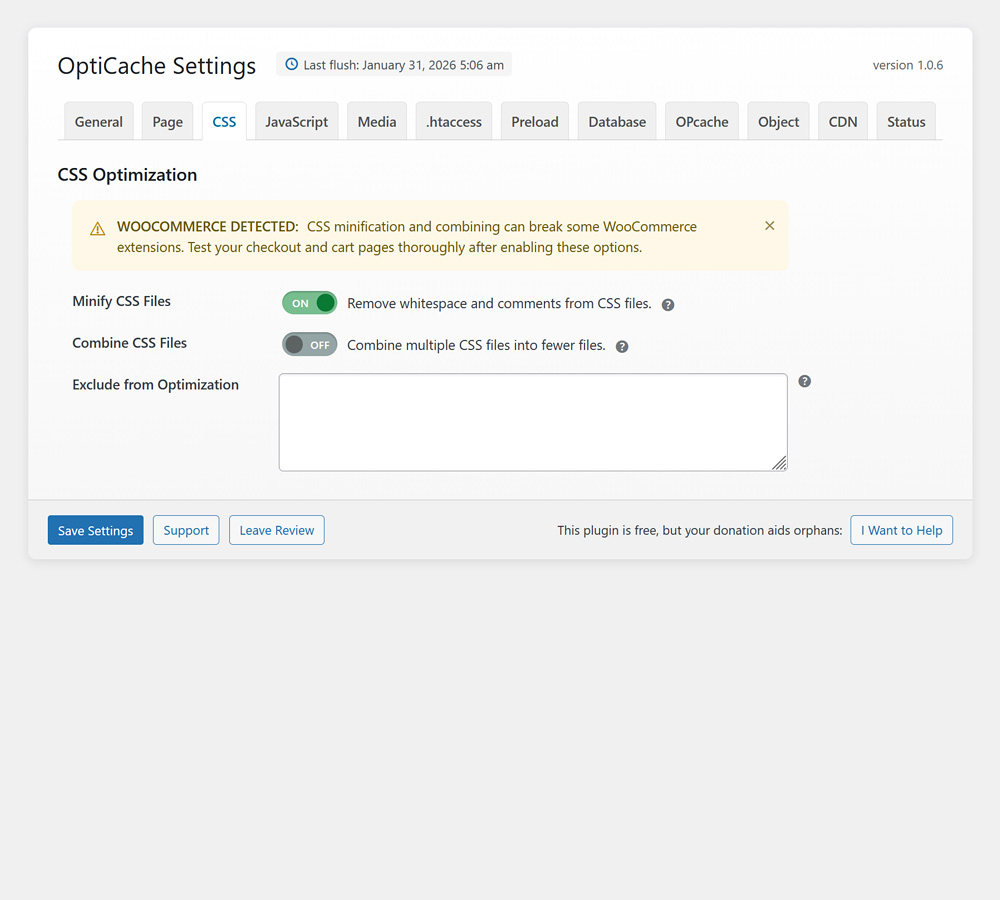
CSS Optimization – Themes and plugins load CSS files that control how the site looks. Minification removes unnecessary spaces and comments from these files, making them smaller and faster to download. An optional combination merges multiple CSS files into one, reducing the number of requests browsers make.
-
JavaScript Optimization – Similar to CSS, but for scripts that add interactivity to the site. Minification shrinks file sizes. Defer loading instructs browsers to load JavaScript after the visible content, so visitors see the page faster. These are premium features in most cache plugins.
-
HTML Minification – Removes unnecessary whitespace, line breaks, and comments from page HTML code, reducing file size by 10-20%.
-
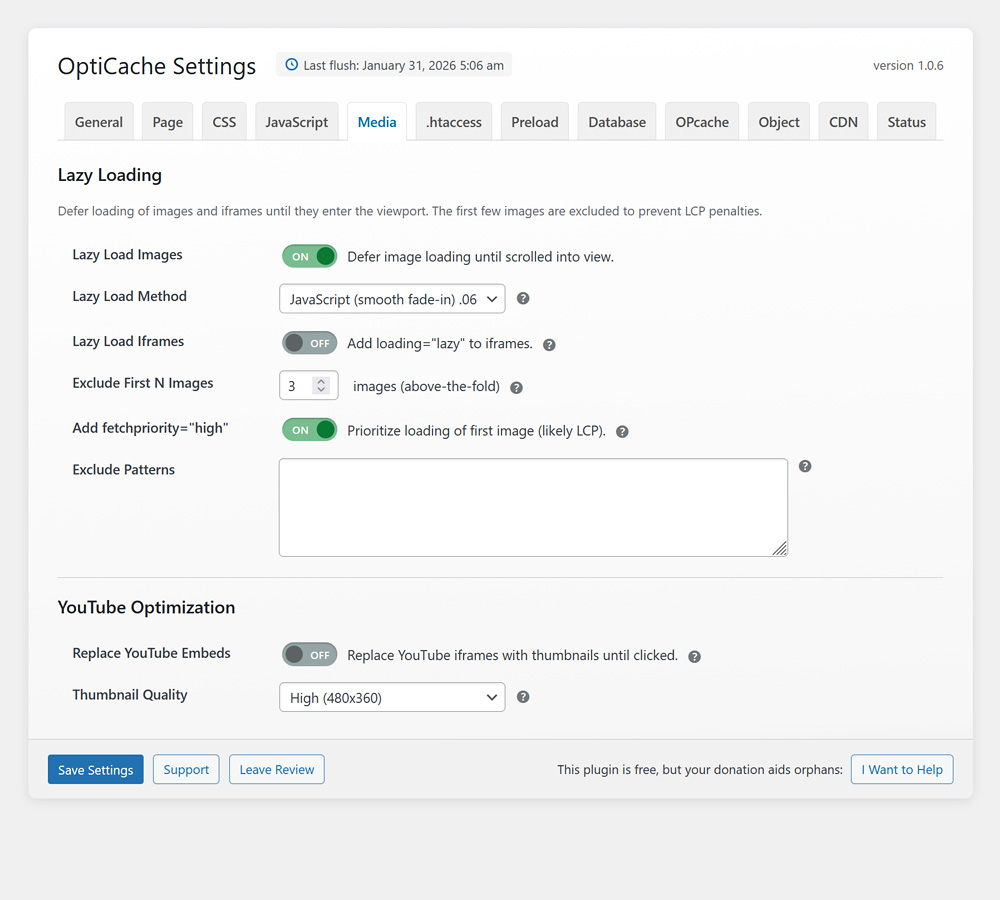
Lazy Loading – Defers loading of images and iframes until they scroll into view, dramatically improving initial page load times. Choose between JavaScript mode with smooth fade-in animation (adjustable speed from 0.4s to 1.0s) or native browser mode for simplicity. The first few images are automatically excluded to prevent affecting the Largest Contentful Paint (LCP) score.
-
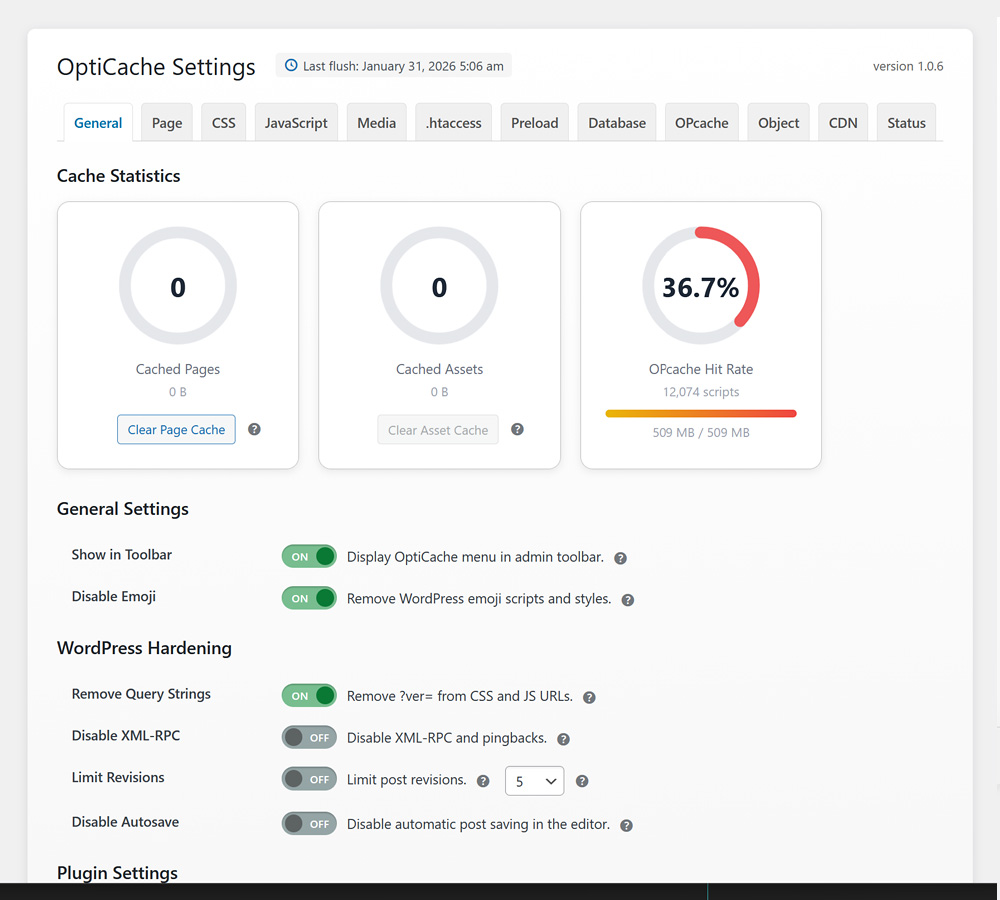
Disable Emoji – WordPress loads emoji scripts on every page even though modern browsers display emojis natively. Disabling this removes 2 unnecessary files (~10KB) from every page load.
-
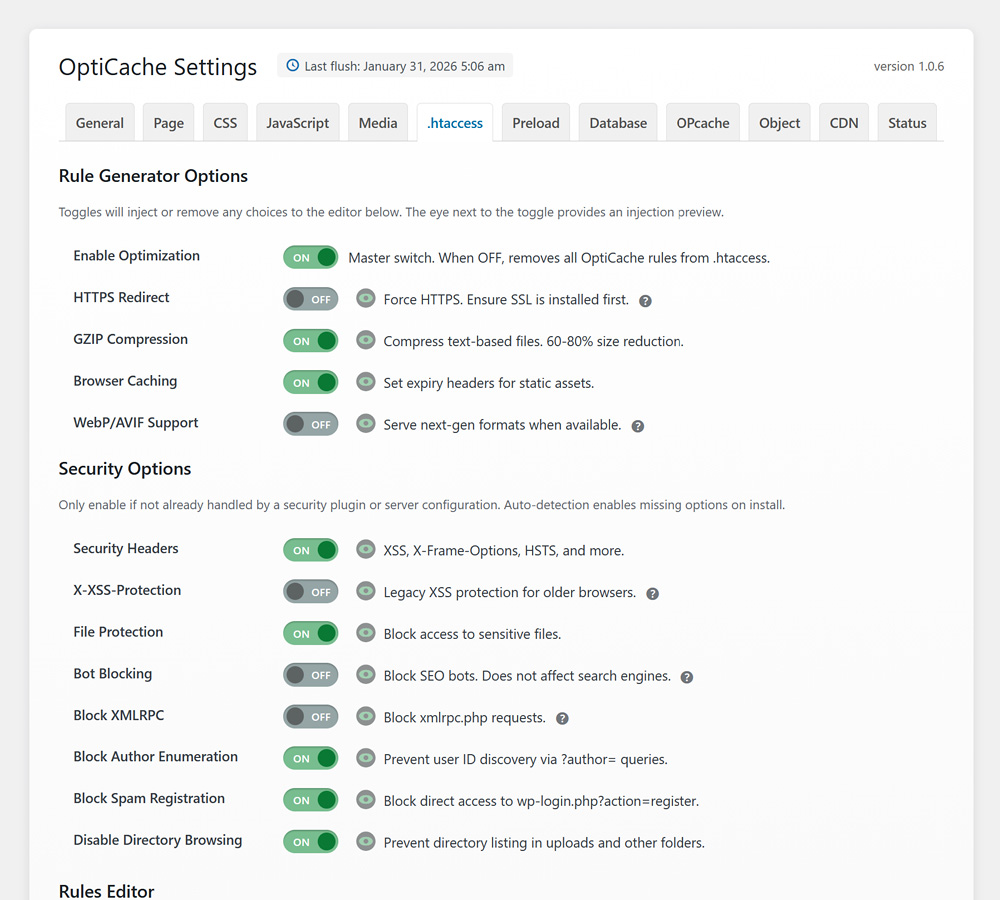
.htaccess Optimization – Intelligently generated server rules that would typically require expert knowledge to configure manually. Toggle controls include HTTPS redirection, WordPress rewrite rules for permalinks, security headers (HSTS, X-Frame-Options, X-Content-Type-Options, XSS Protection, Referrer Policy), GZIP compression, browser caching with optimized expiry times, WebP/AVIF image serving, protection of sensitive files, bad bot blocking, and XML-RPC blocking. Security essentials like author enumeration prevention, registration spam blocking, and directory browsing protection are always active. The intelligent parser preserves existing server configurations such as PHP settings and cPanel handlers when generating new rules.
-
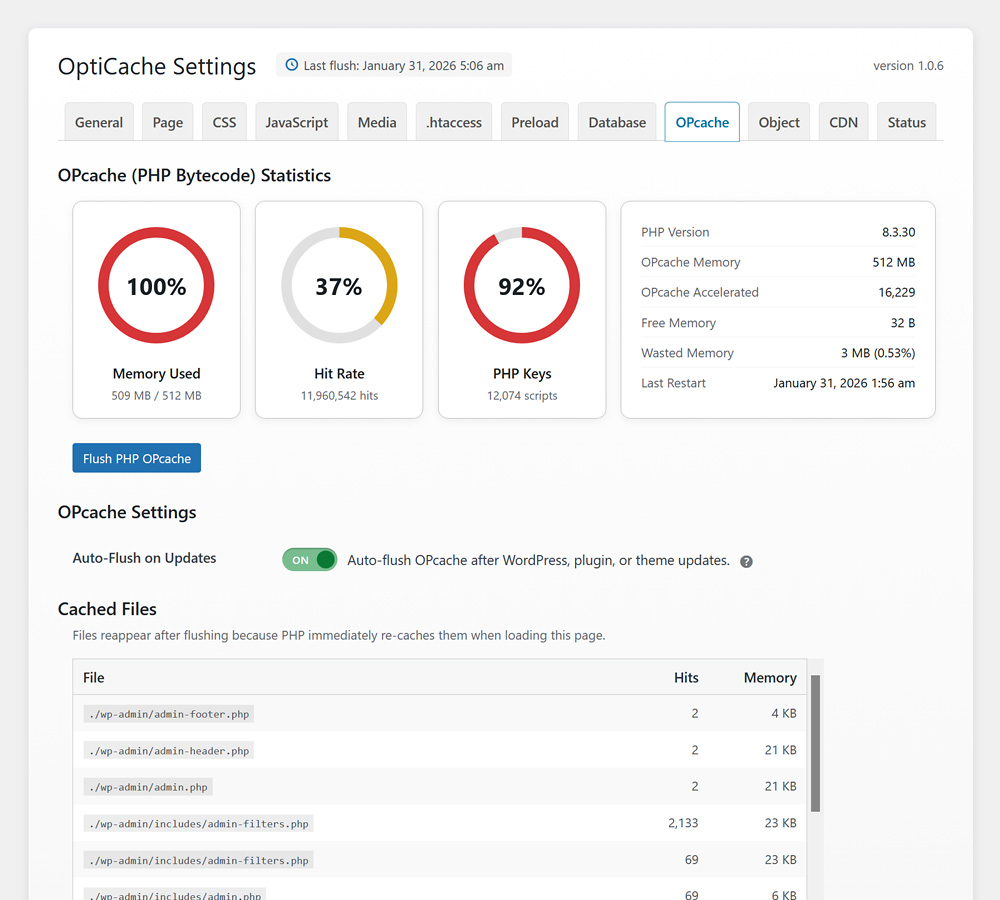
PHP OPcache Management – PHP OPcache is a server feature that remembers compiled PHP code so it doesn’t have to be processed repeatedly. OptiCache displays OPcache statistics and provides one-click clearing when needed (such as after updates).
-
Object Cache (Redis/Memcached) – Object caching stores database query results in memory, dramatically speeding up dynamic pages and WordPress admin areas. This straightforward implementation supports single-server PhpRedis (PECL) and Memcached (PECL) backends, the standard configuration for shared hosting, VPS, and dedicated servers. Automatically detects available extensions and connects to the local cache server. Especially beneficial for WooCommerce stores, membership sites, and any site with logged-in users where page caching doesn’t apply. Simply add server connection details to wp-config.php and enable with one click. (Note: This is not designed for advanced multi-server configurations like Redis Sentinel, clustering, or replication. For those enterprise setups, consider a dedicated object cache plugin.)
-
Resource Preloading – DNS prefetch and preconnect instruct browsers to start connecting to external services (like Google Fonts) before they’re needed, shaving milliseconds off load times.
-
Automatic Plugin Detection – JavaScript optimization (defer, delay, minification) can break scripts that expect to run immediately. OptiCache automatically detects installed e-commerce platforms (WooCommerce, Easy Digital Downloads, MemberPress, BigCommerce, Ecwid), payment gateways (Stripe, PayPal, Square, WooPayments, Authorize.Net, Amazon Pay, Mollie, eWAY, PayFast, Braintree), and common plugins (Contact Form 7, Gravity Forms, Elementor, WPForms), then injects the necessary JavaScript exclusions to protect their critical scripts. When a new plugin or gateway is detected, a notification prompts users to review their JavaScript settings. Exclusions are automatically removed if the plugin is uninstalled. Universal patterns for Google Analytics, Tag Manager, and reCAPTCHA are included by default because they are common across most sites and can cause delays.
-
CDN Integration (Beta) – Serve static assets (images, CSS, JavaScript) from a Content Delivery Network for faster global delivery. Supports all major CDN providers, including Cloudflare, Amazon CloudFront, Akamai, KeyCDN, BunnyCDN, Azure CDN, CDN77, and Google Cloud CDN. Includes Cloudflare API integration for automatic cache purging when content changes, with manual purge available from the admin bar. Configure exclusion patterns for files that should not be served from CDN. Also includes Varnish Integration for hosts using Varnish reverse proxy cache (Cloudways, Kinsta, WP Engine, etc.) with auto-detection, automatic purging on content changes, and connection testing.
-
Admin Toolbar Quick Access – Clear the cache with one click from the WordPress admin bar on any page.
-
Conflict Detection – Automatically detects over 30 caching and optimization plugins including WP Rocket, LiteSpeed Cache, W3 Total Cache, WP Super Cache, WP Fastest Cache, Autoptimize, and Perfmatters, identifying specific feature overlaps and providing remediation guidance. Also detects performance features in 14 popular themes including Avada, Divi, BeTheme, The7, Salient, Customizr, X Theme/Pro (Themeco), Astra, GeneratePress, Kadence, Blocksy, OceanWP, Neve, and Hello Elementor. Hosting-level caching from WP Engine, Kinsta, SiteGround, and Cloudflare is also identified.
-
JavaScript Debug Mode – When script optimization causes issues, most users don’t know how to access browser developer tools. OptiCache includes an optional debug mode that captures front-end JavaScript errors and displays them in the admin panel. Enable it temporarily for troubleshooting. The intelligent integration will scan your website, and any errors will appear in a readable table that shows the error message, source file, and affected page. Errors can be purged with one click when finished.
-
WP-CLI Support – Developers and hosting companies can manage cache through command-line scripts for automated deployments and maintenance.
WP-CLI Commands:
wp opticache clear– Clear all cacheswp opticache clear --type=page– Clear only page cachewp opticache clear --type=assets– Clear only minified CSS/JSwp opticache clear --type=opcache– Clear PHP OPcachewp opticache clear-post 123– Clear cache for specific post(s)wp opticache stats– Display cache statisticswp opticache preload– Start cache warmupwp opticache preload-stop– Stop cache warmupwp opticache preload-status– Check warmup progresswp opticache htaccess– Install .htaccess ruleswp opticache htaccess --action=remove– Remove .htaccess ruleswp opticache object status– Show object cache statuswp opticache object enable– Enable object cache drop-inwp opticache object disable– Disable object cache drop-inwp opticache object flush– Flush object cachewp opticache object test– Test connection to cache server
Optional Features (Off by Default):
Some features are disabled by default because they require specific configurations or may not be appropriate for all sites:
- HTTPS Redirect – Enable only with SSL is working. Risk: Makes the site inaccessible without a valid SSL.
- Block XML-RPC – Risk: Breaks Jetpack and WordPress mobile app.
- Block SEO Bots – Risk: Blocks Ahrefs, SEMrush, Moz crawlers that may be part of paid subscriptions.
- WebP/AVIF Support – Does nothing unless next-gen image files have already been created.
- Combine CSS – Risk: Can break page layouts with load-order dependent stylesheets.
- Combine JS – Risk: Can break sliders, forms, popups, and payment gateways.
Translations
All 552 text strings use WordPress translation functions. Includes complete translations for English, Spanish, French, German, Russian, Dutch, Polish, Portuguese, and Finnish. Any edits to the PO files or additional languages are welcome.
Donations
If this effort helps you, please consider making a small donation via the main plugin page in the lower-right. All funds support orphans worldwide, especially those in need of survival assistance. This is the sole reason this plugin exists: to help others in desperate need.
Privacy & Data
Operates entirely on your server with no external services, APIs, or data transmission. All cached files and minified assets are stored locally in your wp-content directory. No visitor data is collected, tracked, or shared. No cookies are set except for standard WordPress cookies used to detect logged-in users (to serve uncached pages). The plugin reads your site’s public URLs for cache warmup but makes no external requests. PHP OPcache statistics are read-only from your server’s memory. Complete cache deletion is available via the settings page, the admin bar, or WP-CLI.
Installation
- Upload the plugin files to the
/wp-content/plugins/opticachedirectory, or install through the WordPress plugins screen - Activate the plugin through the ‘Plugins’ screen in WordPress
- That’s it! The plugin is preconfigured with optimal settings
- Optionally, visit OptiCache settings to enable additional features or fine-tune
Frequently asked questions
Do I need to configure anything after activation?
No. OptiCache is preconfigured with safe, effective defaults that work with virtually any WordPress site. Simply activate and the site will immediately load faster.
What is Cache Warmup (Preload)?
Cache warmup automatically visits pages in the background to pre-generate cached versions. This ensures that first-time visitors receive fast, cached pages rather than waiting for the cache to be built. It can be started manually or configured to run automatically after clearing the cache.
Will this plugin work with my theme?
Yes. OptiCache is designed to work with any properly coded WordPress theme. The default settings are conservative to ensure maximum compatibility.
Can certain pages be excluded from caching?
Yes. URLs can be excluded using wildcard patterns in the Page Cache settings. WooCommerce cart, checkout, and account pages are excluded by default.
Does it work with WooCommerce?
Yes. OptiCache is fully compatible with WooCommerce. Dynamic pages (cart, checkout, my-account) are automatically excluded from caching, and WooCommerce cookies are respected.
How is the cache cleared?
The cache can be cleared from: – The OptiCache settings page – The admin toolbar (if enabled) – WP-CLI commands – Automatically when content is published or updated
What do the colored indicators mean in the admin bar?
The admin bar menu displays colored status beads next to each cache type: Page Cache: Green (≤10 cached pages), Yellow (11-50 pages), Red (51+ pages) Asset Cache: Green (≤20 files), Yellow (21-100 files), Red (101+ files) PHP OPcache: Green (≤45% memory used), Yellow (46-95%), Red (96%+) Settings: Always gray (no status) Green indicates nearly empty, yellow indicates moderately full, and red indicates the cache should be cleared. These provide a quick visual indication of cache status without opening the settings page. However, PHP OPcache is typically full by design, as it repopulates…
Should HTTPS redirect be enabled?
Only enable this if an SSL certificate is installed and working. Enabling it without SSL will make the site inaccessible.
Why is XML-RPC blocking disabled by default?
XML-RPC blocking breaks Jetpack and the official WordPress mobile app. Only enable it if these services are not in use.
Why is Bot Blocking disabled by default?
Bot blocking prevents SEO tool crawlers, such as Ahrefs and SEMrush, from accessing the site. If these services are used to monitor backlinks or rankings, blocking their bots would be a waste of the subscription.
What does Disable Emoji do?
WordPress loads emoji scripts and styles on every page by default. Modern browsers have native emoji support, making these extra files unnecessary. Disabling them saves 2 HTTP requests and approximately 10KB per page load.
What is PHP OPcache and why use it?
PHP OPcache is a bytecode caching system built into PHP that dramatically speeds up PHP execution by storing precompiled script bytecode in memory. Instead of parsing and compiling PHP files on every request, the server uses the cached compiled version. OptiCache provides a dashboard to monitor OPcache memory usage, hit rates, and cached files, plus one-click flushing when needed (such as after plugin updates).
Why does OPcache show full immediately after clearing?
This is expected behavior. When OPcache is cleared, it is completely emptied. However, when WordPress loads the next page (including the “cache cleared” confirmation), PHP recompiles and re-caches all the files needed to display that page: WordPress core, the active theme, and all active plugins. OPcache refills within milliseconds because any PHP execution repopulates it. The clear operation did work, but the empty state cannot be observed because checking it requires running PHP. Clearing remains useful after plugin or theme updates to force recompilation of changed files.
Why isn’t Object Cache connecting even though the PHP extension is installed?
Object caching requires two components: a PHP extension (client) and a running cache server (daemon). Many hosting environments have the PHP extension installed, but no actual cache server running. For Memcached: The php-memcached (PECL) extension allows PHP to communicate with a Memcached server, but a Memcached daemon must be installed and running on the server (typically listening on port 11211). On shared hosting, this service may not be available. On VPS or dedicated servers, the memcached service may need to be installed and started manually. For Redis: The PhpRedis (PECL) extension…
What is GZIP compression?
GZIP compression reduces the size of website files during transfer from the server to visitors’ browsers. The browser automatically decompresses the files on arrival. This typically reduces file sizes by 70-80%, making pages load much faster, especially on slower connections.
What is browser caching?
Browser caching instructs browsers to store files such as images, CSS, and JavaScript for a specified period. On return visits, the browser uses the saved files instead of downloading them again, making repeat visits dramatically faster.
What does “defer JavaScript” mean?
Normally, when a browser encounters JavaScript while loading a page, it stops rendering until the script is downloaded and executed. Deferring instructs the browser to continue displaying page content while downloading scripts in the background, then executes them after the page is visible. This makes sites feel faster because visitors see content sooner.
What are DNS prefetch and preconnect?
When a site loads resources from external servers (like Google Fonts), browsers need time to look up those servers’ addresses (DNS) and establish secure connections. DNS prefetch and preconnect instruct browsers to perform this work early, in the background, so resources load faster when actually needed.
What is the difference between minify and combine?
Minify removes unnecessary characters (spaces, comments, line breaks) from CSS and JavaScript files to reduce their size. Combine merges multiple files into one. Minify is safe and recommended. Combine can occasionally break sites if scripts depend on loading in a specific order, which is why it is disabled by default.
What is the difference between JavaScript and Native lazy loading?
JavaScript lazy loading uses Intersection Observer to detect when images approach the viewport, then loads them with a smooth fade-in animation. Four animation speeds are available (0.4s to 1.0s). Native browser lazy loading uses the built-in loading=”lazy” attribute. It is simpler, but images appear instantly without animation. If the active theme already provides JavaScript lazy loading with effects, choose Native to avoid conflicts.
Changelog
None to report as of the release version
1.0.9 – 02/10/26
- Added sitemap-based URL discovery for cache warmup (auto-detects Yoast SEO, Rank Math, All in One SEO, SEOPress, The SEO Framework, Jetpack, Squirrly SEO, SmartCrawl, Google XML Sitemaps, XML Sitemap & Google News, Sitemap by BestWebSoft, Companion Sitemap Generator, and WordPress core sitemaps)
- Added Detect Sitemap button with URL count reporting
- Added custom sitemap URL option for non-standard configurations
- Added configurable max URL limit for sitemap preload (default 500)
- Added Brotli compression toggle for .htaccess (requires mod_brotli for Apache or ngx_brotli for Nginx)
- Added Paymattic payment platform detection with automatic JavaScript exclusions (wppayform, wpf-, stripe_elements, paystack, razorpay, payrexx)
- Fixed JavaScript exclusions being removed on plugin deactivation instead of only on plugin deletion (exclusions now persist through deactivation for safe troubleshooting)
- Fixed uninstall cleanup missing dynamic detection options, warning dismissals, and transients that were orphaned in wp_options
- Improved conflict detection wording throughout to clarify that overlapping features simply need to be disabled, not that OptiCache is incompatible
- Fixed Object Cache metrics chart not displaying data (Redis flush was deleting metrics key)
- Fixed Object Cache metrics serializer key mismatch between frontend write and admin read paths
- Fixed OPcache flush on plugin/theme updates using full reset instead of selective invalidation to prevent stale bytecode from renamed or moved files
- Fixed admin bar cache clearing redirecting to the General settings tab instead of staying on the current page (replaced admin-post.php redirect approach with AJAX so the page never navigates)
- Fixed e-commerce/plugin/gateway detection not triggering when plugins were already active before OptiCache was installed (now runs initial scan on first load)
- Fixed stale Really Simple Security rules lingering in .htaccess after plugin deactivation (now stripped during parsing and cleaned from existing installs on upgrade)
1.0.8 – 02/06/26
- Added conflict detection for Salient, Customizr, and X Theme/Pro (Themeco)
- Added Cornerstone page builder detection
- Expanded Perfmatters conflict detection to cover all optimization features
- Fixed Max Cache Size not auto-purging when the limit is reached
- Assure compliance with WordPress 6.9.1
1.0.7 – 02/04/26
- Fixed: Page cache now auto-clears on plugin/theme updates via WordPress updater
- Fixed: Page cache now auto-clears on plugin activation/deactivation
- Fixed: Plugin detection moved from admin_init to activation hooks to reduce admin overhead
- Fixed: Conflict detection now only runs on OptiCache settings page instead of every admin page
- Fixed: Early translation loading warning in WordPress 6.7+
- Improved: Significantly reduced database queries on WooCommerce and other admin pages
1.0.6 – 02/01/26
- New: WordPress Hardening section with Remove Query Strings, Disable XML-RPC, Limit Revisions, and Disable Autosave
- New: Clean HTML Head section with Remove Generator Tag, Remove RSD Link, Remove WLW Manifest, and Remove Shortlink
- New: Disable Embeds option to remove wp-embed.js (~6KB savings)
- New: Max Cache Size setting to set automatic cache cleanup threshold (100MB to 1000MB)
- New: Last cache flush timestamp displayed in settings header
- New: Tooltips on Clear Page Cache and Clear Asset Cache buttons
- Fixed: Reset to Defaults now preserves all .htaccess settings and custom rules
- Fixed: Clear Asset Cache button disabled when CSS Combine and JS Combine are both off
1.0.5 – 01/15/26
- New: CDN Integration tab (Beta) with comprehensive URL rewriting for static assets
- New: File Extensions filtering – precise control over which file types are served via CDN
- New: Included Directories setting – limit CDN rewriting to specific paths (wp-content/, wp-includes/)
- New: Site URL override for non-standard WordPress configurations
- New: Disable for Admin option – bypass CDN when logged in as administrator
- New: Validate Configuration button to test CDN accessibility
- New: Preconnect hints automatically added for faster CDN connections
- New: Support for all major CDN providers (Cloudflare, CloudFront, BunnyCDN, KeyCDN, Akamai, Azure CDN, Google Cloud CDN, CDN77)
- New: Cloudflare API integration with email + Global API Key authentication
- New: Automatic Cloudflare cache purge when content changes
- New: Manual Cloudflare purge button in admin bar
- New: Wildcard support for CDN exclusion patterns
- New: Rewrite Relative URLs option for better control
- New: Varnish Integration for hosts using Varnish reverse proxy cache (Cloudways, Kinsta, WP Engine, etc.)
- New: Varnish auto-detection via HTTP headers (X-Varnish, X-Cache)
- New: Varnish Server IP configuration (default: 127.0.0.1)
- New: Automatic Varnish cache purge on post/page/comment changes
- New: Manual Varnish purge button with connection test
- New: PURGE and URLPURGE methods for full site and individual URL purging
- New: Excluded Query Parameters setting for Varnish (utm_source, fbclid, gclid, etc.)
- New: Debug Log panel for troubleshooting CDN, Cloudflare, and Varnish operations
- New: View Log, Clear Log, and Download Log buttons for beta testers
- New: Comprehensive error logging with timestamps and context data
- New: Automatic disk space protection – purges oldest cache files when hosting reaches 85% capacity
- New: Admin dashboard notice when disk space protection is triggered
- Note: CDN and Varnish features are in beta – test thoroughly before production use
1.0.4 – 01/02/26
- New: E-commerce platform detection (WooCommerce, Easy Digital Downloads, MemberPress, BigCommerce, Ecwid)
- New: Common plugin detection (Contact Form 7, Gravity Forms, Elementor, WPForms)
- New: Payment gateway detection (Stripe, PayPal, Square, WooPayments, Authorize.Net, Amazon Pay, Mollie, eWAY, PayFast, Braintree)
- New: Automatic JS exclusion injection for detected platforms, plugins, and gateways
- New: Default JS delay exclusions for Google Analytics, Tag Manager, and reCAPTCHA
- New: JavaScript Debug Mode to capture front-end errors for troubleshooting
- New: Conflict detection for 30 caching plugins with feature-level identification
- New: Conflict detection for 11 themes (Avada, Divi, BeTheme, The7, Astra, GeneratePress, Kadence, Blocksy, OceanWP, Neve, Hello Elementor)
- New: WP-CLI support with full command suite (cache, assets, object-cache, opcache, db, htaccess, status)
- Improved: System Information now displays in a two-column layout (responsive)
- Improved: Toast notification width reduced for cleaner appearance
- Improved: Object cache metrics with interactive Chart.js visualization
Screenshots


For developers
Is this your plugin? Show off the numbers.
Add a live badge to your site, docs or GitHub README. It updates on its own — no account needed.
Best OptiCache alternatives
All cache plugins →





FAQ
OptiCache: quick answers
Straight answers, pulled from live WordPress.org data.
Live data from WordPress.org · checked Sep 28, 2026
Is OptiCache free?
Yes. OptiCache is free to download and use from the official WordPress.org plugin directory.
Is OptiCache safe to use in 2026?
OptiCache shows warning signs in 2026 — compare the alternatives below before installing. It runs on 10+ sites and was last updated 8 months ago, and scores 38/100 on our health check.
How many websites use OptiCache?
OptiCache is active on 10+ WordPress websites and has been downloaded 807 times since it launched in January 2026. It was downloaded 74 times in the last 30 days.
Does OptiCache work with WordPress 7.1?
OptiCache is officially tested up to WordPress 6.9.9, while the latest release is 7.1.2. It may still work, but try it on a staging site first.
What PHP version does OptiCache need?
OptiCache requires PHP 8.0 or higher. Most hosts run PHP 8.x today, so it works on any modern WordPress hosting.
When was OptiCache last updated?
The latest version, 1.0.9, was released on February 12, 2026 (8 months ago).
Who makes OptiCache?
OptiCache is developed and maintained by artiosmedia.
What are the best alternatives to OptiCache?
The most popular alternatives to OptiCache are WP Super Cache (1M+ installs), WP Fastest Cache (1M+ installs) and WP-Optimize (1M+ installs).
Powered by PageForge
Want thousands of pages that rank like these? Build them in an afternoon.
This directory runs on the same engine as PageForge. Turn any spreadsheet, CSV or API into thousands of fast, SEO-ready WordPress pages — with schema, internal links and AI-written copy baked in.
- CSV, Google Sheets & API data sources
- AI content, schema & internal links per page
- Works with Elementor, Gutenberg, Yoast & Rank Math
- Free on WordPress.org — no credit card


