



OPcache Manager
OPcache statistics and management right in the WordPress admin dashboard.

Solid choice
OPcache Manager is a solid plugin choice in 2026, with a few things worth checking first. It runs on 1K+ sites, is rated 5/5 and was last updated 1 month ago, and scores 73/100 on our health check.
- Tested with the latest WordPress (7.1)
- Very few reviews so far
- Needs PHP 8.2 or newer
How does it stack up?
Side-by-side on installs, updates, ratings & support



Daily downloads
Download spikes usually follow a new release — each site that auto-updates counts as a download.
Rankings
Where OPcache Manager stands todayWordPress.org search rankings
Live position in the plugin search, top 100| Keyword | Position |
|---|---|
| analytics | >100 |
| cache | >100 |
| monitor | #68 |
| OPcache | #1 |
| Zend | #2 |
Version adoption
Share of active sites per release.
Rating breakdown
★★★★★★★★★★ 5 from 4 reviews
About OPcache Manager
From the official readme · v3.5.0Description
OPcache statistics and management right in the WordPress admin dashboard.
OPcache Manager is a full featured OPcache management and analytics reporting tool. It allows you to monitor and optimize OPcache operations on your WordPress site or network.
OPcache Manager works on dedicated or shared servers. In shared environments, its use has no influence on other hosted sites than yours. Its main management features are:
- individual script invalidation, forced invalidation and recompilation;
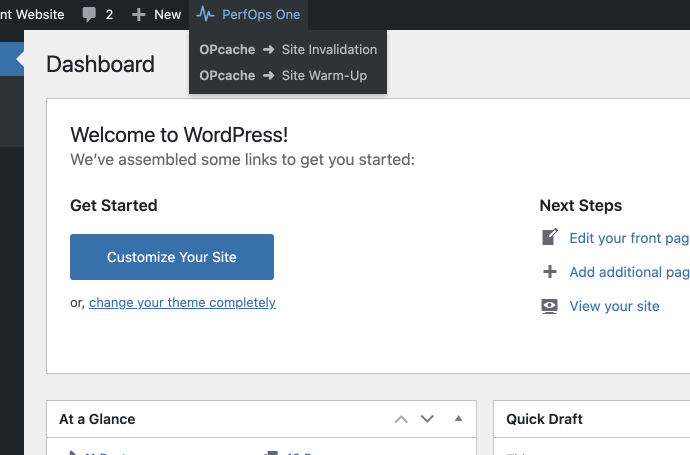
- manual site invalidation – a sort of ‘smart’ OPcache reset only for your site;
- manual site warm-up – to pre-compile all of you site files;
- optional scheduled site invalidation and/or warm-up.
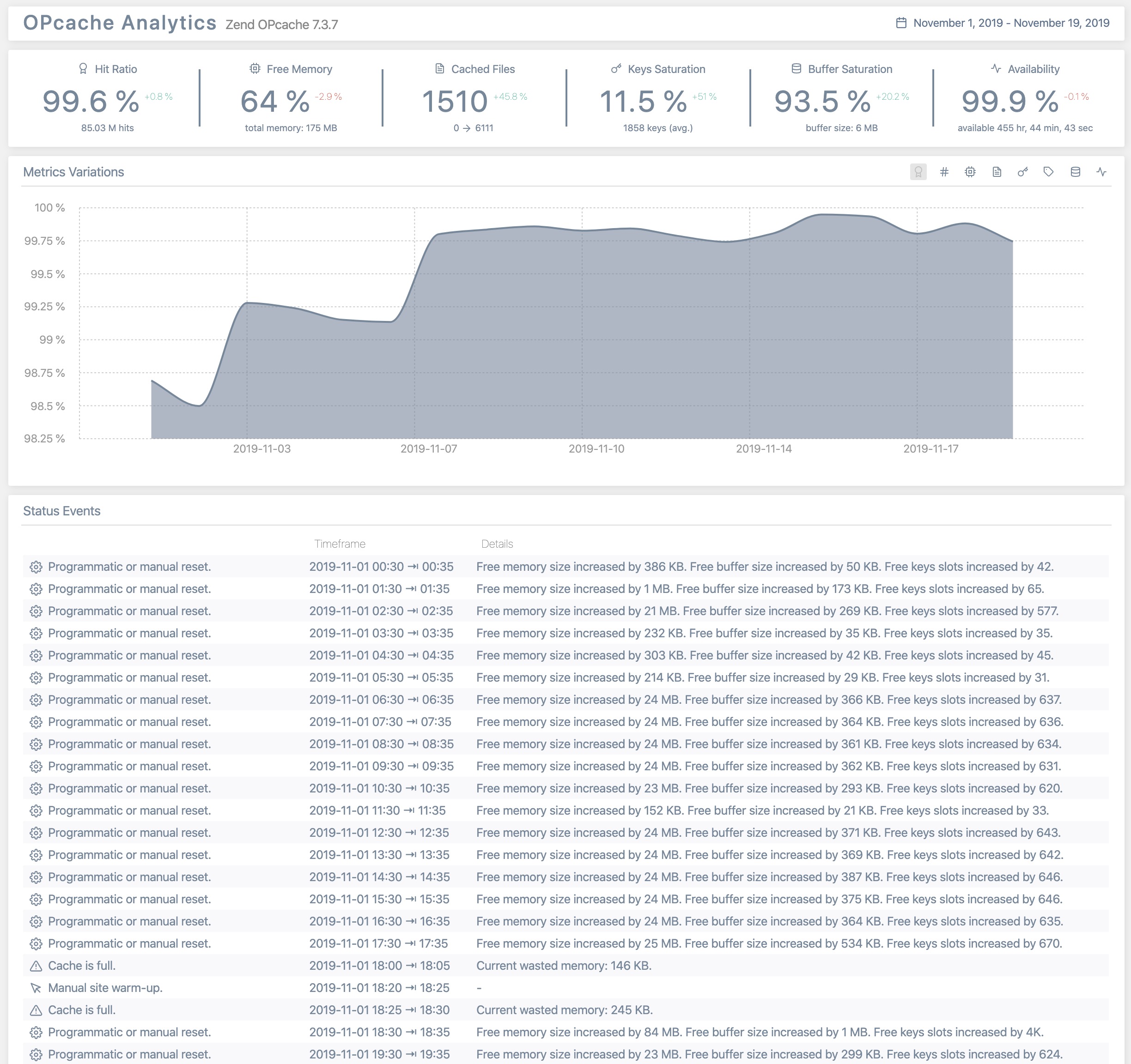
OPcache Manager is also a full featured analytics reporting tool that analyzes all OPcache operations on your site. It can report:
- KPIs: hit ratio, free memory, cached files, keys saturation, buffer saturation and availability;
- metrics variations;
- metrics distributions;
- OPcache related events.
OPcache Manager supports multisite report delegation (see FAQ).
OPcache Manager supports a set of WP-CLI commands to:
- invalidate or warmup cache – see
wp help opcache invalidateandwp help opcache warmupfor details; - toggle on/off main settings – see
wp help opcache settingsfor details; - obtain operational statistics – see
wp help opcache analyticsfor details.
For a full help on WP-CLI commands in OPcache Manager, please read this guide.
OPcache Manager is part of PerfOps One, a suite of free and open source WordPress plugins dedicated to observability and operations performance.
OPcache Manager is a free and open source plugin for WordPress. It integrates many other free and open source works (as-is or modified). Please, see ‘about’ tab in the plugin settings to see the details.
Support
This plugin is free and provided without warranty of any kind. Use it at your own risk, I’m not responsible for any improper use of this plugin, nor for any damage it might cause to your site. Always backup all your data before installing a new plugin.
Anyway, I’ll be glad to help you if you encounter issues when using this plugin. Please read carefully the FAQ at the bottom of this page before requesting support.
Privacy
This plugin, as any piece of software, is neither compliant nor non-compliant with privacy laws and regulations. It is your responsibility to use it with respect for the personal data of your users and applicable laws.
This plugin doesn’t set any cookie in the user’s browser.
This plugin doesn’t handle personally identifiable information (PII).
Donation
If you like this plugin or find it useful and want to thank me for the work done, please consider making a donation to La Quadrature Du Net or the Electronic Frontier Foundation which are advocacy groups defending the rights and freedoms of citizens on the Internet. By supporting them, you help the daily actions they perform to defend our fundamental freedoms!
Installation
From your WordPress dashboard
- Visit ‘Plugins > Add New’.
- Search for ‘OPcache Manager’.
- Click on the ‘Install Now’ button.
- Activate OPcache Manager.
From WordPress.org
- Download OPcache Manager.
- Upload the
opcache-managerdirectory to your/wp-content/plugins/directory, using your favorite method (ftp, sftp, scp, etc…). - Activate OPcache Manager from your Plugins page.
Once Activated
- Visit ‘PerfOps One > Control Center > OPcache Manager’ in the left-hand menu of your WP Admin to adjust settings.
- Enjoy!
Frequently asked questions
Can this plugin work on multisite?
Yes. It is designed to work on multisite too. Network Admins can configure the plugin, use management tools and have access to all analytics reports. Sites Admins have access to the analytics reports only.
What are the requirements for scheduled invalidation/warm-up and statistics to work?
You need to have a fully operational WordPress cron. If you’ve set an external cron (crontab, online cron, etc.), its frequency must be less than 5 minutes – 1 or 2 minutes is a recommended value.
Where can I get support?
Support is provided via the official WordPress page. Because I am human myself, please note that I only answer to support requests made by humans, who behave like humans. This excludes requests or bug reports written by AI or those that do not adhere to basic rules of courtesy.
Where can I report a bug?
You can report bugs and suggest ideas via the GitHub issue tracker of the plugin.
Screenshots


For developers
Is this your plugin? Show off the numbers.
Add a live badge to your site, docs or GitHub README. It updates on its own — no account needed.
Best OPcache Manager alternatives
All analytics plugins →





FAQ
OPcache Manager: quick answers
Straight answers, pulled from live WordPress.org data.
Live data from WordPress.org · checked Sep 27, 2026
Is OPcache Manager free?
Yes. OPcache Manager is free to download and use from the official WordPress.org plugin directory.
Is OPcache Manager safe to use in 2026?
OPcache Manager is a solid plugin choice in 2026, with a few things worth checking first. It runs on 1K+ sites, is rated 5/5 and was last updated 1 month ago, and scores 73/100 on our health check.
How many websites use OPcache Manager?
OPcache Manager is active on 1K+ WordPress websites and has been downloaded 36,800 times since it launched in November 2019. It was downloaded 880 times in the last 30 days.
Does OPcache Manager work with WordPress 7.1?
Yes. The developer has tested OPcache Manager up to WordPress 7.1.2, the latest release. It requires WordPress 6.4 or newer.
What PHP version does OPcache Manager need?
OPcache Manager requires PHP 8.2 or higher. Most hosts run PHP 8.x today, so it works on any modern WordPress hosting.
When was OPcache Manager last updated?
The latest version, 3.5.0, was released on August 18, 2026 (1 month ago).
Who makes OPcache Manager?
OPcache Manager is developed and maintained by Pierre Lannoy.
What are the best alternatives to OPcache Manager?
The most popular alternatives to OPcache Manager are Site Kit by Google (5M+ installs), MonsterInsights (2M+ installs) and WP Statistics (600K+ installs).
Powered by PageForge
Want thousands of pages that rank like these? Build them in an afternoon.
This directory runs on the same engine as PageForge. Turn any spreadsheet, CSV or API into thousands of fast, SEO-ready WordPress pages — with schema, internal links and AI-written copy baked in.
- CSV, Google Sheets & API data sources
- AI content, schema & internal links per page
- Works with Elementor, Gutenberg, Yoast & Rank Math
- Free on WordPress.org — no credit card


