


Login for Stripe Customer Portal | Stripe Billing Login Page | Magic Link Customer Account
Stripe Customer Portal login for WordPress - passwordless magic-link email, branded login page, [shortcode] embed, GDPR-ready.

Solid choice
Login for Stripe Customer Portal is a solid plugin choice in 2026, with a few things worth checking first. It runs on 10+ sites, is rated 5/5 and was last updated 3 weeks ago, and scores 73/100 on our health check.
- Actively developed — last update 3 weeks ago
- Tested with the latest WordPress (7.1)
- Small user base (10+ active installs)
- Very few reviews so far
How does it stack up?
Side-by-side on installs, updates, ratings & support



Daily downloads
Download spikes usually follow a new release — each site that auto-updates counts as a download.
Rankings
Where Login for Stripe Customer P… stands todayWordPress.org search rankings
Live position in the plugin search, top 100| Keyword | Position |
|---|---|
| account | >100 |
| customer | >100 |
| login | >100 |
| portal | #29 |
| stripe | #83 |
Version adoption
Share of active sites per release.
Rating breakdown
★★★★★★★★★★ 5 from 1 reviews
About Login for Stripe Customer Portal
From the official readme · v1.1.1Description
The fastest way to put a branded Stripe Customer Portal login page on your WordPress site – no passwords, no developer required.
Customers want to update their card, change their plan, or download an invoice WITHOUT emailing support. Stripe’s Customer Portal already does all of that – what’s been missing is a clean, branded login entry point on your own domain.
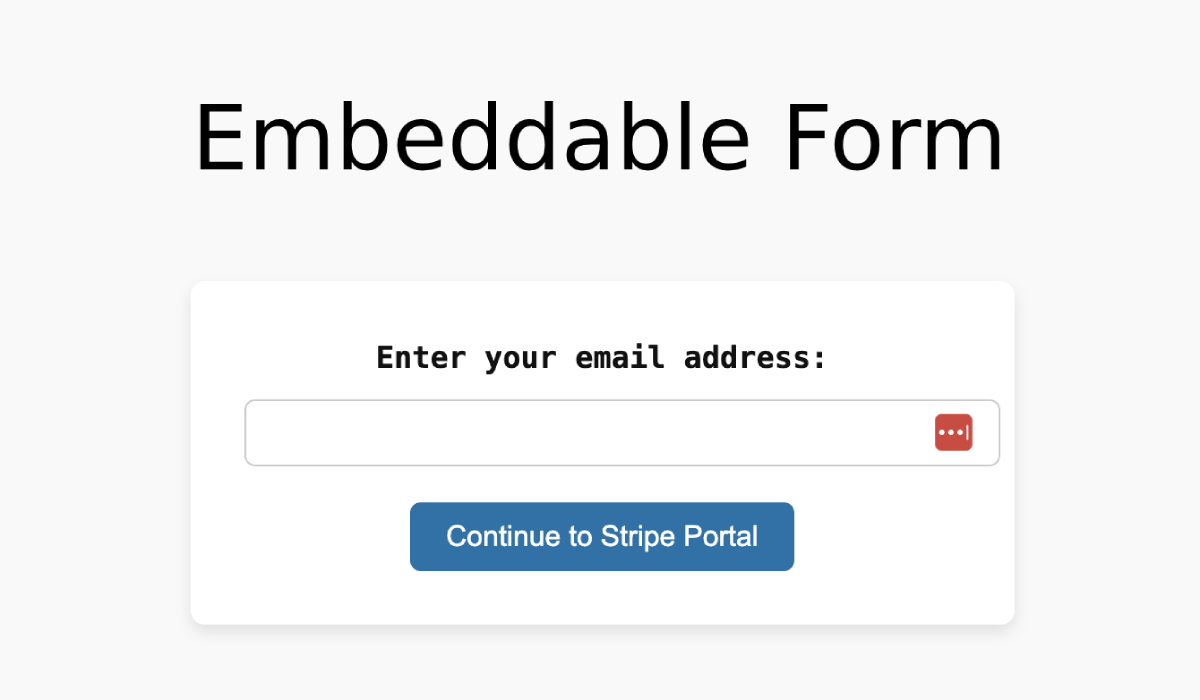
Login for Stripe Customer Portal solves that in 60 seconds: paste your Stripe Secret Key, save, and a passwordless magic-link form is live on your site. Customers enter their email, click the link in their inbox, and land directly inside Stripe’s hosted Customer Portal – already authenticated.
https://customerportalplugin.com/ – visit the website to see the plugin in action, browse the email template gallery, and view the PRO feature tour.
✅ FREE FEATURES
- 🔐 Stripe Customer Portal login – connect your Stripe account, customers manage billing themselves.
- ✉️ Magic-link email authentication – one-time link valid for 1 hour; no passwords to manage.
- 🧩 Shortcode embed – drop
[login-stripe-customer-portal]on any page; works multiple times on one page. - 💬 Inline confirmation – submissions stay on your page (new in 1.1.0 – no more blank
wp_diescreens). - 🔗 Custom URL slug – host the login at
yoursite.com/billing/,/account/, or any path you like. - ↩️ Custom return URL – pick where customers land after logging out of Stripe’s portal.
- 🎛️ Existing-customer gate – optionally restrict access to email addresses that already have a Stripe customer record.
- 🛡️ Security hardened – SHA-256 token hashing, per-email + per-IP rate limiting, CSRF nonces, no enumeration oracle.
- 🇪🇺 GDPR-compliant – exporter + eraser registered with WordPress Privacy Tools out of the box.
- 🧰 WP-CLI commands –
wp lscp purge-tokens / limiter-reset / send / config. - 🧹 Daily token cleanup – WP-Cron sweep removes expired magic-link tokens automatically.
- 🧑💻 Developer extension surface – 12+ filters and actions for customizing every stage of the flow.
📕 Documentation · 🆘 Support forum · 🌐 Website
🚀 UNLOCK MORE WITH PRO
Need branded emails, a styled login form, role automation on Stripe events, or to run multiple Stripe accounts from one site? Upgrade to PRO – every license tier includes every feature, including white-label.
👉 Compare PRO plans on the website
🎨 Branded magic-link emails
Replace the plain HTML email with one of 6 pre-built templates (Minimal, Card, Bold, Stripe-like, Newsletter, Card-with-logo). Pick a brand color, drop in your logo URL, customize the subject / heading / CTA / footer – every change is shown in a live preview iframe inside the admin BEFORE you save. No “send a test email” loop required.
💅 Login-form styler
Style the public login form to match your site – 6 form templates (Minimal, Card, Inline, Full-width, Centered, Branded), brand color, custom heading / subheading / button label / email placeholder, all with the same live-preview iframe.
🔗 WP user ↔ Stripe customer bridge
Pre-fill the magic-link form for logged-in WP users (one click instead of typing). On every successful redemption, link the Stripe customer id to the WP user as _lscp_stripe_customer_id user-meta – your other plugins and themes can read it. Optionally auto-create the WP user (with a configurable default role) the first time someone redeems.
🛒 WooCommerce / MemberPress / LearnDash integration
Adds a configurable “Manage Billing” button to:
- The WooCommerce My Account dashboard (classic and block-based templates).
- The MemberPress account home.
- The LearnDash profile page (
[ld_profile]).
One click sends the user to your branded portal login – pre-filled with their email if they’re logged in.
🪝 Stripe webhooks → WP role automation
PRO-only feature. The webhook REST endpoint, signature verification, and idempotency cache all ship in the PRO build. Without PRO, Stripe events sent to your site are not processed by this plugin – subscription state will not auto-sync to WP roles. If you only need the public login form + portal redirect, FREE is enough.
A REST endpoint (/wp-json/lscp/v1/webhook) verifies the Stripe Stripe-Signature header (HMAC-SHA256 + 5-minute timestamp tolerance, constant-time compare) and automates WordPress role changes on the events that matter:
customer.subscription.created/.updated→ assign your configured “active” role.customer.subscription.deleted→ remove the role (or assign a downgrade role).invoice.payment_failed→ assign your “past due” role.invoice.paid→ fire an extensible action (lscp_pro_webhook_invoice_paid).
7-day SHA-256-keyed idempotency cache means Stripe retries are safe – no double-firing.
🌐 Multi-Stripe-account routing
Run multiple Stripe accounts from one WordPress install. Each account gets its own URL slug (/billing-eu/, /billing-us/), API key, validate-existing toggle, redirect URL, and From email. Requests are routed transparently via WordPress’s pre_option_* filters – the FREE plugin code is unchanged.
🏷️ Agency white-label
Replace “Powered by Gaucho Plugins” with your own brand name across every admin string. Hide the upgrade prompts entirely. Included with every PRO tier – no need to buy the most expensive plan.
💌 Priority email support
PRO customers get a dedicated support inbox – typical reply within one business day.
💵 PRO licensing
Every PRO tier unlocks every PRO feature, white-label included. Tiers differ only in how many sites a license covers.
👉 Compare plans on the website
✅ PERFECT FOR
- SaaS founders using Stripe Billing who want customers to self-serve.
- Membership sites that need a branded billing portal.
- WooCommerce stores using Stripe Subscriptions (PRO adds the My Account button).
- MemberPress / LearnDash sites that want a one-click Manage Billing entry point.
- Digital agencies managing client portfolios with multiple Stripe accounts.
🤝 WORKS WITH
- Stripe Billing (subscriptions, invoices, customer portal) – required.
- WooCommerce – PRO integration adds the Manage Billing button to My Account.
- MemberPress – PRO integration adds the button to the account page.
- LearnDash – PRO integration adds the button to the profile page.
- Any WordPress theme – classic or block-based.
- Any caching plugin (the rewrite endpoint marks itself uncacheable).
- WP Mail SMTP, FluentSMTP, Brevo, SendGrid, Postmark, etc. (uses standard
wp_mail).
📚 RESOURCES
- Website: customerportalplugin.com
- Documentation: docs.customerportalplugin.com
- Pricing & PRO upgrade: customerportalplugin.com/pricing
- Changelog: customerportalplugin.com/changelog
- Free support: WordPress.org support forum
- PRO support: included with every PRO license
🧰 GAUCHO PLUGINS PORTFOLIO
- Payment Page – Stripe payment forms in under 60 seconds.
- Split Pay – Split WooCommerce payments across multiple connected Stripe accounts.
- Gyta Buyback – Trade-in / buyback for WooCommerce.
- China Payments – WeChat Pay + Alipay in WooCommerce.
- Speed in China / Blocked in China – China-region site diagnostics.
- Version Info – WP, PHP, MySQL, web-server versions in the admin dashboard.
External Services
This plugin connects to the following external services.
Stripe (api.stripe.com)
This plugin uses your Stripe Secret API key to authenticate customers and generate secure links to the Stripe Customer Portal. Customer email addresses are sent to Stripe when a user requests a login link. Stripe hosts the Customer Portal where customers manage billing information.
Freemius (api.freemius.com, freemius.com)
This plugin includes the Freemius SDK for license and update management. Data is sent to Freemius only when you opt in through the Freemius connect screen.
Installation
- Upload the plugin files to
/wp-content/plugins/or install through the WordPress plugins screen. - Activate via the Plugins screen.
- Navigate to Stripe Portal in the WordPress admin menu.
- Paste your Stripe Secret API key, pick a slug for the login page (e.g.
customer-portal), set a return URL, and save. - Visit
yourdomain.com/<your-slug>/to see the login form – or drop[login-stripe-customer-portal]on any page. - (Recommended) Go to Settings → Permalinks → Save once after changing the slug.
Full setup guide: docs.customerportalplugin.com
Frequently asked questions
What problem does this plugin solve?
Stripe’s hosted Customer Portal is great, but the URL to access it is unique per customer and not shareable. This plugin puts a clean public login page on your own domain so customers can enter their email and get an instant magic-link to their portal session – without needing a password, your support team, or a custom Stripe API integration.
Do I need PRO to use the plugin?
No. The free version on WordPress.org has everything you need to put a working magic-link Stripe portal login on your site: shortcode embed, custom URL slug, GDPR tools, rate limiting, SHA-256-hashed tokens, WP-CLI commands. PRO adds branding, integrations, webhook automation, and multi-account routing.
How do I get my Stripe Secret API key?
Log into your Stripe Dashboard → Developers → API keys. Copy the Secret Key (starts with sk_live_… for live mode or sk_test_… for test mode). Paste it into Stripe Portal → Settings.
Can I customize the login page styling?
Yes – two ways: Free: Add custom CSS targeting .lscp-portal-form. The form HTML is fully filterable via the lscp_form_template filter for advanced theming. PRO: Use the built-in form styler – 6 templates, brand color pickers, custom heading/button label, live preview in admin. No CSS required.
Can I brand the magic-link email?
Free: the email body is filterable via lscp_email_html_body (developer route). PRO: pick from 6 pre-built templates in the admin, set your brand color + logo + custom heading/CTA, see a live preview as you type.
Does the plugin replace WooCommerce / MemberPress / LearnDash billing?
No – it complements them. Your Stripe products, subscriptions, and billing logic stay in Stripe. With PRO, a “Manage Billing” button gets added to the WC / MP / LD account page so logged-in customers go to your branded portal login in one click.
How does the magic link login actually work?
Customer enters their email on your login form. Plugin (rate-limited) issues a single-use token, stores its SHA-256 hash as a 1-hour transient, and emails the customer a link. Customer clicks the link → token is verified, marked used, and the Stripe Customer Portal session is created. Customer is redirected to Stripe’s hosted portal – already authenticated. The token never appears in your database in cleartext. The link expires after one hour or after a single use, whichever comes first.
Can I run multiple Stripe accounts on one site?
Yes, with PRO. The Multi-Account tab lets you add as many Stripe accounts as your license allows, each with its own URL slug, API key, redirect URL, and from email. The free version is single-account.
Does the webhook listener handle Stripe retries safely?
Yes. PRO’s webhook endpoint dedupes by Stripe event.id with a 7-day SHA-256-keyed transient – a retried event returns 200 {"replayed": true} without re-firing your role automation rules.
Is the plugin GDPR compliant?
Yes. The free version registers a Privacy Tools exporter and eraser so site owners can satisfy data subject access and erasure requests via Tools → Export / Erase Personal Data.
Where can I find the changelog?
Recent changes are below. The full changelog (every release) is at customerportalplugin.com/changelog.
Where can I get support?
Free: WordPress.org support forum. PRO: priority email support is included with every PRO license.
Changelog
1.1.1
- Fixed: an invalid or already used magic link now shows a proper error page instead of a server error.
- Improved: the WordPress.org free download is generated again from the official build.
- Compatibility: Tested up to WordPress 7.1. Requires PHP 7.2 or newer. Updated Freemius SDK.
See changelog.txt for the full version history.
Screenshots




For developers
Is this your plugin? Show off the numbers.
Add a live badge to your site, docs or GitHub README. It updates on its own — no account needed.
Best Login for Stripe Customer Por… alternatives
All account plugins →




FAQ
Login for Stripe Customer Portal: quick answers
Straight answers, pulled from live WordPress.org data.
Live data from WordPress.org · checked Oct 6, 2026
Is Login for Stripe Customer Portal free?
Yes. Login for Stripe Customer Portal is free to download and use from the official WordPress.org plugin directory. The developer also sells premium add-ons or a Pro version with extra features.
Is Login for Stripe Customer Portal safe to use in 2026?
Login for Stripe Customer Portal is a solid plugin choice in 2026, with a few things worth checking first. It runs on 10+ sites, is rated 5/5 and was last updated 3 weeks ago, and scores 73/100 on our health check.
How many websites use Login for Stripe Customer Portal?
Login for Stripe Customer Portal is active on 10+ WordPress websites and has been downloaded 1,963 times since it launched in November 2024. It was downloaded 137 times in the last 30 days.
Does Login for Stripe Customer Portal work with WordPress 7.1?
Yes. The developer has tested Login for Stripe Customer Portal up to WordPress 7.1.2, the latest release. It requires WordPress 5.0 or newer.
What PHP version does Login for Stripe Customer Portal need?
Login for Stripe Customer Portal requires PHP 7.2 or higher. Most hosts run PHP 8.x today, so it works on any modern WordPress hosting.
When was Login for Stripe Customer Portal last updated?
The latest version, 1.1.1, was released on September 18, 2026 (3 weeks ago).
Who makes Login for Stripe Customer Portal?
Login for Stripe Customer Portal is developed and maintained by Brandon Ernst.
What are the best alternatives to Login for Stripe Customer Portal?
The most popular alternatives to Login for Stripe Customer Portal are Allow Multiple Accounts (9K+ installs), Disable User Login (6K+ installs) and UsersWP – ReCaptcha (3K+ installs).
Powered by PageForge
Want thousands of pages that rank like these? Build them in an afternoon.
This directory runs on the same engine as PageForge. Turn any spreadsheet, CSV or API into thousands of fast, SEO-ready WordPress pages — with schema, internal links and AI-written copy baked in.
- CSV, Google Sheets & API data sources
- AI content, schema & internal links per page
- Works with Elementor, Gutenberg, Yoast & Rank Math
- Free on WordPress.org — no credit card


