


Light Views Counter – Fast, Scalable View Counter for High-Traffic Sites
Lightweight and fast post view counter with smart tracking, built for high-traffic sites and large post databases.

Use with caution
Light Views Counter works, but test it on a staging site before relying on it in 2026. It runs on 3K+ sites, is rated 5/5 and was last updated 6 months ago, and scores 61/100 on our health check.
- Momentum — downloads up 33.4% vs the previous 30 days
- Very few reviews so far
How does it stack up?
Side-by-side on installs, updates, ratings & support


Daily downloads
Download spikes usually follow a new release — each site that auto-updates counts as a download.
Rankings
Where Light Views Counter stands todayWordPress.org search rankings
Live position in the plugin search, top 100| Keyword | Position |
|---|---|
| Counter | #2 |
| popular posts | #28 |
| statistics | #65 |
| tracking | >100 |
| views | #5 |
Version adoption
Share of active sites per release.
Rating breakdown
★★★★★★★★★★ 5 from 1 reviews
About Light Views Counter
From the official readme · v1.3.0Description
Light Views Counter is a professional, high-performance WordPress plugin that tracks post and page views using intelligent scroll detection technology.
Designed for bloggers, news sites, magazines, and content creators, this plugin helps you understand what content truly resonates with your audience.
Built for speed and scalability, Light Views Counter is optimized for heavy-traffic websites and large post databases. It delivers reliable view tracking without adding query overhead or slowing down your site’s performance.
🎯 Why Choose Light Views Counter?
Tracking
* Scroll Detection Technology – Only counts views when visitors actually read your content (configurable scroll threshold)
* Bot Protection – Automatically filters out search engine crawlers and automated traffic
* Duplicate Prevention – Prevent counting the same user multiple times within a configurable time window
* Short Content Smart Detection – Intelligently handles posts that fit in viewport without requiring scroll
Lightning Fast Performance
* Zero Impact on Page Speed – Asynchronous REST API ensures counting happens in the background
* Built-in Caching – Transient-based caching system reduces database load
* sendBeacon API – Fire-and-forget counting for maximum performance (enabled by default)
Easy to Use
* Automatic Tracking – Works immediately after activation, no configuration required
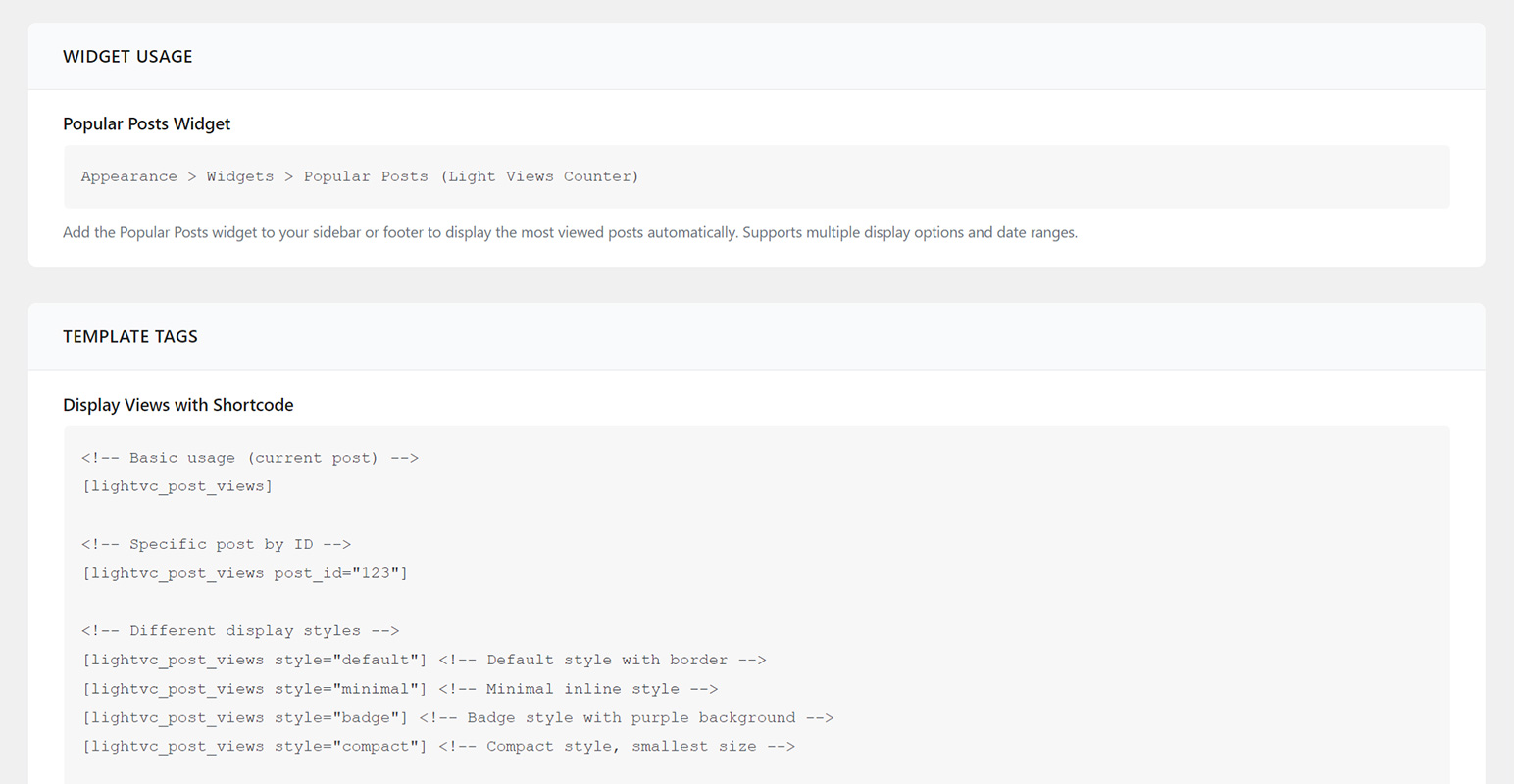
* Flexible Shortcode – Display views anywhere with [lightvc_post_views] shortcode
* Popular Posts Widgets – Ready-to-use WordPress and Elementor widgets
* Auto-Display Option – Automatically show view counts at the end of posts
Developer Friendly
* Clean Public API – Simple functions: lightvc_get_post_views(), lightvc_get_popular_posts()
* WP_Query Integration – Sort posts by views: 'orderby' => 'lightvc_views'
* Hooks & Filters – Customize everything: lightvc_post_views_count, lightvc_views_html, lightvc_exclude_user
* REST API Endpoints – HTTP access for external integrations
Enterprise Ready
* High Traffic Optimized – Tested on sites with millions of views per day
* Cache Plugin Compatible – Works perfectly with WP Rocket, W3 Total Cache, LiteSpeed Cache, Cloudflare
* GDPR Compliant – No personal data collection, no cookies, privacy-focused
Perfect For
- Bloggers – See which posts your readers love most
- News Websites – Track trending stories and breaking news engagement
- Magazine Sites – Identify top-performing content and popular topics
- Content Marketers – Measure content performance and reader engagement
- E-commerce – Track product page views and customer interest
- Publishers – Understand content performance across categories
Key Features
Smart Counting System
* Scroll-based view detection
* Automatic short content detection and handling
* Configurable time window to prevent duplicate counts
* Admin user exclusion (don’t count your own views)
* Bot and crawler filtering
Widgets & Integration
* Standard WordPress widget for popular posts
* Display options: thumbnails, view counts, dates
* Fully customizable layouts
* Works in any widget area
Analytics & Reporting
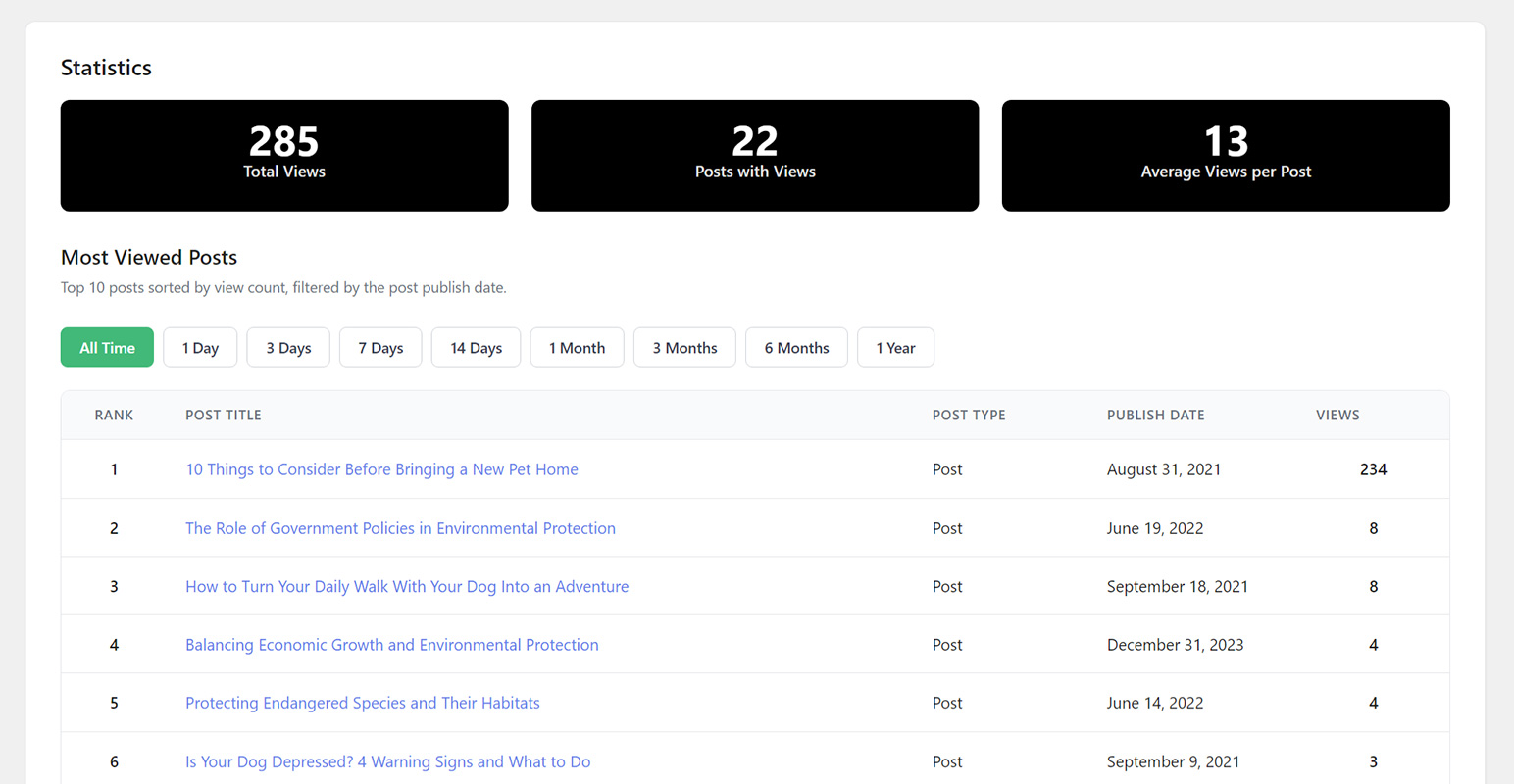
* Admin dashboard with statistics
* Total views across all posts
* Most viewed posts list
* Average views per post
* Views column in posts list (sortable)
Performance Features
* Custom database table with optimized indexes
* Transient caching system
* Object cache support (Redis/Memcached)
* sendBeacon API for fire-and-forget requests
* Conditional script loading
* No external dependencies
Developer Tools
* WordPress hooks and filters
* view data REST API endpoints
* WP_Query orderby support
* Compatible with any theme
💻 For Developers
Light Views Counter provides a complete developer toolkit:
Basic Functions
Get post views:
Get popular posts:
10,
‘date_range’ => 7 // Last 7 days
) );
?>
WP_Query Integration
Sort posts by views:
‘post’,
‘orderby’ => ‘lightvc_views’,
‘order’ => ‘DESC’,
‘posts_per_page’ => 10
) );
?>
Hooks & Filters
Modify view count:
add_filter( ‘lightvc_post_views_count’, ‘my_custom_views’, 10, 2 );
Customize HTML output:
add_filter( ‘lightvc_views_html’, ‘my_custom_html’, 10, 3 );
Exclude specific users:
add_filter( ‘lightvc_exclude_user’, ‘my_user_exclusion’ );
Track view events:
add_action( ‘lightvc_views_counted’, ‘my_view_tracker’ );
REST API Endpoints
GET /wp-json/lightvc/v1/views/{post_id}– Get view count for a post
📱 Shortcode Usage
Display views anywhere using the flexible shortcode:
Basic usage:
[lightvc_post_views]
With custom style:
[lightvc_post_views style=”badge”]
With custom label:
[lightvc_post_views label=”Total Reads”]
For specific post:
[lightvc_post_views post_id=”123″]
All options:
[lightvc_post_views post_id=”123″ style=”badge” label=”Views” icon=”👁️” show_label=”true”]
Available styles: default, minimal, badge, compact
Translations & Compatibility
Language Support
* English (default)
* Translation ready with .pot file included
Theme Compatibility
* Works with any WordPress theme
* Deep integration with Foxiz News theme
Plugin Compatibility
* Cache Plugins: WP Rocket, W3 Total Cache, WP Super Cache, LiteSpeed Cache, Autoptimize
* CDN Services: Cloudflare, StackPath, KeyCDN, BunnyCDN
🔒 Privacy & Security
GDPR Compliant
* No personal data collection
* No cookies used
* No cross-site tracking
* localStorage is client-side only
* Complete transparency
Security Features
* Rate limiting to prevent abuse
* Admin capability checks
🔗 Useful Links
Installation
Automatic Installation (Recommended)
- Log in to your WordPress admin dashboard
- Navigate to Plugins > Add New
- Search for “Light Views Counter”
- Click Install Now button
- Click Activate button
- Done! The plugin starts tracking views immediately
Manual Installation
- Download the plugin ZIP file
- Log in to your WordPress admin dashboard
- Navigate to Plugins > Add New > Upload Plugin
- Click Choose File and select the downloaded ZIP file
- Click Install Now
- Click Activate Plugin
Manual Upload via FTP
- Download and extract the plugin ZIP file
- Upload the
light-views-counterfolder to/wp-content/plugins/directory via FTP - Log in to WordPress admin dashboard
- Navigate to Plugins page
- Find Light Views Counter and click Activate
Configuration (Optional)
After activation, you can customize settings:
- Navigate to Settings > Light Views Counter
- With Foxiz Theme: Navigate to Foxiz Admin > Light Views Counter
The plugin features a modern admin interface with AJAX auto-save (settings save automatically), toast notifications, and organized sections.
Available Settings:
Tracking Settings:
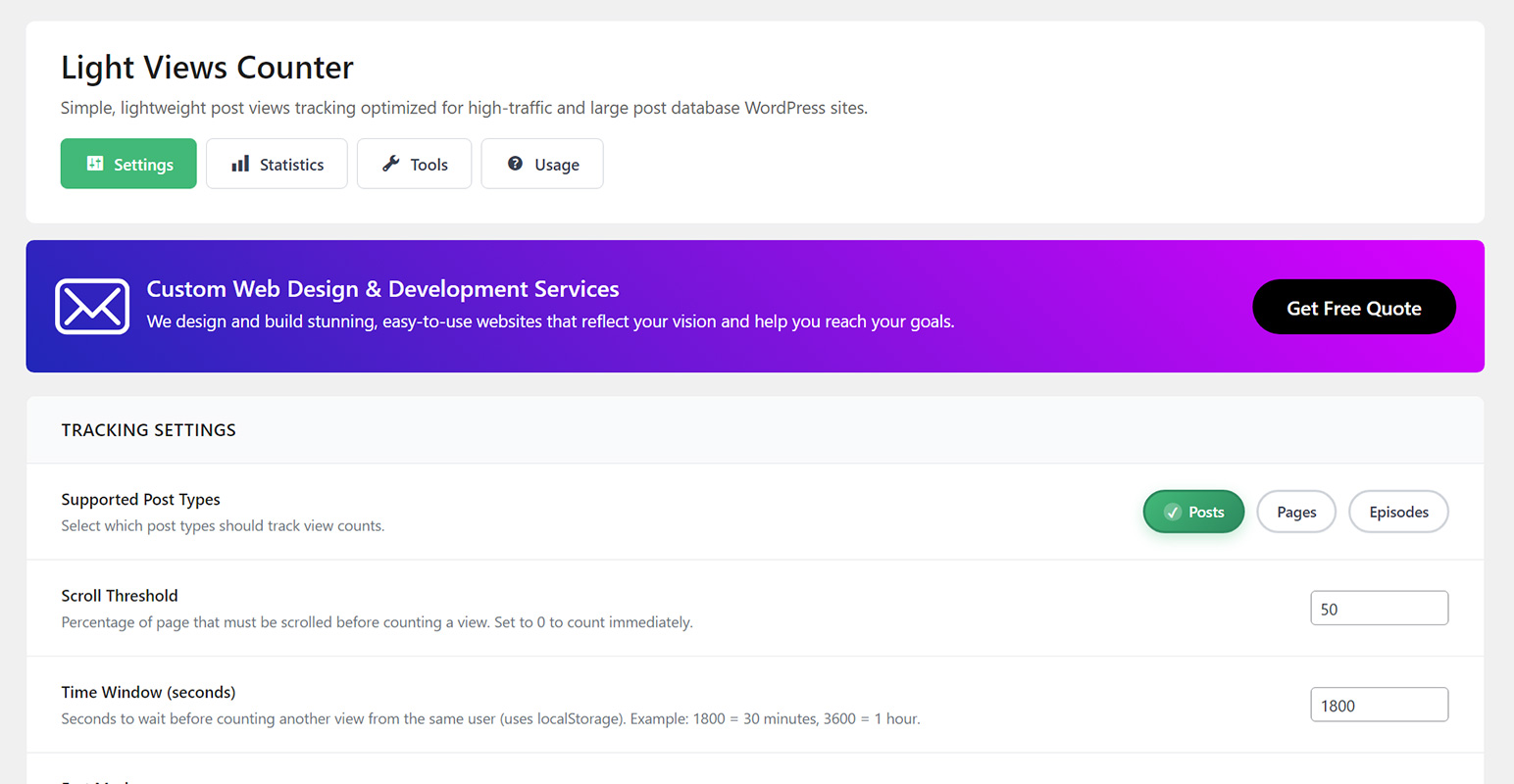
* Scroll Threshold (default: 50%) – How far users must scroll before counting a view
* Time Window (default: 1800 seconds / 30 minutes) – Prevents duplicate counts from same user
* Supported Post Types (default: Posts) – Select which post types to track (Posts, Pages, Custom Types)
* Fast Mode (default: Enabled) – Uses sendBeacon API for maximum performance
Performance Settings:
* Enable Caching (default: Enabled) – Cache view counts for better performance
* Cache Duration (default: 300 seconds / 5 minutes) – How long to cache data
* Query Method (default: Subquery) – Choose Subquery (<100k posts) or JOIN (100k+ posts) for orderby queries
Display Settings:
* Show Views on Content (default: Disabled) – Auto-display view count at end of posts
API Settings:
* Enable GET Endpoint (default: Disabled) – Allow public REST API access to view counts
Getting Started
- Verify Tracking – Visit any post on your site, scroll down, then check the admin dashboard statistics
- Add Widgets – Go to Appearance > Widgets and add “Popular Posts (Light Views Counter)”
- View Statistics – Check the Views column in your Posts list (admin area)
That’s it! Your site is now tracking post views intelligently.
Changelog
1.3.0
- Improved: Targeted cache clearing instead of full flush for better performance
- Improved: Static caching for plugin options to reduce database queries
- Compatibility: Tested with WordPress 7.0
1.2.0
- Added: Delete Data on Uninstall setting
- Fixed: Scroll Threshold and Time Window now accept 0 value
- Fixed: Time Window unit calculation (seconds, not minutes)
- Fixed: Supported Post Types setting now properly enforced
- Improved: Consistent default values across PHP and JavaScript
1.1.0
- Security Enhancements
1.0.0
Initial Release
Screenshots
For developers
Is this your plugin? Show off the numbers.
Add a live badge to your site, docs or GitHub README. It updates on its own — no account needed.
Best Light Views Counter alternatives
All Counter plugins →





FAQ
Light Views Counter: quick answers
Straight answers, pulled from live WordPress.org data.
Source: WordPress.org
Is Light Views Counter free?
Yes. Light Views Counter is free to download and use from the official WordPress.org plugin directory.
Is Light Views Counter safe to use in 2026?
Light Views Counter works, but test it on a staging site before relying on it in 2026. It runs on 3K+ sites, is rated 5/5 and was last updated 6 months ago, and scores 61/100 on our health check.
How many websites use Light Views Counter?
Light Views Counter is active on 3K+ WordPress websites and has been downloaded 14,184 times since it launched in November 2025. It was downloaded 1,303 times in the last 30 days.
Does Light Views Counter work with WordPress 7.1?
Light Views Counter is officially tested up to WordPress 7.0.9, while the latest release is 7.1.5. It may still work, but try it on a staging site first.
What PHP version does Light Views Counter need?
Light Views Counter requires PHP 7.4 or higher. Most hosts run PHP 8.x today, so it works on any modern WordPress hosting.
When was Light Views Counter last updated?
The latest version, 1.3.0, was released on May 22, 2026 (6 months ago).
Who makes Light Views Counter?
Light Views Counter is developed and maintained by ThemeRuby.
What are the best alternatives to Light Views Counter?
The most popular alternatives to Light Views Counter are Post Views Counter (100K+ installs), WP-PostViews (90K+ installs) and Simple Download Monitor (20K+ installs).
Powered by PageForge
One template and a spreadsheet. A real page for every search.
PageForge turns each row of a CSV into a WordPress page with its own title, URL, SEO fields and schema, built on the layout you already designed. Free on WordPress.org.
- CSV and XLSX, plus Google Sheets on Professional and Enterprise
- Its own title, URL, SEO fields and schema for every page
- Works with the block editor, Elementor, Divi and Avada
- Free on WordPress.org, no credit card