



Animate Any Block – Scroll Animations & Motion Effects for Gutenberg
Add AOS (Animate On Scroll) effects to any WordPress block. Easily configure scroll-triggered animations directly from the block editor sidebar.

Use with caution
Animate Any Block works, but test it on a staging site before relying on it in 2026. It runs on 60+ sites and was last updated 3 months ago, and scores 53/100 on our health check.
- Small user base (60+ active installs)
- Very few reviews so far
How does it stack up?
Side-by-side on installs, updates, ratings & support



Daily downloads
Download spikes usually follow a new release — each site that auto-updates counts as a download.
Rankings
Where Animate Any Block stands todayWordPress.org search rankings
Live position in the plugin search, top 100| Keyword | Position |
|---|---|
| animation | >100 |
| animations | >100 |
| block-editor | >100 |
| effects | >100 |
| gutenberg | >100 |
Version adoption
Share of active sites per release.
About Animate Any Block
From the official readme · v1.1Description
LBC Animate Any Block brings the wildly popular AOS – Animate On Scroll library straight into the WordPress Block Editor (Gutenberg).
Bring your pages to life without writing a single line of code. Simply select any block, toggle the animation switch, and choose from dozens of professional scroll-triggered effects.
Core Features
- Universal Block Support: Works flawlessly with all Core blocks (Paragraph, Image, Group, Cover) AND third-party plugins (WooCommerce, Kadence, GenerateBlocks, ACF, etc).
- 28 Animation Types: Choose from elegant Fades, Slides, Flips, and Zooms.
- Granular Control: Tweak animation Duration, Delay, Easing, and Offset on a per-block basis.
- Advanced Triggers: Configure Anchor Placement, CSS Anchor selectors, and specify whether animations should play once or mirror on scroll up.
- FSE Compatible: Fully compatible with WordPress Full Site Editing (FSE) themes.
- Performance Focused: No jQuery required. The AOS library is bundled locally (only ~14 KB minified) with zero external CDN requests.
- Clean DOM: Animations are strictly opt-in. Unaffected blocks remain completely untouched with zero added bloat.
How it works
- Select any block in the page or post editor.
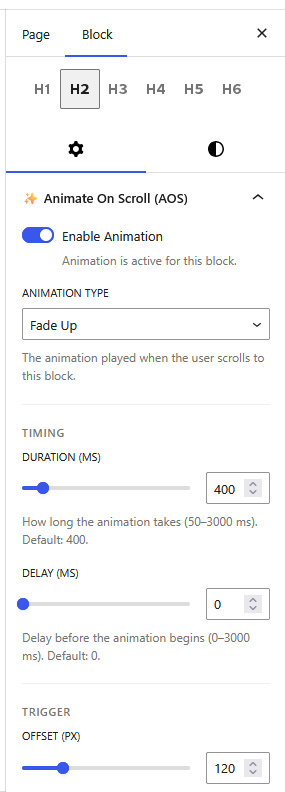
- Open the “✨ Animate On Scroll (AOS)” panel in the block sidebar.
- Toggle Enable Animation and customize your effect.
- Save the page and scroll down on the front end to watch it trigger!
Speed up WordPress Website
Take your website’s performance to the next level with Leverage Browser Caching Pro! Unlock lightning-fast load times, improve your Core Web Vitals, and dominate search engine rankings with our premium optimization suite.
- 🚀 Ultimate Caching & Compression: Take full control with customizable cache lifespans, GZIP compression, Keep-Alive connections, and optimal Cache-Control headers to instantly serve pages to your visitors.
- ⚡ Deep Code Minification: Shrink your CSS, JavaScript, and HTML footprints. Delay non-critical JS execution to skyrocket your Google PageSpeed Insights scores.
- 🖼️ Smart Media & Font Delivery: Drastically reduce initial load weight with intelligent lazy loading for images and iframes, plus seamless Google Fonts optimization.
- 🛠️ Database Cleanup & Site Health: Keep your backend running smoothly with automated database optimization, DNS prefetching, heartbeat control, and enhanced security by disabling XML-RPC.
- 🛒 WooCommerce Optimized: Fully compatible with WooCommerce—speed up your online store without breaking checkout flows or dynamic cart data.
- ⚙️ Intuitive Dashboard: Manage all your advanced performance tweaks effortlessly through a clean, user-friendly settings panel.
- 🛡️ Priority Support & Updates: Enjoy peace of mind with fast, expert assistance from our dedicated team, plus continuous feature updates.
Upgrade to Leverage Browser Caching Pro!
Credits & Acknowledgements
- AOS (Animate On Scroll): The core animation engine of this plugin is powered by the fantastic AOS Library, developed by Michał Sajnóg and available under the MIT License.
Open Source & GitHub
We believe in open-source development! If you’re a developer looking to contribute, report an issue, or simply explore the code, visit our official repository:
LBC Animate Any Block on GitHub
Installation
Option 1: Install via WordPress Dashboard (Recommended)
- Navigate to Dashboard → Plugins → Add New.
- Search for LBC Animate Any Block.
- Click Install Now, and then click Activate.
Option 2: Upload via WordPress Dashboard
- Download the plugin ZIP from the official repository: https://wordpress.org/plugins/lbc-animate-any-block/
- Go to Dashboard → Plugins → Add New → Upload Plugin.
- Select the downloaded ZIP file and click Install Now.
- Click Activate Plugin.
Option 3: Upload via FTP
- Download the plugin ZIP file.
- Extract the ZIP to reveal the
lbc-animate-any-blockfolder. - Upload the entire folder to the
/wp-content/plugins/directory on your server. - Go to Dashboard → Plugins, locate the plugin, and click Activate.
Changelog
Initial release.
1.1
- Fix plugin review
- Avail both min and non-min
- Fix readme: installation section
- GPL license ready check
- Provide a public source code: added in readme GitHub Repo
1.0
- Initial release.
- 28 AOS animation types & 20 easing functions.
- Per-block duration, delay, offset, once, mirror, and anchor controls.
- AOS 2.3.4 bundled locally.
Screenshots
For developers
Is this your plugin? Show off the numbers.
Add a live badge to your site, docs or GitHub README. It updates on its own — no account needed.
Best Animate Any Block alternatives
All animation plugins →





FAQ
Animate Any Block: quick answers
Straight answers, pulled from live WordPress.org data.
Live data from WordPress.org · checked Nov 16, 2026
Is Animate Any Block free?
Yes. Animate Any Block is free to download and use from the official WordPress.org plugin directory.
Is Animate Any Block safe to use in 2026?
Animate Any Block works, but test it on a staging site before relying on it in 2026. It runs on 60+ sites and was last updated 3 months ago, and scores 53/100 on our health check.
How many websites use Animate Any Block?
Animate Any Block is active on 60+ WordPress websites and has been downloaded 498 times since it launched in July 2026. It was downloaded 133 times in the last 30 days.
Does Animate Any Block work with WordPress 7.1?
Animate Any Block is officially tested up to WordPress 7.0.8, while the latest release is 7.1.4. It may still work, but try it on a staging site first.
What PHP version does Animate Any Block need?
Animate Any Block requires PHP 7.4 or higher. Most hosts run PHP 8.x today, so it works on any modern WordPress hosting.
When was Animate Any Block last updated?
The latest version, 1.1, was released on August 6, 2026 (3 months ago).
Who makes Animate Any Block?
Animate Any Block is developed and maintained by Rinku Y.
What are the best alternatives to Animate Any Block?
The most popular alternatives to Animate Any Block are Blocks Animation: CSS Anima… (90K+ installs), Greenshift (70K+ installs) and UiCore Animate (40K+ installs).
Powered by PageForge
Want thousands of pages that rank like these? Build them in an afternoon.
This directory runs on the same engine as PageForge. Turn any spreadsheet, CSV or API into thousands of fast, SEO-ready WordPress pages — with schema, internal links and AI-written copy baked in.
- CSV, Google Sheets & API data sources
- AI content, schema & internal links per page
- Works with Elementor, Gutenberg, Yoast & Rank Math
- Free on WordPress.org — no credit card


