



Block Animations, Motion & Scroll Effects – Ghost Kit
Animate WordPress blocks with reveal, scroll, mouse and loop effects, set in the block settings.

Solid choice
Block Animations, Motion & Scro… is a solid plugin choice in 2026, with a few things worth checking first. It runs on 7K+ sites, is rated 4.6/5 and was last updated 2 weeks ago, and scores 76/100 on our health check.
- Loved by users — 4.6/5 from 46 reviews
- Actively developed — last update 2 weeks ago
- Tested with the latest WordPress (7.1)
- Momentum — downloads up 430.2% vs the previous 30 days
How does it stack up?
Side-by-side on installs, updates, ratings & support



Daily downloads
Download spikes usually follow a new release — each site that auto-updates counts as a download.
Rankings
Where Block Animations, Motion &… stands todayWordPress.org search rankings
Live position in the plugin search, top 100| Keyword | Position |
|---|---|
| animation | #15 |
| blocks | >100 |
| effects | #9 |
| gutenberg blocks | >100 |
| scroll effects | #3 |
Version adoption
Share of active sites per release.
Rating breakdown
★★★★★★★★★★ 4.6 from 46 reviews
About Block Animations, Motion & Scroll Effec…
From the official readme · v3.7.2Description
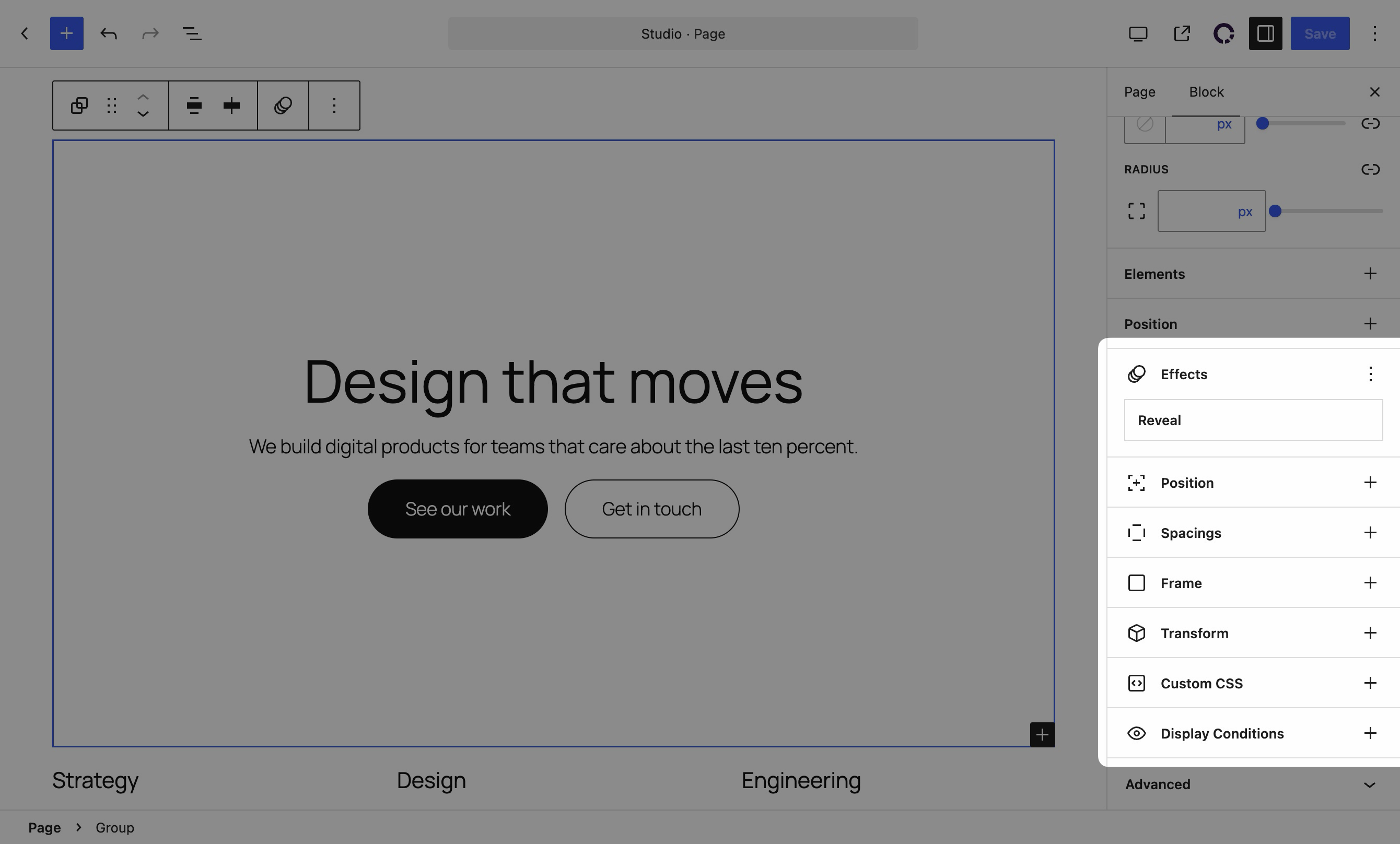
Ghost Kit adds motion to the blocks you already use. Select a block, open Effects in the block settings, and choose what happens when it comes into view, when the page scrolls past it, and when the pointer moves across it.
See Live Demo | Documentation | GitHub
WordPress ships a good set of blocks now. What it still does not ship is motion, and the usual way to get motion is to rebuild the page in a page builder. Ghost Kit is the smaller move. Keep the blocks you have and add the animation on top.
🎬 Reveal animations
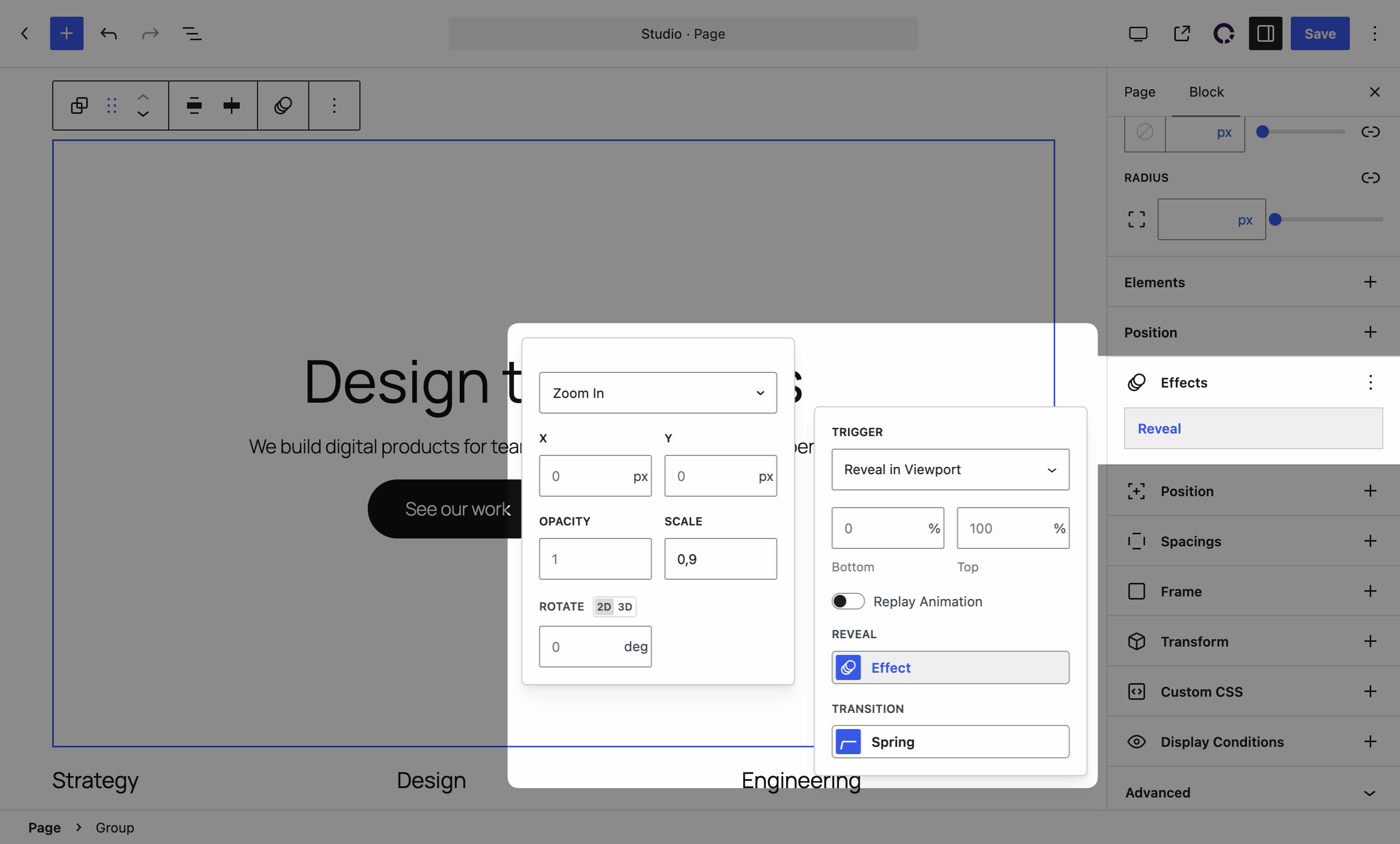
Start from a preset, Fade In, Zoom In or one of the three directional zooms, then adjust the offset, opacity, scale and rotation the block animates from. The transition is a spring rather than a fixed easing curve, so the movement settles instead of stopping dead. Reveal is in the free plugin.
📜 Scroll effects
Tie a block’s position, scale, rotation and opacity to how far the page has scrolled, rather than to a single trigger. This is how parallax sections and scroll-driven reveals are built.
🖱️ Mouse effects
Move, tilt, scale or rotate a block as the pointer travels over it. Hover and press are separate states, so a card can lift under the cursor and sink when it is clicked.
🔁 Loop animations
Run an animation continuously. Rotating badges, floating shapes and drifting backgrounds are all loops with different transforms.
♿ Reduced motion is respected
Every effect checks prefers-reduced-motion: reduce before it runs, so a visitor who turned animations off in their operating system gets a still page. There is nothing to configure.
🧩 It works on the blocks you already have
Effects appear on every core WordPress block, from Paragraph, Heading and Image to Cover, Group, Columns, Buttons and Query Loop. They appear on every Ghost Kit block as well. A block from another plugin can opt in by declaring supports.ghostkit in its own block.json.
You do not have to rebuild anything. Install the plugin, select a block that is already on the page, and the controls are there.
⚙️ Extensions
The same place carries the controls a block usually needs and WordPress leaves out.
-
Position
Switch a block to absolute or fixed and offset it, per screen size. -
Spacings
Padding and margin per screen size, on any block. -
Frame
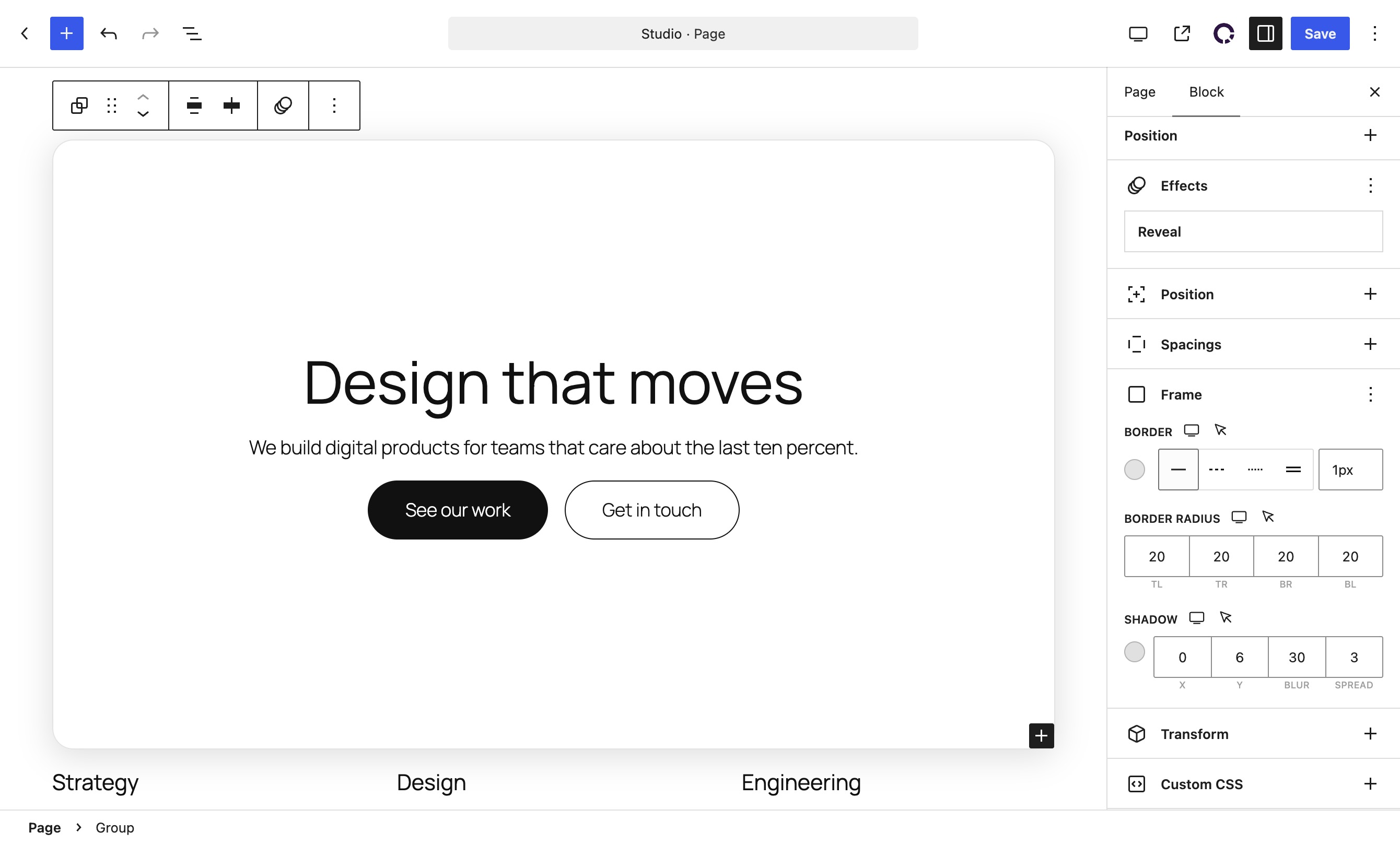
Borders, corner radius and shadows, with a separate hover state. -
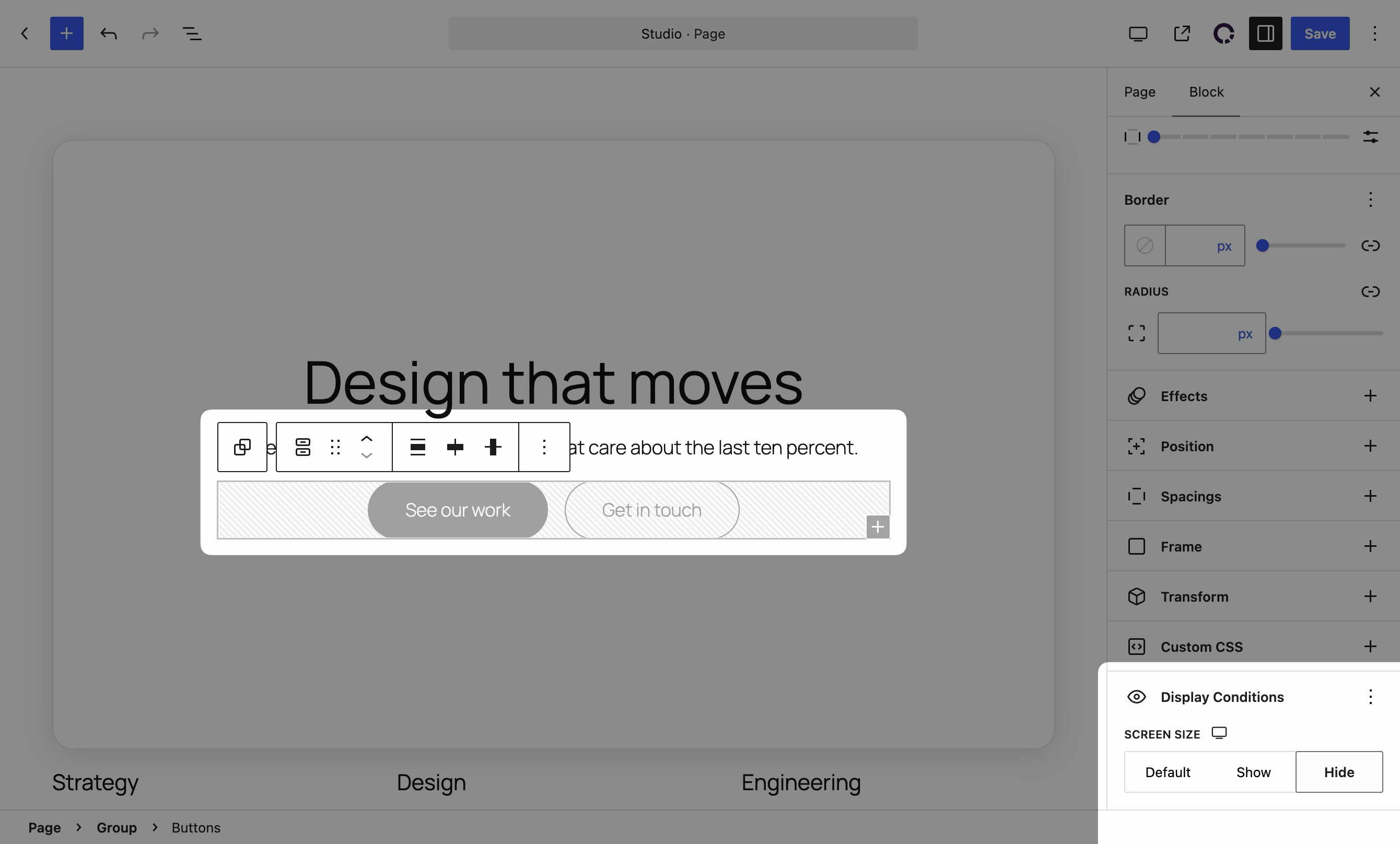
Display
Hide a block on the screen sizes where it does not belong. -
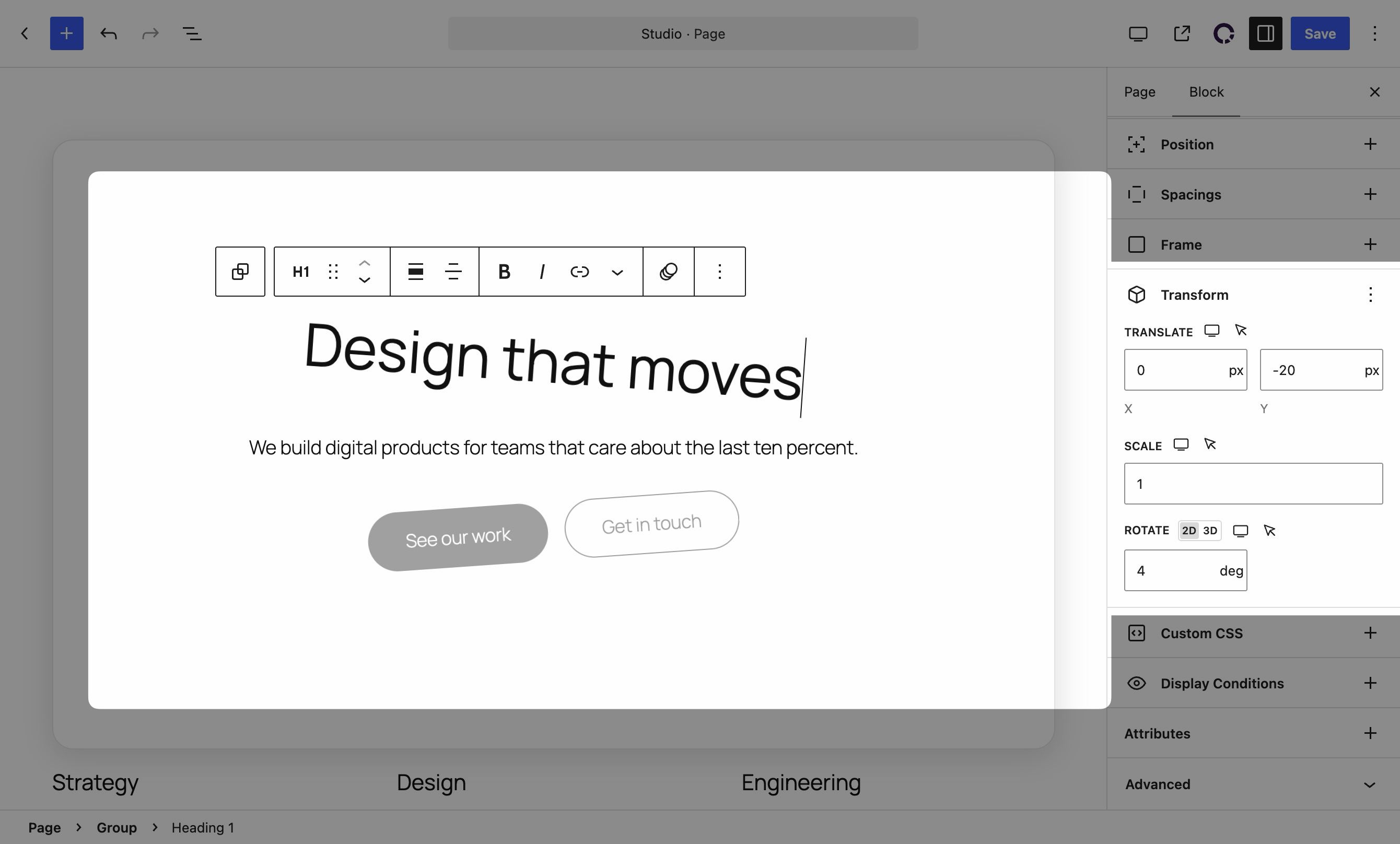
Transform
Translate, scale, rotate and skew, including a hover state. -
Custom CSS & JavaScript
Per page or site wide, edited in the admin with syntax highlighting.
🧱 Blocks
Ghost Kit also ships blocks for the things core still leaves out. Every one of them carries the Effects panel.
- Advanced Columns, a twelve column responsive grid with visual size and order controls
- Accordion, Tabs, Toggle Content
- Alert, Icon, Number Box, Progress, Countdown
- Button, Circle Button, Divider, Shape Divider
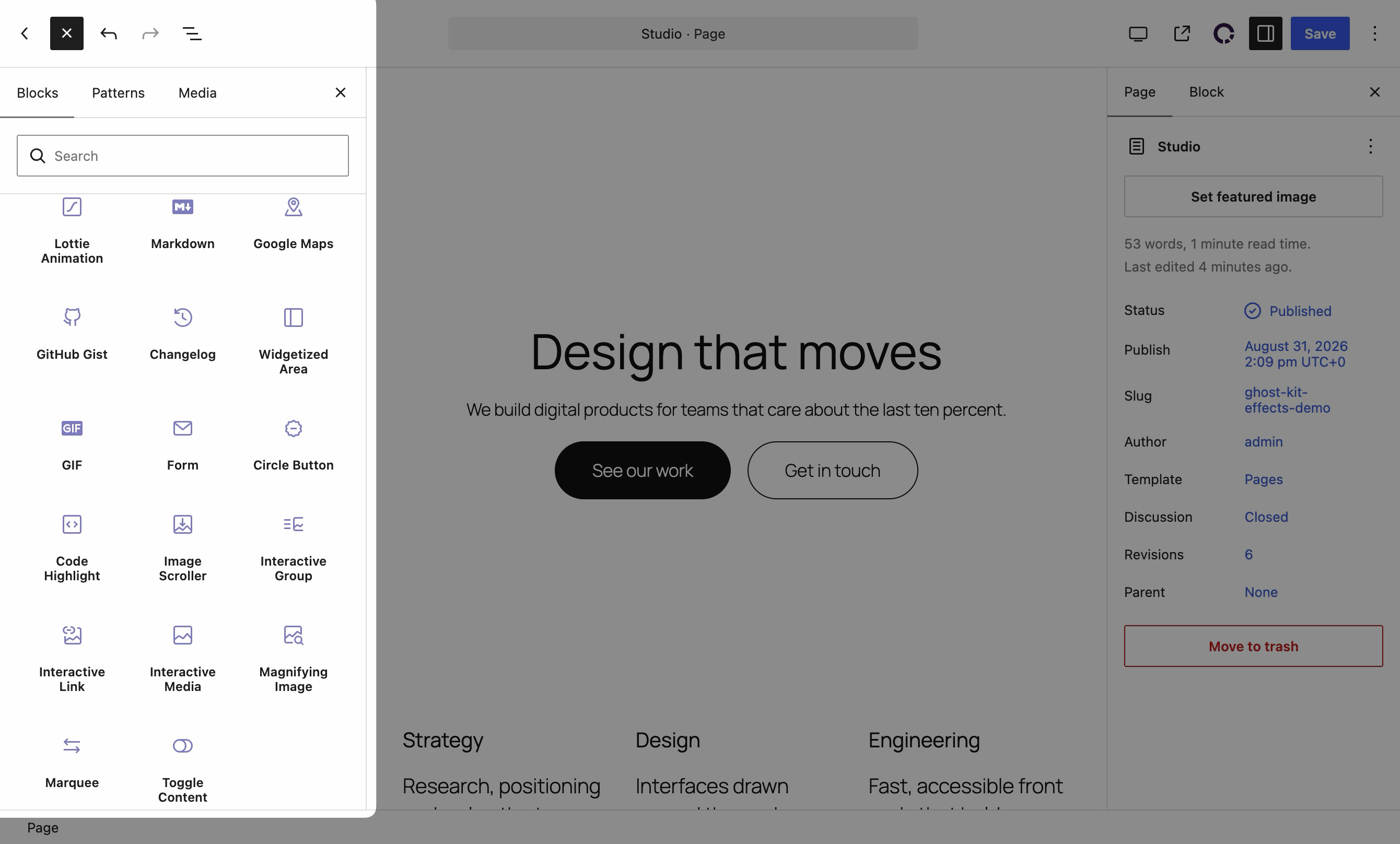
- Video, GIF, Image Compare, Image Scroller, Magnifying Image, Carousel, Marquee
- Contact Form, Google Maps, Pricing Table, Testimonial, Table of Contents
- Code Highlight, GitHub Gist, Changelog, Interactive Links
✍️ Content formatting
Formats that apply to a text selection rather than to a whole block. See them on the formats demo page.
Animated Text, Badges, Lorem Ipsum Generator, Spoiler, Stroke, Tooltip, Uppercase
🔥 Ghost Kit Pro
The free plugin covers reveal animations, the layout extensions and the block set. Ghost Kit Pro adds the rest of the motion system and pays for the free version to keep being maintained and supported.
- Scroll effects, mouse effects and loop animations
- 3D rotation, custom viewport and replay for reveal animations
- CSS transform and transition per block, with a hover state
- Custom block attributes and custom responsive breakpoints
- Marquee, Code Highlight, Interactive Links, Magnifying Image, Image Scroller, Circle Button and Toggle Content blocks
- Animated Text, Stroke, Spoiler and Tooltip formats
- More icon packs, Adobe Fonts and custom font files
- Gradients for buttons, backgrounds, icons and badges
- Extra shapes for the Shape Divider block
🏳️ Multilingual
Ghost Kit adds a layer of WPML compatibility. Every block is translation ready. Read the multilingual guide.
Installation
Automatic installation
In the WordPress dashboard go to Plugins, click Add New, and search for Ghost Kit. Click Install Now and then Activate. Effects appear in the block settings straight away.
Manual installation
Download the plugin, upload the folder to wp-content/plugins over FTP, and activate it from the Plugins screen. The WordPress documentation has the longer version.
Frequently asked questions
Which blocks can I animate?
Every core WordPress block and every Ghost Kit block. That covers Paragraph, Heading, Image, Cover, Group, Columns, Buttons, Query Loop and the rest of the core set. A block from another plugin joins in once it declares supports.ghostkit in its block.json.
Do I need a page builder?
No. Ghost Kit works inside the standard block editor and the Site Editor. Pages you have already built stay as they are, and the Effects panel appears on the blocks that are on them.
Do the animations work on mobile?
Yes. Reveal animations run on touch devices as the visitor scrolls. Mouse effects need a pointer, so they stay idle on touch screens rather than misfiring.
Will animations slow down my site?
The effects are CSS transforms and opacity changes, which the browser composites on the GPU. Ghost Kit loads the effects script only on pages that actually use an effect.
What happens for visitors who turned animations off?
Ghost Kit checks prefers-reduced-motion: reduce and skips the animation for them, leaving the block in its final state. This is on by default and there is no setting to remember.
How do I add a parallax effect?
Select the block, open Effects, and use Scroll to tie its vertical offset to the scroll position. Scroll effects are part of Ghost Kit Pro.
Can I reuse an effect on another block?
Yes. The block toolbar has a Ghost Kit menu with Copy extensions and Paste extensions, so an effect you tuned on one block can be pasted onto the next one instead of set up again.
Does Ghost Kit have documentation?
Yes, at ghostkit.io/docs. It covers every block, every extension, and the filters and events for developers.
Is Ghost Kit translation ready?
Yes, and it carries WPML compatibility for block content.
Changelog
3.7.2 – Sep 14, 2026
- fixed a critical error on sites where another plugin ships a different version of the same CSS parser, which showed up as “Declaration of Sabberworm\CSS\Value\Size::render() must be compatible” once the custom breakpoints styles were rebuilt
- changed custom breakpoints to be applied to the shipped stylesheets directly instead of compiling styles on the site, so the change takes effect on the next page load
- fixed RTL sites loading the left-to-right stylesheets for blocks, the editor and the settings pages
- Pro:
- fixed one failed plugin update on the Plugins screen leaving the remaining queued updates waiting for a page reload
- fixed RTL sites loading the left-to-right stylesheets of the Pro blocks on the frontend and in the editor
3.7.1 – Aug 31, 2026
- changed Ghost Kit to stay active next to Ghost Kit Pro instead of being deactivated
- Pro:
- fixed effects sometimes not running, leaving blocks with a reveal effect hidden on the page
3.7.0 – Aug 26, 2026
- added WordPress 7.1 compatibility
- added a Privacy-Enhanced Mode toggle to the Video block, shown once the entered URL is a YouTube one
- changed YouTube embeds to use the regular YouTube host by default, because the privacy-enhanced host asks a share of visitors to sign in before it plays anything
- fixed block icons and the custom color palette not reaching the blocks they style in the editor
- fixed the typography preview not applying in the editor
- fixed PHP warnings logged by the Table of Contents and Widgetized Area blocks
- raised the minimum PHP requirement to 7.4
- Pro:
- fixed tooltips never appearing in the editor
- fixed the update notice still offering a version already installed
- added a capability check to the license activation request
3.6.1 – Jun 21, 2026
- fixed stored XSS from contributors via Customizer post meta (
ghostkit_customizer_options) - hardened Customizer post meta with permission checks, sanitization, and frontend filtering
- fixed Gutenberg post saves failing when unchanged protected post meta was included in the REST request
- allow local typography editing for users with
edit_poston the post; global typography editing requiresedit_theme_options
3.6.0 – Jun 5, 2026
- added WordPress 7.0 compatibility
- improved frontend assets detection — centralize block.json handles, extensions, style variants, and effects markers in
GhostKit_Assets_Detector - added
gkt_icons_detected_packsfilter to enqueue only icon packs used on the page - added editor filters for responsive preview sizes (
mediaSizes,previewWidth) - fixed GitHub Gist block stylesheet lookup and gist-simple script registration in the editor
- fixed Gist and Lottie block assets loading in the block editor
- fixed Table of Contents REST request params sanitization
- fixed URL Picker inspector layout overrides scope in the editor
- fixed Pricing Table Item features list editing (replaced deprecated RichText multiline)
- fixed quote to testimonial transform preserving content
- fixed editor compatibility with stable Gutenberg controls and removed deprecations
- use WordPress admin theme CSS variables for accent UI colors
- minor changes and fixes
- Pro:
- fixed custom Breakpoints styles not loading from uploads on the frontend
- fixed Breakpoints settings validation when editing values in settings
- synced editor responsive preview with saved Pro breakpoint widths
3.5.1 – Mar 4, 2026
- fixed frontend general styles being enqueued in the editor, which caused style conflicts (e.g., issues with the
Displayextension in the editor)
Screenshots
For developers
Is this your plugin? Show off the numbers.
Add a live badge to your site, docs or GitHub README. It updates on its own — no account needed.
Best Block Animations, Motion & Sc… alternatives
All animation plugins →





FAQ
Block Animations, Motion & Scroll E…: quick answers
Straight answers, pulled from live WordPress.org data.
Live data from WordPress.org · checked Sep 26, 2026
Is Block Animations, Motion & Scro… free?
Yes. Block Animations, Motion & Scro… is free to download and use from the official WordPress.org plugin directory. The developer also sells premium add-ons or a Pro version with extra features.
Is Block Animations, Motion & Scro… safe to use in 2026?
Block Animations, Motion & Scro… is a solid plugin choice in 2026, with a few things worth checking first. It runs on 7K+ sites, is rated 4.6/5 and was last updated 2 weeks ago, and scores 76/100 on our health check.
How many websites use Block Animations, Motion & Scro…?
Block Animations, Motion & Scro… is active on 7K+ WordPress websites and has been downloaded 283,607 times since it launched in July 2018. It was downloaded 10,206 times in the last 30 days.
Does Block Animations, Motion & Scro… work with WordPress 7.1?
Yes. The developer has tested Block Animations, Motion & Scro… up to WordPress 7.1.2, the latest release. It requires WordPress 6.6 or newer.
What PHP version does Block Animations, Motion & Scro… need?
Block Animations, Motion & Scro… requires PHP 7.4 or higher. Most hosts run PHP 8.x today, so it works on any modern WordPress hosting.
When was Block Animations, Motion & Scro… last updated?
The latest version, 3.7.2, was released on September 14, 2026 (2 weeks ago).
Who makes Block Animations, Motion & Scro…?
Block Animations, Motion & Scro… is developed and maintained by nK.
What are the best alternatives to Block Animations, Motion & Scro…?
The most popular alternatives to Block Animations, Motion & Scro… are Blocks Animation: CSS Anima… (90K+ installs), Greenshift (70K+ installs) and UiCore Animate (40K+ installs).
Powered by PageForge
Want thousands of pages that rank like these? Build them in an afternoon.
This directory runs on the same engine as PageForge. Turn any spreadsheet, CSV or API into thousands of fast, SEO-ready WordPress pages — with schema, internal links and AI-written copy baked in.
- CSV, Google Sheets & API data sources
- AI content, schema & internal links per page
- Works with Elementor, Gutenberg, Yoast & Rank Math
- Free on WordPress.org — no credit card


