



LandexHub Consent – Cookie Banner, GDPR & Google Consent Mode v2
Cookie banner for GDPR with Google Consent Mode v2, script gating, site diagnostics and consent logging. No cloud service required.

Solid choice
LandexHub Consent is a solid plugin choice in 2026, with a few things worth checking first. It runs on 20+ sites and was last updated 6 days ago, and scores 67/100 on our health check.
- Actively developed — last update 6 days ago
- Tested with the latest WordPress (7.1)
- Small user base (20+ active installs)
- Very few reviews so far
How does it stack up?
Side-by-side on installs, updates, ratings & support



Daily downloads
Download spikes usually follow a new release — each site that auto-updates counts as a download.
Rankings
Where LandexHub Consent stands todayWordPress.org search rankings
Live position in the plugin search, top 100| Keyword | Position |
|---|---|
| consent mode | #86 |
| cookie banner | >100 |
| cookie consent | >100 |
| cookies | >100 |
| GDPR | >100 |
Version adoption
Share of active sites per release.
About LandexHub Consent
From the official readme · v0.9.6Description
LandexHub Consent is a lightweight, configurable cookie consent banner (cookie bar) for WordPress. It sets the Google Consent Mode v2 default before the Google tags it loads, lets you gate third-party scripts behind consent, checks your front page for sources that load before the visitor decides, and records a privacy-minimal proof of consent — all stored in your own WordPress. No visitor IP address is stored in the consent log, and the plugin sends no telemetry and no data of its own anywhere. Google tags you choose to configure talk to Google, as described under External services.
Installation and first setup, step by step:
Features
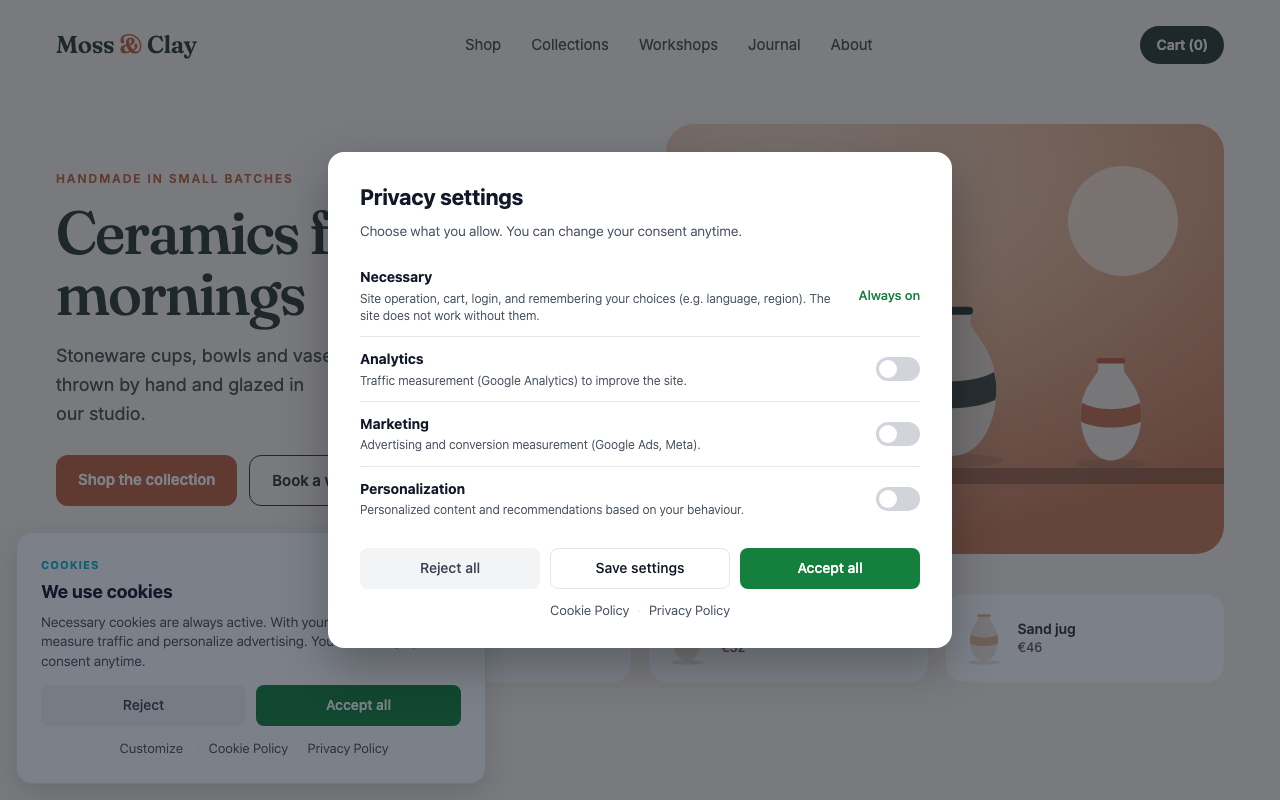
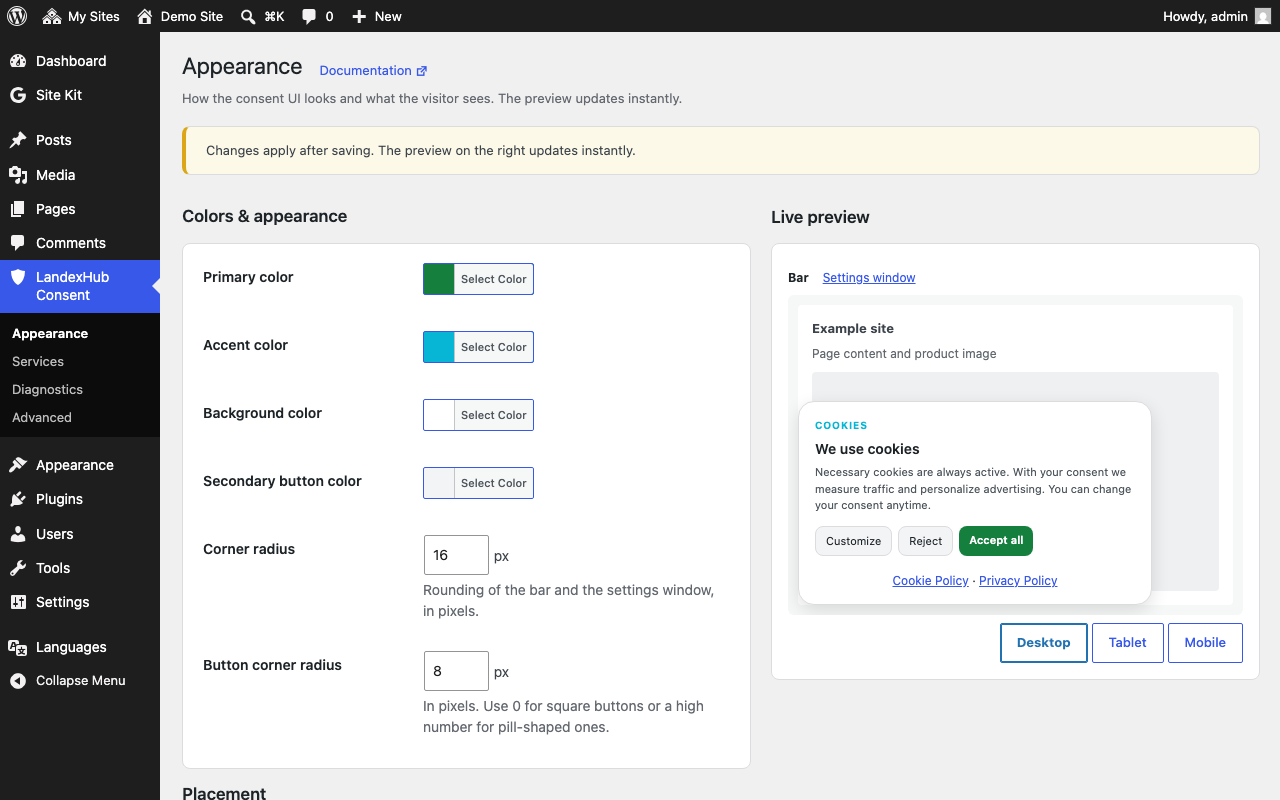
- Consent banner and preferences modal, responsive and accessible, with a live preview in the admin.
- Four categories — necessary, analytics, marketing, personalization — mapped to Google Consent Mode v2 signals.
- Google Consent Mode v2, advanced by default: measurement runs cookieless before consent and fully after. The
denieddefault is printed early in<head>, before the GTM container or gtag.js set in this plugin. Switch to basic if the gtag.js measurement ID set in this plugin should not load at all until the visitor agrees. A GTM container always loads; what each tag inside it does before consent is set in GTM. - Optional GTM / gtag.js loading — fill in your container or measurement ID (G-, AW- or DC-) and the plugin loads it right after its consent default.
- Script gating — mark any script (inline or external) with
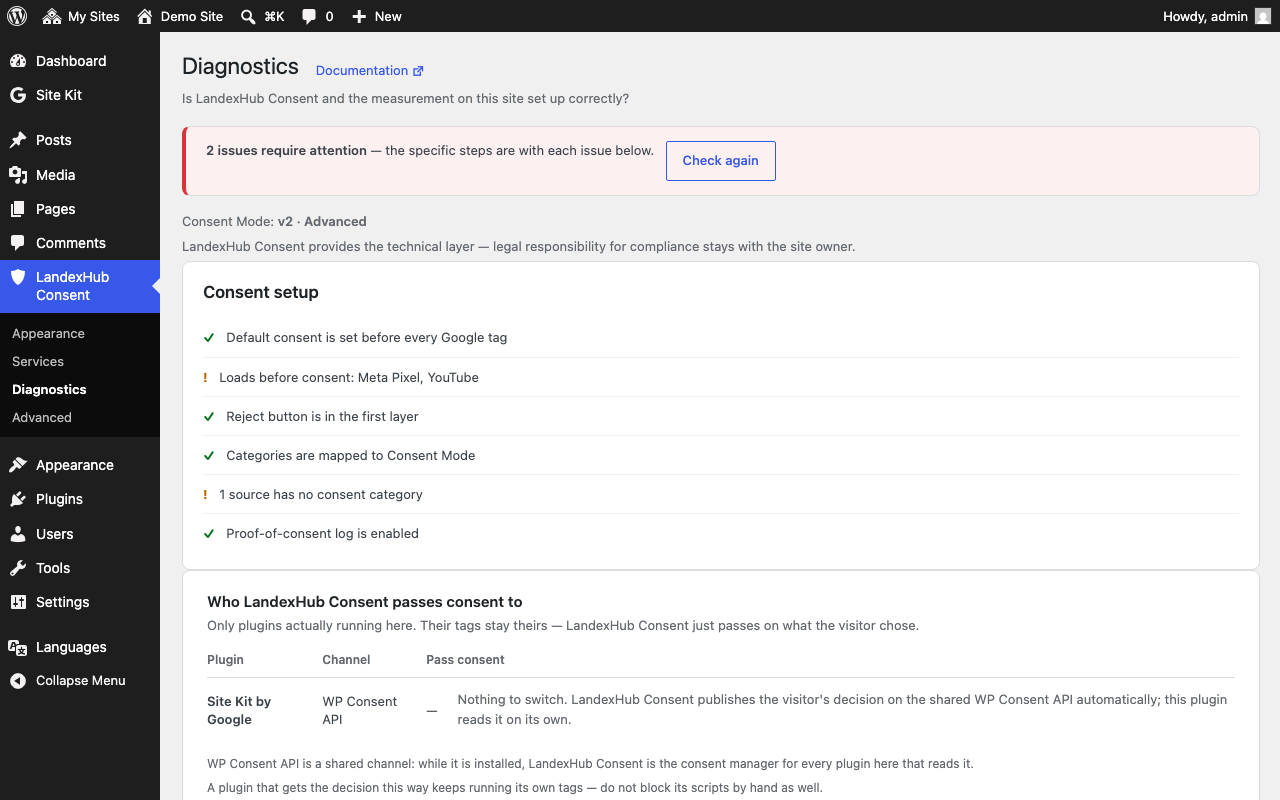
type="text/plain"anddata-consent-category(an external one keeps its address indata-src), or gate an enqueued script with theLandexHub_Consent::block_handle()PHP helper. The plugin runs it once the visitor consents to that category. - Site check — reads the HTML of your front page and lists the third-party scripts, embedded frames and known tracking pixels it recognises there, an estimate of who adds each one and whether consent governs it. Requests that scripts make later, other pages and the tags inside a GTM container are not checked. Each source that loads before consent comes with step-by-step instructions to gate it by hand.
- Google tag order check — warns when a tag is configured before the consent default (it would measure without consent) or when the same container is loaded twice.
- Services list — keep a list of the services your site uses with their consent category, and show it to visitors on your cookie policy page with the
[landexhub_consent_services]shortcode or the “Services & cookies overview” block. A bundled catalog of 66 known services adds names, cookies and privacy policy links. Codes the site needs to work, such as payments, spam protection or pickup point maps, are listed apart as functional codes: they run without consent and are not reported as a problem. - Consent integrations — publishes the visitor’s decision through the WP Consent API standard for plugins that read it, and sends Google Consent Mode v2 signals that Google tags added by other plugins follow. Tested with Site Kit by Google (its own Consent Mode on or off) and MonsterInsights.
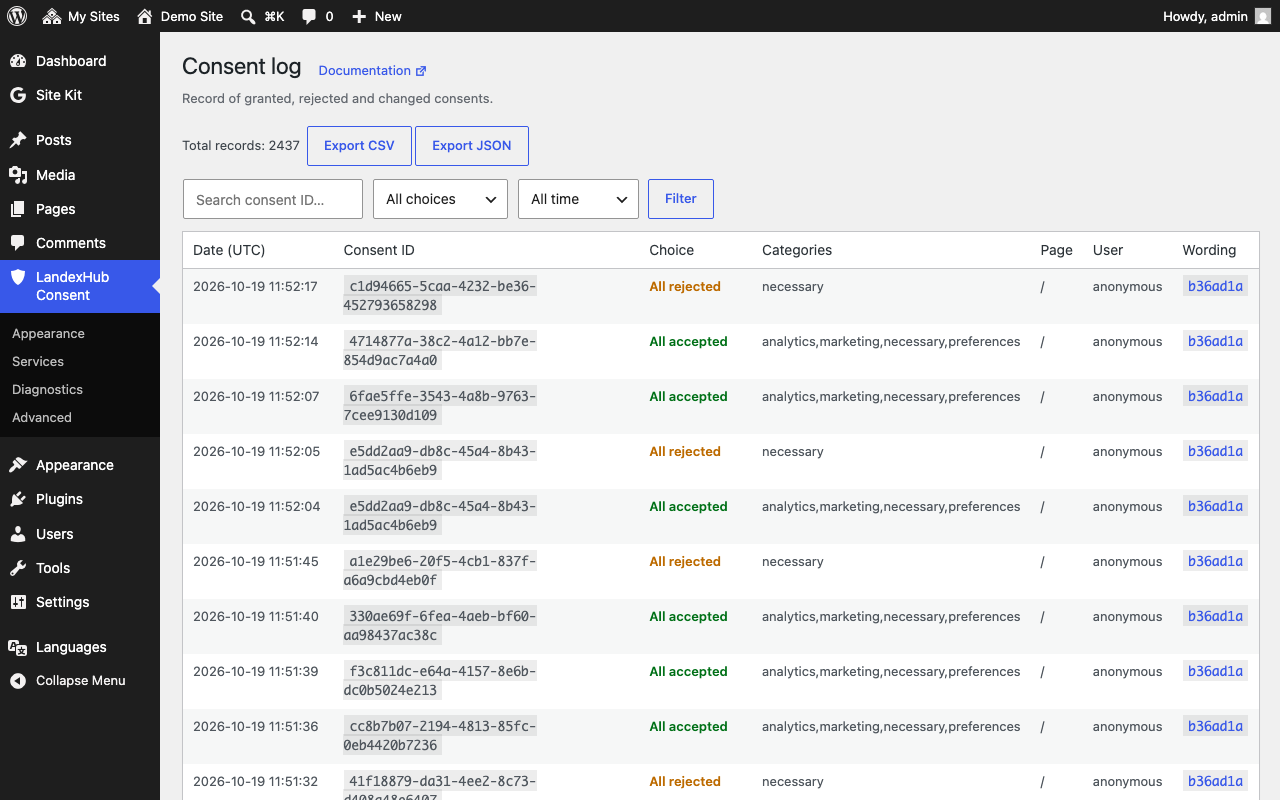
- Proof-of-consent log in your own database (no IP address in the records), with filters, CSV/JSON export and 30-day statistics. Each record carries a fingerprint of the bar texts its page was shown with; when that fingerprint is not known, the texts current at the time are recorded and the record is marked so. You choose how long records are kept (3 months to 5 years, or until you delete them).
- WordPress privacy tools integration (export/erase) and automatic cleanup of old records.
- Three-step setup on first run, settings import/export, consent reset and a diagnostic report.
- Admin translated into Czech, Slovak, Polish and German.
- Multisite supported.
Privacy
The plugin reports nothing about your site or your visitors to anyone. The consent log is written to a table in your own site, without IP addresses. Scripts you configure yourself (GTM, gtag.js) are loaded from Google.
Plugin author: LandexHub — terms, privacy policy. LandexHub also makes a separate, optional add-on; this plugin does not need it.
Source code
Nothing in this plugin is minified, compressed or obfuscated. The JavaScript in assets/js/ is compiled from TypeScript, and those TypeScript sources ship with the plugin in the src/ folder together with the compiler configuration and build instructions (src/README.md). One command with the TypeScript compiler reproduces the shipped files byte for byte.
External services
This plugin does not call home and sends no telemetry. Depending on what you configure, it talks to the following services:
Google Tag Manager / Google tag (gtag.js) — optional, disabled by default. If you enter your own GTM container ID or gtag.js measurement ID in the plugin settings, the plugin embeds the standard Google snippet, and every visitor’s browser then loads the tag from www.googletagmanager.com (requests gtm.js or gtag/js). This is required for the measurement you configured to work. The plugin prints the Google Consent Mode v2 denied default before these tags, unless a developer turns that default off with the landexhub_consent_emit_consent_default filter. With a GTM container the plugin also prints Google’s <noscript> frame right after the opening <body> tag (in themes that call wp_body_open()), as in Google’s installation instructions: visitors without JavaScript then load ns.html from www.googletagmanager.com. Without JavaScript there is no consent bar and no Consent Mode default, so that request carries no consent state. What Google receives with those requests (IP address, user agent, page URL, consent state signals) is described in Google’s documentation: Google Terms of Service, Google Privacy Policy. If you also enter your own tag domain (for a server-side Google Tag Manager container or the Google tag gateway), the same requests go to that address instead of www.googletagmanager.com: to a server you or your provider run, which may pass data on to Google as you configure it. If you leave the ID empty, this plugin loads nothing from Google or from that address.
Your own site (loopback) — the site check fetches your own homepage over HTTP (a loopback request to your own server) to scan the HTML for third-party scripts and the Google tag order. No external service is involved.
There are no other remote requests: no telemetry, no fonts, no CDNs. Links to the LandexHub website open in a new tab and send nothing by themselves.
Installation
- Upload the plugin to
/wp-content/plugins/landexhub-consent, or install it from Plugins → Add New. - Activate the plugin.
- The three-step setup (appearance → measurement → site check) opens on first run; everything then lives under four tabs — Appearance, Services, Diagnostics, Advanced.
- Gate third-party scripts with
type="text/plain"anddata-consent-category— the Services page shows what was found and how to gate each source (guide: https://docs.landexhub.com/consent/blocking-scripts).
Changelog
Google tags can load from your own tag domain (server-side GTM, Google tag gateway).
0.9.6
- Own tag domain for server-side GTM and the Google tag gateway: GTM, gtag.js and the noscript frame can load from your own address (e.g. https://analytics.example.com) instead of www.googletagmanager.com. The site check recognizes tags on that address, and GTM snippets that load the container from another domain.
- Consent integrations: PixelYourSite is now listed as a plugin LandexHub Consent cannot pass consent to (it does not read WP Consent API), with a link to gating its scripts by hand.
0.9.5
- Faster pages: the banner script loads deferred, so it no longer blocks rendering. The small inline snippet before GTM now also sends a returning visitor’s stored choice, so Google tags still get it before they start.
- Developer API revision 2.1 (the hooks added in 0.9.4) and a filter to load the banner script blocking as before.
0.9.4
- Services shows where each source comes from (a plugin, the theme, a template file, page content) and a clearer service detail with what to do.
- Codes the site needs to work (payments, spam protection, pickup points) are listed apart as functional codes and are not reported as a problem.
- Larger catalog (66 services) and a more precise site check, including Google tags that start before the consent default.
- Google URL passthrough is now an opt-in setting; before, it was always on.
- New hooks for developers.
0.9.3
- GTM triggers on the consent event fire wherever the container is printed in the page.
- Google tags follow Google’s installation snippets, including the GTM
<noscript>frame. - Services page fixes: “Verify the edit” returns to the service, no duplicate rows, necessary services are not reported as problems.
0.9.2
- Consent log retention is a setting: 3 months up to 5 years, or until you delete the records.
- The “Designed by LandexHub” credit link is off by default.
- Services list: save any source from the site check with a consent category for your cookie policy page.
- Stricter validation of settings and imports; the WordPress privacy tools export and erase a logged-in visitor’s consent records.
- Multisite and WP Consent API fixes, and a more precise site check.
0.9.1
Initial release.
Screenshots



For developers
Is this your plugin? Show off the numbers.
Add a live badge to your site, docs or GitHub README. It updates on its own — no account needed.
Best LandexHub Consent alternatives
All consent mode plugins →





FAQ
LandexHub Consent: quick answers
Straight answers, pulled from live WordPress.org data.
Live data from WordPress.org · checked Nov 17, 2026
Is LandexHub Consent free?
Yes. LandexHub Consent is free to download and use from the official WordPress.org plugin directory.
Is LandexHub Consent safe to use in 2026?
LandexHub Consent is a solid plugin choice in 2026, with a few things worth checking first. It runs on 20+ sites and was last updated 6 days ago, and scores 67/100 on our health check.
How many websites use LandexHub Consent?
LandexHub Consent is active on 20+ WordPress websites and has been downloaded 474 times since it launched in October 2026. It was downloaded 477 times in the last 30 days.
Does LandexHub Consent work with WordPress 7.1?
Yes. The developer has tested LandexHub Consent up to WordPress 7.1.4, the latest release. It requires WordPress 6.3 or newer.
What PHP version does LandexHub Consent need?
LandexHub Consent requires PHP 7.4 or higher. Most hosts run PHP 8.x today, so it works on any modern WordPress hosting.
When was LandexHub Consent last updated?
The latest version, 0.9.6, was released on November 11, 2026 (6 days ago).
Who makes LandexHub Consent?
LandexHub Consent is developed and maintained by landexhub.
What are the best alternatives to LandexHub Consent?
The most popular alternatives to LandexHub Consent are tarteaucitron.io (10K+ installs), Cookie Choices (for EU Cook… (9K+ installs) and GAinWP Google Analytics Int… (7K+ installs).
Powered by PageForge
Want thousands of pages that rank like these? Build them in an afternoon.
This directory runs on the same engine as PageForge. Turn any spreadsheet, CSV or API into thousands of fast, SEO-ready WordPress pages — with schema, internal links and AI-written copy baked in.
- CSV, Google Sheets & API data sources
- AI content, schema & internal links per page
- Works with Elementor, Gutenberg, Yoast & Rank Math
- Free on WordPress.org — no credit card


