



Tracking and Consent Manager – WP Full Picture
All-in-one tracking and consent management. Use Google Analytics, Google Ads, Meta Pixel, and more - without breaking privacy laws.

Safe pick
Yes — Tracking and Consent Manager is a safe, well-maintained plugin to use in 2026. It runs on 3K+ sites, is rated 5/5 and was last updated 4 days ago, and scores 92/100 on our health check.
- Loved by users — 5/5 from 21 reviews
- Actively developed — last update 4 days ago
- Tested with the latest WordPress (7.1)
- Momentum — downloads up 176.2% vs the previous 30 days
How does it stack up?
Side-by-side on installs, updates, ratings & support



Daily downloads
Download spikes usually follow a new release — each site that auto-updates counts as a download.
Rankings
Where Tracking and Consent Manager stands todayWordPress.org search rankings
Live position in the plugin search, top 100| Keyword | Position |
|---|---|
| analytics | #81 |
| consent mode | #29 |
| GDPR | >100 |
| google ads | #62 |
| gtm | #10 |
Version adoption
Share of active sites per release.
Rating breakdown
★★★★★★★★★★ 5 from 21 reviews
About Tracking and Consent Manager
From the official readme · v10.1.2.1Description
WP Full Picture is a tracking manager for WordPress and WooCommerce.
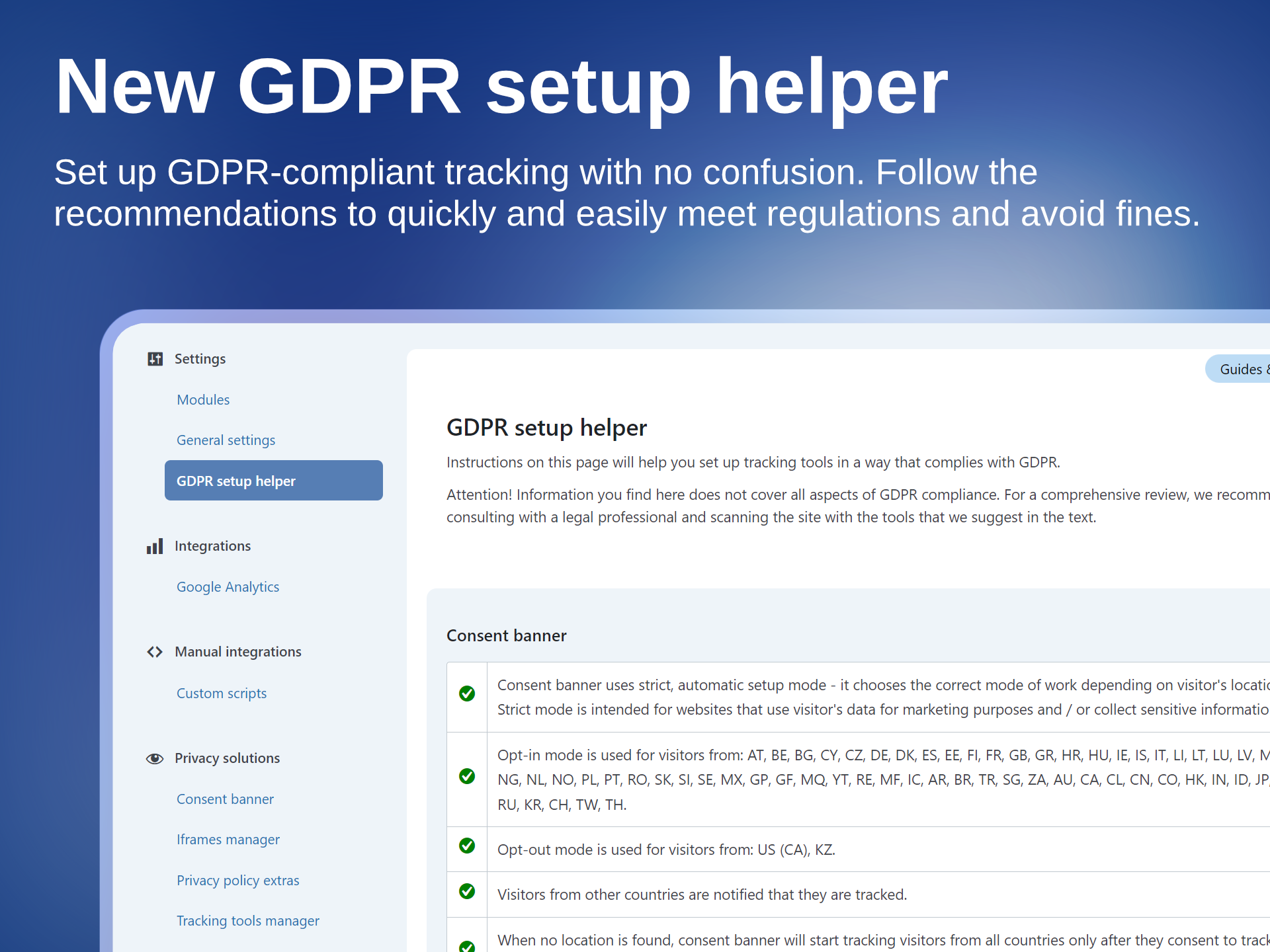
It lets you install tracking tools, display a GDPR-compliant consent banner and block tracking until visitors give their consent.
WP Full Picture replaces:
- Tracking plugins, like PixelYourSite, Pixel Manager for WooCommerce or Google Site Kit,
- GTM plugins, like GTM4WP,
- Consent Management Platforms, like CookieBot, CookieYes, Complianz and others.
🎁 WHAT’S INCLUDED
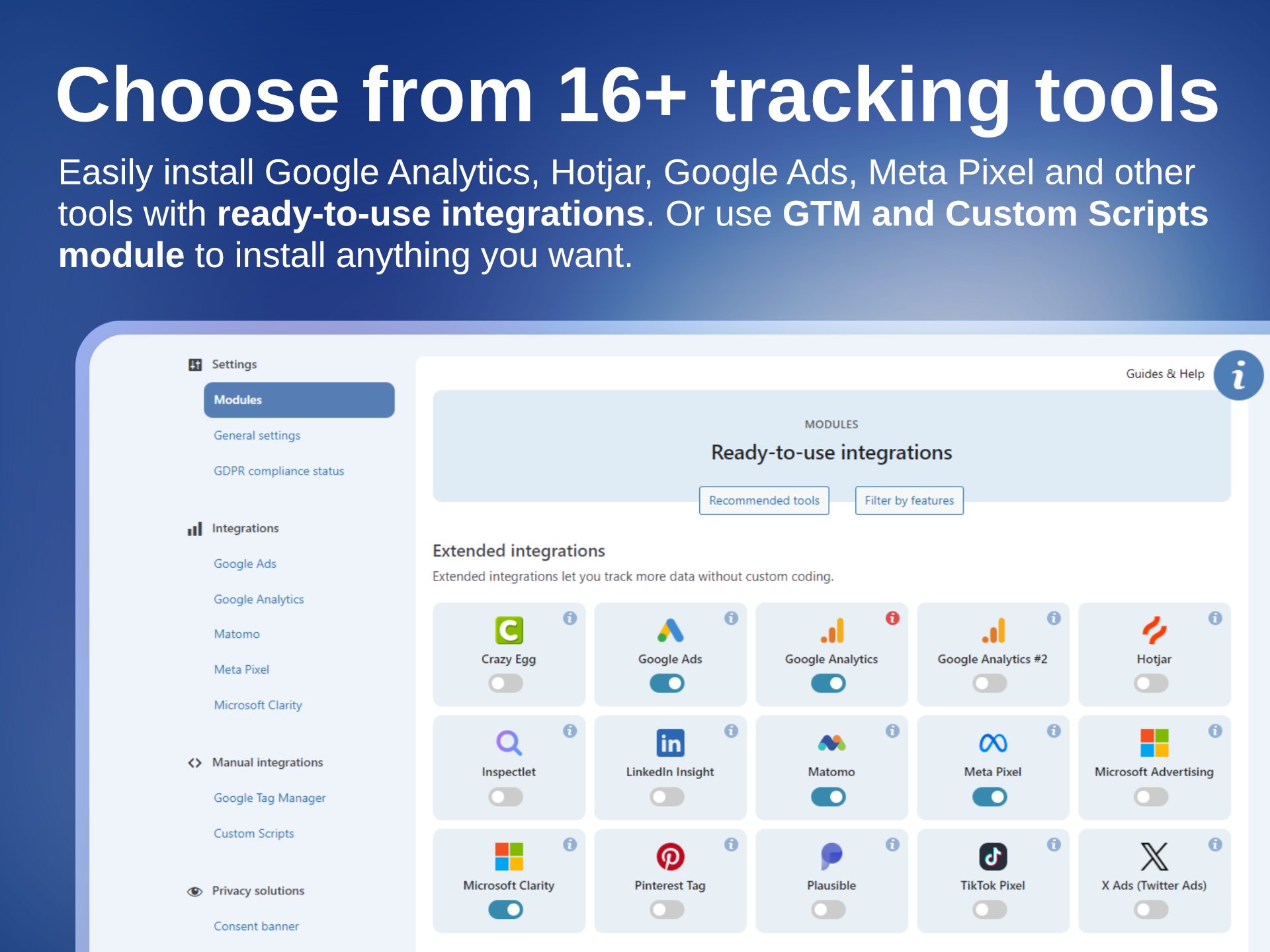
- 16 ready-to-use integrations with tools like Google Analytics, Google Ads, Meta Pixel, and more
- Built-in, pre-configured consent banner
- Google Consent Mode v2 and Microsoft UET Consent Mode support
- Google Tag Manager integration
- Comprehensive WooCommerce tracking
…and much more
🧩 INTEGRATIONS
Connect all your favorite tracking and analytics tools in minutes — no coding, no chaos.
WP Full Picture comes with ready-to-use integrations that help you understand your visitors, optimize your campaigns, and grow your business — all while staying compliant.
- Google Analytics learn more
- Google Ads learn more
- Meta Pixel learn more
- Pinterest Ads tag learn more
- Hotjar learn more
- Twitter / X learn more
- Microsoft Advertising learn more
- Microsoft Clarity learn more
- LinkedIn Insights Tag learn more
- TikTok Pixel learn more
- Plausible Analytics learn more
- Matomo learn more
- Inspectlet learn more
- Crazy Egg learn more
- PostHog (installation only)
- Simple Analytics (installation only)
Need something else?
Install more tools with the built-in Google Tag Manager integration (advanced) or a Custom Integrations module (quick and simple).
All tools installed with outhese modules work seamlessly with the built-in consent banner and consent management system — so every tool runs in full compliance.
🍪 CONSENT BANNER
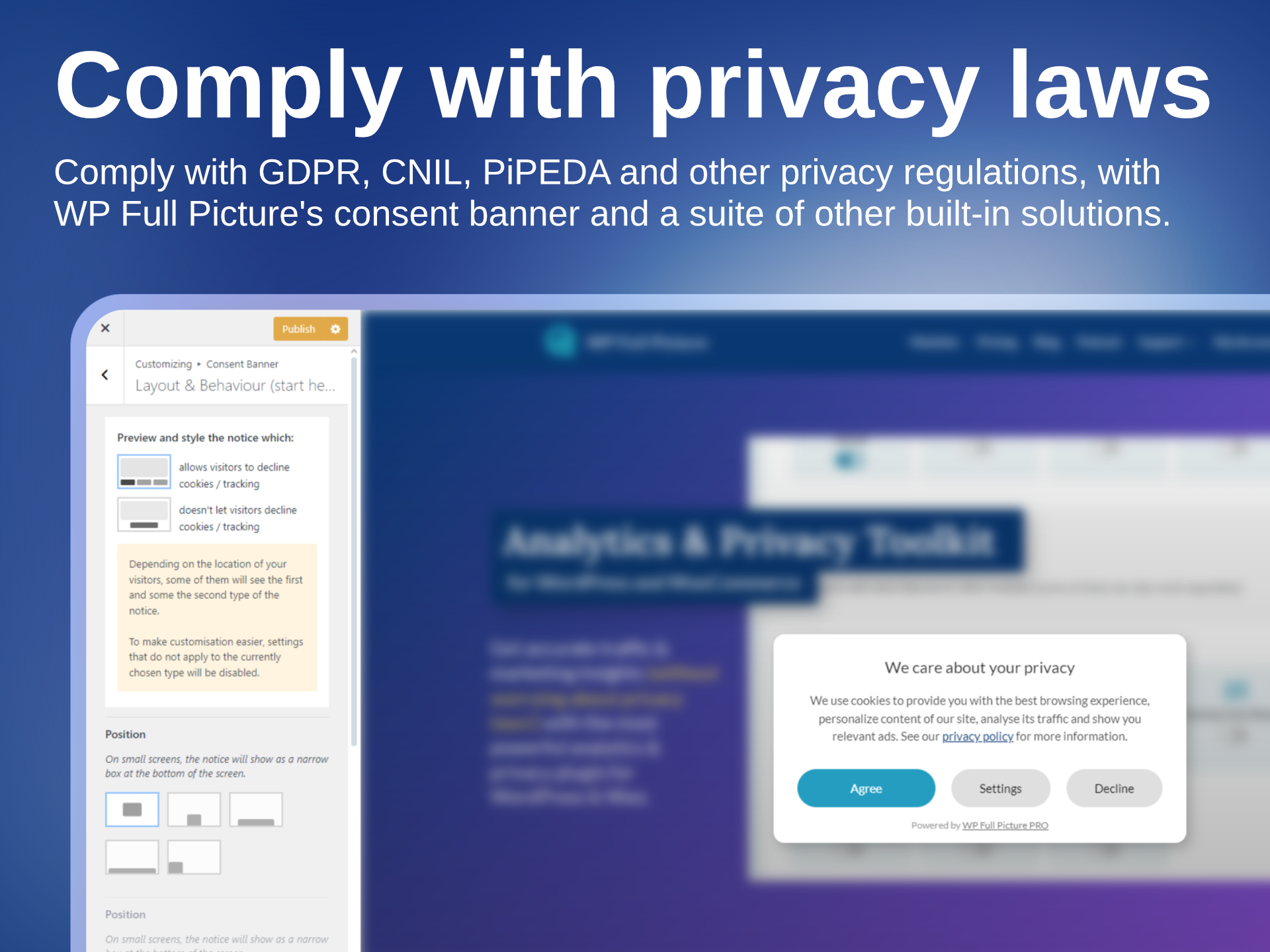
WP FP comes with a GDPR-compliant consent banner that just works — no setup headaches, no cookie scans, no limits.
It comes with Google Consent Mode v2 and Microsoft UET Consent Mode built-in, so you can safely collect traffic insights, run ad campaigns and track conversions.
The banner automatically manages all your tracking tools that you installed with WP Full Picture, ensuring your site stays compliant with privacy laws while you keep gathering valuable data.
No complicated setup. No third-party cookie scanners.
👁️ ADVANCED TRACKING
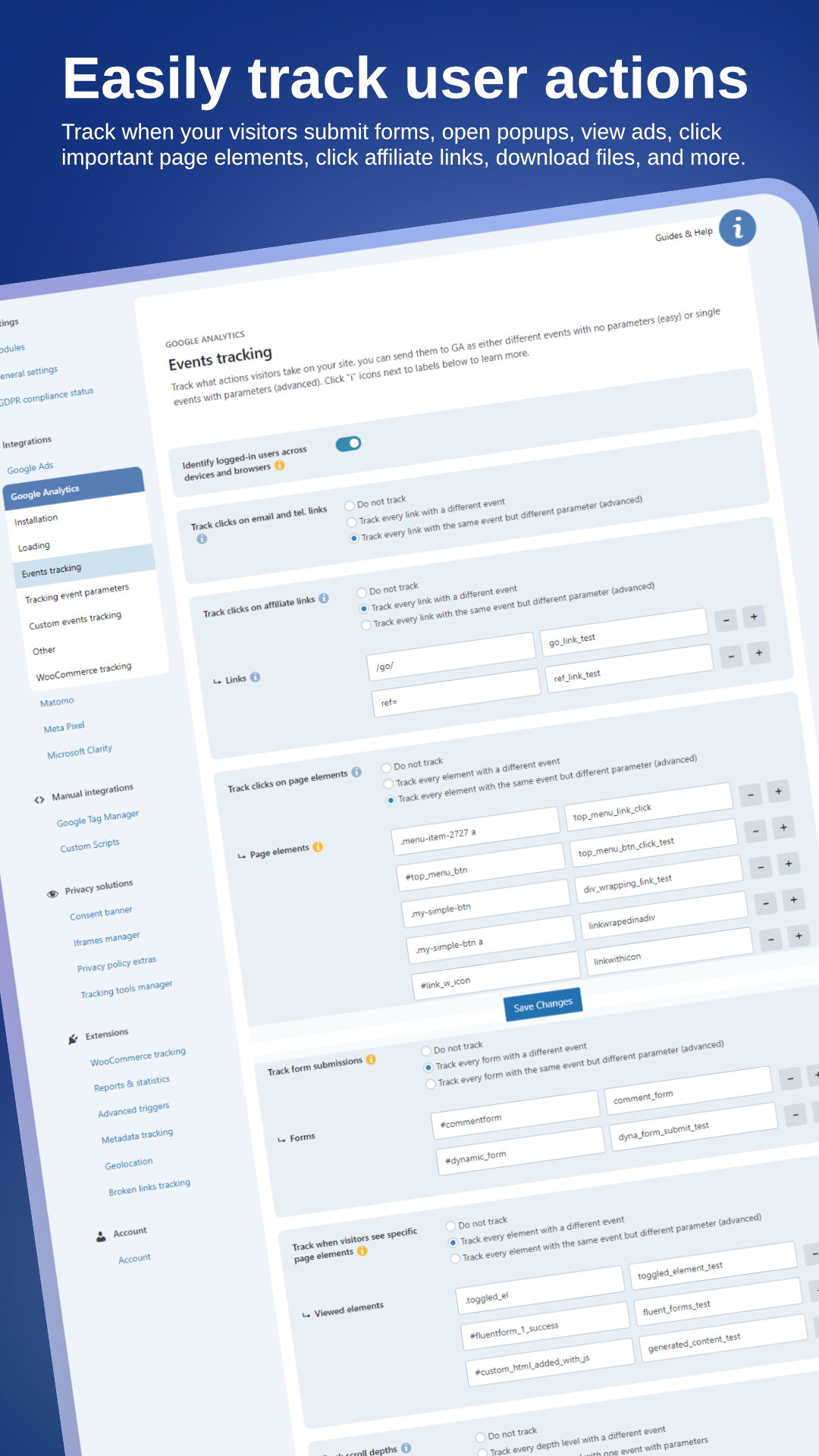
With WP Full Picture you can track:
- WooCommerce events (see below)
- Clicks in affiliate links, contact links, buttons and other page elements
- Form submissions
- Views of popups, ads and pricing tables
- Page types, categories, tags
- User roles and statuses
- and more
You can track it with the tools installed with WP FP or push this data to Google Tag Manager’s dataLayer. Whatever you prefer.
[PRO] With WP Full Picture Pro, you go one step further and unlock business-oriented features like:
- Server-side tracking with Meta CAPI and Measurement Protocol
- Google Tag Gateway via Cloudflare
- Advanced Matching / Enhanced conversions tracking
- Custom events builder
- Visitor scoring (for measuring the quality of traffic sources)
- Metadata tracking
- JavaScript error tracking
- and more
🛒 WOOCOMMERCE TRACKING
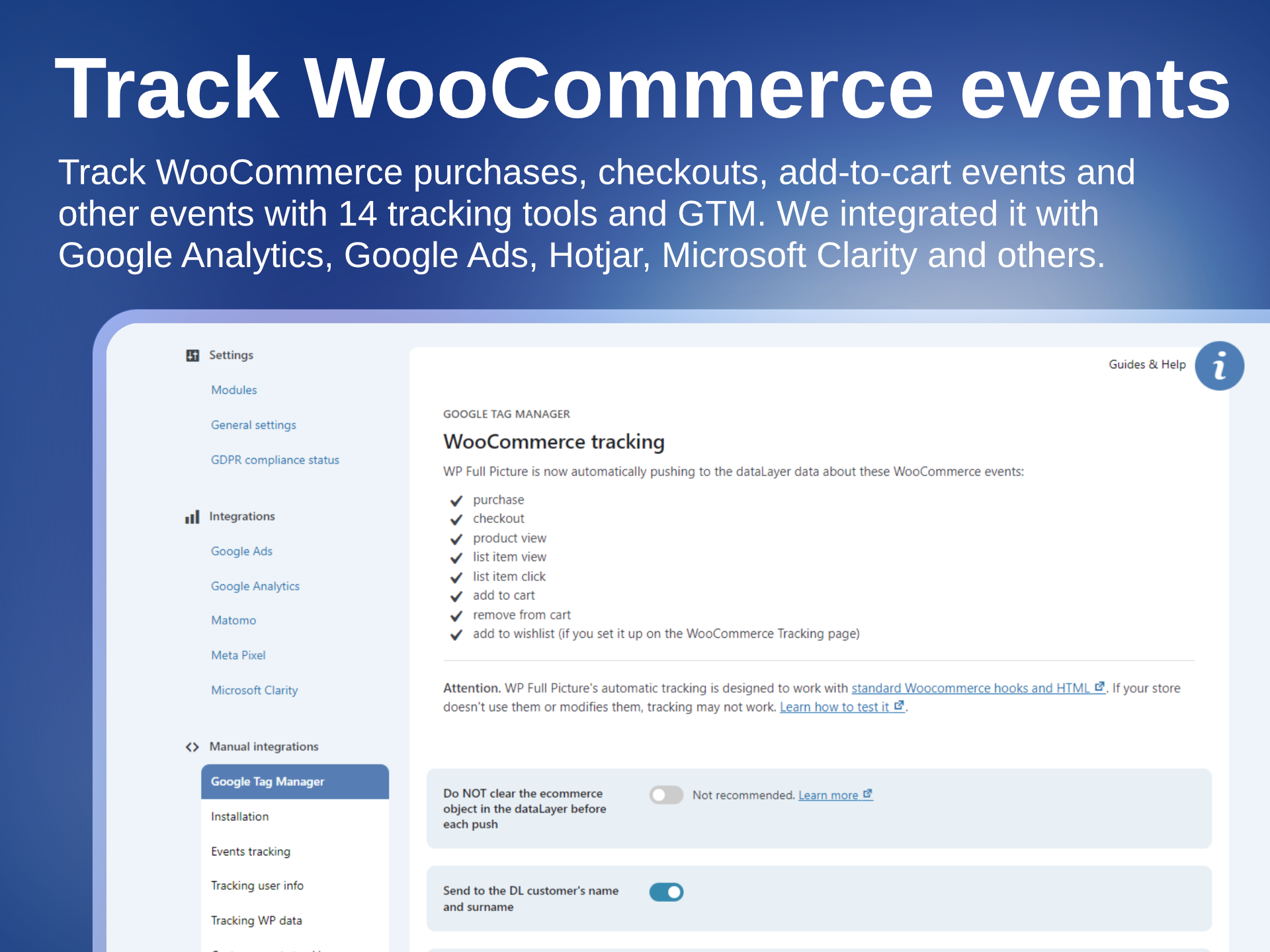
WP Full Picture tracks all major WooCommerce events in 14 tracking tools, including Google Analytics, Google Ads, Meta Pixel, and Google Tag Manager.
It tracks key actions like:
- Product views and list views
- Additions to cart
- Starting checkout
- Completed purchases
- Coupon usage and more
Every event includes detailed product information for accurate conversion tracking and smarter ad targeting.
[PRO] The Pro version adds:
- Status-based order tracking (for higher accuracy)
- Server-side tracking with Meta Capi and Measurement Protocol (to better avoid ad blockers)
- Enhanced conversions and advanced matching (for better conversion attribution and ad optimisation)
📈 STATISTICS IN WP ADMIN
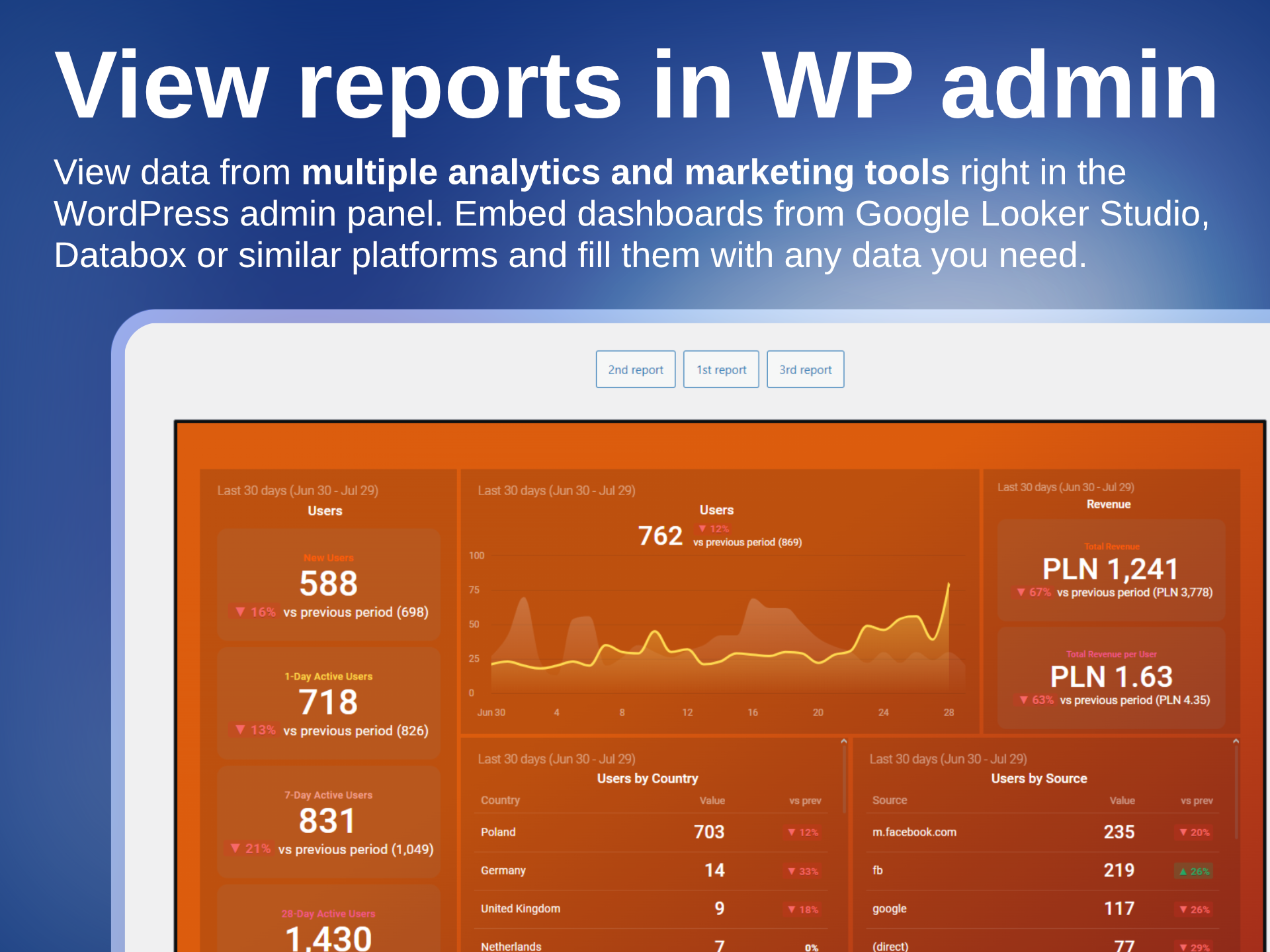
With WP Full Picture, you can embed reports with statistics from Google Looker Studio, Databox, and other BI platforms – directly in your WP admin.
💎 WP FULL PICTURE FREE vs PRO
Frequently asked questions
Does the plugin slow down page loading?
Yes, just like any other plugin, but by a very, veeery small amount. WP Full Picture is modular, which means it only loads what is necessary. Aditionally, all files are loaded asynchronously, which does not block loading of other page elements and works well with caching tools.
Is WP Full Picture compatible with page builders?
Yes. We tested it with Gutenberg, Elementor, Bricks, Breakdance. Only Bricks requires one small tweak to track interactions with WooCommerce product lists.
Can I use WP Full Picture’s consent banner with other tracking plugins and tools?
Yes. You can use it to control tracking scripts installed by other plugins and load them according to privacy laws. WP Full Picture automatically handles all plugins that load Google Analytics, Ads and Microsoft Advertising. It can also control the loading og PixelYourSite, Jetpack stats and tools loaded with Pixel Manager for WooCommerce.
Can I use a different consent management plugin or platform (CookieBot, Iubenda, CookieYes, etc.) with WP Full Picture?
No. WP Full Picture’s modules for installing analytics tools are only optimized to work with WP Full Picture’s consent banner.
Can I use WP Full Picture on a website that displays ads?
At the moment there is not a single free consent management tool that lets you show ads from Google Adsense and other advertising platforms. To do it, the tool needs to use a IAB TCF framework which WP Full Picture does not use even in the paid version.
Does WP Full Picture support Google’s consent mode v2?
Yes. Consent mode v2 is fully supported. It works with Google Analytics, Google Ads and GTM. It works out-of-the-box. Simply, enable the consent banner module and it will work.
Is WP Full Picture certified by Google?
Google certifies only tools that support Google Adsense (for displaying ads on your own site) and use IAB TCF framework. WP Full Picture doesn’t do it. At the moment only paid Consent Management Platforms use this framework. No free tool has it.
Does WP Full Picture lists individual cookies in a privacy policy?
No. This is a popular myth. Listing cookies is not required by law, plus it is technically doable only on simple sites. You can learn more about it here.
Does WP Full Picture generate privacy policies?
No. We recommend you use a specialized service for this.
How does WP Full Picture’s cookie notice block cookies?
Depending on the tracking tool, WP Full Picture either instructs the tool not to load cookies or blocks scripts that create these cookies.
Is WP Full Picture’s consent banner limited in any way?
No. It can be displayed unlimited number of times, on unlimited pages by unlimited number of visitors.
I live in the EU, but I want to start tracking visitors right after they visit the page. Can I do this?
Technically, you can. Legally you can’t.
Will my site comply with ALL privacy regulations just by using WP Full Picture?
No. Privacy regulations cover many areas of business. WP Full Picture helps you handle only a part of it, so you still need to be aware and act accordingly to be fully compliant with the rest of them.
Can I translate texts in the cookie notice?
Yes. WP Full Picture has been tested and works with multilingual plugins WPML and Polylang. It is possible that it also works with other plugins but we haven’t tested them.
Does WP Full Picture generate product feeds for Google Shopping or Facebook?
No. WP Full Picture is focused on tracking and privacy. To generate a product catalogue you can use one of many plugins from WordPress repository or cloud platforms.
Does WP Full Picture display statistics in the dashboard?
Yes. WP Full Picture lets you display in your WP admin panel reports and dashboards created in Google Looker Studio, Databox and other similar platforms. These platforms allow you to create advanced reports with aggregated data from various analytics and marketing tools, Google spreadsheets and even WooCommerce data.
Changelog
10.1.2.1 (23-09-2026)
- [Update] Freemius SDK
- [Fix] “return response” for cURL sending data to other servers sometimes echoed returns instead of not showing them
- [Fix] other minor fixes and improvements to sending data to remote servers
- [Fix] Other small code fixes and improvements
- [Other] Added a banner about v11 beta tests
10.1.1 (11-03-2026)
- [Update] [Woo] Added a few extra rules to better track ATC buttons on single product pages that use Ajax
- [Fix] [Woo] Fixed a bug that showed on some configs, and prevented tracking “add to cart” events on cart pages
10.1.0 (11-03-2026)
- [New] [Pro] Added support for Stape’s sGTM plugin
- [New] [Pro] [MS clarity] You can now send custom events/tags
- [New] [Woo] You can now track add to cart events on single products which originated after clicks in “add to cart + options (beta)” block (variable and grouped products are not supported yet)
- [Other] [Woo] removed unused code and made function names clearly describe their purpose
- [Update] Moved Consent Mode 2 related settings to the inline JS, to have it fire before any other script
- [Other] Changes to in-admin texts
10.0.2 (25-02-2026)
- [Update] Visual fixes in the admin pages for WP 7.0
- [Fix] Fixed typos in some field descriptions
- [Other] README.txt update
10.0.1 (18-02-2026)
- [Fix] [Woo] Fixed compatibility with WooCommerce HPOS
- [Fix] [GTM] Default name of GTM’s dataLayer is now set to fupi_dataLayer to avoid issues with Google tools loaded outside GTM
- [Fix] [Woo] Matomo sometimes did not correctly track products added and removed from cart
- [Other] Text updates
10.0.0 (09-02-2026)
This was released only to PRO users
- [New] All files of WP FP are now loaded asynchronously
- [New] Dashboard page with guides and useful links
- [New] Conflict checker (accessible through the new dashboard page)
- [New] Consent Manager module can now control the loading of PixelYourSite and Pixel Manager for WooCommerce
- [New] Added time information to fpdata object
- [New] [Pro] Reactions module
- [New] [Woo] Option to send “add to cart” events on cart page rather then when users click “add to cart” buttons
- [New] [Woo] You can now disable sending stadard Add To Cart events and replace them with your own code
- [New] [Woo] You can now choose specific WooCommerce pages where instead of sending “Product view” events you will send “Product list view” events (for main products)
- [New] [Pro] Custom triggers can now use “Coursor left browser window” action
- [Update] WooCommerce tracking – important code modifications so that tracking can work with asynchronous file loading
- [Update] Simplified navigation
- [Update] Design and texts
- [Update] You can now block several files of the same 3rd party tool
- [Update] [Pro] Meta Pixel no longer sends Conversion API event for pageviews by default. Now it needs to be enabled by the user
- [Update] [Pro] Visitor scoring levels (10,20,30, etc.) are now enabled by default
- [Removed] Animation for the consent banner
- [Removed] Removed an option to disregard cookie choices (due to abuse and/or improper use)
- [Removed] Function to force load Google Analytics and Ads scripts
- [Removed] Function to load Google Analytics and Ads in specific countries
- [Removed] Custom Brand for WooCommerce (deprecated for a long time)
- [Removed] Options for saving WP FP scripts in files
- [Fix] Small JS bug on the settings page of the Google Analytics module
- [Fix] JS errors on “blur” events (DOM events)
- [Fix] Removed debug_mode parameter from GA events
- [Fix] Consent banner’s scroll lock is now set in a different way and is no longer removed by WooCommerce
- [Fix] [Pro] Value comparison type “lower than” in the builder of custom triggers did not work
- [Fix] [Pro] A bug prevented session cookie to be updated when a user updated from WP FP Free to Pro
- [Fix] [Pro] A bug in Status Based Order Tracking in GA4, which did not track orders for installs with different GTAGs for GA and GAds
- [Fix] Iframe placeholders will no longer get incorrect dimensions on some setups
- [Other] Renamed “Custom scripts” module to “Custom integrations” to avoid confusion with the purpose of the module
- [Other] Optimized JS functions in the customizer
- [Other] Tweaked some texts in the GDPR setup helper and the saved proofs of consent
- [Other] Increased tiemouts for sending data server-server
- [Other] Small tweaks, optimizations and removal of unnecessary code
Screenshots
For developers
Is this your plugin? Show off the numbers.
Add a live badge to your site, docs or GitHub README. It updates on its own — no account needed.
Best Tracking and Consent Manager alternatives
All analytics plugins →





FAQ
Tracking and Consent Manager: quick answers
Straight answers, pulled from live WordPress.org data.
Live data from WordPress.org · checked Sep 26, 2026
Is Tracking and Consent Manager free?
Yes. Tracking and Consent Manager is free to download and use from the official WordPress.org plugin directory.
Is Tracking and Consent Manager safe to use in 2026?
Yes — Tracking and Consent Manager is a safe, well-maintained plugin to use in 2026. It runs on 3K+ sites, is rated 5/5 and was last updated 4 days ago, and scores 92/100 on our health check.
How many websites use Tracking and Consent Manager?
Tracking and Consent Manager is active on 3K+ WordPress websites and has been downloaded 60,198 times since it launched in December 2020. It was downloaded 1,969 times in the last 30 days.
Does Tracking and Consent Manager work with WordPress 7.1?
Yes. The developer has tested Tracking and Consent Manager up to WordPress 7.1.2, the latest release. It requires WordPress 5.4 or newer.
What PHP version does Tracking and Consent Manager need?
Tracking and Consent Manager requires PHP 7.4 or higher. Most hosts run PHP 8.x today, so it works on any modern WordPress hosting.
When was Tracking and Consent Manager last updated?
The latest version, 10.1.2.1, was released on September 22, 2026 (4 days ago).
Who makes Tracking and Consent Manager?
Tracking and Consent Manager is developed and maintained by Krzysztof Planeta.
What are the best alternatives to Tracking and Consent Manager?
The most popular alternatives to Tracking and Consent Manager are Site Kit by Google (5M+ installs), MonsterInsights (2M+ installs) and WP Statistics (600K+ installs).
Powered by PageForge
Want thousands of pages that rank like these? Build them in an afternoon.
This directory runs on the same engine as PageForge. Turn any spreadsheet, CSV or API into thousands of fast, SEO-ready WordPress pages — with schema, internal links and AI-written copy baked in.
- CSV, Google Sheets & API data sources
- AI content, schema & internal links per page
- Works with Elementor, Gutenberg, Yoast & Rank Math
- Free on WordPress.org — no credit card


