



Integrate WooCommerce with Lightspeed (Vend)
This powerful integration plugin connects Lightspeed Retail (X-Series) with your WooCommerce store, offering:

Solid choice
Integrate WooCommerce with Ligh… is a solid plugin choice in 2026, with a few things worth checking first. It runs on 40+ sites, is rated 5/5 and was last updated 4 days ago, and scores 79/100 on our health check.
- Actively developed — last update 4 days ago
- Tested with the latest WordPress (7.1)
- Small user base (40+ active installs)
How does it stack up?
Side-by-side on installs, updates, ratings & support



Daily downloads
Download spikes usually follow a new release — each site that auto-updates counts as a download.
Rankings
Where Integrate WooCommerce with… stands todayWordPress.org search rankings
Live position in the plugin search, top 100| Keyword | Position |
|---|---|
| customer | >100 |
| lightspeed | #3 |
| sale | >100 |
| sync | >100 |
| vend | #1 |
Version adoption
Share of active sites per release.
Rating breakdown
★★★★★★★★★★ 5 from 5 reviews
About Integrate WooCommerce with Lightspeed (…
From the official readme · v1.6Description
This powerful integration plugin connects Lightspeed Retail (X-Series) with your WooCommerce store, offering:
✨ Free Features:
* Two-way inventory synchronization
* Simple product import
* Product updates from Lightspeed to WooCommerce
* Real-time order and customer from WooCommerce to Lightspeed
🌟 Premium Features:
* Automated product updates
* Automated inventory sync
* Lightspeed register selection for orders from WooCommerce
* Variable product support
* Lightspeed Brands integration
* WooCommerce order ids in Lightspeed orders
* Lightspeed Loyalty points tracking
* Priority support
Note: The premium features are only available in the Premium version of the plugin. You can get in touch with us or purchase from here: https://linkly.link/2ufSU
Limitations
- Composite products are not currently supported (planned for future release)
The Integration
Steps:
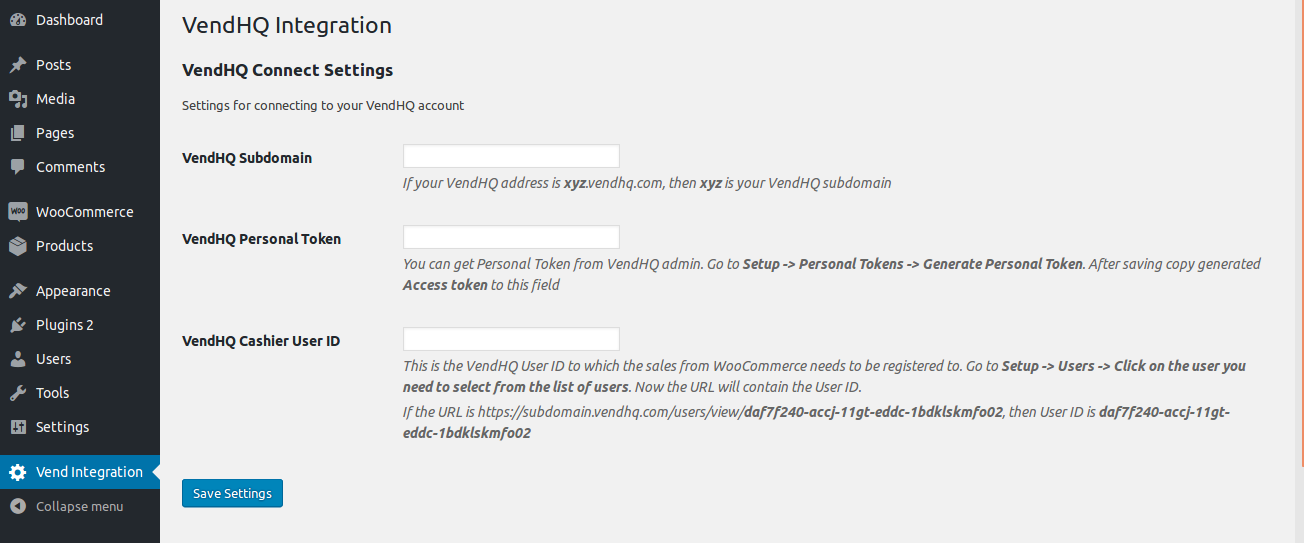
- Click “Lightspeed Integration” on left menu in WordPress admin.
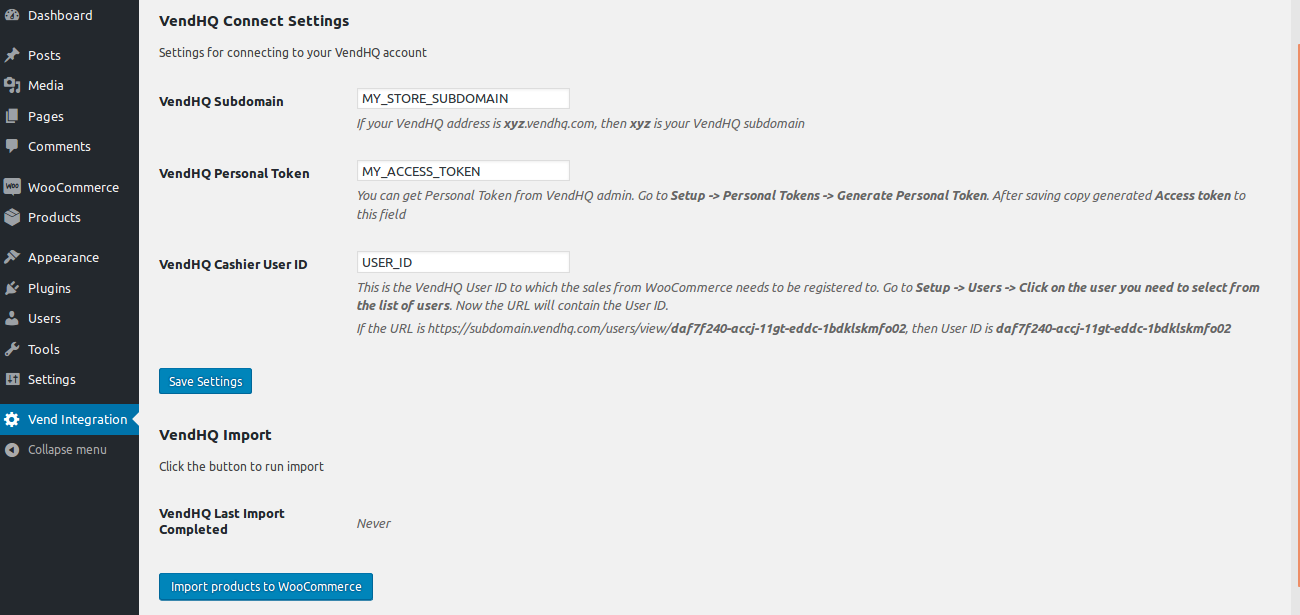
- Enter Lightspeed Subdomain, Lightspeed Personal Token and Lightspeed Cashier User ID and Click “Save Settings”(Detailed instructions are in the page).
- Now you will be able to import products to WooCommerce by clicking the button “Import products to WooCommerce”.
Installation
This plugin requires you to have the WooCommerce plugin already installed and activated in WordPress. Otherwise you won’t be able to activate this plugin. It is recommended that you use this plugin in a staging environment before installing it on production.
From WordPress Admin
- Go to “Plugins” > “Add New”.
- Search for “Integrate WooCommerce With Lightspeed”.
- Once you find it click “Install” and after installing click “Activate”.
Manual
- Upload the folder “integrate-woocommerce-lightspeed” to
/wp-content/plugins/directory. - Activate the plugin through WordPress admin: Go to “Plugins” and click the “Activate” link corresponding to the plugin.
After Activation
Steps:
- Click “Lightspeed Integration” on left menu in WordPress admin.
- Enter Lightspeed Subdomain, Lightspeed Personal Token and Lightspeed Cashier User ID and Click “Save Settings”(Detailed instructions are in the page).
- Now you will be able to import products to WooCommerce by clicking the button “Import products to WooCommerce”.
Frequently asked questions
Is this compatible with the latest WooCommerce version?
Yes, we regularly test and update the plugin for compatibility with the latest WooCommerce releases.
How often does the sync happen?
Free version: Manual sync Premium version: Automatic sync within a few minutes (configurable)
Does this plugin import all the products?
The free version of the plugin will import all the Simple products and the premium version imports Variable products too.
What about Variable and Composite products in Lightspeed?
Variable products are Premium feature. contact us here for purchasing: https://sujith123.wufoo.com/forms/z1xchp690scddy2/ Composite products are not currently supported.
Will WooCommerce work with my theme?
Yes, the plugin is not dependent on WordPress themes.
Where can I request new features?
You can use the form here: https://sujith123.wufoo.com/forms/z1xchp690scddy2/
Where can I report bugs?
Bugs can be reported in the support forum – Support link on the WordPress.org plugin page.
Changelog
1.6
- Tax tracking is now available in free version
- Updated compatibility with WooCommerce 10.x
1.5
- User Experience improvements
1.4
- Updated individual product API version to 2.0
1.3.3
- Bug fix and User Experience improvements
1.3.2
- Bug fix.
1.3.1
- Bug fix and minor improvement.
Screenshots
For developers
Is this your plugin? Show off the numbers.
Add a live badge to your site, docs or GitHub README. It updates on its own — no account needed.
Best Integrate WooCommerce with Li… alternatives
All customer plugins →





FAQ
Integrate WooCommerce with Lightspe…: quick answers
Straight answers, pulled from live WordPress.org data.
Live data from WordPress.org · checked Oct 8, 2026
Is Integrate WooCommerce with Ligh… free?
Yes. Integrate WooCommerce with Ligh… is free to download and use from the official WordPress.org plugin directory.
Is Integrate WooCommerce with Ligh… safe to use in 2026?
Integrate WooCommerce with Ligh… is a solid plugin choice in 2026, with a few things worth checking first. It runs on 40+ sites, is rated 5/5 and was last updated 4 days ago, and scores 79/100 on our health check.
How many websites use Integrate WooCommerce with Ligh…?
Integrate WooCommerce with Ligh… is active on 40+ WordPress websites and has been downloaded 4,742 times since it launched in June 2018. It was downloaded 128 times in the last 30 days.
Does Integrate WooCommerce with Ligh… work with WordPress 7.1?
Yes. The developer has tested Integrate WooCommerce with Ligh… up to WordPress 7.1.3, the latest release. It requires WordPress 4.4 or newer.
What PHP version does Integrate WooCommerce with Ligh… need?
Integrate WooCommerce with Ligh… requires PHP 5.2.4 or higher. Most hosts run PHP 8.x today, so it works on any modern WordPress hosting.
When was Integrate WooCommerce with Ligh… last updated?
The latest version, 1.6, was released on October 3, 2026 (4 days ago).
Who makes Integrate WooCommerce with Ligh…?
Integrate WooCommerce with Ligh… is developed and maintained by sujith222.
What are the best alternatives to Integrate WooCommerce with Ligh…?
The most popular alternatives to Integrate WooCommerce with Ligh… are Intercom (6K+ installs), LeadBooster Chatbot by Pipe… (2K+ installs) and Add Customer for WooCommerce (1K+ installs).
Powered by PageForge
Want thousands of pages that rank like these? Build them in an afternoon.
This directory runs on the same engine as PageForge. Turn any spreadsheet, CSV or API into thousands of fast, SEO-ready WordPress pages — with schema, internal links and AI-written copy baked in.
- CSV, Google Sheets & API data sources
- AI content, schema & internal links per page
- Works with Elementor, Gutenberg, Yoast & Rank Math
- Free on WordPress.org — no credit card


