



Integrate PostHog Web Analytics
Unofficial Plugin to integrate PostHog's web analytics tracking script to your WordPress web site.

Use with caution
Integrate PostHog Web Analytics works, but test it on a staging site before relying on it in 2026. It runs on 300+ sites, is rated 5/5 and was last updated 5 months ago, and scores 50/100 on our health check.
- Small user base (300+ active installs)
- Very few reviews so far
How does it stack up?
Side-by-side on installs, updates, ratings & support



Daily downloads
Download spikes usually follow a new release — each site that auto-updates counts as a download.
Rankings
Where Integrate PostHog Web Analy… stands todayWordPress.org search rankings
Live position in the plugin search, top 100| Keyword | Position |
|---|---|
| analytics | #46 |
| PostHog | #1 |
Version adoption
Share of active sites per release.
Rating breakdown
★★★★★★★★★★ 5 from 1 reviews
About Integrate PostHog Web Analytics
From the official readme · v1.1.6Description
Unofficial Plugin to integrate PostHog’s web analytics and event tracking on your WordPress web site. With PostHog, you can:
* Track visitor behavior and engagement across your WordPress site
* Analyze user journeys and conversion funnels
* Monitor key metrics like pageviews, session duration, and bounce rates
* Create custom events to track specific user actions
* View detailed analytics reports and dashboards
* Make data-driven decisions to optimize your site
For those needing to meet GDPR, HIPAA or other privacy requirements, the plugin can be set in a cookieless mode.
WooCommerce
Integrate PostHog Web Analytics can also track WooCommerce product, cart and checkout events:
External services
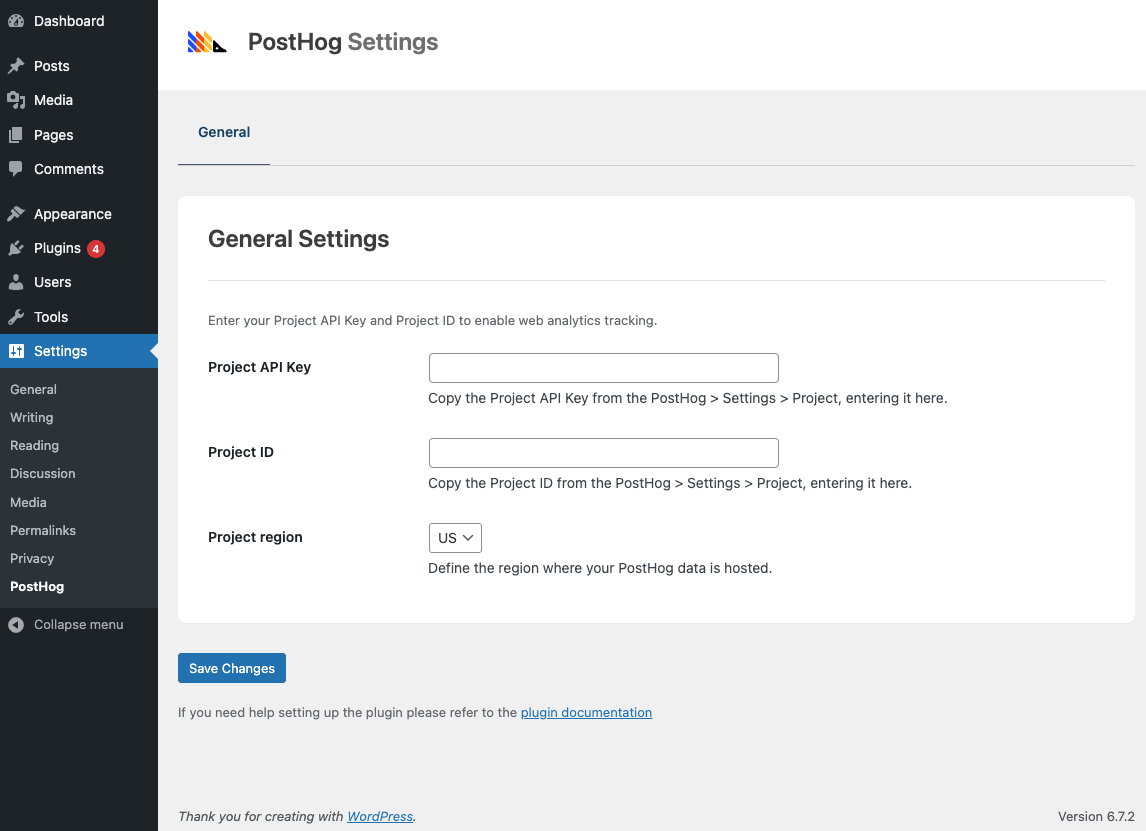
This plugin stores your PostHog API and Project ID, using them to insert the required JavaScript tag that permits PostHog to collect your web site’s analytics in your PostHog account.
Refer to PostHog’s privacy policy for more information.
Documentation
Full Plugin documentation can be found here.
Configuration
To configure the Plugin, follow the documentation here.
Installation
- Navigate to
Plugins > Add New Pluginin WordPress - Type
Integrate PostHog Web Analyticsin the Search Plugins search field, and press the Enter key - Click
Install NowbesideIntegrate PostHog Web Analytics - Once installed, click
Activate
Frequently asked questions
Is this GDPR, HIPAA and Privacy Compliant?
Yes – you’ll need to set the Peristence setting to Memory at Settings > PostHog Web Analytics. This will use a cookieless method for data collection, ensuring GDPR, HIPAA and other privacy compliance.
Do I need a paid PostHog account?
No – PostHog’s generous free tier will track 1M free events, 5K free session recordings, and more. Every month. Forever.
Where can I find the Plugin’s Documentation?
Full Plugin documentation can be found here.
Will this slow down my site?
No, the plugin is optimized for performance with minimal impact on page load times.
Changelog
1.1.6 (2026-05-20)
- WordPress 7.0 compatibility
1.1.5 (2026-04-02)
- Updated: Dashboard submodule
1.1.4 (2026-03-20)
- Added: Reverse Proxy Domain option. See Docs: https://www.wpzinc.com/documentation/posthog/installation/
1.1.3 (2025-09-18)
- Fix: Event Tracking: WooCommerce: Improved tracking for block-based carts and checkouts
1.1.2
- Fix: PHP Notice: Function
_load_textdomain_just_in_timewas called incorrectly
1.1.1
- Added: Event Tracking: WooCommerce. See Docs: https://www.wpzinc.com/documentation/posthog/woocommerce-integration/
1.0.0
- First release
Screenshots
For developers
Is this your plugin? Show off the numbers.
Add a live badge to your site, docs or GitHub README. It updates on its own — no account needed.
Best Integrate PostHog Web Analyti… alternatives
All analytics plugins →





FAQ
Integrate PostHog Web Analytics: quick answers
Straight answers, pulled from live WordPress.org data.
Live data from WordPress.org · checked Oct 14, 2026
Is Integrate PostHog Web Analytics free?
Yes. Integrate PostHog Web Analytics is free to download and use from the official WordPress.org plugin directory.
Is Integrate PostHog Web Analytics safe to use in 2026?
Integrate PostHog Web Analytics works, but test it on a staging site before relying on it in 2026. It runs on 300+ sites, is rated 5/5 and was last updated 5 months ago, and scores 50/100 on our health check.
How many websites use Integrate PostHog Web Analytics?
Integrate PostHog Web Analytics is active on 300+ WordPress websites and has been downloaded 2,852 times since it launched in April 2025. It was downloaded 203 times in the last 30 days.
Does Integrate PostHog Web Analytics work with WordPress 7.1?
Integrate PostHog Web Analytics is officially tested up to WordPress 7.0.7, while the latest release is 7.1.3. It may still work, but try it on a staging site first.
What PHP version does Integrate PostHog Web Analytics need?
Integrate PostHog Web Analytics requires PHP 7.4 or higher. Most hosts run PHP 8.x today, so it works on any modern WordPress hosting.
When was Integrate PostHog Web Analytics last updated?
The latest version, 1.1.6, was released on May 20, 2026 (5 months ago).
Who makes Integrate PostHog Web Analytics?
Integrate PostHog Web Analytics is developed and maintained by WP Zinc.
What are the best alternatives to Integrate PostHog Web Analytics?
The most popular alternatives to Integrate PostHog Web Analytics are Site Kit by Google (5M+ installs), MonsterInsights (2M+ installs) and WP Statistics (500K+ installs).
Powered by PageForge
Want thousands of pages that rank like these? Build them in an afternoon.
This directory runs on the same engine as PageForge. Turn any spreadsheet, CSV or API into thousands of fast, SEO-ready WordPress pages — with schema, internal links and AI-written copy baked in.
- CSV, Google Sheets & API data sources
- AI content, schema & internal links per page
- Works with Elementor, Gutenberg, Yoast & Rank Math
- Free on WordPress.org — no credit card


