


Handrail Accessibility Widget
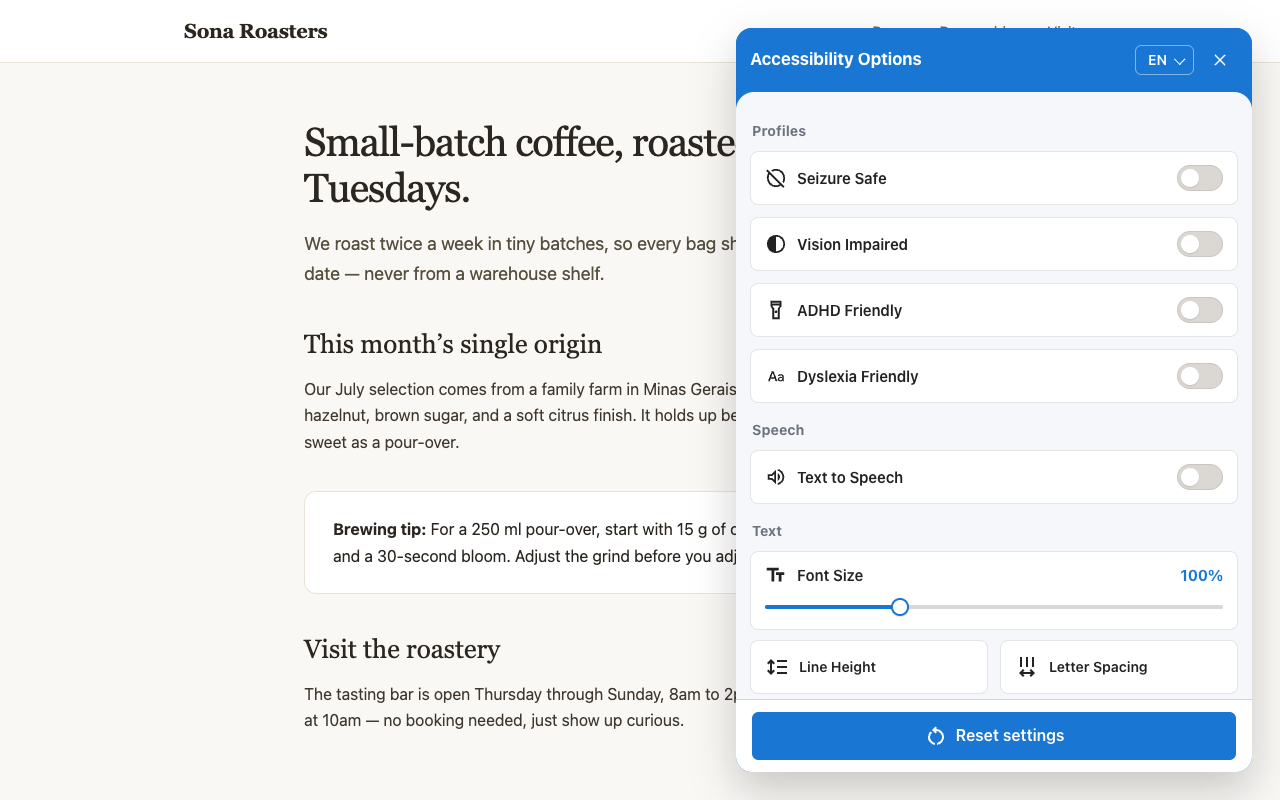
Adds the Handrail accessibility widget to your site: font sizing, contrast modes, dyslexia-friendly font, text-to-speech, and more.

Solid choice
Handrail Accessibility Widget is a solid plugin choice in 2026, with a few things worth checking first. It runs on 10+ sites and was last updated 2 weeks ago, and scores 66/100 on our health check.
- Actively developed — last update 2 weeks ago
- Tested with the latest WordPress (7.1)
- Small user base (10+ active installs)
- Very few reviews so far
How does it stack up?
Side-by-side on installs, updates, ratings & support



Daily downloads
Download spikes usually follow a new release — each site that auto-updates counts as a download.
Rankings
Where Handrail Accessibility Widg… stands todayWordPress.org search rankings
Live position in the plugin search, top 100| Keyword | Position |
|---|---|
| a11y | #63 |
| accessibility | >100 |
| contrast | >100 |
| text to speech | >100 |
| widget | >100 |
Version adoption
Share of active sites per release.
About Handrail Accessibility Widget
From the official readme · v1.6.3Description
Handrail is a small floating panel that gives your visitors accessibility controls they actually want — font sizing, contrast modes, a dyslexia-friendly font, animation pausing, text-to-speech, and more. Like a real handrail: quiet support that helps without claiming to fix the building.
Everything the widget needs is bundled with the plugin and served from your own site — the widget script, the OpenDyslexic font, and the optional audit engine. No external requests, no CDNs, no tracking, no accounts. Configure position, button size, and language from Settings > Handrail Accessibility Widget.
The widget is free and open source (MIT), with no paid tier. Visitor preferences are stored locally in their browser and never sent anywhere.
Note: this widget is a complement to — not a substitute for — real accessibility work (semantic HTML, ARIA, keyboard navigation, alt text). It does not guarantee compliance with WCAG, ADA, Section 508, or any other standard.
Source Code
The bundled JavaScript is built from public, human-readable source code:
js/accessible-web-widget.wp.min.js— the widget itself. Source repository: https://github.com/ifrederico/accessible-web-widget (MIT). Build withnpm install && npm run build(Rollup); this file is thedist/accessible-web-widget.wp.min.jsoutput, a WordPress-specific build with no remote fallback URLs.js/axe.min.js— axe-core 4.11.1 by Deque Systems, unmodified. Source repository: https://github.com/dequelabs/axe-core (MPL-2.0). Loaded only in developer mode (?acc-dev=true).fonts/OpenDyslexic3-Regular.*— OpenDyslexic by Abbie Gonzalez, https://opendyslexic.org/ (SIL OFL 1.1; seefonts/LICENSE.txt).
Installation
- Upload the
handrail-widgetfolder to/wp-content/plugins/, or install via the Plugins screen. - Activate the plugin through the Plugins screen in WordPress.
- Go to Settings > Handrail Accessibility Widget to configure position, size, and language.
Changelog
1.6.3
- Saturation has a third level, Monochrome, which shows the page in grayscale. Tap the Saturation tile to cycle Low, High, Monochrome, off. It is remembered between visits and cleared by Reset like the other levels. Thanks to @eliran-positive for the contribution.
1.6.2
- Works much better on phones. The menu keeps compact two-column rows instead of switching to tall tiles, so it needs about half the scrolling; scrolling inside it no longer moves the page behind it; and on phones held sideways the header and footer take less room.
- Reading Guide now appears as soon as it is turned on, and a tap moves it. Text Magnifier opens with a tap and stays a readable size on small screens. Big Cursor is hidden on touch-only devices, where there is no cursor to enlarge.
- Focus rings now appear only for keyboard users and no longer stay stuck after a click or tap; the Font Size slider shows one too. Hover effects no longer stick on touch screens, and Escape closes the language list before the menu.
- Screen readers now hear “Contrast: Light”, “Saturation: Low”, or “Readable Font: Lexend” instead of only the level name.
- Fixed text added to the page after the text size was changed (for example, content loaded later inside a link) being enlarged twice.
1.6.1
- Fixed text sizing on nested elements, such as a link with a span inside it. The inner element was scaled twice, so it came out larger than the text around it. Thanks to @AdamMagued for the fix.
1.6.0
- Removed the text alignment control introduced in 1.5.4. Overriding the alignment of every heading, paragraph, and list item fought with the way most sites are designed, and the result didn’t read well in practice. Pages now keep their authored alignment.
- Fixed the Reading Guide disappearing whenever Simplify Layout was switched on. The two can now be used together. Thanks to @njf0x for the fix.
1.5.4
- Adds a logical text alignment control that cycles through Start, Center, End, and the page’s original alignment. Start and End follow the text direction for left-to-right and right-to-left content, and the preference persists until reset.
- Completes the Spanish translations for annotations, text-to-speech, speech playback, Simplify Layout, reading status, and the new text alignment control.
1.5.3
- 34 new interface languages, for 54 total — including Chinese (Simplified and Traditional), Japanese, Korean, Hindi, Bengali, Arabic-script Persian and Urdu, and many more. Every UI label is translated.
Screenshots
For developers
Is this your plugin? Show off the numbers.
Add a live badge to your site, docs or GitHub README. It updates on its own — no account needed.
Best Handrail Accessibility Widget alternatives
All a11y plugins →



FAQ
Handrail Accessibility Widget: quick answers
Straight answers, pulled from live WordPress.org data.
Live data from WordPress.org · checked Nov 17, 2026
Is Handrail Accessibility Widget free?
Yes. Handrail Accessibility Widget is free to download and use from the official WordPress.org plugin directory.
Is Handrail Accessibility Widget safe to use in 2026?
Handrail Accessibility Widget is a solid plugin choice in 2026, with a few things worth checking first. It runs on 10+ sites and was last updated 2 weeks ago, and scores 66/100 on our health check.
How many websites use Handrail Accessibility Widget?
Handrail Accessibility Widget is active on 10+ WordPress websites and has been downloaded 715 times since it launched in July 2026. It was downloaded 256 times in the last 30 days.
Does Handrail Accessibility Widget work with WordPress 7.1?
Yes. The developer has tested Handrail Accessibility Widget up to WordPress 7.1.4, the latest release. It requires WordPress 5.0 or newer.
What PHP version does Handrail Accessibility Widget need?
Handrail Accessibility Widget requires PHP 7.2 or higher. Most hosts run PHP 8.x today, so it works on any modern WordPress hosting.
When was Handrail Accessibility Widget last updated?
The latest version, 1.6.3, was released on November 4, 2026 (2 weeks ago).
Who makes Handrail Accessibility Widget?
Handrail Accessibility Widget is developed and maintained by ifrederico.
What are the best alternatives to Handrail Accessibility Widget?
The most popular alternatives to Handrail Accessibility Widget are Web Accessibility (formally… (500K+ installs), WP Accessibility (60K+ installs) and AccessibleWP (10K+ installs).
Powered by PageForge
Want thousands of pages that rank like these? Build them in an afternoon.
This directory runs on the same engine as PageForge. Turn any spreadsheet, CSV or API into thousands of fast, SEO-ready WordPress pages — with schema, internal links and AI-written copy baked in.
- CSV, Google Sheets & API data sources
- AI content, schema & internal links per page
- Works with Elementor, Gutenberg, Yoast & Rank Math
- Free on WordPress.org — no credit card


