



Fabio Chatbot Lite for Shop, Blog & Forums
Fabio AI ChatBot Lite adds an AI chatbot that answers visitors' questions strictly based on your website's real content.

Solid choice
Fabio Chatbot Lite for Shop, Bl… is a solid plugin choice in 2026, with a few things worth checking first. Was last updated 4 weeks ago, and scores 64/100 on our health check.
- Actively developed — last update 4 weeks ago
- Tested with the latest WordPress (7.1)
- Small user base (<10 active installs)
- Very few reviews so far
How does it stack up?
Side-by-side on installs, updates, ratings & support



Daily downloads
Download spikes usually follow a new release — each site that auto-updates counts as a download.
Rankings
Where Fabio Chatbot Lite for Shop… stands todayWordPress.org search rankings
Live position in the plugin search, top 100| Keyword | Position |
|---|---|
| AI Chatbot | >100 |
| ai search | >100 |
| ChatGPT | >100 |
| site search | >100 |
| Wordpress Chatbot | >100 |
About Fabio Chatbot Lite for Shop, Blog & For…
From the official readme · v0.0Description
Most websites lose 80% of their visitors because they don’t find what they are looking for within 5 seconds. Fabio AI ChatBot Lite adds an AI chatbot that answers visitors’ questions strictly based on your website’s real content.
Fabio AI ChatBot Lite is a WordPress plugin that installs an AI-powered chatbot to help visitors quickly find accurate information on your website. Fabio AI ChatBot Lite answers exclusively from your WordPress, WooCommerce, and bbPress content. The chatbot never uses external knowledge or the public internet and comes with analytics features.
You choose which AI provider generates the answers: OpenAI, Google Gemini, Mistral AI, or Anthropic (Claude). Bring your own API key from any of these providers.
Video tutorials (“how to” guides) are available on the official YouTube channel
A complete feature comparison list is available here
Key principles:
- ✅ Answers based only on scanned website content
- 🌍 Answers in your WordPress installation language
- 🔄 Manual or automatic site scanning
- 💬 Unlimited conversations
- ⬇️ Unlimited conversation download
Features
- 📄 Full scan of WordPress content
- Blog: scans pages, posts, tags, and categories, check the set-up guide
- Blog: cross-references information across multiple articles, categories, and tags to deliver comprehensive, summarized answers — even across 500+ pages
- 🛒 WooCommerce integration
- WooCommerce: scans products, prices, discounts, reviews, and descriptions
- WooCommerce: finds the cheapest or most expensive product among more than 1000 products, and identifies the ones matching specific features requested by the user
- 💬 bbPress forum support: scans forum topics and replies to provide the most relevant answer to support questions
- Manual scan or automatic daily scan
- Front-end chatbot via shortcode, pop-up bubble, or automatic insertion, check the set-up guide
- Customizable welcome message to increase user engagement, check the set-up guide
- 🎨 Customizable colors, gradients, and bubble position for a chatbot that blends into your design, check the set-up guide
- 🔒 Secure and reliable answer generation
- 🤖 Support for multiple AI providers: OpenAI, Google Gemini, Mistral AI, and Anthropic (Claude) — bring your own API key, check the set-up guide
- OpenAI models: GPT-5.6 Luna, GPT-5.4 Nano
- Google Gemini models: Gemini 3.1 Flash-Lite, Gemini 3.5 Flash
- Mistral AI models: Mistral Large 3
- Anthropic models: Claude Haiku 4.5, Claude Sonnet 5
- Compatible with large, small, and medium-sized AI language models, so you can balance answer quality against API cost depending on your traffic volume
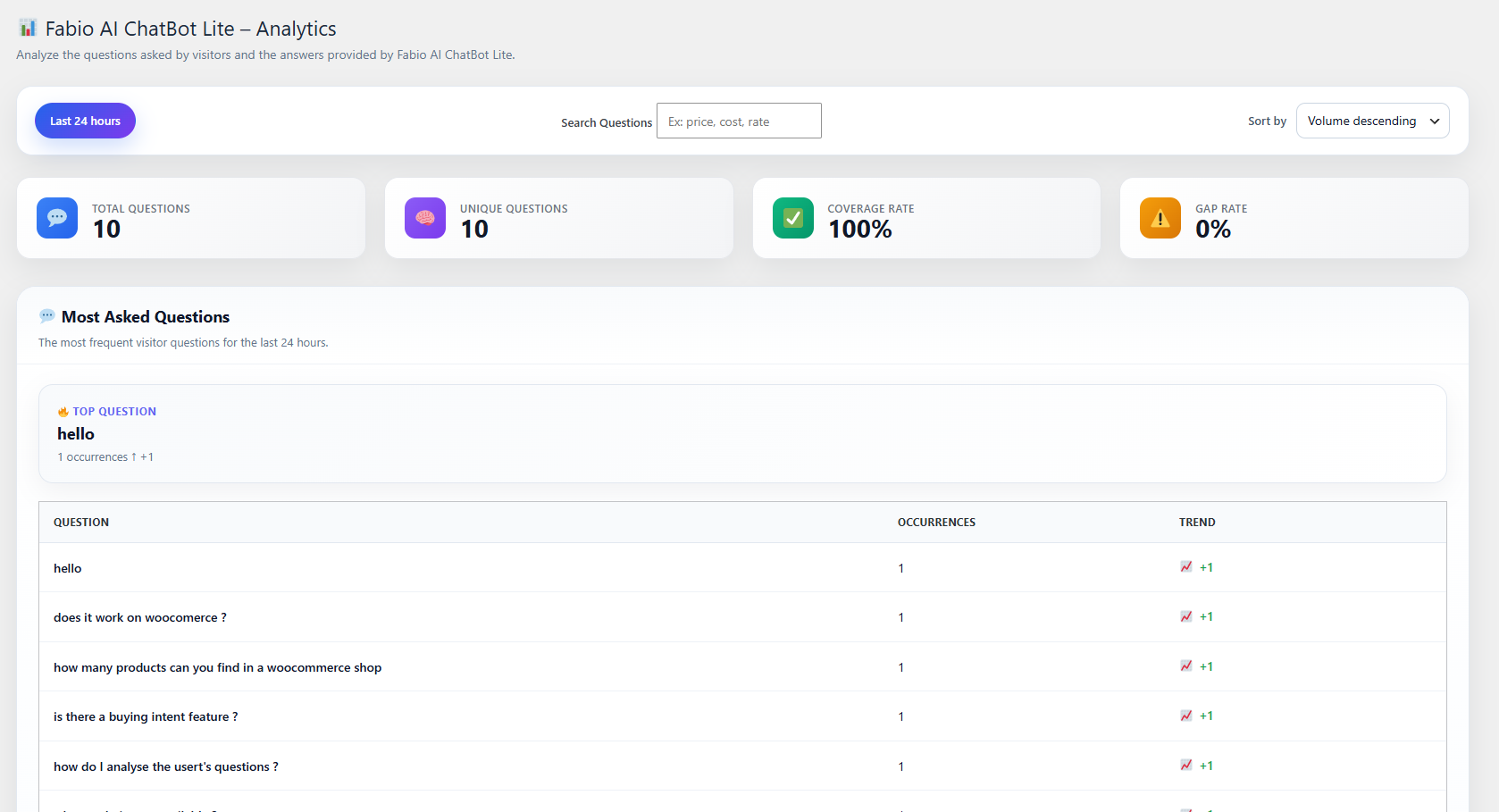
- 📊 Built-in 24-hour analytics: review visitor questions and chatbot answers, filter by keyword
- Gap Index: automatically flags questions whose answers are poorly covered by your existing content
- Supports any language available on your WordPress installation
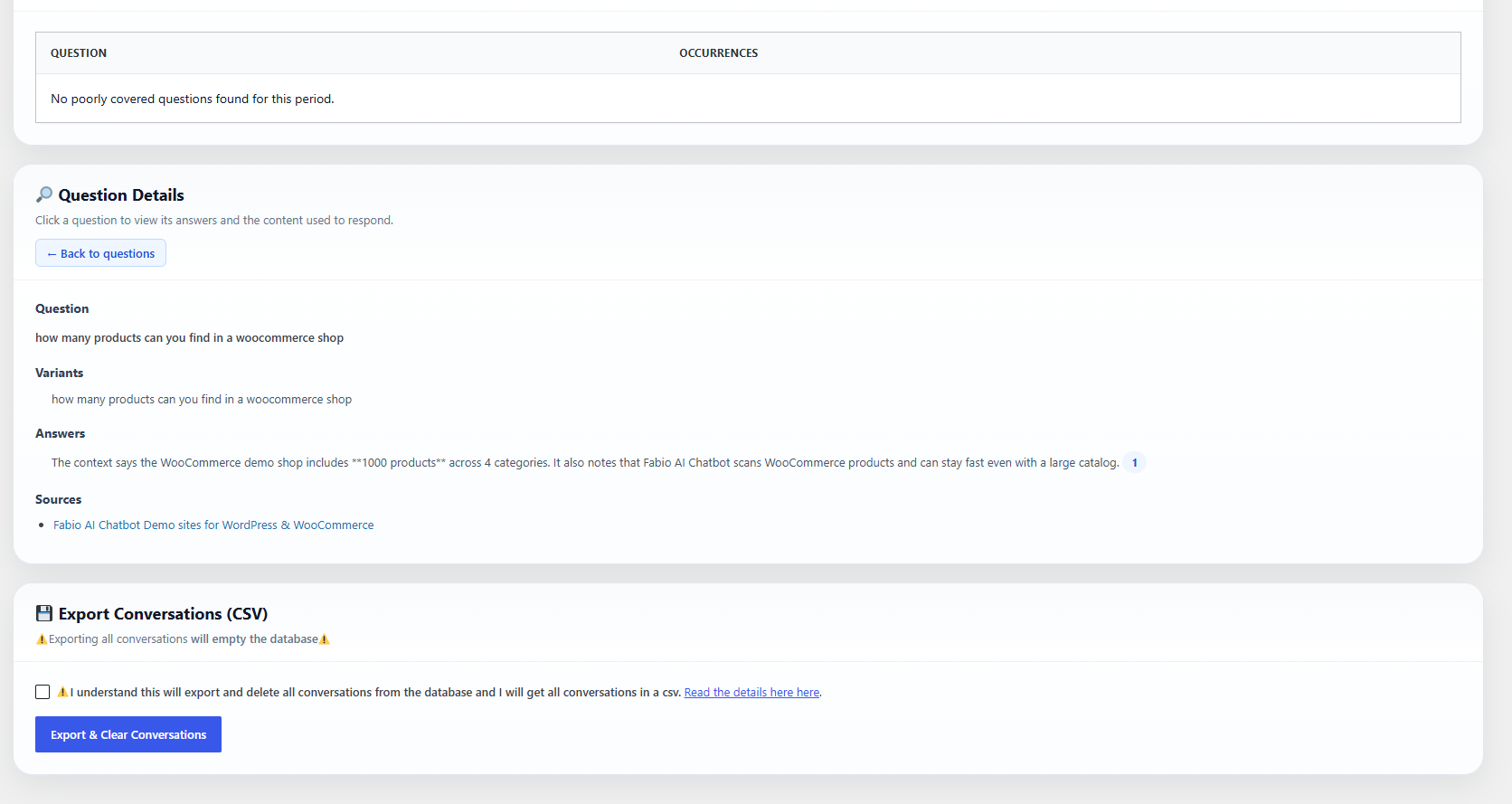
- Unlimited CSV export of conversation history
Usage
- 🔌 Install and activate the plugin
- 🔑 Configure your own API key in the settings (OpenAI, Gemini, Mistral, or Anthropic)
- 🔍 A site scan runs automatically
- 🖥️ Choose how to display the chatbot: shortcode
[fabioai_chatbot], floating bubble, or automatic insertion - 📊 Analyze the questions asked by users and the answers given by Fabio AI ChatBot Lite
Settings
From the WordPress admin panel, you can:
- 🔍 Launch a manual site scan
- 💬 Define the chatbot welcome message
- 🔑 Configure the OpenAI, Gemini, Mistral, and/or Anthropic API key
- 🤖 Choose the specific AI model per provider (e.g. Claude Haiku 4.5 for lower cost, Claude Sonnet 5 for higher accuracy)
- 🎨 Customize the chatbot’s appearance (colors, gradients, bubble position)
- ⬇️ Download conversations
Security & Reliability
- 🔒 Responses are strictly limited to scanned site content
- 🚫 No document uploads
- 🧹 Automatic content cleaning and segmentation
- 🛡️ Protection against invented or out-of-scope answers
External services
This plugin connects to third-party AI providers to generate chatbot responses based on your website’s scanned content. You must provide your own API key for the provider you choose to use; no data is sent unless you configure a key.
— OpenAI —
* 🎯 Usage: Generates chatbot responses when OpenAI is selected as the provider.
* 📤 Data sent: user questions (prompts), site content segments used as context, and your API key (for authentication).
* 📄 Terms of Use
* 🔐 Privacy Policy
— Google Gemini —
* 🎯 Usage: Generates chatbot responses when Gemini is selected as the provider.
* 📤 Data sent: user questions (prompts), site content segments used as context, and your API key (for authentication).
* 📄 Terms of Service
* 🔐 Privacy Policy
— Mistral AI —
* 🎯 Usage: Generates chatbot responses when Mistral is selected as the provider.
* 📤 Data sent: user questions (prompts), site content segments used as context, and your API key (for authentication).
* 📄 Terms of Service
* 🔐 Privacy Policy
— Anthropic —
* 🎯 Usage: Generates chatbot responses when Anthropic (Claude) is selected as the provider.
* 📤 Data sent: user questions (prompts), site content segments used as context, and your API key (for authentication).
* 📄 Terms of Service
* 🔐 Privacy Policy
API keys are stored locally in your WordPress database and are only used to authenticate requests to the provider you selected. You are responsible for complying with the terms and policies of the AI provider you choose to use.
Upgrade to Biz
Need more control over your chatbot? Fabio AI ChatBot Biz unlocks advanced features for growing sites:
- 🎯 Buying-intent detection: an additional instructions field to fine-tune how the chatbot detects and reacts to buying intent, guiding visitors toward a call-to-action
- 📋 30+ ready-to-use buying-intent templates: pre-built detection templates for all business types (directory, how-to, insurance, finance, e-commerce, and more)
- 🎭 2 extra tones: Friendly, and Professional & Serious, in addition to the default tone
- 🖼️ Custom bubble icon: replace the default chat icon with your own logo for more virality and engagement
- 📅 Extended analytics: 30-day history plus custom date range filtering, instead of the last 24 hours only
- 🆓 14-day free trial
All your Lite settings, scanned content, and conversation history carry over automatically when you upgrade — nothing to reconfigure.
More Information
Author
Fabio-Plugins.com
Installation
- 📦 Upload the plugin folder to /wp-content/plugins/
- ⚡ Activate the plugin from the Plugins menu
- ⚙️ Configure the plugin from the admin settings page
Frequently asked questions
🌐 Does the chatbot use the internet?
No. It only answers using your website content.
🔑 Do I need an API key?
Yes, you need your own API key from OpenAI, Gemini, Mistral, or Anthropic. This plugin does not include or provide API keys.
🤖 Which AI models can I choose?
For each provider, you can select between a lower-cost model and a higher-accuracy model directly from the settings page: GPT-5.6 Luna or GPT-5.4 Nano (OpenAI), Gemini 3.1 Flash-Lite or Gemini 3.5 Flash (Google Gemini), Mistral Large 3 (Mistral AI), and Claude Haiku 4.5 or Claude Sonnet 5 (Anthropic).
🎥 Where can I find video tutorials?
“How to” video guides are available on the official YouTube channel
💾 Are conversations stored?
Yes. Conversation history is stored locally in your WordPress database and can be analyzed and downloaded as CSV.
🎨 Can I customize the chatbot’s appearance?
Yes. You can customize colors, gradients, bubble position, and the welcome message from the admin settings page.
Changelog
Some AI models were retired by their providers and have been removed. If your selected model is no longer available, it now automatically falls back to another supported model. Anthropic (Claude) has been added as a new provider option.
1.0.6
- Fixed a bug where bbPress forums, topics, and replies were not indexed during the scan, even though the content existed and was published.
1.0.5
- Added a real-time visual progress bar for both automatic and manual scans, so you always know when a scan is running or complete.
- The first automatic scan now starts immediately upon activation, instead of waiting up to a minute.
- Added the next scheduled automatic scan date to the admin page.
- Added a detailed breakdown of indexed content by type (blog posts, pages, products, categories, tags, forums, topics, replies).
- WooCommerce product categories and product tags are now scanned and indexed as their own searchable content, in addition to being referenced inside each product.
- Displayed the minimum content length required for content to be indexed (50 characters for products, 200 characters for everything else).
- Reorganized the settings page into 5 clear numbered steps for easier setup.
1.0.4
- Added Shadow & Elevation
- UX improved on back end
1.0.3
- Added Anthropic (Claude) as a new supported AI provider, with Claude Haiku 4.5 and Claude Sonnet 5 models.
- Updated OpenAI model list: now offers GPT-5.6 Luna and GPT-5.4 Nano (previously offered older, retired models).
- Updated Google Gemini model list: now offers Gemini 3.1 Flash-Lite and Gemini 3.5 Flash (previous preview models have been retired by Google).
- Updated Mistral AI model list: now offers Mistral Large 3 only (previous models have been retired by Mistral).
- Note: sites with a previously selected model that is no longer available will automatically fall back to the first available model for that provider.
- Added links to video tutorials and the full feature list in the plugin description.
1.0.2
- Features description improved
1.0.1
- Adding an option to download all conversations without emptying the table.
- Removing “powered by”.
Screenshots


For developers
Is this your plugin? Show off the numbers.
Add a live badge to your site, docs or GitHub README. It updates on its own — no account needed.
Best Fabio Chatbot Lite for Shop,… alternatives
All AI Chatbot plugins →





FAQ
Fabio Chatbot Lite for Shop, Blog &…: quick answers
Straight answers, pulled from live WordPress.org data.
Live data from WordPress.org · checked Oct 4, 2026
Is Fabio Chatbot Lite for Shop, Bl… free?
Yes. Fabio Chatbot Lite for Shop, Bl… is free to download and use from the official WordPress.org plugin directory.
Is Fabio Chatbot Lite for Shop, Bl… safe to use in 2026?
Fabio Chatbot Lite for Shop, Bl… is a solid plugin choice in 2026, with a few things worth checking first. Was last updated 4 weeks ago, and scores 64/100 on our health check.
How many websites use Fabio Chatbot Lite for Shop, Bl…?
Fabio Chatbot Lite for Shop, Bl… is active on <10 WordPress websites and has been downloaded 450 times since it launched in August 2026. It was downloaded 277 times in the last 30 days.
Does Fabio Chatbot Lite for Shop, Bl… work with WordPress 7.1?
Yes. The developer has tested Fabio Chatbot Lite for Shop, Bl… up to WordPress 7.1.2, the latest release. It requires WordPress 6.0 or newer.
What PHP version does Fabio Chatbot Lite for Shop, Bl… need?
Fabio Chatbot Lite for Shop, Bl… requires PHP 8.0 or higher. Most hosts run PHP 8.x today, so it works on any modern WordPress hosting.
When was Fabio Chatbot Lite for Shop, Bl… last updated?
The latest version, 0.0, was released on September 7, 2026 (4 weeks ago).
Who makes Fabio Chatbot Lite for Shop, Bl…?
Fabio Chatbot Lite for Shop, Bl… is developed and maintained by Fabio Plugins.
What are the best alternatives to Fabio Chatbot Lite for Shop, Bl…?
The most popular alternatives to Fabio Chatbot Lite for Shop, Bl… are WPZOOM Connect: AI Chat, Cl… (90K+ installs), Lead Generation Contact Wid… (10K+ installs) and Hyve Lite (7K+ installs).
Powered by PageForge
Want thousands of pages that rank like these? Build them in an afternoon.
This directory runs on the same engine as PageForge. Turn any spreadsheet, CSV or API into thousands of fast, SEO-ready WordPress pages — with schema, internal links and AI-written copy baked in.
- CSV, Google Sheets & API data sources
- AI content, schema & internal links per page
- Works with Elementor, Gutenberg, Yoast & Rank Math
- Free on WordPress.org — no credit card


