



WEB-Translation – eTranslation Multilingual
Make your site multilingual in few steps with WEB-T – eTranslation Multilingual WordPress plugin.

Use with caution
WEB-Translation works, but test it on a staging site before relying on it in 2026. It runs on 400+ sites, is rated 3.7/5 and was last updated 4 months ago, and scores 59/100 on our health check.
- Small user base (400+ active installs)
How does it stack up?
Side-by-side on installs, updates, ratings & support


Daily downloads
Download spikes usually follow a new release — each site that auto-updates counts as a download.
Rankings
Where WEB-Translation stands todayWordPress.org search rankings
Live position in the plugin search, top 100| Keyword | Position |
|---|---|
| automatic translation | #19 |
| localization | #44 |
| multilingual | #10 |
| translate | >100 |
| translation | #22 |
Version adoption
Share of active sites per release.
Rating breakdown
★★★★★★★★★★ 3.7 from 7 reviews
About WEB-Translation
From the official readme · v2.0.7Description
Creating multilingual websites has never been easier: the WEB-T – eTranslation Multilingual WordPress plug-in can automatedly translate your web content into 30+ languages – free, easy and secure as always.
WEB-T – eTranslation Multilingual allows full website content translation in any language supported by the eTranslation automated translation service provided by the EC. The automated translations are performed by eTranslation service API.
Features
- Translates your web content automatedly
- Easy to use
- East to integrate
- Visual translation editor
- Automated translation in 30+ languages via eTranslation integration
- Image translation support
- Translation caching for quick page load times
- Dynamic content translation
- Compatible with WooCommerce, Gutenberg and other plugins & themes
- Configurable language switcher
Automated translation
WEB-T enables seamless translation of your website’s entire content into any language supported by compatible automated translation services. You can integrate your preferred service using APIs or opt for the free eTranslation service provided by the European Commission (EC).
While WEB-T itself is free, access to the eTranslation service and API key is limited to organizations and individuals within the European Union (EU) and its associated countries.
If you’re located outside the EU and require translation services, you’ll need to find a machine translation (MT) service provider compatible with the WEB-T API. Instructions on how to ensure compatibility with WEB-T APIs can be found here.
More information
See how to configure & use this plugin and read more about the WEB-T project by European Commission on official WEB-T website.
Credits
WEB-T – eTranslation Multilingual is a fork of TranslatePress by Cozmoslabs. We thank TranslatePress developers (Cozmoslabs, Razvan Mocanu, Madalin Ungureanu, Cristophor Hurduban) for their work on the original plugin.
Installation
- Upload etranslation-multilingual.zip file from WordPress dashboard -> Plugins -> Add new -> Upload Plugin -> Choose file -> Install Now
1.1. Alternatively, upload unzipped etranslation-multilingual folder to the ‘/wp-content/plugins/’ directory - Activate installed plugin through ‘Plugins’ menu (Plugins -> WEB-T – eTranslation Multilingual -> Activate)
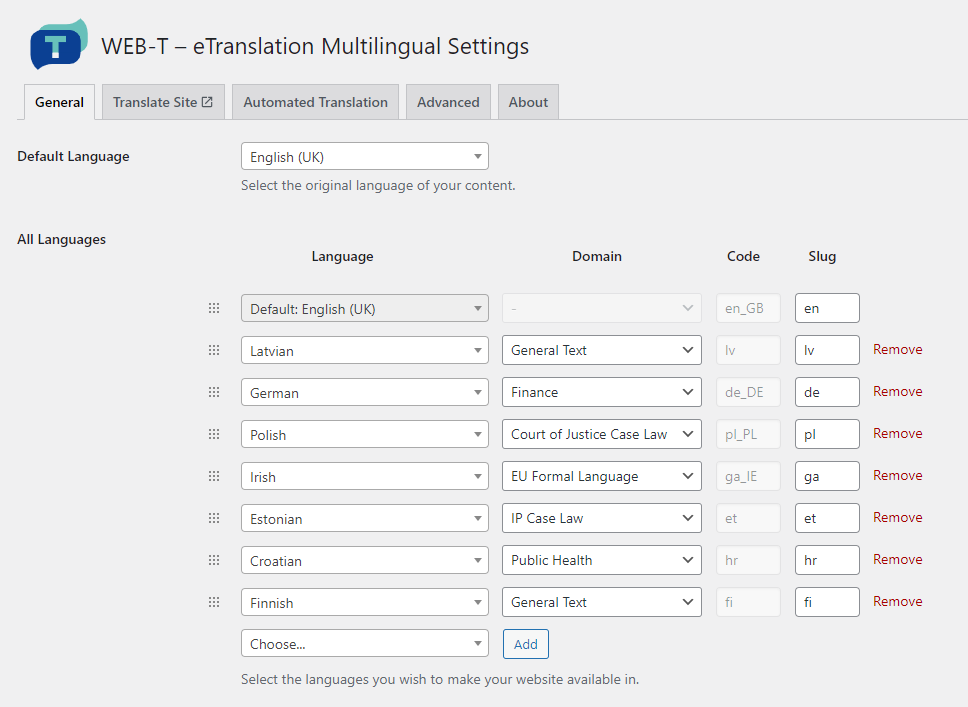
- Configure website source & target languages, eTranslation credentials for automated translation from plugin settings (Settings -> WEB-T – eTranslation Multilingual)
Detailed setup & usage tutorials and videos are available here.
Changelog
2.0.7
- Updated minimum PHP version requirement to 7.4
- Updated minimum WordPress version requirement to 6.4.3
- Updated to the REST V2 API version of eTranslation.
2.0.6
- Improved page loading performance and compatibility with WooCommerce
2.0.5
- Resolved eTranslation connection issue with OpenSSL 3.0 & cURL versions < 7.88.1
2.0.4
- Support for WooCommerce High-Performance Order Storage (HPOS)
2.0.3
- Plugin description improvements
2.0.2
- Accessibility improvements
- Pre-translation URL load fix
Screenshots


For developers
Is this your plugin? Show off the numbers.
Add a live badge to your site, docs or GitHub README. It updates on its own — no account needed.
Best WEB-Translation alternatives
All automatic translation plugins →





FAQ
WEB-Translation: quick answers
Straight answers, pulled from live WordPress.org data.
Live data from WordPress.org · checked Oct 1, 2026
Is WEB-Translation free?
Yes. WEB-Translation is free to download and use from the official WordPress.org plugin directory.
Is WEB-Translation safe to use in 2026?
WEB-Translation works, but test it on a staging site before relying on it in 2026. It runs on 400+ sites, is rated 3.7/5 and was last updated 4 months ago, and scores 59/100 on our health check.
How many websites use WEB-Translation?
WEB-Translation is active on 400+ WordPress websites and has been downloaded 4,928 times since it launched in March 2023. It was downloaded 256 times in the last 30 days.
Does WEB-Translation work with WordPress 7.1?
WEB-Translation is officially tested up to WordPress 7.0.6, while the latest release is 7.1.2. It may still work, but try it on a staging site first.
What PHP version does WEB-Translation need?
WEB-Translation requires PHP 7.4 or higher. Most hosts run PHP 8.x today, so it works on any modern WordPress hosting.
When was WEB-Translation last updated?
The latest version, 2.0.7, was released on June 17, 2026 (4 months ago).
Who makes WEB-Translation?
WEB-Translation is developed and maintained by EC WEB-T.
What are the best alternatives to WEB-Translation?
The most popular alternatives to WEB-Translation are TranslatePress (400K+ installs), Translate WordPress with We… (50K+ installs) and Polylang Duplicate Content… (10K+ installs).
Powered by PageForge
Want thousands of pages that rank like these? Build them in an afternoon.
This directory runs on the same engine as PageForge. Turn any spreadsheet, CSV or API into thousands of fast, SEO-ready WordPress pages — with schema, internal links and AI-written copy baked in.
- CSV, Google Sheets & API data sources
- AI content, schema & internal links per page
- Works with Elementor, Gutenberg, Yoast & Rank Math
- Free on WordPress.org — no credit card


