


Translate and boost SEO – Automatic AI translation – wpLingua
Translate and make your websites multilingual : no word limits, SEO-friendly, automatic translator, AI translation API and editable translations

Safe pick
Yes — Translate and boost SEO is a safe, well-maintained plugin to use in 2026. It runs on 2K+ sites, is rated 4.9/5 and was last updated 6 days ago, and scores 85/100 on our health check.
- Loved by users — 4.9/5 from 30 reviews
- Actively developed — last update 6 days ago
- Tested with the latest WordPress (7.1)
- Momentum — downloads up 49.6% vs the previous 30 days
How does it stack up?
Side-by-side on installs, updates, ratings & support


Daily downloads
Download spikes usually follow a new release — each site that auto-updates counts as a download.
Rankings
Where Translate and boost SEO stands todayWordPress.org search rankings
Live position in the plugin search, top 100| Keyword | Position |
|---|---|
| ai translation | #11 |
| automatic translation | #3 |
| seo | #81 |
| translate | #18 |
| translation | #6 |
Version adoption
Share of active sites per release.
Rating breakdown
★★★★★★★★★★ 4.9 from 30 reviews
About Translate and boost SEO
From the official readme · v2.16.8Description
An all-in-one solution that makes your websites multilingual and translate them automatically, without word limits.
✓ One free first language for non-commercial websites
✓ Automatic translation API connector
✓ Unlimited number of translated words
✓ SEO-friendly: indexing of translated pages in search engines
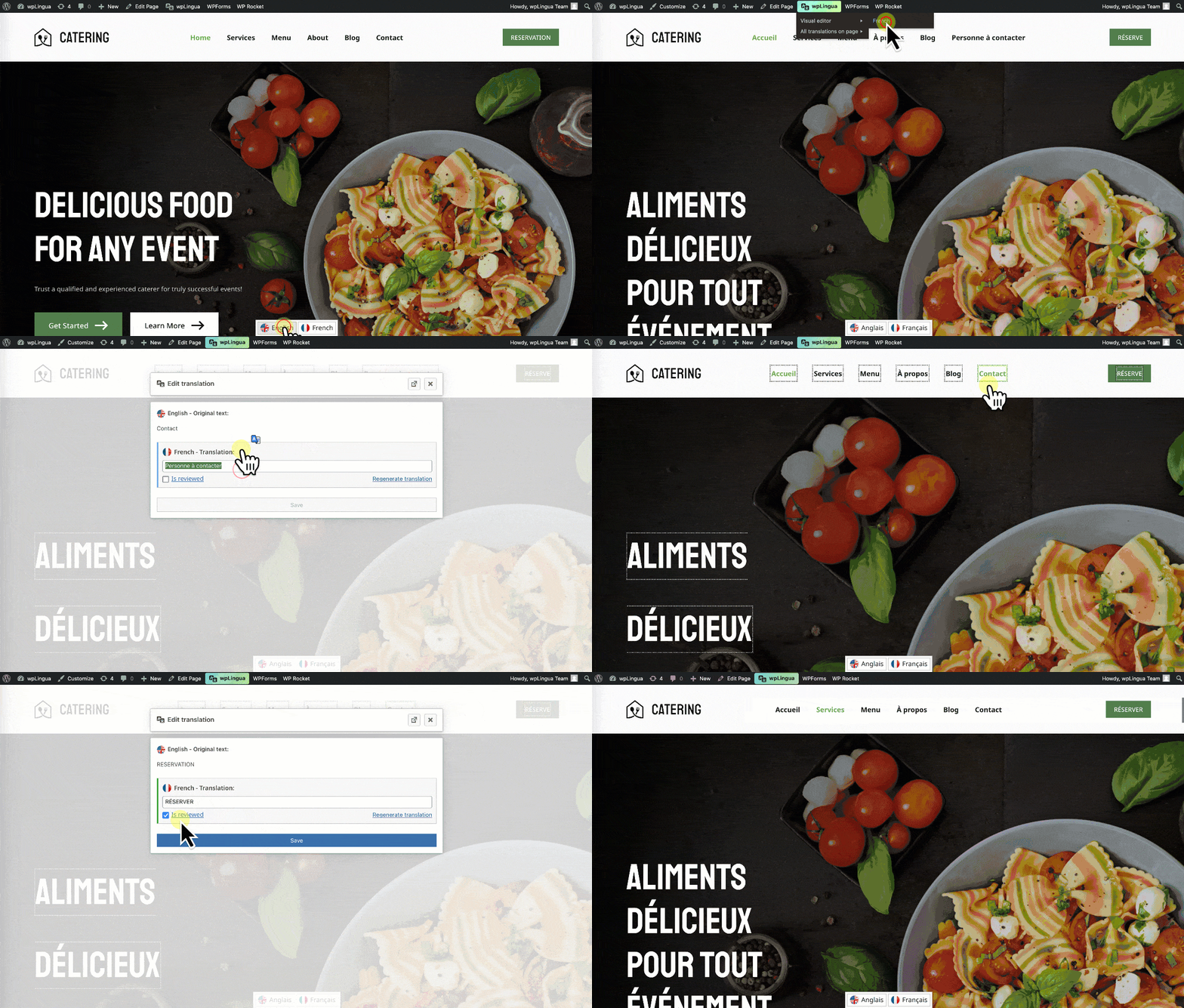
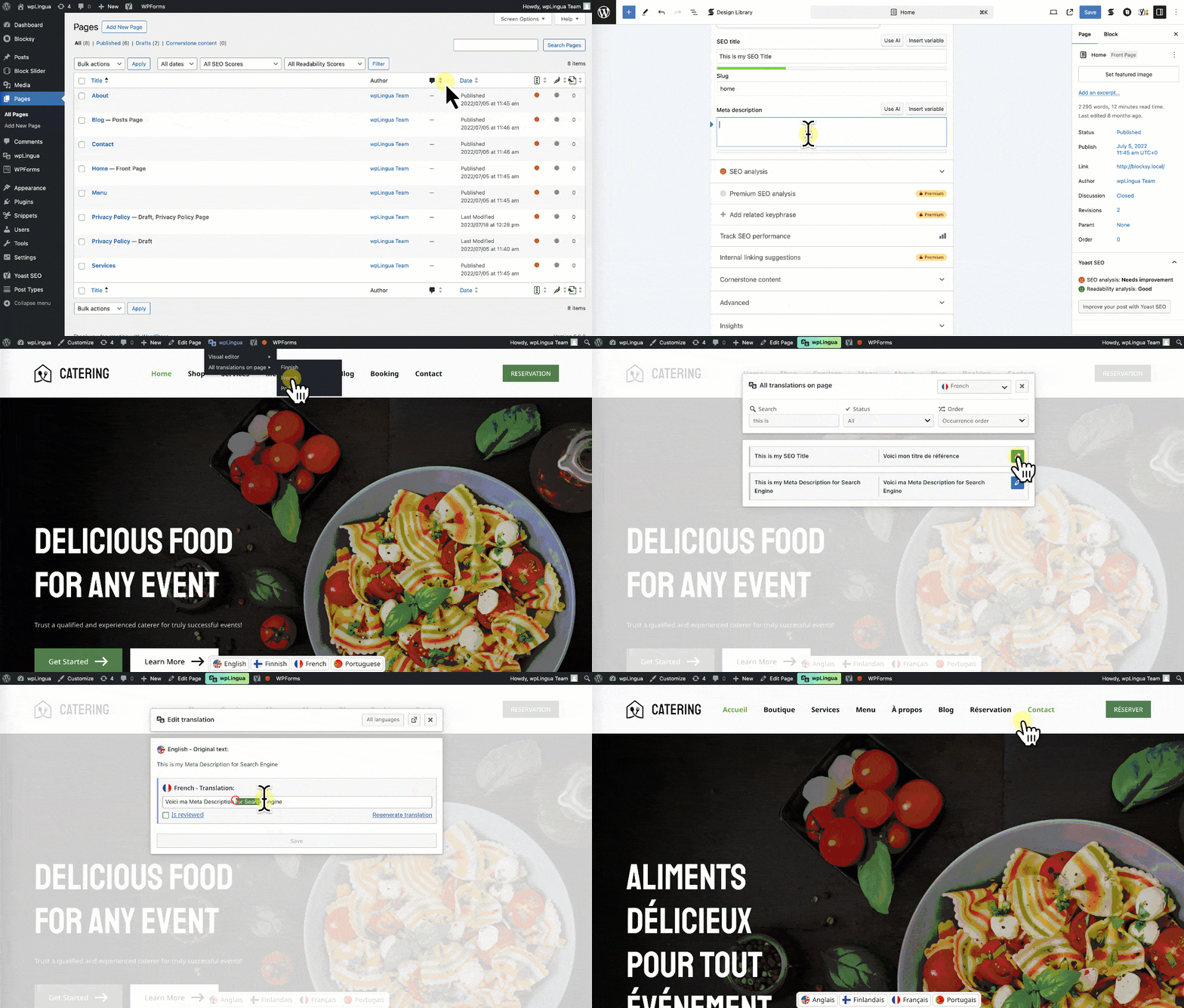
✓ On-page visual editor for editing translations
✓ Customizable language switcher
✓ Translate website URLs
✓ Making XML sitemaps automatically multilingual
✓ No coding knowledge needed
✓ Self-hosted data
✓ Open source, find wpLingua on GitHub
✓ And more!
🎬 6 minutes to translate your website
Video tutorial available in Chinese, Danish, English, Finnish, French, German, Greek, Hindi, Italian, Japanese, Korean, Polish, Portuguese and Spanish.
🔥 One free target language
The first language translation is completely free for non-commercial websites. If your website is of a commercial nature (e-commerce, advertising, etc.), a commercial licence is available.
🧮 No word limits!
Don’t count the words on your website to decide which plan to choose, wpLingua doesn’t limit them! Simply choose the number of target languages and translate without counting!
🚀 Optimized for international search engines (SEO)
When you use wpLingua on your website, all elements of your content – even those that are invisible – are translated.
wpLingua is “SEO-Friendly” because it takes care of translating:
✓ Meta Title tags
✓ Meta Description tags
✓ Hreflang alternative links
✓ Meta tags for social networks (Twitter X, OpenGraph Facebook…)
✓ ALT attributes of images
✓ And more.
By optimizing indexing, we ensure that your translated pages are not only understood by your audience, but are also easily found by search engines.
🪄 Streamlined Setup Process
Forget about complex plugins to set up, wpLingua enhances the user experience of the multilingual world.
All you need to do to get started is request your machine translation API key, then play with the language switcher appearance options!
Let wpLingua take care of the technical aspects while you concentrate on creating compelling content for your international audience. Our commitment is to make multilingual capabilities accessible and easy to use for all WordPress users.
✍️ Tailor-made translations at your fingertips with our On-Page Editor
Although wpLingua gives you the convenience of machine translations, we understand the nuances of each language.
wpLingua allows you to fine-tune each translation manually if you need to.
Experience the fusion of automation and the personal touch with our visual on-page editor.
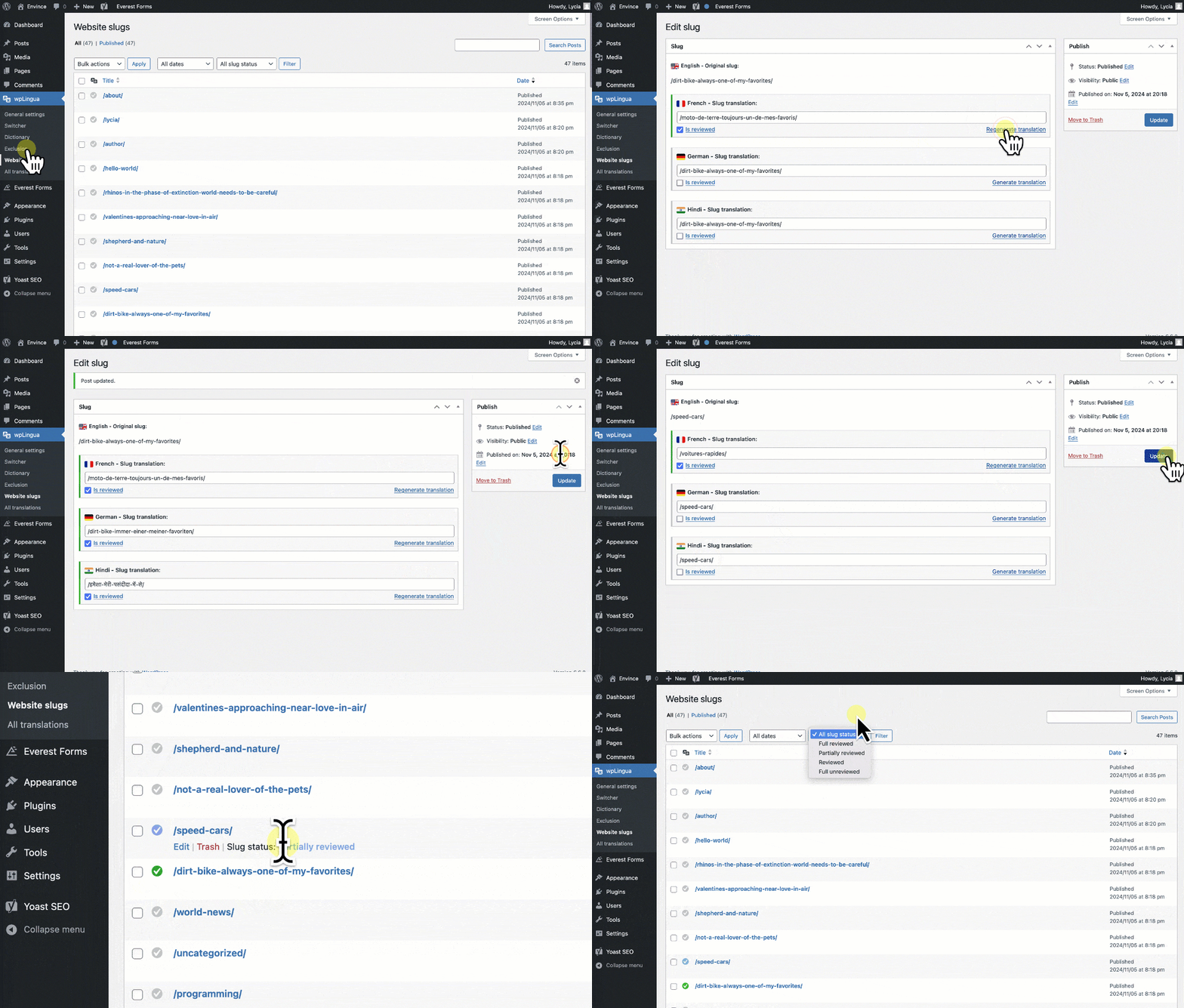
🔗 Editable URL translation
The plugin automatically discovers URLs on your website and lets you translate them. URLs are split into slugs (parts of the URL), making them easy to edit. This feature boosts SEO performance!
🎨 Fully customizable language switcher
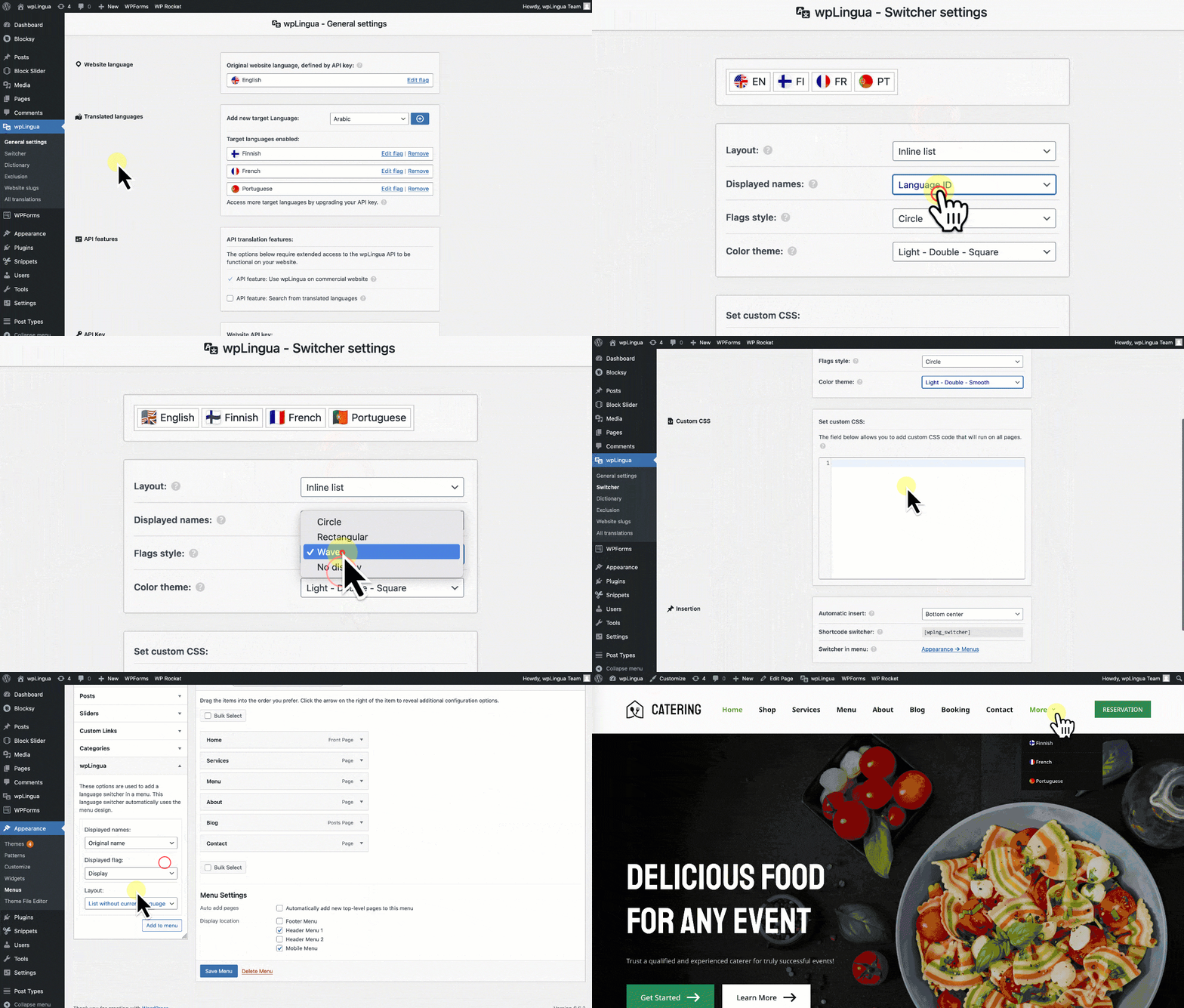
wpLingua’s language switcher is fully customizable. You can display the language selector in four ways:
✓ Automatic insertion via predefined positions.
✓ Use a shortcode to display it wherever you like.
✓ Insertion in the navigation menu using the design defined by the theme.
✓ Insertion in the navigation menu from the site editor using the Gutenberg block named Language Switcher
You can also control the appearance of the language switcher using:
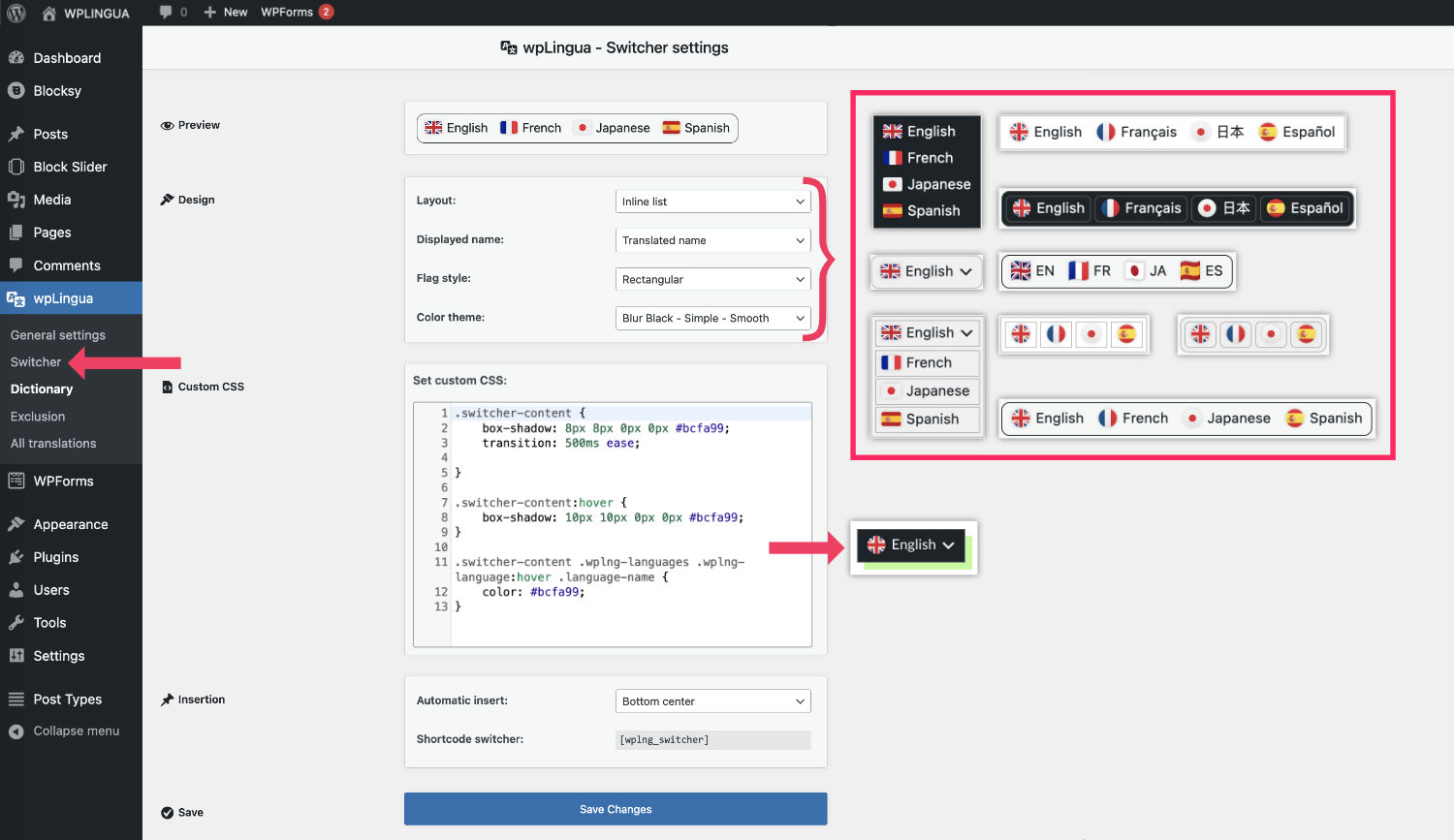
✓ Switcher styles (dropdown, inline and block)
✓ Predefined themes (light, dark, chameleon, etc.)
✓ Configurable language names (translated name, original name, language ID, etc.)
✓ Flag shapes (round, rectangle and wavy)
✓ Language-based flag choices or import your own flag images
✓ Adding custom CSS in a dedicated insert
With all these customization options, there’s no way your website’s language switcher will look like any other!
📖 Translation rules by dictionary
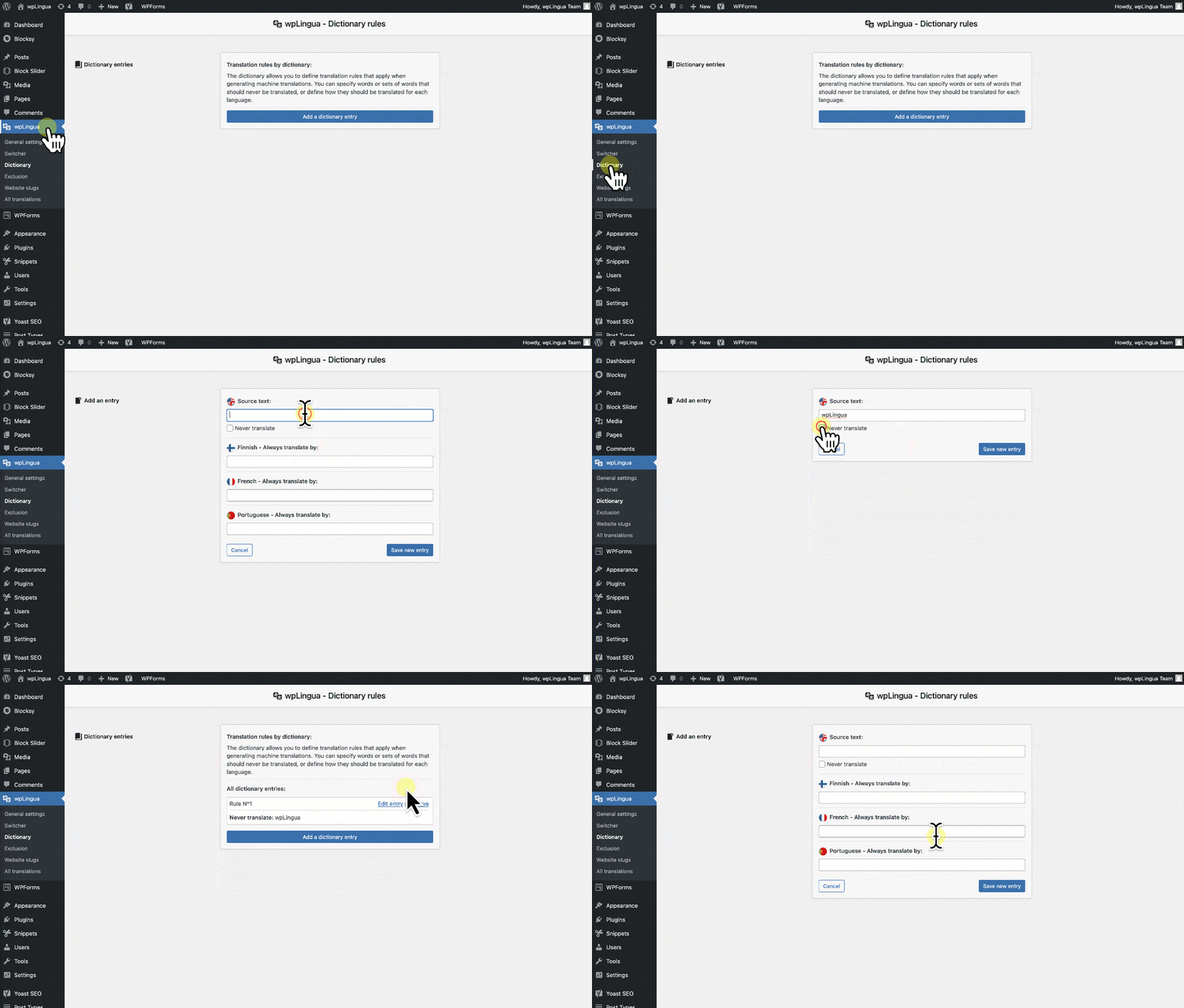
The dictionary allows you to define translation rules that apply when generating machine translations. You can specify words or sets of words that should never be translated, or define how they should be translated for each language.
🖼️ Translation of links and media
This feature lets you apply translation rules to links and media, offering even greater customization. You can display different images or modify link URLs according to the current language. These rules apply to the following elements: Link URLs, image URLs, iframe URLs and URLs in intercepted JSONs.
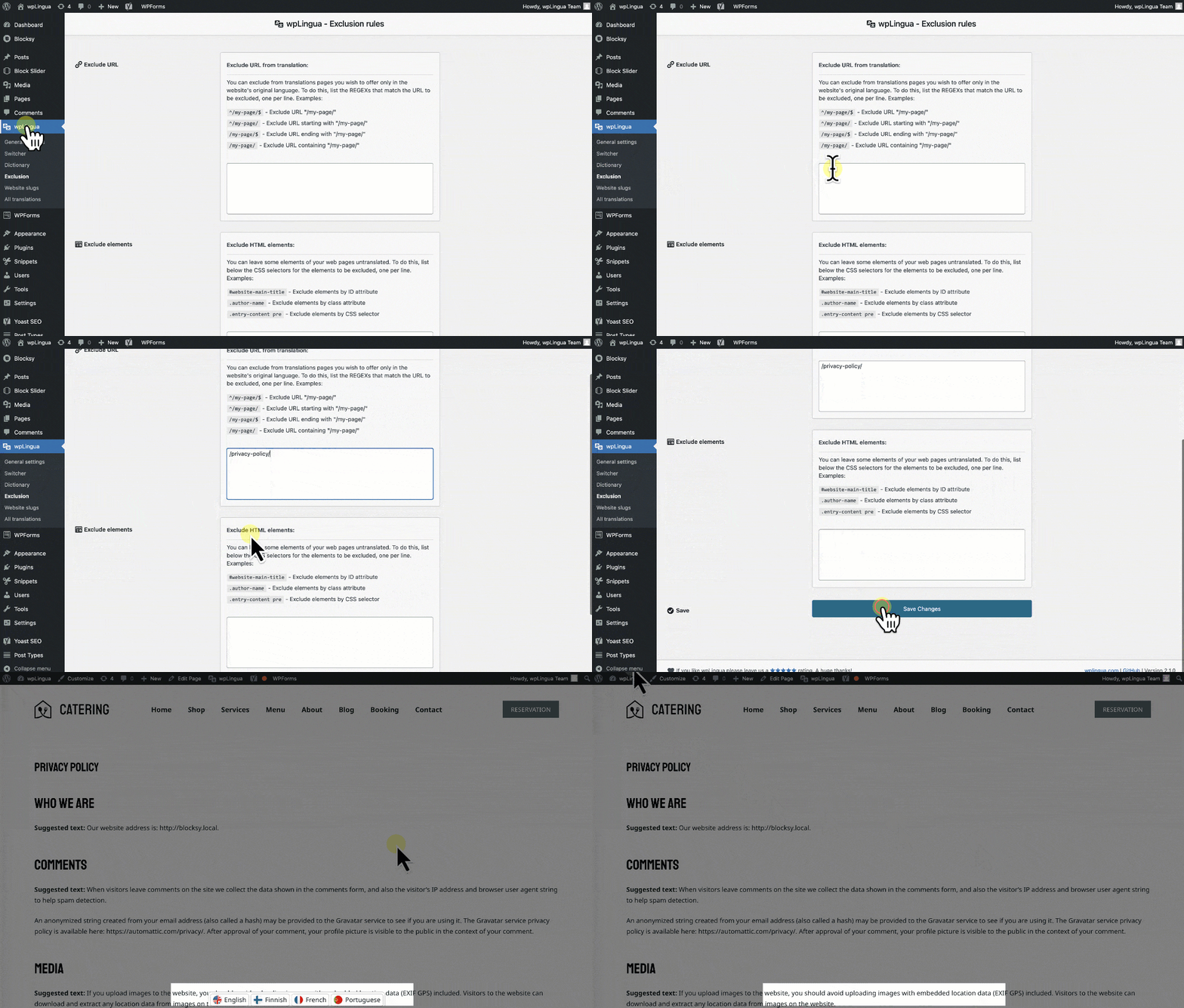
🧭 Intuitive possibilities to exclude certain translations
Navigate the complexities of website translation with wpLingua’s intelligent exclusion feature.
Want to preserve specific sections of a page in its original language? Our system seamlessly allows you to pinpoint and exclude translations using CSS selectors.
If entire pages need to remain untouched, effortlessly exclude them by their URL. All of this can be managed with ease through our user-friendly exclusions manager.
With wpLingua, you’re always in command of what gets translated and what doesn’t, ensuring your website’s essence remains intact.
💫 Supported languages
The plugin supports the following languages
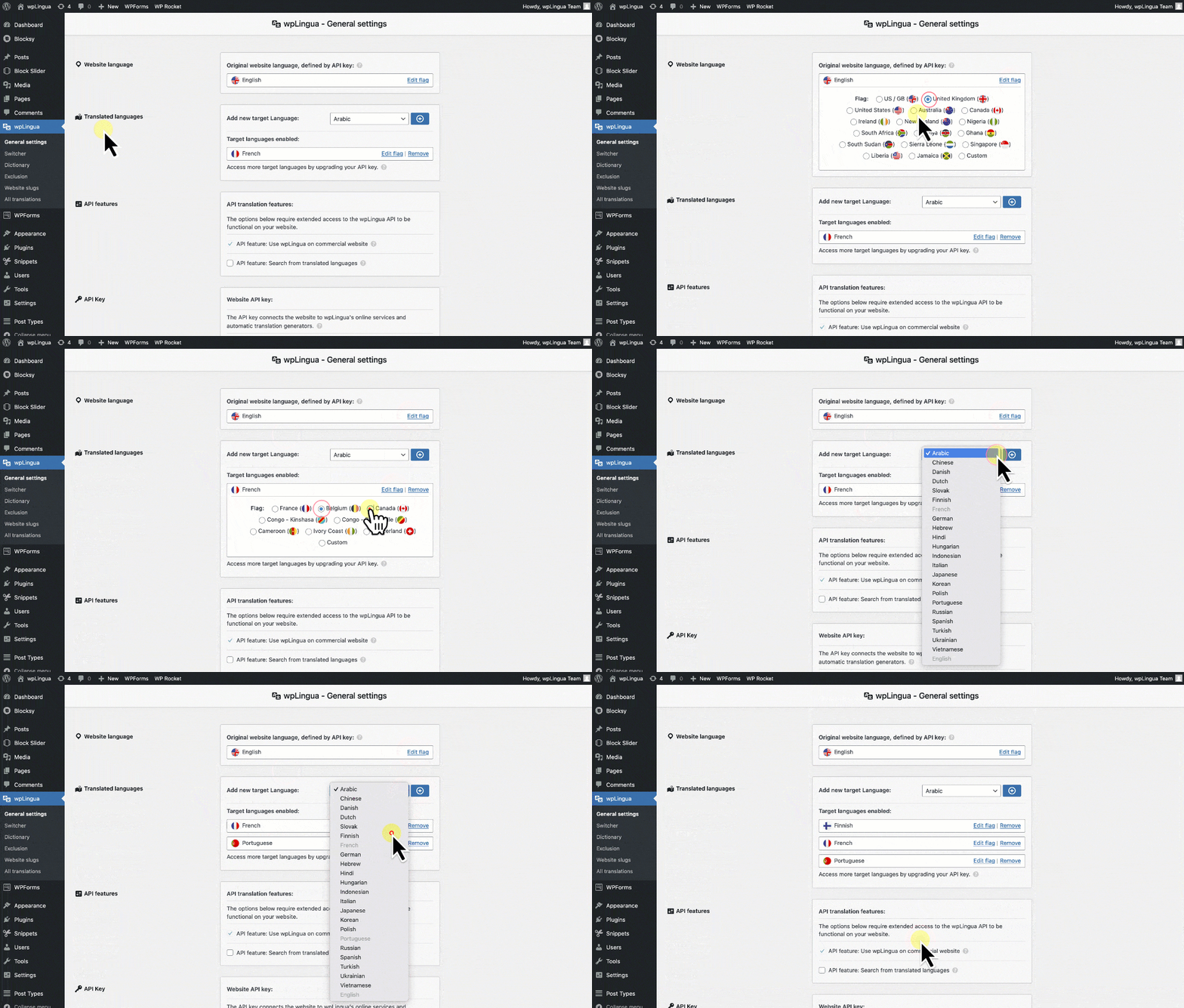
Arabic ∘ Chinese ∘ Danish ∘ Dutch ∘ Slovak ∘ English ∘ Finnish ∘ French ∘ German ∘ Greek ∘ Hebrew ∘ Hindi ∘ Hungarian ∘ Indonesian ∘ Italian ∘ Japanese ∘ Korean ∘ Norwegian ∘ Polish ∘ Portuguese ∘ Russian ∘ Spanish ∘ Swedish ∘ Turkish ∘ Ukrainian ∘ Vietnamese
The plugin is translated into the following languages
Danish ∘ Dutch ∘ English ∘ Finnish ∘ French ∘ German ∘ Hindi ∘ Hungarian ∘ Indonesian ∘ Italian ∘ Japanese ∘ Korean ∘ Portuguese ∘ Spanish ∘ Swedish
You can contribute to the translation of the wpLingua plugin on translate.wordpress.org and contribute to the editing of PO/MO translation files on GitHub.
🔌 Theme and plugin compatibility
The method used by wpLingua to translate website texts ensures compatibility with most themes and plugins.
Compatible plugins tested: WooCommerce, Yoast SEO, SEOPress, All in One SEO, SEOKey, Elementor, Gutenberg, Divi Builder, Advanced Custom Fields (ACF), Contact Form 7, Fluent Forms, WP Forms, Gravity Form, MailPoet, WP Rocket, Cache Enabler, WP Fastest Cache, All-in-One WP Migration, UpdraftPlus, Redirection, Complianz, WF Cookies, Complianz, LuckyWP Table of content, WP Grid Builder, and more…
Compatible themes tested: Divi, Twenty Twenty-One, Astra, OceanWP, Blocksy, Hello, GeneratePress, Neve, Envince, Twenty Twenty-Four, Twenty Twenty-Five, Poe, Neve FSE, Frost, Tove, and more…
⚡️ The wpLingua API and plugin connectors
The wpLingua plugin relies on our own wpLingua API, an integrated third-party service, to provide its machine translation functionality. The call to this Third Party Service (wpLingua API) is made when creating an API key from the plugin, during API key verification and when your website requests a new automatic translation (new texts discovered on a page web or request automatic translations from the translation edition). We invite you to consult our Terms & Conditions page for more information.
Keywords: wpLingua, WP Lingua, WP-Lingua, Multilingual, Bilingual, Translation, Translate, Translated, Translator, Localization, Automatic translation, Machine translation, Translation connector, Languages, Language switcher, Language selector, API, SEO, Custom flags
Installation
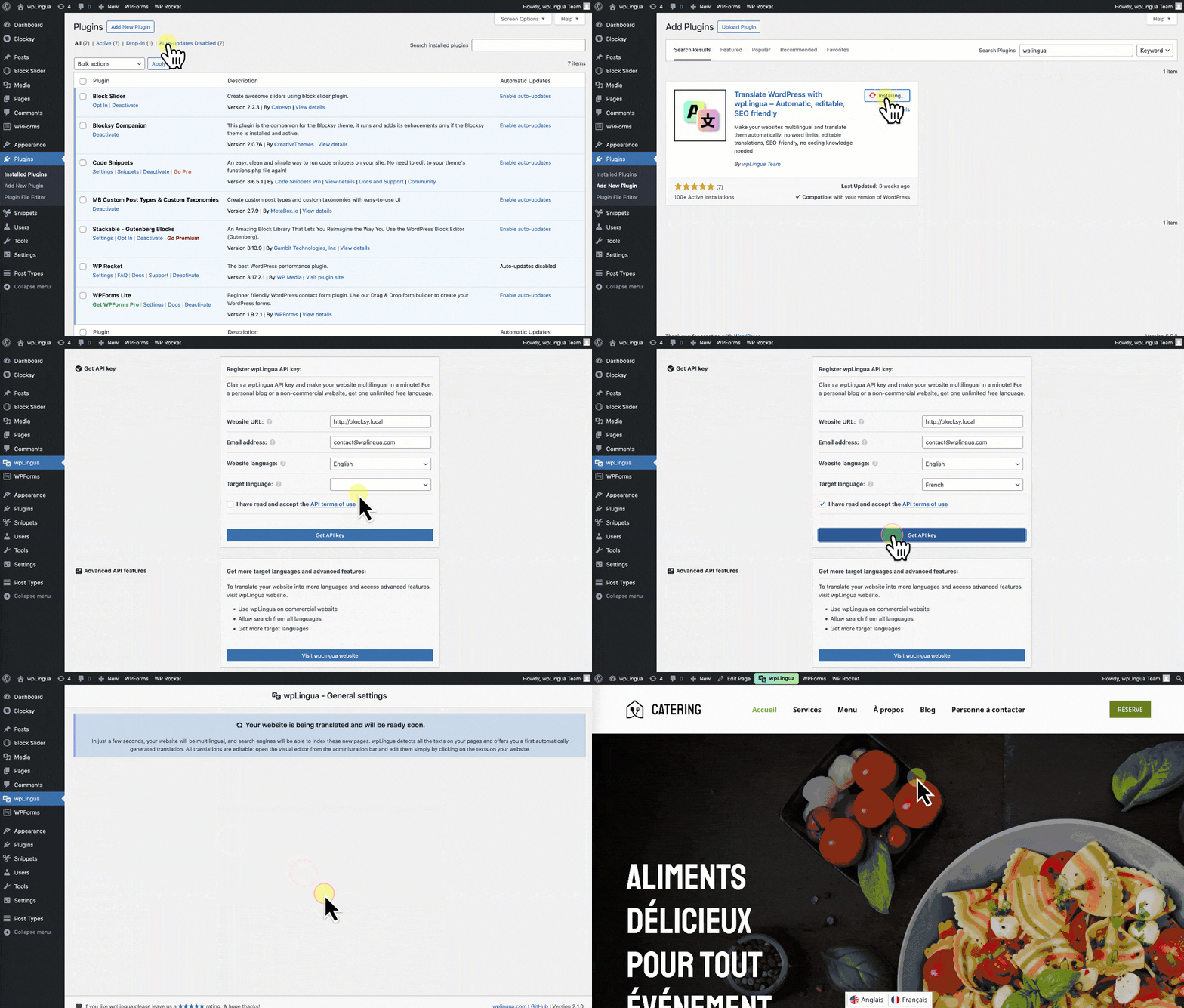
- Download the plugin zip file and install it via the WordPress interface, or upload it directly to your plugins directory.
- Activate wpLingua from your plugins page.
- Navigate to the wpLingua settings to get your free API key and to set up your language preferences.
- Start translating your content!
Frequently asked questions
What languages are available for plugin administration?
For the time being, the plugin administration is available in Danish, Dutch, English, Finnish, French, German, Hindi, Hungarian, Indonesian, Italian, Japanese, Korean, Portuguese, Spanish, and Swedish. If you want to help us translate it into more languages, don’t hesitate!
What languages are available for translation?
The plugin supports the following languages: Arabic ∘ Chinese ∘ Danish ∘ Dutch ∘ Slovak ∘ English ∘ Finnish ∘ French ∘ German ∘ Greek ∘ Hebrew ∘ Hindi ∘ Hungarian ∘ Indonesian ∘ Italian ∘ Japanese ∘ Korean ∘ Norwegian ∘ Polish ∘ Portuguese ∘ Russian ∘ Spanish ∘ Swedish ∘ Turkish ∘ Ukrainian ∘ Vietnamese
How it works?
wpLingua intercepts page content and analyzes HTML and JS code. It discovers all texts, translates them and makes the pages multilingual. This approach ensures compatibility with most themes, plugins and page builders such as Gutenberg, Elementor, Divi
Is wpLingua compatible with WooCommerce or other plugins?
Absolutely! wpLingua intercepts page content and analyzes HTML and JS code. It discovers all texts, translates them and renders the pages multilingual. This approach guarantees compatibility with the translation of your WooCommerce online store, as well as with all other WordPress plugins.
Is wpLingua compatible with Divi or other Theme?
The method used by wpLingua to translate website texts guarantees compatibility with most themes. Themes tested with guaranteed compatibility: Divi, Twenty Twenty-One, Astra, OceanWP, Blocksy, Hello, GeneratePress, Neve, Envince, Twenty Twenty-Four, Twenty Twenty-Five, Poe, Neve FSE, Frost, Tove, and more
Is wpLingua compatible with Gutenberg or other page builders?
The method used by wpLingua to translate website texts guarantees compatibility with most page builders. Page builders tested with guaranteed compatibility: Elementor, Divi Builder, Gutenberg.
Is wpLingua compatible with WordPress Multisite?
No, wpLingua is not compatible with WordPress Multisite
Is wpLingua compatible with caching plugins?
Quite ! And it’s even recommended to cache your pages and translations to improve website loading and performance.
Is there a Gutenberg block to easily insert the language selector from the site editor?
Yes! If your website uses a block-based theme (like Twenty Twenty Five, Neve FSE, etc.), you can easily edit the website header via the Site Editor to add the Language switcher block in the location of your choice. You can also easily display the language switcher wherever you want using our shortcode provided for this purpose. Simply copy and paste this shortcode where you want: [wplng_switcher]
How can I get more languages?
To get more than one language, you need to opt for the Premium package, which gives you access to up to 25 translated languages.
Do I need a DeepL or Google Translate plan in addition to wpLingua?
No. Translations are managed by our API integrated in wpLingua. You do not need to purchase an additional plan.
Is wpLingua entirely free?
You can use wpLingua free of charge to translate your website into the language of your choice, provided your website is not intended for commercial use. If your website is for commercial use, or if you would like more languages translated, we invite you to choose a premium package.
Where are my translations stored?
Your server’s database holds all the translations locally.
Changelog
First release. Be sure to set up your preferences after installation.
2.16.8
- Improved plugin compatibility:
- WooCommerce: Translate the “Place order” button
- Contact Form 7: Translate quiz questions
- Improved options page design
2.16.7
- Improved settings menu design
2.16.6
- Navigation menu settings
- Fix icon alignment in Chrome
- Review size and spacing
- Option pages
- Fix select input height on WordPress 7.1
- Fix icon alignment in buttons on WordPress 7.1
2.16.5
- Update plugin translations for all supported languages
2.16.4
- Added guidance on using a reliable email address to receive the API key
- Added a warning about potential email filtering by some hosting providers
- Added an option to request a new API key using a different email address if the email is not received
- Improved link visibility by underlining certain links for better UX
2.16.3
- Smoother load in progress mode
- Some code review
Screenshots
For developers
Is this your plugin? Show off the numbers.
Add a live badge to your site, docs or GitHub README. It updates on its own — no account needed.
Best Translate and boost SEO alternatives
All ai translation plugins →



FAQ
Translate and boost SEO: quick answers
Straight answers, pulled from live WordPress.org data.
Live data from WordPress.org · checked Sep 28, 2026
Is Translate and boost SEO free?
Yes. Translate and boost SEO is free to download and use from the official WordPress.org plugin directory.
Is Translate and boost SEO safe to use in 2026?
Yes — Translate and boost SEO is a safe, well-maintained plugin to use in 2026. It runs on 2K+ sites, is rated 4.9/5 and was last updated 6 days ago, and scores 85/100 on our health check.
How many websites use Translate and boost SEO?
Translate and boost SEO is active on 2K+ WordPress websites and has been downloaded 72,774 times since it launched in February 2024. It was downloaded 7,903 times in the last 30 days.
Does Translate and boost SEO work with WordPress 7.1?
Yes. The developer has tested Translate and boost SEO up to WordPress 7.1.2, the latest release. It requires WordPress 6.0 or newer.
What PHP version does Translate and boost SEO need?
Translate and boost SEO requires PHP 7.4 or higher. Most hosts run PHP 8.x today, so it works on any modern WordPress hosting.
When was Translate and boost SEO last updated?
The latest version, 2.16.8, was released on September 22, 2026 (6 days ago).
Who makes Translate and boost SEO?
Translate and boost SEO is developed and maintained by wpLingua Translation Service.
What are the best alternatives to Translate and boost SEO?
The most popular alternatives to Translate and boost SEO are TranslatePress (400K+ installs), LocoAI (70K+ installs) and Translate WordPress with We… (50K+ installs).
Powered by PageForge
Want thousands of pages that rank like these? Build them in an afternoon.
This directory runs on the same engine as PageForge. Turn any spreadsheet, CSV or API into thousands of fast, SEO-ready WordPress pages — with schema, internal links and AI-written copy baked in.
- CSV, Google Sheets & API data sources
- AI content, schema & internal links per page
- Works with Elementor, Gutenberg, Yoast & Rank Math
- Free on WordPress.org — no credit card


