



Entity Schema
LocalBusiness schema with multi-type support (up to 4 @type values), 135+ business types, and FAQ schema. Clean JSON-LD, no dependencies.

Solid choice
Entity Schema is a solid plugin choice in 2026, with a few things worth checking first. It runs on 30+ sites and was last updated 1 month ago, and scores 63/100 on our health check.
- Tested with the latest WordPress (7.1)
- Small user base (30+ active installs)
- Very few reviews so far
How does it stack up?
Side-by-side on installs, updates, ratings & support



Daily downloads
Download spikes usually follow a new release — each site that auto-updates counts as a download.
Rankings
Where Entity Schema stands todayWordPress.org search rankings
Live position in the plugin search, top 100| Keyword | Position |
|---|---|
| faq | >100 |
| local seo | >100 |
| schema | #96 |
| seo | >100 |
| structured data | >100 |
Version adoption
Share of active sites per release.
About Entity Schema
From the official readme · v2.10.0Description
Professional schema markup made simple.
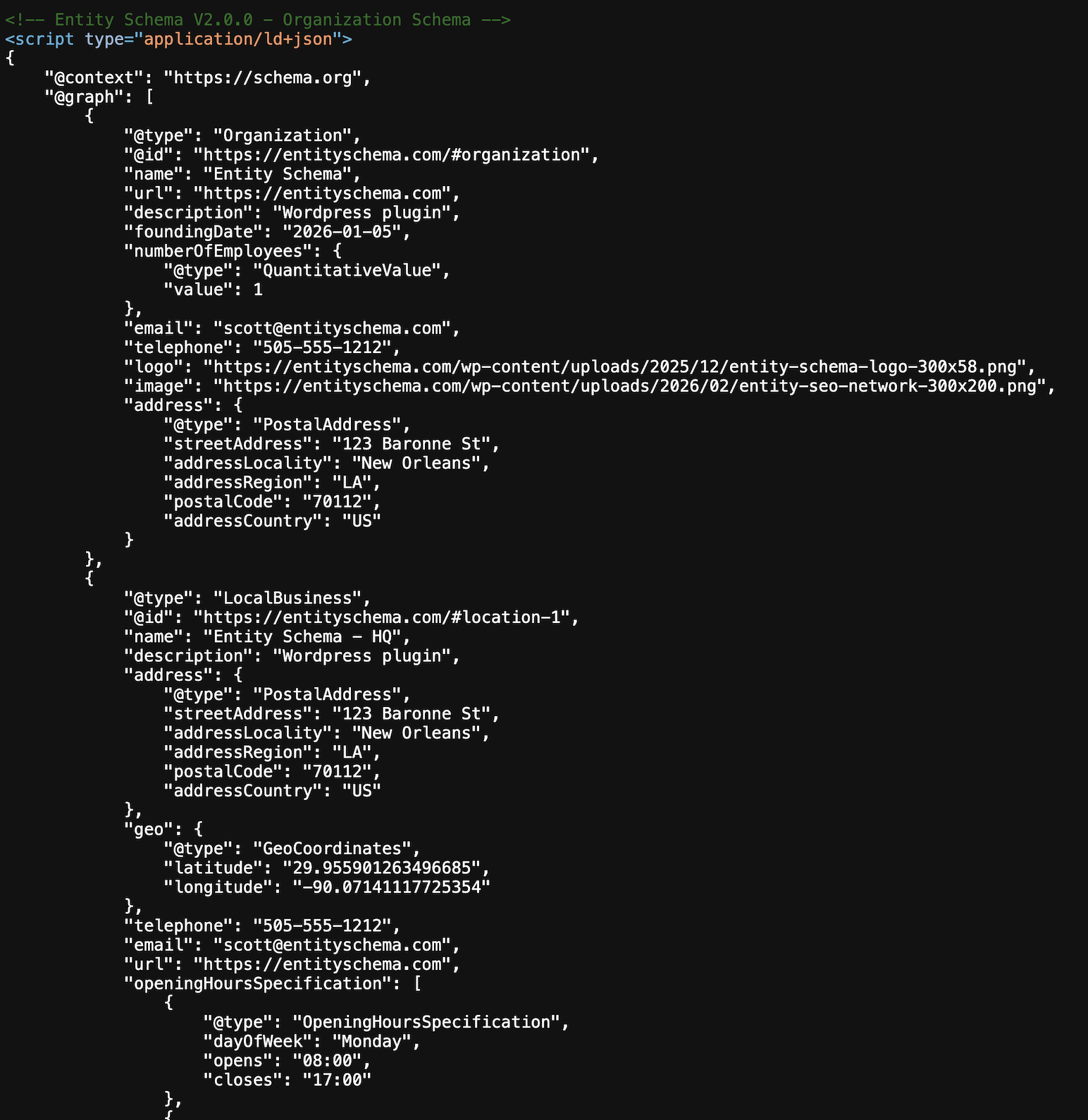
Entity Schema gives WordPress sites multi-type LocalBusiness schema (up to 4 @type values across 135+ business types) and FAQ markup. No external API dependencies, no tracking, and a clean interface that outputs valid JSON-LD structured data.
Why Entity Schema?
- Full-Featured Core – LocalBusiness schema, FAQ schema with drag-and-drop reordering, and conflict management all included in the free version
- Flexible Template – Universal template supports 135+ business types with all the fields you need
- Zero Coding Required – Clean admin interface that anyone can use, no JSON or code editing needed
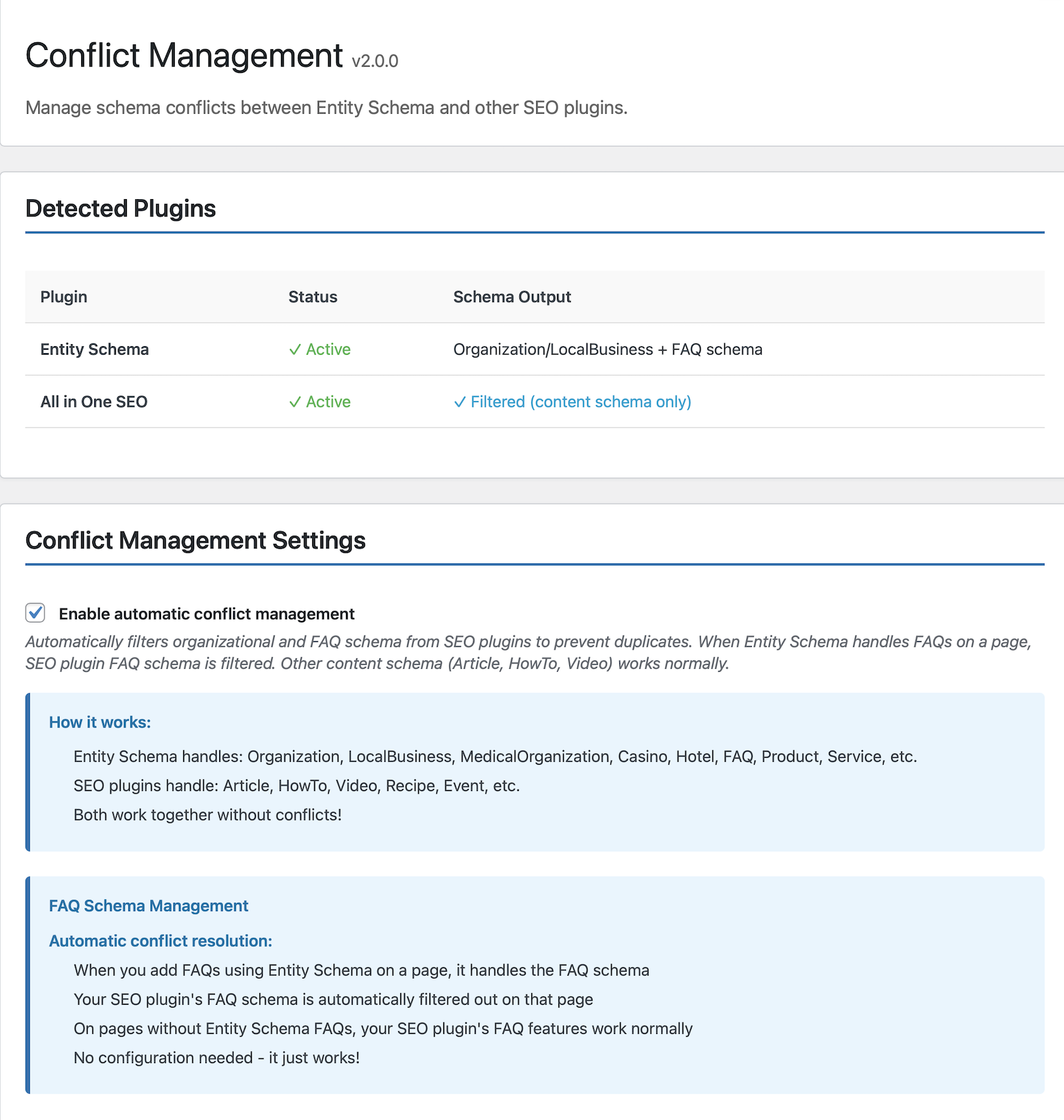
- SEO Plugin Friendly – Built-in conflict management works seamlessly with Yoast, Rank Math, and All in One SEO
- Translation Ready – Fully internationalized with proper i18n support for global audiences
Features
Organization & LocalBusiness Schema
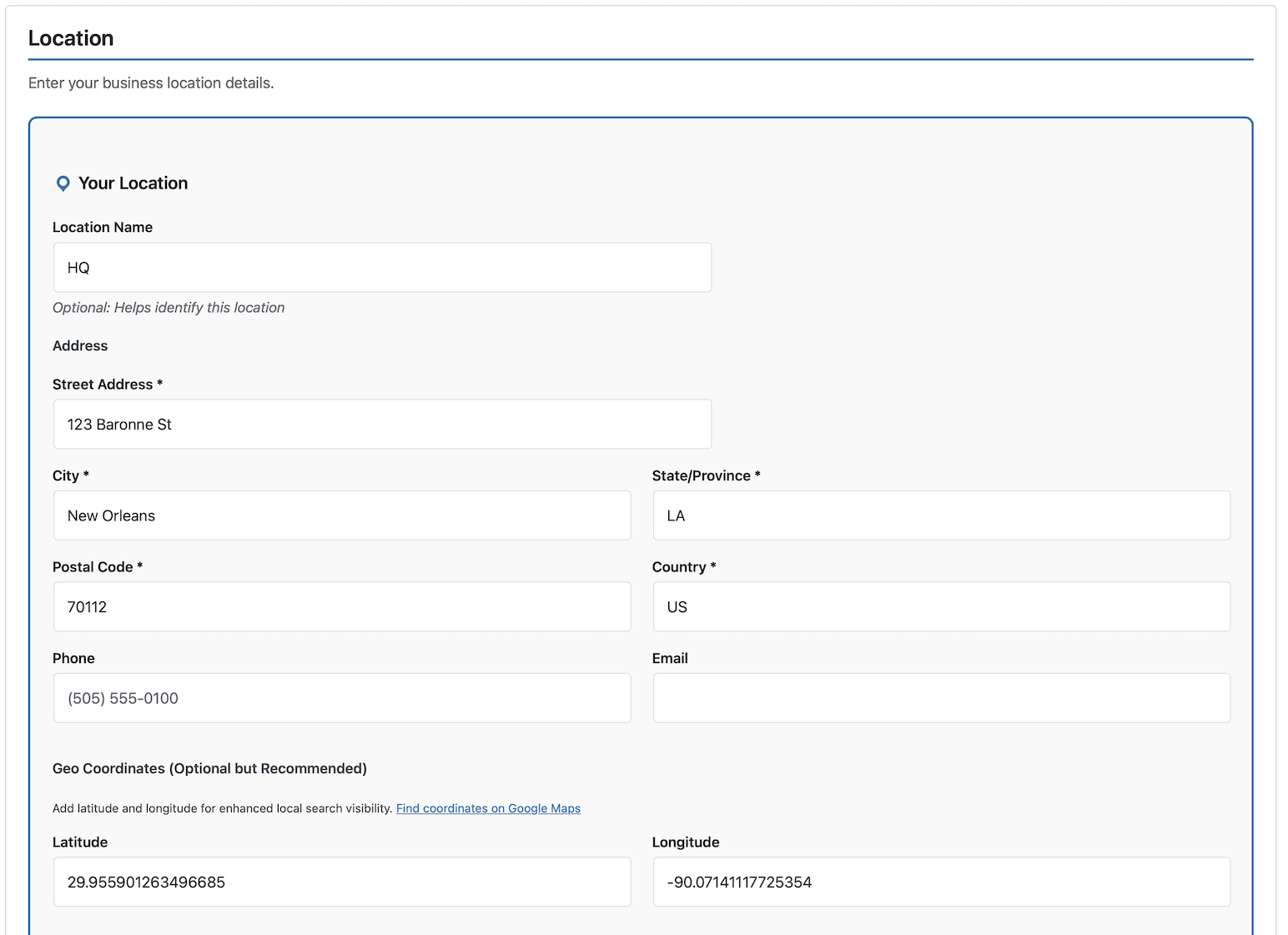
✓ Single location with full address details
✓ 135+ business types supported
✓ Multi-type support — combine up to four business types in a single @type array
✓ Operating hours configuration
✓ Service areas (City, State, Country, or AdministrativeArea)
✓ Social media profiles integration
✓ Logo and image support
✓ Contact information and phone numbers
FAQ Schema
✓ Unlimited FAQs per page/post
✓ Drag-and-drop reordering
✓ Three display styles: list (default), accordion, and minimal
✓ List default aligns with Google’s snippet visibility guidance
✓ Automatic theme color matching
✓ Custom color overrides via shortcode
✓ Clean, accessible markup
Technical Features
✓ Conflict management for SEO plugins
✓ Clean JSON-LD output
✓ No external API calls
✓ Translation ready (i18n)
✓ WordPress coding standards compliant
✓ GPL licensed
Perfect For
- Local Businesses – Restaurants, salons, contractors, retail stores — including businesses that span multiple types
- Professional Services – Lawyers, accountants, consultants, agencies
- WordPress Agencies – Provide schema for clients without subscription fees
Technical Highlights
- Clean Architecture – Base template system with specialized extensions
- Automatic Template Routing – Switches templates based on business type selection
- No Database Bloat – Uses standard WordPress storage efficiently
- Proper Escaping – All output sanitized and escaped per WordPress standards
- PHPDoc Coverage – Fully documented code for developers
- Hooks & Filters – Extensible for custom development
Installation
Automatic Installation
- Log into your WordPress admin dashboard
- Go to Plugins → Add New
- Search for “Entity Schema”
- Click Install Now on the Entity Schema plugin
- Click Activate after installation completes
- Go to Entity Schema in your admin sidebar to configure
Manual Installation
- Download the plugin ZIP file
- Log into your WordPress admin dashboard
- Go to Plugins → Add New → Upload Plugin
- Click Choose File and select the ZIP file
- Click Install Now
- Click Activate Plugin after installation completes
After Activation
- Click Entity Schema in your WordPress admin sidebar
- The Universal Template will load automatically
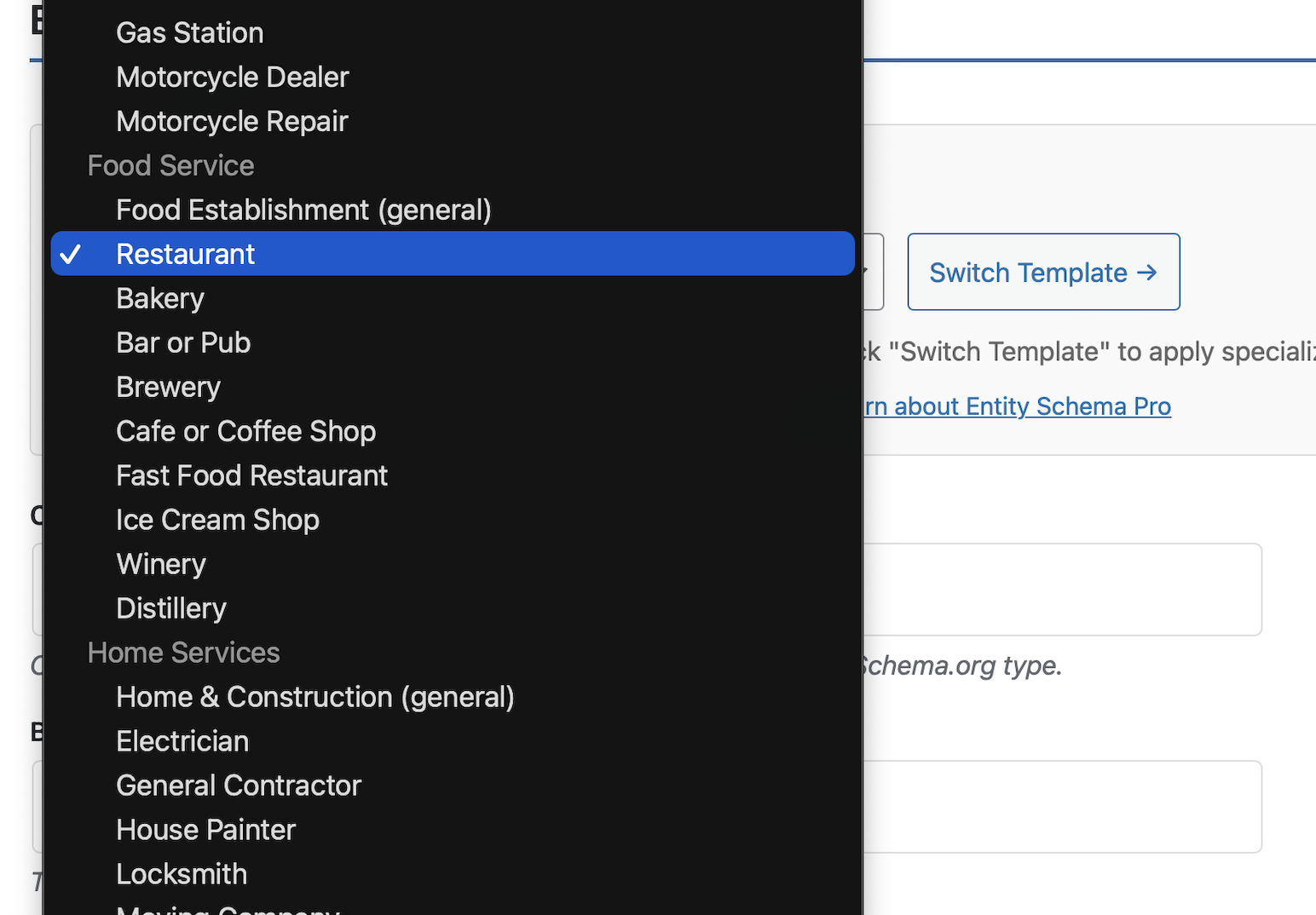
- Select your business type from the dropdown (135+ options)
- Fill in your business information (name, address, phone, etc.)
- Click Save All Changes
Your organization schema is now live on your homepage!
To add FAQ schema:
1. Edit any page or post
2. Scroll to the FAQ Schema metabox
3. Add your questions and answers
4. Add the [entisc_faq] shortcode where you want FAQs to display
5. Publish or update the page
Frequently asked questions
What does Entity Schema do that’s different from general SEO plugins?
Entity Schema specializes in business schema – organization, locations, and FAQs with dedicated fields and features. Key Features: Complete LocalBusiness schema – Full address, hours, service areas, and contact fields Drag-and-drop FAQ reordering – Rearrange questions without deleting/recreating Conflict management – Works alongside other SEO plugins without duplicate schema Clean, focused functionality – Dedicated to business schema with no bloat
Will this conflict with my SEO plugin?
No! Entity Schema includes automatic conflict management. It detects Yoast, Rank Math, and All in One SEO, then prevents duplicate organization/business schema. How it works: 1. Your SEO plugin handles: Articles, HowTo, Videos, (content schema) 2. Entity Schema handles: Organization, LocalBusiness, FAQs (business schema) 3. Both plugins work together without conflicts Enable conflict management in Entity Schema → Conflicts settings. It’s that simple.
Do I need coding knowledge to use this?
Not at all. Entity Schema was built for non-technical users. The admin interface uses simple forms – just fill in your business information like you would on any website. No JSON editing. No code snippets. No complicated settings. If you can fill out a contact form, you can use Entity Schema.
Will this improve my SEO?
Schema markup helps search engines and AI systems understand your business accurately. It won’t make weak content rank higher, but it makes your business facts machine-readable, which means search engines don’t have to guess what you do, where you operate, or what you offer. Two things get conflated here. Structured data (schema markup) makes your business facts explicit. Structured content (clear headings, direct answers, useful information) is what earns visibility in search results and AI-generated answers. Schema handles the first half; your content handles the second. Entity Schema gives…
Does it work with page builders?
Yes! Entity Schema works with all page builders including: Gutenberg (WordPress block editor) Elementor Divi Beaver Builder WPBakery Oxygen Bricks The FAQ shortcode [entisc_faq] works anywhere you can add shortcodes. The schema itself is added to the page HTML, so it works regardless of your page builder.
What business types are supported?
Entity Schema supports 135+ business types organized into categories: Professional Services: Attorney, AccountingService, RealEstateAgent, InsuranceAgency, Notary, etc. Retail & Sales: Store, ClothingStore, HardwareStore, FurnitureStore, JewelryStore, etc. Automotive: AutoDealer, AutoRepair, AutoBodyShop, GasStation, MotorcycleDealer, etc. Food Service: Restaurant, CafeOrCoffeeShop, Bakery, FastFoodRestaurant, BarOrPub, Distillery, etc. Home Services: Electrician, Plumber, RoofingContractor, HVACBusiness, Locksmith, etc. Lodging: Hotel, Motel, BedAndBreakfast, Resort, Campground…
How do I display FAQs on my pages?
After adding FAQs in the FAQ Schema metabox, add this shortcode to your page content: [entisc_faq] Display style options: * [entisc_faq] – Default list style (recommended for SEO and snippet visibility) * [entisc_faq style="accordion"] – Accordion with expand/collapse * [entisc_faq style="minimal"] – Minimal styling Color options: * [entisc_faq accent_color="#0073aa"] – Custom accent color * [entisc_faq bg_color="#f9f9f9"] – Custom background color * [entisc_faq text_color="#333333"] – Custom text color Colors automatically match your WordPress theme by default!
Can I reorder FAQs without deleting them?
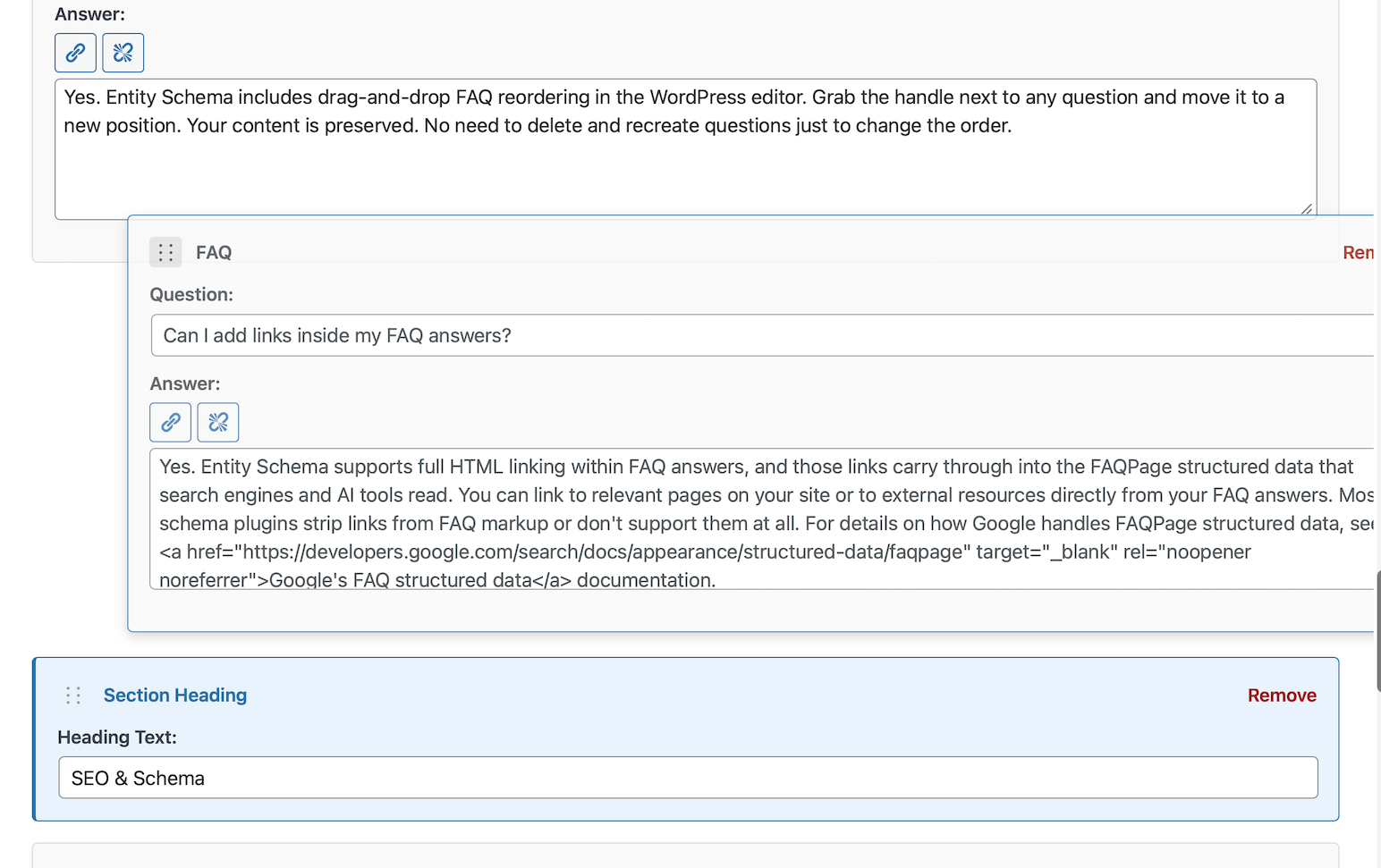
Yes! In the FAQ metabox, simply drag the ⋮⋮ handle to rearrange questions. Your content is preserved – no deleting and recreating FAQs just to change the order.
Can I add links inside FAQ answers?
Yes. Entity Schema preserves any links you add inside your FAQ answers. They appear exactly as you wrote them, both in the visible display on your page and in the FAQPage structured data. Google’s FAQ spec explicitly allows anchor tags in answer text, so there’s nothing to worry about on the markup side. Some FAQ plugins strip links from the structured data output even when they display them on the page. Entity Schema keeps them intact in both places. For more on how to get the most out of FAQ schema, visit https://entityschema.com/faq/
Is it translation ready / multilingual compatible?
Yes! Entity Schema is fully internationalized with proper i18n support. All user-facing strings are wrapped in translation functions with the entity-schema text domain. Works with: * WPML * Polylang * TranslatePress * Weglot * Any translation plugin
Does it store data externally or make API calls?
Entity Schema stores all of your schema data (business info, FAQs, settings) in your WordPress database. Your schema data stays on your server and is never sent anywhere. The plugin bundles the Freemius SDK to manage optional opt-in usage tracking and deactivation feedback. See the “Third-Party Services” section below for details.
Third-Party Services
Entity Schema uses the Freemius SDK (freemius.com) for plugin activation, optional anonymous usage tracking (opt-in only), and deactivation feedback. The SDK is bundled with this plugin. What data is sent and when: On activation: The Freemius SDK shows an opt-in dialog asking if you want to share anonymous usage diagnostics. Nothing is sent unless you click “Allow & Continue.” If you skip or decline, no data is sent. If you opt in: Freemius periodically sends anonymous diagnostics (WordPress version, PHP version, active theme, plugin version, site URL) to help improve the plugin. On…
How do I verify my schema is working?
Two easy ways: Method 1: View Source 1. Visit your homepage 2. Right-click → View Page Source 3. Search for “schema.org” 4. You’ll see your schema in clean JSON-LD format Method 2: Google Rich Results Test 1. Copy your page URL 2. Visit: https://search.google.com/test/rich-results 3. Paste your URL and click “Test URL” 4. Google shows exactly what schema it found Green checkmarks = success! Built-In Links: Entity Schema includes direct links to both the Google Rich Results Test and Schema.org’s validator right from the plugin settings, so you can verify your markup from your WordPress…
Changelog
2.10.0 – 2026-08-27
- Added: About / Team page. A new settings section lets you pick a published page as your About or Team page and add team members — name, title, website, bio, areas of expertise, alma mater, professional credentials, social profiles, and a photo. Each team member is output on that page as a Person entity linked to your organization via worksFor. When exactly one person is shown, the output includes a ProfilePage wrapper for that page. Founders configured in the Founders section can be included on the About page with one checkbox, as the same entities as on the homepage.
- Fixed: Conflict management is now scoped by page context. The full Organization/WebSite/LocalBusiness suppression of other SEO plugins’ schema only applies on the homepage, where Entity Schema outputs its own entity. On blog posts and inner pages the other plugin’s schema is left intact (previously its Organization and WebSite nodes were removed there, leaving broken references in its article markup); the only inner-page suppression is the other plugin’s FAQ markup, and only on posts where Entity Schema has its own FAQs.
2.9.1 – 2026-08-23
- Added: Wikipedia and Wikidata URL fields on the Organization — both are appended to the Organization sameAs array alongside your social profiles
- Added: Check-in Time, Check-out Time, and Pets Allowed fields for all Lodging business types (Hotel, Motel, Bed and Breakfast, Hostel, Resort, Campground, Vacation Rental, Ski Resort, and Lodging Business)
2.9.0 – 2026-08-16
- Added: Organization Founders. A new section on every template lets you list your founders — name, title, website, description, social profiles, and a photo. Each founder is added to your schema as a Person entity linked from your organization. This helps search engines and AI systems understand who founded your organization (it is not a Google rich-results feature).
- Changed (Pro): Casino output is now a flat
@graph— the casino plus its venues (hotel, golf course, restaurants, etc.) as linked top-level entities, matching the structure the Healthcare and Universal templates already use. Note for anyone consuming the raw JSON-LD: restaurant@ids changed from#restaurant-0(0-based) to#restaurant-1(1-based). - Changed (Pro): Nonprofit output is now always
@graph-wrapped, with the parent organization and each program as linked top-level entities instead of nested objects. - Changed: Universal location entities now link back to the organization via
parentOrganization, matching the other templates, and all@idvalues use your site’s home URL consistently. - Fixed: Importing your own site’s Nonprofit schema no longer creates a phantom location from the parent organization.
2.8.0 – 2026-08-09
- Changed (Pro): Healthcare multi-location output is now a flat
@graph(organization node plus@id‘d location and pharmacy nodes), matching the Universal template’s structure. The organization node isOrganizationwhenever at least one location renders; location nodes now carry the selected medical business type instead of always beingMedicalClinic. Note for anyone consuming the raw JSON-LD: location@ids changed from#clinic-0(0-based) to#location-1(1-based), and pharmacies now have their own#pharmacy-N@idinstead of being anonymous. - Changed: Every service area now outputs as
AdministrativeAreawith a name and, when provided, a Wikipedia/Wikidata link. The old Area Type dropdown (City/State/Country) is gone. - Changed: Phone numbers in the JSON-LD output are now formatted consistently (E.164); numbers that cannot be parsed are omitted rather than published malformed. Your saved values are unchanged.
- Changed: The home page schema now includes every location, even ones with their own dedicated location page.
- Changed (Pro): Nonprofit locations can now have their own service areas, overriding the organization-wide list; a location without its own areas still inherits the organization’s.
- Fixed (Pro): The “Add Area” button for per-location service areas on the Healthcare template did not respond to clicks.
2.7.0 – 2026-08-06
- Changed: Stored settings now use one canonical field naming shared by all templates; existing data migrates automatically (a pre-migration backup is kept). Schema output is unchanged.
- Changed: Year Founded accepts a 4-digit year or a full YYYY-MM-DD date and is validated on save.
2.6.1 – 2026-08-05
- Fixed: Healthcare locations with an address but no name now emit a clinic node under the business name instead of being silently skipped.
- Changed: Saving settings no longer deletes data keys the active template does not recognize – unrecognized keys submitted with a save are now kept instead of being destroyed.
Screenshots
For developers
Is this your plugin? Show off the numbers.
Add a live badge to your site, docs or GitHub README. It updates on its own — no account needed.
Best Entity Schema alternatives
All faq plugins →





FAQ
Entity Schema: quick answers
Straight answers, pulled from live WordPress.org data.
Live data from WordPress.org · checked Sep 29, 2026
Is Entity Schema free?
Yes. Entity Schema is free to download and use from the official WordPress.org plugin directory.
Is Entity Schema safe to use in 2026?
Entity Schema is a solid plugin choice in 2026, with a few things worth checking first. It runs on 30+ sites and was last updated 1 month ago, and scores 63/100 on our health check.
How many websites use Entity Schema?
Entity Schema is active on 30+ WordPress websites and has been downloaded 792 times since it launched in July 2026. It was downloaded 135 times in the last 30 days.
Does Entity Schema work with WordPress 7.1?
Yes. The developer has tested Entity Schema up to WordPress 7.1.2, the latest release. It requires WordPress 6.2 or newer.
What PHP version does Entity Schema need?
Entity Schema requires PHP 7.4 or higher. Most hosts run PHP 8.x today, so it works on any modern WordPress hosting.
When was Entity Schema last updated?
The latest version, 2.10.0, was released on August 28, 2026 (1 month ago).
Who makes Entity Schema?
Entity Schema is developed and maintained by scottgutelius.
What are the best alternatives to Entity Schema?
The most popular alternatives to Entity Schema are VK Blocks (100K+ installs), Easy Accordion (70K+ installs) and BetterDocs (30K+ installs).
Powered by PageForge
Want thousands of pages that rank like these? Build them in an afternoon.
This directory runs on the same engine as PageForge. Turn any spreadsheet, CSV or API into thousands of fast, SEO-ready WordPress pages — with schema, internal links and AI-written copy baked in.
- CSV, Google Sheets & API data sources
- AI content, schema & internal links per page
- Works with Elementor, Gutenberg, Yoast & Rank Math
- Free on WordPress.org — no credit card


