



Dynamic Cart Messages for WooCommerce
Elevate your sales game with Dynamic Cart Messages for WooCommerce! This powerful tool enables you to display personalized messages on your WooCommerce cart page. Motivate your customers to increase their cart quantity…

Solid choice
Dynamic Cart Messages for WooCo… is a solid plugin choice in 2026, with a few things worth checking first. It runs on 100+ sites, is rated 5/5 and was last updated 1 month ago, and scores 71/100 on our health check.
- Tested with the latest WordPress (7.1)
- Small user base (100+ active installs)
- Very few reviews so far
How does it stack up?
Side-by-side on installs, updates, ratings & support



Daily downloads
Download spikes usually follow a new release — each site that auto-updates counts as a download.
Rankings
Where Dynamic Cart Messages for W… stands todayWordPress.org search rankings
Live position in the plugin search, top 100| Keyword | Position |
|---|---|
| bulk | >100 |
| products | >100 |
| tools | >100 |
| utilities | #32 |
| woocommerce | >100 |
Version adoption
Share of active sites per release.
Rating breakdown
★★★★★★★★★★ 5 from 2 reviews
About Dynamic Cart Messages for WooCommerce
From the official readme · v3.1.2Description
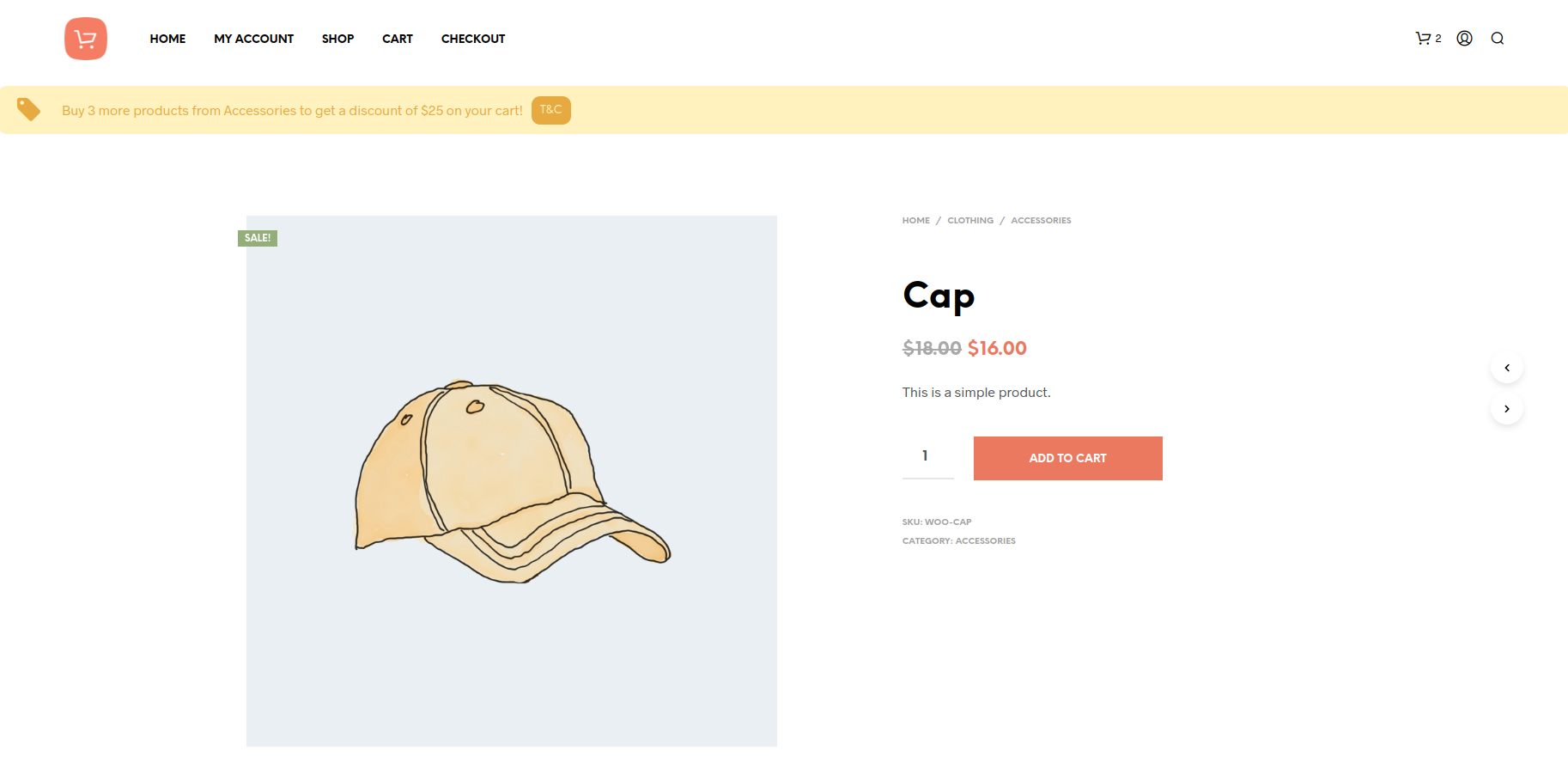
Elevate your sales game with Dynamic Cart Messages for WooCommerce! This powerful tool enables you to display personalized messages on your WooCommerce cart page. Motivate your customers to increase their cart quantity or total spend on your favorite products or product categories, driving a boost in your sales.
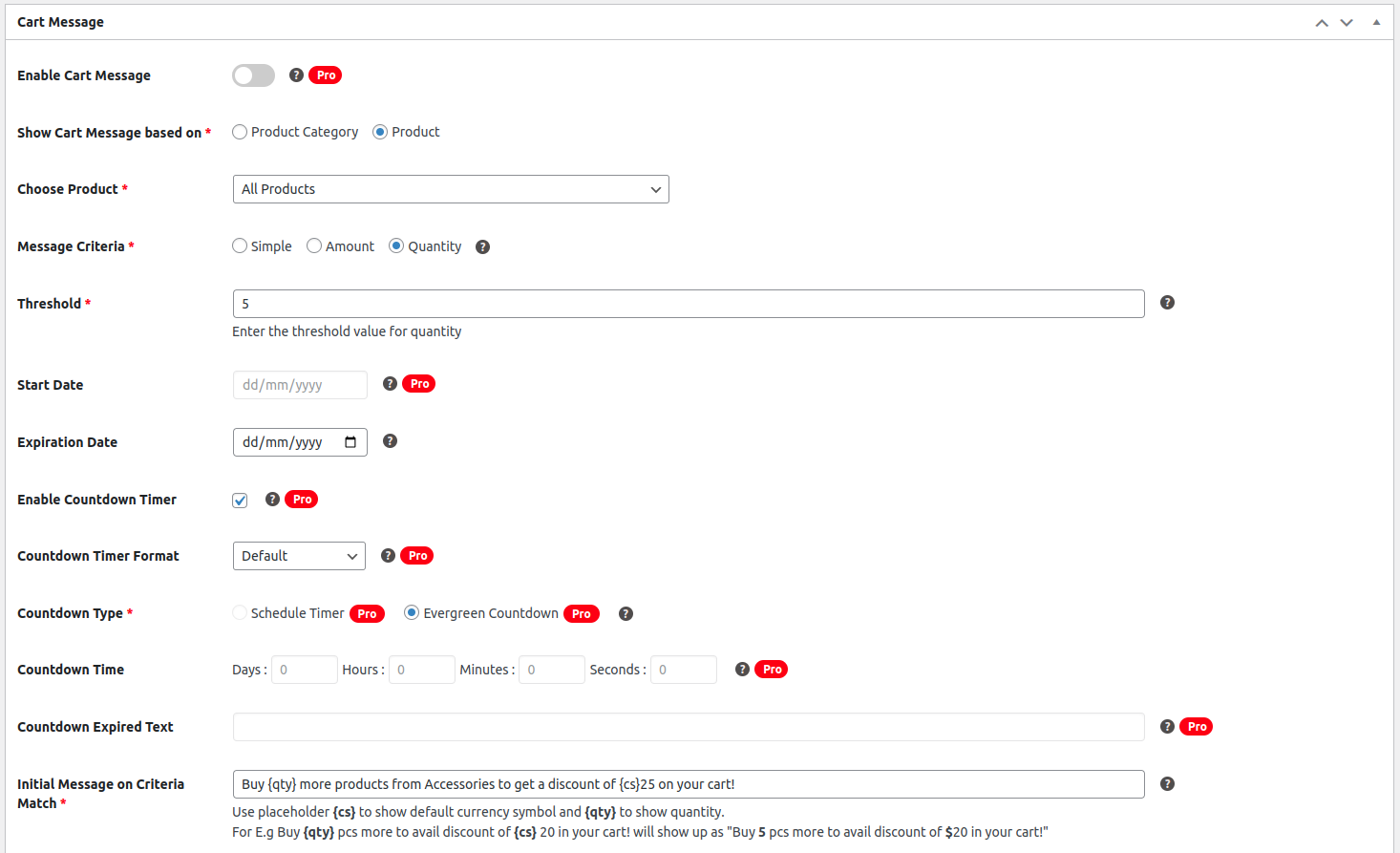
- Allows you to show messages based on 3 different types of rules – Simple, Price-based, or Quantity-based.
- These messages can be set for a particular product, product category, or all products.
- Allows you to set specific thresholds for price and quantity to incentivize customers to add a certain price amount/quantity to the cart to avail a discount.
- Once the customer adds a product to the cart that qualifies the defined criteria for a message, depending on the rule type (price /quantity) customers will be able to see how much amount/quantity they need to add to the cart to avail the offer set by you.
- The message can be shown to users on Cart Page, Checkout Page & Product Pages.
- Allows you to set an expiry date for the message.
- Allows you to add a Call-to-action with a URL in the message which you can use to link to a separate landing page or to a page that explains the terms & conditions of the offer.
Perfect for store owners who want to –
- Show free shipping based on cart value like Amazon. E.g. “Add $50 of eligible items to your order to qualify for Free Delivery”.
- Incentivise customers to add more quantity to the cart of a particular product or products of a particular category to buy ‘X’ items. E.g. “Buy 5 more to get a discount of 10%. Use Coupon FLAT10 at checkout”.
- Incentivize customers to buy a certain amount value of a particular product or particular category E.g “Buy $10 worth of more T-shirts to be eligible for 5% cashback”.
- Show a success message based on the condition set and threshold value reached.
Fast and Easy
Easy to set conditions for the messages quickly in minutes.
Conditionally Dynamic
The message changes automatically based on the specific amount/quantity set for the product/product category that customers need to add instead of showing a plain static message that drives them to buy more.
“Add $10 of products to your cart to avail free shipping” is more personalized, appealing, and convincing than a plain static message like “Free shipping on all orders above $100”.
Boost Sales
By seeing messages, customers are tempted to buy more and thus it boosts sales. Also, you can increase the average order value by notifying customers about the amount to spend to get free shipping or a discount.
With Dynamic Cart Messages Pro for WooCommerce, take your sales game to the next level with the following features:
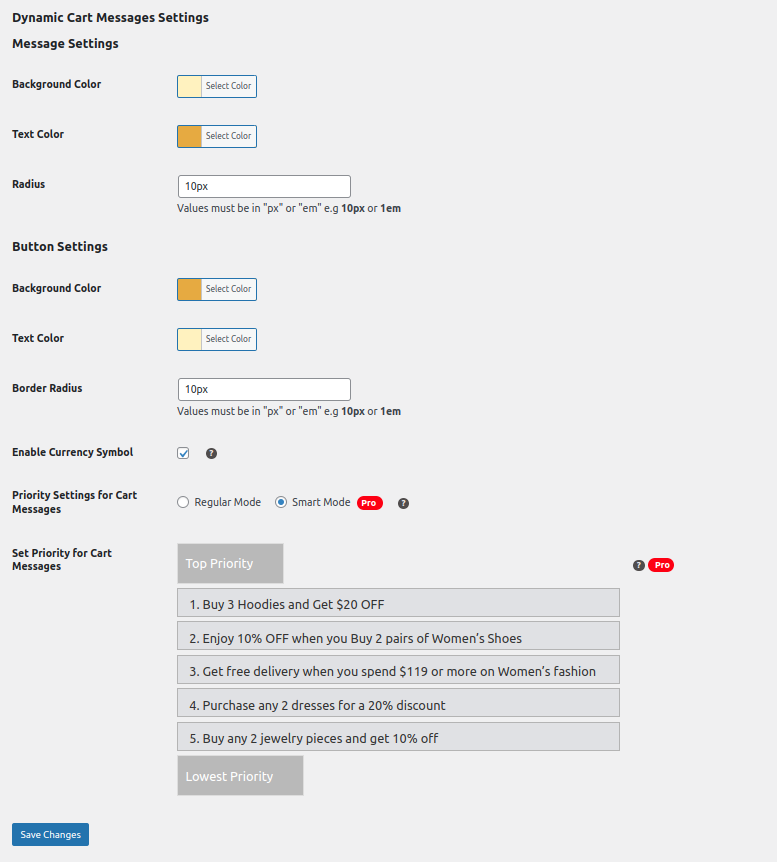
- Prioritize Cart Messages: Streamline customer decisions with prioritized Cart Messages. This feature allows you to sequence messages for similar products or categories, displaying them one at a time based on set priorities. Enhance the shopping experience by guiding customers through a clear, incentivized path, encouraging them to add more to their carts with strategic, sequential messaging.
- Urgency-Driven Countdowns: Generate urgency with Countdown Timers alongside Cart Messages, urging buyers to act swiftly. Choose between Scheduled Countdowns for precise sale periods and Evergreen Countdowns for a continuous sense of urgency.
- Strategic Message Placement: Strategically display Cart Messages on the Cart Page, Checkout Page, and Product Page, influencing purchasing decisions at crucial touchpoints.
- Diverse Countdown Designs: Select from four captivating Countdown Designs, ensuring visually appealing and effective prompts for increased WooCommerce sales.
- Icons and Emojis support: Elevate your messages with a vast selection of icons and emojis. The pro version empowers you to choose from a variety of icons, upload custom ones, and even incorporate emojis for expressive cart messages.
- Scheduled Campaign in Advance: Plan your campaigns with ease. The pro version allows you to schedule campaigns by selecting the exact date and time in advance, ensuring a timely and strategic approach.
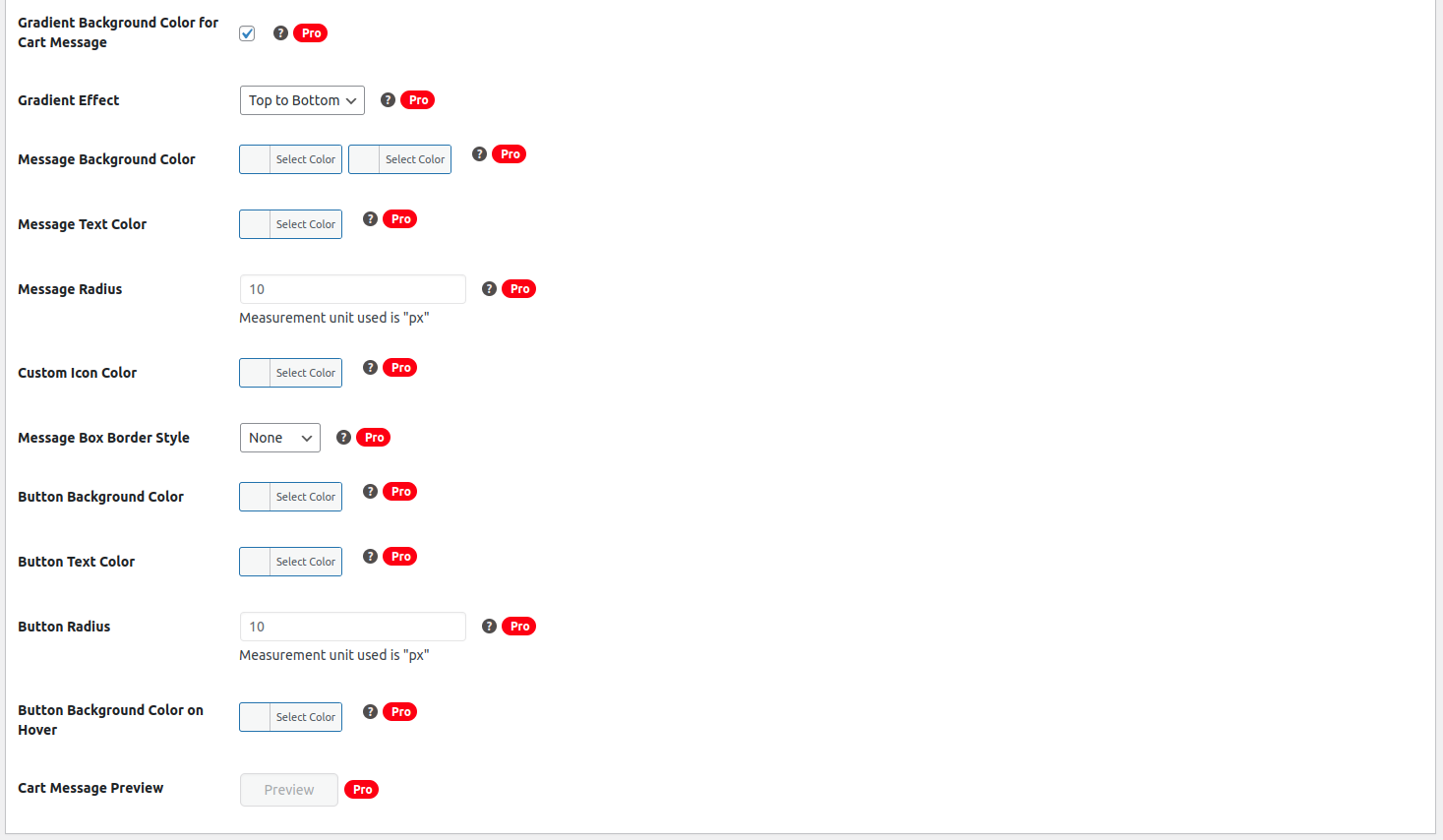
- Creative Color Mastery: Unleash your creativity by customizing your cart message’s color scheme. Enjoy the flexibility of setting custom colors for every element and introducing gradient colors for an artistic touch, making your messages visually appealing.
- Preview Perfection: Tailor your cart message to perfection. With the Dynamic Cart Messages Pro, you can customize your message to your liking and preview it effortlessly before going live, ensuring flawless execution with just a click.
Recommended Plugins:
HIRE THE EXPERTS
Need a tailor-made solution for WooCommerce that solves complex business problems? Our team of experienced developers have helped many businesses like yours to accomplish these goals. Hire us as your WooCommerce Developers today!
Keep up to date with us by subscribing to the newsletter, following us on Twitter and liking us on Facebook.
If you enjoy using the software we’d love it if you could give us a review!
Installation
This section describes how to install the plugin and get it working.
1. Upload the dynamic-cart-messages-woocommerce plugin folder to your /wp-content/plugins/ directory
2. Activate the plugin through the ‘Plugins’ menu in WordPress
3. Visit the ‘Cart Messages’ menu item in your admin sidebar.
Changelog
3.1.2 2026-09-08
- Enhanced – Updated the UI of the Popup in the Plugin.
- Fix – Removed the Closing Cross from the Cart Messages.
- Fix – Updated the Discontinued Products Toggle Feature.
3.1.1 2025-12-30
- Fix – Improved data sanitization and corrected strip-tags handling issues.
3.1.0 2025-12-22
- Fix – Code improvements aligned with WordPress guidelines.
3.0.1 2025-09-15
- Fix – minor footer UI Fix.
3.0.0 2025-01-07
- Enhanced – Enhanced the overall look and feel of the plugin for a better user experience. Redesigned the page layout with tabbed navigation.
- Update – Implemented a custom color style for the cart message for each cart message.
-
Update – Tested with WooCommerce version 9.4.2 & WordPress version 6.7.1.= 2.0.1 2024-11-09 =
-
Update – Tested with WooCommerce version 9.3.3 & WordPress version 6.6.2.
2.0.0 2024-10-16
- New – Implemented the Inclusive of Tax setting, offering the option to include tax in threshold calculations for dynamic cart messages.
- New – Implemented the ability to duplicate existing cart messages, creating draft copies for faster message management.
Screenshots



For developers
Is this your plugin? Show off the numbers.
Add a live badge to your site, docs or GitHub README. It updates on its own — no account needed.
Best Dynamic Cart Messages for Woo… alternatives
All bulk plugins →




FAQ
Dynamic Cart Messages for WooCommer…: quick answers
Straight answers, pulled from live WordPress.org data.
Live data from WordPress.org · checked Oct 14, 2026
Is Dynamic Cart Messages for WooCo… free?
Yes. Dynamic Cart Messages for WooCo… is free to download and use from the official WordPress.org plugin directory.
Is Dynamic Cart Messages for WooCo… safe to use in 2026?
Dynamic Cart Messages for WooCo… is a solid plugin choice in 2026, with a few things worth checking first. It runs on 100+ sites, is rated 5/5 and was last updated 1 month ago, and scores 71/100 on our health check.
How many websites use Dynamic Cart Messages for WooCo…?
Dynamic Cart Messages for WooCo… is active on 100+ WordPress websites and has been downloaded 5,873 times since it launched in June 2022. It was downloaded 219 times in the last 30 days.
Does Dynamic Cart Messages for WooCo… work with WordPress 7.1?
Yes. The developer has tested Dynamic Cart Messages for WooCo… up to WordPress 7.1.3, the latest release. It requires WordPress 5.0 or newer.
What PHP version does Dynamic Cart Messages for WooCo… need?
Dynamic Cart Messages for WooCo… requires PHP 7.2 or higher. Most hosts run PHP 8.x today, so it works on any modern WordPress hosting.
When was Dynamic Cart Messages for WooCo… last updated?
The latest version, 3.1.2, was released on September 8, 2026 (1 month ago).
Who makes Dynamic Cart Messages for WooCo…?
Dynamic Cart Messages for WooCo… is developed and maintained by SaffireTech.
What are the best alternatives to Dynamic Cart Messages for WooCo…?
The most popular alternatives to Dynamic Cart Messages for WooCo… are Manage (100K+ installs), WP Bulk Delete (90K+ installs) and Bulk Delete (30K+ installs).
Powered by PageForge
Want thousands of pages that rank like these? Build them in an afternoon.
This directory runs on the same engine as PageForge. Turn any spreadsheet, CSV or API into thousands of fast, SEO-ready WordPress pages — with schema, internal links and AI-written copy baked in.
- CSV, Google Sheets & API data sources
- AI content, schema & internal links per page
- Works with Elementor, Gutenberg, Yoast & Rank Math
- Free on WordPress.org — no credit card


