



Bulk Delete
Bulk delete posts, pages, users, attachments, and meta fields based on complex bulk conditions & filters.

Safe pick
Yes — Bulk Delete is a safe, well-maintained plugin to use in 2026. It runs on 30K+ sites, is rated 4.3/5 and was last updated 1 month ago, and scores 84/100 on our health check.
- Proven at scale on 30K+ active sites
- Tested with the latest WordPress (7.1)
How does it stack up?
Side-by-side on installs, updates, ratings & support



Daily downloads
Download spikes usually follow a new release — each site that auto-updates counts as a download.
Rankings
Where Bulk Delete stands todayWordPress.org search rankings
Live position in the plugin search, top 100| Keyword | Position |
|---|---|
| bulk | #4 |
| bulk clean | #2 |
| bulk delete | #2 |
| clean database | #14 |
| delete | #3 |
Version adoption
Share of active sites per release.
Rating breakdown
★★★★★★★★★★ 4.3 from 129 reviews
About Bulk Delete
From the official readme · v6.12Description
Bulk Delete allows you to delete posts, pages, attachments, users and meta fields in bulk based on different conditions and filters.
Features
The following conditions and filters are supported.
Deleting posts
This Plugin supports the following bulk delete options for deleting posts;
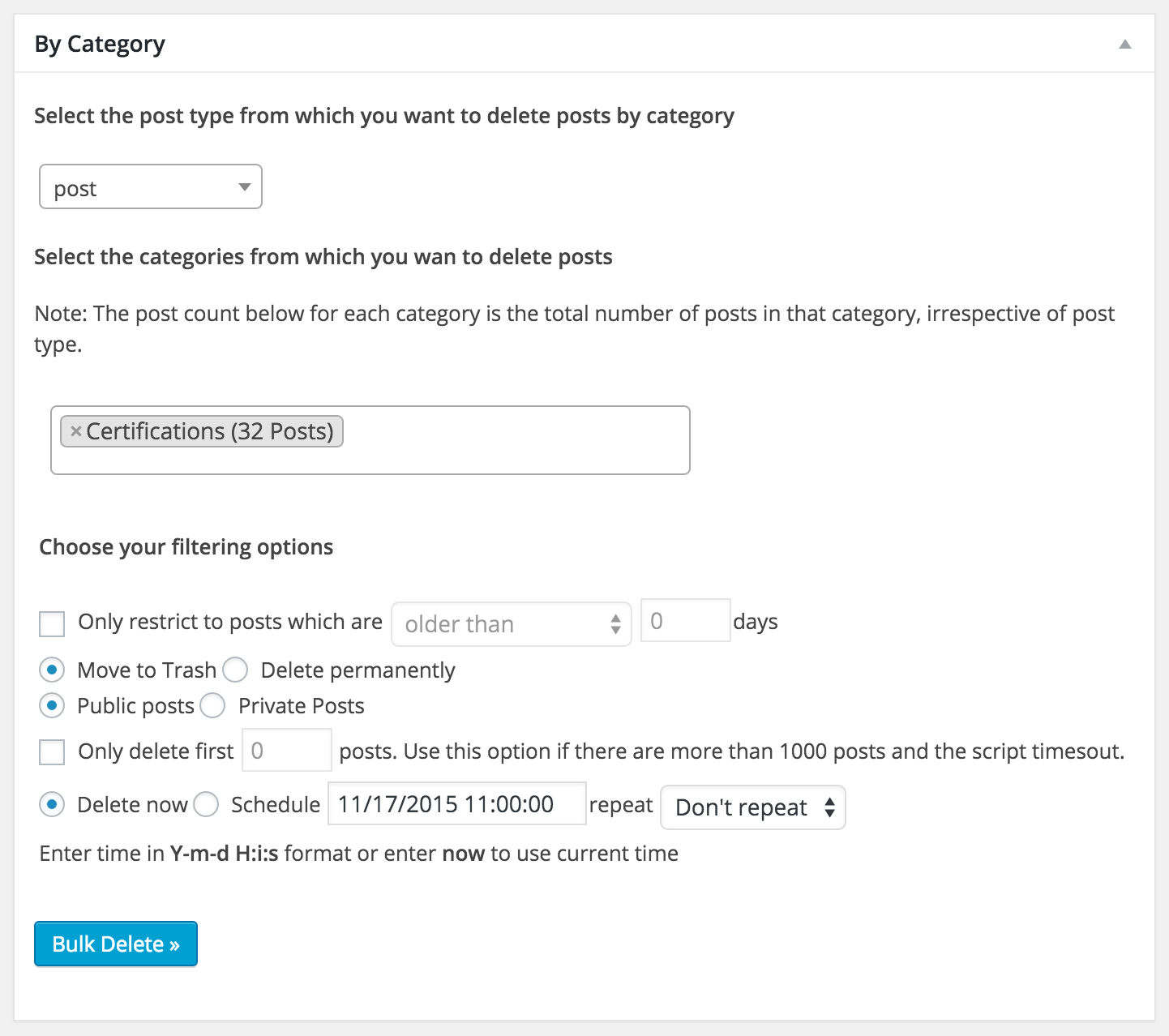
- Delete posts by category
- Delete posts by tag
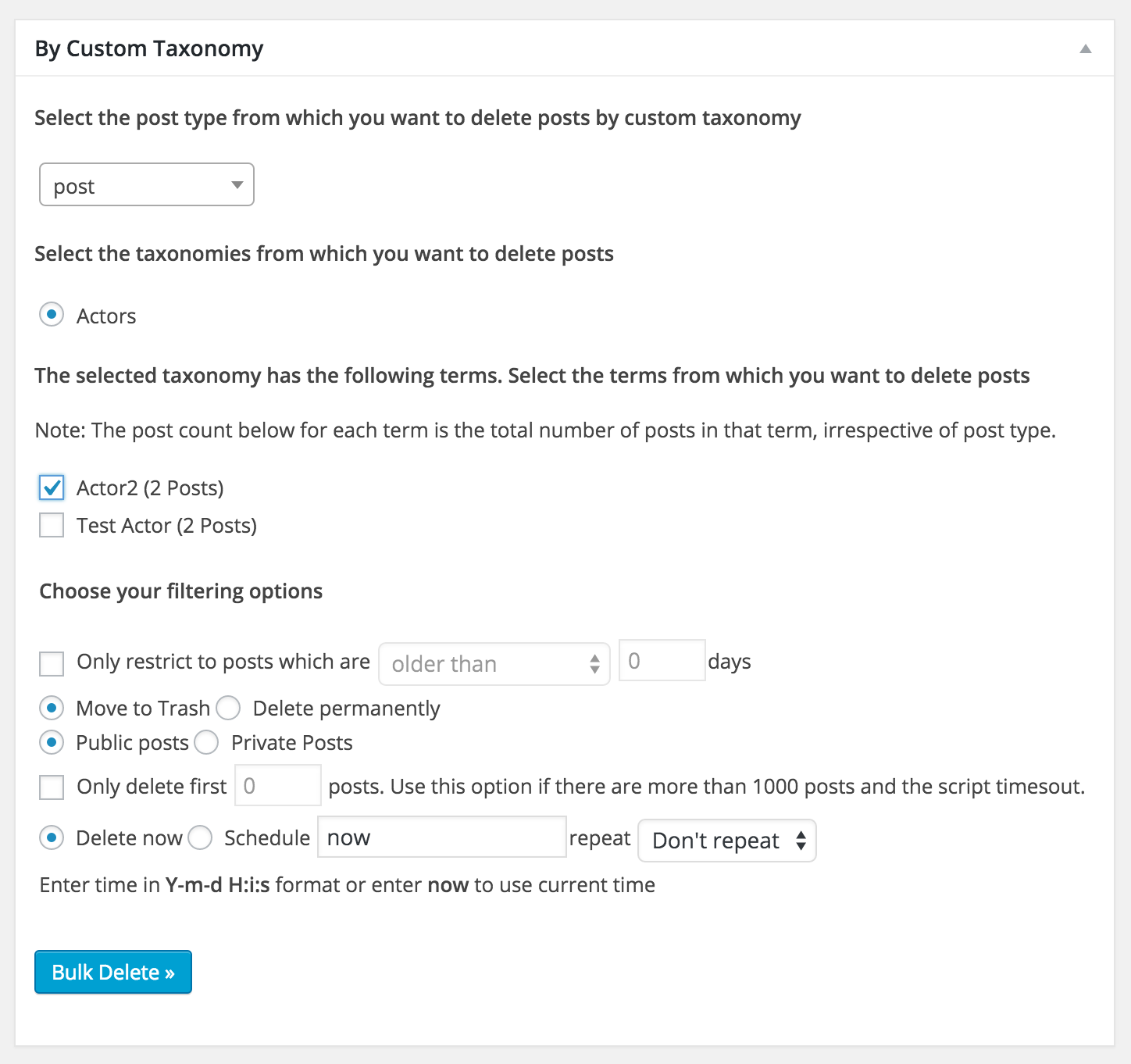
- Delete posts by custom taxonomy
- Delete posts by custom post type
- Delete posts by comment count
- Delete posts by URL
- Delete posts by custom field (Available in PRO)
- Delete posts by title (Available in PRO)
- Delete posts by duplicate title (Available in PRO)
- Delete all draft posts
- Delete all pending posts
- Delete all private posts
- Delete all scheduled posts
- Delete all posts from trash (Available in PRO)
All the above options support the following filters;
- Post date greater than X days
- Post date less than X days
- Only public posts
- Only private posts
- Restrict to first N posts
- Delete permanently or just move to trash
- Schedule deletion of posts automatically (Available in PRO)
Deleting posts by content
- Delete posts by content (Available in PRO)
- Delete duplicate posts by title (Available in [PRO]](https://bulkwp.com/))
- Delete posts based on whether it contains attachment or not (Available in PRO)
Deleting posts by user
Deleting pages
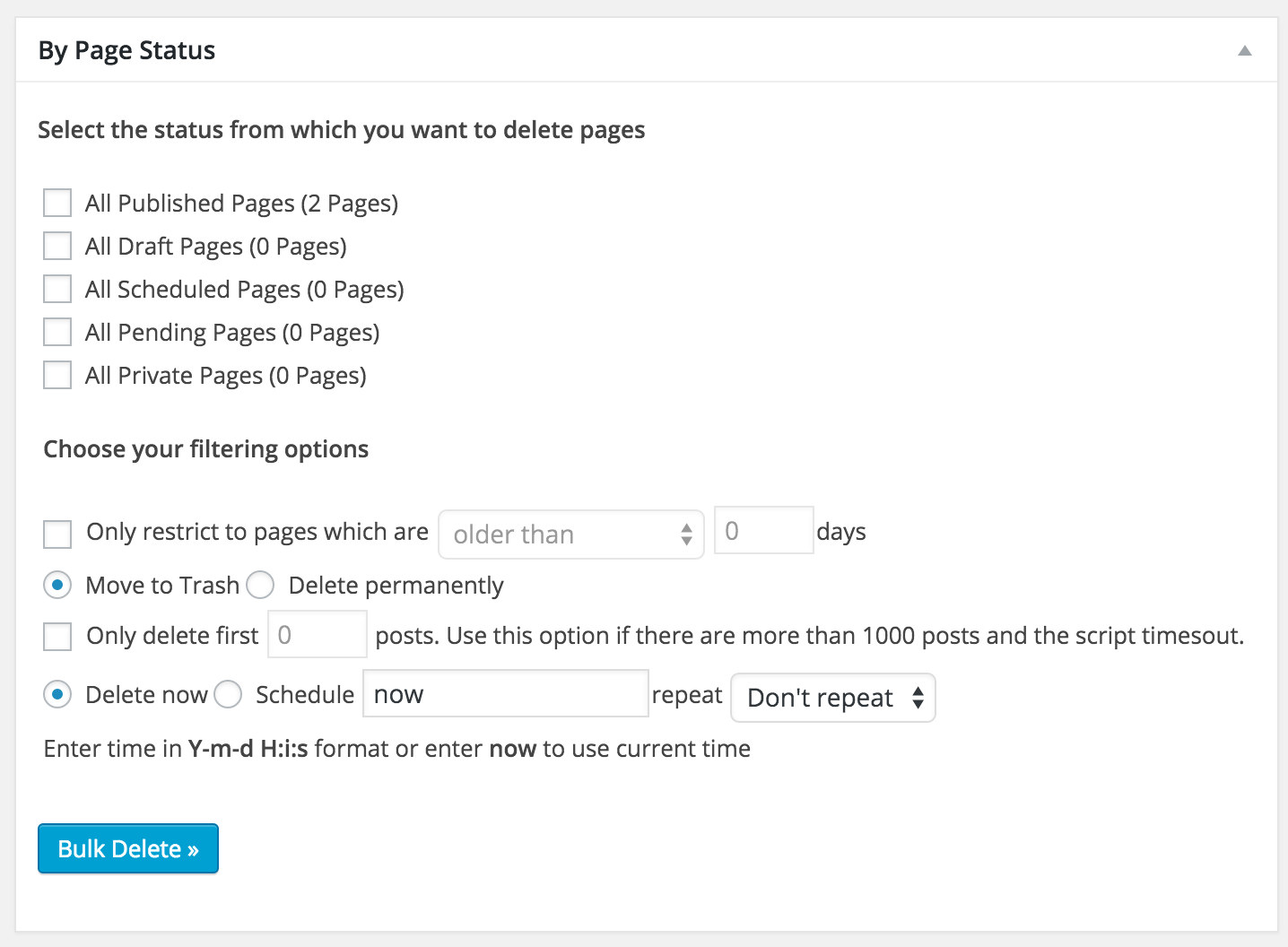
- Delete all published pages
- Delete all draft pages
- Delete all pending pages
- Delete all private pages
- Delete all scheduled pages
- Delete all pages from trash (Available in PRO)
Like posts, all the above options support the following filters as well;
- Post date greater than X days
- Post date less than X days
- Only public pages
- Only private pages
- Restrict to first N pages
- Delete permanently or just move to trash
- Schedule deletion of pages automatically (Available in PRO)
Deleting post revisions
- Delete all post revisions
Deleting users
- Delete users based on user role
- Delete users based on user meta fields
- Delete users who have not logged in in the last X days
- Delete users based on their registered date
Deleting Meta Fields
- Delete Post meta fields
- Delete Comment meta fields
- Delete User meta fields
Deleting Attachments
- Delete Attachments (Available in PRO)
Deleting content from other plugins
- Delete Jetpack Contact Form Messages
Support
Translation
The Plugin currently has translations for the following languages.
- Dutch (Thanks Rene)
- Brazilian Portuguese (Thanks Marcelo of Criacao de Sites em Ribeirao Preto)
- German (Thanks Jenny Beelens)
- Turkish Portuguese (Thanks Bahadir Yildiz)
- Spanish (Thanks Brian Flores)
- Italian (Thanks Paolo Gabrielli)
- Bulgarian (Thanks Nikolay Nikolov)
- Russian (Thanks Maxim Pesteev)
- Lithuanian (Thanks Vincent G)
- Hindi (Thanks Love Chandel)
- Serbian (Thanks Diana)
- Gujarati (Thanks Puneet)
Installation
The simplest way to install the plugin is to use the built-in automatic plugin installer. Go to plugins -> Add New and then enter the name of the plugin to automatically install it.
If for some reason the above method doesn’t work then you can download the plugin as a zip file, extract it and then use your favorite FTP client and then upload the contents of the zip file to the wp-content/plugins/ directory of your WordPress installation and then activate the Plugin from Plugins page.
Frequently asked questions
After installing the Plugin, I just see a blank page.
This can happen if you have huge number of posts and your server is very underpowered. Check your PHP error log to see if there are any errors and correct them. The most common problems are script timeout or running out of memory. Change your PHP.ini file and increase the script timeout and/or amount of memory used by PHP process. In particular try to change the following settings max_execution_time = 600 – Maximum execution time of each script, in seconds max_input_time = 30 – Maximum amount of time each script may spend parsing request data memory_limit = 256M – Maximum amount of memory a…
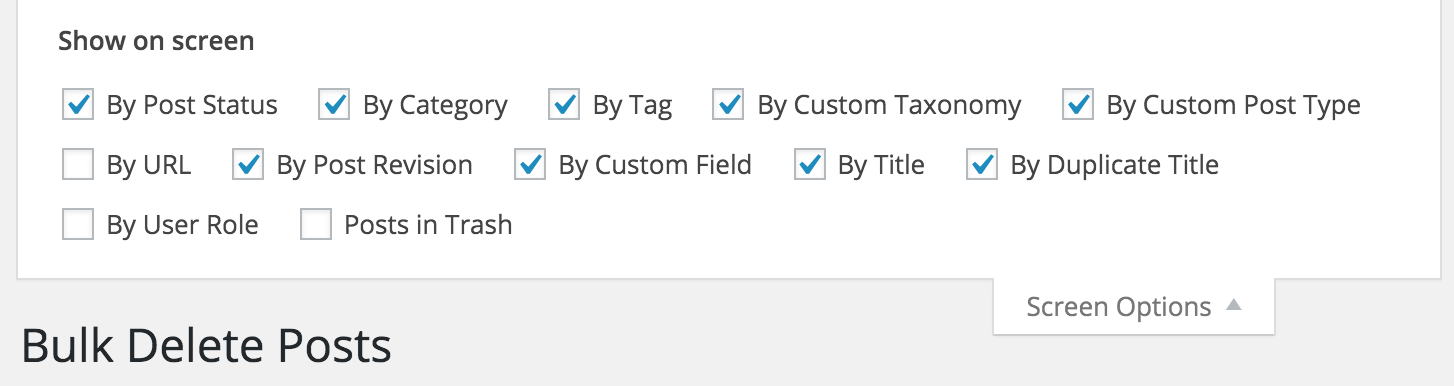
How do I disable different sections of the Plugin
You can enable or disable different sections of the Plugin by choosing the required modules in the screen option. You can open screen options by clicking the link in the top right corner of the Plugin page.
Is it possible to restore the posts that I have deleted through the Plugin?
If you choose the option “Move to trash” then you can find them from trash. But if you choose “Delete permanently”, then it is not possible to retrieve the posts. So be very careful.
Is it possible that some Plugin are not compatible with Bulk Delete?
Yes. If a Plugin rewrites the query vars by using add_filter( 'pre_get_posts' ) then it may be incompatible with this Plugin. If you find any Plugin with which Bulk Delete doesn’t work, then let me know and I will try to see if I can add support through some hack.
Is it possible to schedule deletion of posts?
The ability to schedule deletion of posts is available in PRO.
I have a question about the pro version, how should I contact you?
You can contact us by posting about it in our support forum.
Changelog
Added the ability to choose post status in addition to post type while deleting meta fields.
2026-07-22 – v6.12
- minor update
2025-12-23 – v6.11
- major rewrite and cleanup
2025-09-06
- WebFactory took over development
- full rewrite will follow soon
2019-04-11 – v6.0.2
Enhancements
- Show Bulk Delete menu to only administrators.
- Make Delete Comment Meta scheduler more reliable.
- Tweak the message that is shown when a cron job is manually run.
2019-04-09 – v6.0.1
New Features
- Added the ability to choose post status in addition to post type while deleting meta fields.
Enhancements
- Enhanced warning and error messages.
- Enhanced the taxonomy dropdown by grouping built-in and custom taxonomies.
- Enhanced UI for scheduling deletion.
2019-02-22 – v6.0.0 (10th Anniversary release)
New Features
- Added the ability to delete taxonomy terms based on name.
- Added the ability to delete taxonomy terms based on post count.
- Added the ability to delete posts based on comment count.
- Added the ability to delete users who don’t belong to any role (no role).
- Added the ability to reassign posts of a user who is going to be deleted to another user before deletion.
- Added the ability to unstick sticky posts.
- Added support for custom post status.
- Added the ability to delete comment meta based on both meta key and value.
- Complete rewrite of the way deletion is handled to improve performance.
Enhancements
- Load all 3rd party library js and css locally and not from CDN. The plugin can work fully in offline mode.
- Introduced a filter to exclude certain posts or users from getting deleted.
- Display schedule label instead of slug in scheduled jobs list table.
- Lot of UI/UX improvements.
- Fully compatible with from PHP 5.3 to 7.3.
- Fully compatible with Gutenberg.
Screenshots





For developers
Is this your plugin? Show off the numbers.
Add a live badge to your site, docs or GitHub README. It updates on its own — no account needed.
Best Bulk Delete alternatives
All bulk plugins →





FAQ
Bulk Delete: quick answers
Straight answers, pulled from live WordPress.org data.
Live data from WordPress.org · checked Sep 27, 2026
Is Bulk Delete free?
Yes. Bulk Delete is free to download and use from the official WordPress.org plugin directory.
Is Bulk Delete safe to use in 2026?
Yes — Bulk Delete is a safe, well-maintained plugin to use in 2026. It runs on 30K+ sites, is rated 4.3/5 and was last updated 1 month ago, and scores 84/100 on our health check.
How many websites use Bulk Delete?
Bulk Delete is active on 30K+ WordPress websites and has been downloaded 1,194,965 times since it launched in March 2009. It was downloaded 8,497 times in the last 30 days.
Does Bulk Delete work with WordPress 7.1?
Yes. The developer has tested Bulk Delete up to WordPress 7.1.2, the latest release. It requires WordPress 5.0 or newer.
What PHP version does Bulk Delete need?
Bulk Delete requires PHP 5.3 or higher. Most hosts run PHP 8.x today, so it works on any modern WordPress hosting.
When was Bulk Delete last updated?
The latest version, 6.12, was released on August 16, 2026 (1 month ago).
Who makes Bulk Delete?
Bulk Delete is developed and maintained by WebFactory.
What are the best alternatives to Bulk Delete?
The most popular alternatives to Bulk Delete are Manage (100K+ installs), WP Bulk Delete (90K+ installs) and Bulk Post Update Date (10K+ installs).
Powered by PageForge
Want thousands of pages that rank like these? Build them in an afternoon.
This directory runs on the same engine as PageForge. Turn any spreadsheet, CSV or API into thousands of fast, SEO-ready WordPress pages — with schema, internal links and AI-written copy baked in.
- CSV, Google Sheets & API data sources
- AI content, schema & internal links per page
- Works with Elementor, Gutenberg, Yoast & Rank Math
- Free on WordPress.org — no credit card


