


Dragon Compliance – CRA & NIS2 Compliance, SBOM Export & Vulnerability Scanner
CRA and NIS2 compliance for WordPress: software inventory, SBOM export, vulnerability scanning, readiness checklist and a timestamped evidence log.

Solid choice
Dragon Compliance is a solid plugin choice in 2026, with a few things worth checking first. Was last updated 1 week ago, and scores 64/100 on our health check.
- Actively developed — last update 1 week ago
- Tested with the latest WordPress (7.1)
- Small user base (<10 active installs)
- Very few reviews so far
How does it stack up?
Side-by-side on installs, updates, ratings & support


Daily downloads
Download spikes usually follow a new release — each site that auto-updates counts as a download.
Rankings
Where Dragon Compliance stands todayWordPress.org search rankings
Live position in the plugin search, top 100| Keyword | Position |
|---|---|
| compliance | >100 |
| nis2 | #5 |
| sbom | #2 |
| security | >100 |
| vulnerability scanner | #95 |
About Dragon Compliance
From the official readme · v1.0.13Description
The EU Cyber Resilience Act (CRA) and NIS2 directive expect businesses to know
what software they run, monitor it for known vulnerabilities, patch without
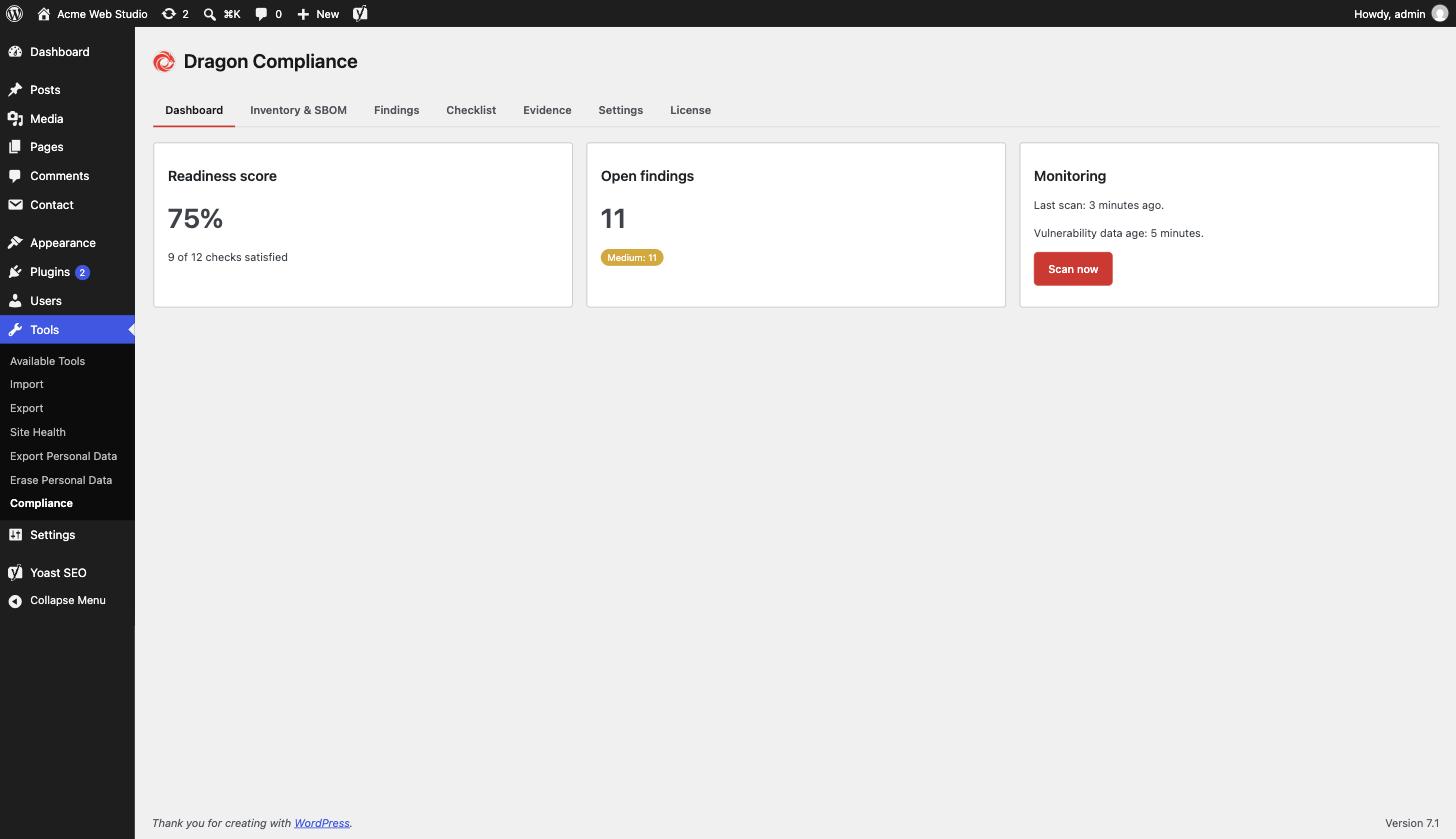
delay – and to be able to prove all of that. Dragon Compliance is the
WordPress compliance plugin that turns your site into something you can hand
to an auditor:
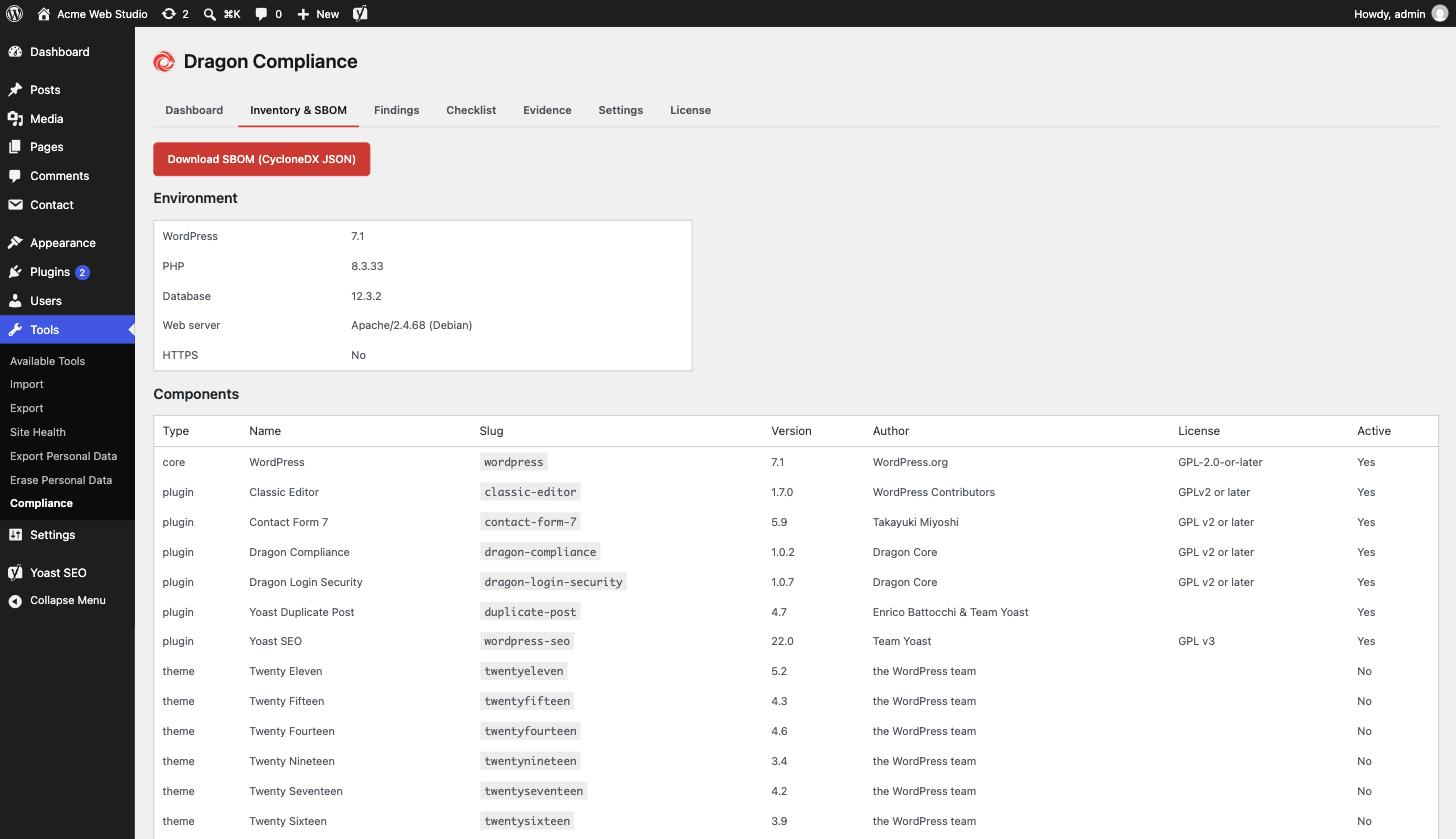
- Software inventory – WordPress core, every plugin and theme with version,
author and license, plus the PHP/database/server environment. - SBOM export – download a standards-compliant CycloneDX 1.6 JSON Software
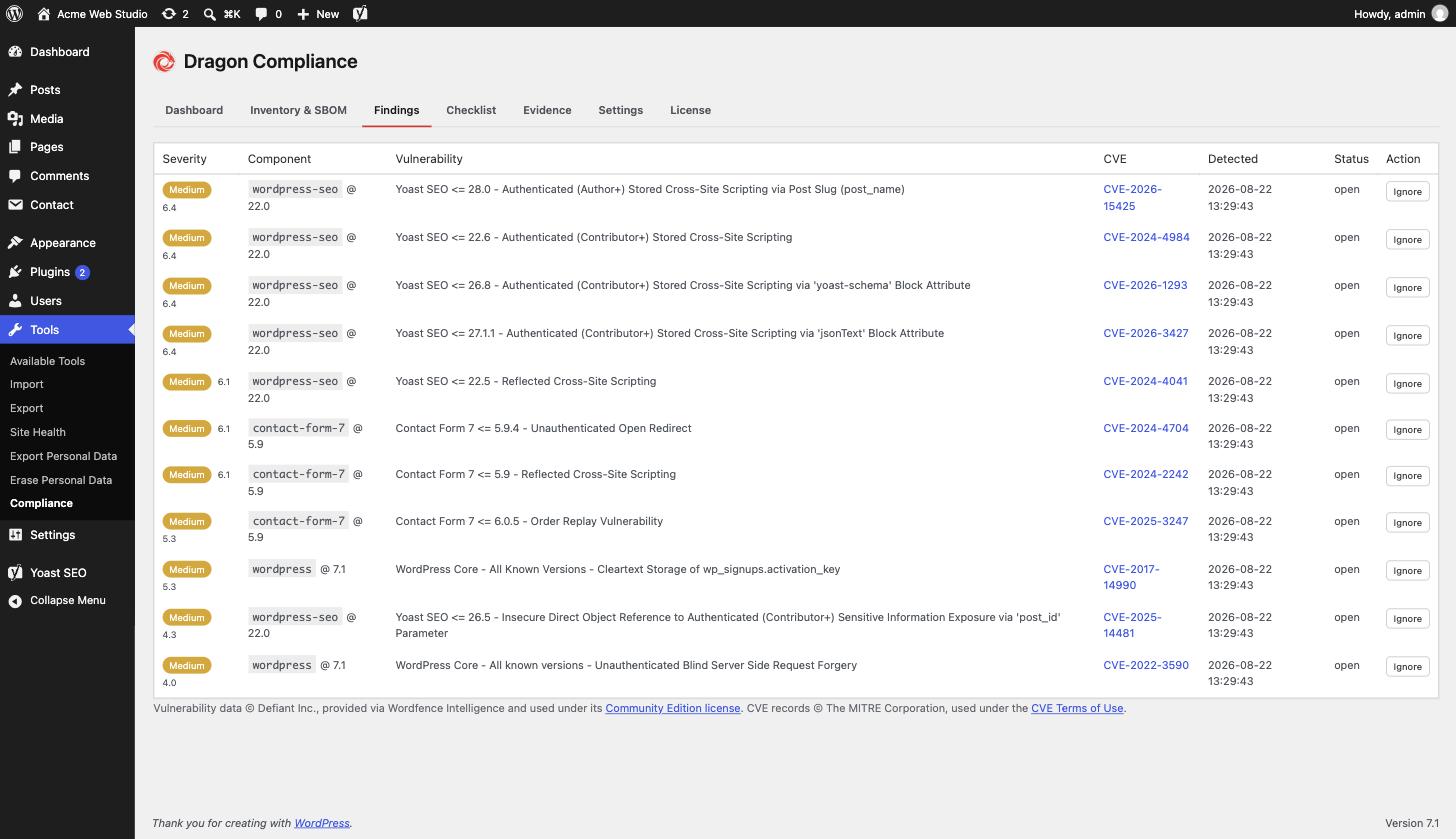
Bill of Materials, the artifact auditors and enterprise customers ask for. - Vulnerability monitoring – a daily scan matches your inventory against
the Wordfence Intelligence vulnerability database and lists affected
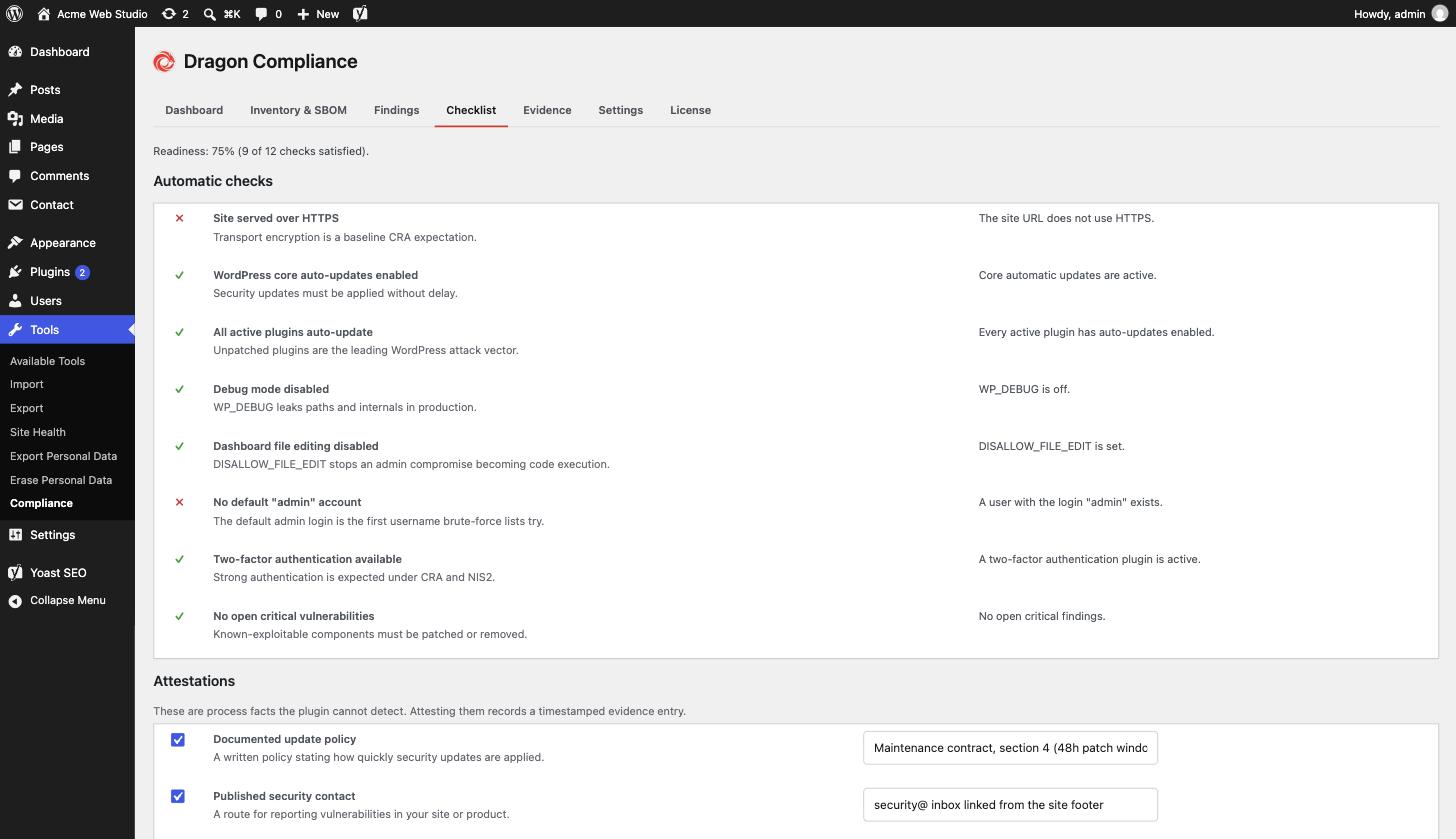
components by severity. New critical findings can email the site admin. - CRA readiness checklist – automatic checks (HTTPS, auto-updates coverage,
debug mode, file editing, 2FA, default admin account, open criticals) plus
manual attestations for process facts like your update policy and backups,
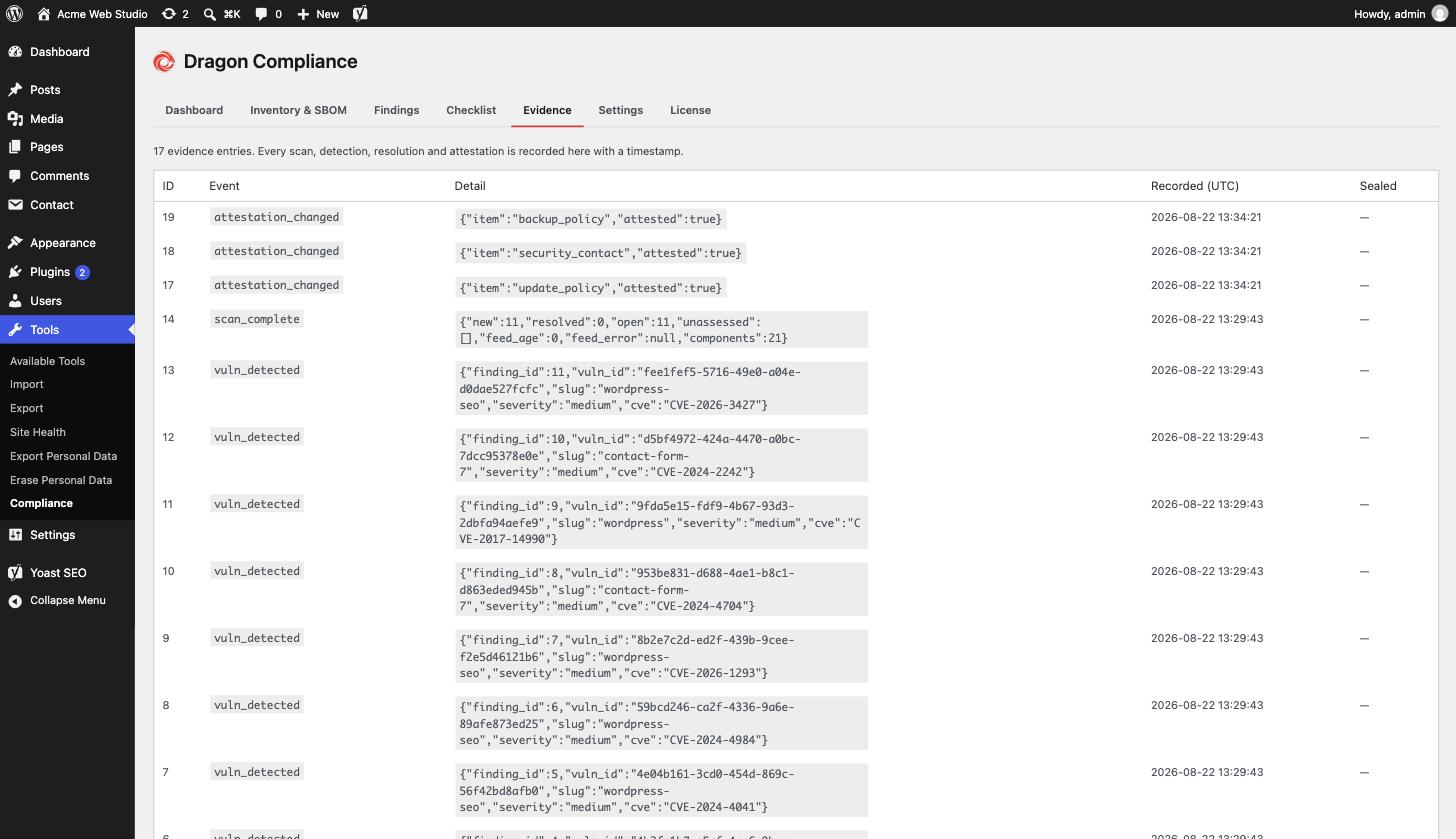
with a completion score. - Evidence log – every scan, detection, resolution and attestation change
is recorded with a timestamp, building the audit trail regulators expect.
Everything is processed locally on your server. Your inventory is never
uploaded anywhere – the only outbound request is downloading the public
vulnerability database.
Everything above is free, fully functional and unlimited.
Dragon Compliance Pro
For agencies and businesses that answer to clients or auditors:
- White-label scheduled compliance reports
- SBOM snapshots with diffs, and SPDX 2.3 export
- Tamper-evident hash-chained evidence log
- Time-to-patch metrics
- Alert routing: multiple recipients, signed webhooks, Slack
- NIS2 mapping view
See Dragon Compliance Pro for details.
External services
This plugin can connect to the Wordfence Intelligence vulnerability database
(a service by Defiant Inc.) to download its public list of known WordPress
vulnerabilities. This is required for the vulnerability-monitoring feature
and happens once daily, and when you press “Scan now”.
Only a standard HTTP request with your Wordfence Intelligence API token is
sent – no data about your site, its inventory or its users is transmitted.
You need a free wordfence.com account to generate a token; without one, the
plugin’s other features work normally and monitoring stays off.
Wordfence terms of service: https://www.wordfence.com/terms-of-use/
Wordfence privacy policy: https://www.wordfence.com/privacy-policy/
If the separate Dragon Compliance Pro add-on is installed and licensed, the
same vulnerability list is downloaded from Dragon Core (api.dragoncore.ltd)
instead, so no Wordfence account is needed. That request carries only your
Dragon Core licence key and site hostname (for licence validation) – again,
nothing about your inventory or users. Dragon Core serves an unmodified copy of
the Wordfence Intelligence feed, including its copyright notices. This
plugin only ever downloads the feed from www.wordfence.com or
api.dragoncore.ltd; no other host is accepted.
Dragon Core terms: https://dragoncore.ltd/terms
Dragon Core privacy policy: https://dragoncore.ltd/privacy
Credits
The WordPress.org listing icon is drawn with glyphs from Lucide (https://lucide.dev), ISC License. Copyright (c) for portions of Lucide are held by Cole Bemis 2013-2022 as part of Feather (https://feathericons.com, MIT License). All other copyright (c) for Lucide are held by Lucide Contributors 2022. The plugin itself does not include these icons.
Installation
- Upload the plugin files to
/wp-content/plugins/dragon-compliance, or
install through the WordPress plugins screen. - Activate the plugin through the ‘Plugins’ screen.
- Go to Tools → Compliance.
- (Optional, for vulnerability monitoring) Create a free wordfence.com
account, generate an API token under Dashboard → Integrations, and paste it
under Tools → Compliance → Settings.
Frequently asked questions
Does the CRA apply to my site?
If your WordPress site is part of a commercial digital product or service offered in the EU, parts of the CRA and NIS2 likely apply to your business. This plugin gives you the technical evidence base – it is not legal advice.
Where does the vulnerability data come from?
From the Wordfence Intelligence Community Edition database, matched locally against your installed versions. Your inventory never leaves your server.
What SBOM formats are supported?
CycloneDX 1.6 JSON in the free plugin. Dragon Compliance Pro adds SPDX 2.3 and automatic SBOM snapshots with diffs.
What is an SBOM, and why would I need one?
A Software Bill of Materials lists every software component you run, with versions and licenses – like an ingredients label for your site. Auditors, enterprise customers and EU regulation increasingly ask for one. This plugin exports yours in the standard CycloneDX format in one click.
When do the CRA obligations start?
The Cyber Resilience Act’s vulnerability and incident reporting obligations begin in September 2026, with the remaining requirements following in 2027. If the CRA touches your business, the evidence trail is worth starting now – findings and attestations only prove a history if they have one.
Will it slow down my site?
No. Scans run in the background once a day via WP-Cron, there is no front-end code at all, and the vulnerability match happens locally against a cached copy of the database.
Is this a malware scanner?
No. It matches your installed software versions against a database of publicly known vulnerabilities. It does not scan files for infections.
Changelog
Stricter handling of checklist input. No change to how scans or exports work.
1.0.13
- Checklist notes and attestations are cleaned as they are read. A malformed submission saves an empty note instead of the word “Array”.
- The plugin inventory reads each plugin’s licence through WordPress’s own plugin list.
- Another plugin that changes the list of plugin headers can no longer hide licences from the inventory or the SBOM.
- Fixed: uninstall deletes data only when the opt-in is clearly on (1, true, yes or on), not for a value set to “false” or “no”.
1.0.12
- Fixed: the daily scan and the scan after a plugin change stopped with an error when run by WP-Cron, so only Scan now worked. Scheduled scans now run.
- Fixed: a custom single-file plugin named like a WordPress.org plugin could be matched to that plugin’s vulnerabilities. Only Hello Dolly is matched by file name.
- Multisite: each site schedules its own scan, reads the network’s auto-update settings and sees network-activated two-factor plugins.
- Deactivating clears both scheduled scans, and uninstall runs per site.
1.0.11
- Fixed: a vulnerability that returns after it was resolved (for example after a plugin downgrade) is reopened and alerted again.
- Single-file plugins such as Hello Dolly are matched against the vulnerability feed.
- Alert text shows vulnerability titles correctly.
1.0.10
- Every screen, email and alert is now translatable, so community translations from translate.wordpress.org cover the whole plugin. Counts use proper plural forms, and numbers and dates follow your site’s language.
- Severity, status and evidence entries show readable labels.
1.0.9
- An “Upgrade to Pro” link on the Plugins screen, a one-line pointer at the foot of the plugin’s own screens, and a single dismissible note once the plugin has done its job. All three disappear when the Pro add-on is active; nothing in the free plugin is locked or changed.
1.0.8
- Fixed: an attestation whose database write failed was still logged as evidence and reported as saved. All four attestations are now stored in a single write that is read back before any evidence is recorded, evidence is recorded only for items that actually changed, and a refused write shows an error instead of “Attestations saved”.
- Fixed: ignoring or reopening a finding recorded a status-change evidence entry even when the row did not change. Evidence is now recorded only when the status actually changed, and a no-op or failed update shows a notice instead of “Finding updated”.
- Fixed: a scan whose “mark resolved” write failed still recorded resolution evidence and fired the resolved hook for every finding. Resolutions that were not stored are no longer reported, and the next scan retries them.
- Fixed: the database schema version was stamped even when a table could not be created, which stopped the plugin from retrying. Each table is now checked to exist before the version is recorded; a failure is retried every 10 minutes and shown to administrators as a notice naming the missing tables.
Screenshots
For developers
Is this your plugin? Show off the numbers.
Add a live badge to your site, docs or GitHub README. It updates on its own — no account needed.
Best Dragon Compliance alternatives
All compliance plugins →





FAQ
Dragon Compliance: quick answers
Straight answers, pulled from live WordPress.org data.
Live data from WordPress.org · checked Oct 10, 2026
Is Dragon Compliance free?
Yes. Dragon Compliance is free to download and use from the official WordPress.org plugin directory.
Is Dragon Compliance safe to use in 2026?
Dragon Compliance is a solid plugin choice in 2026, with a few things worth checking first. Was last updated 1 week ago, and scores 64/100 on our health check.
How many websites use Dragon Compliance?
Dragon Compliance is active on <10 WordPress websites and has been downloaded 418 times since it launched in August 2026. It was downloaded 299 times in the last 30 days.
Does Dragon Compliance work with WordPress 7.1?
Yes. The developer has tested Dragon Compliance up to WordPress 7.1.3, the latest release. It requires WordPress 6.2 or newer.
What PHP version does Dragon Compliance need?
Dragon Compliance requires PHP 8.0 or higher. Most hosts run PHP 8.x today, so it works on any modern WordPress hosting.
When was Dragon Compliance last updated?
The latest version, 1.0.13, was released on October 2, 2026 (1 week ago).
Who makes Dragon Compliance?
Dragon Compliance is developed and maintained by Dragon Core.
What are the best alternatives to Dragon Compliance?
The most popular alternatives to Dragon Compliance are Cookie Compliance for WordP… (800K+ installs), WP Consent API (200K+ installs) and Cookiez (40K+ installs).
Powered by PageForge
Want thousands of pages that rank like these? Build them in an afternoon.
This directory runs on the same engine as PageForge. Turn any spreadsheet, CSV or API into thousands of fast, SEO-ready WordPress pages — with schema, internal links and AI-written copy baked in.
- CSV, Google Sheets & API data sources
- AI content, schema & internal links per page
- Works with Elementor, Gutenberg, Yoast & Rank Math
- Free on WordPress.org — no credit card


