



Cookie Compliance for WordPress – Cookie Consent, GDPR & CCPA
Consent management for WordPress — GDPR, CCPA & ePrivacy, autoblocking, Google Consent Mode, Microsoft Consent Mode (Pro), GPC & WP Consent API.

Safe pick
Yes — Cookie Compliance for WordPress is a safe, well-maintained plugin to use in 2026. It runs on 800K+ sites, is rated 4.8/5 and was last updated 19 hours ago, and scores 82/100 on our health check.
- Proven at scale on 800K+ active sites
- Loved by users — 4.8/5 from 3,027 reviews
- Actively developed — last update 19 hours ago
- Tested with the latest WordPress (7.1)
- Slow support — only 0% of recent threads resolved
How does it stack up?
Side-by-side on installs, updates, ratings & support


Daily downloads
Download spikes usually follow a new release — each site that auto-updates counts as a download.
Rankings
Where Cookie Compliance for WordP… stands todayWordPress.org search rankings
Live position in the plugin search, top 100| Keyword | Position |
|---|---|
| compliance | #4 |
| cookies | #15 |
| GDPR | #7 |
| google consent mode | #7 |
| privacy | #34 |
Version adoption
Share of active sites per release.
Rating breakdown
★★★★★★★★★★ 4.8 from 3,027 reviews
About Cookie Compliance for WordPress
From the official readme · v3.1.19Description
Cookie Compliance for WordPress puts a clear, fair consent banner on your site and connects it to Cookie Compliance, the consent management platform by Hu-manity.co. (Previously published as “Compliance by Hu-manity.co”, and before that “Cookie Notice”.) The plugin runs the banner on your site; the Cookie Compliance dashboard is where you configure it, manage every domain you own and keep your consent records.
Built around Intentional Consent, the banner gives visitors three equal choices — accept none, some or all — so people can decide with confidence and you avoid the one-sided “dark pattern” designs that privacy regulators look at closely.
Two ways to use it
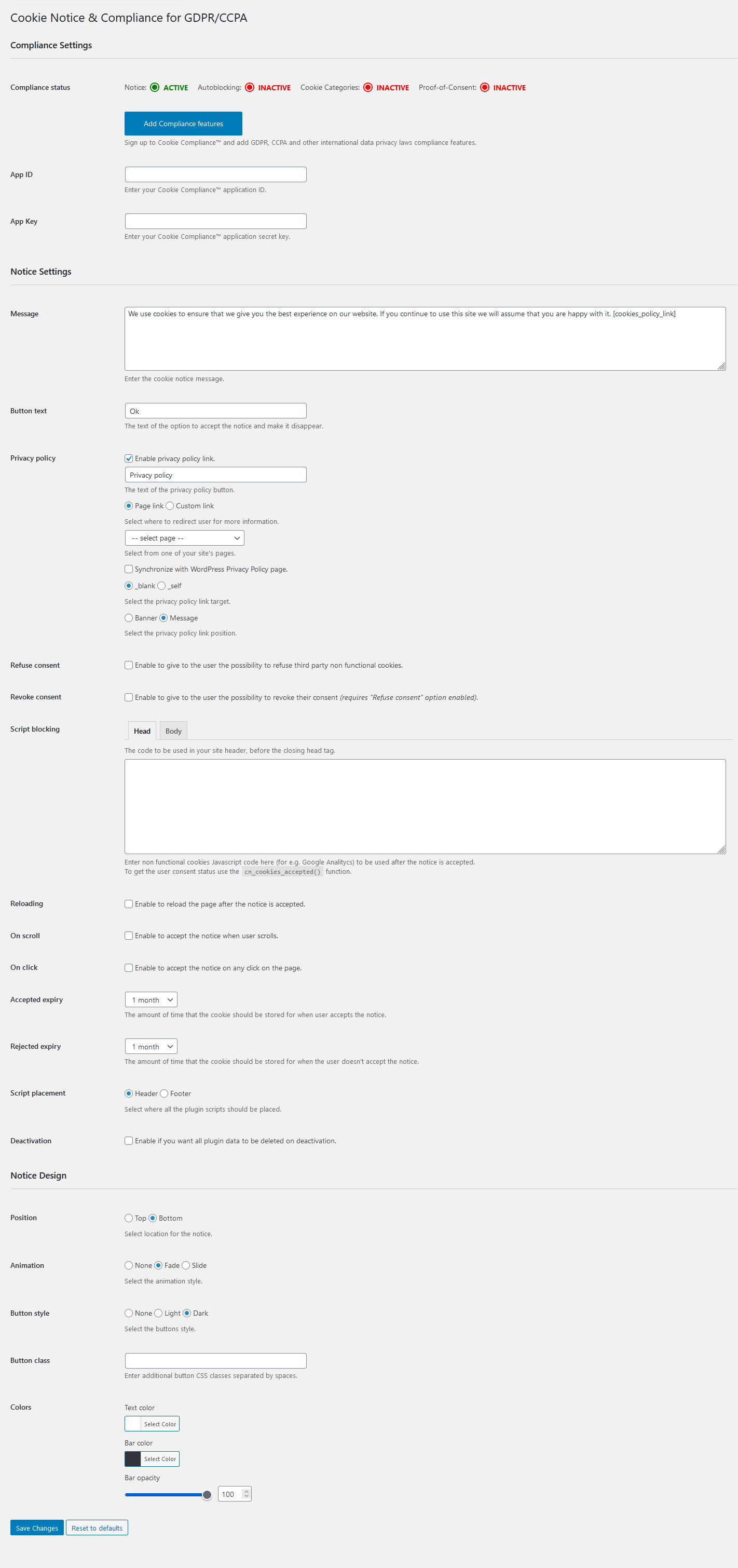
- Banner Only mode works on its own, with no account. You get the consent banner and its settings.
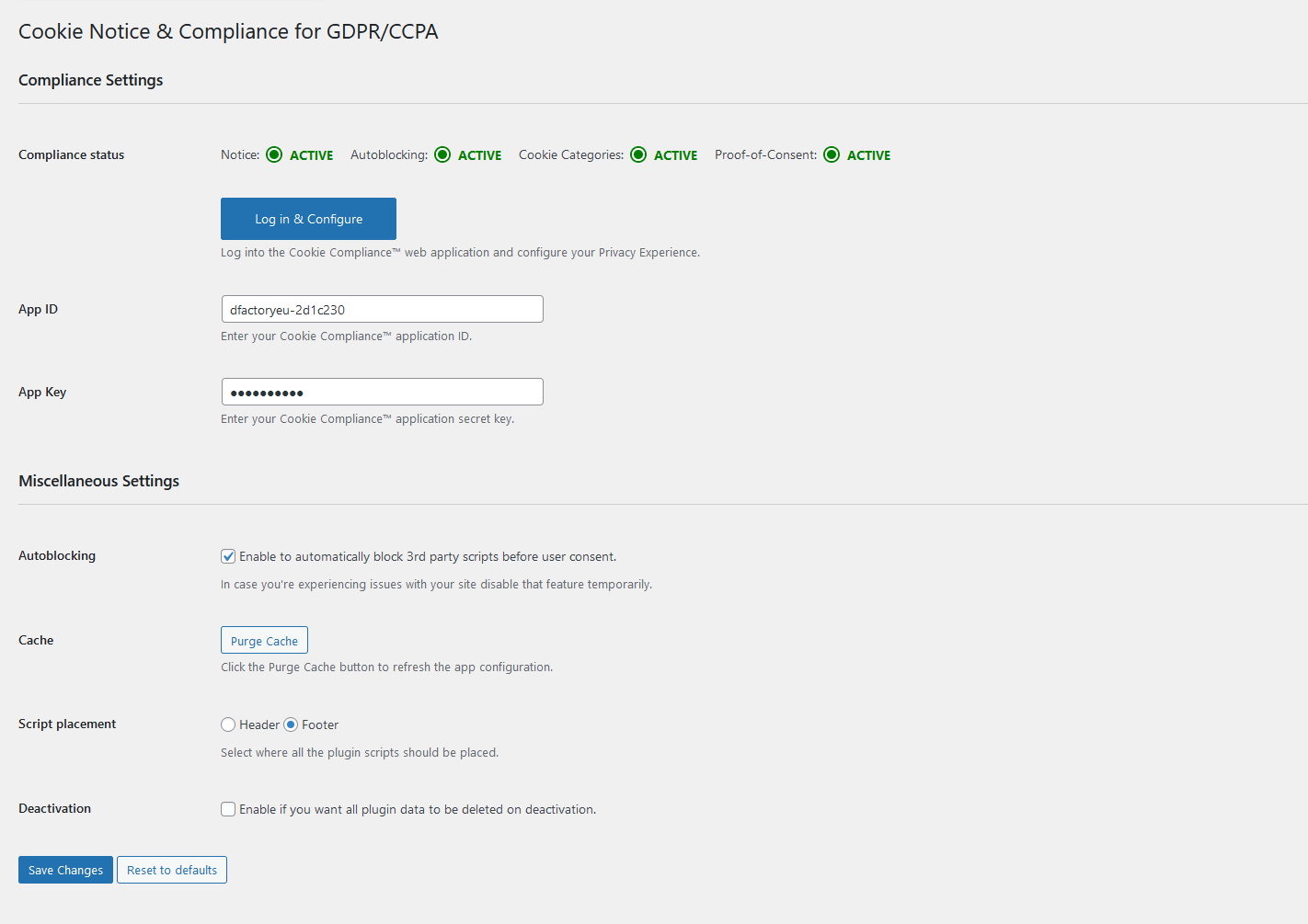
- Connected mode (free or paid) signs you in to Cookie Compliance from inside WordPress and adds automatic script blocking, purpose categories, consent records, Google Consent Mode, multilingual banners and multi-domain management.
Banner Only mode
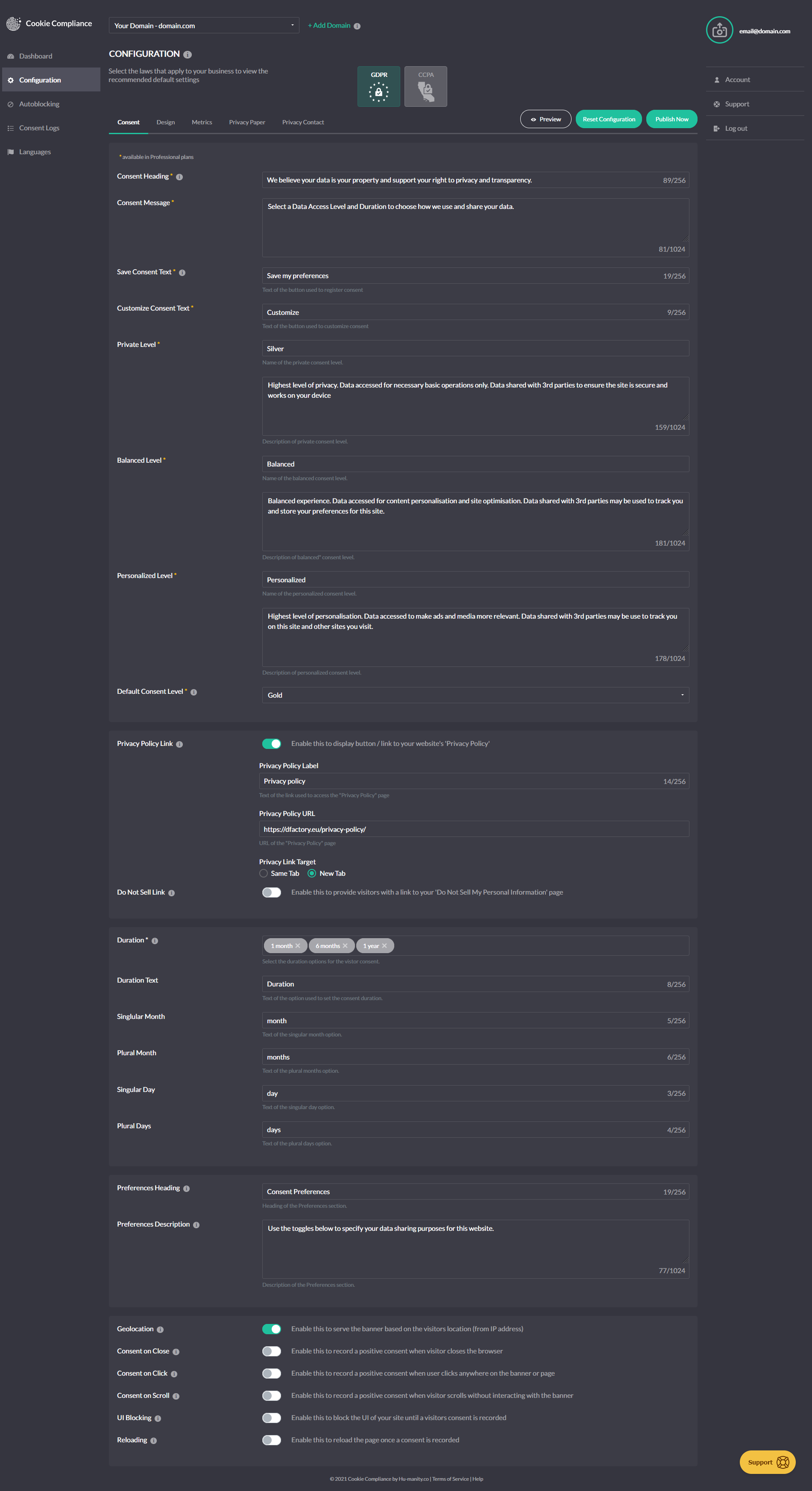
- Customizable notice message
- Consent on click, scroll or close
- Multiple cookie expiry options
- Link to your Privacy Policy page, synchronized with the WordPress Privacy Policy page
- WPML and Polylang compatible
- SEO friendly
- WP Consent API integration registers Cookie Compliance as the active Consent Management Platform under the WP Consent API when that free companion plugin is active, so cooperative plugins such as WooCommerce, Google Site Kit, Burst Statistics, WP Statistics, AddToAny and Pixel Manager for WooCommerce follow the choice your visitors make in the banner — no account needed.
Connected mode
Signed in to Cookie Compliance, on a free or paid plan, you also get:
- Intentional Consent — three equal buttons that let visitors accept none, some or all cookies through packaged Data Access Levels. Supports the equal-choice principle in GDPR and other data protection laws.
- Cookie purpose categories — visitors choose by category, supporting opt-in consent.
- Consent duration selector — visitors control how long their consent lasts, in line with EU authority guidance of no more than 6 months.
- Consent metrics — the visitor’s consent record and a list of blocked and allowed third parties, shown in the banner. Reflects guidance from authorities such as CNIL (France) and the ICO (UK).
- Customizable Privacy Paper and Privacy Contact — summarize your privacy notice and give visitors your privacy contact and links to data subject request forms, supporting the “informed” principle of valid consent.
- Automatic script blocking — holds non-essential scripts and iframes until the visitor chooses. To be compliant, your site must record consent before setting or sending cookies.
- Google Consent Mode v2 (every plan) — adjusts how Google services (ad_storage, analytics_storage, ad_user_data, ad_personalization) behave according to visitor consent.
- Facebook Consent Mode and Microsoft Consent Mode (Professional plan) — apply visitor choices to Meta and Microsoft advertising (UET) signals the same way.
- Global Privacy Control (GPC) and Do Not Track — a visitor’s browser-level opt-out is applied to the Marketing category as soon as the banner can read it, with no extra click.
- Consent record storage — every consent is recorded and available for export, supporting proof-of-consent requirements.
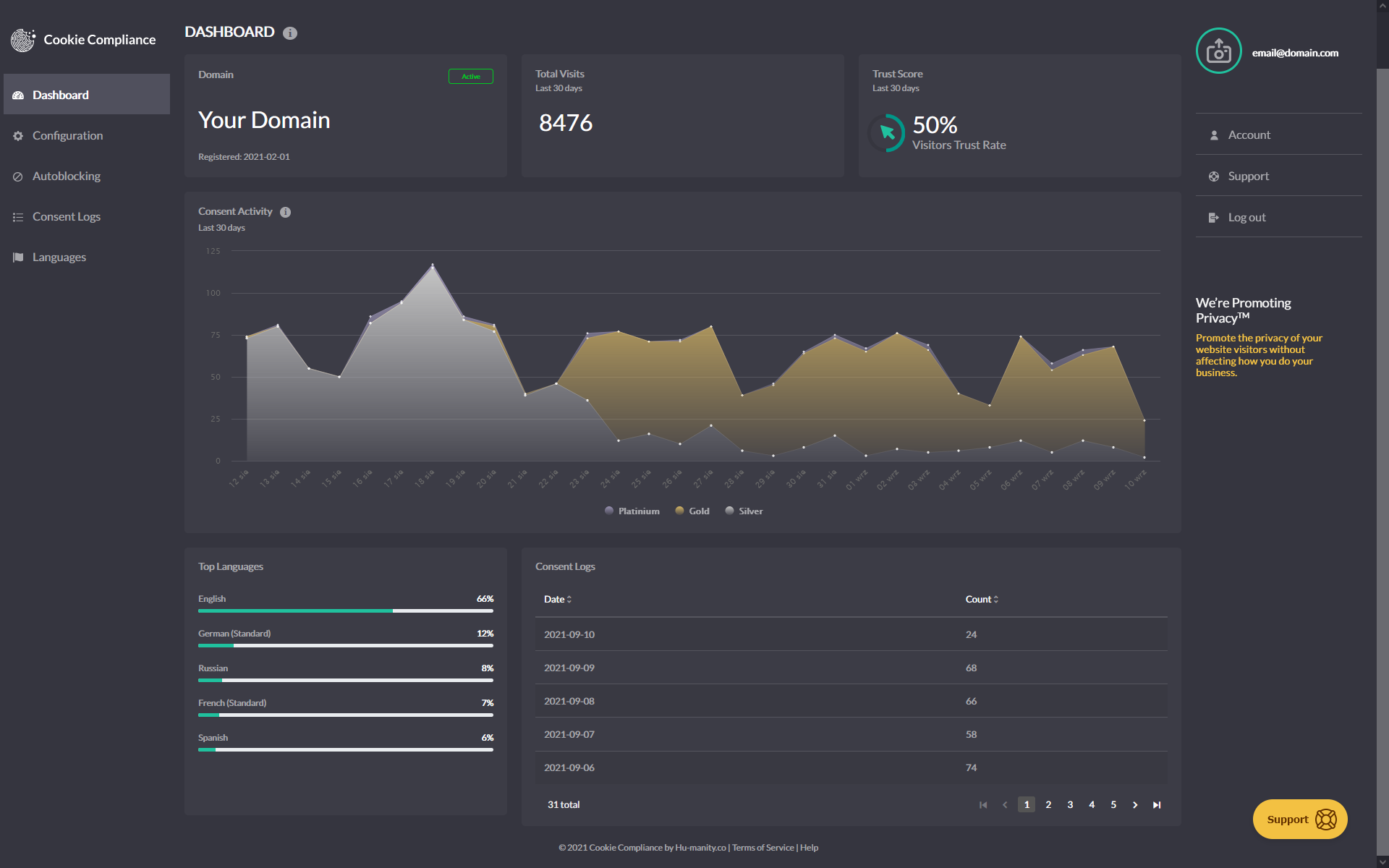
- Consent analytics dashboard — visits, a “trust score” and a consent activity graph, so you can tune the banner and track your acceptance rate.
- Default configurations for GDPR, CCPA and more, ready to deploy and fully customizable to match your site.
- Multilingual support — banner text is translated automatically, and you can customize every string.
- Multidomain management — manage additional Free or Professional domains under one account, each with its own banner configuration and design.
Built for the laws that apply to you
Cookie Compliance gives you configurable defaults and technical controls for GDPR and the ePrivacy Directive (EU), PECR (UK), LGPD (Brazil), PIPEDA (Canada), CCPA and CPRA (California), VCDPA (Virginia) and the Colorado Privacy Act, and follows guidance from authorities including the EDPS, ICO, CNIL, GPDP (Italy), BfDI (Germany), AEPD (Spain) and noyb.eu. Whether your site is fully compliant depends on how you configure it and how your site uses personal data.
Privacy
Cookie Compliance for WordPress is a Consent Management Platform client. Depending on how you use it, the plugin may send data to Hu-manity.co services on your behalf. This section describes what data leaves your WordPress server and when. It is kept up to date as the plugin evolves; material changes are noted in the changelog.
Plugin-only mode (Banner Only)
If you install the plugin and choose “Banner Only” in the Welcome screen — or never open the Welcome screen at all — the plugin operates entirely on your WordPress site. No account is created and the plugin does not initiate calls to Hu-manity.co services.
Connected mode (Free or Professional)
If you create a Cookie Compliance account from the Welcome screen (or log into an existing one), the plugin connects your site to the Hu-manity.co platform. While connected, the plugin sends data over HTTPS to Hu-manity.co’s platform services (hosted under *-api.hu-manity.co) for the following purposes:
- Account sign-up and sign-in, and registering your site as an application.
- Fetching and updating your banner configuration.
- Fetching consent analytics and individual consent records shown in the Audit Trail.
- Processing subscription payments (Professional plans only).
The data sent depends on the feature you are using and typically includes:
- Account-identifying data such as the email address and password used for sign-up or sign-in.
- Site-identifying data such as your site’s URL, title, description, and language.
- Application credentials (App ID and Secret Key) issued to your site at registration, included with subsequent platform requests.
- Subscription and billing data for Professional plans, such as the selected plan identifier and a one-time payment token described below.
- Integration telemetry such as the plugin version, the admin interface and language you use, which of the plugin’s own options are switched on, basic diagnostics about how it is running, and which of the caching or JavaScript-optimisation plugins it needs to stay compatible with are active on your site, and whether a Google, Meta or Microsoft tracking plugin is active, sent as HTTP headers so we can understand integration adoption and support the plugin.
- Operational metadata such as the timestamp and locale of a request, as is normal for HTTPS API calls.
As the plugin evolves, additional non-personal fields of the same categories listed above may be sent to support new features. Material changes are noted in the changelog.
Payments (Professional plans only)
Payment card details are collected by Braintree’s hosted-fields SDK running in your browser and are tokenized there. The plugin and Hu-manity.co servers do not receive raw card data. A one-time, non-replayable Braintree token is sent to Hu-manity.co’s platform to create the subscription.
Deactivation feedback
If you deactivate the plugin and fill in the optional deactivation feedback form, the reason you select, any free-text comment you type, and your site URL are sent once to Hu-manity.co so we can improve the product. Submitting the form is optional; clicking “Skip” sends nothing. This applies to both Plugin-only and Connected modes.
The banner shown to your site visitors
The consent banner shown to your site visitors is served from cdn.hu-manity.co/hu-banner.min.js. When a visitor interacts with the banner, the banner script (running in the visitor’s browser, not the plugin) communicates directly with Hu-manity.co services to record the consent decision — this is what makes consent records available to you in the Audit Trail. This data flow is between the visitor’s browser and Hu-manity.co and does not pass through your WordPress server. Because these requests originate in the visitor’s browser, the visitor’s IP address is visible to Hu-manity.co as part of standard HTTPS network handling.
Local state set by the plugin
The plugin stores operational state in three places. None of this is transmitted to Hu-manity.co:
- On your WordPress server (options and transients) — for example, a welcome-modal dismissal timestamp (
cookie_notice_welcome_dismissed) and short-lived caches of API tokens and configuration. - In the admin user’s browser (localStorage) — for example, first-run setup flags such as
cn_setup_wizard_complete_*andcn_has_platform_config_*. - In visitor browsers (a short-lived
hu-formcookie, 5 minutes) — set when forms with consent integration are submitted. Used locally by the form-consent flow.
As the plugin evolves, additional keys may be stored in any of these locations. They remain local state on your site or in the user’s browser — not data sent to Hu-manity.co. Material changes to this pattern would be noted in the changelog.
Data the plugin does not send
- The plugin does not transmit visitor IP addresses, cookies, page URLs, or page content as data fields. IP addresses are, as with any HTTPS request, visible to the receiving server as part of standard network handling.
- The plugin does not transmit the content of your posts, pages, users, or WordPress database.
- The plugin does not send data to third parties other than Hu-manity.co and, for Professional plan payments, Braintree (a PayPal service).
Service providers
- Hu-manity.co / Cookie Compliance — primary service provider.
- Terms of Service: https://cookie-compliance.co/terms-of-service/
- Privacy contact: https://cookie-compliance.co/documentation/privacy-contact/
- Braintree (a PayPal service) — processes Professional plan signups initiated from the plugin (not invoked for Banner Only or Free).
- When you manage your subscription from the Cookie Compliance web application, additional payment gateway providers may process your billing information.
- Hu-manity.co’s email subscription service — receives your account email address and name to manage newsletter and operational email preferences. You can unsubscribe at any time via the email footer or by deleting your account.
Account and consent data is processed in the European Union (AWS Ireland region). Hu-manity.co’s public marketing websites (hu-manity.co, cookie-compliance.co) are hosted separately in the United States.
How long we retain your data
- Plugin-side caches on your WordPress server (API tokens, subscription data, configuration) are short-lived, with TTLs typically up to 24 hours. The visitor
hu-formcookie expires after 5 minutes. - On the Hu-manity.co platform, account information and consent records are retained as long as your Cookie Compliance account is active, and are removed when the account is deleted or via an erasure request.
What rights you have over your data
- Stop further sends. Deactivate the plugin from the Plugins screen — no further plugin-initiated API calls will be made.
- Export consent records. Site owners can export cookie-consent and privacy-consent logs as CSV from the Cookie Compliance web application.
- Delete your account and all associated data. The Cookie Compliance web application has an account-deletion flow. Triggering it cancels active subscriptions, deletes your apps and banner configuration, removes your consent records from the platform, and nullifies free-text personal data before deleting the account.
- Erasure of visitor data (GDPR Article 17 / CCPA Delete). To request erasure of a specific visitor’s records (by email, session ID, IP, or consent ID), contact Hu-manity.co via the privacy contact page above. Hu-manity.co processes the request and erases the matching records from its storage systems within 30 days, in line with GDPR Article 12.
- Manage consent (visitors). Site visitors can adjust their consent at any time through the consent banner.
Installation
- Install Cookie Compliance for WordPress either via the WordPress.org plugin directory, or by uploading the files to your server.
- Activate the plugin through the ‘Plugins’ menu in WordPress.
- Go to Settings > Compliance in your WordPress admin — the setup wizard will launch automatically on first activation.
- Choose your setup path in the welcome screen: sign in to Cookie Compliance (Free or Professional) for the full compliance features, or select Banner Only to run the plugin on its own.
- If connecting: create a Cookie Compliance account or sign in to an existing one directly from the wizard — no need to leave WordPress.
- Select your plan, configure your banner using the guided checklist, and you’re live.
- Return to Settings > Compliance any time to adjust your configuration, review consent logs in the Audit Trail, or manage your Cookie Compliance connection.
Changelog
Plugin page refresh only. No change to your banner or settings.
3.1.19
- Fix: When you connect the plugin to a different site in your Cookie Compliance account, the banner uses the new site’s rules from the first page view, not the previous site’s.
- Fix: Terms of Service links in setup and checkout open the current terms on cookie-compliance.co. Also fixed Forgot password link.
3.1.18
- Fix: On sites using Polylang, Conditional display lists pages in every language, and rules for those pages are kept when you save.
- Improvement: The plugin now calls the Cookie Compliance web app your dashboard, the name you know it by.
3.1.17
- New: The Overview tab now shows your last 30 days of consent activity, the same charts as the WordPress dashboard widget.
- New: On connected sites, Cookie Consent lets you set your company’s country, saved to your Cookie Compliance account.
- Fix: On connected sites, a privacy law’s suggested settings apply when you first select that law. Later saves keep the banner choices you have made.
- Fix: On the Overview tab, Meta, Microsoft, and Global Privacy Control show as optional when they are off. Global Privacy Control stays recommended for CCPA and other US state laws.
- Fix: Support now opens in the Admin Portal with this domain already selected.
- Improvement: Clearer banner and Privacy Consent screens. Standard and Compact appear with the New engine, “Can’t see your banner?” sits with your banner, and Admin Portal links open this site.
3.1.16
- Improvement: Simpler, more reliable privacy policy link. On connected sites, choose your policy page and turn on Sync to use it on your banner; set the link text in the Admin Portal. In Banner Only mode, the policy button always opens your policy.
- Tested up to WordPress 7.1.
3.1.15
- Docs: Refreshed the plugin page. Older version history now lives in changelog.txt. No change to your banner or settings.
3.1.14
- New: An Overview tab shows your protection status in plain words, your last 7 days of consents, and a one-click fix for anything that needs attention.
- New: Preview shows your banner even when it would be hidden for you, and says why.
- Improvement: Tabs are now Overview, Cookie Consent, Privacy Consent and Consent Logs. Laws, languages and Consent Signals (formerly consent mode) sit together on the Cookie Consent tab.
- Improvement: Compliance evidence follows your live banner and blocking settings, with no scan to wait for. The tracker list is removed, as it only showed trackers added by hand. Blocking is unchanged.
- Fix: With page caching on, preview, page-builder and JSON requests are no longer cached, so visitors always get the banner. If your cache may hold such a page, purge it once.
- Security: Account messages, such as sign-in or payment errors, show as plain text, and debug logs no longer store full account replies.
Screenshots
For developers
Is this your plugin? Show off the numbers.
Add a live badge to your site, docs or GitHub README. It updates on its own — no account needed.
Best Cookie Compliance for WordPre… alternatives
All compliance plugins →





FAQ
Cookie Compliance for WordPress: quick answers
Straight answers, pulled from live WordPress.org data.
Live data from WordPress.org · checked Nov 17, 2026
Is Cookie Compliance for WordPress free?
Yes. Cookie Compliance for WordPress is free to download and use from the official WordPress.org plugin directory.
Is Cookie Compliance for WordPress safe to use in 2026?
Yes — Cookie Compliance for WordPress is a safe, well-maintained plugin to use in 2026. It runs on 800K+ sites, is rated 4.8/5 and was last updated 19 hours ago, and scores 82/100 on our health check.
How many websites use Cookie Compliance for WordPress?
Cookie Compliance for WordPress is active on 800K+ WordPress websites and has been downloaded 44,862,928 times since it launched in July 2013. It was downloaded 615,767 times in the last 30 days.
Does Cookie Compliance for WordPress work with WordPress 7.1?
Yes. The developer has tested Cookie Compliance for WordPress up to WordPress 7.1.4, the latest release. It requires WordPress 4.9.6 or newer.
What PHP version does Cookie Compliance for WordPress need?
Cookie Compliance for WordPress requires PHP 7.4 or higher. Most hosts run PHP 8.x today, so it works on any modern WordPress hosting.
When was Cookie Compliance for WordPress last updated?
The latest version, 3.1.19, was released on November 16, 2026 (19 hours ago).
Who makes Cookie Compliance for WordPress?
Cookie Compliance for WordPress is developed and maintained by Humanityco.
What are the best alternatives to Cookie Compliance for WordPress?
The most popular alternatives to Cookie Compliance for WordPress are WP Consent API (300K+ installs), Cookiez (50K+ installs) and One Stop Shop for WooCommer… (10K+ installs).
Powered by PageForge
Want thousands of pages that rank like these? Build them in an afternoon.
This directory runs on the same engine as PageForge. Turn any spreadsheet, CSV or API into thousands of fast, SEO-ready WordPress pages — with schema, internal links and AI-written copy baked in.
- CSV, Google Sheets & API data sources
- AI content, schema & internal links per page
- Works with Elementor, Gutenberg, Yoast & Rank Math
- Free on WordPress.org — no credit card


