



Docket Cache – Object Cache Accelerator
Speed up your WordPress site with a persistent object cache, powered by OPcache. An efficient alternative to Redis and Memcached.

Solid choice
Docket Cache is a solid plugin choice in 2026, with a few things worth checking first. It runs on 20K+ sites, is rated 4.9/5 and was last updated 4 days ago, and scores 74/100 on our health check.
- Proven at scale on 20K+ active sites
- Loved by users — 4.9/5 from 50 reviews
- Actively developed — last update 4 days ago
How does it stack up?
Side-by-side on installs, updates, ratings & support



Daily downloads
Download spikes usually follow a new release — each site that auto-updates counts as a download.
Rankings
Where Docket Cache stands todayWordPress.org search rankings
Live position in the plugin search, top 100| Keyword | Position |
|---|---|
| cache | #11 |
| database | #91 |
| object cache | #5 |
| OPcache | #4 |
| performance | >100 |
Version adoption
Share of active sites per release.
Rating breakdown
★★★★★★★★★★ 4.9 from 50 reviews
About Docket Cache – Object Cache Accelerator
From the official readme · v26.04.06Description
Docket Cache is a persistent WordPress Object Cache that stores cached data as plain PHP code. It is designed as an alternative for sites that do not have access to Redis or Memcached.
Most file-based caching plugins use serializing and unserializing to save PHP objects to flat files. Docket Cache takes a different approach by converting objects into plain PHP code. This makes data retrieval faster and improves overall performance, especially when Zend OPcache is enabled.
For more information, please refer to the documentation on Caching In WordPress.
Why use this plugin?
For reliable persistent Object Cache in WordPress, Redis or Memcached are the top choices. However, they require server knowledge and are rarely available on low-cost or shared hosting plans.
The alternative is to store object caches in files. In WordPress, exporting PHP objects is not straightforward. Most file-based caching plugins rely on serialising and unserialising objects to store and retrieve data.
Docket Cache takes a better approach by turning the object cache into plain PHP code. This is faster because WordPress can use the cache directly without additional processing.
Features
- Object caching + OPcache
- Advanced Post Caching
- Object Cache Precaching
- WordPress Menu Caching
- WordPress Translation Caching
- WordPress Core Query Optimisation
- Term Count Queries Optimisation
- Post, Page, Comment Count Optimisation
- Database Tables Optimisation
- WooCommerce Optimisation
- WP Options Autoload suspension
- Post Missed Schedule Tweaks
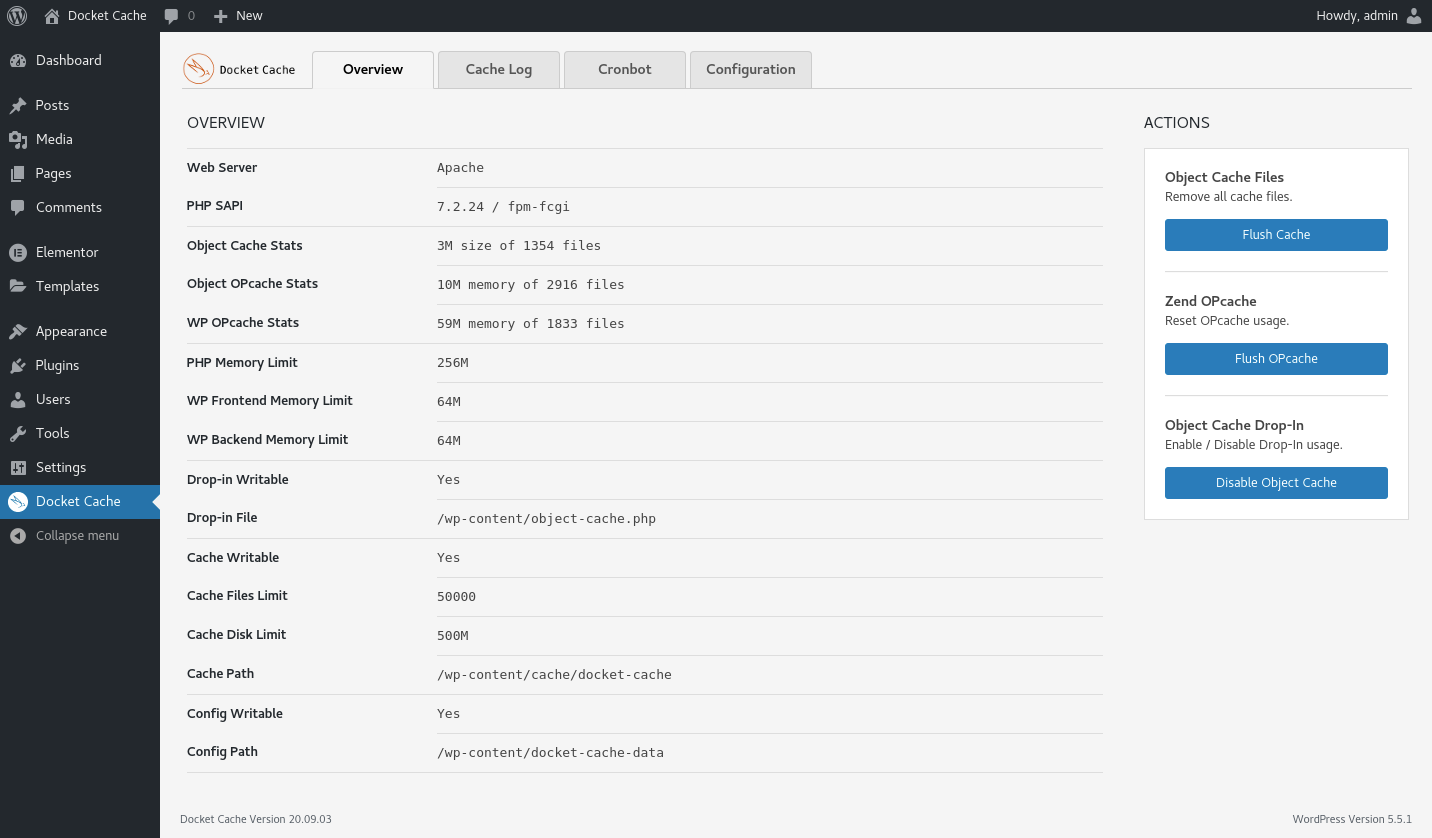
- Object Cache + OPcache Stats + OPcache Viewer
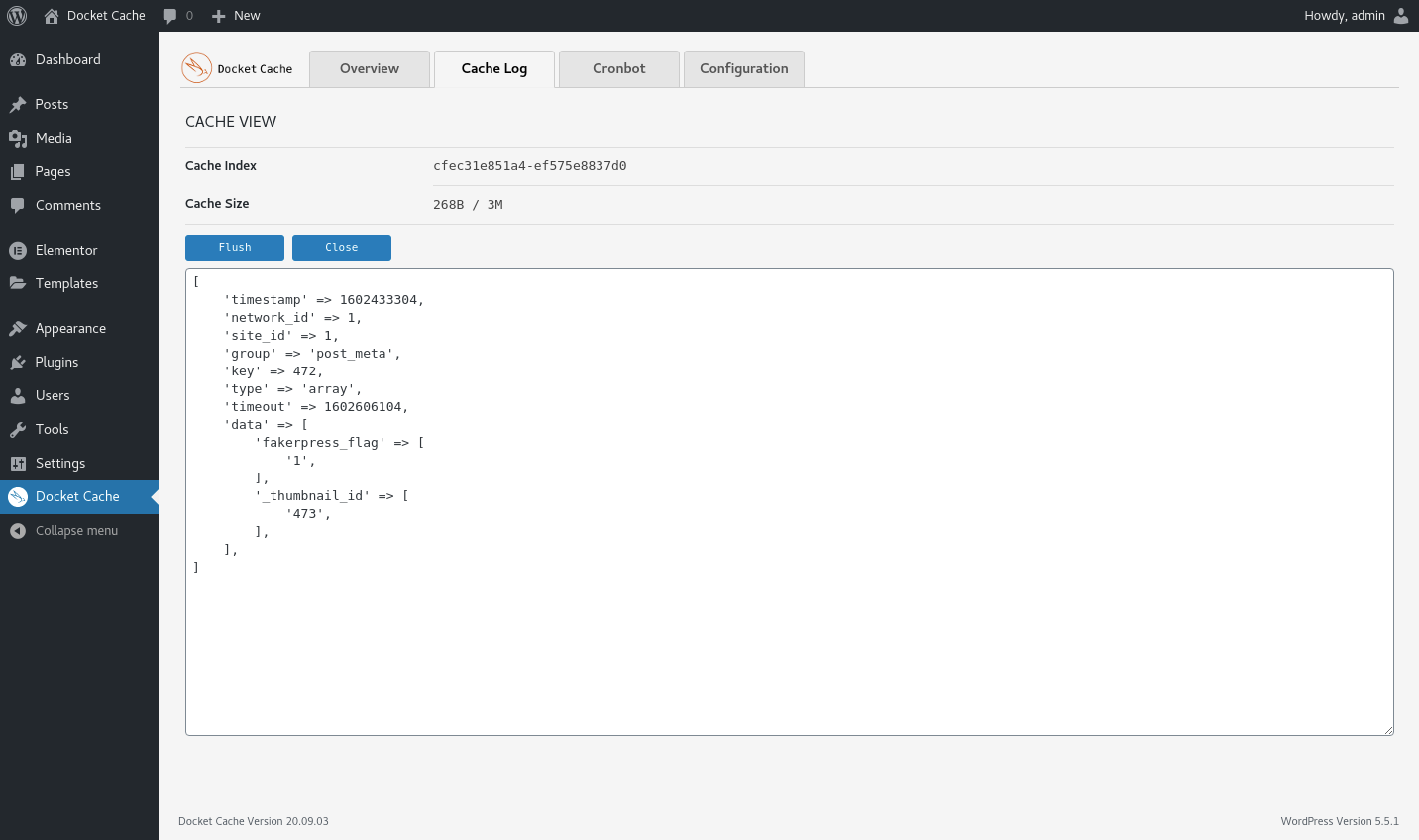
- Cache Log
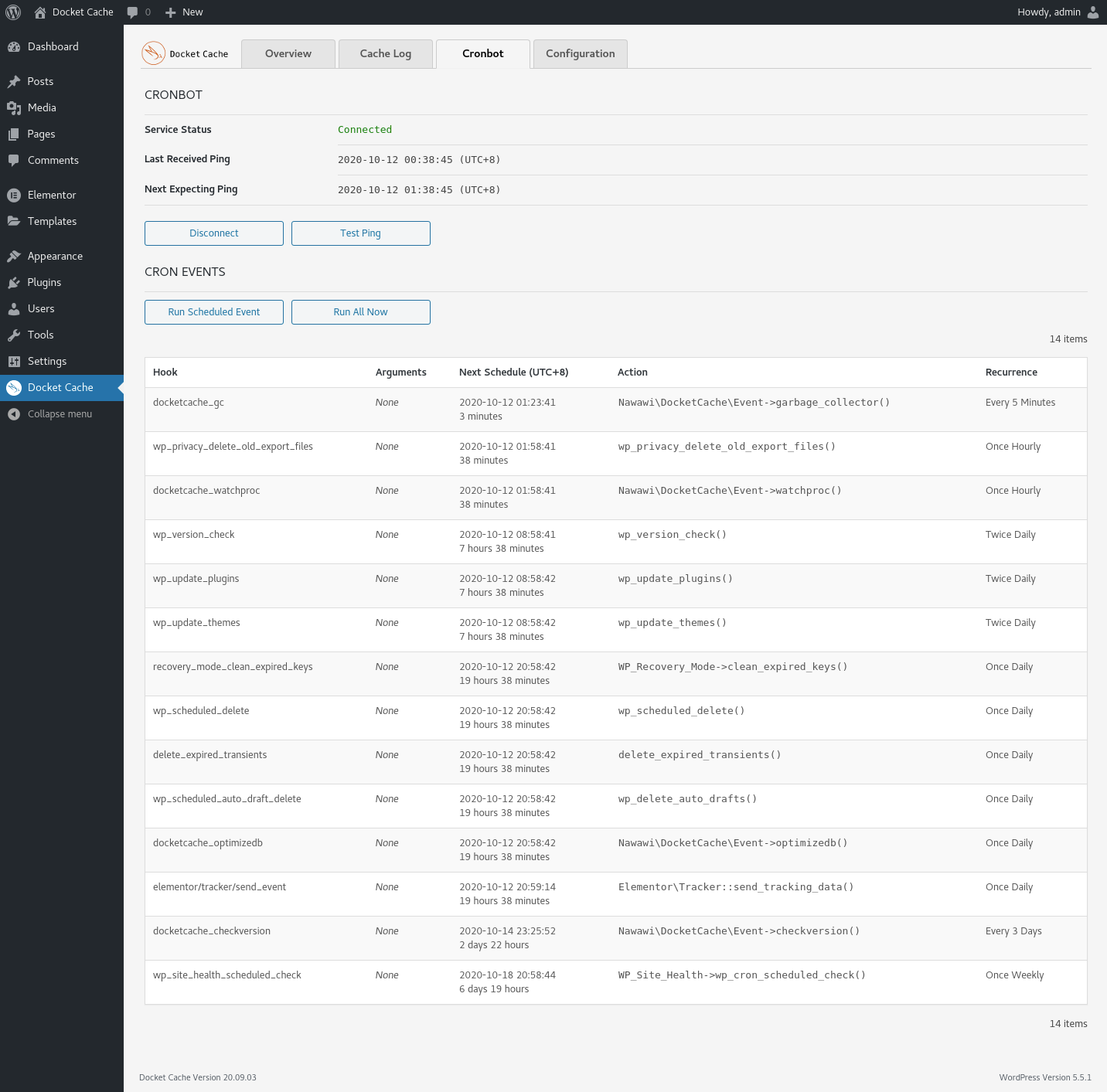
- Cronbot Service
- WP-CLI support
- Multisite / Multi-Network support
Requirements
To use Docket Cache requires minimum:
- PHP 7.2.5
- WordPress 5.4
- Zend OPcache
Documentation
For configuration options, installation guides, and command-line usage, please refer to the Documentation.
Development
- GitHub Repository — Source code and development hub for Docket Cache.
- Changelog — Full history of changes, fixes, and improvements.
- Gapo Tunnel — Expose local services to the internet through secure tunnels. Useful for testing Docket Cache on a local development environment.
- WP Staging Desktop — Turn a live WordPress site into a local development environment in minutes.
Sponsor This Project
Support the ongoing development of Docket Cache with a one-off or recurring contribution.
Noteworthy Sponsors:
A heartfelt thanks and appreciation.
- Jimat Hosting
- Themecloud
- Websavers Inc
- Avunu LLC
- Linqru
- Gentleman’s Guru
- SecurePay
- DNSVault
- Exnano Creative
Other sponsors are mentioned in the honourable list
Installation
Docket Cache requires PHP 7.2.5 or higher, WordPress 5.4 or higher, and Zend OPcache for best performance.
- In your WordPress admin, go to Plugins -> Add New.
- Search for “Docket Cache” and click Install Now.
- Click Activate or Network Activate for Multisite setups.
- Click Docket Cache in the left menu to access the settings page.
Please allow a few seconds for Docket Cache to begin caching objects.
Frequently asked questions
What is Object Caching in WordPress?
Object caching stores database query results so they can be retrieved quickly the next time they are needed. Cached data is served directly from the cache rather than making repeated database queries. This reduces the load on your server and makes your site faster. In simple terms, object caching keeps frequently used data in a location where it can be accessed more quickly.
What is Docket Cache in Object Caching?
By default, the WordPress object cache is non-persistent. This means cached data is stored in memory only for the duration of a single page request. It is not kept between page loads. To make it persistent, the object cache must be stored on disk. Docket Cache does more than just store the object cache — it converts cached data into plain PHP code. This is faster because WordPress can use the cache directly without additional processing.
What is OPcache in Docket Cache?
OPcache is a caching engine built into PHP. It improves performance by storing precompiled script bytecode in shared memory, so PHP does not need to load and parse scripts on each request. Docket Cache converts the object cache into plain PHP code. When reading and writing cache data, it uses OPcache directly, which results in faster data retrieval and better performance.
What is the Cronbot Service in Docket Cache?
Cronbot is an external service that pings your website every hour to keep WordPress Cron running actively. This service is optional and is not required. By default, it is not connected to the end-point server. You can disable it entirely on the configuration page.
What is the Garbage Collector in Docket Cache?
The Garbage Collector is a scheduled event that runs every 5 minutes to monitor cache files, clean up expired entries, and collect statistics.
What is a RAM disk in Docket Cache?
A RAM disk uses your server’s memory (RAM) to act as a storage drive. It can be a hardware device or a virtual disk. Reading and writing data from RAM is much faster than from an SSD. Storing Docket Cache files on a RAM disk can greatly improve performance. Please note that creating a RAM disk requires server administrator access (root), so this option is not available on shared hosting. Here is an example command to create and use a RAM disk with Docket Cache: $ cd wp-content/ $ sudo mount -t tmpfs -o size=500m tmpfs ./cache/docket-cache To mount the cache path automatically when the server…
What is the minimum RAM required for shared hosting?
By default, WordPress sets the memory limit to 256 MB. When combined with MySQL and the web server, you need more than 256 MB. If your hosting plan only provides 256 MB in total, this is not enough, and Docket Cache will not be able to improve your site’s performance.
How is Docket Cache different from other object cache plugins?
Docket Cache is an Object Cache Accelerator. It optimises caching by handling post queries, comment counting, WordPress translations, and more before storing the object cache.
Can I use it alongside other cache plugins?
Yes and no. You can use it together with a page caching plugin, but not with another object cache plugin.
Can I use it with LiteSpeed Cache?
Yes. The LiteSpeed Cache plugin includes its own Object Cache feature. It may display a notice asking you to disable Docket Cache. Simply turn off the LiteSpeed Cache Object Cache to use Docket Cache instead.
Can I use Docket Cache on a busy WooCommerce store?
It is not recommended for high-traffic WooCommerce stores. Docket Cache is designed as a file-based alternative to in-memory caches like Redis and Memcached, and may not handle the demands of a busy store. For WooCommerce sites with heavy traffic, we recommend using Redis instead.
I have a VPS. Can I use Docket Cache instead of Redis?
You can, but if your VPS supports Redis, we recommend using Redis for better performance. Docket Cache is best suited for environments where Redis or Memcached is not available. That said, Docket Cache works well for small to medium sites on a VPS, with no network connection required and no risk of cache-key conflicts.
Changelog
Please do manually remove wp-content/object-cache.php and wp-content/cache/docket-cache if an error occurs during updates. Thanks.
26.04.06
- Fixed: admin/log.php -> esc_textarea() on Cache Log output to prevent stored XSS.
- Fixed: Plugin::dc_log() -> Sanitise REQUEST_URI caller before logging.
- Fixed: Plugin -> Capability check on log/debug.log downloads reachable unauthenticated on ‘init’.
26.04.05
- Fixed: Removed double echo in log.php.
26.04.04
- Added: Configuration UI toggle for WP-CLI OPcache Invalidation (mirrors DOCKET_CACHE_WPCLI_OPCACHE constant).
- Fixed: CliOpcache::notify() -> Buffered per-file notifications at shutdown to prevent HTTP request floods during GC and individual cache unlinks.
- Fixed: CliOpcache -> REST route registered before compat check to eliminate 404 noise when workers bail early under load.
- Fixed: CronAgent::receive_ping() -> Type-safety guard on ping inputs to prevent PHP 8 TypeError from array-form values.
- Fixed: CronAgent::receive_ping() -> Explicit return after close_ping() when CRONBOT is disabled.
- Fixed: CronAgent::receive_ping() -> Multisite loop isolates per-site errors via try/catch; wpcron_error reported so cronbot server detects persistent failures.
- Fixed: CronAgent::run_wpcron() -> Re-entry guard via instance flag and try/finally.
- Fixed: CronAgent::run_wpcron() -> ob_end_clean() on exception path; stop decrementing $run_event below zero.
- Fixed: CronAgent::run_wpcron() -> Pre-init $results and $cron_event to prevent PHP 8 undefined-variable warnings.
- Fixed: CronAgent::run_wpcron() -> REQUEST_URI check uses urldecode() and checks wp_doing_cron() first to avoid URL-encoded bypass.
- Fixed: CronAgent::send_action() -> Cache key includes action to prevent collision between on/off calls from the same IP.
- Improved: CronAgent::send_action() -> $stmp cache-buster refreshes every 5 minutes to avoid CDN staleness in long-running processes.
- Improved: CronAgent::check_connection() -> Skip on AJAX/REST/cron requests to reduce shutdown-hook overhead on high-traffic endpoints.
26.04.03
- Added: CliOpcache — Invalidate web-server OPcache from WP-CLI via REST endpoint.
- Added: DOCKET_CACHE_WPCLI_OPCACHE constant to enable/disable CLI OPcache invalidation.
- Added: DOCKET_CACHE_CONFIGACTION constant to enable/disable Export/Import settings feature.
- Added: Export/Import settings feature for configuration backup and restore.
- Fixed: CliOpcache -> Path traversal protection using realpath() validation.
- Fixed: CliOpcache -> Bulk flush suppression to avoid excessive HTTP requests during full cache flush.
- Fixed: CliOpcache -> Shared secret initialised during REST route registration.
- Fixed: ReqAction -> Flush Object Cache causing 502 nginx error by deferring flush after response.
- Fixed: Plugin::get_opcache_status() -> Filter scripts by ABSPATH to prevent counting other sites on shared hosting.
- Fixed: Plugin::get_opcache_status() -> Removed unnecessary is_file() stale check on every cached script.
- Fixed: OPcache Viewer -> Escaped output of configuration values to prevent XSS.
- Improved: Filesystem::unlink() -> Notify web-server OPcache on individual cache file deletion.
- Improved: Filesystem::cachedir_flush() -> Utilise Crawler class for internal HTTP requests.
- Improved: Plugin::get_opcache_status() -> Skip building scripts array for overview page, cap at 50000 for OPcacheView.
- Improved: Plugin::get_opcache_status() -> Timeout guard for file cache scan on shared hosting.
- Improved: OPcacheView -> Removed “All Items” option, replaced with 50000 items cap.
- Improved: OPcacheView::get_status() -> Cache result to prevent double scan per page load.
24.07.07
- Fixed: _load_textdomain_just_in_time was called incorrectly on WordPress 6.7+.
v24.07.06
- Fixed: MoCache double-applying load_textdomain_mofile filter.
Screenshots




For developers
Is this your plugin? Show off the numbers.
Add a live badge to your site, docs or GitHub README. It updates on its own — no account needed.
Best Docket Cache alternatives
All cache plugins →





FAQ
Docket Cache: quick answers
Straight answers, pulled from live WordPress.org data.
Live data from WordPress.org · checked Sep 26, 2026
Is Docket Cache free?
Yes. Docket Cache is free to download and use from the official WordPress.org plugin directory.
Is Docket Cache safe to use in 2026?
Docket Cache is a solid plugin choice in 2026, with a few things worth checking first. It runs on 20K+ sites, is rated 4.9/5 and was last updated 4 days ago, and scores 74/100 on our health check.
How many websites use Docket Cache?
Docket Cache is active on 20K+ WordPress websites and has been downloaded 394,811 times since it launched in July 2020. It was downloaded 16,896 times in the last 30 days.
Does Docket Cache work with WordPress 7.1?
Docket Cache is officially tested up to WordPress 7.0.6, while the latest release is 7.1.2. It may still work, but try it on a staging site first.
What PHP version does Docket Cache need?
Docket Cache requires PHP 7.2.5 or higher. Most hosts run PHP 8.x today, so it works on any modern WordPress hosting.
When was Docket Cache last updated?
The latest version, 26.04.06, was released on September 22, 2026 (4 days ago).
Who makes Docket Cache?
Docket Cache is developed and maintained by Nawawi Jamili.
What are the best alternatives to Docket Cache?
The most popular alternatives to Docket Cache are WP Super Cache (1M+ installs), WP Fastest Cache (1M+ installs) and WP-Optimize (1M+ installs).
Powered by PageForge
Want thousands of pages that rank like these? Build them in an afternoon.
This directory runs on the same engine as PageForge. Turn any spreadsheet, CSV or API into thousands of fast, SEO-ready WordPress pages — with schema, internal links and AI-written copy baked in.
- CSV, Google Sheets & API data sources
- AI content, schema & internal links per page
- Works with Elementor, Gutenberg, Yoast & Rank Math
- Free on WordPress.org — no credit card


