



Clothsy AI – Virtual Try-On for WooCommerce
AI virtual try-on for WooCommerce. Shoppers upload a photo and see your clothes on themselves before they buy. Free plan included.

Solid choice
Clothsy AI is a solid plugin choice in 2026, with a few things worth checking first. Was last updated 1 week ago, and scores 64/100 on our health check.
- Actively developed — last update 1 week ago
- Tested with the latest WordPress (7.1)
- Small user base (<10 active installs)
- Very few reviews so far
- Needs PHP 8.1 or newer
How does it stack up?
Side-by-side on installs, updates, ratings & support

Daily downloads
Download spikes usually follow a new release — each site that auto-updates counts as a download.
Rankings
Where Clothsy AI stands todayWordPress.org search rankings
Live position in the plugin search, top 100| Keyword | Position |
|---|---|
| fashion | >100 |
| fitting room | #11 |
| Try On | >100 |
| virtual try on | >100 |
| woocommerce | >100 |
About Clothsy AI
From the official readme · v0.2.13Description
Shoppers don’t have to imagine how it looks. They see it.
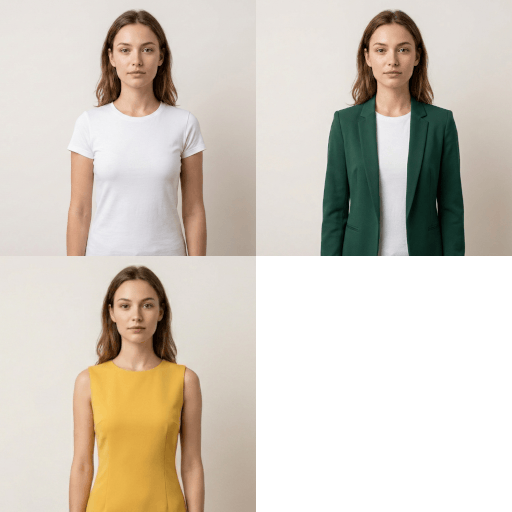
Clothsy AI adds a “Try It On” button to your WooCommerce product pages. A shopper uploads a photo, and in under a minute sees themselves wearing the product, right next to Add to cart. Seeing it on themselves helps shoppers buy with confidence and order the right item the first time.
Watch the one-minute tour:
How it works
- Install and click Connect store. No account to create and no API keys to copy.
- The button appears on your product pages, below Add to cart, styled to match your store.
- Shoppers try products on. They upload a photo or take one with their camera, and add the product to their cart from the result.
Built for shoppers
- A try-on window that stays out of the way. It docks in the corner of the page, so the product stays in view, and works as a full-height sheet on phones.
- Before-and-after slider. Shoppers drag between their own photo and the try-on.
- Add to cart from the result, or share the look with a friend through a short link.
- Variable products. When a shopper picks a colour, they try on that colour.
- History. Shoppers can reopen any of their past try-ons on your store.
- Clearly labelled. Every result is marked as an AI-generated preview.
Built for store owners
- Works with any theme. The button appears automatically, or place it yourself with the Clothsy AI Try-On Button block or the
[clothsy_ai_tryon]shortcode for block themes and page builders. - Match your brand. Set the button’s text, colours and corner shape.
- Per-product control. Turn try-on off for any product, or tell Clothsy AI whether it is a top, bottom, dress, outerwear or shoes.
- Usage at a glance. See try-on opens, completed try-ons and your remaining monthly allowance inside WordPress.
- Fast pages. Product pages get one small, deferred script. The try-on window and its styles load only when a shopper clicks the button, and photos go straight to Clothsy AI, never through your web server.
- Safe on staging. A copy of your site keeps try-on switched off, so it can’t use your allowance or disconnect your live store.
- Already use the Clothsy AI platform? Link this store to your platform account with a one-time code.
Privacy and consent built in
- Consent before any photo is sent. Shoppers see, in plain language, what happens to their photo and confirm they are 18 or older before anything leaves their browser. The consent is recorded with the date.
- No email required. The try-on never asks shoppers for an email address.
- Automatic safety checks on every photo and result.
- WordPress privacy tools. Shopper data works with WordPress’s Export and Erase Personal Data tools, and the plugin suggests text for your privacy policy.
Plans
Every store starts on the free Basic plan with 15 try-ons a month. No card is needed. Paid plans add more, billed monthly, and you can change or cancel them any time from WooCommerce → Clothsy AI:
- Starter: 250 try-ons a month, $19.99/month (₹1,926 in India)
- Growth: 750 try-ons a month, $49.99/month (₹4,817 in India)
- Pro: 2,000 try-ons a month, $99.99/month (₹9,634 in India)
- Scale: 4,250 try-ons a month, $199/month (₹19,174 in India)
Stores whose WooCommerce store address is in India pay in rupees through Razorpay (UPI, cards and more). Stores everywhere else pay in US dollars through PayPal.
Need more? Ask us about a Custom plan at contact@fabricvton.com.
Upgrades start right away with a full allowance. Downgrades and cancellations take effect when your current billing period ends. When the month’s allowance is used up, the try-on button tells shoppers to come back later. You are never charged extra.
External services
This plugin relies on the Clothsy AI service (hosted at api.clothsyai.fabricvton.com) to generate try-on images, store your leads and usage statistics, and manage your plan. Nothing is sent until you click Connect store. After that, data is sent in these cases:
- When you click Connect store: your site URL, site name, the site admin email address, and the plugin version. The service then requests one URL on your site to confirm the connection, and once it is confirmed sends one welcome email with setup tips to that admin address.
- When an admin opens the Clothsy AI screen, changes the on/off setting, downloads leads, or disconnects: your store ID and the request details, and with the screen and plan choices, your store’s country from WooCommerce settings (it decides whether you pay in rupees or US dollars). Requests are signed with a secret that never leaves your server.
- When you choose or cancel a plan: your store ID, your store’s country and the chosen plan. You pay on a Clothsy AI checkout page: through Razorpay if your store is in India, or through PayPal elsewhere. Card details are never sent to your site or to Clothsy AI.
- When an admin runs Export or Erase Personal Data for an email address: that email address, so Clothsy AI can return or delete the data it holds for it.
- When you delete the plugin: your store ID, so Clothsy AI disconnects the store.
- When a shopper uses the try-on: nothing is sent until the shopper agrees, in a card explaining what happens to their photo, that they are 18 or older, and that they own the photo or have the person’s permission. Only then does the browser send the photo, an anonymous session ID, the product’s name and image URL, and a record of the consent they gave. Shoppers are never asked for an email address. When the try-on window opens, an anonymous “opened” event is sent for your statistics; if a shopper rates a result, that rating is sent too. If a shopper chooses to share a look, the try-on’s ID and the product’s name, link and image are sent, and Clothsy AI keeps a copy of that try-on image on the shared page for 30 days.
Try-on images are generated with an AI image-processing sub-processor and checked by an image-safety service. Uploaded shopper photos are not stored on your WordPress server. Generated images are kept by Clothsy AI only when the shopper shares a look; that shared copy is deleted after 30 days. See the shopper privacy notice for the subprocessors’ handling of uploaded photos.
The service is provided by Clothsy AI: Terms of Service, Privacy Policy, Shopper privacy notice.
Installation
- Install and activate the plugin from Plugins → Add New. WooCommerce must be active.
- Go to WooCommerce → Clothsy AI and click Connect store. Your site must be publicly reachable while you connect, because Clothsy AI calls it back once to confirm you own it.
- Visit a product page. The try-on button appears below Add to cart.
Optional:
- Change the button’s text, colours, corner radius or placement under WooCommerce → Clothsy AI → Button.
- On a block theme or page builder, set Placement to “Manually” and add the Clothsy AI Try-On Button block to your single product template, or use the
[clothsy_ai_tryon]shortcode. - To change one product, open it in the editor and use the Clothsy AI tab to turn try-on off or set its garment type.
Frequently asked questions
What kinds of products work best?
Clothing worn on the body: tops, shirts, jackets and coats, trousers and skirts, dresses and jumpsuits. Clear product photos on a plain background give the best results. If a product shouldn’t offer try-on, turn it off in the product’s Clothsy AI tab.
How long does a try-on take?
Usually under a minute. The window shows the progress while the shopper waits, and they can keep browsing the page.
Will it slow down my store?
No. Product pages get one small script (about 14 KB compressed), loaded with defer so it never holds up the page. The try-on window and its styles load only when a shopper clicks the button, and photos are sent from the shopper’s browser straight to Clothsy AI, so they never pass through your web server.
Do shopper photos get stored?
Your WordPress site does not store the uploaded photo. Clothsy AI sends it to its AI and safety-processing services to create and check the preview. A generated image is saved by Clothsy AI for 30 days only if the shopper chooses to share the look. See the shopper privacy notice for details.
Do shoppers have to agree before their photo is used?
Yes. Before the first try-on, the window explains what happens to the photo and asks the shopper to agree. Nothing leaves their browser until they do, and the consent is recorded with the date so you have a record of it.
Does it work with block themes and page builders?
Yes. Add the Clothsy AI Try-On Button block to your single product template, or use the [clothsy_ai_tryon] shortcode, and set Placement to “Manually” in the plugin settings.
What happens when I run out of try-ons?
The button tells shoppers to come back later, and you are never charged extra. Your allowance resets each month, or you can upgrade from WooCommerce → Clothsy AI and the new allowance starts right away.
How do I handle a shopper’s request to see or delete their data?
Use WordPress’s Tools → Export Personal Data and Tools → Erase Personal Data. Clothsy AI’s data is included automatically, including anything captured before the try-on stopped asking for email addresses.
What happens if I disconnect or delete the plugin?
The try-on button disappears and any paid plan is cancelled, running to the end of the period you paid for. Your statistics, and any leads captured before the try-on stopped asking for email, are kept for 30 days, so reconnecting the same site brings them back. After that they are deleted.
I use a staging site.
A copy of your site keeps try-on switched off, so it can’t use your allowance. If you move your store to a new address, the plugin offers to move the connection.
Where can I get help?
Email contact@fabricvton.com, or post in this plugin’s support forum.
Changelog
Stores in India now pay in rupees through Razorpay; stores elsewhere pay in US dollars through PayPal.
0.2.13
- Paid plans in rupees through Razorpay for stores in India, and in US dollars through PayPal for stores elsewhere, picked from your WooCommerce store address.
- Prices in rupees show with the ₹ sign.
0.2.12
- Tested with WooCommerce 11.2.
- The privacy notice links now open the current Clothsy AI policies.
- Stores that never captured email addresses no longer see empty email and lead counts, or a download for leads they don’t have.
0.2.11
- Fix two “Browse… No file selected” boxes showing in the try-on window on themes that style every file input.
0.2.10
- Fix opening past try-ons from the history button, which did nothing.
- Add the “Clear my try-ons” button the consent card describes, so shoppers can remove their looks and withdraw consent on this device.
0.2.9
- Connect to the Clothsy AI service at its new address, api.clothsyai.fabricvton.com. Fixes choosing a paid plan, which reported an unexpected response. Connected stores keep working without reconnecting.
0.2.8
- Link a connected WooCommerce store to a Clothsy AI platform account with a one-time code entered by a store administrator.
Screenshots


For developers
Is this your plugin? Show off the numbers.
Add a live badge to your site, docs or GitHub README. It updates on its own — no account needed.
Best Clothsy AI alternatives
All fashion plugins →




FAQ
Clothsy AI: quick answers
Straight answers, pulled from live WordPress.org data.
Live data from WordPress.org · checked Oct 19, 2026
Is Clothsy AI free?
Yes. Clothsy AI is free to download and use from the official WordPress.org plugin directory.
Is Clothsy AI safe to use in 2026?
Clothsy AI is a solid plugin choice in 2026, with a few things worth checking first. Was last updated 1 week ago, and scores 64/100 on our health check.
How many websites use Clothsy AI?
Clothsy AI is active on <10 WordPress websites and has been downloaded 644 times since it launched in September 2026. It was downloaded 651 times in the last 30 days.
Does Clothsy AI work with WordPress 7.1?
Yes. The developer has tested Clothsy AI up to WordPress 7.1.3, the latest release. It requires WordPress 6.5 or newer.
What PHP version does Clothsy AI need?
Clothsy AI requires PHP 8.1 or higher. Most hosts run PHP 8.x today, so it works on any modern WordPress hosting.
When was Clothsy AI last updated?
The latest version, 0.2.13, was released on October 9, 2026 (1 week ago).
Who makes Clothsy AI?
Clothsy AI is developed and maintained by clothsyai.
What are the best alternatives to Clothsy AI?
The most popular alternatives to Clothsy AI are Tryly.ai Virtual Try-On for… (40+ installs), Virtual Try-On for WooComme… (20+ installs) and TryonX (10+ installs).
Powered by PageForge
Want thousands of pages that rank like these? Build them in an afternoon.
This directory runs on the same engine as PageForge. Turn any spreadsheet, CSV or API into thousands of fast, SEO-ready WordPress pages — with schema, internal links and AI-written copy baked in.
- CSV, Google Sheets & API data sources
- AI content, schema & internal links per page
- Works with Elementor, Gutenberg, Yoast & Rank Math
- Free on WordPress.org — no credit card


