


TryonX – AI Virtual Try-On for WooCommerce
AI virtual try-on for WooCommerce. Shoppers upload a photo and see your clothing on themselves before buying. Powered by Google Gemini.

Use with caution
TryonX works, but test it on a staging site before relying on it in 2026. It runs on 10+ sites and was last updated 1 week ago, and scores 55/100 on our health check.
- Actively developed — last update 1 week ago
- Tested with the latest WordPress (7.1)
- Small user base (10+ active installs)
- Very few reviews so far
Daily downloads
Download spikes usually follow a new release — each site that auto-updates counts as a download.
Rankings
Where TryonX stands todayWordPress.org search rankings
Live position in the plugin search, top 100| Keyword | Position |
|---|---|
| ai try-on | >100 |
| clothing | #65 |
| fashion | >100 |
| virtual try on | #36 |
| woocommerce | >100 |
Version adoption
Share of active sites per release.
About TryonX
From the official readme · v1.3.0Description
Turn your WooCommerce store into an AI fitting room.
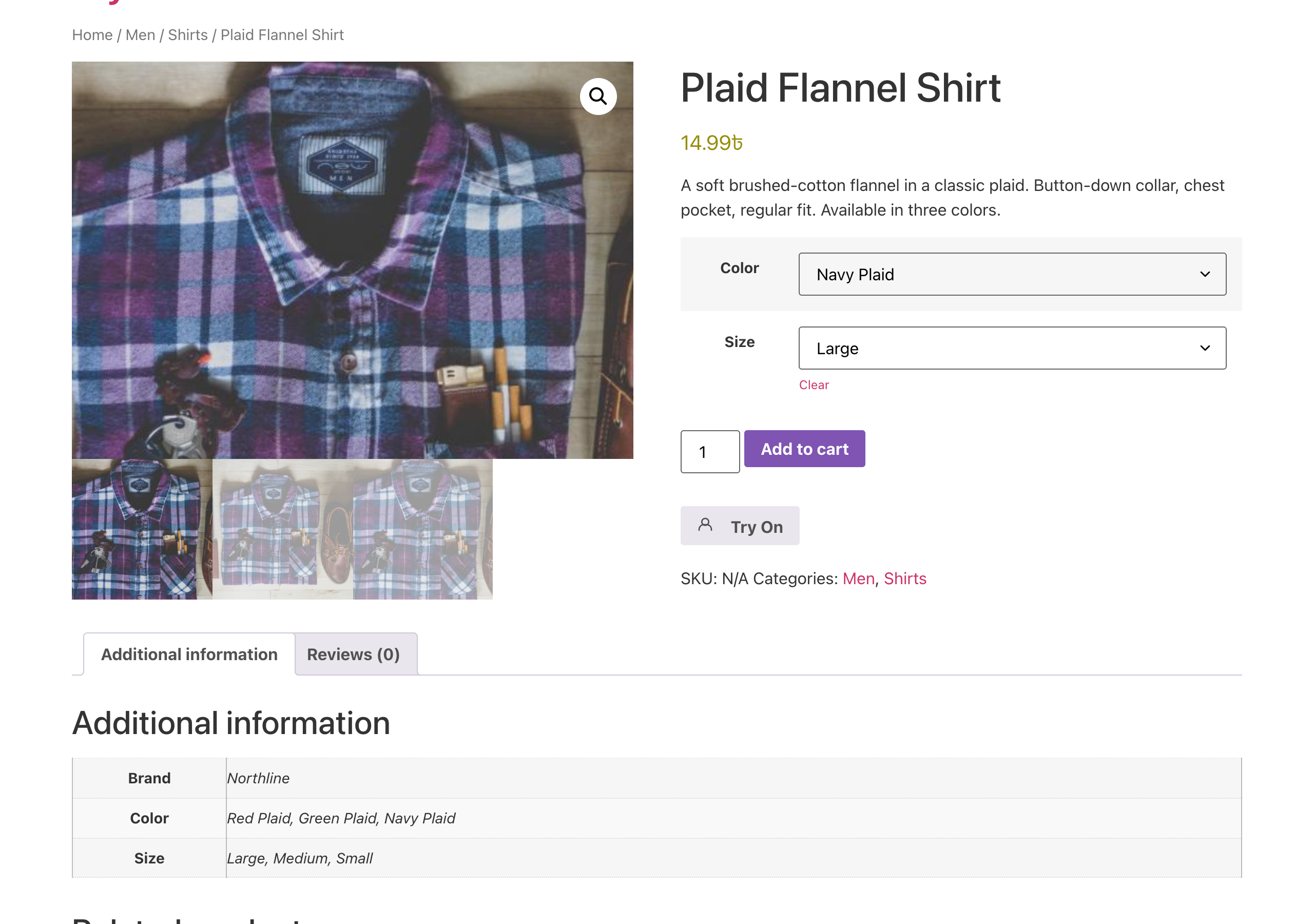
TryonX adds a “Try On” button to product pages so customers upload a photo and instantly see how your apparel looks on them — powered by Google Gemini 2.5 Flash Image AI. No app. No custom theme rebuild. Install, connect your API key, and start offering virtual try-on for WooCommerce in minutes.
Shoppers buy with confidence. You sell more. Returns drop. That is the promise of AI try-on for online fashion — and TryonX brings it to WordPress stores of every size.
Why WooCommerce stores install TryonX
- Higher conversion — Customers who visualize a fit are more likely to add to cart.
- Fewer “will it fit?” doubts — Answer the #1 question in fashion e-commerce before checkout.
- Lower return rates — Better expectations mean fewer size and style surprises.
- Shareable moments — Results can be shared on social media; your products get organic reach.
- Works on mobile — Most fashion traffic is mobile; TryonX is built mobile-first.
- Analytics built in — See which products get the most try-ons and measure engagement.
Who is this plugin for?
- Fashion & apparel WooCommerce stores (tees, hoodies, dresses, jackets, activewear)
- Boutiques & DTC brands that want a premium, interactive product experience
- Agencies building modern WooCommerce sites with Elementor, Divi, or block themes
- Merchants ready to differentiate with AI-powered virtual fitting without enterprise pricing
Features: AI virtual try-on for WooCommerce product pages
- AI virtual try-on — Photorealistic garment visualization with Google Gemini 2.5 Flash Image
- One photo, many products — Session memory: upload once, then try other products for 24 hours
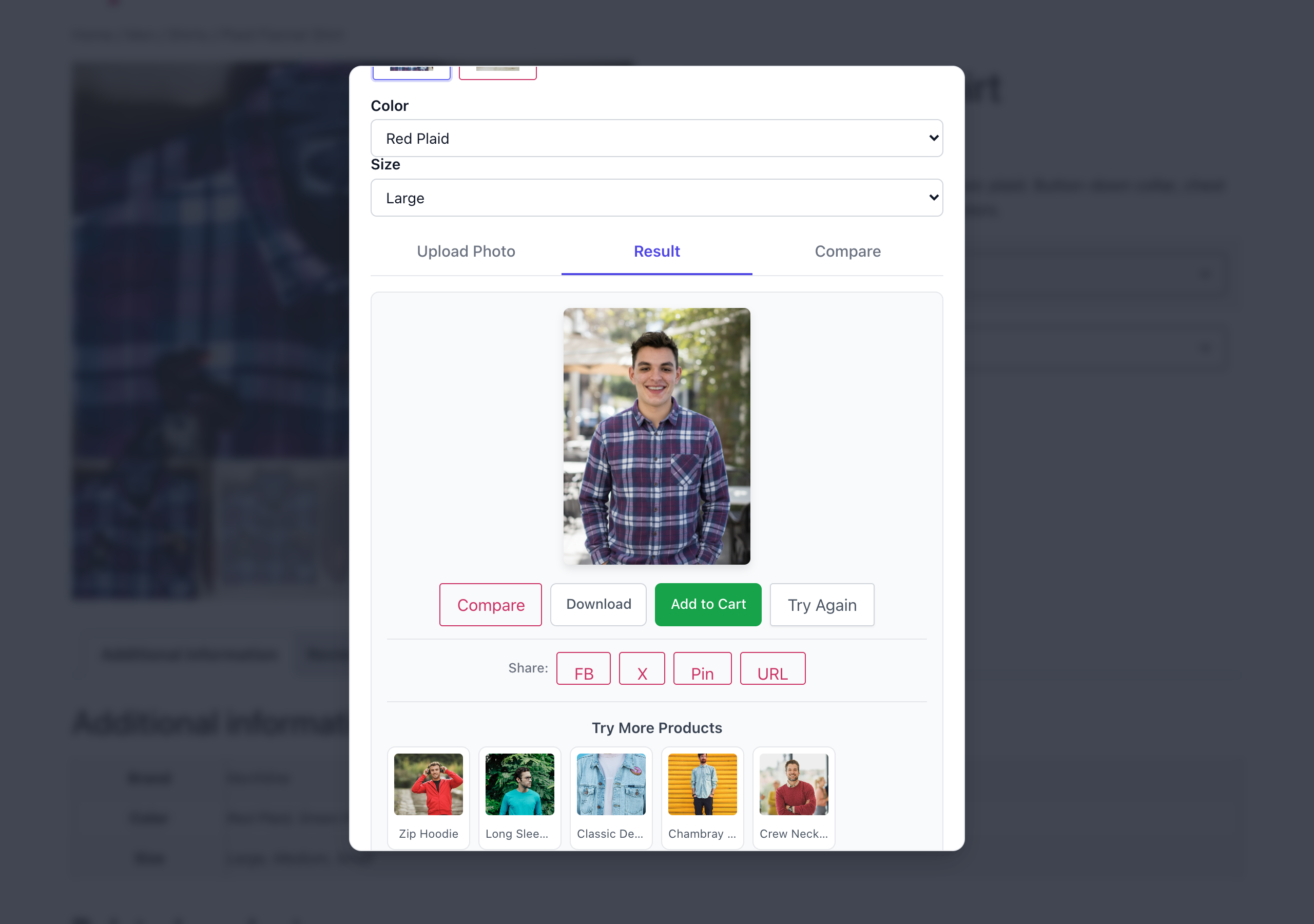
- Try more products — A grid of similar items from the same category that shoppers can test without re-uploading
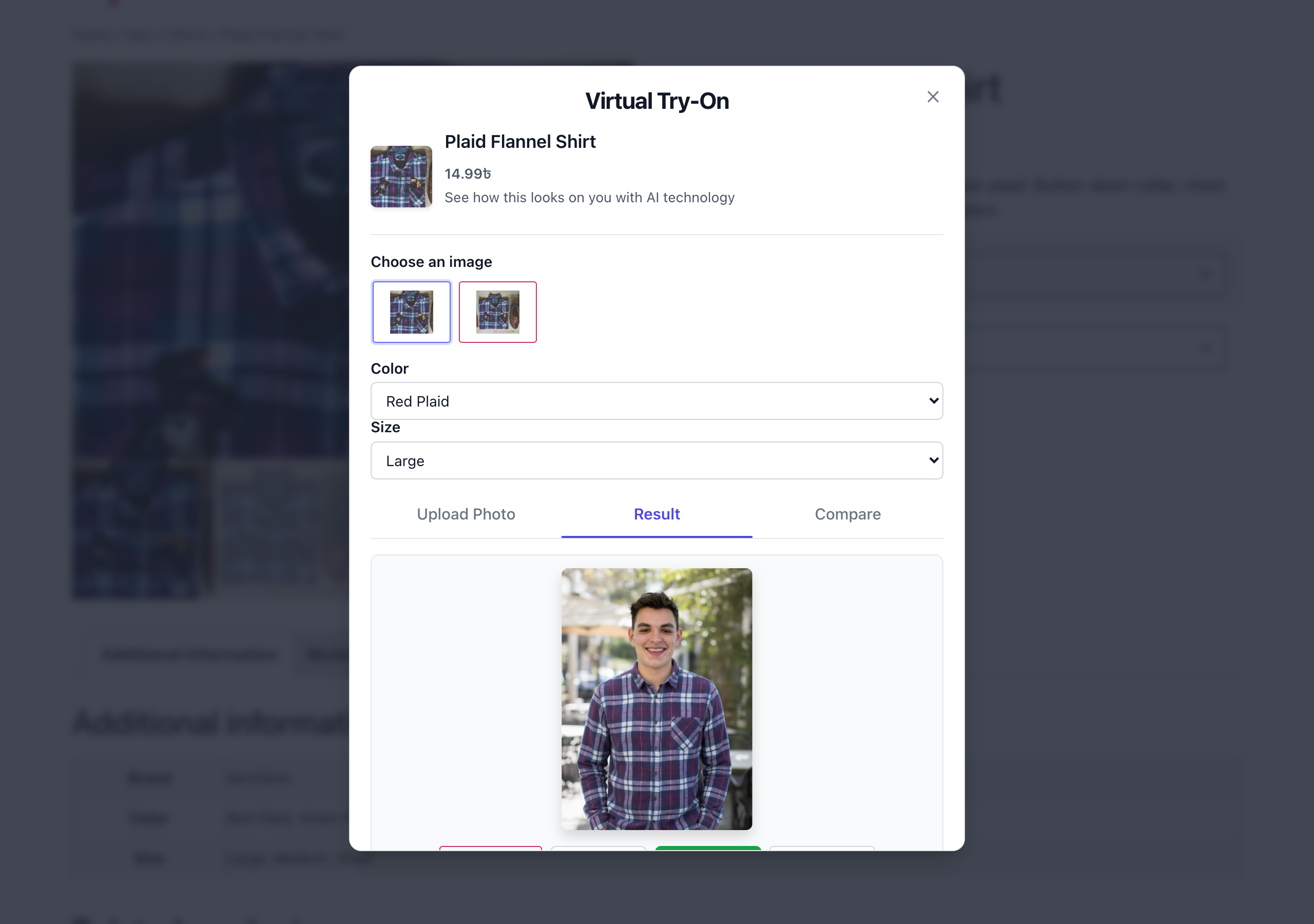
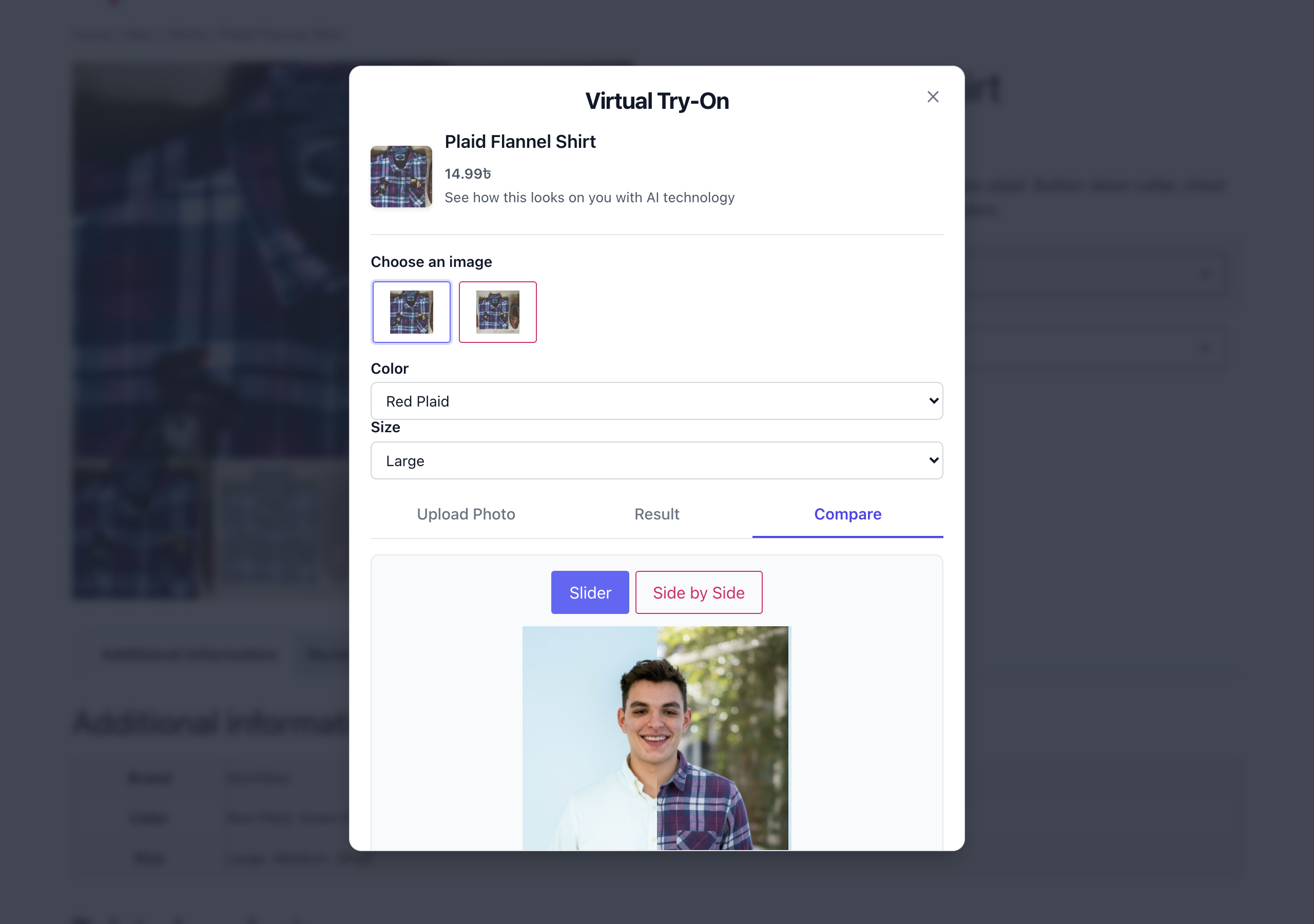
- Before / after compare — Slider and side-by-side views of the shopper’s photo and the try-on result
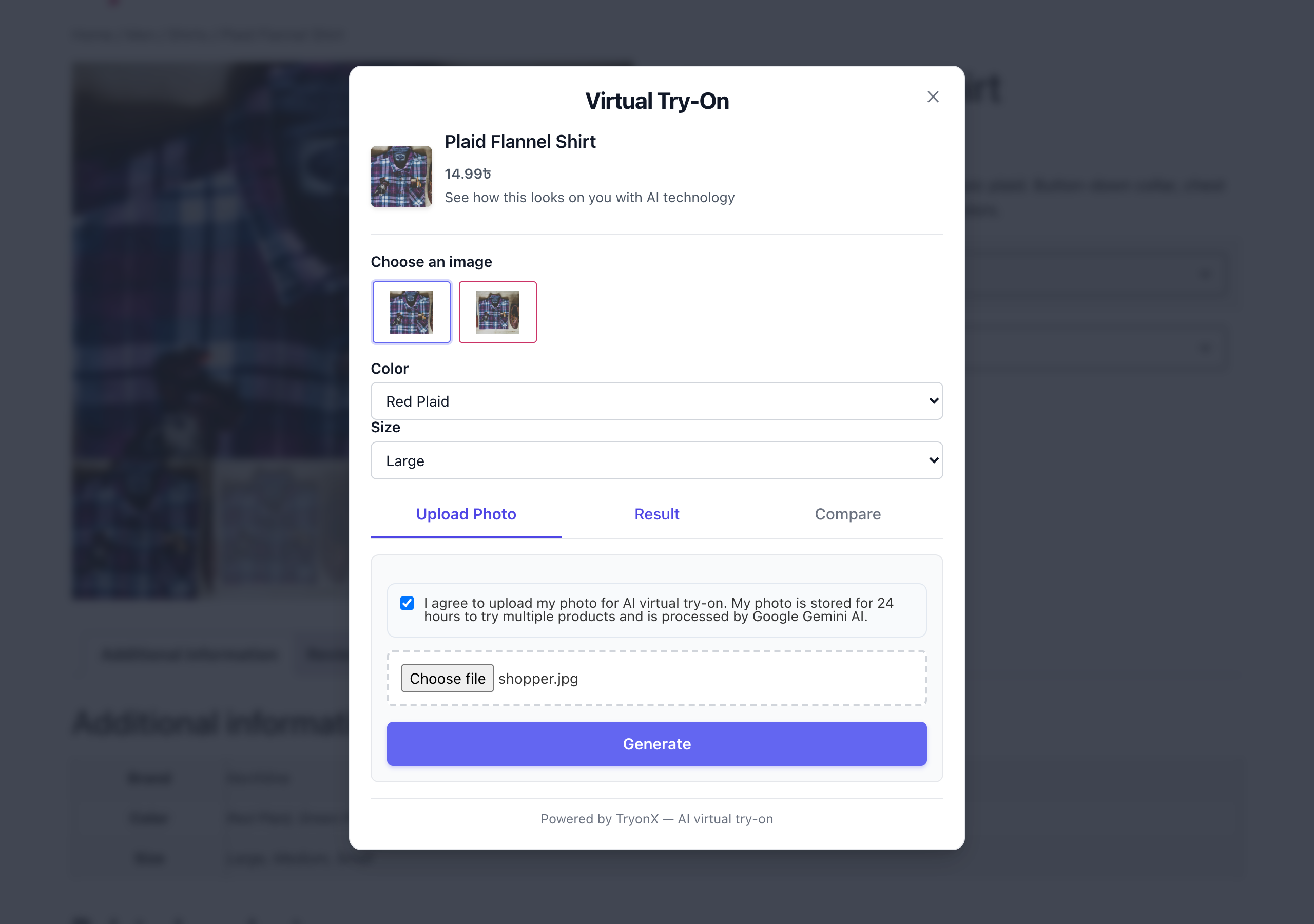
- Garment image picker — Shoppers choose which product photo (featured, gallery, or your custom garment image) is sent to the AI
- Variable products — One selector per attribute (Size, Color, …) so the result screen adds the right variation to the cart
- Add to cart from results — Close the loop from try-on to purchase in one click
- Download and share — Shoppers can save the result or share it to Facebook, X, or Pinterest
- Per-product controls — Enable or disable try-on per product and set a dedicated flat-lay garment image
- Shortcode —
[tryonx]or[tryonx product_id="123"]for landing pages and page builders - Privacy controls — Consent checkbox, shopper “Remove my photo” button, automatic deletion of generated images, optional login-only mode, IP anonymization, and WordPress privacy-tool support
- Cost controls — Per-shopper hourly limit plus a store-wide daily cap on generated images
- Analytics dashboard — Try-on counts, success rate, add-to-carts, orders and revenue from tried-on products, failure reasons, top products, daily chart, and a WordPress dashboard widget
- Shop & category pages — Optional Try On button under each product in product grids
- Easy setup — Guided checklist, one-click API connection test, “all products” switch, bulk enable/disable from the Products list
- Cache-friendly — No cookie until a shopper uses try-on, and nothing visitor-specific in the page HTML
- Theme-friendly — Works with Hello Elementor, Divi, and block themes
- Developer hooks — Filters and actions for custom integrations
Accessibility
- The try-on window is announced to screen readers as a modal dialog with a title, and closes with the Escape key.
- Upload, Generate, Compare, Download, Share, and Add to cart are native buttons and links that can be reached with the Tab key. Focus moves into the window when it opens, stays inside it, and returns to the Try On button when it closes.
- Product, saved-photo, and before/after images carry text alternatives.
- Errors and status are shown as text messages, not by color alone.
- Every label, button, and message is translatable (text domain
tryonx).
How virtual try-on works (3 steps)
- Shopper uploads a photo on your WooCommerce product page (JPEG, PNG, or WebP — large phone photos are resized in the browser automatically).
- TryonX sends the photo + product image to Gemini AI and generates a realistic try-on result.
- Customer compares, downloads, shares, or adds to cart — then tries more products without re-uploading.
Setup in under 5 minutes
- Install TryonX and activate WooCommerce.
- Go to WooCommerce → Virtual Try-On.
- Paste your Google AI Studio API key.
- Click Test connection, then turn on All products or select clothing categories (or enable per product).
- Publish — the Try On button appears on eligible products.
Requirements
- WordPress 5.6+ (tested up to 7.1) and WooCommerce 5.0+ (tested up to 10.8, required)
- PHP 7.2+
- Google Gemini API key with access to a Gemini image model — gemini-2.5-flash-image by default, changeable under AI model in the settings (paid plan required for image generation — see Google AI Pricing)
- Outbound HTTPS from your server to Google’s API
- Product featured image (or custom garment image per product)
Best for: Clothing and apparel. Other product types may be supported in future updates.
Note: Image generation uses Google’s Gemini API. You control your API key and usage costs. Photos are processed only when a customer clicks Generate.
External services
This plugin connects to Google’s Gemini AI API to generate virtual try-on images when a shopper uses the feature.
What data is sent:
- The customer’s uploaded photo and the WooCommerce product (garment) image
- Data is sent only when the customer clicks Generate
- Your API key and the model name are sent when you click Test connection in the settings
- Images are transmitted over HTTPS (Base64 in the API request)
API endpoint: https://generativelanguage.googleapis.com/v1beta/models/{model}:generateContent (default model: gemini-2.5-flash-image)
Data handling:
- Temporary processing files are deleted after use
- Generated try-on images are saved in your WordPress
uploadsfolder and deleted after 30 days by default (configurable) - Session photos expire after 24 hours, and shoppers can remove theirs at any time
- Photos are re-encoded on your server before use, which strips EXIF data such as GPS location
- Google’s retention policies apply to API requests — see their terms below
Service provider: Google LLC
Usage
Show the Try On button on WooCommerce product pages
- Go to WooCommerce → Virtual Try-On and tick the product categories that should offer try-on.
- The Try On button appears automatically on every eligible single product page. Change its label, position, and colour under Display, and optionally show it on shop and category pages too.
Enable or disable try-on for one product
Edit the product, open Product data → Virtual Try-On, and choose Enabled or Disabled to override the category setting. Add a garment image here if your featured image is a lifestyle shot — a clean flat-lay or front-facing product photo gives the best AI results.
Add try-on to any page with the shortcode
[tryonx]— on a product page, shows the button for the current product[tryonx product_id="42"]— shows the button for product 42 on any page, post, or page-builder layout[tryonx product_id="42" label="See it on you"]— sets a custom button label
What shoppers do
- Click Try On and upload a photo (JPEG, PNG, or WebP; big photos are resized automatically).
- Pick a product image if the product has more than one, then click Generate.
- Compare before and after, download or share the result, add the product to the cart, or try another product without uploading again.
Tips for better try-on results
- Ask shoppers for a well-lit, front-facing photo that shows the upper body.
- Use garment images with a plain background and the whole item visible. Flat-lay or on-hanger photos work best; a photo of a model wearing the item can confuse the AI, so add a dedicated garment image for those products.
- Review WooCommerce → Virtual Try-On → Analytics to see which products are tried most and how often generation succeeds.
Installation
- Upload the plugin or install from Plugins → Add New.
- Activate TryonX and ensure WooCommerce is active.
- Open WooCommerce → Virtual Try-On.
- Enter your Gemini API key from Google AI Studio.
- Check the product categories that should show Try On (e.g. Clothing, T-Shirts).
- Visit a product page, upload a test photo, and click Generate.
Pro tip: Edit any product → Product data → Virtual Try-On to force-enable try-on or upload a dedicated garment image for better AI results.
Frequently asked questions
What is the best virtual try-on plugin for WooCommerce?
TryonX is built specifically for WooCommerce fashion stores. It combines Gemini AI image generation, session-based multi-product try-on, comparison tools, analytics, add-to-cart on results, and per-product controls — without requiring a separate SaaS subscription beyond your Google API usage.
How do I add virtual try-on to my WooCommerce store?
Install TryonX, add your Gemini API key under WooCommerce → Virtual Try-On, enable your apparel categories, and the Try On button appears on product pages. Use [tryonx] on any page for custom placement.
Does TryonX work with Elementor, Divi, and block themes?
Yes. TryonX hooks into standard WooCommerce product templates and includes theme compatibility helpers for stores where the global product object may be a slug or ID (Hello Elementor, Divi, etc.).
Is TryonX free?
The plugin is free to install. Virtual try-on image generation requires a paid Google Gemini API plan for the gemini-2.5-flash-image model. Review Google AI Pricing for current rates.
What products work with AI try-on?
Clothing and apparel work best: t-shirts, hoodies, dresses, jackets, and similar items with a clear garment image. Enable by category or per product. Upload a custom garment image in the product editor for flat-lay or model photos.
Will this help reduce WooCommerce returns?
Virtual try-on helps customers set realistic expectations before purchase, which can reduce fit-related returns. Results vary by store, catalog, and customer base — use built-in analytics to track try-on volume and top products.
Is the try-on window accessible with a keyboard and screen reader?
The try-on window is marked up as a modal dialog, closes with the Escape key, uses native buttons that can be reached with the Tab key, and provides text alternatives for its images. Messages are shown as text rather than by color alone. If you find an accessibility barrier, please report it in the support forum so it can be fixed.
Does it work on mobile phones?
Yes. The try-on modal is fully responsive for mobile, tablet, and desktop — where most fashion shoppers browse.
Can customers try multiple products with one photo?
Yes. After the first successful try-on, their photo is saved for 24 hours so they can try other products in the same session or from the Try More Products grid without uploading again.
Is TryonX GDPR-friendly?
TryonX includes optional photo consent text, session expiry (24 hours), a “Remove my photo” button for shoppers, automatic deletion of session photos and generated images, rate limiting, optional IP anonymization in analytics, suggested privacy-policy text, and support for the WordPress personal data eraser. The session cookie is only set when a shopper actually uses try-on. You remain responsible for your store’s privacy policy and lawful basis for processing customer photos.
The Try On button does not show on my product page
Check that: (1) WooCommerce is active, (2) the product’s category is enabled in plugin settings or the product is set to Enabled under Virtual Try-On, (3) the product has a featured or garment image, and (4) you are viewing a single product page.
Try-on generation failed or timed out
Open WooCommerce → Virtual Try-On and click Test connection — it tells you whether the API key, billing, or the AI model is the problem. The settings page also shows the reason for the most recent failure, and the Analytics tab lists failure reasons. Google retires AI models over time: if the test says the model is not available, enter a current Gemini image model under AI model.
Can I embed try-on on a landing page?
Yes. Use the shortcode [tryonx product_id="123"] replacing 123 with your product ID, or [tryonx] on a product page to use the current product.
Changelog
Security release — please update. Fixes an unsafe photo upload, adds a configurable AI model, conversion analytics and cost controls. Generated try-on images are now deleted after 30 days by default; change "Keep generated images" under Privacy, limits & data if you want to keep them longer.
1.3.0 [October 10, 2026]
- Security: Uploaded photos are now identified by their contents and re-encoded on the server; the file name and type sent by the browser are no longer trusted. Previously a crafted upload could be stored with an executable extension in a public folder. Please update.
- Security: The garment image is read on the server from the product’s own images instead of being uploaded by the browser, so the endpoint can no longer be used to run arbitrary images through your Gemini key
- Security: Removed the unused
tryonx_store_photoendpoint; upload folders block script execution; API key is sent as a header instead of in the URL; technical API errors are no longer shown to shoppers - Added: AI model setting and
tryonx_gemini_modelfilter — Google retires image models over time, and the model was previously hard-coded - Added: Test connection button, setup checklist, and a notice showing why the latest try-on failed
- Added: “All products” switch, hierarchical category list, and bulk enable/disable actions on the Products list
- Added: Button position presets, accent colour, and optional Try On button on shop and category pages
- Added: Conversion analytics — add-to-carts, orders and revenue from tried-on products (works with HPOS and block checkout), failure reasons, and 7/30/90-day periods
- Added: Store-wide daily cap on try-ons, automatic deletion of generated images (30 days by default) and old analytics, “Remove my photo” for shoppers, privacy-policy text and personal data eraser
- Added: Photos are resized in the browser before upload, so large phone photos work and uploads are faster; cancel button and progress messages while generating
- Added:
TRYONX_GEMINI_API_KEYconstant,tryonx_prompt,tryonx_login_url,tryonx_max_upload_bytesandtryonx_max_image_dimensionfilters - Fixed: Try-on failed when product images were served from a CDN or another domain
- Fixed: Product pages served from a full-page cache showed expired security tokens and could expose one visitor’s saved-photo link to others; a cookie was set for every visitor on every page
- Fixed: Rate limit could be bypassed by clearing cookies; it is now per account or IP and only counts requests that reach the AI
- Fixed: Analytics conversion query was incorrect and very slow on stores with many orders; date ranges ignored the site timezone; analytics queries failed on WordPress older than 6.2
- Fixed:
.htaccessrules that caused 500 errors for result images on some Apache 2.4 servers; upload folders were rewritten on every page load - Fixed: Uploaded photo preview never appeared; wrong price shown for shortcode buttons and “Try More Products”; add-to-cart for variations with “Any” attributes; “Try More Products” error for a deleted category; page could stay unscrollable after quickly reopening the window
- Fixed: Try On buttons added to the page after load (infinite scroll, quick view) did not open the window
- Changed: The “Powered by TryonX” line in the try-on window is now off by default and can be enabled under Display
- Changed: Uninstall now also removes stored photos, generated images, product settings and the scheduled cleanup
1.2.4 [August 26, 2026]
- Added: Declared WooCommerce High Performance Order Storage (HPOS) compatibility, so TryonX no longer appears as “incompatible” on WooCommerce → Settings → Advanced → Features
- Added: Declared Cart & Checkout blocks compatibility
- Added:
WC requires at leastandWC tested up toplugin headers so WooCommerce can report support accurately - Improved: Tested against WordPress 7.1 and WooCommerce 10.8
- Improved: WooCommerce detection falls back to the
WooCommerceclass /WC_PLUGIN_FILEconstant, so installs with WooCommerce in a non-standard plugin directory are recognized - Improved:
Requires Pluginsheader casing corrected so WordPress enforces the WooCommerce dependency
1.2.3 [June 10, 2026]
- Added: Gallery thumbnail picker inside the modal — the shopper chooses which product image (featured + WooCommerce gallery, with per-product custom garment image first) is sent to the AI. This decouples the garment image from variation selection, which often only changes size/color
- Fixed: Variable product variation selector inside the modal — the single flat dropdown only ever displayed the first option and could conflict with themes/swatch plugins that replace native
<select>styling. The modal now renders one selector per product attribute (Size, Color, …), matching WooCommerce’s native picker, and drives the add-to-cart URL for the result screen - Improved: Single-option attributes are auto-selected to mirror WooCommerce’s product-page behavior
1.2.2 [June 10, 2026]
- Fixed: Variable product variation selector — each try-on button now carries its own variation data (single product, shortcode, and archive layouts)
- Fixed: Add-to-cart link uses the selected variation’s URL instead of the parent product’s generic URL
- Fixed: Variation labels now include attribute names (e.g. Size, Color) so options are distinguishable
- Fixed: Fallback variation loading when
get_available_variations()defers to AJAX on large variable products - Improved: Variation dropdown syncs garment image and cart URL to the first variation on open
- Improved: “Try more products” grid clears leftover variation dropdown when switching products
1.2.1 [May 24, 2026]
- Improved: Bug fixes and stability improvements.
1.2.0 [May 15, 2026]
- Added: Per-product try-on settings and custom garment image (WooCommerce product tab)
- Added:
[tryonx]shortcode for landing pages and custom layouts - Added: Privacy controls — consent checkbox, rate limiting, login-only mode, IP anonymization
- Added: Add to cart button on try-on results
- Added: Variable product variation selector in the modal
- Added:
TRYONX_Helpers::resolve_product()andget_single_product()for reliable product detection across themes - Added:
TRYONX_Helpers::upload_file_url()for correct public file URLs - Fixed: Fatal error on product pages when themes set
global $productto a slug string (Elementor, Hello Elementor, Divi, and similar) - Fixed: Generated try-on result images showing as broken — upload URLs were missing a slash between folder and filename
- Fixed: Session photo thumbnails not loading in the try-on modal
- Fixed: Session-only try-on no longer requires re-uploading user image
- Fixed: Upload directory paths unified (
tryonx-results,tryonx-temp,tryonx-sessions) - Fixed:
$_FILESsanitization bug that broke image uploads - Improved: Assets load only on eligible product pages (better performance)
- Improved: Compare view uses customer photo instead of product image
- Improved: Upload path helpers always use trailing slashes;
.htaccessrules refresh on existing installs - Improved: WooCommerce missing admin notice
Screenshots
For developers
Is this your plugin? Show off the numbers.
Add a live badge to your site, docs or GitHub README. It updates on its own — no account needed.
FAQ
TryonX: quick answers
Straight answers, pulled from live WordPress.org data.
Live data from WordPress.org · checked Oct 17, 2026
Is TryonX free?
Yes. TryonX is free to download and use from the official WordPress.org plugin directory.
Is TryonX safe to use in 2026?
TryonX works, but test it on a staging site before relying on it in 2026. It runs on 10+ sites and was last updated 1 week ago, and scores 55/100 on our health check.
How many websites use TryonX?
TryonX is active on 10+ WordPress websites and has been downloaded 1,414 times since it launched in September 2025. It was downloaded 170 times in the last 30 days.
Does TryonX work with WordPress 7.1?
Yes. The developer has tested TryonX up to WordPress 7.1.3, the latest release. It requires WordPress 5.6 or newer.
What PHP version does TryonX need?
TryonX requires PHP 7.2 or higher. Most hosts run PHP 8.x today, so it works on any modern WordPress hosting.
When was TryonX last updated?
The latest version, 1.3.0, was released on October 10, 2026 (1 week ago).
Who makes TryonX?
TryonX is developed and maintained by WPXERO.
Powered by PageForge
Want thousands of pages that rank like these? Build them in an afternoon.
This directory runs on the same engine as PageForge. Turn any spreadsheet, CSV or API into thousands of fast, SEO-ready WordPress pages — with schema, internal links and AI-written copy baked in.
- CSV, Google Sheets & API data sources
- AI content, schema & internal links per page
- Works with Elementor, Gutenberg, Yoast & Rank Math
- Free on WordPress.org — no credit card


