



Virtual Try-On for WooCommerce – Preview AI
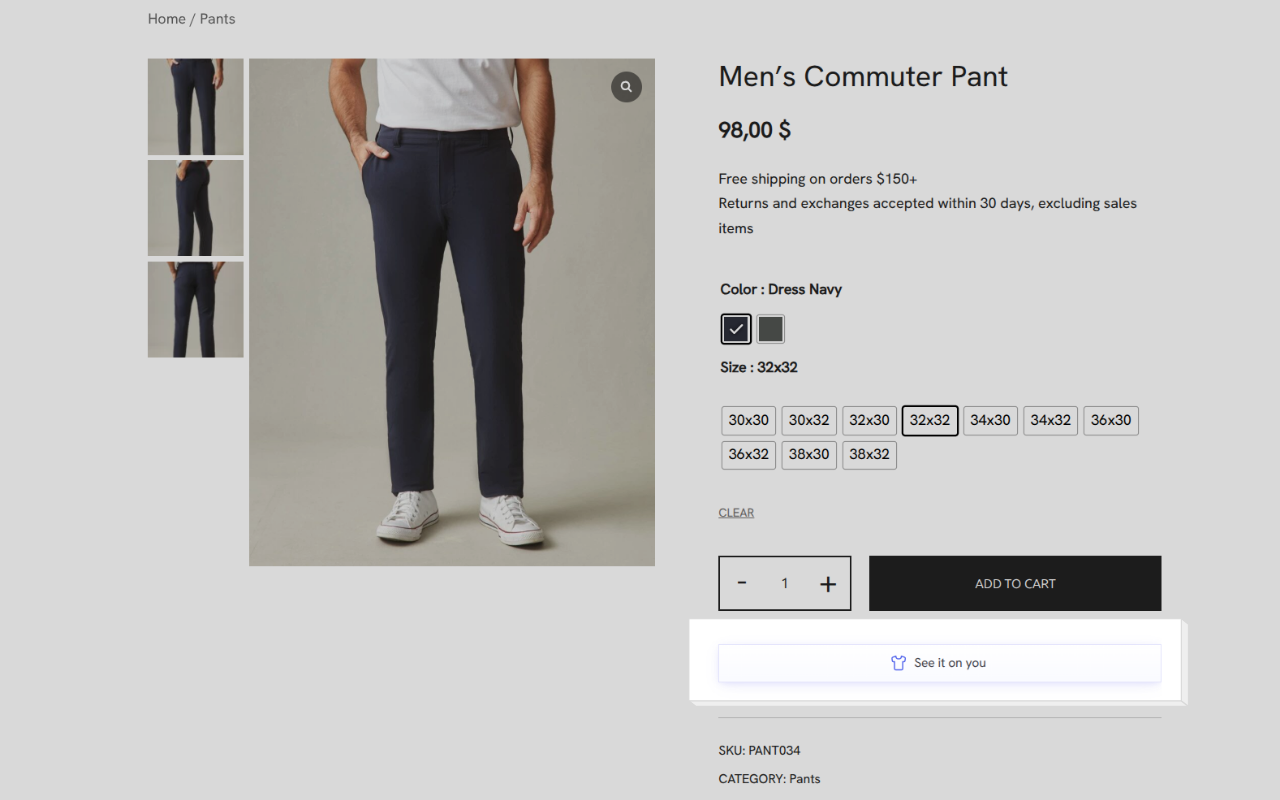
Preview AI is an AI-powered Virtual Try-On plugin for WooCommerce. Shoppers upload a photo and instantly see how a product looks on them — right on the product page, without leaving your store 👕✨

Use with caution
Virtual Try-On for WooCommerce works, but test it on a staging site before relying on it in 2026. It runs on 20+ sites, is rated 5/5 and was last updated 3 months ago, and scores 59/100 on our health check.
- Momentum — downloads up 52% vs the previous 30 days
- Small user base (20+ active installs)
- Very few reviews so far
How does it stack up?
Side-by-side on installs, updates, ratings & support



Daily downloads
Download spikes usually follow a new release — each site that auto-updates counts as a download.
Rankings
Where Virtual Try-On for WooComme… stands todayWordPress.org search rankings
Live position in the plugin search, top 100| Keyword | Position |
|---|---|
| apparel | #21 |
| clothing | #33 |
| fashion | #58 |
| virtual try on | #5 |
| woocommerce | >100 |
Version adoption
Share of active sites per release.
Rating breakdown
★★★★★★★★★★ 5 from 1 reviews
About Virtual Try-On for WooCommerce
From the official readme · v1.5.2Description
Preview AI is an AI-powered Virtual Try-On plugin for WooCommerce. Shoppers upload a photo and instantly see how a product looks on them — right on the product page, without leaving your store 👕✨
Customers who use virtual try-on convert at 3× the rate of those who don’t.
- 📈 3× higher conversion — shoppers who try on buy more
- 🔄 Fewer returns — expectations match reality before checkout
- ⏱️ More time on site — customers stay longer exploring products
- 💰 Higher average order value — confidence drives bigger carts
Try it yourself on the live demo →
Why it works
Most fashion shoppers hesitate not because of price, but because they can’t picture themselves in the product. Preview AI removes that friction at the most critical moment — the product page.
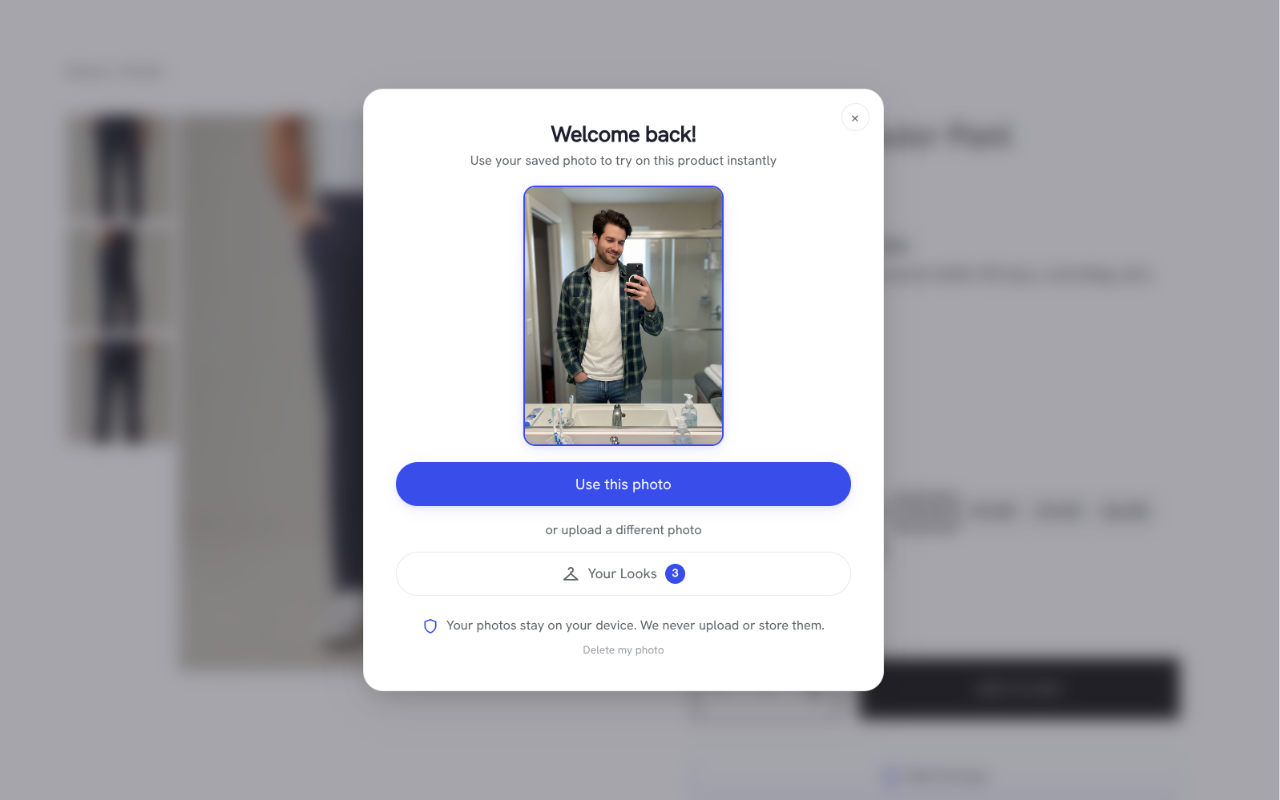
With a simple “Virtual Try-On” button, shoppers upload a photo and get a realistic AI-generated preview in seconds. No apps to install, no disruption to the checkout flow.
Benefits for merchants
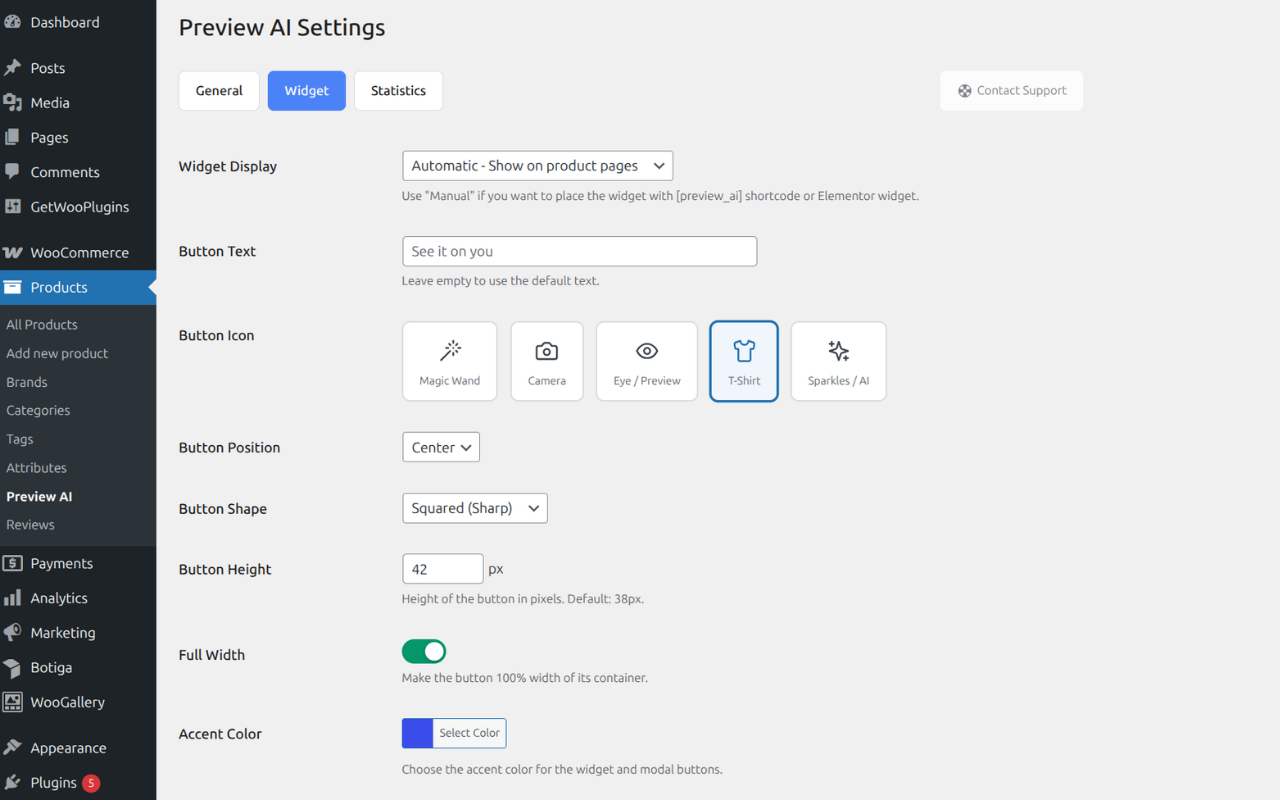
- 🎨 Fully customize the button (color, text, shape, position)
- ⚡ Zero performance impact — AI runs on external infrastructure
- 📊 Built-in analytics to measure try-on impact on sales
- 🔌 Works with WooCommerce hooks, shortcode, or Elementor widget
Analytics & conversion tracking 📊
Preview AI includes an analytics panel designed to help merchants measure real impact.
Track:
* How many shoppers use the Virtual Try-On feature
* How many previews are successfully generated
* Conversion performance of users who interacted with Virtual Try-On
* Feature adoption across your product catalog
This allows you to understand not just usage, but how Virtual Try-On contributes to conversions — helping you optimize product pages and justify ROI.
Fully customizable & theme-friendly 🎨
Preview AI is designed to work seamlessly with any WooCommerce theme.
Customize:
* Button color and styling to match your brand
* Button text and labels
* Button position on the product page
* Placement via WooCommerce hooks, shortcode, or Elementor widget
You can start with the default setup and progressively customize the experience without touching code.
Features
– AI-powered virtual try-on from a single photo
– Supports:
– Upper-body garments (t-shirts, shirts, jackets, hoodies)
– Lower-body garments (pants, skirts)
– Dresses and full-body outfits
– Shoes
– Virtual Try-On button on WooCommerce product pages
– Elementor widget + shortcode support
– Customizable button (color, text, position)
– Analytics dashboard with usage & conversion insights
– Automatic product type classification
– Mobile-first, responsive design
– Performance-friendly external AI architecture
External Service Disclosure
This plugin connects to an external service operated by Preview AI.
Service Provider: Preview AI
Service URL: https://previewai.app
Terms of Service: https://www.previewai.app/terms/terms-and-conditions
Privacy Policy: https://www.previewai.app/terms/privacy-policy
Data transmitted to the service:
- Virtual try-on generation — Product images and a customer-uploaded photo are sent to generate the try-on preview. Customer photos are processed in real time and are not stored permanently.
- Conversion attribution (opt-in) — When enabled in Settings > General > Advanced Analytics, anonymized order metadata (order ID, order total, currency, and product IDs) is sent when an order is completed or refunded to measure the impact of virtual try-on on sales. This feature is disabled by default and requires explicit activation by the store administrator. No customer personal data (name, email, address, or IP) is transmitted.
All communication is authenticated via the store’s API key and transmitted over HTTPS. A free usage tier is included so the plugin is functional immediately after activation.
Compatibility
– WooCommerce: Optimized for current versions
– Elementor: Includes a widget for custom product templates
– Themes: Compatible with Astra, Hello Elementor, OceanWP, and most WooCommerce themes
– Responsive across all modern devices
Installation
- Upload the
preview-aifolder to the/wp-content/plugins/directory - Activate the plugin from the WordPress Plugins menu
- Complete the onboarding wizard to connect your store
- The Virtual Try-On button appears automatically on supported products
Frequently asked questions
Is the plugin free?
Yes. The plugin is free and includes a free tier of the Preview AI service. Optional paid plans are available for stores with higher usage needs.
Why does it use an external service?
AI image generation requires specialized infrastructure that typical web hosting environments do not provide. Using an external service allows Preview AI to deliver better results without affecting your site’s performance.
Are customer photos stored?
Customer images are processed in real time to generate the try-on preview. They are not stored permanently and are handled according to the Preview AI privacy policy.
Which products are supported?
Preview AI currently supports: – Tops – Bottoms – Dresses and full outfits – Shoes
Changelog
Minor fixes and compatibility with WordPress 7.0.1.
1.5.2
– Minor fixes and internal improvements.
– Compatibility verified with WordPress 7.0.1.
1.5.0
– New top-level “Preview AI” menu with dedicated subpages: General, Widget, Statistics, and Products.
– Added category-based product control: enable or disable Preview AI for entire categories at once.
– New Products page with category manager and bulk actions guide.
1.4.1
– Fixed expired try-on images: saved looks now auto-refresh their signed URLs instead of showing broken images after 7 days.
1.4.0
– Stable release. Sends the WordPress site locale on registration so the Preview AI service can align transactional emails with the store language.
1.3.2
– Added smart plan recommendation: the settings page now shows a contextual upgrade suggestion when your monthly previews are running low, so your customers never miss a try-on.
1.3.1
– Fixed widget visibility: the try-on button no longer disappears due to account status changes. Errors are shown at generation time instead.
Screenshots
For developers
Is this your plugin? Show off the numbers.
Add a live badge to your site, docs or GitHub README. It updates on its own — no account needed.
Best Virtual Try-On for WooCommerce alternatives
All apparel plugins →FAQ
Virtual Try-On for WooCommerce: quick answers
Straight answers, pulled from live WordPress.org data.
Live data from WordPress.org · checked Oct 17, 2026
Is Virtual Try-On for WooCommerce free?
Yes. Virtual Try-On for WooCommerce is free to download and use from the official WordPress.org plugin directory.
Is Virtual Try-On for WooCommerce safe to use in 2026?
Virtual Try-On for WooCommerce works, but test it on a staging site before relying on it in 2026. It runs on 20+ sites, is rated 5/5 and was last updated 3 months ago, and scores 59/100 on our health check.
How many websites use Virtual Try-On for WooCommerce?
Virtual Try-On for WooCommerce is active on 20+ WordPress websites and has been downloaded 2,145 times since it launched in January 2026. It was downloaded 520 times in the last 30 days.
Does Virtual Try-On for WooCommerce work with WordPress 7.1?
Virtual Try-On for WooCommerce is officially tested up to WordPress 7.0.7, while the latest release is 7.1.3. It may still work, but try it on a staging site first.
What PHP version does Virtual Try-On for WooCommerce need?
Virtual Try-On for WooCommerce requires PHP 7.4 or higher. Most hosts run PHP 8.x today, so it works on any modern WordPress hosting.
When was Virtual Try-On for WooCommerce last updated?
The latest version, 1.5.2, was released on July 17, 2026 (3 months ago).
Who makes Virtual Try-On for WooCommerce?
Virtual Try-On for WooCommerce is developed and maintained by Preview AI.
What are the best alternatives to Virtual Try-On for WooCommerce?
The most popular alternatives to Virtual Try-On for WooCommerce are Apliiq Print on Demand for… (50+ installs), Tryly.ai Virtual Try-On for… (40+ installs) and Fervor & Zeal (<10 installs).
Powered by PageForge
Want thousands of pages that rank like these? Build them in an afternoon.
This directory runs on the same engine as PageForge. Turn any spreadsheet, CSV or API into thousands of fast, SEO-ready WordPress pages — with schema, internal links and AI-written copy baked in.
- CSV, Google Sheets & API data sources
- AI content, schema & internal links per page
- Works with Elementor, Gutenberg, Yoast & Rank Math
- Free on WordPress.org — no credit card


