


Clean Image Filenames
This plugin automatically converts language accent characters to non-accent characters in filenames when uploading to the media library.

Use with caution
Clean Image Filenames works, but test it on a staging site before relying on it in 2026. It runs on 30K+ sites, is rated 4.6/5 and was last updated 9 months ago, and scores 61/100 on our health check.
- Proven at scale on 30K+ active sites
- Loved by users — 4.6/5 from 21 reviews
- Only tested up to WordPress 6.9 (latest is 7.1)
How does it stack up?
Side-by-side on installs, updates, ratings & support



Daily downloads
Download spikes usually follow a new release — each site that auto-updates counts as a download.
Rankings
Where Clean Image Filenames stands todayWordPress.org search rankings
Live position in the plugin search, top 100| Keyword | Position |
|---|---|
| files | >100 |
| images | >100 |
| media | >100 |
| sanitize | #7 |
| upload | >100 |
Version adoption
Share of active sites per release.
Rating breakdown
★★★★★★★★★★ 4.6 from 21 reviews
About Clean Image Filenames
From the official readme · v1.5Description
This plugin automatically converts language accent characters in filenames when uploading to the media library. Characters are converted into browser and server friendly, non-accent characters.
Features
- Converts accent characters to non-accent, latin equivalents in Swedish, Danish, German, and more.
- Removes special characters like exclamation marks, periods, hashtags, and more.
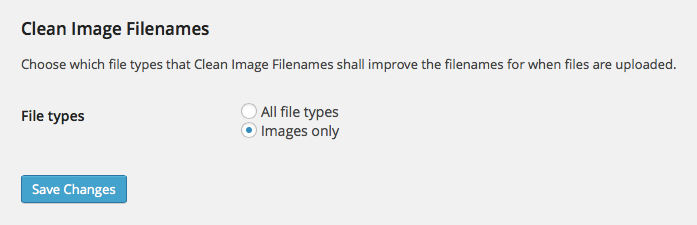
- Lets you choose if you want to convert only image files, or all file types.
- Makes site and server migrations easier thanks to non-accent character filenames.
- Provides filter hook for developers who want to specify which file types to convert.
Examples
- Räksmörgås.jpg → raksmorgas.jpg
- Æblegrød_FTW!.gif → aeblegrod-ftw.gif
- Château de Ferrières.png → chateau-de-ferrieres.png
Worth noting
The plugin only converts filenames when the files are being uploaded. It can not convert existing files.
Filter for developers
This filter provides developers a way to specify which file types the plugin should convert. This filter overrides the plugin settings on the media settings page. For a complete list of mime types, see Wikipedia.
The following example will convert PDF, JPEG and PNG files only:
function my_clean_image_filenames_mime_types() {
    $mime_types = array(
        'application/pdf',
        'image/jpeg',
        'image/png',
    );
    return $mime_types;
}
add_filter( 'clean_image_filenames_mime_types', 'my_clean_image_filenames_mime_types' );
Installation
- Search for Clean Image Filenames in the plugins directory.
- Install and activate the plugin.
or
- Download and unzip the plugin and upload the
clean-image-filenamesdirectory to your/plugins/directory. - Activate the plugin through the ‘Plugins’ menu in WordPress.
Frequently asked questions
Can this plugin convert filenames of existing files in the media library?
No, this plugin only cleans the filenames of files when they are being uploaded to the media library.
Changelog
This version adds plugin uninstall script that deletes plugin settings if you were to delete the plugin.
1.5
- Add support for WebP and AVIF image formats. Thanks to @vinkla for the pull request.
1.4
- Add support for cleaning filenames when sideloaded (usually when uploaded programmatically) using the wp_handle_sideload_prefilter hook.
1.3
- Rewrite cleaning function to better handle specific characters.
- Make sure code is compliant with WordPress Coding Standards.
1.2.1
- Enable plugin to be translated/internationalization.
1.2
- Set original, un-cleaned filename as attachment title.
1.1.1
- Added uninstall script that deletes plugin settings when the plugin is uninstalled.
Screenshots
For developers
Is this your plugin? Show off the numbers.
Add a live badge to your site, docs or GitHub README. It updates on its own — no account needed.
Best Clean Image Filenames alternatives
All files plugins →





FAQ
Clean Image Filenames: quick answers
Straight answers, pulled from live WordPress.org data.
Live data from WordPress.org · checked Sep 27, 2026
Is Clean Image Filenames free?
Yes. Clean Image Filenames is free to download and use from the official WordPress.org plugin directory.
Is Clean Image Filenames safe to use in 2026?
Clean Image Filenames works, but test it on a staging site before relying on it in 2026. It runs on 30K+ sites, is rated 4.6/5 and was last updated 9 months ago, and scores 61/100 on our health check.
How many websites use Clean Image Filenames?
Clean Image Filenames is active on 30K+ WordPress websites and has been downloaded 362,988 times since it launched in October 2014. It was downloaded 4,633 times in the last 30 days.
Does Clean Image Filenames work with WordPress 7.1?
Clean Image Filenames is officially tested up to WordPress 6.9.9, while the latest release is 7.1.2. It may still work, but try it on a staging site first.
When was Clean Image Filenames last updated?
The latest version, 1.5, was released on January 14, 2026 (9 months ago).
Who makes Clean Image Filenames?
Clean Image Filenames is developed and maintained by Upperdog.
What are the best alternatives to Clean Image Filenames?
The most popular alternatives to Clean Image Filenames are Media Cleaner: Clean your W… (90K+ installs), File Upload Types by WPForms (40K+ installs) and File Manager (10K+ installs).
Powered by PageForge
Want thousands of pages that rank like these? Build them in an afternoon.
This directory runs on the same engine as PageForge. Turn any spreadsheet, CSV or API into thousands of fast, SEO-ready WordPress pages — with schema, internal links and AI-written copy baked in.
- CSV, Google Sheets & API data sources
- AI content, schema & internal links per page
- Works with Elementor, Gutenberg, Yoast & Rank Math
- Free on WordPress.org — no credit card


