



WP Synchro – The Ultimate WordPress Migration Tool
WP Synchro is the ultimate WordPress migration plugin for professionals and agencies.

Safe pick
Yes — WP Synchro is a safe, well-maintained plugin to use in 2026. It runs on 2K+ sites, is rated 5/5 and was last updated 3 weeks ago, and scores 88/100 on our health check.
- Loved by users — 5/5 from 30 reviews
- Actively developed — last update 3 weeks ago
- Tested with the latest WordPress (7.1)
- Momentum — downloads up 247.7% vs the previous 30 days
How does it stack up?
Side-by-side on installs, updates, ratings & support



Daily downloads
Download spikes usually follow a new release — each site that auto-updates counts as a download.
Rankings
Where WP Synchro stands todayWordPress.org search rankings
Live position in the plugin search, top 100| Keyword | Position |
|---|---|
| clone | #48 |
| database | >100 |
| files | >100 |
| migrate | #52 |
| migration | #20 |
Version adoption
Share of active sites per release.
Rating breakdown
★★★★★★★★★★ 5 from 30 reviews
About WP Synchro
From the official readme · v1.16.1Description
WP Synchro is the ultimate WordPress migration plugin for professionals and agencies.
Easily migrate, clone, backup, and synchronize your WordPress site, including database, media, plugins, themes, and custom files. WP Synchro is designed for fast, secure, and customizable migrations between local, staging, and production environments.
Key Features (Free):
* One-click WordPress database migration (pull/push)
* Search/replace in database data (supports serialized data)
* Handles migration of database table prefixes between sites
* Database backup before migration
* Select specific database tables or migrate all
* Automatic cache clearing after migration for popular cache plugins
* Secure, encrypted data transfer – no third-party servers
* Set up once, run multiple times – perfect for development, staging, and production
PRO Features:
* File migration: media, plugins, themes, custom files/folders
* Only migrate changed files for faster sync
* User confirmation before making file changes
* Customize migrations down to a single file or folder
* Support for basic authentication (.htaccess)
* Email notifications on migration success or failure
* WP CLI command for scheduled migrations (cron)
* 14-day free trial for PRO features
Typical Use Cases:
* Move or clone WordPress sites between servers or hosts
* Push local development or staging sites to production
* Pull a copy of a live site for debugging or development
* Keep staging and production in sync
* Back up your WordPress site
Quick Start
- Install WP Synchro on both source and destination WordPress sites.
- Activate the plugin via the Plugins menu.
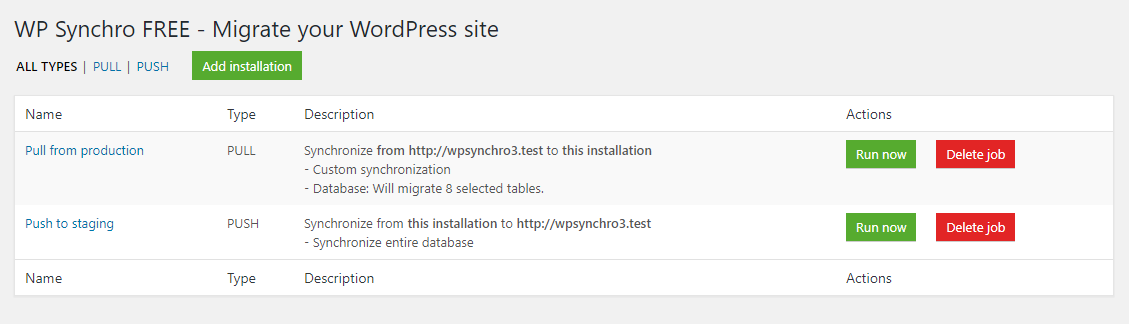
- Create a new migration job in WP Synchro.
- Select what to migrate: database, files, or both.
- Run the migration and watch your site move!
- Rerun the same migration anytime with one click.
Support & Documentation
For detailed documentation and support, visit WP Synchro Documentation.
Installation
- Upload the plugin files to the
/wp-content/plugins/wpsynchrodirectory, or install the plugin through the WordPress plugins screen directly. - Install WP Synchro on both sites involved in the migration.
- Activate the plugin through the ‘Plugins’ screen in WordPress.
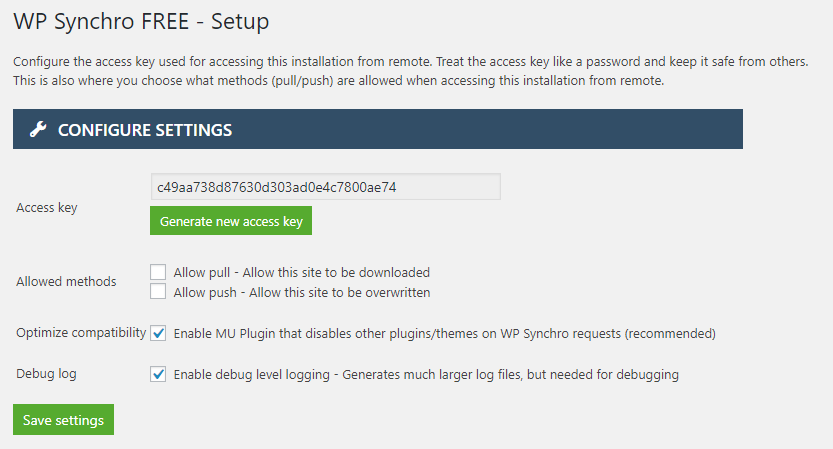
- Configure migration settings in WP Synchro > Setup.
- Add your first migration job and configure it.
- Run the migration.
- Enjoy fast, easy migrations and repeat as needed.
Frequently asked questions
How do I migrate my WordPress site with WP Synchro?
Install WP Synchro on both sites, create a migration job, select what to migrate (database, files, or both), and run the migration. See the Quick Start section above.
Can I move my WordPress site to a new host or domain?
Yes! WP Synchro handles migrations between any WordPress sites, including different hosts or domains. It automatically updates URLs and handles database table prefixes.
Does WP Synchro support file migration?
Yes, file migration (media, plugins, themes, custom files) is available in the PRO version.
Is my data secure during migration?
Yes, all data is transferred directly between your sites and is encrypted. No third-party servers are involved.
Can I schedule migrations?
Yes, with the PRO version you can use the built-in WordPress scheduling or you can use WP CLI to schedule migrations via cron or other triggers.
Does WP Synchro support multisite?
Not yet. Multisite support is planned for a future release.
Where can I get support or report bugs?
Contact us at support@daev.tech.
Changelog
1.16.1
- Hotfix: Add missing file for database backup functionality, which was enabled in the free version
1.16.0
- Improvement: Add an onboarding guide to help newcomers understand the terminology
- Improvement: Add a wizard to help create simple migrations
- Improvement: Make database backups available in the free version
- Improvement: Make the migrations run in a modal popup instead of its own page
- Change: Bump supported WordPress version to 7.1
- Change: Bump minimum PHP version to 7.4
1.15.0
- Improvement: Give warning when the source database contains tables that are not prefixed with the site’s prefix
- Improvement: Add button in “Logs” to remove any temporary tables that WP Synchro have left behind in a failing migration
- Change: Bump supported WP up to 7.0
1.14.0
- Bugfix: Fix a minor translation loading timing, where the plugin updater would use translation before it was loaded
- Change: Bump supported WP up to 6.9
1.13.0
- Bugfix: Optimize the handling of database queries, which no longer has the same tendency to cause sort buffer errors in certain conditions
- Bugfix: When verifying migrations, give better debug information when it fails, instead of a generic JS message
1.12.0
- Improvement: Extend cron scheduling system, so migrations can be run at intervals automatically without user intervention and without WP CLI
- Improvement: Prevent unwanted background update from PRO version to FREE version for some users
- Improvement: Make it possible to only delete a single log from the “Logs” menu, instead of all or nothing
- Improvement: Make it possible to download the database backup from a pull migration in “Logs” menu
- Bugfix: No longer use ini_restore() native PHP function, because some hosting does not allow it
Screenshots


For developers
Is this your plugin? Show off the numbers.
Add a live badge to your site, docs or GitHub README. It updates on its own — no account needed.
Best WP Synchro alternatives
All clone plugins →





FAQ
WP Synchro: quick answers
Straight answers, pulled from live WordPress.org data.
Live data from WordPress.org · checked Sep 27, 2026
Is WP Synchro free?
Yes. WP Synchro is free to download and use from the official WordPress.org plugin directory.
Is WP Synchro safe to use in 2026?
Yes — WP Synchro is a safe, well-maintained plugin to use in 2026. It runs on 2K+ sites, is rated 5/5 and was last updated 3 weeks ago, and scores 88/100 on our health check.
How many websites use WP Synchro?
WP Synchro is active on 2K+ WordPress websites and has been downloaded 80,120 times since it launched in July 2018. It was downloaded 2,288 times in the last 30 days.
Does WP Synchro work with WordPress 7.1?
Yes. The developer has tested WP Synchro up to WordPress 7.1.2, the latest release. It requires WordPress 5.8 or newer.
What PHP version does WP Synchro need?
WP Synchro requires PHP 7.4 or higher. Most hosts run PHP 8.x today, so it works on any modern WordPress hosting.
When was WP Synchro last updated?
The latest version, 1.16.1, was released on September 9, 2026 (3 weeks ago).
Who makes WP Synchro?
WP Synchro is developed and maintained by WP Synchro.
What are the best alternatives to WP Synchro?
The most popular alternatives to WP Synchro are All-in-One WP Migration and… (5M+ installs), Yoast Duplicate Post (3M+ installs) and WPvivid (900K+ installs).
Powered by PageForge
Want thousands of pages that rank like these? Build them in an afternoon.
This directory runs on the same engine as PageForge. Turn any spreadsheet, CSV or API into thousands of fast, SEO-ready WordPress pages — with schema, internal links and AI-written copy baked in.
- CSV, Google Sheets & API data sources
- AI content, schema & internal links per page
- Works with Elementor, Gutenberg, Yoast & Rank Math
- Free on WordPress.org — no credit card


