


Choice Universal Form Tracker for Google Tag Manager
Track Contact Form 7, Gravity Forms, Ninja Forms, Elementor and Avada form submissions in Google Tag Manager, with UTM and click ID attribution.

Solid choice
Choice Universal Form Tracker f… is a solid plugin choice in 2026, with a few things worth checking first. It runs on 20+ sites and was last updated 1 month ago, and scores 63/100 on our health check.
- Tested with the latest WordPress (7.1)
- Small user base (20+ active installs)
- Very few reviews so far
How does it stack up?
Side-by-side on installs, updates, ratings & support



Daily downloads
Download spikes usually follow a new release — each site that auto-updates counts as a download.
Rankings
Where Choice Universal Form Track… stands todayWordPress.org search rankings
Live position in the plugin search, top 100| Keyword | Position |
|---|---|
| conversion tracking | >100 |
| datalayer | #48 |
| form tracking | >100 |
| google tag manager | >100 |
| UTM | >100 |
Version adoption
Share of active sites per release.
About Choice Universal Form Tracker for Googl…
From the official readme · v3.30.1Description
Five form plugins, one event shape. Each form plugin fires its submissions differently, so a site running more than one ends up with a different tag, a different trigger, and a different set of field names for each. This plugin detects whichever form plugins are active and emits a single, consistent form_submit event for all of them, so one tag in Google Tag Manager covers the whole site.
Campaign attribution rides along. UTM parameters and advertising click IDs are captured on the visitor’s first landing and stored for 30 days, so a form submitted a week after the ad click still reports the campaign that produced it.
Supported form plugins
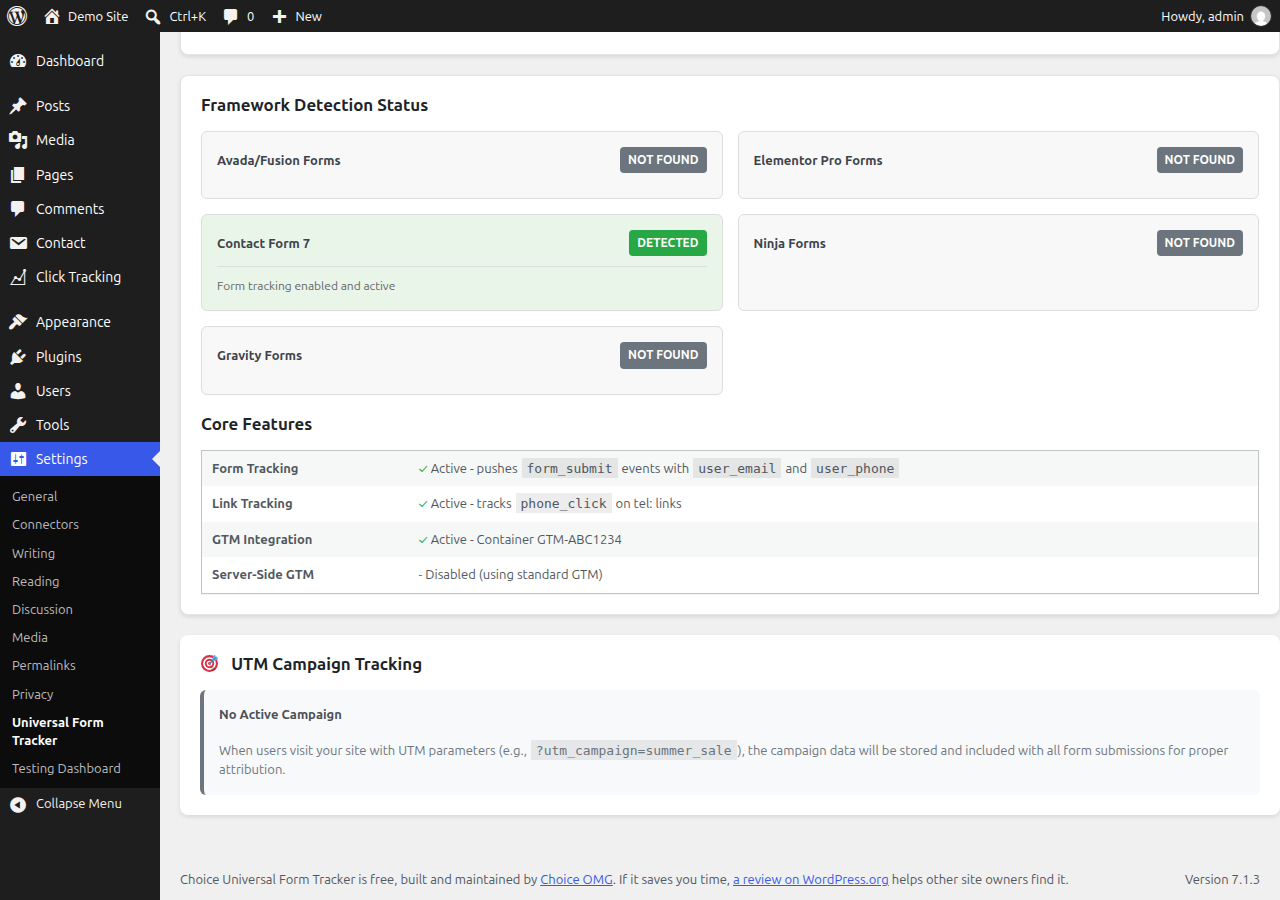
Detection is automatic. No configuration is needed beyond activating the plugin, and nothing is loaded for a form plugin that is not installed.
- Contact Form 7
- Gravity Forms
- Ninja Forms
- Elementor Pro forms
- Avada / Fusion Builder forms
These are third-party products, listed here to describe compatibility. This plugin is not affiliated with, endorsed by, or supported by their makers.
What gets tracked
form_submiton every detected submission, carrying the form type, form ID, and the email address and phone number the visitor enteredgenerate_leadwhen a submission includes a valid email address and the Generate Lead Events setting is on (off by default on new installs)qualify_leadwhen a submission carries an email address, a phone number, and an advertising click IDphone_clickwhen a visitor clicks atel:link, andemail_clickfor amailto:link, except links and numbers you exclude (see the FAQ)- UTM parameters (source, medium, campaign, term, content) on all of the above
- Advertising click IDs:
gclid,gbraid,wbraid,fbclid,msclkid,ttclid,twclid,rdt_cid,li_fat_id,snap_click_id, andpclid
Every event carries cuft_tracked: true, which gives you one reliable condition to build triggers on.
Send it to GA4, Google Ads and Meta
One trigger in Google Tag Manager covers every form on the site, and a form plugin added later needs no new tag:
- Add Data Layer Variables for
cuft_trackedand for the fields you need, such asform_type,form_id,utm_campaign,gclidandlead_id. - Create a Custom Event trigger for
form_submitwith the conditioncuft_trackedequalstrue. - Fire your GA4 event tag, Google Ads conversion tag or Meta Pixel
Leadevent on that trigger. For Google Ads enhanced conversions, mapuser_emailinto a User-Provided Data variable.user_phoneholds the number as the visitor typed it, so convert it to E.164 form (such as+17805550173) before mapping it. For GA4, sendlead_idand leave the contact details out.
Shared lead identity
Each event can carry a lead_id: the SHA-256 hash of the visitor’s email address, lowercased and trimmed, or of their phone number in E.164 form when no email was given. The same hash is computed server-side, so an analytics event and a downstream CRM record derived from the same person produce the same identifier.
The form_submit event also carries the raw email address and phone number. Send lead_id instead of those fields wherever raw personal data must not go; Google Analytics, for one, forbids sending it email addresses or phone numbers.
The normalisation matches what Google Enhanced Conversions and Meta CAPI expect, so the value doubles as a match key for offline conversion imports.
Built to stay out of the way
- No jQuery dependency; the tracking scripts are plain JavaScript
- No third-party CDN requests; every library the plugin needs ships with it
- Framework scripts load only for form plugins that are actually present
- Tracking failures are contained and never block a form submission
Who maintains this
Choice OMG maintains this plugin. We are a digital marketing and web agency in Edmonton, Alberta, and we built it because our clients’ sites run several form plugins at once and each one needed its own analytics plumbing. The plugin’s overview page is Choice Universal Form Tracker for WordPress. If you would rather have GTM, GA4 and Google Ads conversion tracking set up for you, Choice OMG does that for clients.
External services
This plugin can connect to the external services below. Every one of them is off on a new install and stays off until an administrator configures it on the settings screen. With none configured, the plugin only pushes events to the window.dataLayer array in the visitor’s own browser and sends nothing anywhere.
Google Tag Manager
Used when you enter a GTM container ID on the settings screen. Leave that field empty and no request is made; the plugin then pushes events to a dataLayer supplied by your own GTM installation instead.
What is sent: the visitor’s browser requests the container script from https://www.googletagmanager.com/gtm.js (and, for visitors without JavaScript, the ns.html frame). As with any GTM installation, Google receives the request, the visitor’s IP address and browser details, and whatever your own container tags choose to send, which will include the form and campaign data described above if you configure tags to forward it.
When: on every front-end page load, once a container ID is set.
- Service: Google Tag Manager
- Terms of service: https://www.google.com/analytics/terms/tag-manager/
- Privacy policy: https://policies.google.com/privacy
Server-side Google Tag Manager (optional custom host)
Used only when you enable server-side GTM and enter your own tagging server hostname. Off by default. The setting accepts a bare hostname only (for example gtm.example.com); the plugin builds the script address itself as https://<host>/gtm.js?id=<container ID>.
What is sent: the container script is requested from the host you entered instead of from Google, so that host receives the same page-load request described above. To decide whether the host is healthy, the plugin also requests gtm.js and ns.html from it, server to server, when you press the test button and on a six-hour schedule, with a recheck 15 minutes after a failed check. Those checks carry the container ID and no visitor data. When the custom host fails two checks in a row, the plugin falls back to www.googletagmanager.com, and returns to the host after three passes in a row.
When: on every front-end page load, and on the six-hour health check, while server-side GTM is enabled.
You choose the host, so you decide who receives the request and which terms apply.
Google Analytics Measurement Protocol
Used only when you supply both a GA4 Measurement ID and an API secret on the settings screen. Without both, no request is made.
What is sent: a server-side event to https://www.google-analytics.com/mp/collect, containing the GA client ID read from the visitor’s _ga cookie, the event name, the configured lead value and currency, and the event parameters for that submission.
When: when a lead’s status is updated through the plugin’s webhook (for example, a lead marked qualified).
- Service: Google Analytics
- Terms of service: https://marketingplatform.google.com/about/analytics/terms/us/
- Privacy policy: https://policies.google.com/privacy
Click collector (optional custom host)
Used only when you enter a Click Collector Host on the settings screen. Empty by default, in which case nothing is sent.
What is sent: the visitor’s browser sends a POST (navigator.sendBeacon) to https://<the host you entered>/p carrying the advertising click ID and its platform, the five UTM parameters, the referring URL, the landing page URL, and the GA client ID from the _ga cookie.
When: on page load, only when a click ID is present in the URL or in the plugin’s own click cookie.
You choose the host. Point it at your own collector, or at the one Choice OMG operates for its clients, in which case Choice OMG receives the data above under the terms and privacy policy linked in the next section.
Choice OMG phone validation service
Used only when an administrator switches phone validation on and registers the site with a registration secret that Choice OMG issues to its clients. Both are off and empty by default, so this service is never contacted on a standard install.
What is sent: registering the site (the Register Site button) sends the site’s domain name and the registration secret to https://phone-validator.choice.zone. After that, each phone number to be checked is sent from your server to https://phone-validator.choice.zone/validate-phone together with the site’s registration token. Choice OMG’s service looks the number up with its own providers and returns whether the number is valid, its line type, and a quality score. The plugin itself never contacts those providers.
When: when a submitted phone number is validated. Results are cached on your site for 24 hours per number, so a repeated number is not sent again within that window.
- Service: Choice OMG
- Terms of service: https://choice.marketing/terms/
- Privacy policy: https://choice.marketing/privacy-policy/
Because form submissions can carry personal data, review your own privacy policy and any applicable data-protection obligations (GDPR, CCPA, PIPEDA and similar) before enabling any of these services.
Installation
- Install the plugin through the Plugins screen, or upload the
choice-universal-form-trackerfolder to/wp-content/plugins/. - Activate it through the Plugins screen.
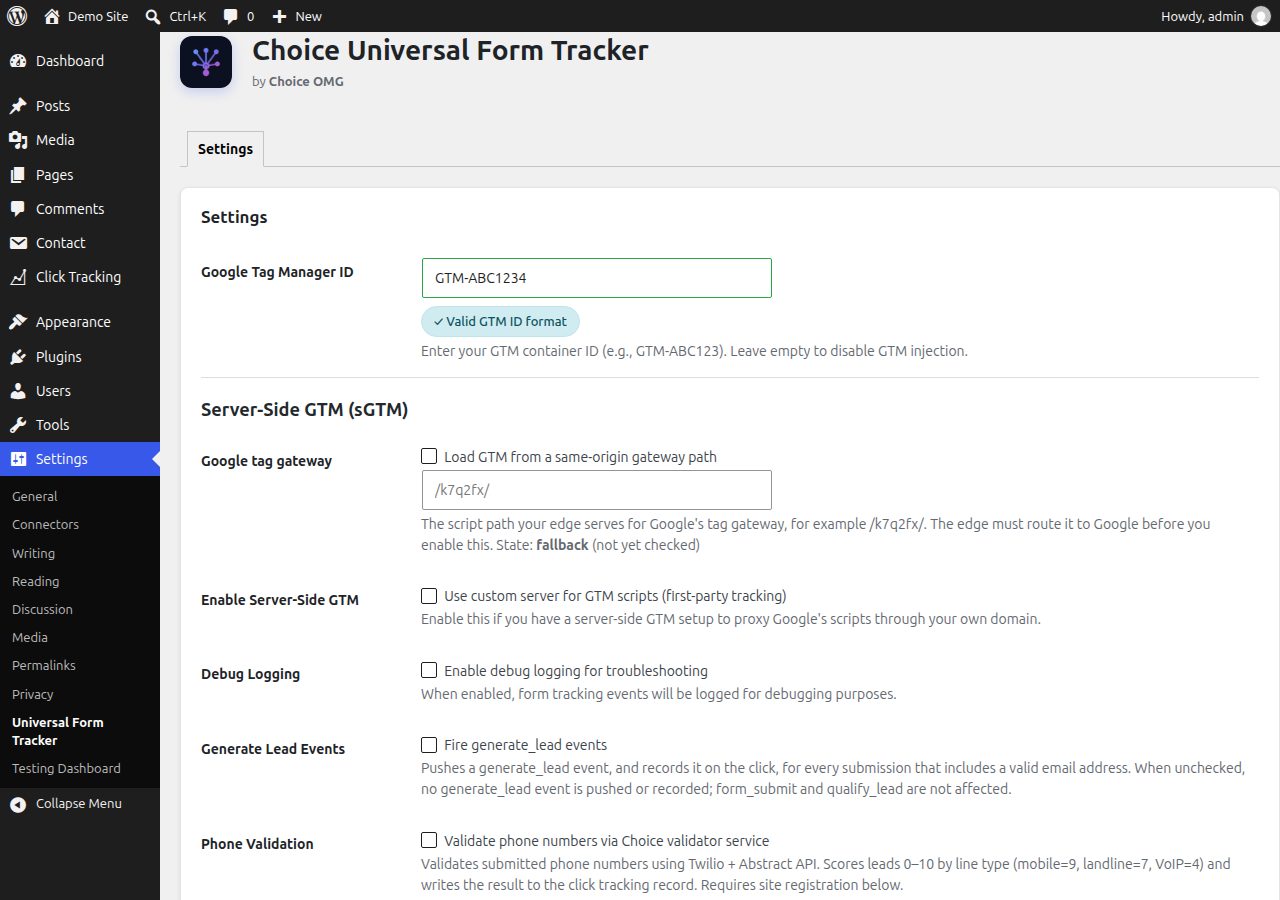
- Go to Settings > Universal Form Tracker.
- Enter your Google Tag Manager container ID, or leave it empty to use your own GTM installation.
- Confirm your form plugins appear under Framework Detection Status.
Nothing else is required. Tracking starts as soon as the plugin is active.
Changelog
Click rows older than 365 days are now deleted daily; set Click Data Retention to 0 first to keep them. Stored IP hashes are cleared and new ones are keyed. Form events no longer carry ip_hash or click_platform.
3.30.1
- The plugin’s settings screen shows its mark and maker, and its three screens credit Choice OMG in the admin footer with a link to leave a review. Other admin screens are unchanged.
- The Plugins screen row adds Documentation and Write a review links beside Support.
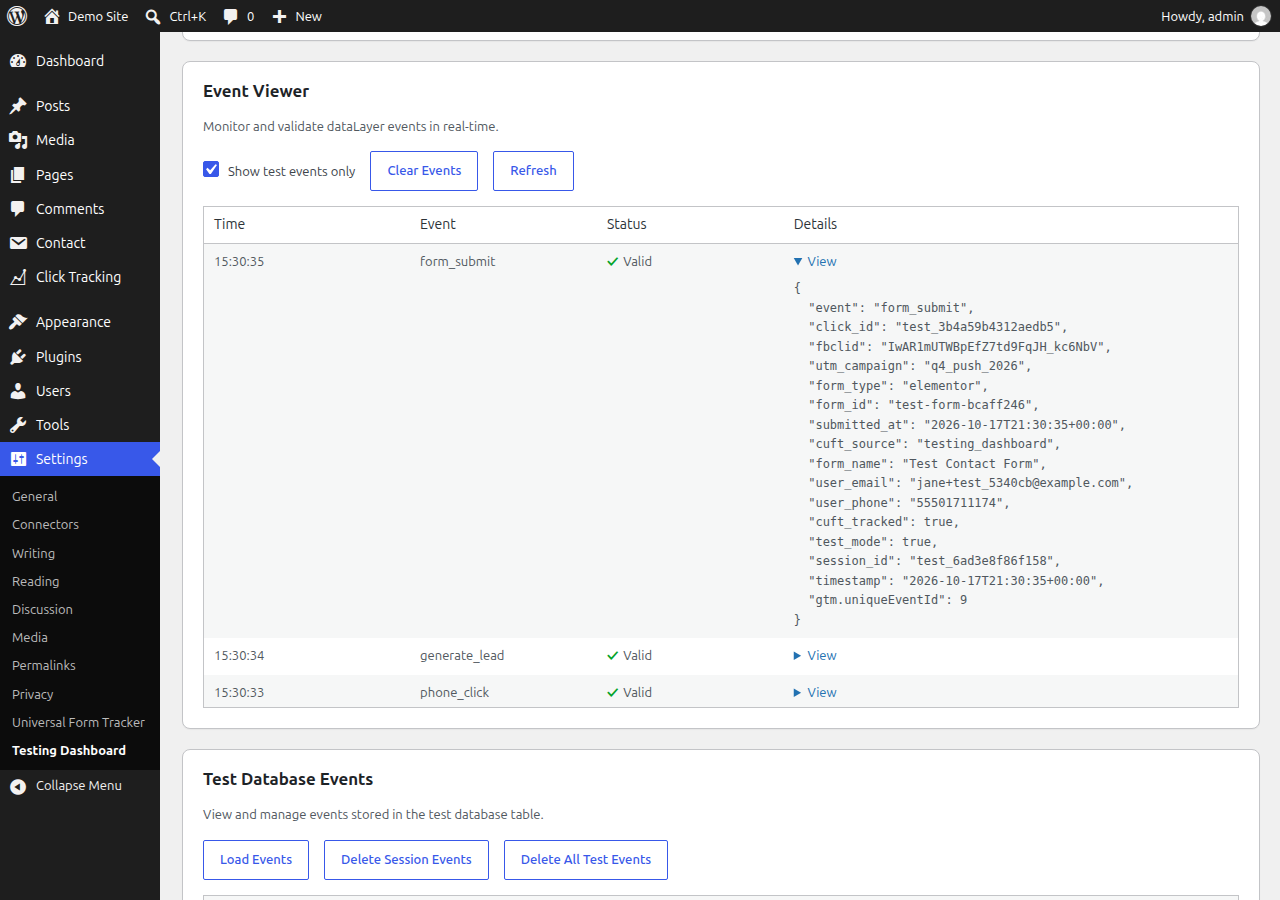
- Fixed: the Testing Dashboard’s Event Viewer and Test Database Events panels never showed anything. Simulated events now appear with their validation result and full payload, and stored test events can be listed and deleted.
- Fixed: the Event Viewer’s check marked real
phone_clickandemail_clickevents invalid, because it looked for field names the plugin does not send. - Readme: a GTM setup section for GA4, Google Ads and Meta, and FAQ entries on using the plugin beside GTM4WP, GTM Kit or Site Kit and on paid versions (there are none).
3.30.0
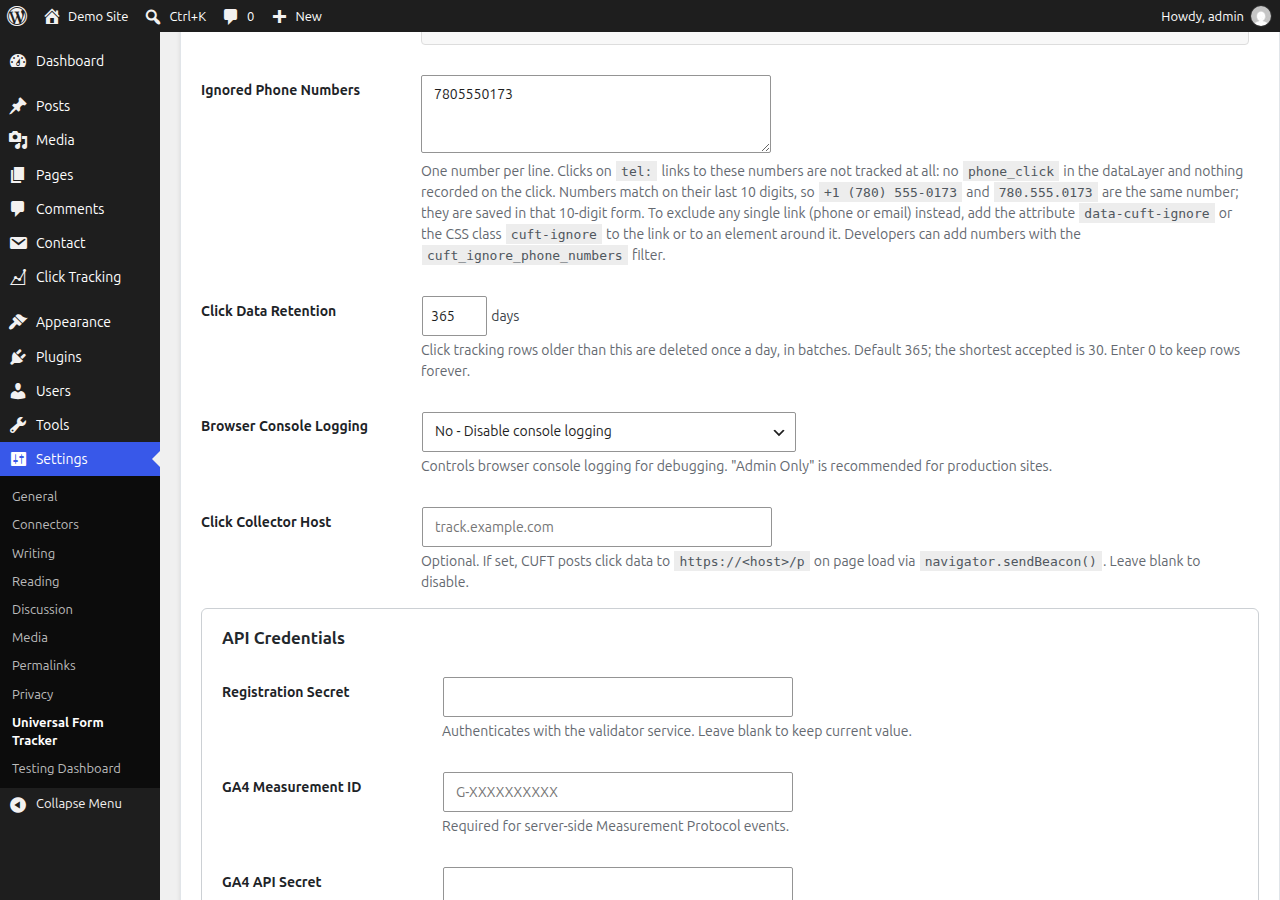
- Added Ignored Phone Numbers (Settings). Clicks on
tel:links to a listed number are not tracked: nophone_clickin the dataLayer and no request to the server. Numbers match on their last 10 digits, ignoring formatting and extensions. Thecuft_ignore_phone_numbersfilter adds numbers from code. - Any link inside an element with
data-cuft-ignoreor the classcuft-ignoreis not tracked. - Added the
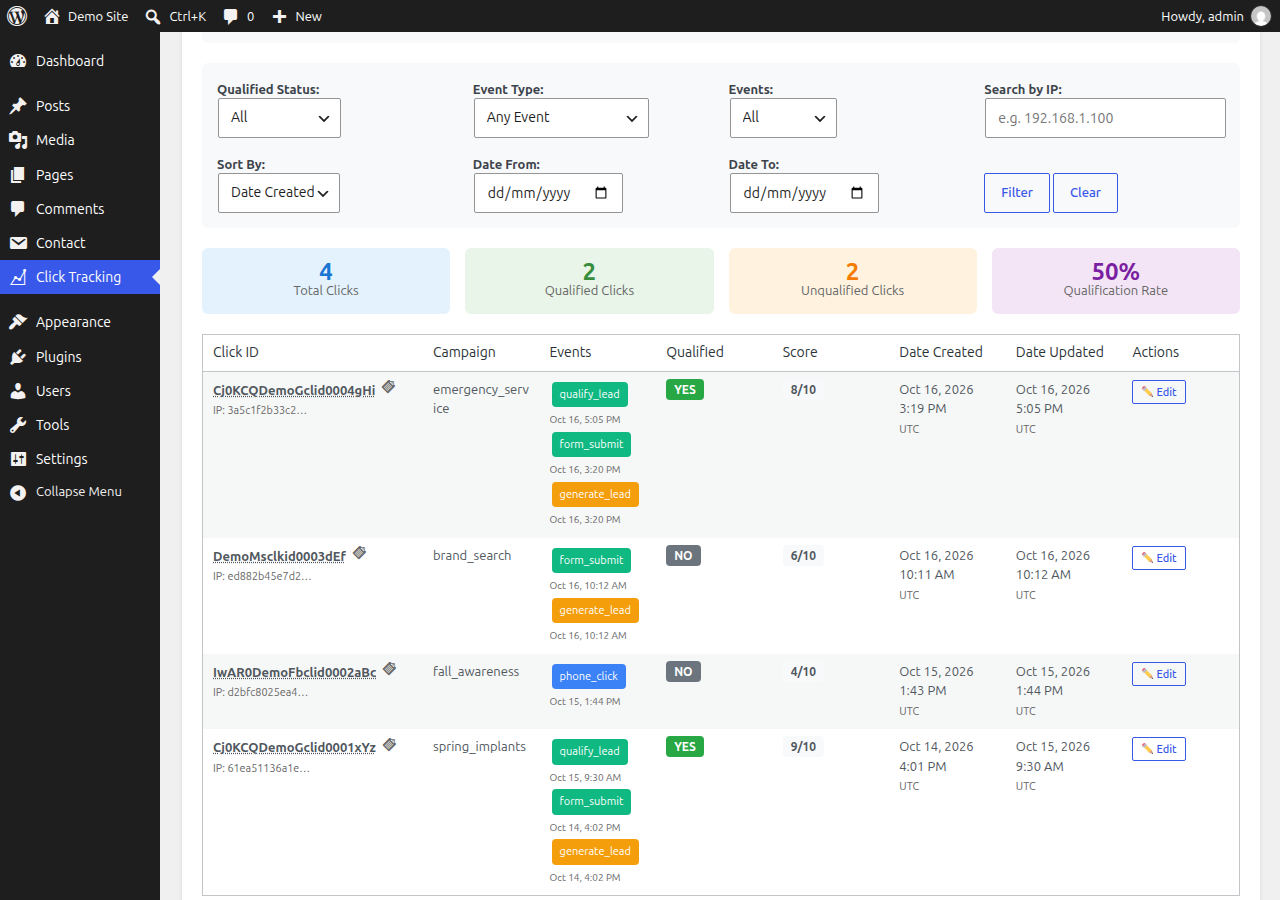
cuft_record_eventfilter, which can stop an event reported by the browser from being recorded on its click. - Added Click Data Retention (Settings, default 365 days, 0 keeps rows forever). A daily job deletes older click rows in batches of 1,000, bounded in time, and continues in a follow-up run when there is more to delete. Before 3.30.0 click rows were never deleted.
- IP hashes are now keyed (HMAC-SHA256 with a key derived from
AUTH_KEYandAUTH_SALTin wp-config.php) instead of a plain SHA-256 of the address, which could be reversed by hashing every IPv4 address. Hashes stored before the upgrade are cleared by the daily job. DefineCUFT_IP_HASH_KEYto use your own key. - Pages no longer contain the visitor’s click ID or IP hash. A full-page cache could have served one ad visitor’s click ID to everyone after them; the scripts now read the visitor’s own cookie. Form events no longer carry
ip_hashorclick_platform. - Fixed: reloading an ad landing page reset the click’s qualification and score from your CRM and replaced its campaign. A click row is now written once and never rewritten from the front end.
- Fixed: the click row written on an ad landing had no campaign, or an earlier visit’s campaign, because the browser saves the UTM parameters only after the page loads. They are now read from the landing URL alone, and values longer than their column are shortened instead of losing the row.
- Fixed: a failed Contact Form 7 email stored the visitor’s email address and phone number in the plugin’s log, even with debug logging off. The log no longer keeps contact details or form answers, entries written before the upgrade are cleaned once, and the log is no longer loaded on every request.
- Fixed: the click retention job did not run where the
cuft_enabledfilter switched tracking off. - Fixed: the six-hour server-side GTM health check never ran, so a failed tagging server never fell back to Google. It now falls back after two failed checks in a row (a failure is rechecked 15 minutes later) and returns within the hour once the server passes three checks.
- Contact Form 7 failure, validation and spam warnings appear in the browser console only when Console Logging is on.
- The Support link on the Plugins screen goes to the WordPress.org support forum.
3.29.4
- First release published in the WordPress.org directory. No code change from 3.29.3, which was released on GitHub only.
- Readme: new screenshots taken on 3.29.3, directory tags that match what the plugin does, and links to the maintainer and the plugin’s overview page.
3.29.3
- First release that carries both 3.29 lines: the directory review fixes listed under 3.29.0 to 3.29.2, and the Google tag gateway loader mode below.
- Added a Google tag gateway loader mode (Settings > Server-Side GTM). When switched on with a same-origin script path, the container loads from that path instead of googletagmanager.com. It is off by default and changes nothing on a site that leaves it off.
- An hourly health probe checks the path and the container: the container response must hold both the container id and
google_tag_manager, and the probe follows no redirects. Two passes in a row select the gateway; two failures in a row return to the loader the site used before. The loader also falls back to Google in the browser if the gateway script errors or does not define the container. - Every state change purges the page caches of WP Super Cache, WP Rocket, W3 Total Cache, SiteGround Optimizer and LiteSpeed Cache, and the object cache.
- The noscript iframe stays on googletagmanager.com while the gateway mode is enabled.
- The gateway loader builds its script URLs like every other mode: in PHP, from the validated path or host and the container ID, encoded for script context.
3.29.2
- The webhook always requires the site’s secret key. The “Require webhook key” setting is removed; a key is generated for any site that lacks one, and a request without the right key is rejected before any other input is read.
- Scripts no longer fall back to a hard-coded
/wp-admin/admin-ajax.php. The AJAX address comes only fromadmin_url( 'admin-ajax.php' ), passed in by PHP. - Readme: the phone validation section lists only the service the plugin contacts.
3.29.1
- Lead events are no longer lost on the click record. The browser sends form_submit, generate_lead and qualify_lead as three requests within milliseconds; each one read the saved events, added its own and wrote the list back, so they overwrote each other and the record kept one or two of the three. Writes now take a per-click database lock and only land if the saved list is unchanged since it was read, retrying otherwise. Works on InnoDB and MyISAM tables and on hosts without user locks.
- Contact Form 7 submissions now record their events on the click record. The script settings the recorder needs were attached to jQuery, which WordPress does not load on a page where nothing depends on it, and Contact Form 7 does not. The settings now load on every page from the plugin’s own script handle.
Screenshots
For developers
Is this your plugin? Show off the numbers.
Add a live badge to your site, docs or GitHub README. It updates on its own — no account needed.
Best Choice Universal Form Tracker… alternatives
All conversion tracking plugins →





FAQ
Choice Universal Form Tracker for G…: quick answers
Straight answers, pulled from live WordPress.org data.
Source: WordPress.org
Is Choice Universal Form Tracker f… free?
Yes. Choice Universal Form Tracker f… is free to download and use from the official WordPress.org plugin directory.
Is Choice Universal Form Tracker f… safe to use in 2026?
Choice Universal Form Tracker f… is a solid plugin choice in 2026, with a few things worth checking first. It runs on 20+ sites and was last updated 1 month ago, and scores 63/100 on our health check.
How many websites use Choice Universal Form Tracker f…?
Choice Universal Form Tracker f… is active on 20+ WordPress websites and has been downloaded 311 times since it launched in October 2026. It was downloaded 132 times in the last 30 days.
Does Choice Universal Form Tracker f… work with WordPress 7.1?
Yes. The developer has tested Choice Universal Form Tracker f… up to WordPress 7.1.5, the latest release. It requires WordPress 6.2 or newer.
What PHP version does Choice Universal Form Tracker f… need?
Choice Universal Form Tracker f… requires PHP 7.4 or higher. Most hosts run PHP 8.x today, so it works on any modern WordPress hosting.
When was Choice Universal Form Tracker f… last updated?
The latest version, 3.30.1, was released on October 19, 2026 (1 month ago).
Who makes Choice Universal Form Tracker f…?
Choice Universal Form Tracker f… is developed and maintained by jaffray.
What are the best alternatives to Choice Universal Form Tracker f…?
The most popular alternatives to Choice Universal Form Tracker f… are Pixel Manager for WooCommer… (40K+ installs), CallRail Phone Call Tracking (10K+ installs) and Conversios (10K+ installs).
Powered by PageForge
One template and a spreadsheet. A real page for every search.
PageForge turns each row of a CSV into a WordPress page with its own title, URL, SEO fields and schema, built on the layout you already designed. Free on WordPress.org.
- CSV and XLSX, plus Google Sheets on Professional and Enterprise
- Its own title, URL, SEO fields and schema for every page
- Works with the block editor, Elementor, Divi and Avada
- Free on WordPress.org, no credit card