


Conversios – GA4, Google Ads & Meta Conversion Tracking with Product Feed for WooCommerce
GA4, Google Ads & Meta Pixel conversion tracking plus product feed sync for WooCommerce. Server-side tracking (CAPI) and reports in one plugin.

Safe pick
Yes — Conversios is a safe, well-maintained plugin to use in 2026. It runs on 10K+ sites, is rated 4.3/5 and was last updated 1 day ago, and scores 86/100 on our health check.
- Proven at scale on 10K+ active sites
- Actively developed — last update 1 day ago
How does it stack up?
Side-by-side on installs, updates, ratings & support



Daily downloads
Download spikes usually follow a new release — each site that auto-updates counts as a download.
Rankings
Where Conversios stands todayWordPress.org search rankings
Live position in the plugin search, top 100| Keyword | Position |
|---|---|
| conversion tracking | #5 |
| Facebook Pixel | #18 |
| google ads | #10 |
| google analytics | #63 |
| woocommerce | >100 |
Version adoption
Share of active sites per release.
Rating breakdown
★★★★★★★★★★ 4.3 from 206 reviews
About Conversios
From the official readme · v7.2.26Description
Conversios is an all-in-one conversion tracking and product feed plugin for WooCommerce. It tracks purchases and the full shopping journey in Google Analytics 4 (GA4), Google Ads, Microsoft Ads, Meta (Facebook & Instagram), TikTok, and Snapchat, and syncs your product feed to 4 channels — Google Merchant Center, Microsoft Merchant Center, Meta Catalog, and TikTok Catalog — from a single dashboard.
Instead of running separate plugins for pixels, Conversion API (CAPI) events, product feeds, and reporting, Conversios replaces them with one no-code setup that takes about 15 minutes. It tracks 15+ GA4 ecommerce and engagement events, includes free TikTok Pixel purchase conversion tracking, is trusted by 60,000+ stores, and is fully compatible with WooCommerce HPOS (High-Performance Order Storage).
Universal Commerce Protocol (UCP) (Pro) makes your WooCommerce products discoverable and purchasable inside Google Gemini shopping experiences, synced through Google Merchant Center with server-side purchase tracking. (Requires an approved Google Merchant Center account.)
Order Recovery Engine (Pro) recovers untracked conversions in GA4, Google Ads, and Meta to close the gap between WooCommerce orders and ad platform reports.
In a published WooCommerce case study, a global paint brand reported a 90% increase in Meta Ads conversions and a 50% uplift in Google Ads conversions after implementing Conversios, along with a smaller GA4 vs WooCommerce reporting gap. Read it here:
Global paint brand sees 90% lift in Meta Ads with Conversios
Walkthrough Video
Watch the full Conversios setup walkthrough covering GA4 tracking, Google Ads conversions, Meta Pixel + CAPI, Microsoft Ads UET, and product feed syncing.
Why is my WooCommerce data inconsistent across GA4 and ad platforms?
Most WooCommerce stores lose conversion data to browser restrictions, ad blockers, and fragmented tracking set up across multiple plugins. The result: GA4, Google Ads, and Meta each report different revenue than WooCommerce, and product feeds for Google, Meta, Microsoft, and TikTok fall out of date and get disapproved.
Conversios fixes this by unifying pixel tracking, server-side tracking, product feed sync, and reporting in one plugin. You manage everything from a single dashboard — no developer required — and validate platform numbers against real WooCommerce orders.
Customer Feedback
“Outstanding support. Setup was quick and issues were resolved efficiently.”
@sajava
“Essential for e-commerce at scale; helped us move to managed first-party tracking and keep revenue reporting in sync across platforms and POS.”
@boomstudio
GA4 Tracking for WooCommerce (Free)
Conversios connects Google Analytics 4 to WooCommerce and tracks 15+ ecommerce and engagement events automatically — purchase, refund, add to cart, checkout steps, product views, plus scroll depth, form submissions, sign-ups, logins, and file downloads. No code, no Google Tag Manager expertise needed (though you can use your own GTM container if you prefer).
Google Ads & Microsoft Ads Conversion Tracking
- Google Ads remarketing tag to build audiences (Pro)
- Google Ads purchase conversion tracking with Enhanced Conversions (Pro)
- Google Ads Dynamic Remarketing for personalized product ads (Pro)
- Microsoft UET (Universal Event Tracking) for Microsoft Ads reporting and remarketing (Free)
- Microsoft Ads purchase conversion tracking — included (Free), rare in this category
Meta Pixel, TikTok, CAPI & More Pixels
- Meta (Facebook & Instagram) Pixel for ad tracking and conversion optimization (Free)
- Meta Conversions API (CAPI) — server-side events that survive iOS restrictions and ad blockers (Pro)
- TikTok Pixel with automated setup, ecommerce events, and purchase conversion tracking (Free)
- TikTok Conversions API (CAPI) for server-side event accuracy (Pro)
- Snapchat Pixel for ad tracking and audience building (Free)
- Snapchat Conversions API (CAPI) for server-side event accuracy (Pro)(https://www.conversios.io/pricing/?plugin_name=aio&utm_source=wpaioreadme&utm_medium=profeature&utm_campaign=wpaioreadme)
- Pinterest Tag, LinkedIn Insight Tag, X (Twitter) Pixel (Free)
In total, Conversios offers 12+ pixel and marketing tool integrations in one plugin.
Server-Side Tracking (Pro)
Server-side tracking sends conversion events from your server instead of the visitor’s browser, so purchases are still recorded when browser tracking is blocked. Conversios server-side tracking improves accuracy on Safari and iOS and on ad-blocked traffic, and supports GA4 server events, Google Ads Enhanced Conversions, Meta CAPI, TikTok CAPI, and Snapchat CAPI. The Order Recovery Engine then recovers conversions that were still missed.
See Pro plans
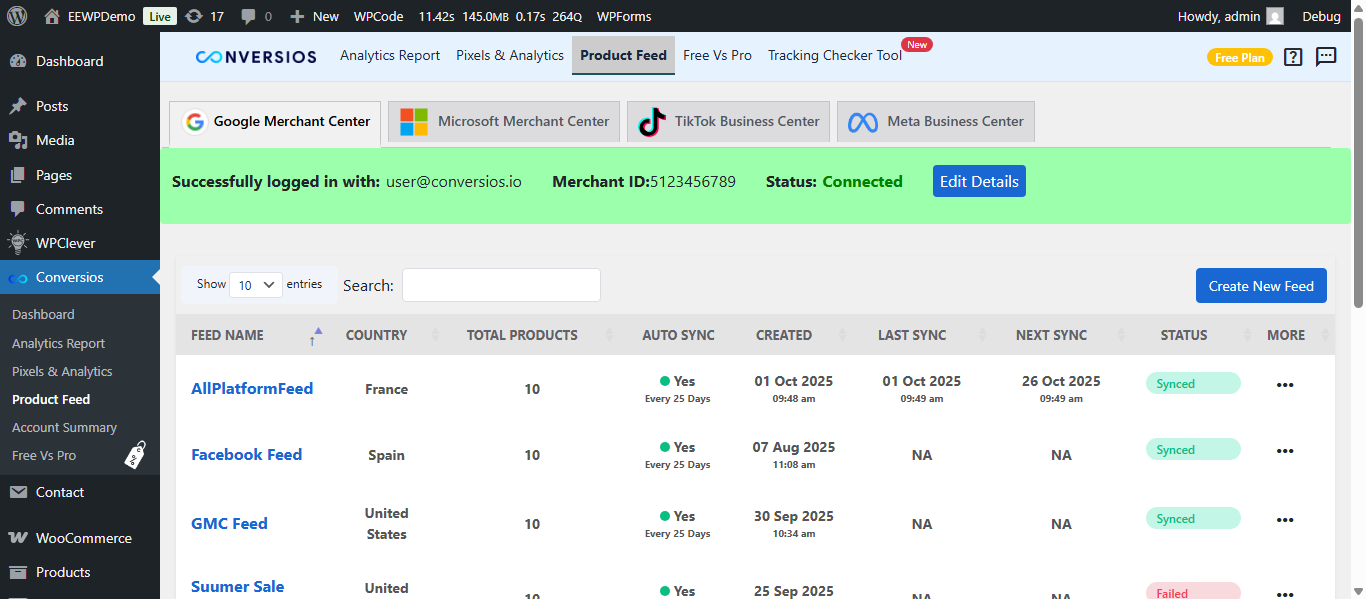
WooCommerce Product Feed for Google Shopping and More (Free)
A product feed is the structured product data (title, price, availability, images) that shopping channels need to show your products. Conversios syncs your WooCommerce catalog in real time to:
- Google Merchant Center for Google Shopping ads
- Microsoft Merchant Center (Bing Shopping)
- Meta Catalog (Facebook & Instagram Shops)
- TikTok Catalog for ecommerce ads
Real-time updates for price, availability, and variants reduce feed disapprovals and keep listings accurate — no separate feed plugin needed.
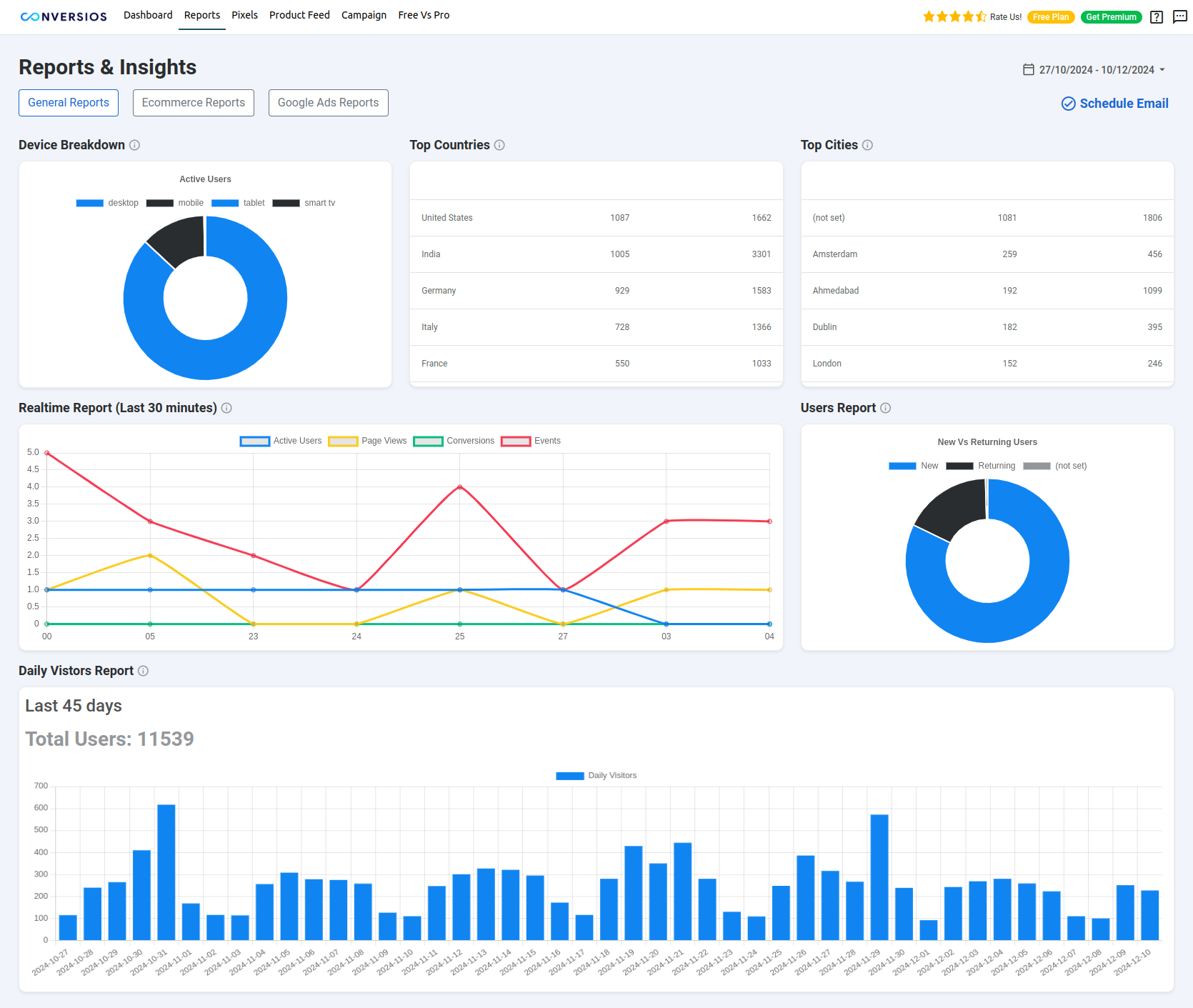
Reports & Insights Inside WordPress
Stop checking GA4, Google Ads, Meta, and WooCommerce separately. Conversios centralizes key reports inside your WordPress admin:
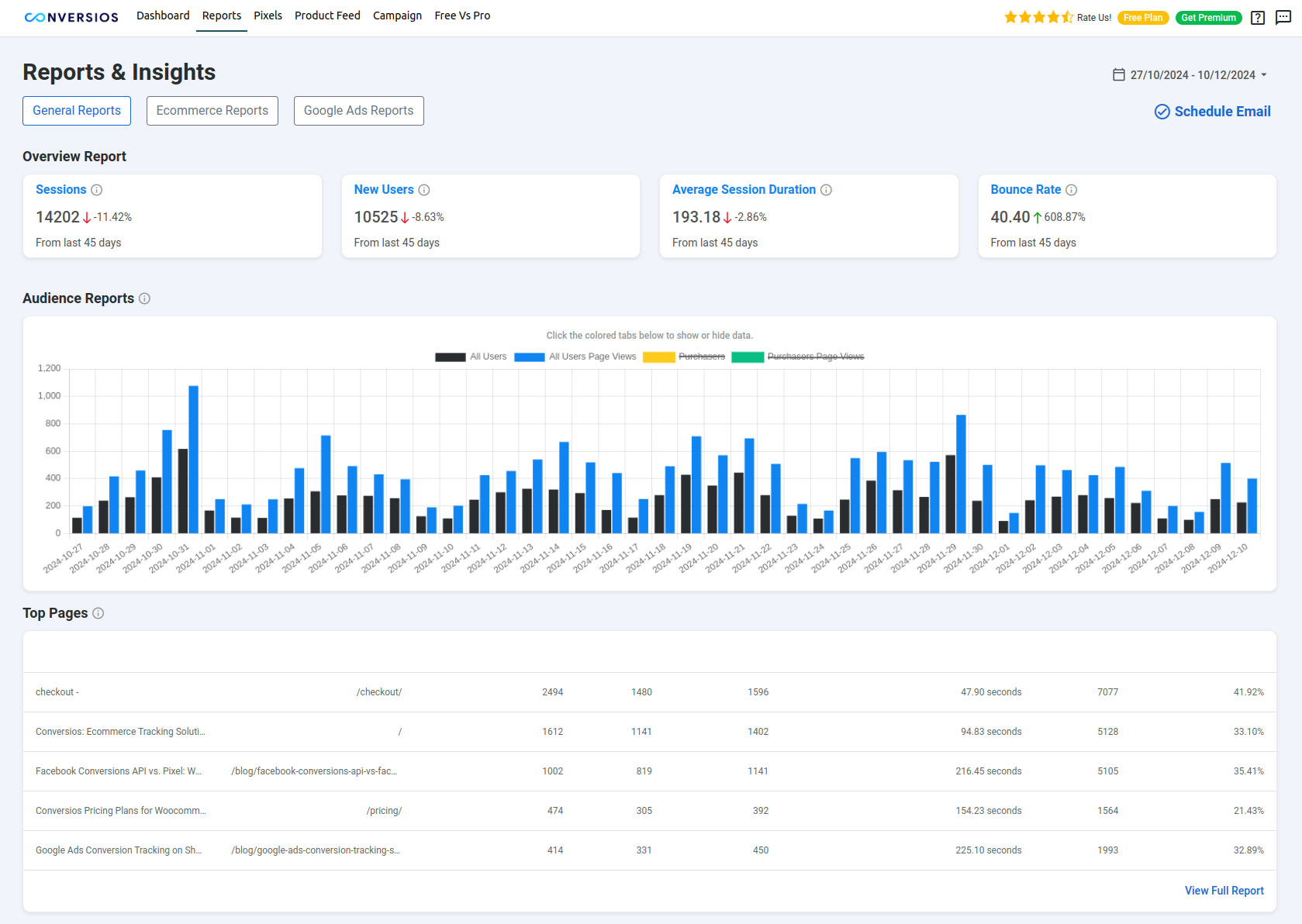
- GA4 general reports for events and conversions (Free)
- GA4 Ecommerce Funnel reporting (Pro)
- Google Ads conversion reporting (Pro)
- Meta Ads conversion reporting (Pro)
- White-label PDF reports for clients and stakeholders (Pro)
Heatmap and Session Recording Integrations (Free)
- Microsoft Clarity for session recordings and heatmaps
- Hotjar for session replays, heatmaps, and feedback polls
- Crazy Egg for heatmaps and scrollmaps
Full feature list: Conversios features
Supported Payment Methods
Purchase conversions work with common WooCommerce payment gateways, including Stripe, PayPal, WooCommerce Payments, Authorize.Net, and Razorpay.
Important: Purchase tracking works when the payment flow redirects customers to the WooCommerce Order Received / Thank You page. Any gateway that returns users to this page after successful payment will be tracked correctly. Server-side tracking (Pro) can help recover some offsite gateway cases.
Supported WooCommerce Events
Conversios tracks the complete WooCommerce shopping journey using standard GA4 ecommerce and engagement events.
Store and product browsing
– page_view (page visit)
– view_item_list (category or product list view)
– select_item (product click)
– view_item (product detail page)
Cart actions
– add_to_cart (add product to cart)
– remove_from_cart (remove product from cart)
– view_cart (cart page view)
Checkout steps
– begin_checkout (checkout started)
– add_shipping_info (shipping method selected)
– add_payment_info (payment method selected)
Orders and purchase
– purchase (order completed)
– refund (order refunded)
Other GA4 engagement events
– scroll (scroll depth tracking)
– form_submit (Contact Form 7, Ninja Forms, Formidable Forms, WPForms, Gravity Forms)
– signup (user sign-up)
– login (user login)
– email_click, phone_click, address_click
– file_download (file download tracking)
– article_load (content or article load events)
Add to Cart works out of the box for standard WooCommerce themes. Stores using drawer carts, AJAX carts, or custom flows may require customization — contact info@conversios.io.
Consent Mode v2 Support (Free)
Google Consent Mode v2 lets you keep measuring conversions in a privacy-compliant way by adjusting tracking based on visitor consent. Conversios supports Basic and Advanced Google Consent Mode v2 plus Microsoft Consent Mode for GDPR and CCPA compliance.
Conversios does not provide a consent banner. It sends or blocks tracking based on your existing Consent Management Platform (CMP). Compatible CMPs include CookieYes, GDPR Cookie Compliance, Real Cookie Banner, and Cookiebot. For Consent Mode setup help, email info@conversios.io — configuration is handled by the Conversios team.
Best Fit for Which Stores
- WooCommerce DTC brands running paid ads that need consistent purchase conversion reporting in GA4 and ad platforms
- Stores selling physical or digital products where purchase and checkout data drives ROAS decisions
- Stores using multiple ad platforms that want pixels, feeds, and conversions managed in one place
- Stores that want to validate GA4 and ad platform conversions against WooCommerce orders
- Agencies managing client stores (white-label reports and priority support in Pro)
- Merchants who prefer a no-code setup without developer dependency
Setup in Minutes
Get started in about 15 minutes with a no-code setup wizard. One plugin replaces separate tools for tracking, feeds, and reporting.
Support
Need help with setup, event validation, custom cart/checkout, payment gateways, or Consent Mode? Email info@conversios.io or chat on WhatsApp.
Step-by-step guides: Setup Documentation
Check whether tracking is working on your site with our free tool:
Website Tracking Checker Tool
Pro users get priority support and dedicated onboarding assistance; most tickets are resolved within 24 hours.
Privacy Policy
View our detailed privacy policy here.
Compatibility
Conversios is compatible with the following major plugins and setups:
- Perfect Brands for WooCommerce, YITH WooCommerce Brands, WooCommerce Brands (for Product Feed)
- YITH Multi-Currency Switcher for WooCommerce
- YITH Custom Thank You Page for WooCommerce
- Multi-currency plugins like WOOCS, CURCY, and WBW Currency Switcher
- CMPs like CookieYes, GDPR Cookie Compliance, Real Cookie Banner, and Cookiebot (for Consent Mode v2)
- Lead generation plugins: Contact Form 7, Ninja Forms, Formidable Forms, WPForms, Gravity Forms
- WooCommerce High-Performance Order Storage (HPOS)
- WordPress Multisite
- WPML and Polylang for multilingual stores
Installation
- Upload the Conversios plugin folder to the
/wp-content/plugins/directory. - Activate the plugin from the “Plugins” menu in WordPress.
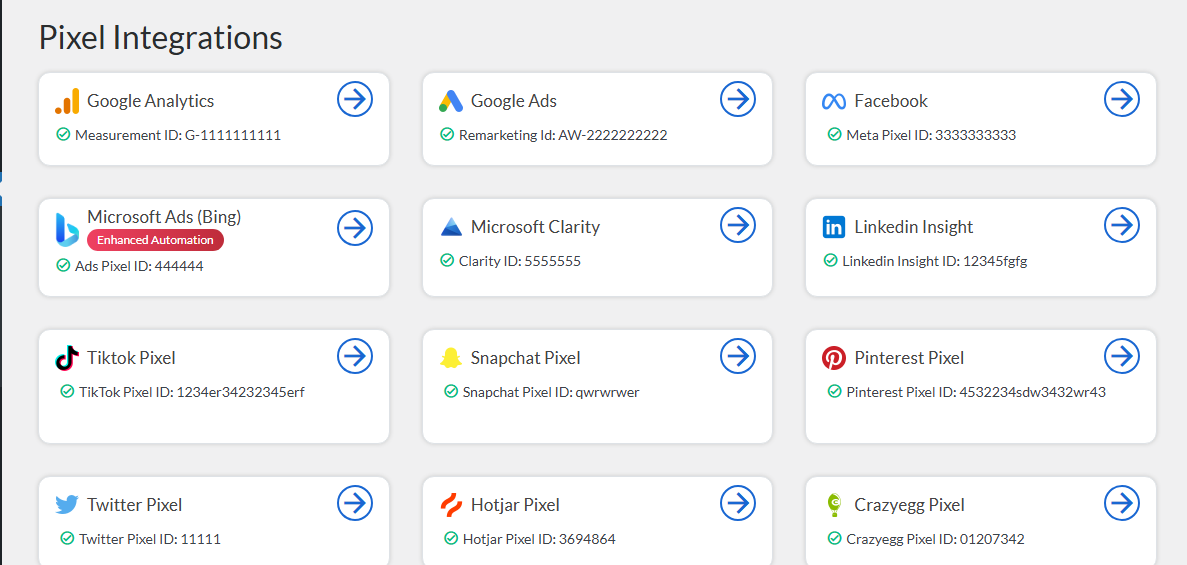
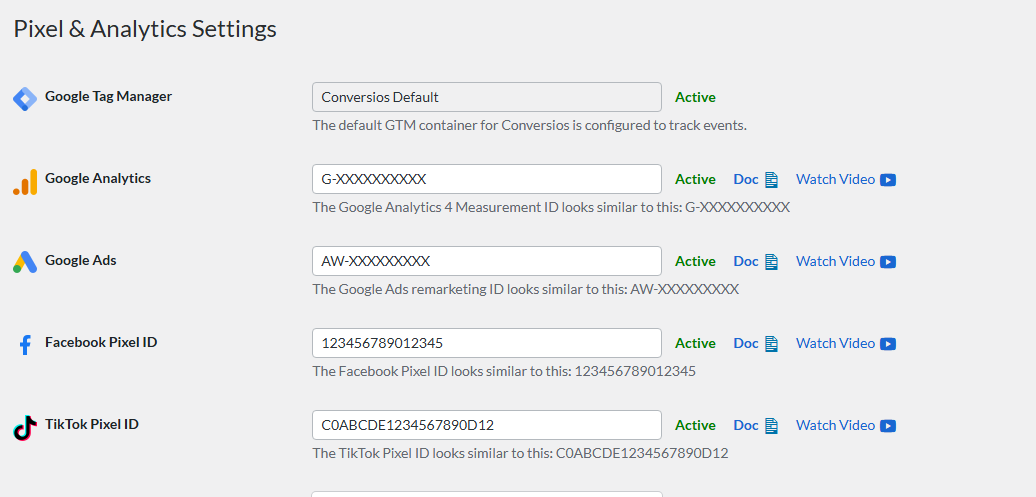
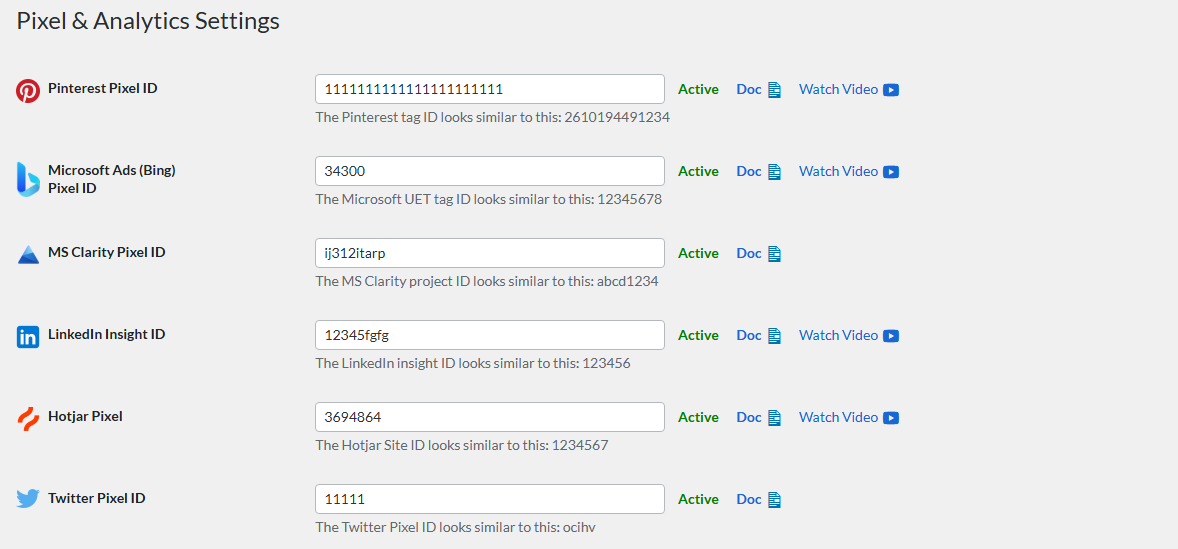
- Set up Pixel & Analytics Integrations (WordPress Admin → Conversios → Pixel Integrations):
- Google Analytics 4 (GA4): Add your GA4 Measurement ID to enable WooCommerce event tracking.
- Google Ads (Pro): Enable the remarketing tag and add your Conversion ID and Conversion Label for purchase conversions. Enhanced conversions are optional.
- Microsoft Ads: Add your Microsoft UET Tag and configure the Purchase conversion goal/ID.
- TikTok: Connect your TikTok account and the pixel is set up automatically — ecommerce events and purchase conversions start tracking without manual configuration (Free).
- Set up other integrations if needed: Meta (Facebook) Pixel, Snapchat Pixel, Pinterest Tag, LinkedIn Insight Tag, X (Twitter) Pixel, Microsoft Clarity, Hotjar, Crazy Egg.
- Sync your product feeds: connect Google Merchant Center, Microsoft Merchant Center, Meta Catalog, and TikTok Catalog.
- After setup, click Finish Setup in the onboarding wizard.
- View reports inside the plugin (Conversios → Analytics Reports): General Reports (GA4, Free), eCommerce Reports (GA4, Pro), Google Ads Reports (Pro), Meta (Facebook) Reports (Pro).
- Explore detailed setup guides:
- For common troubleshooting, visit our FAQ section.
- Need help? Email info@conversios.io.
Frequently asked questions
Is Conversios free?
Yes. The free plugin includes GA4 ecommerce tracking (15+ events), Microsoft Ads purchase conversion tracking, Meta Pixel, TikTok Pixel with purchase conversions, Pinterest/LinkedIn/X pixels, product feed sync to 4 channels, GA4 general reports, and Consent Mode v2. Pro adds Google Ads tracking (remarketing, purchase conversions, Dynamic Remarketing), server-side tracking (CAPI), advanced reports, and more — see pricing.
How do I set up GA4 tracking for WooCommerce?
Install Conversios, add your GA4 Measurement ID in the setup wizard, and the plugin automatically tracks 15+ ecommerce events including purchase, add to cart, and checkout — no code required. Step-by-step guide: GA4 setup.
How do I set up Google Ads conversion tracking for WooCommerce?
Google Ads tracking in Conversios — remarketing tag, purchase conversions, and Enhanced Conversions — is available in Pro. Add your Conversion ID and Conversion Label in Conversios → Pixel Integrations and events fire automatically. Setup guide: Google Ads Conversions.
How do I fix a revenue mismatch between GA4 and WooCommerce?
Revenue gaps are usually caused by ad blockers, iOS/Safari restrictions, consent-blocked tracking, or purchases that never reach the thank-you page. Conversios reduces the gap with accurate client-side events (Free) and server-side tracking plus the Order Recovery Engine (Pro), and its in-dashboard reports let you compare platform data against WooCommerce orders.
How do I create a Google Shopping product feed for WooCommerce?
Connect Google Merchant Center in Conversios and your WooCommerce catalog syncs automatically, with real-time updates for price, availability, and variants — included free. The same feed manager also syncs to Microsoft Merchant Center, Meta Catalog, and TikTok Catalog.
What is the Meta Conversion API (CAPI) and do I need it?
The Conversion API sends purchase and event data from your server directly to Meta, so conversions are still recorded when browser tracking is blocked by iOS or ad blockers. If you run Meta ads and see under-reported conversions, CAPI typically improves attribution. Meta CAPI is available in Conversios Pro; the Meta Pixel is free.
Does Conversios support Google Analytics 4 (GA4)?
Yes. Conversios integrates with Google Analytics 4 and automatically tracks 15+ ecommerce events like purchases, cart views, checkouts, and sign-ups. Guide: GA4 setup.
Can I use Conversios without writing code?
Yes. The plugin includes a no-code setup wizard to connect GA4, Google Ads, Microsoft Ads, Meta Pixel, TikTok Pixel, and other pixels in about 15 minutes.
Does Conversios support server-side tracking?
Yes, in the Pro version. Server-side tracking sends events from your server so conversions lost to iOS restrictions and ad blockers are recovered, improving attribution accuracy across GA4, Google Ads, Meta, TikTok, and Snapchat.
Is Google Ads remarketing included in Free?
No. The Google Ads remarketing tag, purchase conversion tracking, and Dynamic Remarketing are available in Pro. The free plugin includes Microsoft Ads purchase conversions, TikTok Pixel purchase conversions, Meta Pixel, and GA4 ecommerce tracking.
Does Conversios support Google Ads Dynamic Remarketing?
Yes, in the Pro version. The plugin sends the product identifiers and page types required to show personalized product ads on the Google Display Network. A connected Google Merchant Center feed is recommended.
Is Microsoft Ads purchase conversion tracking included in Free?
Yes. Microsoft Ads UET purchase conversions are included free.
Does Conversios track TikTok conversions for WooCommerce?
Yes. The free plugin sets up your TikTok Pixel automatically and tracks WooCommerce ecommerce events including purchase conversions, so orders are attributed to your TikTok Ads campaigns. TikTok Conversions API (CAPI) server-side tracking is available in Pro, and TikTok Catalog product feed sync is included free.
Why are events not firing in GA4 or Meta Events Manager?
Verify your IDs and labels first, then confirm events in GA4 DebugView or Meta Test Events. If you use caching or security plugins, whitelist Conversios scripts. Ensure orders reach the WooCommerce thank-you page and that consent is granted when using a CMP.
What should I do if conversions are not showing in Google Ads or Meta?
Confirm the Conversion ID and Label (Google Ads) or Pixel ID (Meta). Check for caching or script blockers and whitelist Conversios. Validate events in GA4 DebugView, Meta Test Events, and Microsoft UET Tag Helper.
Can I use my own Google Tag Manager (GTM) container?
Yes. You can use your own GTM container or the pre-configured options provided by Conversios.
Is Conversios compatible with Consent Mode v2?
Yes. Conversios supports Google Consent Mode v2 and works with popular CMPs to respect user choices under GDPR and CCPA. Note that Conversios does not include a consent banner — pair it with a CMP like CookieYes or Cookiebot.
Will the plugin slow down my site?
No. Conversios is performance-optimized and uses a lightweight implementation designed to minimize impact on load time.
Does Conversios work with High-Performance Order Storage (HPOS)?
Yes. Conversios is fully compatible with WooCommerce HPOS.
Can I sync product feeds to Google, Microsoft, Meta, or TikTok catalogs?
Yes. You can sync WooCommerce products to Google Merchant Center, Microsoft Merchant Center, Meta Catalog, and TikTok Catalog — all included free, with real-time updates.
Changelog
Conversios 7.2.22
July 21, 2026
- New: TikTok Pixel automated setup (Free) – connect your TikTok Pixel automatically, no manual code or Events Manager configuration needed.
- New: TikTok ecommerce event tracking (Free) – view content, add to cart, checkout, and more sent automatically from WooCommerce.
- New: TikTok purchase conversion tracking (Free) – attribute WooCommerce orders to your TikTok Ads campaigns.
- Improvement: TikTok Catalog product feed sync – improved product data syncing for TikTok ecommerce ads.
- Improvement: Plan scope update – the Google Ads remarketing tag is now part of the Pro plan. See the pricing page for current plan details.
Conversios 7.2.20
July 10, 2026
- Added user-friendly and actionable error messages to help users identify and resolve expired Google authentication sessions.
Conversios 7.2.19
July 07, 2026
- Upgrade from the Content API to the new Merchant API to keep your product feed synchronized and maintain seamless integration with Google Merchant Center.
Conversios 7.2.17
May 04, 2026
- Feature Preview: Order Recovery Engine – Recover the untracked conversions in the Google Analytics, Google Ads and Meta.
Conversios 7.2.15
February 02, 2026
- Added Universal Commerce Protocol (UCP) support under Server-Side Tracking (Pro) for Google Gemini shopping experiences.
Conversios 7.2.14
December 01, 2025
- Improved compatibility with WordPress Multisite setups.
- Enhanced compatibility with WPML and Polylang for multilingual stores.
- Improved Google Tag Manager (GTM) DataLayer for more accurate event tracking.
Screenshots
For developers
Is this your plugin? Show off the numbers.
Add a live badge to your site, docs or GitHub README. It updates on its own — no account needed.
Best Conversios alternatives
All conversion tracking plugins →





FAQ
Conversios: quick answers
Straight answers, pulled from live WordPress.org data.
Live data from WordPress.org · checked Sep 26, 2026
Is Conversios free?
Yes. Conversios is free to download and use from the official WordPress.org plugin directory. The developer also sells premium add-ons or a Pro version with extra features.
Is Conversios safe to use in 2026?
Yes — Conversios is a safe, well-maintained plugin to use in 2026. It runs on 10K+ sites, is rated 4.3/5 and was last updated 1 day ago, and scores 86/100 on our health check.
How many websites use Conversios?
Conversios is active on 10K+ WordPress websites and has been downloaded 2,811,608 times since it launched in June 2014. It was downloaded 13,563 times in the last 30 days.
Does Conversios work with WordPress 7.1?
Conversios is officially tested up to WordPress 7.0.6, while the latest release is 7.1.2. It may still work, but try it on a staging site first.
What PHP version does Conversios need?
Conversios requires PHP 7.4 or higher. Most hosts run PHP 8.x today, so it works on any modern WordPress hosting.
When was Conversios last updated?
The latest version, 7.2.26, was released on September 25, 2026 (1 day ago).
Who makes Conversios?
Conversios is developed and maintained by Conversios.
What are the best alternatives to Conversios?
The most popular alternatives to Conversios are Pixel Manager for WooCommer… (40K+ installs), CallRail Phone Call Tracking (10K+ installs) and Pixelavo (2K+ installs).
Powered by PageForge
Want thousands of pages that rank like these? Build them in an afternoon.
This directory runs on the same engine as PageForge. Turn any spreadsheet, CSV or API into thousands of fast, SEO-ready WordPress pages — with schema, internal links and AI-written copy baked in.
- CSV, Google Sheets & API data sources
- AI content, schema & internal links per page
- Works with Elementor, Gutenberg, Yoast & Rank Math
- Free on WordPress.org — no credit card


