


CartNudge – Cart Upsells, Cross-sells & Free Shipping Bar for WooCommerce
Show upsells and cross-sells in the WooCommerce cart, mini cart, and side cart, with optional discounts and a free shipping progress bar.

Solid choice
CartNudge is a solid plugin choice in 2026, with a few things worth checking first. Was last updated 4 hours ago, and scores 64/100 on our health check.
- Actively developed — last update 4 hours ago
- Tested with the latest WordPress (7.1)
- Small user base (<10 active installs)
- Very few reviews so far
How does it stack up?
Side-by-side on installs, updates, ratings & support



Daily downloads
Download spikes usually follow a new release — each site that auto-updates counts as a download.
Rankings
Where CartNudge stands todayWordPress.org search rankings
Live position in the plugin search, top 100| Keyword | Position |
|---|---|
| cart | >100 |
| cross-sell | >100 |
| free shipping bar | >100 |
| side cart | >100 |
| upsell | >100 |
About CartNudge
From the official readme · v1.1.0Description
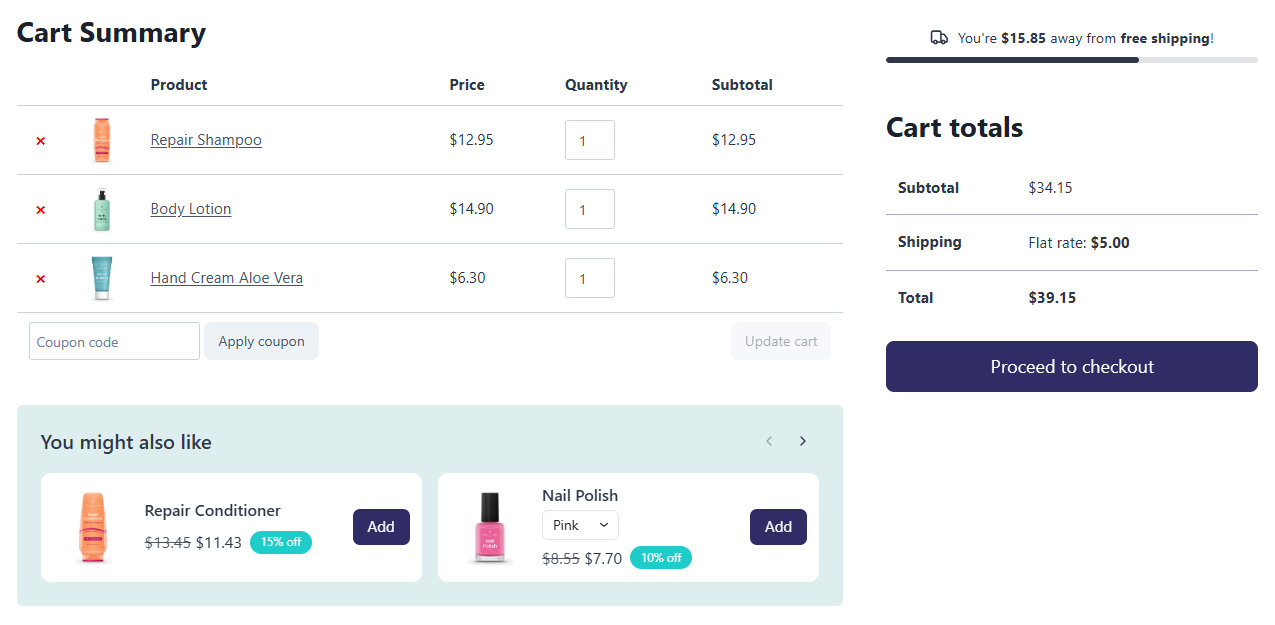
CartNudge is a WooCommerce plugin for cart upsells and cross-sells, shown in the cart, mini cart, and side cart, where customers add them with one click. It also adds a free shipping progress bar that shows customers how much is left until shipping is free. Small nudges at the right moment – and more revenue from the orders you already get.
Key features
Global cart offers
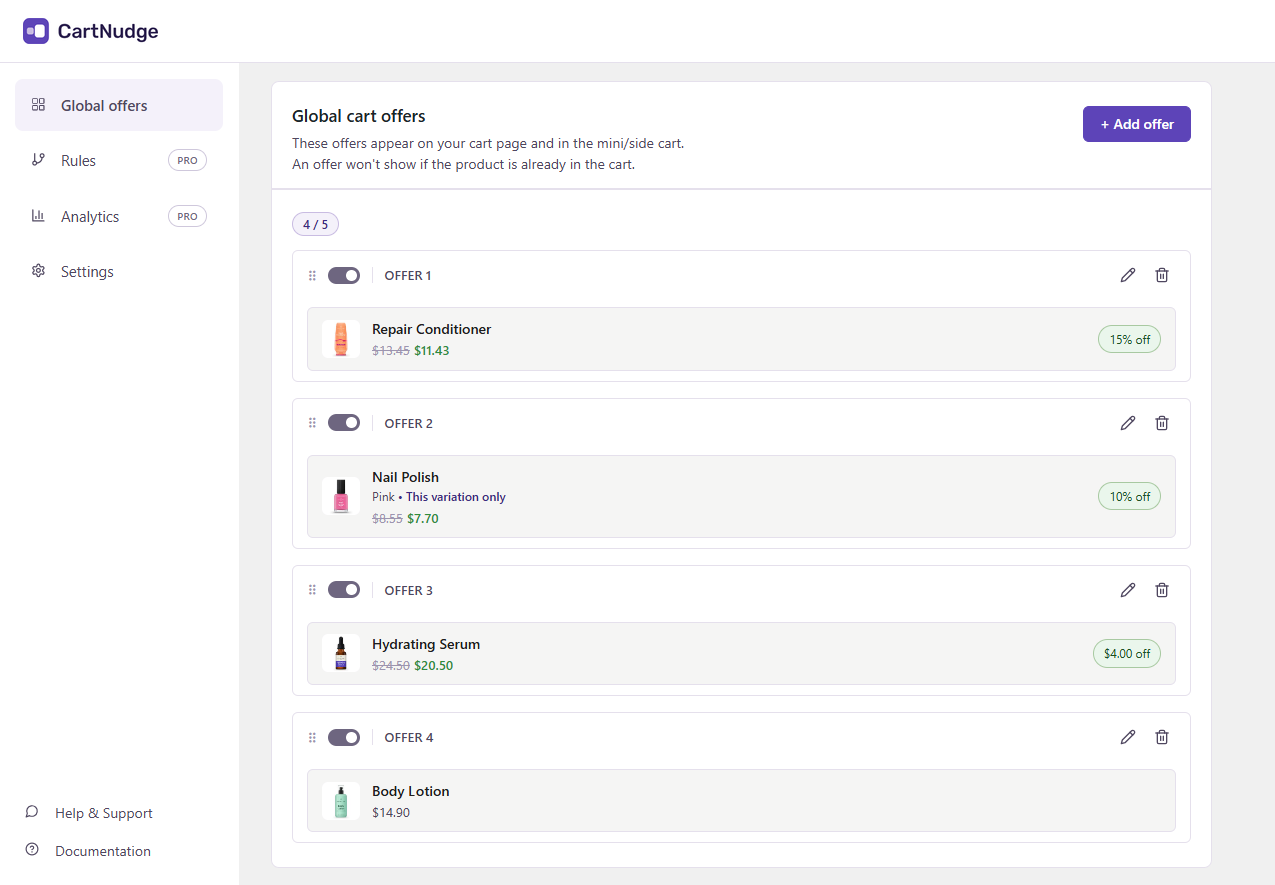
Choose the products you want to offer in the cart. Customers add them without leaving the cart.
- Shown in all carts, whatever the customer is buying.
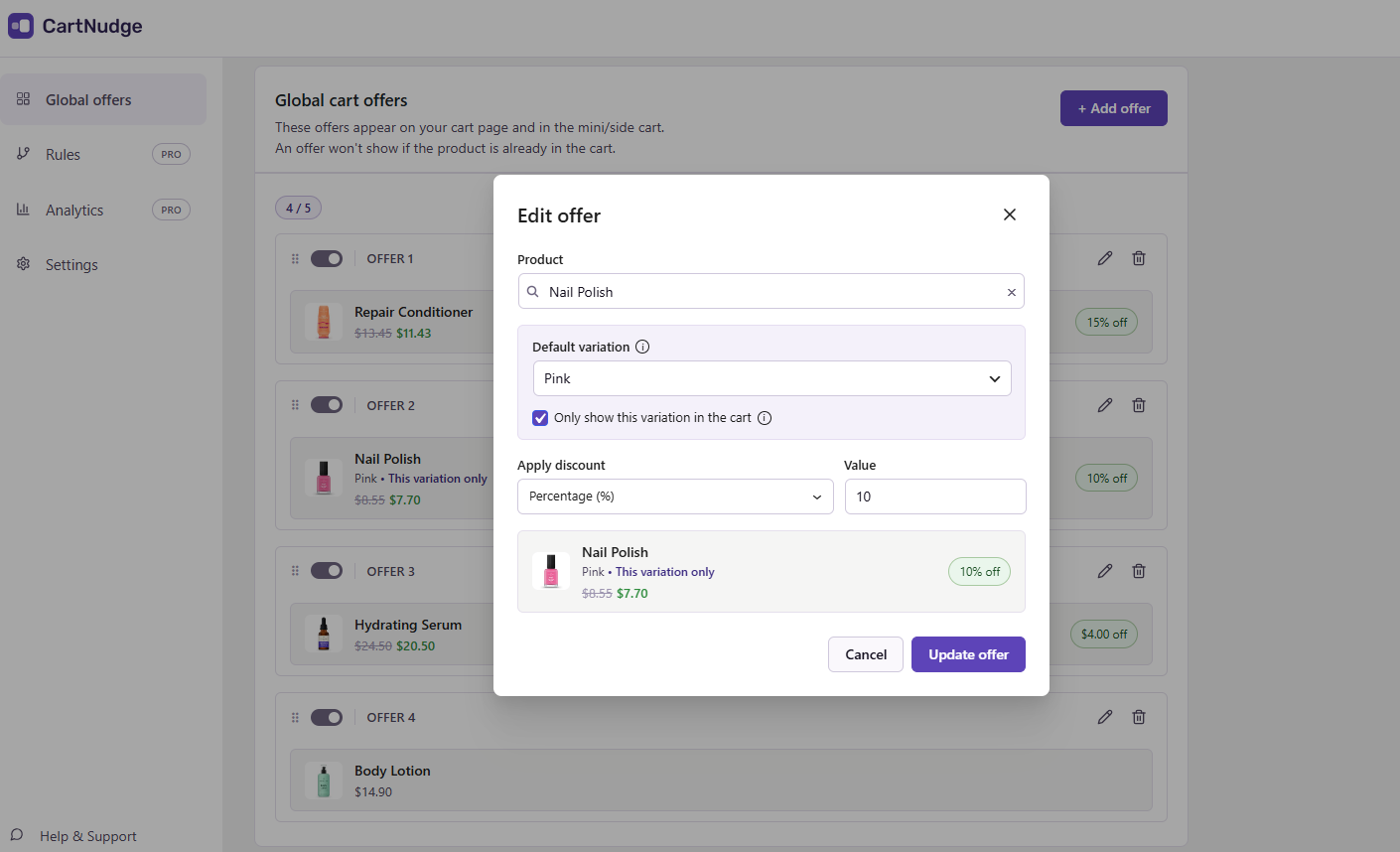
- Optional discount – a percentage or a fixed amount.
- Simple and variable products.
- Products already in the cart or out of stock are hidden automatically.
- If a product is already on sale, the lower price wins.
Free shipping progress bar
Show customers how much more they need to spend to get free shipping. The bar updates as they add or remove products.
- Reads the free shipping threshold directly from your WooCommerce shipping settings, so there is nothing to set twice.
- Takes coupons into account.
- Shows a message once free shipping is reached.
Cart, mini cart, and side cart
Offers and the free shipping bar appear wherever customers review their cart.
- Cart page – the classic cart and the Cart block.
- Mini cart, including the Mini-Cart block.
- Popular side cart plugins, listed in the FAQ.
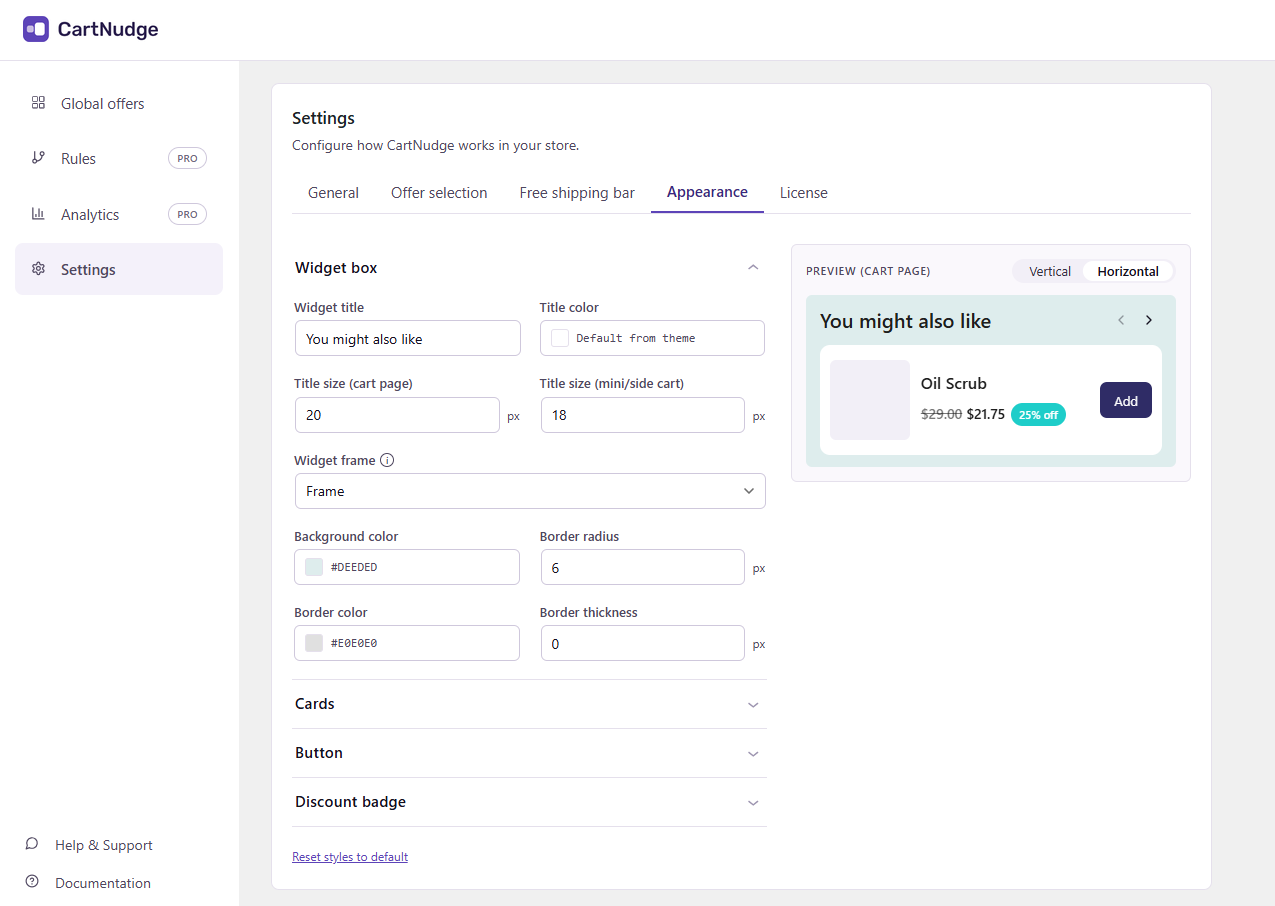
Appearance
Style the widget to match your store’s branding, without writing any code.
- Card layout – horizontal or vertical cards in a slider.
- Your own colors and font sizes.
- Button, border, and discount badge styles.
CartNudge Pro
Global offers are a great start. CartNudge Pro takes it further: it matches offers to what’s in the cart and shows you which ones bring in revenue.
- Cart offer rules – show targeted offers based on the products in the cart, product categories, or cart value.
- Offer selection mode – choose how offers are picked: by priority, best conversion rate, random rotation, or your own order.
- Analytics – track impressions, conversion rate, and revenue for each offer, so you know which ones to keep and which to change. There is no third-party tracking, so data stays in your store’s database.
See features and pricing at cartnudge.co.
External services
CartNudge uses the Freemius SDK for licensing and upgrades to CartNudge Pro. Nothing is sent by default, and your store’s visitors never connect to Freemius. Data is sent only when you:
- Opt in through the “Opt In” link on the Plugins screen: your name, e-mail address, site address, WordPress, PHP and plugin versions, plugin events, and optionally your list of plugins and themes. The opt-in screen shows exactly what is shared.
- Answer the deactivation question, if you submit it: your reason and any comment, sent with the opt-in details above. If you tick “Anonymous feedback”, only the reason and comment are sent, with an anonymous site ID.
- Activate or deactivate a PRO license: your license key, your name and e-mail address, site address, and WordPress, PHP and plugin versions, to verify the license. While a license is active, the site checks it with Freemius periodically. PRO downloads also come from Freemius.
- Buy or renew PRO: the checkout is hosted by Freemius.
Freemius terms of service and privacy policy.
Installation
- Make sure WooCommerce is installed and active.
- In your WordPress admin, go to Plugins → Add Plugin, search for “CartNudge”, then install and activate it.
- Go to CartNudge → Global offers and choose the products you want to offer.
- Go to CartNudge → Settings to turn on the free shipping bar and customize the widget to match your store.
To install manually, download the ZIP file, go to Plugins → Add Plugin → Upload Plugin, choose the file, then install and activate it.
Changelog
1.1.0
- Added: A Get started page that guides new users through the basic setup.
- Improved: Redirect to the plugin page after activation.
- Improved: Renamed the sidebar links to Support and Help guides.
- Fixed: Chrome autofill suggestions no longer cover the results in the product search.
- Improved: Updated the Freemius SDK to 2.13.5.
1.0.1
- Improved: The plugin sidebar now fills the full height of the page.
- Improved: Updated reasons in the deactivation feedback form.
- Improved: Admin notices from WordPress and other plugins are no longer shown on the CartNudge page.
- Improved: The mobile navigation now slides in from the right.
- Improved: Links to cartnudge.co no longer use rel=”noreferrer”.
- Fixed: The admin layout no longer breaks at some screen widths.
- Fixed (Pro): Rule labels now use an en dash between the product and the variation.
1.0.0
- Initial release.
Screenshots

For developers
Is this your plugin? Show off the numbers.
Add a live badge to your site, docs or GitHub README. It updates on its own — no account needed.
Best CartNudge alternatives
All cart plugins →




FAQ
CartNudge: quick answers
Straight answers, pulled from live WordPress.org data.
Source: WordPress.org
Is CartNudge free?
Yes. CartNudge is free to download and use from the official WordPress.org plugin directory.
Is CartNudge safe to use in 2026?
CartNudge is a solid plugin choice in 2026, with a few things worth checking first. Was last updated 4 hours ago, and scores 64/100 on our health check.
How many websites use CartNudge?
CartNudge is active on <10 WordPress websites and has been downloaded 299 times since it launched in October 2026. It was downloaded 301 times in the last 30 days.
Does CartNudge work with WordPress 7.1?
Yes. The developer has tested CartNudge up to WordPress 7.1.5, the latest release. It requires WordPress 6.0 or newer.
What PHP version does CartNudge need?
CartNudge requires PHP 8.0 or higher. Most hosts run PHP 8.x today, so it works on any modern WordPress hosting.
When was CartNudge last updated?
The latest version, 1.1.0, was released on November 19, 2026 (4 hours ago).
Who makes CartNudge?
CartNudge is developed and maintained by Digartis.
What are the best alternatives to CartNudge?
The most popular alternatives to CartNudge are Menu Cart for WooCommerce (70K+ installs), Welcart e-Commerce (10K+ installs) and Simple Shopping Cart (10K+ installs).
Powered by PageForge
One template and a spreadsheet. A real page for every search.
PageForge turns each row of a CSV into a WordPress page with its own title, URL, SEO fields and schema, built on the layout you already designed. Free on WordPress.org.
- CSV and XLSX, plus Google Sheets on Professional and Enterprise
- Its own title, URL, SEO fields and schema for every page
- Works with the block editor, Elementor, Divi and Avada
- Free on WordPress.org, no credit card