



Bulk Deployer
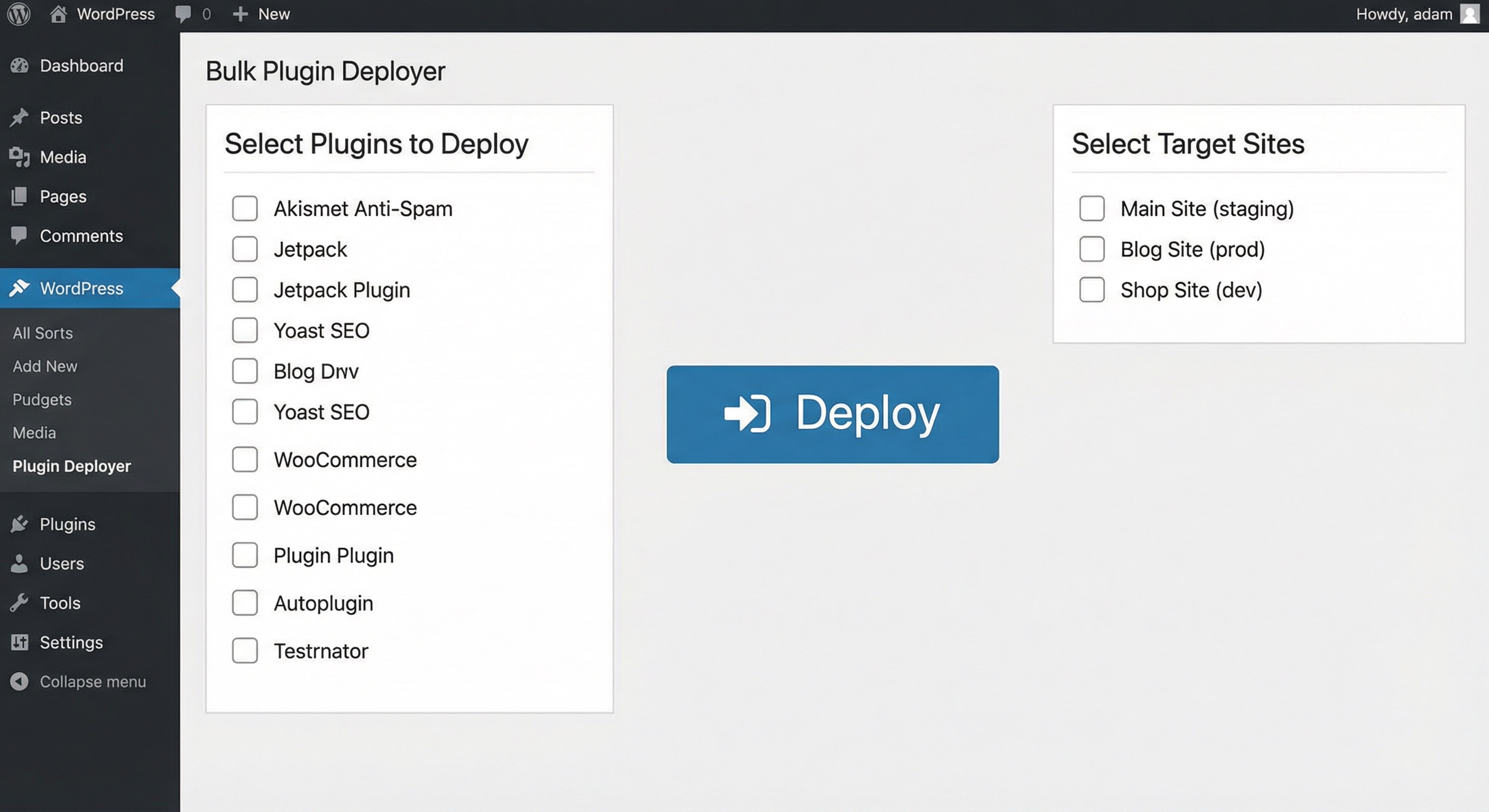
Bulk deploy WordPress plugins to multiple sites via FTP or SFTP. Manage target sites, test connections, and deploy selected plugins in one go.

Consider an alternative
Bulk Deployer shows warning signs in 2026 — compare the alternatives below before installing. It runs on 10+ sites and was last updated 7 months ago, and scores 38/100 on our health check.
- Small user base (10+ active installs)
- Very few reviews so far
- Only tested up to WordPress 6.9 (latest is 7.1)
How does it stack up?
Side-by-side on installs, updates, ratings & support



Daily downloads
Download spikes usually follow a new release — each site that auto-updates counts as a download.
Rankings
Where Bulk Deployer stands todayWordPress.org search rankings
Live position in the plugin search, top 100| Keyword | Position |
|---|---|
| automation | >100 |
| bulk | >100 |
| deploy | >100 |
| ftp | >100 |
| sftp | #53 |
Version adoption
Share of active sites per release.
About Bulk Deployer
From the official readme · v1.0.0Description
Bulk Deployer helps developers and agencies manage multiple WordPress installations by automating plugin deployment to many sites at once. Perfect for WordPress developers, agencies, and site administrators who need to deploy plugins across multiple client sites efficiently.
Key Features
- Bulk Deployment: Deploy multiple plugins to multiple sites simultaneously
- Secure Credential Management: Store FTP/SFTP credentials with encryption
- Connection Testing: Test connections before deployment to avoid failures
- Progress Tracking: Real-time deployment progress with detailed results
- Flexible Protocols: Support for both FTP and SFTP connections
- Clean Interface: Intuitive admin interface for easy management
- Security First: All credentials encrypted using WordPress salts
Use Cases
- WordPress agencies managing multiple client sites
- Developers deploying plugins across development environments
- Site administrators updating plugins on multiple installations
- Automated deployment workflows for plugin updates
Security Features
- Nonces on all AJAX endpoints for CSRF protection
- Capability checks (
manage_options) for access control - Passwords encrypted using WordPress salts
- Secure credential storage and transmission
External Connections
This plugin enables you to deploy WordPress plugins to remote servers via FTP or SFTP. All connections are made exclusively to servers that YOU configure with YOUR own credentials.
What Gets Connected
- Your Own Servers Only: The plugin connects only to FTP/SFTP servers that you manually add in the settings
- User-Controlled Credentials: All server addresses, ports, usernames, and passwords are provided by you
- No Third-Party Services: No data is sent to any service controlled by the plugin author or any third party
What Data Is Sent
- Plugin Files: When you initiate a deployment, the plugin uploads the selected WordPress plugin files to your specified servers
- When: Data is sent only when you manually trigger a deployment action
- Where: Data goes only to the FTP/SFTP servers you have configured
- No Tracking: The plugin does not send any analytics, usage data, or personal information anywhere
Connection Protocols
- FTP: Standard File Transfer Protocol connections to your servers (typically port 21)
- SFTP: Secure File Transfer Protocol over SSH to your servers (typically port 22)
- Both protocols require you to provide server credentials and are used solely to upload plugin files to your own infrastructure
SSH2/SFTP Protocol Usage
This plugin uses the PHP SSH2 extension to establish SFTP connections to your remote servers. When SFTP is selected (port 22), the plugin uses the SSH2 protocol and the ssh2.sftp:// stream wrapper to securely transfer files.
What it is: SSH2 is a PHP extension that implements the SSH2 (Secure Shell) protocol, enabling secure file transfers via SFTP. The ssh2.sftp:// is a PHP stream wrapper that allows file operations over SFTP connections.
What it’s used for: The SSH2 extension is used to establish secure SFTP connections to your configured remote servers for uploading plugin files. This provides encrypted file transfer capabilities.
What data is sent: When you deploy plugins via SFTP, the plugin sends:
* Plugin files (as ZIP archives and extracted files) to your configured SFTP servers
* Authentication credentials (username and password) to establish the SFTP connection
* File transfer commands and directory operations
When: Data is sent only when you manually initiate a deployment action through the plugin’s admin interface.
Where: All connections are made to SFTP servers that you configure with your own server addresses, ports, and credentials. No data is sent to any third-party service.
PHP SSH2 Extension: This plugin requires the PHP SSH2 extension (php-ssh2) to be installed on your server for SFTP functionality. The SSH2 extension is an open-source PHP extension that implements the SSH2 protocol. For more information about the SSH2 protocol, visit: https://www.php.net/manual/en/book.ssh2.php
Privacy: All server credentials are encrypted using WordPress salts before being stored in your database. The plugin does not collect, store, or transmit any data to external services beyond the SFTP connections you configure.
For your security and legal protection, all server credentials are encrypted using WordPress salts before being stored in your database.
Installation
- Upload the
bulk-deployerfolder to/wp-content/plugins/ - Activate the plugin via Plugins → Installed Plugins
- Go to Bulk Deployer in the admin sidebar menu
Frequently asked questions
Does this plugin activate plugins remotely?
No. It uploads plugin files to the target site’s wp-content/plugins directory. You can then activate the plugins on the target site manually or through your site management tools.
What if my host blocks FTP?
Use SFTP by setting the port to 22. Most modern hosting providers support SFTP which is more secure than FTP.
Are passwords stored securely?
Yes. All passwords are encrypted using WordPress salts before being stored in the database. The encryption is irreversible and follows WordPress security best practices.
Can I deploy to sites with different WordPress versions?
Yes, as long as the target sites meet the minimum requirements (WordPress 5.0+ and PHP 7.4+). The plugin will upload files regardless of the WordPress version.
What happens if a deployment fails?
The plugin provides detailed error messages for each failed deployment. You can retry individual sites or troubleshoot connection issues before attempting again.
Is there a limit to the number of sites I can manage?
No, there’s no hard limit on the number of sites you can add. However, performance may vary based on your server resources and the number of simultaneous deployments.
Can I schedule automatic deployments?
Currently, deployments are manual. Future versions may include scheduling capabilities.
Does this work with multisite installations?
Yes, you can deploy plugins to individual sites within a multisite network, but you’ll need to add each site separately with its own credentials.
Screenshots
For developers
Is this your plugin? Show off the numbers.
Add a live badge to your site, docs or GitHub README. It updates on its own — no account needed.
Best Bulk Deployer alternatives
All automation plugins →





FAQ
Bulk Deployer: quick answers
Straight answers, pulled from live WordPress.org data.
Live data from WordPress.org · checked Oct 2, 2026
Is Bulk Deployer free?
Yes. Bulk Deployer is free to download and use from the official WordPress.org plugin directory.
Is Bulk Deployer safe to use in 2026?
Bulk Deployer shows warning signs in 2026 — compare the alternatives below before installing. It runs on 10+ sites and was last updated 7 months ago, and scores 38/100 on our health check.
How many websites use Bulk Deployer?
Bulk Deployer is active on 10+ WordPress websites and has been downloaded 448 times since it launched in February 2026. It was downloaded 60 times in the last 30 days.
Does Bulk Deployer work with WordPress 7.1?
Bulk Deployer is officially tested up to WordPress 6.9.9, while the latest release is 7.1.2. It may still work, but try it on a staging site first.
What PHP version does Bulk Deployer need?
Bulk Deployer requires PHP 7.4 or higher. Most hosts run PHP 8.x today, so it works on any modern WordPress hosting.
When was Bulk Deployer last updated?
The latest version, 1.0.0, was released on February 22, 2026 (7 months ago).
Who makes Bulk Deployer?
Bulk Deployer is developed and maintained by Hayan.
What are the best alternatives to Bulk Deployer?
The most popular alternatives to Bulk Deployer are OttoKit: All-in-One Automat… (90K+ installs), Zapier for WordPress (50K+ installs) and Uncanny Automator (40K+ installs).
Powered by PageForge
Want thousands of pages that rank like these? Build them in an afternoon.
This directory runs on the same engine as PageForge. Turn any spreadsheet, CSV or API into thousands of fast, SEO-ready WordPress pages — with schema, internal links and AI-written copy baked in.
- CSV, Google Sheets & API data sources
- AI content, schema & internal links per page
- Works with Elementor, Gutenberg, Yoast & Rank Math
- Free on WordPress.org — no credit card


