



Autocomplete Google places
Add Google Places address autocomplete to your address fields and auto-fill city, state and postcode.

Solid choice
Autocomplete Google places is a solid plugin choice in 2026, with a few things worth checking first. It runs on 100+ sites, is rated 5/5 and was last updated 4 weeks ago, and scores 70/100 on our health check.
- Actively developed — last update 4 weeks ago
- Small user base (100+ active installs)
- Very few reviews so far
How does it stack up?
Side-by-side on installs, updates, ratings & support


Daily downloads
Download spikes usually follow a new release — each site that auto-updates counts as a download.
Rankings
Where Autocomplete Google places stands todayWordPress.org search rankings
Live position in the plugin search, top 100| Keyword | Position |
|---|---|
| Address AutoComplete | #9 |
| autocomplete | #7 |
| Autocomplete Google Address | #6 |
| google address autocomplete | #7 |
Version adoption
Share of active sites per release.
Rating breakdown
★★★★★★★★★★ 5 from 2 reviews
About Autocomplete Google places
From the official readme · v3.3.1Description
This plugin enables Google Places address auto-completion on text input fields (order, checkout and registration pages). When a user starts typing an address and picks a suggestion, the plugin auto-fills the street, city, state, postcode and country fields. You only need a valid Google Places API key.
The plugin targets the standard WooCommerce-style billing and shipping address fields (for example billing_address_1 and shipping_address_1).
As of version 3.0.0 the front-end script is written in modern, dependency-free vanilla JavaScript (no jQuery required) and the bundled CMB2 settings library has been updated for security.
External services
This plugin connects to the Google Maps JavaScript API (Places library) to provide address autocomplete and suggestions. This is required for the plugin to function.
When a visitor types in an address field, the text entered is sent to Google to return address predictions, and the selected address details are returned to fill the form. The plugin loads the Google Maps script from Google’s servers using the API key you configure on the settings page, along with your site’s language and region.
No data is sent until a visitor interacts with an address field on a page that contains a supported field. You must provide your own Google API key.
- Service provider: Google Maps Platform
- Terms of Service: https://cloud.google.com/maps-platform/terms
- Privacy Policy: https://policies.google.com/privacy
Installation
- Upload the plugin files to the
/wp-content/plugins/autocomplete-google-placesdirectory, or install the plugin through the WordPress Plugins screen directly. - Activate the plugin through the Plugins screen in WordPress.
- Open the Google Places admin menu (location-pin icon) and enter your Google Places API key.
- Save. Autocomplete is now active on pages that contain the supported address fields.
Frequently asked questions
Is this a paid plugin?
No, it is completely free.
Do I need a Google API key?
Yes. As of 3.0.0 there is no built-in fallback key. Create a key in the Google Cloud Console with the Maps JavaScript API and the Places library enabled, then enter it on the Google Places settings page.
Does it still require jQuery?
No. As of 3.0.0 the front-end script is pure vanilla JavaScript and no longer enqueues jQuery.
Which fields are supported?
The standard WooCommerce-style billing and shipping address fields. When an address is selected, address line 1, city, state, postcode and country are filled automatically.
Can I use it on custom form fields?
Yes. In the “Custom fields (Form ID / class)” setting you can target address fields on most forms (Contact Form 7, Gravity Forms, Elementor, and other standard HTML forms) by ID and/or CSS class. Fields added dynamically (Ajax, modals, multi-step forms) are detected automatically.
It does not work on a field built with React or Vue. Why?
Some plugins and themes build their address fields with a JavaScript framework such as React or Vue, where the field value is fully controlled by the framework. On those fields, no external autocomplete (including this one) can attach reliably, because the framework re-renders the input and overrides external changes. This is a limitation of how those frameworks work, not of this plugin. Standard HTML fields are fully supported. Improved support for framework-based fields is planned for a future release.
Changelog
Requires PHP 7.4+ (bundles CMB2 2.12.0). You must enter your own Google Places API key on the settings page; the old hardcoded fallback key has been removed. If you used a publicly exposed key from an older version, rotate or revoke it in Google Cloud.
3.3.1
- Update – Compatibility with latest WordPress & WooCommerce versions
3.3.0
- New: custom field targeting now works with dynamically added fields. A MutationObserver detects address inputs that appear after page load (React/Ajax modals, multi-step forms, dynamically rendered checkouts) and attaches autocomplete to them automatically.
- Improved: auto-filled values are now written in a way that React and other controlled-input frameworks register correctly, so the filled address is no longer reverted on the next render.
3.2.0
- New: multilingual support. The autocomplete now follows your WordPress site language and region (e.g. fr_FR), so suggestions and the predictions UI appear in the visitor’s locale.
- New: “Suggestion type” setting. Choose what Google suggests — street addresses (default), addresses & areas, cities only, regions, or businesses & places.
- New: “Custom fields (Form ID / class)” option. Target address inputs on any form (Contact Form 7, Gravity Forms, custom forms) by ID and/or CSS class, separated by commas. When a suggestion is selected, the matched field is filled with the full street address and nearby city and postcode fields are auto-filled when present. This restores and improves the old “Form ID” targeting from the 1.x line.
3.1.0
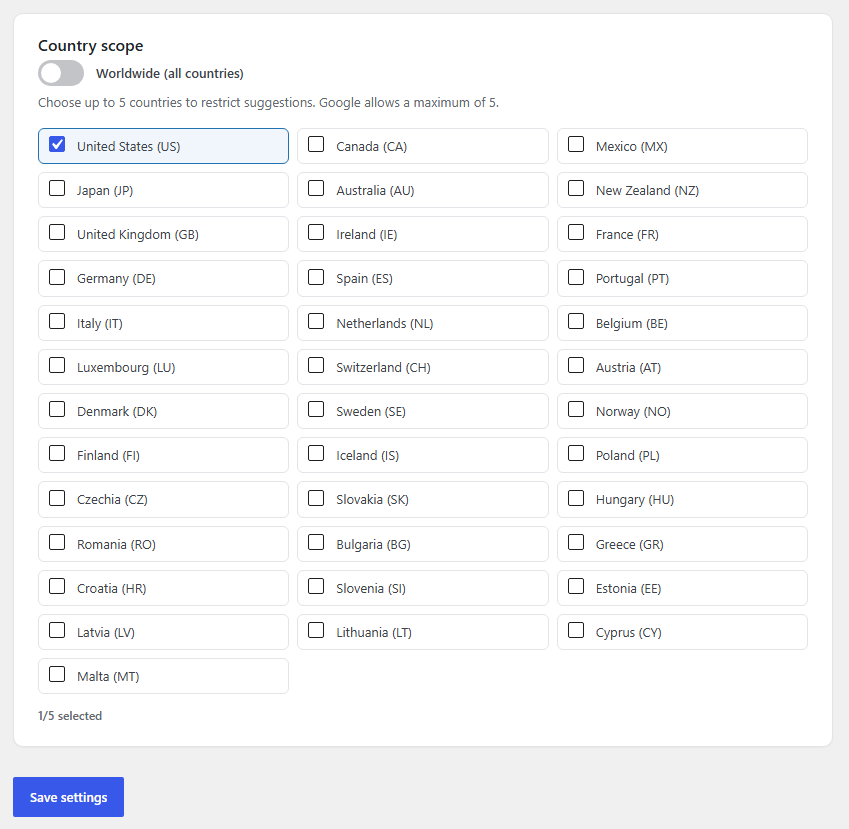
- New: choose the autocomplete country scope from the admin settings. Default is Worldwide (works in all of Europe, USA, Canada, Japan and everywhere else); optionally restrict to up to 5 countries (Google’s maximum).
- New: redesigned admin settings screen built with React (WordPress’ bundled wp.element), including a one-click “Test API key” button that verifies your Google Places key live.
- Changed: replaced the bundled CMB2 library with a lightweight custom settings page (saved via the WordPress Settings API). This removes the vendored library entirely.
3.0.0
- Major release.
- Rewrote the front-end script in modern vanilla JavaScript (ES6); removed the jQuery dependency from the script and its enqueue.
- Security: upgraded the bundled CMB2 library from 2.10.1 to 2.12.0 (addresses CVE-2024-1792) and removed the dead root CMB2 loader.
- Security: removed the hardcoded Google Maps API key fallback; the Maps script now loads only when an API key is configured.
- Security: the Google Maps URL is now built with rawurlencode() and escaped with esc_url_raw().
- Hardening: moved the direct-access guard ahead of all includes, removed unused example files, and added a directory-listing guard to /js.
- Added uninstall cleanup of stored plugin options.
- Compatibility: raised the minimum PHP requirement to 7.4 (required by CMB2 2.12.0); updated “Tested up to”.
Screenshots

For developers
Is this your plugin? Show off the numbers.
Add a live badge to your site, docs or GitHub README. It updates on its own — no account needed.
Best Autocomplete Google places alternatives
All Address AutoComplete plugins →



FAQ
Autocomplete Google places: quick answers
Straight answers, pulled from live WordPress.org data.
Live data from WordPress.org · checked Sep 29, 2026
Is Autocomplete Google places free?
Yes. Autocomplete Google places is free to download and use from the official WordPress.org plugin directory.
Is Autocomplete Google places safe to use in 2026?
Autocomplete Google places is a solid plugin choice in 2026, with a few things worth checking first. It runs on 100+ sites, is rated 5/5 and was last updated 4 weeks ago, and scores 70/100 on our health check.
How many websites use Autocomplete Google places?
Autocomplete Google places is active on 100+ WordPress websites and has been downloaded 2,727 times since it launched in April 2022. It was downloaded 321 times in the last 30 days.
Does Autocomplete Google places work with WordPress 7.1?
Autocomplete Google places is officially tested up to WordPress 7.0.6, while the latest release is 7.1.2. It may still work, but try it on a staging site first.
What PHP version does Autocomplete Google places need?
Autocomplete Google places requires PHP 7.4 or higher. Most hosts run PHP 8.x today, so it works on any modern WordPress hosting.
When was Autocomplete Google places last updated?
The latest version, 3.3.1, was released on August 30, 2026 (4 weeks ago).
Who makes Autocomplete Google places?
Autocomplete Google places is developed and maintained by Kais Chrouda.
What are the best alternatives to Autocomplete Google places?
The most popular alternatives to Autocomplete Google places are Address Validation and Auto… (900+ installs), UK Address Postcode Validat… (700+ installs) and ELEX WooCommerce Address Va… (700+ installs).
Powered by PageForge
Want thousands of pages that rank like these? Build them in an afternoon.
This directory runs on the same engine as PageForge. Turn any spreadsheet, CSV or API into thousands of fast, SEO-ready WordPress pages — with schema, internal links and AI-written copy baked in.
- CSV, Google Sheets & API data sources
- AI content, schema & internal links per page
- Works with Elementor, Gutenberg, Yoast & Rank Math
- Free on WordPress.org — no credit card


