


AutoComplete Address Checkout For WooCommerce
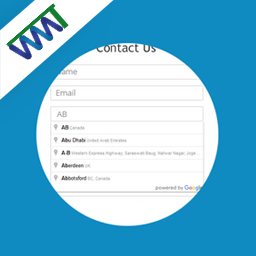
AutoComplete Address Checkout For WooCommerce integrates Google Places API into your WooCommerce checkout to deliver instant address suggestions as customers type. Billing and shipping address fields are auto-filled in…

Use with caution
AutoComplete Address Checkout F… works, but test it on a staging site before relying on it in 2026. It runs on 100+ sites and was last updated 2 months ago, and scores 48/100 on our health check.
- Small user base (100+ active installs)
- Very few reviews so far
How does it stack up?
Side-by-side on installs, updates, ratings & support


Daily downloads
Download spikes usually follow a new release — each site that auto-updates counts as a download.
Rankings
Where AutoComplete Address Checko… stands todayWordPress.org search rankings
Live position in the plugin search, top 100| Keyword | Position |
|---|---|
| Address AutoComplete | #28 |
| address autofill | #12 |
| checkout | >100 |
| google places | >100 |
| woocommerce | >100 |
Version adoption
Share of active sites per release.
About AutoComplete Address Checkout For WooCo…
From the official readme · v1.0Description
AutoComplete Address Checkout For WooCommerce integrates Google Places API into your WooCommerce checkout to deliver instant address suggestions as customers type. Billing and shipping address fields are auto-filled in one click — reducing cart abandonment, eliminating typos, and improving the overall checkout experience.
Whether you’re running a classic WooCommerce checkout or the new Gutenberg block-based checkout, this plugin works seamlessly with both.
🔗 Documentation | Pro Version | Support
✅ Free Features
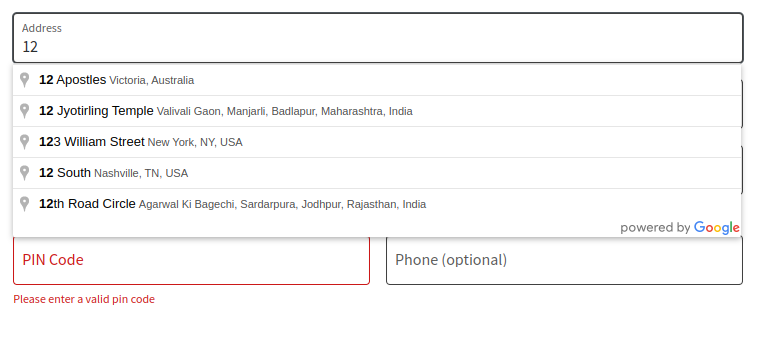
- Google Address Autocomplete — Real-time address suggestions powered by Google Places API
- Auto-fill Address Fields — Instantly fills street, city, postcode, state, and country
- Address Line 2 Support — Fills apartment, suite, unit, neighborhood fields automatically
- Classic & Block Checkout Support — Works with both WooCommerce classic and Gutenberg block checkout
- Billing & Shipping Autocomplete — Separate autocomplete for both billing and shipping address forms
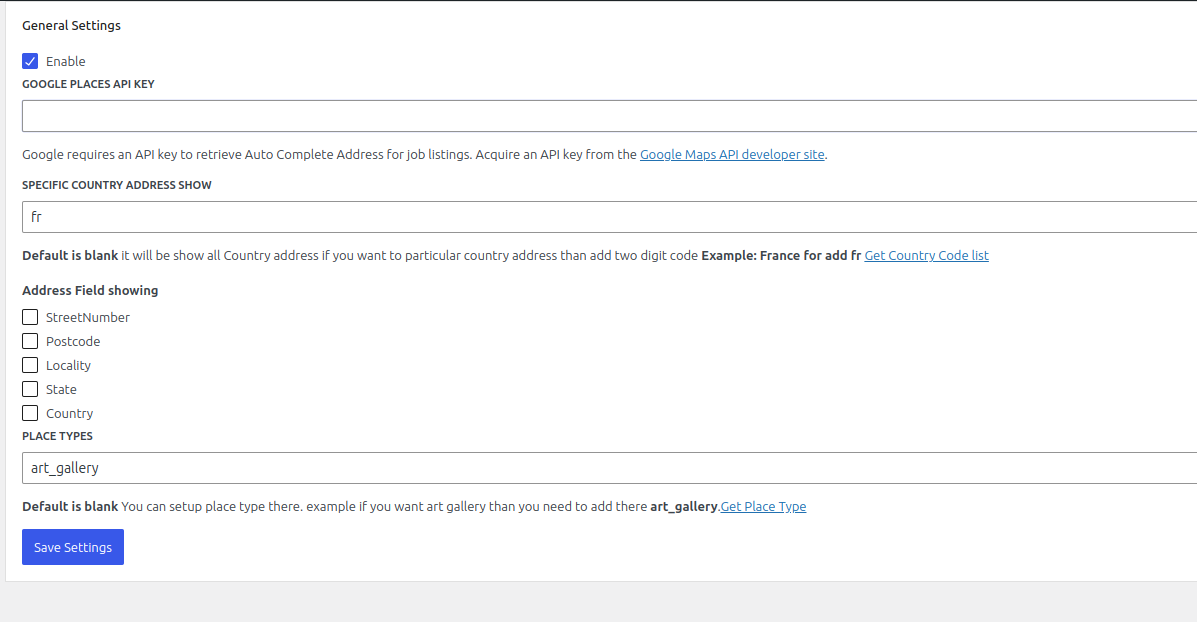
- Customizable Address Fields — Choose which fields to show or hide (street number, postcode, locality, state, country)
- Place Types Support — Filter suggestions by location type (addresses, cities, regions, establishments)
- Custom Placeholder Text — Set your own search field placeholder text
- One-Click Installation — Simple setup, no coding required
🔒 Pro Features
- Country-Specific Address Filtering — Restrict autocomplete suggestions to specific countries (e.g. IN, US, GB, AU)
- Up to 15 Country Restrictions — Limit results to your target markets
- Priority Support — Get help directly from the development team
Why Use AutoComplete Address Checkout For WooCommerce?
Slow and error-prone address entry is one of the top reasons customers abandon WooCommerce checkout. This plugin solves that by:
- Reducing checkout time — Customers find their address in seconds
- Eliminating typos — Google-verified addresses mean fewer failed deliveries
- Improving mobile UX — Autocomplete is especially powerful on mobile keyboards
- Supporting global stores — Works with addresses worldwide
How It Works
- Install and activate the plugin
- Enter your Google Maps API key in the settings
- The autocomplete search field automatically appears above the address fields at checkout
- Customers start typing their address and select from Google’s suggestions
- All address fields (street, city, postcode, state, country) are filled instantly
External Services
This plugin connects to the Google Maps JavaScript API to provide address autocomplete functionality.
- What data is sent: Partial address text typed by the customer is sent to Google servers to retrieve autocomplete suggestions. No personal or payment data is transmitted.
- When data is sent: Only when a customer begins typing in the address search field at checkout.
- Google Terms of Service: https://cloud.google.com/maps-platform/terms
- Google Privacy Policy: https://policies.google.com/privacy
Installation
- Upload the plugin folder to
/wp-content/plugins/or install directly via the WordPress plugin directory - Activate the plugin through the Plugins menu in WordPress
- Go to WooCommerce → AutoComplete Address settings
- Enter your Google Maps API Key (requires Places API enabled in Google Cloud Console)
- Configure your preferred address fields and options
- Save settings — autocomplete is now live on your checkout page
Getting a Google API Key:
- Go to Google Cloud Console
- Create a new project or select an existing one
- Enable Maps JavaScript API and Places API
- Create an API key under Credentials
- Paste the key into the plugin settings
Frequently asked questions
Do I need a Google API key?
Yes. A valid Google Maps API key with Places API and Maps JavaScript API enabled is required. You can get one free from Google Cloud Console.
Does this work with the WooCommerce block checkout?
Yes. The plugin fully supports both the classic WooCommerce checkout and the new Gutenberg block-based checkout introduced in WooCommerce 8.x.
Does autocomplete work for both billing and shipping addresses?
Yes. Separate autocomplete widgets are added for both billing and shipping address fields automatically.
Can I restrict autocomplete to specific countries?
Country-specific address filtering is available in the Pro version. It allows you to restrict suggestions to up to 15 countries by their 2-letter ISO country code (e.g. IN, US, GB).
Does this plugin store any customer data?
No. The plugin does not store or log any customer address data. Only partial address text is sent to Google for autocomplete suggestions.
Is user consent required for GDPR?
The data transmitted is minimal and strictly necessary for checkout functionality. We recommend mentioning the use of Google Maps in your store’s privacy policy as best practice.
What place types are supported?
You can filter results by: address (precise addresses), geocode (all geocoding results), establishment (businesses), (regions) (areas and regions), or (cities) (cities only).
Where can I get support?
Free support is available via the WordPress.org support forum. Pro users get priority support at codesmade.com/contact-us.
Changelog
Initial release. Install to enable Google Places address autocomplete on your WooCommerce checkout.
1.0
- Initial release
- Google Places address autocomplete for WooCommerce checkout
- Support for classic and block checkout
- Billing and shipping address autocomplete
- Customizable address fields
- Place types filtering
Screenshots
For developers
Is this your plugin? Show off the numbers.
Add a live badge to your site, docs or GitHub README. It updates on its own — no account needed.
Best AutoComplete Address Checkout… alternatives
All Address AutoComplete plugins →



FAQ
AutoComplete Address Checkout For W…: quick answers
Straight answers, pulled from live WordPress.org data.
Live data from WordPress.org · checked Sep 30, 2026
Is AutoComplete Address Checkout F… free?
Yes. AutoComplete Address Checkout F… is free to download and use from the official WordPress.org plugin directory.
Is AutoComplete Address Checkout F… safe to use in 2026?
AutoComplete Address Checkout F… works, but test it on a staging site before relying on it in 2026. It runs on 100+ sites and was last updated 2 months ago, and scores 48/100 on our health check.
How many websites use AutoComplete Address Checkout F…?
AutoComplete Address Checkout F… is active on 100+ WordPress websites and has been downloaded 1,947 times since it launched in January 2025. It was downloaded 215 times in the last 30 days.
Does AutoComplete Address Checkout F… work with WordPress 7.1?
AutoComplete Address Checkout F… is officially tested up to WordPress 7.0.6, while the latest release is 7.1.2. It may still work, but try it on a staging site first.
What PHP version does AutoComplete Address Checkout F… need?
AutoComplete Address Checkout F… requires PHP 7.4 or higher. Most hosts run PHP 8.x today, so it works on any modern WordPress hosting.
When was AutoComplete Address Checkout F… last updated?
The latest version, 1.0, was released on July 19, 2026 (2 months ago).
Who makes AutoComplete Address Checkout F…?
AutoComplete Address Checkout F… is developed and maintained by theme funda.
What are the best alternatives to AutoComplete Address Checkout F…?
The most popular alternatives to AutoComplete Address Checkout F… are Address Autocomplete Anythi… (900+ installs), Address Validation and Auto… (900+ installs) and UK Address Postcode Validat… (700+ installs).
Powered by PageForge
Want thousands of pages that rank like these? Build them in an afternoon.
This directory runs on the same engine as PageForge. Turn any spreadsheet, CSV or API into thousands of fast, SEO-ready WordPress pages — with schema, internal links and AI-written copy baked in.
- CSV, Google Sheets & API data sources
- AI content, schema & internal links per page
- Works with Elementor, Gutenberg, Yoast & Rank Math
- Free on WordPress.org — no credit card


