



Address Validation and Autocomplete for WooCommerce | Addressfinder
Prevent failed deliveries and streamline checkout with verified address autocomplete for Australian and New Zealand WooCommerce stores.

Solid choice
Address Validation and Autocomp… is a solid plugin choice in 2026, with a few things worth checking first. It runs on 900+ sites, is rated 4.3/5 and was last updated 1 week ago, and scores 79/100 on our health check.
- Actively developed — last update 1 week ago
- Tested with the latest WordPress (7.1)
- Momentum — downloads up 174.4% vs the previous 30 days
- Small user base (900+ active installs)
How does it stack up?
Side-by-side on installs, updates, ratings & support


Daily downloads
Download spikes usually follow a new release — each site that auto-updates counts as a download.
Rankings
Where Address Validation and Auto… stands todayWordPress.org search rankings
Live position in the plugin search, top 100| Keyword | Position |
|---|---|
| Address AutoComplete | #8 |
| address validation | #4 |
| australia | #20 |
| new zealand | #4 |
| woocommerce | >100 |
Version adoption
Share of active sites per release.
Rating breakdown
★★★★★★★★★★ 4.3 from 6 reviews
About Address Validation and Autocomplete for…
From the official readme · v1.7.17Description
Prevent costly shipping errors and failed deliveries with Addressfinder; Australia and New Zealand’s leading address autocomplete and verification provider.
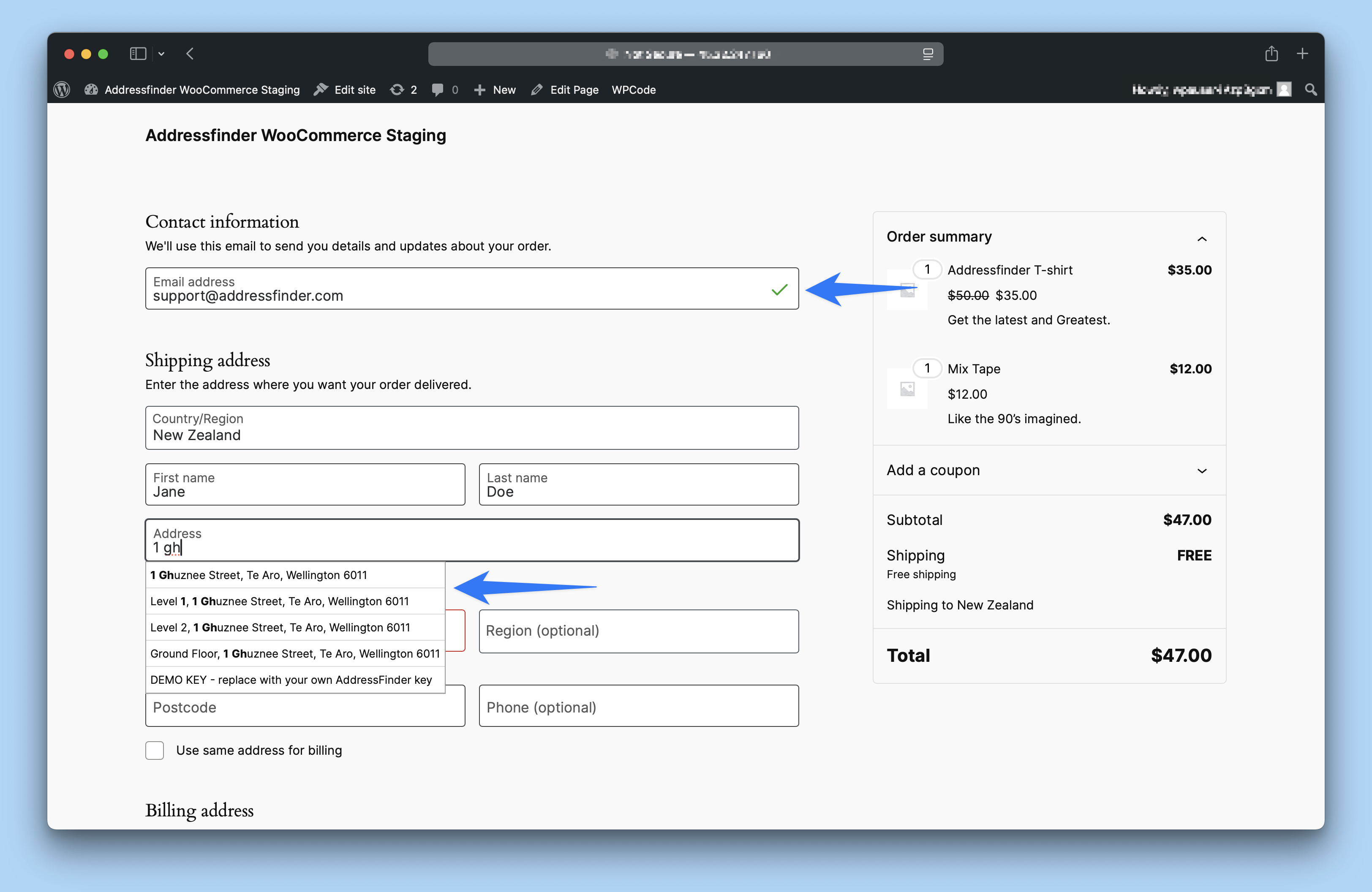
The Addressfinder plugin for WooCommerce adds verified address autocomplete capability to the shipping and billing address fields of your online store.
The plugin suggests verified addresses to your customers as they type and auto-fills the correct address elements into the appropriate fields on selection.
The addresses are validated before customers place their order, ensuring accurate address entry, a streamlined purchase process, and reduced delivery issues.
“The only ones [returns] I’ve been getting back now are unclaimed, actual returns, or Auspost ones that have been damaged. Best widget so far” – Sanity Music Stores
Get verified addresses
No more mistakes. The Addressfinder address database is the most comprehensive address dataset in Australia and New Zealand with support for international addresses in over 15 countries.
Other services such as Google autocomplete just suggests addresses and often don’t provide accurate PO Box or unit and level number addresses which make up ~37% of all Australian postal addresses. Addressfinder makes it easy, handling local complexities and only displaying addresses that local carriers such as Australia Post and NZ Post accept – so every package gets delivered.
Access the latest addresses
The Addressfinder address database is refreshed monthly so you can rely on the data being available and up to date. Our extensive data sources provide us with the freshest data so customers living in new developments or multi-dwelling apartments will still be able to validate their addresses.
Built-in email and phone verification
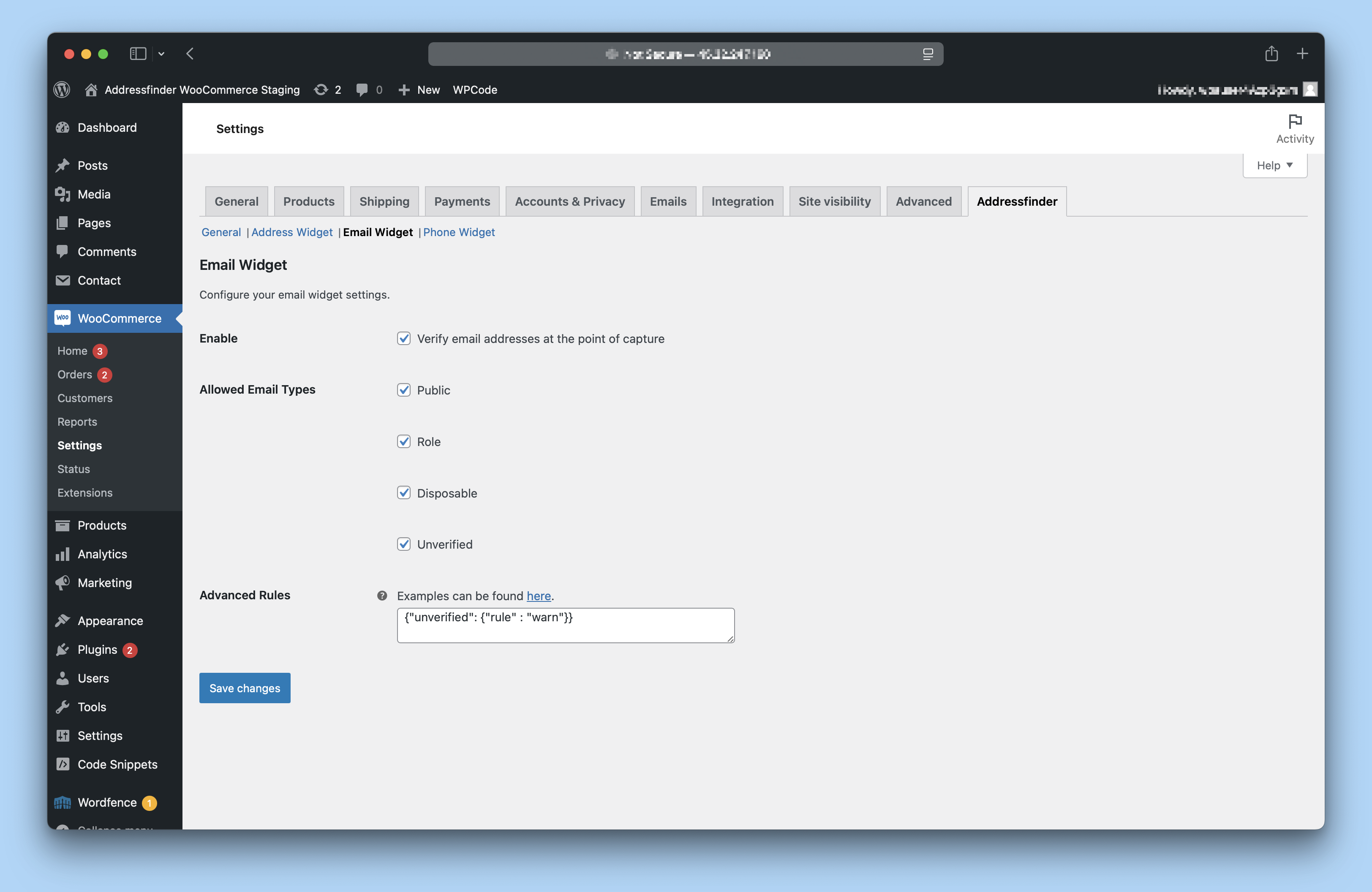
Don’t let a customer slip between the cracks due to a spelling error. Our email and phone verification widgets allow you to collect valid data in the format you require, maintaining your data quality and sender reputation.
Simple visual cues ensure your customers provide only valid contact information while they are actively engaged on your website.
No programming required
This plugin is easy to set up. It does not require any coding experience and you can have it working and validating addresses in minutes.
Reduce time to checkout
Our address autocomplete greatly reduces data entry time and potential for errors. Users can be sure their address is correct and move through to the checkout quickly and with confidence.
Enhance mobile UX
User experience is critical to conversion rate. By using Addressfinder, your checkout experience is made simple for users inputting fields, greatly reducing required keystrokes on small mobile keyboards. Our plugin is responsive and friendly across popular devices and browsers.
Dedicated support
Customer success is core to what we do. Our support team are here to help you through integration and any other questions you may have about our service.
Supported Countries
- Australia
- New Zealand
- Belgium
- Canada
- Czechia
- Denmark
- France
- Germany
- Ireland
- Netherlands
- Portugal
- Singapore
- Spain
- Sweden
- United Kingdom
- United States
Pricing
No setup fee, no credit card or commitment required. Cancel anytime.
We have a variety of plan sizes to suit any retailer. Trial Addressfinder for free then upgrade to a paid plan for ongoing access to the service and additional features.
With Agile and Business plans, you can tailor the features your organisation needs – take advantage of bulk verification, direct API usage, and upgraded support.
View our full suite of plans here https://addressfinder.com/pricing
Demo and Installation
Follow the instructions below to configure Addressfinder for WooCommerce and start verifying data in minutes.
Watch our WooCommerce integration guide for a step-by-step installation video.
Learn more about Addressfinder’s address, email and phone verification services at addressfinder.com.
What do our users think of Addressfinder?
See how others have integrated with Addressfinder within our case studies –
“The only ones [returns] I’ve been getting back now are unclaimed, actual returns, or Auspost ones that have been damaged. Best widget so far” – Sanity Music Stores
Compatibility
WooCommerce Addressfinder is compatible with WooCommerce v3.0 and above
WooCommerce Addressfinder requires:
- WordPress v4.1 or higher
- WooCommerce v2.3 or higher
Contributors
- Jordan Carter (https://github.com/jordandcarter)
- Andrew Pett (https://github.com/aspett)
- Nigel Ramsay (https://github.com/nigelramsay)
- Fiona Sanggang (https://github.com/fsanggang)
- Ross Jourdain (https://github.com/rossjourdain)
- Shaun O’Connell (https://github.com/ndorfin)
- Kate Norquay (https://github.com/katenorquay)
- Daniel Raats (https://github.com/DanielRaats)
Installation
Follow the instructions below to configure Addressfinder for WooCommerce and start verifying data in minutes.
You can also go to our WooCommerce integration guide for a step-by-step installation video.
Install
-
In the WordPress Admin Menu, go to Plugins > Add New Plugin.
-
Search for
woocommerce-addressfinderand click Install Now. -
Wait for the installation to complete, then click Activate.
Configure
-
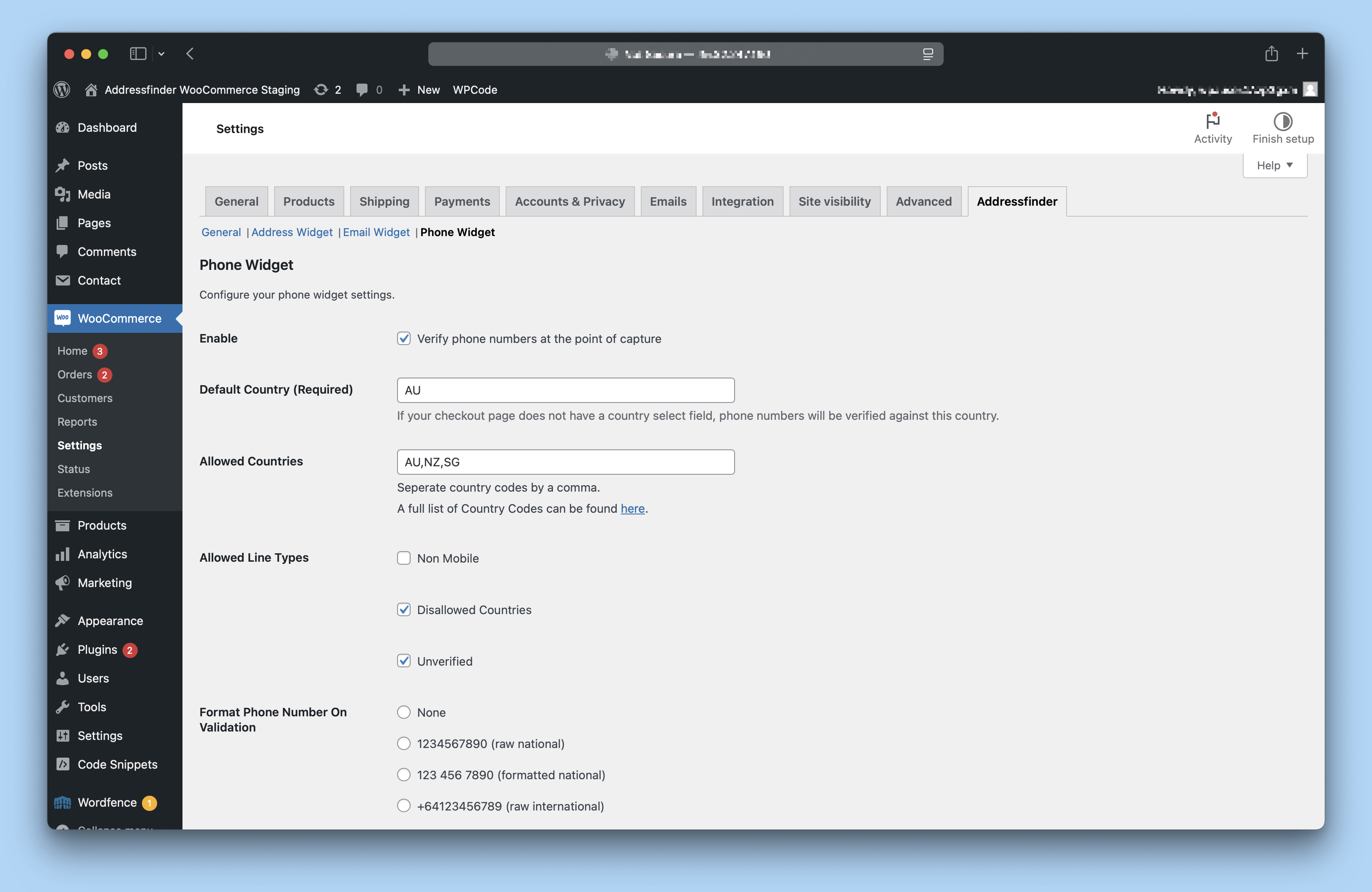
In the WordPress Admin Menu, go to WooCommerce > Settings > Addressfinder.
-
Paste your Addressfinder license key and click Save changes.
-
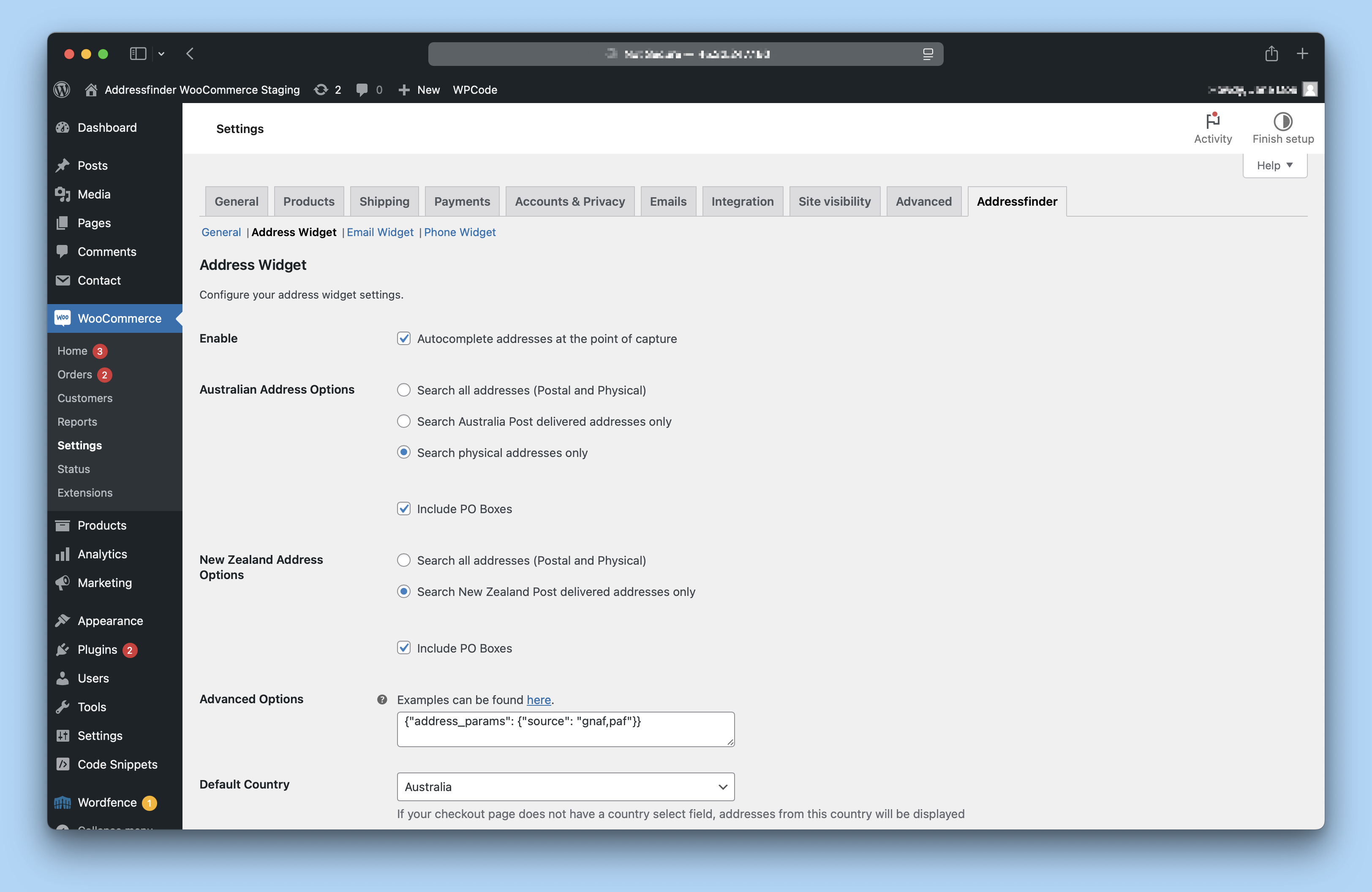
(Optional) Adjust the default behaviour of each widget in the corresponding tab.
To get a license key, sign up for a free trial.
Already have a subscription? Find your key on the Addressfinder portal.
Visit our Documentation site to learn more about Addressfinder for WooCommerce.
Frequently asked questions
What is Addressfinder for WooCommerce?
The WooCommerce plugin provides the following features: Addressfinder for WooCommerce lets you take advantage of Addressfinder’s data verification features directly inside your WooCommerce store. After installing the plugin, you can enable Address Autocomplete in your checkout and verify your customer’s addresses, emails, and phone numbers. * Real-time address validation and autocomplete at checkout page * Validates against Australia Post, NZ Post and more, ensuring accurate addresses * Leverage Addressfinder’s deep ANZ address expertise in your checkout
Can I try it first? How much does it cost?
Yes. We offer a free trial with full access to Addressfinder services. Learn more During the trial you can upgrade to a monthly or annual subscription at any point.
What if I have more questions?
Try searching for what you need in our Documentation site. If you don’t find what you’re looking for, you can get help here.
Changelog
1.7.17
- Confirm compatibility with WooCommerce up to 11.1.1 and WordPress up to version 7.1.1
1.7.16
- Confirm compatibility with WooCommerce up to 11.1.1 and WordPress up to version 7.1.1
1.7.15
- Add support for the free “lite” email and phone verification methods
1.7.14
- Update documentation links
1.7.13
- Update script insert method to use wp_add_inline_script instead of echoing inline script tags
1.7.12
- WooCommerce Listing name update.
Screenshots
For developers
Is this your plugin? Show off the numbers.
Add a live badge to your site, docs or GitHub README. It updates on its own — no account needed.
Best Address Validation and Autoco… alternatives
All Address AutoComplete plugins →



FAQ
Address Validation and Autocomplete…: quick answers
Straight answers, pulled from live WordPress.org data.
Live data from WordPress.org · checked Sep 29, 2026
Is Address Validation and Autocomp… free?
Yes. Address Validation and Autocomp… is free to download and use from the official WordPress.org plugin directory.
Is Address Validation and Autocomp… safe to use in 2026?
Address Validation and Autocomp… is a solid plugin choice in 2026, with a few things worth checking first. It runs on 900+ sites, is rated 4.3/5 and was last updated 1 week ago, and scores 79/100 on our health check.
How many websites use Address Validation and Autocomp…?
Address Validation and Autocomp… is active on 900+ WordPress websites and has been downloaded 57,349 times since it launched in February 2016. It was downloaded 1,092 times in the last 30 days.
Does Address Validation and Autocomp… work with WordPress 7.1?
Yes. The developer has tested Address Validation and Autocomp… up to WordPress 7.1.2, the latest release. It requires WordPress 4.1 or newer.
When was Address Validation and Autocomp… last updated?
The latest version, 1.7.17, was released on September 22, 2026 (1 week ago).
Who makes Address Validation and Autocomp…?
Address Validation and Autocomp… is developed and maintained by Addressfinder.
What are the best alternatives to Address Validation and Autocomp…?
The most popular alternatives to Address Validation and Autocomp… are UK Address Postcode Validat… (700+ installs), ELEX WooCommerce Address Va… (700+ installs) and AddySolution's address Auto… (300+ installs).
Powered by PageForge
Want thousands of pages that rank like these? Build them in an afternoon.
This directory runs on the same engine as PageForge. Turn any spreadsheet, CSV or API into thousands of fast, SEO-ready WordPress pages — with schema, internal links and AI-written copy baked in.
- CSV, Google Sheets & API data sources
- AI content, schema & internal links per page
- Works with Elementor, Gutenberg, Yoast & Rank Math
- Free on WordPress.org — no credit card


