



Auto Cloudinary
Super simple Cloudinary auto-upload implementation for WordPress.

Use with caution
Auto Cloudinary works, but test it on a staging site before relying on it in 2026. It runs on 200+ sites, is rated 4.4/5 and was last updated 1 year ago, and scores 45/100 on our health check.
- Momentum — downloads up 56.3% vs the previous 30 days
- Small user base (200+ active installs)
- No update in over a year
- Only tested up to WordPress 6.8 (latest is 7.1)
How does it stack up?
Side-by-side on installs, updates, ratings & support



Daily downloads
Download spikes usually follow a new release — each site that auto-updates counts as a download.
Rankings
Where Auto Cloudinary stands todayWordPress.org search rankings
Live position in the plugin search, top 100| Keyword | Position |
|---|---|
| cdn | >100 |
| cloudinary | #3 |
| dynamic images | >100 |
| image manipulation | #13 |
| image optimization | >100 |
Version adoption
Share of active sites per release.
Rating breakdown
★★★★★★★★★★ 4.4 from 14 reviews
About Auto Cloudinary
From the official readme · v1.3.1Description
Check out the Github Repository ♥
This plugin provides a super simple Cloudinary auto-upload implementation for WordPress.
It is inspired by Photon and Tachyon.
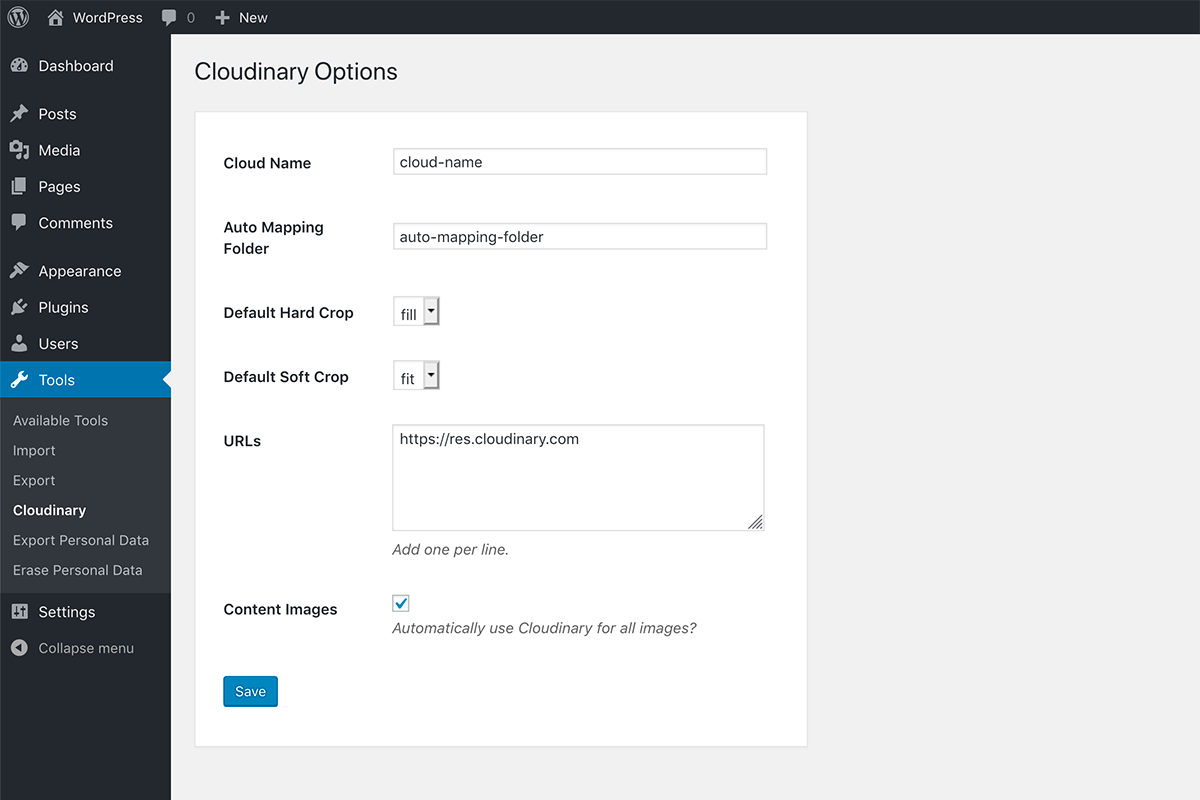
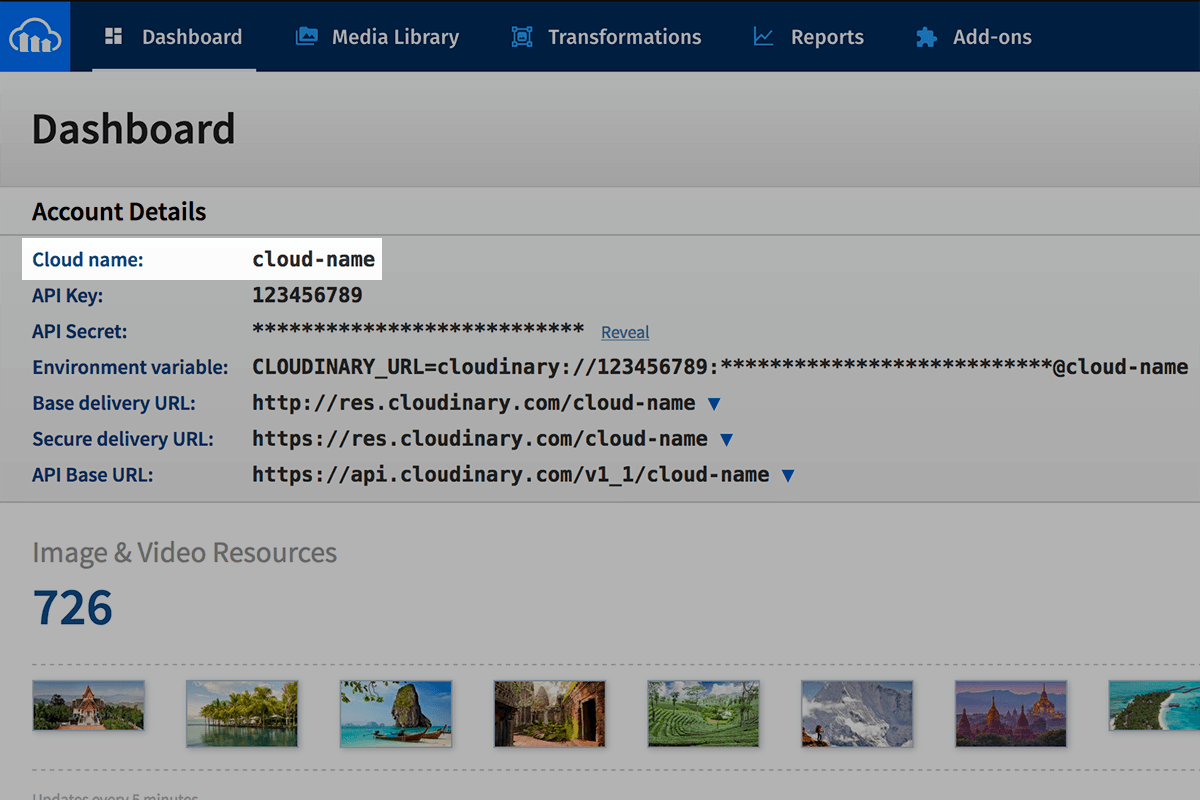
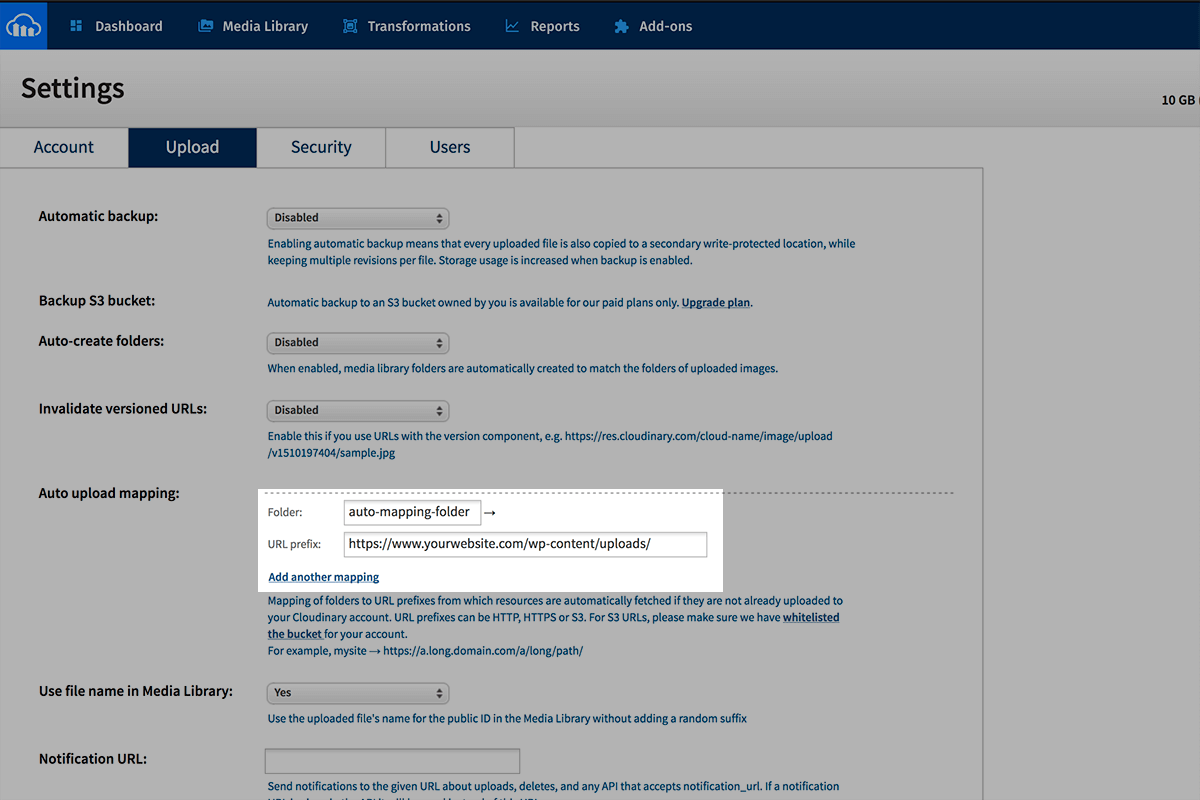
Cloudinary will automatically fetch and serve the images from your media library like a CDN, without you having to worry about the complicated upload API! Just set up auto-upload in your Cloudinary settings, enter the details in the plugin’s options, and you’re all set!
Easy peasy 😎
Important
This plugin is incompatible with the official Cloudinary plugin. You’d need to disable that plugin before using this one.
Quick Links
Setup | Issues | Functions | Filters | Best Practices
Why did you build this plugin?
There already is an official Cloudinary plugin available. But in my opinion, it’s a bit of an overkill and takes over the admin UI. This plugin aims to be:
- Super simple and light-weight
- Totally seamless and out of the way
- A flexible tool for WordPress developers
What is Cloudinary Auto-Upload?
Cloudinary gives you two options to upload files to it’s servers:
- The complicated Upload API 😱
- The super easy and magical Fetch API 🎩
Upload API
TL;DR: Too complicated and in the way 👎
Cloudinary gives you an API, using which, you can manually upload the images to Cloudinary. So you’d need an API key, etc. The official plugin uses this method. When you upload an image to the media library, it in turn, uploads it to Cloudinary. This could be a problem if you have thousands of existing images, and might not be flexible enough to support custom architecture.
Fetch API
TL;DR: Magical 👍
This plugin uses the super easy Auto-Upload feature in the Fetch API. We just tell Cloudinary where to find the files on our server (or on S3 or anywhere on the Internet), and it automatically downloads it from there and saves it on to it’s servers the first time you ask for it, like a CDN would!
What does this plugin do?
This plugin does two main things:
- Provides a simple function
cloudinary_url()to get a Cloudinary auto-upload URL for any image in your media library, with all the Cloudinary transformations, so you can dynamically manipulate an image on the fly. - Attempts to automatically convert all image URLs on the front-end into a Cloudinary auto-upload URL, so you can use Cloudinary as an image CDN.
The magical function 🎩
cloudinary_url( $identifier, $args )
This function returns a Cloudinary Auto Upload URL for an image. Please read the Best Practices page before using this.
Parameters
- identifier (integer/string)(required) : Either the ID of the attachment, or a full image URL.
- args (array)(optional) : Arguments to manipulate the image.
Return Value
Returns a URL (string):
'https://res.cloudinary.com/cloud-name/auto-mapping-folder/2017/12/your-image.jpg'
Arguments
You can optionally send an array of arguments which can transform the image, and set a dynamic file name. Ex:
array(
    'transform' => array( // Optional. All transformations go here.
        'width'   => 300,
        'height'  => 200,
        'crop'    => 'fill',
        'quality' => '80',
        'gravity' => 'face',
    ),
    'file_name' => 'whatever-file-name-you-want', // Optional. If you want to use a dynamic file name for SEO. Don't use the file extension!
);
Here’s a full list of transformations you can achieve with Cloudinary.
Examples
<?php
$url_1 = cloudinary_url( 123, array(
    'transform' => array(
        'width'   => 300,
        'height'  => 200,
        'crop'    => 'fill',
        'quality' => '80',
        'gravity' => 'face',
    ),
    'file_name' => 'dynamic-file-name',
) );

$url_2 = cloudinary_url( 'https://www.yourwebsite.com/wp-content/uploads/2017/12/my-image.jpg', array(
    'transform' => array(
        'width'   => 100,
        'height'  => 100,
    ),
) );

// $url_1 : https://res.cloudinary.com/cloud-name/images/w_300,h_200,c_fill,q_80,g_face/auto-mapping-folder/2017/12/my-image/dynamic-file-name.jpg
// $url_2 : https://res.cloudinary.com/cloud-name/w_100,h_100/auto-mapping-folder/2017/12/my-image.jpg
?>

<img src="<?php echo esc_url( $url_1 ); ?>" width="300" height="200" alt="">
<img src="<?php echo esc_url( $url_2 ); ?>" width="100" height="100" alt="">
Installation
Upload ‘auto-cloudinary’ to the ‘/wp-content/plugins/’ directory.
Activate the plugin through the ‘Plugins’ menu in WordPress.
Changelog
1.3.0
- Better handling of soft crops #41
1.2.3
- Fixed missing admin settings page #32
1.2.2
- Re-opened and fixed “Fix images sizes in block editor” #25
1.2.1
- Fix images sizes in block editor #25
1.2.0
- Turn off Cloudinary URLs for REST API calls #18
- Added progressive image loading parameter #20
- Full release details: https://github.com/junaidbhura/auto-cloudinary/releases/tag/1.2.0
1.1.1
- Better AJAX support #13
Screenshots
For developers
Is this your plugin? Show off the numbers.
Add a live badge to your site, docs or GitHub README. It updates on its own — no account needed.



Best Auto Cloudinary alternatives
All cdn plugins →





FAQ
Auto Cloudinary: quick answers
Straight answers, pulled from live WordPress.org data.
Live data from WordPress.org · checked Oct 1, 2026
Is Auto Cloudinary free?
Yes. Auto Cloudinary is free to download and use from the official WordPress.org plugin directory.
Is Auto Cloudinary safe to use in 2026?
Auto Cloudinary works, but test it on a staging site before relying on it in 2026. It runs on 200+ sites, is rated 4.4/5 and was last updated 1 year ago, and scores 45/100 on our health check.
How many websites use Auto Cloudinary?
Auto Cloudinary is active on 200+ WordPress websites and has been downloaded 36,665 times since it launched in November 2017. It was downloaded 1,061 times in the last 30 days.
Does Auto Cloudinary work with WordPress 7.1?
Auto Cloudinary is officially tested up to WordPress 6.8.10, while the latest release is 7.1.2. It may still work, but try it on a staging site first.
What PHP version does Auto Cloudinary need?
Auto Cloudinary requires PHP 5.6 or higher. Most hosts run PHP 8.x today, so it works on any modern WordPress hosting.
When was Auto Cloudinary last updated?
The latest version, 1.3.1, was released on September 19, 2025 (1 year ago).
Who makes Auto Cloudinary?
Auto Cloudinary is developed and maintained by Junaid Bhura.
What are the best alternatives to Auto Cloudinary?
The most popular alternatives to Auto Cloudinary are W3 Total Cache (900K+ installs), SpeedyCache (600K+ installs) and Breeze Cache (300K+ installs).
Powered by PageForge
Want thousands of pages that rank like these? Build them in an afternoon.
This directory runs on the same engine as PageForge. Turn any spreadsheet, CSV or API into thousands of fast, SEO-ready WordPress pages — with schema, internal links and AI-written copy baked in.
- CSV, Google Sheets & API data sources
- AI content, schema & internal links per page
- Works with Elementor, Gutenberg, Yoast & Rank Math
- Free on WordPress.org — no credit card


