



Aquiline Comment Country Flags for GeneratePress
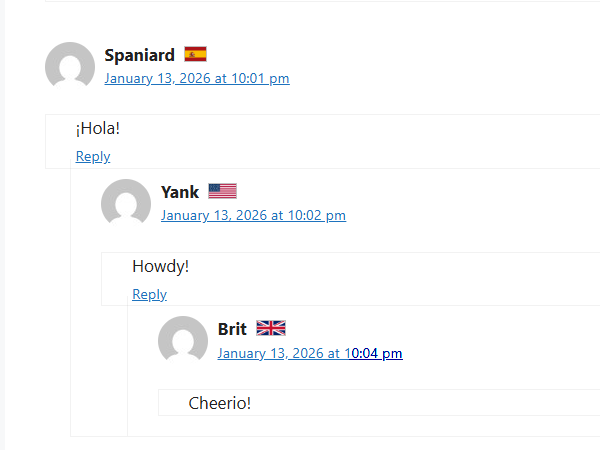
Affords a commenter on a GeneratePress blog the option to affix a country flag to the right of their name in the comment header.

Consider an alternative
Aquiline Comment Country Flags… shows warning signs in 2026 — compare the alternatives below before installing. Was last updated 8 months ago, and scores 36/100 on our health check.
- Small user base (<10 active installs)
- Very few reviews so far
- Only tested up to WordPress 6.9 (latest is 7.1)
How does it stack up?
Side-by-side on installs, updates, ratings & support
![Disable Comments – Remove Comments & Stop Spam [Multi-Site Support]](https://ps.w.org/disable-comments/assets/icon-256x256.png?rev=2509854)


Daily downloads
Download spikes usually follow a new release — each site that auto-updates counts as a download.
Rankings
Where Aquiline Comment Country Fl… stands todayWordPress.org search rankings
Live position in the plugin search, top 100| Keyword | Position |
|---|---|
| comments | >100 |
| country | >100 |
| flags | >100 |
| generatepress | >100 |
About Aquiline Comment Country Flags for Gene…
From the official readme · v1.0.0Description
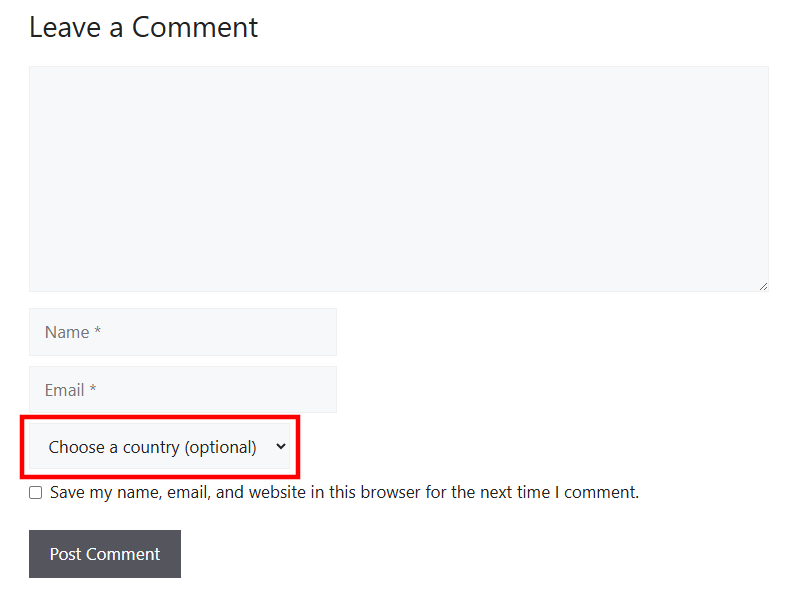
The Aquiline Comment Country Flags plugin affords a commenter on a GeneratePress blog the option to affix a country flag to the right of their name in the comment header. A new, optional field is added below the existing fields in the Comment submit form. The commenter is presented with an alphabetical list of the countries which the site administrator has enabled in the plugin settings panel.
The plugin requires the active parent theme to be GeneratePress v3.1.0 or later, since it relies on a custom action hook introduced with that version. The commenter’s selection is “remembered” in the same way as the name and email, i.e., through use of a cookie. The flag images are in the public domain, and are provided by Flagpedia.net. That site works closely with Wikimedia Commons to maintain an up-to-date, worldwide store of “official” flags.
In cases where a visitor to the site is unfamiliar with a displayed flag, and a pointer such as a mouse is available, they can hover over the flag to reveal the country name. A long press on the flag in some mobile browsers, e.g. Android Chrome, has been seen to produce a popup with the country name at the top.
One limitation is that the Country selection and flag display are not available to logged-in users. Since such users’ metadata (name and email) are handled internally by WordPress, it was decided that support for the Country field in this case would be unduly complex. The logged-in user would just need to log out, then revisit the blog to make their flag selection.
Enabling the flag display via explicit user selection, rather than via IP-based geolocation, has several advantages. It affords greater privacy, and is immune to “false” readings that could occur when a VPN or proxy is in use. Also, a commenter (e.g. someone working abroad) may choose to identify with a country other than that from which their internet connection originates.
Credits
- Flag Images: Flagpedia.net
- License: Public Domain
Installation
- Login to your site as an administrator and navigate to the Plugins admin panel.
- Ensure that your active parent theme is GeneratePress v3.1.0 or later.
- Click Add Plugin, and enter
Aquiline Comment Country Flagsin the search box. - When the plugin appears click Install Now, and then Activate.
- The Plugins panel will now show the newly-activated plugin. Click Settings beneath the plugin name.
- The Comment Country Flags Settings panel will appear. Check the box next to each country that a commenter should have the option to select.
- Scroll to the bottom of the panel and click Save Options. Verify that the “Settings saved” notice appears at the top of the panel.
- For subsequent access to the flag settings, click Settings in the left-hand admin menu and select the “Comment Flags” sub-item.
-
The height, vertical positioning, and other properties of the displayed flags can be adjusted by adding the following to the child theme’s style.css, or in Appearance => Customize => Additional CSS (default values are shown):
img.country-flag-img {

height: 16px;

vertical-align: -1px;

border: 1px solid silver;

}
Screenshots
For developers
Is this your plugin? Show off the numbers.
Add a live badge to your site, docs or GitHub README. It updates on its own — no account needed.
Best Aquiline Comment Country Flag… alternatives
All comments plugins →




FAQ
Aquiline Comment Country Flags for…: quick answers
Straight answers, pulled from live WordPress.org data.
Live data from WordPress.org · checked Oct 2, 2026
Is Aquiline Comment Country Flags… free?
Yes. Aquiline Comment Country Flags… is free to download and use from the official WordPress.org plugin directory.
Is Aquiline Comment Country Flags… safe to use in 2026?
Aquiline Comment Country Flags… shows warning signs in 2026 — compare the alternatives below before installing. Was last updated 8 months ago, and scores 36/100 on our health check.
How many websites use Aquiline Comment Country Flags…?
Aquiline Comment Country Flags… is active on <10 WordPress websites and has been downloaded 421 times since it launched in February 2026. It was downloaded 53 times in the last 30 days.
Does Aquiline Comment Country Flags… work with WordPress 7.1?
Aquiline Comment Country Flags… is officially tested up to WordPress 6.9.9, while the latest release is 7.1.2. It may still work, but try it on a staging site first.
What PHP version does Aquiline Comment Country Flags… need?
Aquiline Comment Country Flags… requires PHP 7.4 or higher. Most hosts run PHP 8.x today, so it works on any modern WordPress hosting.
When was Aquiline Comment Country Flags… last updated?
The latest version, 1.0.0, was released on February 13, 2026 (8 months ago).
Who makes Aquiline Comment Country Flags…?
Aquiline Comment Country Flags… is developed and maintained by Bob Arnold.
What are the best alternatives to Aquiline Comment Country Flags…?
The most popular alternatives to Aquiline Comment Country Flags… are Akismet Anti-spam: Spam Pro… (5M+ installs), Disable Comments (1M+ installs) and Antispam Bee (700K+ installs).
Powered by PageForge
Want thousands of pages that rank like these? Build them in an afternoon.
This directory runs on the same engine as PageForge. Turn any spreadsheet, CSV or API into thousands of fast, SEO-ready WordPress pages — with schema, internal links and AI-written copy baked in.
- CSV, Google Sheets & API data sources
- AI content, schema & internal links per page
- Works with Elementor, Gutenberg, Yoast & Rank Math
- Free on WordPress.org — no credit card


