


AJO Membership
A simple, secure membership portal to protect pages/posts and provide frontend login, registration, password reset, and profile editing.

Use with caution
AJO Membership works, but test it on a staging site before relying on it in 2026. Was last updated 3 months ago, and scores 60/100 on our health check.
- Tested with the latest WordPress (7.1)
- Small user base (<10 active installs)
- Very few reviews so far
How does it stack up?
Side-by-side on installs, updates, ratings & support



Daily downloads
Download spikes usually follow a new release — each site that auto-updates counts as a download.
Rankings
Where AJO Membership stands todayWordPress.org search rankings
Live position in the plugin search, top 100| Keyword | Position |
|---|---|
| login | >100 |
| membership | >100 |
| protect content | >100 |
| registration | >100 |
| user roles | >100 |
About AJO Membership
From the official readme · v1.0Description
AJO Membership is a lightweight, secure, and straightforward plugin designed to turn your WordPress site into a basic membership portal without the bloat of massive membership plugins.
It allows you to restrict access to specific pages, posts, or entire URL paths directly from a simple settings dashboard. Non-registered users attempting to access protected content are automatically redirected to a custom link of your choosing.
The plugin also safely redirects non-administrative users away from the default WordPress dashboard (wp-admin), keeping your frontend pristine, and provides native WordPress-powered shortcodes to handle user authentication entirely on the frontend.
Features
- Content Protection: Protect any URL or path (e.g.,
/premium-content/). Sub-pages are automatically protected. - Custom Redirects: Send unauthorized visitors to a specific landing page or your login page.
- Dashboard Restriction: Automatically blocks non-administrators from accessing the WordPress backend dashboard, redirecting them to the homepage instead.
- Frontend Profile Editor: Allow users to update their Name, Email, and Password directly from a frontend page.
- Native Authentication: Uses WordPress’s core secure functions to handle logins, registrations, and password resets. No clunky third-party tables—just clean, native integration.
Included Shortcodes
Simply paste these shortcodes onto any page or post to display the respective forms:
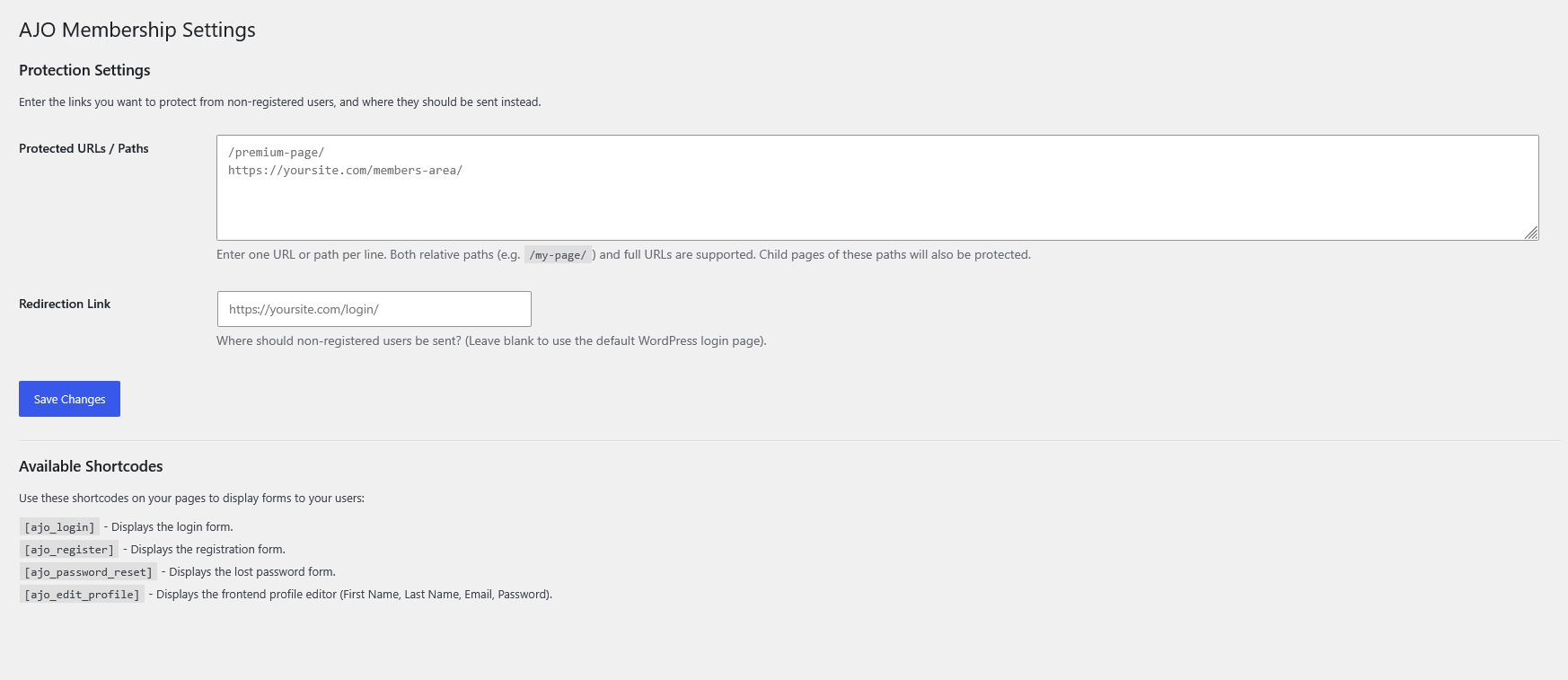
[ajo_login]– Displays the standard login form. (Hides automatically if the user is already logged in).[ajo_register]– Displays a straightforward registration form.[ajo_password_reset]– Displays the lost password / reset request form.[ajo_edit_profile]– Displays a secure frontend profile editor for logged-in users to update their name, email, and password.
Installation
- Upload the
ajo-membershipfolder to the/wp-content/plugins/directory, or install it via the WordPress Plugins dashboard by uploading the.zipfile. - Activate the plugin through the ‘Plugins’ menu in WordPress.
- Go to Settings > AJO Membership to configure your protected URLs and custom redirect link.
- Go to Settings > General and ensure “Anyone can register” is checked if you plan to use the registration shortcode.
- Create standard WordPress pages (e.g., “Login”, “Register”, “My Profile”) and paste the provided shortcodes into the page content.
Frequently asked questions
Why is the registration form not working?
Because this plugin securely utilizes WordPress’s native registration system, you must enable registration in your main WordPress settings. Go to Settings > General and check the box next to Membership that says “Anyone can register”.
How do I protect a specific page?
Go to Settings > AJO Membership. In the “Protected URLs / Paths” box, type the path of the page you want to protect (e.g., /my-secret-page/). Enter one path per line.
Does protecting a parent page protect its child pages?
Yes! If you protect /members/, then any sub-page like /members/downloads/ or /members/videos/ will automatically be protected as well.
Can regular users access my WordPress dashboard?
No. The plugin automatically detects if a user is an Administrator or not. If a subscriber or customer tries to access /wp-admin/, they will be safely redirected back to your homepage.
Changelog
1.0
- Initial release.
- Added content protection via URL path.
- Added shortcodes:
[ajo_login],[ajo_register],[ajo_password_reset]. - Added
[ajo_edit_profile]shortcode for secure frontend profile updating. - Added security feature to block non-admins from accessing the WordPress dashboard.
- Improved security nonces and user input sanitization.
Screenshots
For developers
Is this your plugin? Show off the numbers.
Add a live badge to your site, docs or GitHub README. It updates on its own — no account needed.
Best AJO Membership alternatives
All login plugins →





FAQ
AJO Membership: quick answers
Straight answers, pulled from live WordPress.org data.
Live data from WordPress.org · checked Oct 9, 2026
Is AJO Membership free?
Yes. AJO Membership is free to download and use from the official WordPress.org plugin directory.
Is AJO Membership safe to use in 2026?
AJO Membership works, but test it on a staging site before relying on it in 2026. Was last updated 3 months ago, and scores 60/100 on our health check.
How many websites use AJO Membership?
AJO Membership is active on <10 WordPress websites and has been downloaded 243 times since it launched in July 2026. It was downloaded 70 times in the last 30 days.
Does AJO Membership work with WordPress 7.1?
Yes. The developer has tested AJO Membership up to WordPress 7.1.3, the latest release. It requires WordPress 5.8 or newer.
What PHP version does AJO Membership need?
AJO Membership requires PHP 7.4 or higher. Most hosts run PHP 8.x today, so it works on any modern WordPress hosting.
When was AJO Membership last updated?
The latest version, 1.0, was released on July 15, 2026 (3 months ago).
Who makes AJO Membership?
AJO Membership is developed and maintained by Ali J Online.
What are the best alternatives to AJO Membership?
The most popular alternatives to AJO Membership are WPS Hide Login (2M+ installs), Loginizer (1M+ installs) and Security Optimizer (1M+ installs).
Powered by PageForge
Want thousands of pages that rank like these? Build them in an afternoon.
This directory runs on the same engine as PageForge. Turn any spreadsheet, CSV or API into thousands of fast, SEO-ready WordPress pages — with schema, internal links and AI-written copy baked in.
- CSV, Google Sheets & API data sources
- AI content, schema & internal links per page
- Works with Elementor, Gutenberg, Yoast & Rank Math
- Free on WordPress.org — no credit card


